4 Useful Things Web Designers Can Do With 
Meta Tags 
As a web designer or web 
developer, you must have 
applied meta tags at various 
places like keyword, 
description and title. But in 
this blog, we are going to 
tell you 4 useful things 
which you can do with meta 
tags. 
Website :- http://www.innomaxmedia.org/ 
Email Id:- info@innomaxmedia.org 
Contact No: (65) 9097 9242
1) Browser Cache 
Browser cache has an advantage that it stores everything in its 
cache from the webpages and renders the website much faster when 
the users visit the same website subsequently. However it has a 
disadvantage as well. It will not let the users see the 
updates/changes easily that were made to the website recently. 
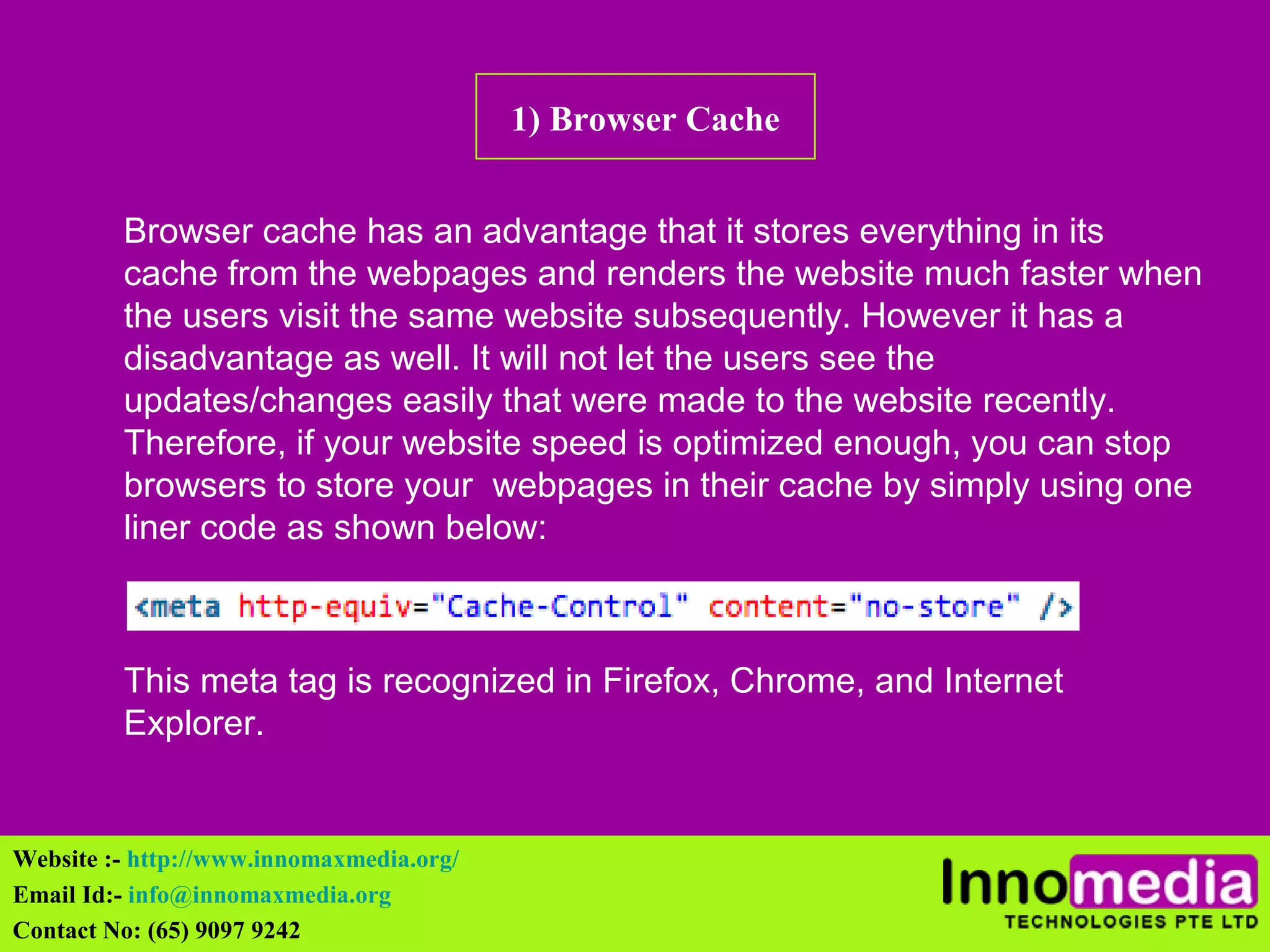
Therefore, if your website speed is optimized enough, you can stop 
browsers to store your webpages in their cache by simply using one 
liner code as shown below: 
This meta tag is recognized in Firefox, Chrome, and Internet 
Explorer. 
Website :- http://www.innomaxmedia.org/ 
Email Id:- info@innomaxmedia.org 
Contact No: (65) 9097 9242
2) Setting Cookies 
Similar to cache, cookies also store some of the users' information in 
the browser and display them to the users on their next visits. For eg. 
if you attempt to buy any product online and you don't checkout to 
pay. The order will be saved in your cart and will be visible to you 
even if you visit the same website after few days. This is done with 
the help of storing users' actions in the cookies. Below is a one line 
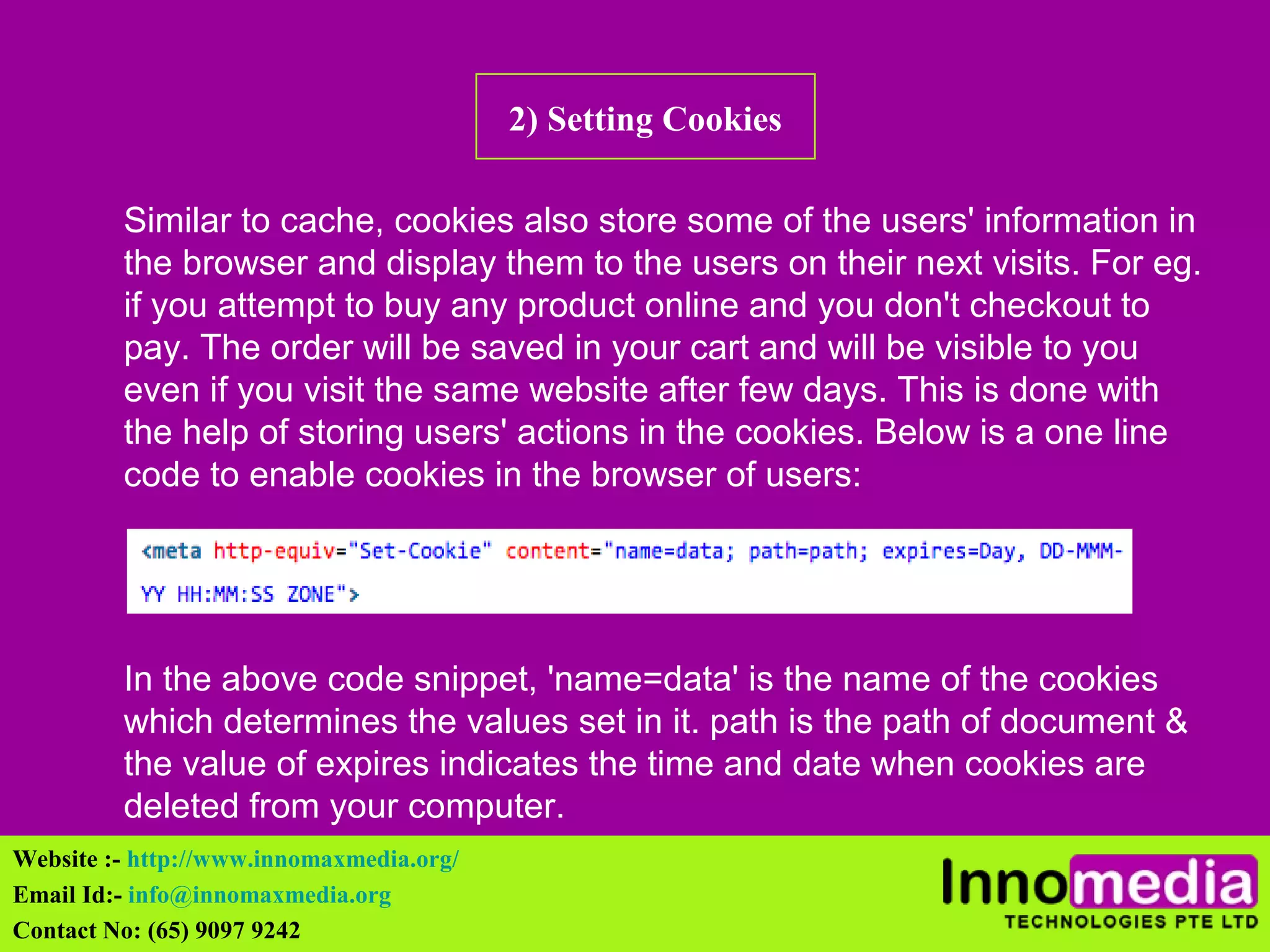
code to enable cookies in the browser of users: 
In the above code snippet, 'name=data' is the name of the cookies 
which determines the values set in it. path is the path of document & 
the value of expires indicates the time and date when cookies are 
deleted from your computer. 
Website :- http://www.innomaxmedia.org/ 
Email Id:- info@innomaxmedia.org 
Contact No: (65) 9097 9242
3) Web Page Refresh 
Often, there arise a situation where the web developer need to 
refresh the page frequently for eg. in a case where the webpage has 
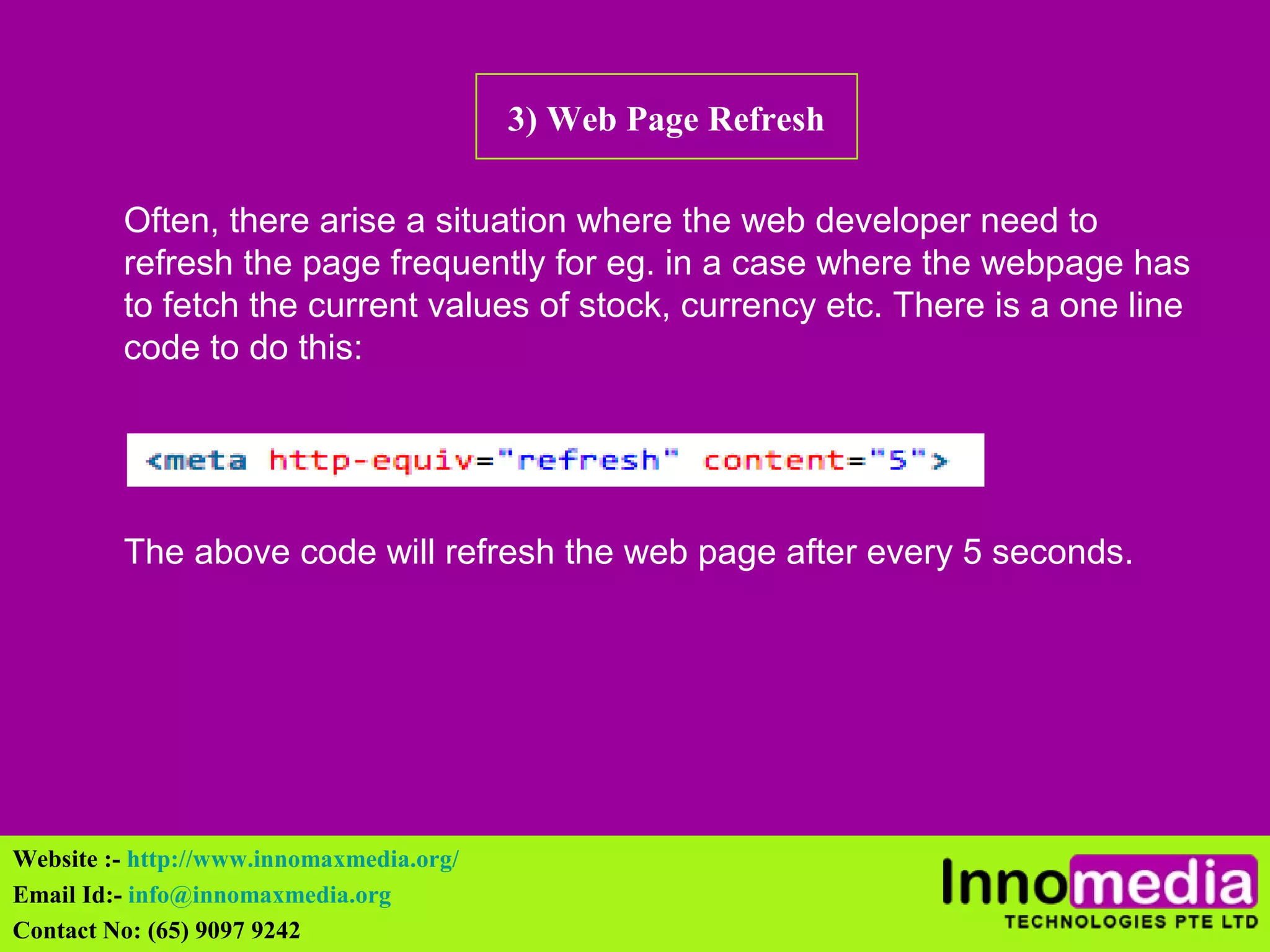
to fetch the current values of stock, currency etc. There is a one line 
code to do this: 
The above code will refresh the web page after every 5 seconds. 
Website :- http://www.innomaxmedia.org/ 
Email Id:- info@innomaxmedia.org 
Contact No: (65) 9097 9242
4) Page Redirection 
This is one of the situation which almost every web design and web 
developer has to face. Some clients want their webpages to be 
redirected to another page after couple of seconds or immediately on 
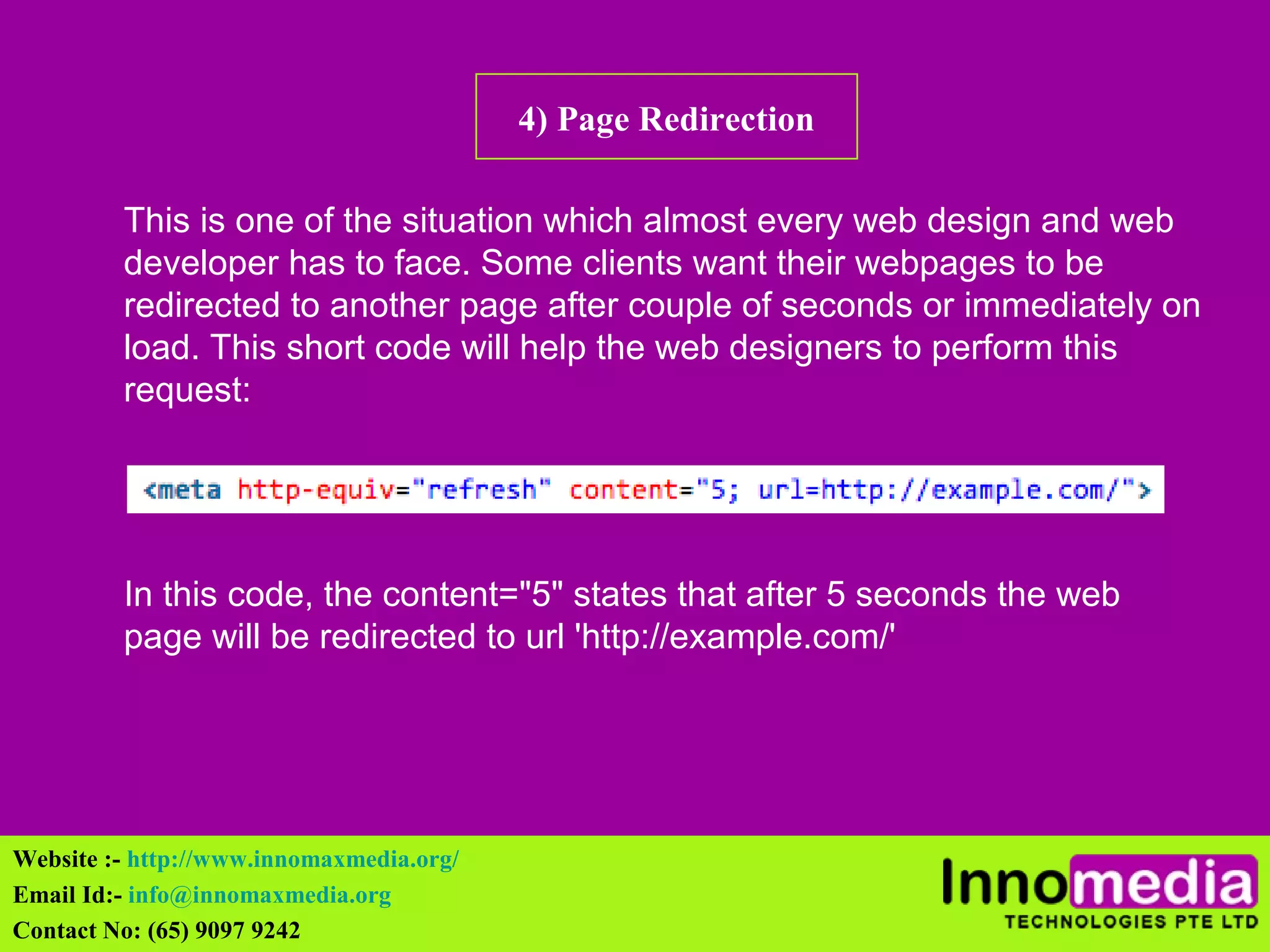
load. This short code will help the web designers to perform this 
request: 
In this code, the content="5" states that after 5 seconds the web 
page will be redirected to url 'http://example.com/' 
Website :- http://www.innomaxmedia.org/ 
Email Id:- info@innomaxmedia.org 
Contact No: (65) 9097 9242
Contact Us 
Innomedia Technologies Pte Ltd 
Westech Building #06-04, 
237 Pandan Loop, 
SINGAPORE 128424 
Contact no:- (65) 9097 9242 
Email Id:- info@innomaxmedia.org 
Website:- innomaxmedia.org@gmail.com 
Website :- http://www.innomaxmedia.org/ 
Email Id:- info@innomaxmedia.org 
Contact No: (65) 9097 9242
Contact Us 
Innomedia Technologies Pte Ltd 
Westech Building #06-04, 
237 Pandan Loop, 
SINGAPORE 128424 
Contact no:- (65) 9097 9242 
Email Id:- info@innomaxmedia.org 
Website:- innomaxmedia.org@gmail.com 
Website :- http://www.innomaxmedia.org/ 
Email Id:- info@innomaxmedia.org 
Contact No: (65) 9097 9242

4 useful things web designers can do with meta tags

  • 1.
    4 Useful ThingsWeb Designers Can Do With Meta Tags As a web designer or web developer, you must have applied meta tags at various places like keyword, description and title. But in this blog, we are going to tell you 4 useful things which you can do with meta tags. Website :- http://www.innomaxmedia.org/ Email Id:- info@innomaxmedia.org Contact No: (65) 9097 9242
  • 2.
    1) Browser Cache Browser cache has an advantage that it stores everything in its cache from the webpages and renders the website much faster when the users visit the same website subsequently. However it has a disadvantage as well. It will not let the users see the updates/changes easily that were made to the website recently. Therefore, if your website speed is optimized enough, you can stop browsers to store your webpages in their cache by simply using one liner code as shown below: This meta tag is recognized in Firefox, Chrome, and Internet Explorer. Website :- http://www.innomaxmedia.org/ Email Id:- info@innomaxmedia.org Contact No: (65) 9097 9242
  • 3.
    2) Setting Cookies Similar to cache, cookies also store some of the users' information in the browser and display them to the users on their next visits. For eg. if you attempt to buy any product online and you don't checkout to pay. The order will be saved in your cart and will be visible to you even if you visit the same website after few days. This is done with the help of storing users' actions in the cookies. Below is a one line code to enable cookies in the browser of users: In the above code snippet, 'name=data' is the name of the cookies which determines the values set in it. path is the path of document & the value of expires indicates the time and date when cookies are deleted from your computer. Website :- http://www.innomaxmedia.org/ Email Id:- info@innomaxmedia.org Contact No: (65) 9097 9242
  • 4.
    3) Web PageRefresh Often, there arise a situation where the web developer need to refresh the page frequently for eg. in a case where the webpage has to fetch the current values of stock, currency etc. There is a one line code to do this: The above code will refresh the web page after every 5 seconds. Website :- http://www.innomaxmedia.org/ Email Id:- info@innomaxmedia.org Contact No: (65) 9097 9242
  • 5.
    4) Page Redirection This is one of the situation which almost every web design and web developer has to face. Some clients want their webpages to be redirected to another page after couple of seconds or immediately on load. This short code will help the web designers to perform this request: In this code, the content="5" states that after 5 seconds the web page will be redirected to url 'http://example.com/' Website :- http://www.innomaxmedia.org/ Email Id:- info@innomaxmedia.org Contact No: (65) 9097 9242
  • 6.
    Contact Us InnomediaTechnologies Pte Ltd Westech Building #06-04, 237 Pandan Loop, SINGAPORE 128424 Contact no:- (65) 9097 9242 Email Id:- info@innomaxmedia.org Website:- innomaxmedia.org@gmail.com Website :- http://www.innomaxmedia.org/ Email Id:- info@innomaxmedia.org Contact No: (65) 9097 9242
  • 7.
    Contact Us InnomediaTechnologies Pte Ltd Westech Building #06-04, 237 Pandan Loop, SINGAPORE 128424 Contact no:- (65) 9097 9242 Email Id:- info@innomaxmedia.org Website:- innomaxmedia.org@gmail.com Website :- http://www.innomaxmedia.org/ Email Id:- info@innomaxmedia.org Contact No: (65) 9097 9242