On Creating an “Intellectual Design
Space”
“Young people need their teachers to craft learning
environments that reduce stress levels, interruptions,
and confusion. Teachers can signal that the
makerspace is a different kind of learning space
through visual and physical cues.”
Martinez and Stager, 2013
Teachers Who Make
Some Definitions
Makerspace – “Publicly accessible places to
design and create.”
Digital Harbor Foundation,
2014
Teachers Who Make
Some Definitions
Fab Lab (Fabrication Lab) - “Low-cost digital
spaces where you can “make almost anything”, aimed
at supporting project-based student-centered
learning.”
FabLab@School Project
Stanford Graduate School
of Education
Teachers Who Make
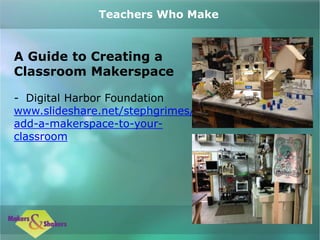
A Guide to Creating a
Classroom Makerspace
- Digital Harbor Foundation
www.slideshare.net/stephgrimes/
add-a-makerspace-to-your-
classroom
Teachers Who Make
Resources for Makerspaces
Digital Harbor Foundation
www.digitalharbor.org/resources/c
lassroom-makerspace/
A Librarian’s Guide to
MakerSpaces: 16 Resources
http://oedb.org/ilibrarian/a-
librarians-guide-to-makerspaces/
Teachers Who Make
Kits for Making and
Makerspaces
Exploratorium Store
https://transaction.exploratorium.
edu/store/feature/tinkering
Invent to Learn
www.inventtolearn.com/stuff/
Teachers Who Make
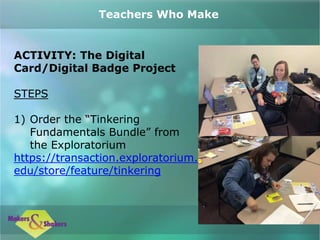
ACTIVITY: The Digital
Card/Digital Badge Project
STEPS
1) Order the “Tinkering
Fundamentals Bundle” from
the Exploratorium
https://transaction.exploratorium.
edu/store/feature/tinkering
Teachers Who Make
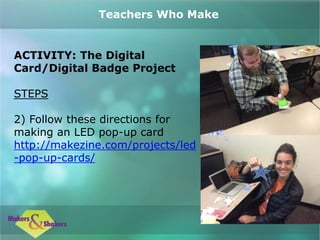
ACTIVITY: The Digital
Card/Digital Badge Project
STEPS
2) Follow these directions for
making an LED pop-up card
http://makezine.com/projects/led
-pop-up-cards/
Teachers Who Make
ACTIVITY: The Digital
Card/Digital Badge Project
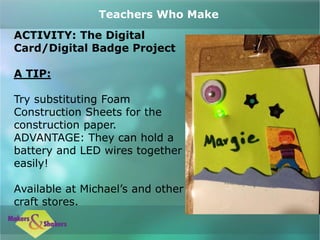
A TIP:
Try substituting Foam
Construction Sheets for the
construction paper.
ADVANTAGE: They can hold a
battery and LED wires together
easily!
Available at Michael’s and other
craft stores.
Teachers Who Make
REFERENCES
FabLab@School | Transformative Learning
Technologies Lab. (n.d.). Retrieved
December 22, 2014, from
https://tltl.stanford.edu/project/fablabsch
ool
LED Pop-up Cards | MAKE. (n.d.).
Retrieved November 16, 2014, from
http://makezine.com/projects/led-pop-
up-cards/
Teachers Who Make
REFERENCES
Martinez, S. L., & Stager, G. (2013). Invent
to learn : making, tinkering, and
engineering in the classroom. Torrance,
Calif. : Constructing Modern Knowledge
Press, 2013.
Wilkinson, K., & Petrich, M. (2013). The art
of tinkering : meet 150+ makers working at
the intersection of art, science &
technology / Karen Wilkinson & Mike
Petrich. [San Francisco] : Weldon Owen,
[2013].
Teachers Who Make
3.2 teachers who make slideshow_final

3.2 teachers who make slideshow_final

  • 3.
    On Creating an“Intellectual Design Space” “Young people need their teachers to craft learning environments that reduce stress levels, interruptions, and confusion. Teachers can signal that the makerspace is a different kind of learning space through visual and physical cues.” Martinez and Stager, 2013 Teachers Who Make
  • 4.
    Some Definitions Makerspace –“Publicly accessible places to design and create.” Digital Harbor Foundation, 2014 Teachers Who Make
  • 5.
    Some Definitions Fab Lab(Fabrication Lab) - “Low-cost digital spaces where you can “make almost anything”, aimed at supporting project-based student-centered learning.” FabLab@School Project Stanford Graduate School of Education Teachers Who Make
  • 6.
    A Guide toCreating a Classroom Makerspace - Digital Harbor Foundation www.slideshare.net/stephgrimes/ add-a-makerspace-to-your- classroom Teachers Who Make
  • 7.
    Resources for Makerspaces DigitalHarbor Foundation www.digitalharbor.org/resources/c lassroom-makerspace/ A Librarian’s Guide to MakerSpaces: 16 Resources http://oedb.org/ilibrarian/a- librarians-guide-to-makerspaces/ Teachers Who Make
  • 8.
    Kits for Makingand Makerspaces Exploratorium Store https://transaction.exploratorium. edu/store/feature/tinkering Invent to Learn www.inventtolearn.com/stuff/ Teachers Who Make
  • 9.
    ACTIVITY: The Digital Card/DigitalBadge Project STEPS 1) Order the “Tinkering Fundamentals Bundle” from the Exploratorium https://transaction.exploratorium. edu/store/feature/tinkering Teachers Who Make
  • 10.
    ACTIVITY: The Digital Card/DigitalBadge Project STEPS 2) Follow these directions for making an LED pop-up card http://makezine.com/projects/led -pop-up-cards/ Teachers Who Make
  • 11.
    ACTIVITY: The Digital Card/DigitalBadge Project A TIP: Try substituting Foam Construction Sheets for the construction paper. ADVANTAGE: They can hold a battery and LED wires together easily! Available at Michael’s and other craft stores. Teachers Who Make
  • 12.
    REFERENCES FabLab@School | TransformativeLearning Technologies Lab. (n.d.). Retrieved December 22, 2014, from https://tltl.stanford.edu/project/fablabsch ool LED Pop-up Cards | MAKE. (n.d.). Retrieved November 16, 2014, from http://makezine.com/projects/led-pop- up-cards/ Teachers Who Make
  • 13.
    REFERENCES Martinez, S. L.,& Stager, G. (2013). Invent to learn : making, tinkering, and engineering in the classroom. Torrance, Calif. : Constructing Modern Knowledge Press, 2013. Wilkinson, K., & Petrich, M. (2013). The art of tinkering : meet 150+ makers working at the intersection of art, science & technology / Karen Wilkinson & Mike Petrich. [San Francisco] : Weldon Owen, [2013]. Teachers Who Make