3 Ways to Simplify Your Mobile Apps
The Problem and the Solution 
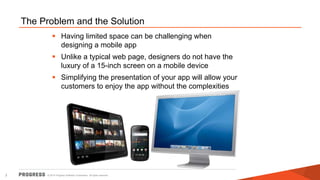
 Having limited space can be challenging when 
designing a mobile app 
 Unlike a typical web page, designers do not have the 
luxury of a 15-inch screen on a mobile device 
 Simplifying the presentation of your app will allow your 
customers to enjoy the app without the complexities 
© 2014 Progress Software Corporation. 2 All rights reserved.
How You Should Simplify Your Apps 
Focus on content, not chrome 
Rely on intuitive touch gestures 
Minimize labels and icons 
© 2014 Progress Software Corporation. 3 All rights reserved.
Focus on Content 
 Emphasize the significance of the app with 
content relevant to the user 
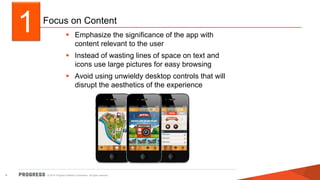
 Instead of wasting lines of space on text and 
icons use large pictures for easy browsing 
 Avoid using unwieldy desktop controls that will 
disrupt the aesthetics of the experience 
1 
© 2014 Progress Software Corporation. 4 All rights reserved.
Rely on Intuitive Touch Gestures 
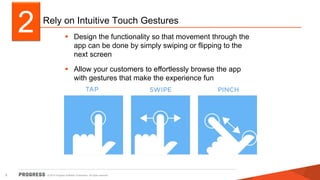
 Design the functionality so that movement through the 
app can be done by simply swiping or flipping to the 
next screen 
 Allow your customers to effortlessly browse the app 
with gestures that make the experience fun 
2 
© 2014 Progress Software Corporation. 5 All rights reserved.
Minimize Labels and Icons 
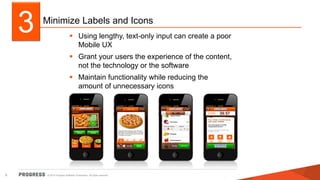
 Using lengthy, text-only input can create a poor 
Mobile UX 
 Grant your users the experience of the content, 
not the technology or the software 
 Maintain functionality while reducing the 
amount of unnecessary icons 
3 
© 2014 Progress Software Corporation. 6 All rights reserved.
 . 
Learn more on how you can 
improve your mobile apps today: 
www.progress.com/MobileUX
3 Ways to Simplify your Mobile Apps

3 Ways to Simplify your Mobile Apps

  • 1.
    3 Ways toSimplify Your Mobile Apps
  • 2.
    The Problem andthe Solution  Having limited space can be challenging when designing a mobile app  Unlike a typical web page, designers do not have the luxury of a 15-inch screen on a mobile device  Simplifying the presentation of your app will allow your customers to enjoy the app without the complexities © 2014 Progress Software Corporation. 2 All rights reserved.
  • 3.
    How You ShouldSimplify Your Apps Focus on content, not chrome Rely on intuitive touch gestures Minimize labels and icons © 2014 Progress Software Corporation. 3 All rights reserved.
  • 4.
    Focus on Content  Emphasize the significance of the app with content relevant to the user  Instead of wasting lines of space on text and icons use large pictures for easy browsing  Avoid using unwieldy desktop controls that will disrupt the aesthetics of the experience 1 © 2014 Progress Software Corporation. 4 All rights reserved.
  • 5.
    Rely on IntuitiveTouch Gestures  Design the functionality so that movement through the app can be done by simply swiping or flipping to the next screen  Allow your customers to effortlessly browse the app with gestures that make the experience fun 2 © 2014 Progress Software Corporation. 5 All rights reserved.
  • 6.
    Minimize Labels andIcons  Using lengthy, text-only input can create a poor Mobile UX  Grant your users the experience of the content, not the technology or the software  Maintain functionality while reducing the amount of unnecessary icons 3 © 2014 Progress Software Corporation. 6 All rights reserved.
  • 7.
     . Learnmore on how you can improve your mobile apps today: www.progress.com/MobileUX