Vb.net Basic Concepts
By:Muhammad Adeel Afzal
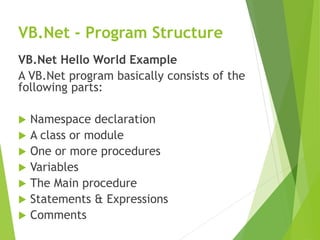
VB.Net - Program Structure
VB.Net Hello World Example
A VB.Net program basically consists of the
following parts:
 Namespace declaration
 A class or module
 One or more procedures
 Variables
 The Main procedure
 Statements & Expressions
 Comments
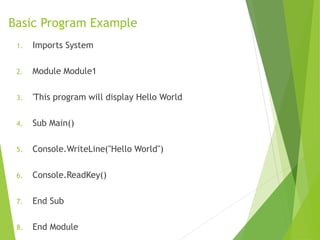
Basic Program Example
1. Imports System
2. Module Module1
3. 'This program will display Hello World
4. Sub Main()
5. Console.WriteLine("Hello World")
6. Console.ReadKey()
7. End Sub
8. End Module
Compile & Execute VB.Net Program
 Start Visual Studio.
 On the menu bar, choose File → New → Project.
 Choose Visual Basic from templates
 Choose Console Application.
 Specify a name and location for your project
using the Browse button, and then choose the
OK button.
 The new project appears in Solution Explorer.
 Write code in the Code Editor.
 Click the Run button or the F5 key to run the
project. A Command Prompt window appears
that contains the line Hello World.
VB.Net - Basic Syntax
Data Types in VB.Net
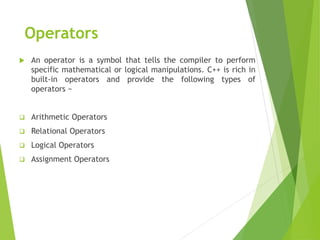
Operators
 An operator is a symbol that tells the compiler to perform
specific mathematical or logical manipulations. C++ is rich in
built-in operators and provide the following types of
operators −
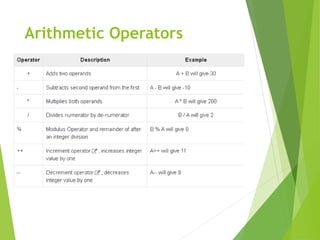
 Arithmetic Operators
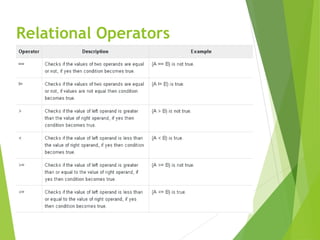
 Relational Operators
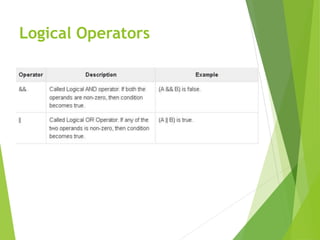
 Logical Operators
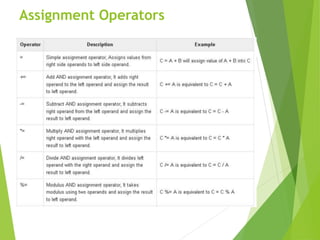
 Assignment Operators
Arithmetic Operators
Relational Operators
Logical Operators
Assignment Operators

2-Vb.net Basic Concepts and structure of .net code.pptx

  • 1.
  • 2.
    VB.Net - ProgramStructure VB.Net Hello World Example A VB.Net program basically consists of the following parts:  Namespace declaration  A class or module  One or more procedures  Variables  The Main procedure  Statements & Expressions  Comments
  • 3.
    Basic Program Example 1.Imports System 2. Module Module1 3. 'This program will display Hello World 4. Sub Main() 5. Console.WriteLine("Hello World") 6. Console.ReadKey() 7. End Sub 8. End Module
  • 4.
    Compile & ExecuteVB.Net Program  Start Visual Studio.  On the menu bar, choose File → New → Project.  Choose Visual Basic from templates  Choose Console Application.  Specify a name and location for your project using the Browse button, and then choose the OK button.  The new project appears in Solution Explorer.  Write code in the Code Editor.  Click the Run button or the F5 key to run the project. A Command Prompt window appears that contains the line Hello World.
  • 5.
  • 6.
  • 7.
    Operators  An operatoris a symbol that tells the compiler to perform specific mathematical or logical manipulations. C++ is rich in built-in operators and provide the following types of operators −  Arithmetic Operators  Relational Operators  Logical Operators  Assignment Operators
  • 8.
  • 9.
  • 10.
  • 11.