Download to read offline


![loadImage()
• loadImage() calls the constructor for us!
• createImage() creates a blank image (all 0’s)!
• Don’t use it in the draw loop (use it in setup)!
• Like any other class, you can store many images
in a PImage[]
• You must provide a filename or URL](https://image.slidesharecdn.com/25imagesi-140410222854-phpapp02/85/25-Images-I-8-320.jpg)

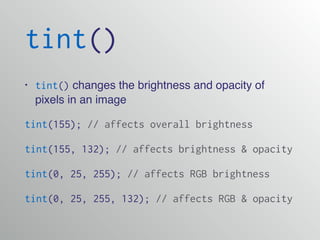

![The pixels[] Array
• We can load the pixels array of our sketch
window with loadPixels()
• We can load the pixels of any image with
img.loadPixels()
• We can manipulate those pixels, and then save
them with updatePixels() img.updatePixels()](https://image.slidesharecdn.com/25imagesi-140410222854-phpapp02/85/25-Images-I-12-320.jpg)
![Demo!
The pixels[] Array](https://image.slidesharecdn.com/25imagesi-140410222854-phpapp02/85/25-Images-I-13-320.jpg)


This document discusses various Processing image classes and functions including: 1. The PImage class which can be used to load, manipulate, and display images. Functions like loadImage() and tint() are used to import and modify images. 2. The pixels[] array which stores the pixel values of an image or sketch window. Functions like loadPixels() and updatePixels() are used to access and modify these pixel values. 3. Locating individual pixels using a linear pixel location based on the image width and pixel x/y coordinates which can be used to get or set specific pixel values.


