WordPress Customization
Goal: Gain a basic understanding of some common functions used by Clique from the
WordPress PHP API, modifying the administrator user-interface, and present various data
formats.
Outcomes:
1. An understanding of what Post Types and Custom Fields are.
2. Be able to identify when to use Custom Post Types and Custom Fields.
3. Able to create and modify Custom Post Types and Custom Fields.
Custom Post Types
Outcomes:
1. Create two Custom Post Types using the WordPress API
2. Modify an existing Custom Post Type
3. Be able query and display post information within page templates
4. Acknowledge when to use Custom Post Types in different situations
Custom Fields
Outcomes:
1. Create custom fields for different post types
2. Gain an understanding of how to save, update, and delete custom post data
3. Acknowledge when to use Custom Fields in different situations
Agenda
1. Why we use various post types.
2. How do I use this in my work, best practices
3. Client example, adding post type to Kendall College site.
4. Adding post type to your forked site
Understanding Why
Why is it important to know how to create Custom Post Types and Fields - especially
programmatically?
1. Present similar data in different ways
2. Present different data in similar ways
3. “Administrative Organization” - a well-organized user and programming interface.
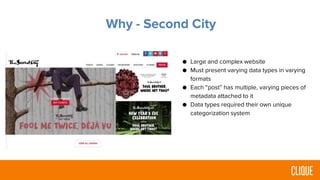
Why - Second City
● Large and complex website
● Must present varying data types in varying
formats
● Each “post” has multiple, varying pieces of
metadata attached to it
● Data types required their own unique
categorization system
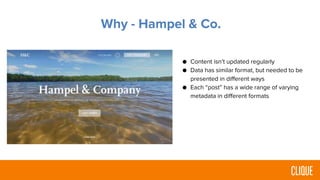
Why - Hampel & Co.
● Content isn’t updated regularly
● Data has similar format, but needed to be
presented in different ways
● Each “post” has a wide range of varying
metadata in different formats
Planning
• Create Post Types
– Identify “groups” of data and information
• What content blocks are similar?
• What content blocks are different?
• Create Custom Fields
– Identify data/information that should be attached to post as metadata
Best Practices/Example
Building
• Required hooks
– add_action
• init
• save_post
• Create Post Types
– register_post_type
• Create Custom Fields
– add_meta_box
Best Practices/Example
Testing
• Ensure post appears in back-end of WordPress
• Ensure data is being saved appropriately
• Loop through custom posts and fields on a page
Best Practices/Example
You do
● Programmatically add 3 custom post types
to your own personal sites
● Programmatically add 3 custom fields to
your own personal sites
Resources
Post Type
● https://codex.wordpress.org/Post_Types
● http://www.wpbeginner.com/wp-tutorials/how-to-create-custom-post-types-in-wordpress/
Fields
● https://codex.wordpress.org/Custom_Fields
● http://www.wpbeginner.com/wp-tutorials/wordpress-custom-fields-101-tips-tricks-and-hacks/
● https://generatewp.com/
Wordpress Custom Post Types

Wordpress Custom Post Types

  • 2.
    WordPress Customization Goal: Gaina basic understanding of some common functions used by Clique from the WordPress PHP API, modifying the administrator user-interface, and present various data formats. Outcomes: 1. An understanding of what Post Types and Custom Fields are. 2. Be able to identify when to use Custom Post Types and Custom Fields. 3. Able to create and modify Custom Post Types and Custom Fields.
  • 3.
    Custom Post Types Outcomes: 1.Create two Custom Post Types using the WordPress API 2. Modify an existing Custom Post Type 3. Be able query and display post information within page templates 4. Acknowledge when to use Custom Post Types in different situations
  • 4.
    Custom Fields Outcomes: 1. Createcustom fields for different post types 2. Gain an understanding of how to save, update, and delete custom post data 3. Acknowledge when to use Custom Fields in different situations
  • 5.
    Agenda 1. Why weuse various post types. 2. How do I use this in my work, best practices 3. Client example, adding post type to Kendall College site. 4. Adding post type to your forked site
  • 6.
    Understanding Why Why isit important to know how to create Custom Post Types and Fields - especially programmatically? 1. Present similar data in different ways 2. Present different data in similar ways 3. “Administrative Organization” - a well-organized user and programming interface.
  • 7.
    Why - SecondCity ● Large and complex website ● Must present varying data types in varying formats ● Each “post” has multiple, varying pieces of metadata attached to it ● Data types required their own unique categorization system
  • 8.
    Why - Hampel& Co. ● Content isn’t updated regularly ● Data has similar format, but needed to be presented in different ways ● Each “post” has a wide range of varying metadata in different formats
  • 9.
    Planning • Create PostTypes – Identify “groups” of data and information • What content blocks are similar? • What content blocks are different? • Create Custom Fields – Identify data/information that should be attached to post as metadata Best Practices/Example
  • 11.
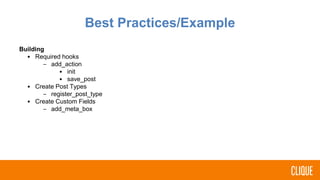
    Building • Required hooks –add_action • init • save_post • Create Post Types – register_post_type • Create Custom Fields – add_meta_box Best Practices/Example
  • 14.
    Testing • Ensure postappears in back-end of WordPress • Ensure data is being saved appropriately • Loop through custom posts and fields on a page Best Practices/Example
  • 15.
    You do ● Programmaticallyadd 3 custom post types to your own personal sites ● Programmatically add 3 custom fields to your own personal sites
  • 16.
    Resources Post Type ● https://codex.wordpress.org/Post_Types ●http://www.wpbeginner.com/wp-tutorials/how-to-create-custom-post-types-in-wordpress/ Fields ● https://codex.wordpress.org/Custom_Fields ● http://www.wpbeginner.com/wp-tutorials/wordpress-custom-fields-101-tips-tricks-and-hacks/ ● https://generatewp.com/

Editor's Notes

  • #3 Custom post types Custom Fields Preps them with show content to review tonight before tomorrow’s design kickoff
  • #4 Custom post types Custom Fields Preps them with show content to review tonight before tomorrow’s design kickoff
  • #5 Custom post types Custom Fields Preps them with show content to review tonight before tomorrow’s design kickoff
  • #6 Your agenda should reflect your learning progression.
  • #7 Custom post types Custom Fields Preps them with show content to review tonight before tomorrow’s design kickoff
  • #8 Walk through how custom post-types were effectively used in a client site This section is all about showing participants how you use this skill set.
  • #9 Walk through how custom post-types were effectively used in a client site This section is all about showing participants how you use this skill set.
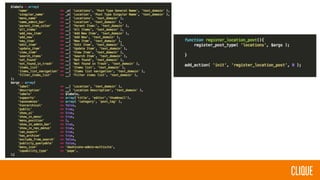
  • #10  we us labels, heiearchical, title, editor author, and thumbnail Debugging functions
  • #11 The $labels and $args arrays in the custom post type example above can easily be generated from https://generatewp.com/post-type/. It is much easier to copy and paste the code from that website than to write all of it out. All of these arguments, though important do not need to be explained. Focus on the main ones such as name, singular_name, menu_name, name_admin_bar, label, and description Also explain how to use menu_icon. Website below lists plenty of icons that can be used in wordpress. https://developer.wordpress.org/resource/dashicons/#media-interactive https://codex.wordpress.org/Function_Reference/register_post_type
  • #12 Make sure to do an example here that everyone can follow along with Remember to pause at various points to make sure everyone's on the same page At the end, ask if everyone's ready to try this solo, if not answer questions until they are
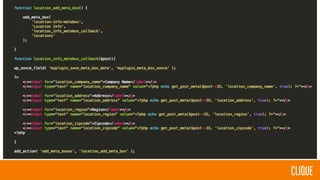
  • #13 include what each arguments in add_meta_box() mean https://codex.wordpress.org/Function_Reference/add_meta_box
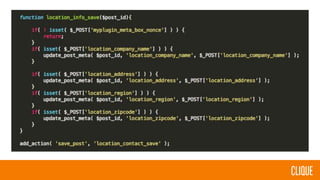
  • #14 Explain that this function ensures the data saves when we add a new custom post type or update a custom post type in the wordpress dashboard.
  • #15 Make sure to do an example here that everyone can follow along with Remember to pause at various points to make sure everyone's on the same page At the end, ask if everyone's ready to try this solo, if not answer questions until they are
  • #16 Find another example of similar difficulty to the one you all did together. Make sure you’re clear with the expected outcome. You can specify features you want to see, or a test that you’ll ask them to pass Specify how much time they’ll have and if this will be a solo or group activity