14 Technologies Every Web
Developer Should Be Able to
Explain
BY: UM E FARWA
1. Browsers
 Browsers are the interpreters of the web. They request information and then when they receive
it, they show us on the page in a format we can see and understand.
 Google Chrome - Currently, the most popular browser brought to you by Google
 Safari - Apple’s web browser
 Firefox - Open-source browser supported by the Mozilla Foundation
 Internet Explorer - Microsoft’s browser. You will most often hear web developers complain
about this one.
2. HTML
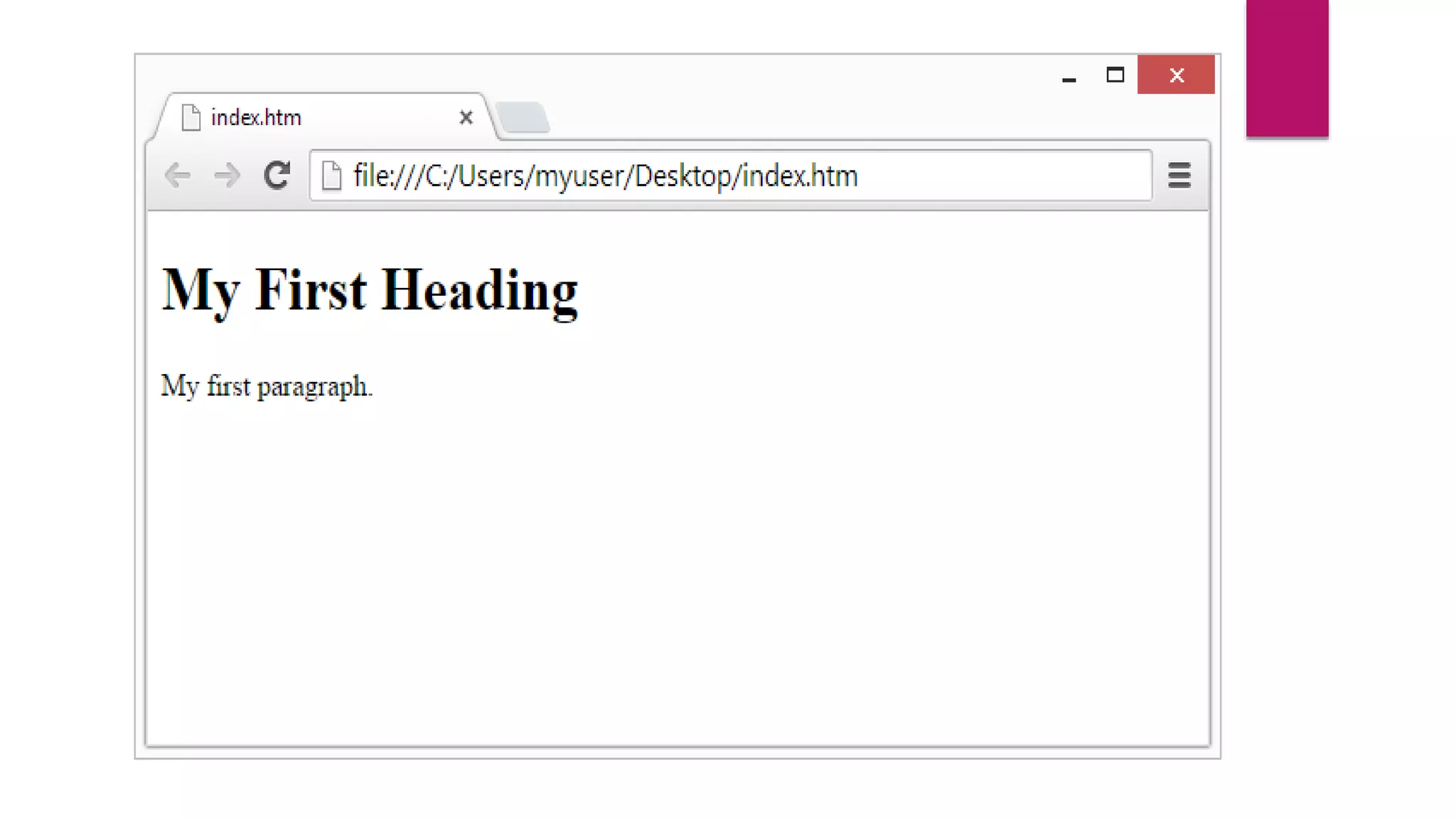
 HTML is a markup language. It provides the structure of a website so that web
browsers know what to show.
 <html>
3. CSS
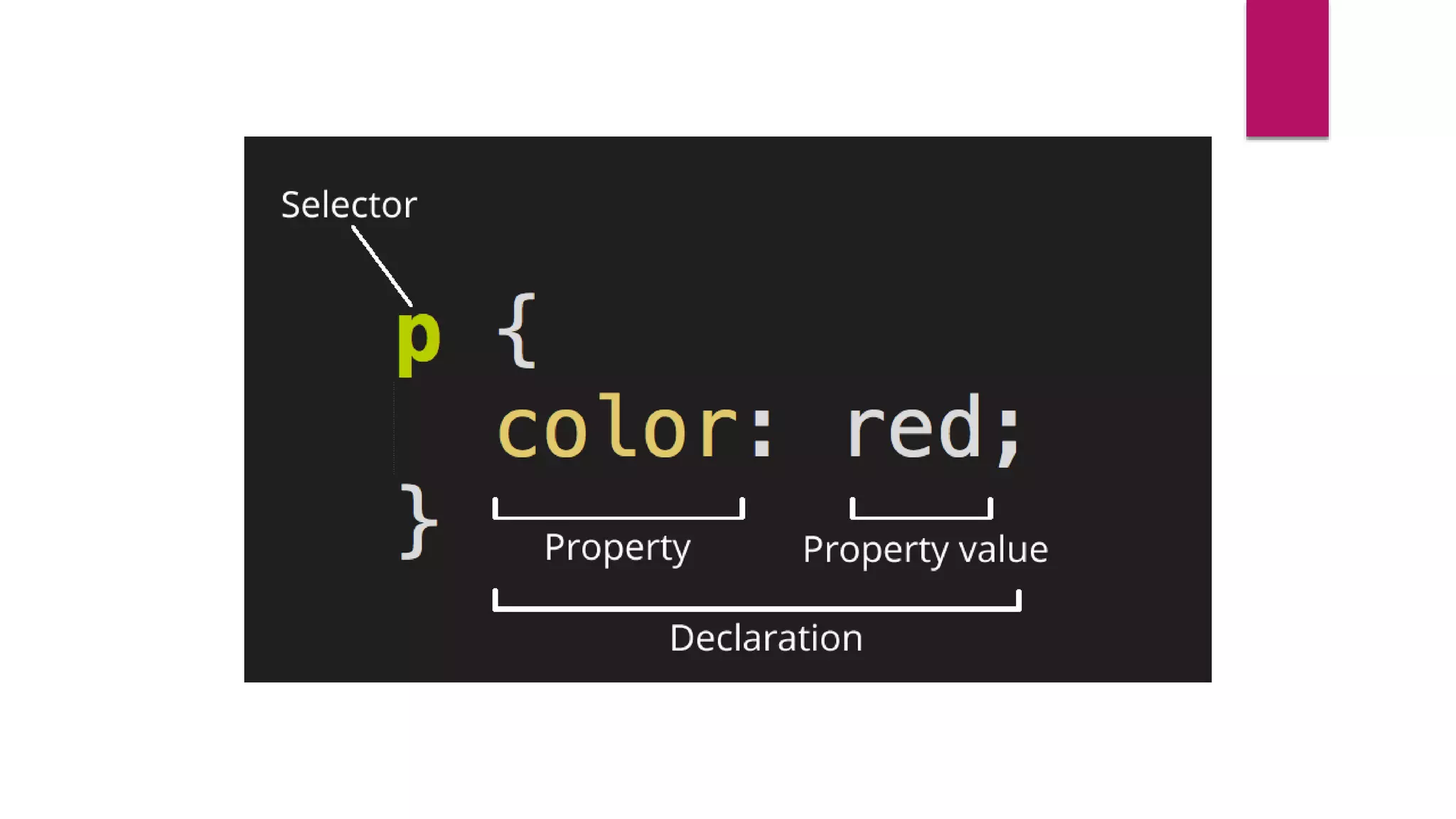
 CSS is a Cascading Style Sheet.
 CSS let’s web designers change colors, fonts, animations, and transitions on the
web.
 They make the web look good.
4. Programming Languages
Programming languages are ways to communicate to computers and tell them what to do.
There are many different programming languages just like there are many different lingual
languages (English, Spanish, French, Chinese, etc).
 Javascript - used by all web browsers, Meteor, and lots of other frameworks
 Coffeescript - is a kind of “dialect” of javascript. It is viewed as simpler and easier on your eyes
as a developer but it complies (converts) back into javascript
 Python -used by the Django framework and used in a lot of mathematical calculations
4. Programming Languages
 Ruby - used by the Ruby on Rails framework
 PHP - used by Wordpress
 Go - newer language, built for speed.
 Objective-C - the programming language behind iOS (your iPhone), lead by
Apple
 Swift - Apple’s newest programming language
 Java - Used by Android (Google) and a lot of desktop applications
5. Frameworks
Frameworks are built to make building and working with programming languages easier.
 Node.js - a server-side javascript framework
 Ruby on Rails - a full-stack framework built using ruby
 Django - a full-stack framework built using python
 Ionic - a mobile framework
 Bootstrap - a UI (user interface) framework for building with HTML/CSS/Javascript
 Foundation - a UI framework for building with HTML/CSS/Javascript
 Angular.js - a front-end javascript framework.
 Ember.js - a front-end javascript framework.
 Backbone.js - a front-end javascript framework.
 Wordpress - a CMS (content management system) built on PHP. Currently, about
20% of all websites run on this framework
 Drupal - a CMS framework built using PHP.
 .NET - a full-stack framework built by Microsoft
6. Libraries
Libraries are groupings of code snippets to enable a large amount of functionality
without having to write it all by yourself. Libraries typically also go through the
trouble to make sure the code is efficient and works well across browsers and
devices (not always the case, but typically they do).
 jQuery
7. Databases
 Databases are where all your data is stored. It’s like a bunch of filing cabinets
with folders filled with files. Databases come mainly in two flavors: SQL and
NoSQL.
 SQL provides more structure which helps with making sure all the data is correct
and validated.
 NoSQL provides a lot of flexibility for building and maintaining applications.
7. Databases
 MongoDB - is an open-sourced NoSQL database and is currently the only
database supported by Meteor.
 Redis - is the most popular key-value store. It is lighting fast for retrieving data
but doesn’t allow for much depth in the data storage.
 PostgreSQL - is a popular open-sourced SQL database.
 MySQL - is another popular open-sourced SQL database. MySQL is used in
Wordpress websites.
 Oracle - is an enterprise SQL database.
 SQL Server - is an SQL server manager created by Microsoft.
8. Client (or Client-side)
 A client is one user of an application.
 It’s you and me when we visit http://google.com.
 Client’s can be desktop computers, tablets, or mobile devices.
 There are typically multiple clients interacting with the same application stored
on a server.
9. Server (or Server-side)
 A server is where the application code is typically stored.
 Requests are made to the server from clients, and the server will gather the
appropriate information and respond to those requests.
10. Front-end
 The front-end is comprised of HTML, CSS, and Javascript.
 This is how and where the website is shown to users.
11. Back-end
 The back-end is comprised of your server and database.
 It’s the place where functions, methods, and data manipulation happens that
you don’t want the clients to see.
12. Protocols
 Protocols are standardized instructions for how to pass information back and
forth between computers and devices.
13. API
 An API is an application programming interface. It is created by the developer of
an application to allow other developers to use some of the application's
functionality without sharing code
14. Data formats
 Data formats are the structure of how data is stored.
 JSON - is quickly becoming the most popular data format
 XML - was the main data format early in the web days and predominantly used
by Microsoft systems
 CSV - is data formatted by commas. Excel data is typically formatted this way.

14 technologies every web developer should be able to understand

  • 2.
    14 Technologies EveryWeb Developer Should Be Able to Explain BY: UM E FARWA
  • 3.
    1. Browsers  Browsersare the interpreters of the web. They request information and then when they receive it, they show us on the page in a format we can see and understand.  Google Chrome - Currently, the most popular browser brought to you by Google  Safari - Apple’s web browser  Firefox - Open-source browser supported by the Mozilla Foundation  Internet Explorer - Microsoft’s browser. You will most often hear web developers complain about this one.
  • 4.
    2. HTML  HTMLis a markup language. It provides the structure of a website so that web browsers know what to show.
  • 6.
  • 7.
    3. CSS  CSSis a Cascading Style Sheet.  CSS let’s web designers change colors, fonts, animations, and transitions on the web.  They make the web look good.
  • 9.
    4. Programming Languages Programminglanguages are ways to communicate to computers and tell them what to do. There are many different programming languages just like there are many different lingual languages (English, Spanish, French, Chinese, etc).  Javascript - used by all web browsers, Meteor, and lots of other frameworks  Coffeescript - is a kind of “dialect” of javascript. It is viewed as simpler and easier on your eyes as a developer but it complies (converts) back into javascript  Python -used by the Django framework and used in a lot of mathematical calculations
  • 10.
    4. Programming Languages Ruby - used by the Ruby on Rails framework  PHP - used by Wordpress  Go - newer language, built for speed.  Objective-C - the programming language behind iOS (your iPhone), lead by Apple  Swift - Apple’s newest programming language  Java - Used by Android (Google) and a lot of desktop applications
  • 11.
    5. Frameworks Frameworks arebuilt to make building and working with programming languages easier.  Node.js - a server-side javascript framework  Ruby on Rails - a full-stack framework built using ruby  Django - a full-stack framework built using python  Ionic - a mobile framework  Bootstrap - a UI (user interface) framework for building with HTML/CSS/Javascript  Foundation - a UI framework for building with HTML/CSS/Javascript
  • 12.
     Angular.js -a front-end javascript framework.  Ember.js - a front-end javascript framework.  Backbone.js - a front-end javascript framework.  Wordpress - a CMS (content management system) built on PHP. Currently, about 20% of all websites run on this framework  Drupal - a CMS framework built using PHP.  .NET - a full-stack framework built by Microsoft
  • 13.
    6. Libraries Libraries aregroupings of code snippets to enable a large amount of functionality without having to write it all by yourself. Libraries typically also go through the trouble to make sure the code is efficient and works well across browsers and devices (not always the case, but typically they do).  jQuery
  • 14.
    7. Databases  Databasesare where all your data is stored. It’s like a bunch of filing cabinets with folders filled with files. Databases come mainly in two flavors: SQL and NoSQL.  SQL provides more structure which helps with making sure all the data is correct and validated.  NoSQL provides a lot of flexibility for building and maintaining applications.
  • 15.
    7. Databases  MongoDB- is an open-sourced NoSQL database and is currently the only database supported by Meteor.  Redis - is the most popular key-value store. It is lighting fast for retrieving data but doesn’t allow for much depth in the data storage.  PostgreSQL - is a popular open-sourced SQL database.  MySQL - is another popular open-sourced SQL database. MySQL is used in Wordpress websites.  Oracle - is an enterprise SQL database.  SQL Server - is an SQL server manager created by Microsoft.
  • 16.
    8. Client (orClient-side)  A client is one user of an application.  It’s you and me when we visit http://google.com.  Client’s can be desktop computers, tablets, or mobile devices.  There are typically multiple clients interacting with the same application stored on a server.
  • 17.
    9. Server (orServer-side)  A server is where the application code is typically stored.  Requests are made to the server from clients, and the server will gather the appropriate information and respond to those requests.
  • 18.
    10. Front-end  Thefront-end is comprised of HTML, CSS, and Javascript.  This is how and where the website is shown to users.
  • 19.
    11. Back-end  Theback-end is comprised of your server and database.  It’s the place where functions, methods, and data manipulation happens that you don’t want the clients to see.
  • 20.
    12. Protocols  Protocolsare standardized instructions for how to pass information back and forth between computers and devices.
  • 21.
    13. API  AnAPI is an application programming interface. It is created by the developer of an application to allow other developers to use some of the application's functionality without sharing code
  • 22.
    14. Data formats Data formats are the structure of how data is stored.  JSON - is quickly becoming the most popular data format  XML - was the main data format early in the web days and predominantly used by Microsoft systems  CSV - is data formatted by commas. Excel data is typically formatted this way.