Adobe Marketo Engage User
Groups
Melbourne | March 2023
Agenda for today:
1. Introductions, housekeeping points and Adobe news
2. Import Program Features deep-dive & Marketo + DAM
3. Q & A panel on Growing with Marketo
4. Closing and socialise!
Welcome!
Thank you to our sponsor, Adobe!
Thank you RMIT for hosting us!
© 2021 Adobe. All Rights Reserved. Adobe Confidential.
Adobe Marketo Engage User Group House Rules
In order to ensure our MUGs stay user-focused and a safe
space for members of the Marketing Nation to learn, network,
and problem solve, we ask that all MUG attendees follow
these rules:
• No self-promotion or pitching of any kind is permitted at
MUG events
• Don’t contact people outside of the User Group without
their consent
• If MUG members share their use case at the User Group,
please don’t share that information without their consent
© 2021 Adobe. All Rights Reserved. Adobe Confidential.
Stay connected with our chapter!
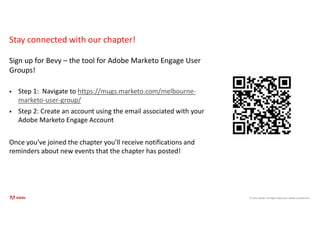
Sign up for Bevy – the tool for Adobe Marketo Engage User
Groups!
 Step 1: Navigate to https://mugs.marketo.com/melbourne-
marketo-user-group/
 Step 2: Create an account using the email associated with your
Adobe Marketo Engage Account
Once you’ve joined the chapter you’ll receive notifications and
reminders about new events that the chapter has posted!
Upcoming Opportunities for
Chapter Members
© 2021 Adobe. All Rights Reserved. Adobe Confidential.
AWARD PROGRAM OBJECTIVES
Global awards program showcasing
customers delivering on Adobe's vision to change
the world through digital experiences using
Adobe Experience Cloud solutions.
Who can apply for the awards?
Customers—from practitioners to leaders—from
all segments and all regions using Adobe
Experience Cloud
2023 Adobe Experience Maker Awards
1. Deadline: 31st March @ 11:59pm PT
2. 15 award categories — three regional
awards and 12 global awards
3. FAQ, category descriptions, tips for
creating award winning applications,
and link to submit nominations here
(adobeexperienceawards.com).
4. Need help? Email
xmakers@adobe.com
© 2021 Adobe. All Rights Reserved. Adobe Confidential.
Share your Adobe Marketo Engage Experience on G2!
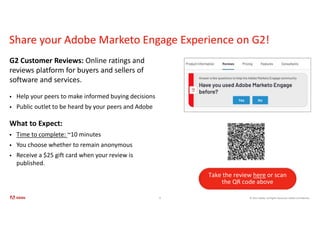
G2 Customer Reviews: Online ratings and
reviews platform for buyers and sellers of
software and services.
 Help your peers to make informed buying decisions
 Public outlet to be heard by your peers and Adobe
What to Expect:
 Time to complete: ~10 minutes
 You choose whether to remain anonymous
 Receive a $25 gift card when your review is
published.
8
Take the review here or scan
the QR code above
© 2021 Adobe. All Rights Reserved. Adobe Confidential.
Need to update your Marketo Engage certification?
Adobe now has 3 certifications for Marketo Engage
• Adobe Certified Professional - Adobe Marketo Engage: This new exam is ideal for marketers who have about
3 - 6 months of Marketo Engage training and hands-on experience. (Update to the former Marketo Certified Associate)
• Adobe Certified Expert - Adobe Marketo Engage Business Practitioner: This exam is ideal for marketers and
marketing consultants who have at least 18 months of Marketo Engage hands-on or field experience. (Update
to the former Marketo Certified Expert)
• Adobe Certified Master - Adobe Marketo Engage Architect: This certification defines a new standard and
process at the highest level. This certification is ideal for current Adobe Certified Experts who have at least 5
years of experience designing marketing automation using Marketo Engage
Visit https://express.adobe.com/page/8OCuJK38uQWuT/ for more information & exam
guides!
Marketo Engage Program
Import Feature Deep-Dive
Jeremy Evans
Adobe Marketo Engage Customer Adoption Specialist
Marketo User Group
Program Import
Jeremy Evans
Customer Adoption Specialist
© 2021 Adobe. All Rights Reserved. Adobe Confidential.
Introduction
Jeremy Evans
Customer Adoption Specialist
 Marketing automation consultant with multiple certifications (Marketo &
Pardot)
 Been with Marketo as a consultant for almost 5 years
 Consulting on marketing automation almost 8 years
 Worked for multiple marketing agencies in Melbourne across broader digital
marketing however a main focus on email marketing and marketing automation
 Helped 100’s of companies implement, adopt and align their business
objectives to get the most out of their marketing automation investment
Agenda
• Program Import
• Program Templates
• Marketo Program Library
• Gotchas
• Impacts on Marketo when importing
• What’s coming?
• Adobe Resources
• Adobe Summit Announcements
• Q/A
Program Import
© 2021 Adobe. All Rights Reserved. Adobe Confidential.
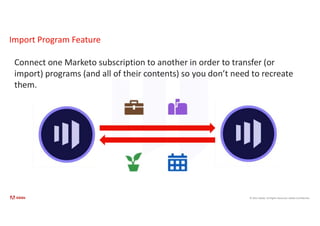
Import Program Feature
Connect one Marketo subscription to another in order to transfer (or
import) programs (and all of their contents) so you don’t need to recreate
them.
© 2021 Adobe. All Rights Reserved. Adobe Confidential.
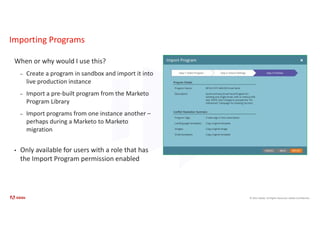
Importing Programs
When or why would I use this?
– Create a program in sandbox and import it into
live production instance
– Import a pre-built program from the Marketo
Program Library
– Import programs from one instance another –
perhaps during a Marketo to Marketo
migration
• Only available for users with a role that has
the Import Program permission enabled
© 2021 Adobe. All Rights Reserved. Adobe Confidential.
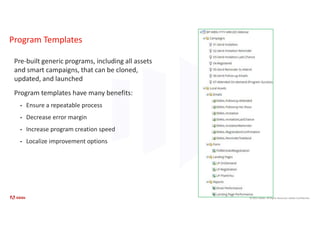
Program Templates
Pre-built generic programs, including all assets
and smart campaigns, that can be cloned,
updated, and launched
Program templates have many benefits:
• Ensure a repeatable process
• Decrease error margin
• Increase program creation speed
• Localize improvement options
© 2021 Adobe. All Rights Reserved. Adobe Confidential.
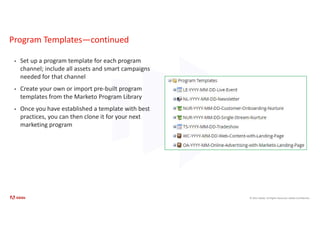
Program Templates—continued
• Set up a program template for each program
channel; include all assets and smart campaigns
needed for that channel
• Create your own or import pre-built program
templates from the Marketo Program Library
• Once you have established a template with best
practices, you can then clone it for your next
marketing program
© 2021 Adobe. All Rights Reserved. Adobe Confidential.
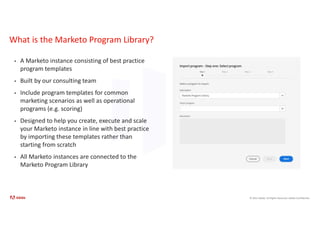
What is the Marketo Program Library?
• A Marketo instance consisting of best practice
program templates
• Built by our consulting team
• Include program templates for common
marketing scenarios as well as operational
programs (e.g. scoring)
• Designed to help you create, execute and scale
your Marketo instance in line with best practice
by importing these templates rather than
starting from scratch
• All Marketo instances are connected to the
Marketo Program Library
© 2021 Adobe. All Rights Reserved. Adobe Confidential.
What exactly does the Marketo Program Library include?
Marketing Program Templates:
© 2021 Adobe. All Rights Reserved. Adobe Confidential.
What exactly does the Marketo Program Library include?
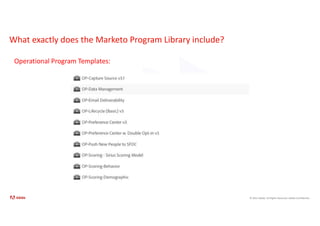
Operational Program Templates:
© 2021 Adobe. All Rights Reserved. Adobe Confidential.
What exactly does the Marketo Program Library include?
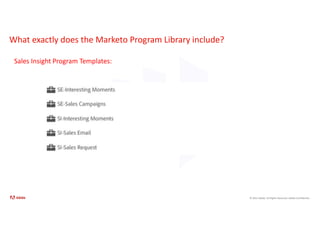
Sales Insight Program Templates:
© 2021 Adobe. All Rights Reserved. Adobe Confidential.
What exactly does the Marketo Program Library include?
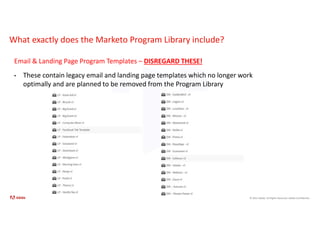
Email & Landing Page Program Templates – DISREGARD THESE!
• These contain legacy email and landing page templates which no longer work
optimally and are planned to be removed from the Program Library
© 2021 Adobe. All Rights Reserved. Adobe Confidential.
What makes these best practice?
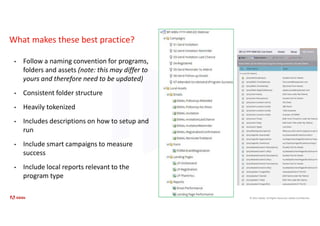
• Follow a naming convention for programs,
folders and assets (note: this may differ to
yours and therefore need to be updated)
• Consistent folder structure
• Heavily tokenized
• Includes descriptions on how to setup and
run
• Include smart campaigns to measure
success
• Include local reports relevant to the
program type
© 2021 Adobe. All Rights Reserved. Adobe Confidential.
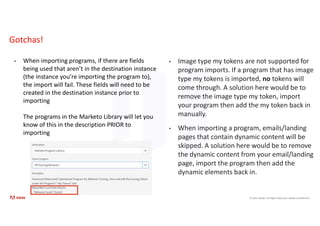
Gotchas!
• When importing programs, if there are fields
being used that aren’t in the destination instance
(the instance you’re importing the program to),
the import will fail. These fields will need to be
created in the destination instance prior to
importing
The programs in the Marketo Library will let you
know of this in the description PRIOR to
importing
• Image type my tokens are not supported for
program imports. If a program that has image
type my tokens is imported, no tokens will
come through. A solution here would be to
remove the image type my token, import
your program then add the my token back in
manually.
• When importing a program, emails/landing
pages that contain dynamic content will be
skipped. A solution here would be to remove
the dynamic content from your email/landing
page, import the program then add the
dynamic elements back in.
© 2021 Adobe. All Rights Reserved. Adobe Confidential.
Impact on External Assets During Program Imports
Programs use external assets like email templates, landing page templates, images, forms,
tokens, and program tags. You have the ability to configure how landing page templates and
program tags are handled, and Marketo automatically manages the rest.
Email & Landing Page Templates:
• Email/Landing Page templates are imported into the Design Studio. You can use conflict rules to
configure behavior when a template with the same name exists. Using the default rule, a number
will be appended to a template if one with the same name exists. For example, if you already have
a template named “Standard Template,” the new one will be named “Standard Template - 1.”
© 2021 Adobe. All Rights Reserved. Adobe Confidential.
Impact on External Assets During Program Imports - continued
Landing Pages & Forms:
• If a form or landing page with the same name exists in Design Studio, they will still be imported,
but with a number appended to their name (ex: Landing Page - 1).
Images:
• Images used by landing pages are imported into the design studio unless one with the same name
exists.
Tokens:
• Tokens that live outside of a program will be converted to local tokens during the import process.
Program Tags:
• You can use conflict rules to control how program tags that do not exist in the destination account
will be treated. Using the default rule will create the program tags, or you can choose to ignore the
tags.
© 2021 Adobe. All Rights Reserved. Adobe Confidential.
What’s coming?
• Updates are on their way!
• Project underway with product and
consulting teams to update and refresh the
Marketo Program Library
• removing legacy programs
• tweaking existing programs
• adding new program templates
• We’ll keep you in the loop and
communicate these updates as they occur
Adobe Resources
©2021 Adobe. All Rights Reserved. Adobe Confidential.
Useful Resources
• Adobe Experience League
• Developer Docs
• Marketo Community
• Marketo Support
• Marketo Lunch & Learn Webinars
• Marketo Group Consulting
©2021 Adobe. All Rights Reserved. Adobe Confidential.
Marketo Engage – Lunch & Learns
31
o Lunch & Learns are recorded webinars where a
Marketo certified consultant will cover a specific
marketing automation topic.
o Run every 6 weeks
o Previously run sessions have covered the following
topics:
• Marketo & Salesforce CRM
• Ad Network Integrations
• Lead Scoring
• Nurturing
• Marketo Sales Insight
• Personalisation
• Reporting & Insights
• Configuring a Marketo Instance
• Managing and Monitoring You Marketo Instance
• Performance Insights
o Please let us know if you'd like access to these
recordings!
©2021 Adobe. All Rights Reserved. Adobe Confidential.
Group Consulting
Overview
Group Consulting is designed to help you take your Marketo skills to the next level! These sessions will allow you to speak with a Marketo
consultant to assist you with general Marketo advice and best practices. Group Consulting is a public forum where other Marketo customers
may join and each person will get to ask one question at a time.
When?
Wednesdays 12pm – 1pm AEST
Format
1-hour open forum virtual session on Wednesdays from 12pm – 1pm AEST with a max of 4-5 attendees per session
How to Register
• Register via this form
• Registrations will close Tuesday 12pm each week for the upcoming session
• Emails will be sent on Tuesday 5pm with link to training for the upcoming session
• If you have registered however the session cap of 5 people has already been hit, your SAM will notify you so you can register for a future
session
Notes:
• Each participant is permitted to ask one question at a time. First person that dialled in goes first then we’ll continue to go around the
virtual room until everyone has had a chance to ask their first question before each participant can ask their next question. If a participant
only has one question, they are welcome to stay and listen in or can leave.
• Group Consulting is not a replacement for Marketo support or custom consulting including business or technical consulting.
Adobe Summit
Announcements
©2021 Adobe. All Rights Reserved. Adobe Confidential.
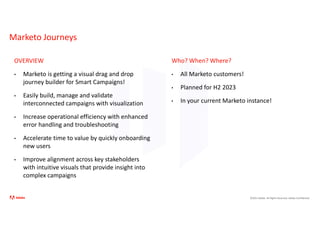
Marketo Journeys
OVERVIEW
• Marketo is getting a visual drag and drop
journey builder for Smart Campaigns!
• Easily build, manage and validate
interconnected campaigns with visualization
• Increase operational efficiency with enhanced
error handling and troubleshooting
• Accelerate time to value by quickly onboarding
new users
• Improve alignment across key stakeholders
with intuitive visuals that provide insight into
complex campaigns
Who? When? Where?
• All Marketo customers!
• Planned for H2 2023
• In your current Marketo instance!
©2021 Adobe. All Rights Reserved. Adobe Confidential.
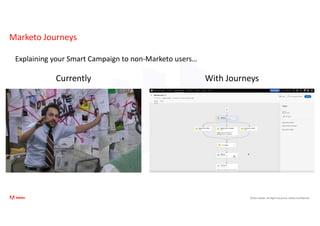
Marketo Journeys
Explaining your Smart Campaign to non-Marketo users…
Currently With Journeys
©2021 Adobe. All Rights Reserved. Adobe Confidential.
Dynamic Chat Updates
Beta in mid-June. Want to join!? Reach to your Adobe Account Manager
Questions?
Marketo Engage + DAM
(Digital Asset Management)
Jessica Clement
Manager, Solution Consulting
© 2021 Adobe. All Rights Reserved. Adobe Confidential.
40
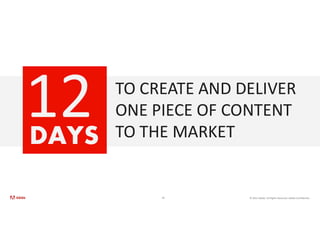
TO CREATE AND DELIVER
ONE PIECE OF CONTENT
TO THE MARKET
DAYS
© 2021 Adobe. All Rights Reserved. Adobe Confidential.
There are certain things in life that most creatives don’t enjoy.
Mundane & repetitive tasks are one of them.
© 2021 Adobe. All Rights Reserved. Adobe Confidential.
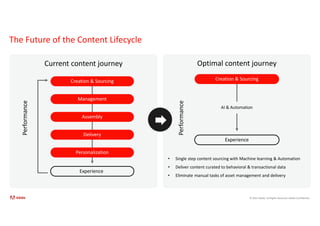
The Future of the Content Lifecycle
Current content journey Optimal content journey
• Single step content sourcing with Machine learning & Automation
• Deliver content curated to behavioral & transactional data
• Eliminate manual tasks of asset management and delivery
Creation & Sourcing
Management
Assembly
Delivery
Personalization
Experience
Performance
Creation & Sourcing
Performance
Experience
AI & Automation
© 2021 Adobe. All Rights Reserved. Adobe Confidential.
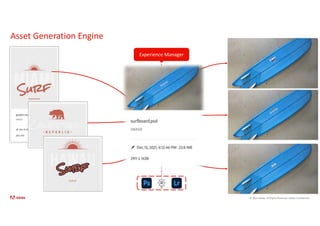
Experience Manager
Asset Generation Engine
© 2021 Adobe. All Rights Reserved. Adobe Confidential.
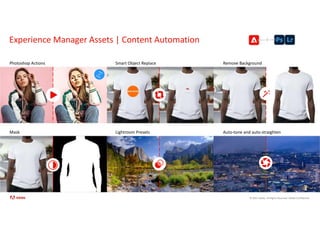
Experience Manager Assets | Content Automation
44
Photoshop Actions Smart Object Replace Remove Background
Mask Lightroom Presets Auto-tone and auto-straighten
© 2021 Adobe. All Rights Reserved. Adobe Confidential.
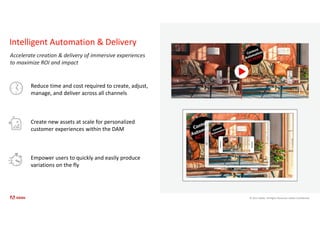
Reduce time and cost required to create, adjust,
manage, and deliver across all channels
Create new assets at scale for personalized
customer experiences within the DAM
Empower users to quickly and easily produce
variations on the fly
Intelligent Automation & Delivery
Accelerate creation & delivery of immersive experiences
to maximize ROI and impact
© 2021 Adobe. All Rights Reserved. Adobe Confidential.
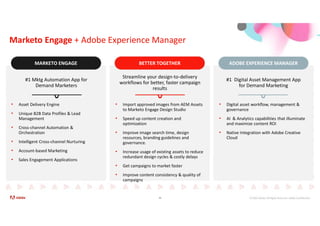
Marketo Engage + Adobe Experience Manager
46
BETTER TOGETHER
BETTER TOGETHER
MARKETO ENGAGE
MARKETO ENGAGE ADOBE EXPERIENCE MANAGER
ADOBE EXPERIENCE MANAGER
#1 Mktg Automation App for
Demand Marketers
#1 Digital Asset Management App
for Demand Marketing
Streamline your design-to-delivery
workflows for better, faster campaign
results
• Asset Delivery Engine
• Unique B2B Data Profiles & Lead
Management
• Cross-channel Automation &
Orchestration
• Intelligent Cross-channel Nurturing
• Account-based Marketing
• Sales Engagement Applications
• Digital asset workflow, management &
governance
• AI & Analytics capabilities that illuminate
and maximize content ROI
• Native Integration with Adobe Creative
Cloud
• Import approved images from AEM Assets
to Marketo Engage Design Studio
• Speed up content creation and
optimization
• Improve image search time, design
resources, branding guidelines and
governance.
• Increase usage of existing assets to reduce
redundant design cycles & costly delays
• Get campaigns to market faster
• Improve content consistency & quality of
campaigns
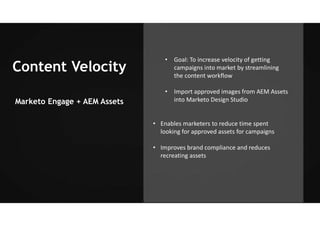
Content Velocity
Marketo Engage + AEM Assets
• Goal: To increase velocity of getting
campaigns into market by streamlining
the content workflow
• Import approved images from AEM Assets
into Marketo Design Studio
• Enables marketers to reduce time spent
looking for approved assets for campaigns
• Improves brand compliance and reduces
recreating assets
© 2021 Adobe. All Rights Reserved. Adobe Confidential.
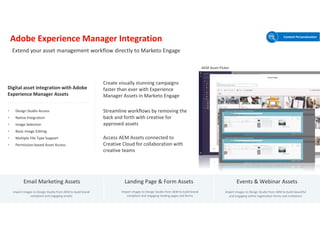
Adobe Experience Manager Integration
Create visually stunning campaigns
faster than ever with Experience
Manager Assets in Marketo Engage
Access AEM Assets connected to
Creative Cloud for collaboration with
creative teams
Streamline workflows by removing the
back and forth with creative for
approved assets
Digital asset integration with Adobe
Experience Manager Assets
• Design Studio Access
• Native Integration
• Image Selection
• Basic Image Editing
• Multiple File Type Support
• Permission-based Asset Access
Email Marketing Assets Landing Page & Form Assets Events & Webinar Assets
Import images to Design Studio from AEM to build brand
compliant and engaging emails
Import images to Design Studio from AEM to build brand
compliant and engaging landing pages and forms
Import images to Design Studio from AEM to build beautiful
and engaging online registration forms and invitations
Extend your asset management workflow directly to Marketo Engage
Content Personalization
AEM Asset Picker
What’s Next
Growing with Marketo Engage
Q & A Panel
© 2021 Adobe. All Rights Reserved. Adobe Confidential.
Ask the experts: How to grow with Marketo and Marketing Automation
 Need advice on a Marketo problem you're having?
 Want an expert opinion on the right tool or plugin for your use case?
 Want some tips on how to become a Marketo power user or admin?
 Want to know how to build a successful career in Marketing Operations?
 This panel Q&A is all about growth with Marketo and our incredible panel will be here to answer,
discuss and debate all of your questions.
© 2021 Adobe. All Rights Reserved. Adobe Confidential.
Your Panelists Today
Martech Consultant for 5 years & enjoying
building scalable solutions & SME for
architectural designs which can operate
efficiently. Recently joined another
Superfund as a Marketing Automation
Lead where I am responsible for designing
& building various automation &
orchestration journeys for members best
interests including personalisation &
tokenisation.
More than twenty years experience in
designing, building, marketing and
documenting technology platforms, and
over fifteen years’ experience with
Marketing Automation and CRM across
multiple platforms.
Veronica has led over 250 small and large
digital transformation projects in
industries such as technology, banking,
insurance, healthcare, superannuation,
nonprofit/advocacy, real estate,
construction, retail, FMCG, recruitment,
higher education, automotive, and
telecommunications.
Malay is an accomplished Marketing
Automation Technical Lead at
AustralianSuper with 8+ years of
experience in marketing technology and
automation. As a Marketo Certified
Architect, he possess extensive expertise
in designing, implementing, and managing
marketing automation systems and
Martech stacks. With a background in both
consulting and client-side positions, Malay
brings valuable insights and expertise to
deliver effective solutions.
Been a Marketo User since 2020 and am
now the CRM and Automation Manager at
RMIT, primarily focusing on optimisation
and uplift for the Experience function. I
have worked at RMIT for 6 years within
Marketing and was an eDM Channel Lead
for the previous Marketing Automation
Platform.
 Call for presenters!
 Have you got a venue or room that could host our next MUG?
Closing – Thanks for coming!

2023 March Melbourne MUG

  • 1.
    Adobe Marketo EngageUser Groups Melbourne | March 2023
  • 2.
    Agenda for today: 1.Introductions, housekeeping points and Adobe news 2. Import Program Features deep-dive & Marketo + DAM 3. Q & A panel on Growing with Marketo 4. Closing and socialise! Welcome!
  • 3.
    Thank you toour sponsor, Adobe! Thank you RMIT for hosting us!
  • 4.
    © 2021 Adobe.All Rights Reserved. Adobe Confidential. Adobe Marketo Engage User Group House Rules In order to ensure our MUGs stay user-focused and a safe space for members of the Marketing Nation to learn, network, and problem solve, we ask that all MUG attendees follow these rules: • No self-promotion or pitching of any kind is permitted at MUG events • Don’t contact people outside of the User Group without their consent • If MUG members share their use case at the User Group, please don’t share that information without their consent
  • 5.
    © 2021 Adobe.All Rights Reserved. Adobe Confidential. Stay connected with our chapter! Sign up for Bevy – the tool for Adobe Marketo Engage User Groups!  Step 1: Navigate to https://mugs.marketo.com/melbourne- marketo-user-group/  Step 2: Create an account using the email associated with your Adobe Marketo Engage Account Once you’ve joined the chapter you’ll receive notifications and reminders about new events that the chapter has posted!
  • 6.
  • 7.
    © 2021 Adobe.All Rights Reserved. Adobe Confidential. AWARD PROGRAM OBJECTIVES Global awards program showcasing customers delivering on Adobe's vision to change the world through digital experiences using Adobe Experience Cloud solutions. Who can apply for the awards? Customers—from practitioners to leaders—from all segments and all regions using Adobe Experience Cloud 2023 Adobe Experience Maker Awards 1. Deadline: 31st March @ 11:59pm PT 2. 15 award categories — three regional awards and 12 global awards 3. FAQ, category descriptions, tips for creating award winning applications, and link to submit nominations here (adobeexperienceawards.com). 4. Need help? Email xmakers@adobe.com
  • 8.
    © 2021 Adobe.All Rights Reserved. Adobe Confidential. Share your Adobe Marketo Engage Experience on G2! G2 Customer Reviews: Online ratings and reviews platform for buyers and sellers of software and services.  Help your peers to make informed buying decisions  Public outlet to be heard by your peers and Adobe What to Expect:  Time to complete: ~10 minutes  You choose whether to remain anonymous  Receive a $25 gift card when your review is published. 8 Take the review here or scan the QR code above
  • 9.
    © 2021 Adobe.All Rights Reserved. Adobe Confidential. Need to update your Marketo Engage certification? Adobe now has 3 certifications for Marketo Engage • Adobe Certified Professional - Adobe Marketo Engage: This new exam is ideal for marketers who have about 3 - 6 months of Marketo Engage training and hands-on experience. (Update to the former Marketo Certified Associate) • Adobe Certified Expert - Adobe Marketo Engage Business Practitioner: This exam is ideal for marketers and marketing consultants who have at least 18 months of Marketo Engage hands-on or field experience. (Update to the former Marketo Certified Expert) • Adobe Certified Master - Adobe Marketo Engage Architect: This certification defines a new standard and process at the highest level. This certification is ideal for current Adobe Certified Experts who have at least 5 years of experience designing marketing automation using Marketo Engage Visit https://express.adobe.com/page/8OCuJK38uQWuT/ for more information & exam guides!
  • 10.
    Marketo Engage Program ImportFeature Deep-Dive Jeremy Evans Adobe Marketo Engage Customer Adoption Specialist
  • 11.
    Marketo User Group ProgramImport Jeremy Evans Customer Adoption Specialist
  • 12.
    © 2021 Adobe.All Rights Reserved. Adobe Confidential. Introduction Jeremy Evans Customer Adoption Specialist  Marketing automation consultant with multiple certifications (Marketo & Pardot)  Been with Marketo as a consultant for almost 5 years  Consulting on marketing automation almost 8 years  Worked for multiple marketing agencies in Melbourne across broader digital marketing however a main focus on email marketing and marketing automation  Helped 100’s of companies implement, adopt and align their business objectives to get the most out of their marketing automation investment
  • 13.
    Agenda • Program Import •Program Templates • Marketo Program Library • Gotchas • Impacts on Marketo when importing • What’s coming? • Adobe Resources • Adobe Summit Announcements • Q/A
  • 14.
  • 15.
    © 2021 Adobe.All Rights Reserved. Adobe Confidential. Import Program Feature Connect one Marketo subscription to another in order to transfer (or import) programs (and all of their contents) so you don’t need to recreate them.
  • 16.
    © 2021 Adobe.All Rights Reserved. Adobe Confidential. Importing Programs When or why would I use this? – Create a program in sandbox and import it into live production instance – Import a pre-built program from the Marketo Program Library – Import programs from one instance another – perhaps during a Marketo to Marketo migration • Only available for users with a role that has the Import Program permission enabled
  • 17.
    © 2021 Adobe.All Rights Reserved. Adobe Confidential. Program Templates Pre-built generic programs, including all assets and smart campaigns, that can be cloned, updated, and launched Program templates have many benefits: • Ensure a repeatable process • Decrease error margin • Increase program creation speed • Localize improvement options
  • 18.
    © 2021 Adobe.All Rights Reserved. Adobe Confidential. Program Templates—continued • Set up a program template for each program channel; include all assets and smart campaigns needed for that channel • Create your own or import pre-built program templates from the Marketo Program Library • Once you have established a template with best practices, you can then clone it for your next marketing program
  • 19.
    © 2021 Adobe.All Rights Reserved. Adobe Confidential. What is the Marketo Program Library? • A Marketo instance consisting of best practice program templates • Built by our consulting team • Include program templates for common marketing scenarios as well as operational programs (e.g. scoring) • Designed to help you create, execute and scale your Marketo instance in line with best practice by importing these templates rather than starting from scratch • All Marketo instances are connected to the Marketo Program Library
  • 20.
    © 2021 Adobe.All Rights Reserved. Adobe Confidential. What exactly does the Marketo Program Library include? Marketing Program Templates:
  • 21.
    © 2021 Adobe.All Rights Reserved. Adobe Confidential. What exactly does the Marketo Program Library include? Operational Program Templates:
  • 22.
    © 2021 Adobe.All Rights Reserved. Adobe Confidential. What exactly does the Marketo Program Library include? Sales Insight Program Templates:
  • 23.
    © 2021 Adobe.All Rights Reserved. Adobe Confidential. What exactly does the Marketo Program Library include? Email & Landing Page Program Templates – DISREGARD THESE! • These contain legacy email and landing page templates which no longer work optimally and are planned to be removed from the Program Library
  • 24.
    © 2021 Adobe.All Rights Reserved. Adobe Confidential. What makes these best practice? • Follow a naming convention for programs, folders and assets (note: this may differ to yours and therefore need to be updated) • Consistent folder structure • Heavily tokenized • Includes descriptions on how to setup and run • Include smart campaigns to measure success • Include local reports relevant to the program type
  • 25.
    © 2021 Adobe.All Rights Reserved. Adobe Confidential. Gotchas! • When importing programs, if there are fields being used that aren’t in the destination instance (the instance you’re importing the program to), the import will fail. These fields will need to be created in the destination instance prior to importing The programs in the Marketo Library will let you know of this in the description PRIOR to importing • Image type my tokens are not supported for program imports. If a program that has image type my tokens is imported, no tokens will come through. A solution here would be to remove the image type my token, import your program then add the my token back in manually. • When importing a program, emails/landing pages that contain dynamic content will be skipped. A solution here would be to remove the dynamic content from your email/landing page, import the program then add the dynamic elements back in.
  • 26.
    © 2021 Adobe.All Rights Reserved. Adobe Confidential. Impact on External Assets During Program Imports Programs use external assets like email templates, landing page templates, images, forms, tokens, and program tags. You have the ability to configure how landing page templates and program tags are handled, and Marketo automatically manages the rest. Email & Landing Page Templates: • Email/Landing Page templates are imported into the Design Studio. You can use conflict rules to configure behavior when a template with the same name exists. Using the default rule, a number will be appended to a template if one with the same name exists. For example, if you already have a template named “Standard Template,” the new one will be named “Standard Template - 1.”
  • 27.
    © 2021 Adobe.All Rights Reserved. Adobe Confidential. Impact on External Assets During Program Imports - continued Landing Pages & Forms: • If a form or landing page with the same name exists in Design Studio, they will still be imported, but with a number appended to their name (ex: Landing Page - 1). Images: • Images used by landing pages are imported into the design studio unless one with the same name exists. Tokens: • Tokens that live outside of a program will be converted to local tokens during the import process. Program Tags: • You can use conflict rules to control how program tags that do not exist in the destination account will be treated. Using the default rule will create the program tags, or you can choose to ignore the tags.
  • 28.
    © 2021 Adobe.All Rights Reserved. Adobe Confidential. What’s coming? • Updates are on their way! • Project underway with product and consulting teams to update and refresh the Marketo Program Library • removing legacy programs • tweaking existing programs • adding new program templates • We’ll keep you in the loop and communicate these updates as they occur
  • 29.
  • 30.
    ©2021 Adobe. AllRights Reserved. Adobe Confidential. Useful Resources • Adobe Experience League • Developer Docs • Marketo Community • Marketo Support • Marketo Lunch & Learn Webinars • Marketo Group Consulting
  • 31.
    ©2021 Adobe. AllRights Reserved. Adobe Confidential. Marketo Engage – Lunch & Learns 31 o Lunch & Learns are recorded webinars where a Marketo certified consultant will cover a specific marketing automation topic. o Run every 6 weeks o Previously run sessions have covered the following topics: • Marketo & Salesforce CRM • Ad Network Integrations • Lead Scoring • Nurturing • Marketo Sales Insight • Personalisation • Reporting & Insights • Configuring a Marketo Instance • Managing and Monitoring You Marketo Instance • Performance Insights o Please let us know if you'd like access to these recordings!
  • 32.
    ©2021 Adobe. AllRights Reserved. Adobe Confidential. Group Consulting Overview Group Consulting is designed to help you take your Marketo skills to the next level! These sessions will allow you to speak with a Marketo consultant to assist you with general Marketo advice and best practices. Group Consulting is a public forum where other Marketo customers may join and each person will get to ask one question at a time. When? Wednesdays 12pm – 1pm AEST Format 1-hour open forum virtual session on Wednesdays from 12pm – 1pm AEST with a max of 4-5 attendees per session How to Register • Register via this form • Registrations will close Tuesday 12pm each week for the upcoming session • Emails will be sent on Tuesday 5pm with link to training for the upcoming session • If you have registered however the session cap of 5 people has already been hit, your SAM will notify you so you can register for a future session Notes: • Each participant is permitted to ask one question at a time. First person that dialled in goes first then we’ll continue to go around the virtual room until everyone has had a chance to ask their first question before each participant can ask their next question. If a participant only has one question, they are welcome to stay and listen in or can leave. • Group Consulting is not a replacement for Marketo support or custom consulting including business or technical consulting.
  • 33.
  • 34.
    ©2021 Adobe. AllRights Reserved. Adobe Confidential. Marketo Journeys OVERVIEW • Marketo is getting a visual drag and drop journey builder for Smart Campaigns! • Easily build, manage and validate interconnected campaigns with visualization • Increase operational efficiency with enhanced error handling and troubleshooting • Accelerate time to value by quickly onboarding new users • Improve alignment across key stakeholders with intuitive visuals that provide insight into complex campaigns Who? When? Where? • All Marketo customers! • Planned for H2 2023 • In your current Marketo instance!
  • 35.
    ©2021 Adobe. AllRights Reserved. Adobe Confidential. Marketo Journeys Explaining your Smart Campaign to non-Marketo users… Currently With Journeys
  • 36.
    ©2021 Adobe. AllRights Reserved. Adobe Confidential. Dynamic Chat Updates Beta in mid-June. Want to join!? Reach to your Adobe Account Manager
  • 37.
  • 39.
    Marketo Engage +DAM (Digital Asset Management) Jessica Clement Manager, Solution Consulting
  • 40.
    © 2021 Adobe.All Rights Reserved. Adobe Confidential. 40 TO CREATE AND DELIVER ONE PIECE OF CONTENT TO THE MARKET DAYS
  • 41.
    © 2021 Adobe.All Rights Reserved. Adobe Confidential. There are certain things in life that most creatives don’t enjoy. Mundane & repetitive tasks are one of them.
  • 42.
    © 2021 Adobe.All Rights Reserved. Adobe Confidential. The Future of the Content Lifecycle Current content journey Optimal content journey • Single step content sourcing with Machine learning & Automation • Deliver content curated to behavioral & transactional data • Eliminate manual tasks of asset management and delivery Creation & Sourcing Management Assembly Delivery Personalization Experience Performance Creation & Sourcing Performance Experience AI & Automation
  • 43.
    © 2021 Adobe.All Rights Reserved. Adobe Confidential. Experience Manager Asset Generation Engine
  • 44.
    © 2021 Adobe.All Rights Reserved. Adobe Confidential. Experience Manager Assets | Content Automation 44 Photoshop Actions Smart Object Replace Remove Background Mask Lightroom Presets Auto-tone and auto-straighten
  • 45.
    © 2021 Adobe.All Rights Reserved. Adobe Confidential. Reduce time and cost required to create, adjust, manage, and deliver across all channels Create new assets at scale for personalized customer experiences within the DAM Empower users to quickly and easily produce variations on the fly Intelligent Automation & Delivery Accelerate creation & delivery of immersive experiences to maximize ROI and impact
  • 46.
    © 2021 Adobe.All Rights Reserved. Adobe Confidential. Marketo Engage + Adobe Experience Manager 46 BETTER TOGETHER BETTER TOGETHER MARKETO ENGAGE MARKETO ENGAGE ADOBE EXPERIENCE MANAGER ADOBE EXPERIENCE MANAGER ADOBE EXPERIENCE MANAGER #1 Mktg Automation App for Demand Marketers #1 Digital Asset Management App for Demand Marketing Streamline your design-to-delivery workflows for better, faster campaign results • Asset Delivery Engine • Unique B2B Data Profiles & Lead Management • Cross-channel Automation & Orchestration • Intelligent Cross-channel Nurturing • Account-based Marketing • Sales Engagement Applications • Digital asset workflow, management & governance • AI & Analytics capabilities that illuminate and maximize content ROI • Native Integration with Adobe Creative Cloud • Import approved images from AEM Assets to Marketo Engage Design Studio • Speed up content creation and optimization • Improve image search time, design resources, branding guidelines and governance. • Increase usage of existing assets to reduce redundant design cycles & costly delays • Get campaigns to market faster • Improve content consistency & quality of campaigns
  • 47.
    Content Velocity Marketo Engage+ AEM Assets • Goal: To increase velocity of getting campaigns into market by streamlining the content workflow • Import approved images from AEM Assets into Marketo Design Studio • Enables marketers to reduce time spent looking for approved assets for campaigns • Improves brand compliance and reduces recreating assets
  • 48.
    © 2021 Adobe.All Rights Reserved. Adobe Confidential. Adobe Experience Manager Integration Create visually stunning campaigns faster than ever with Experience Manager Assets in Marketo Engage Access AEM Assets connected to Creative Cloud for collaboration with creative teams Streamline workflows by removing the back and forth with creative for approved assets Digital asset integration with Adobe Experience Manager Assets • Design Studio Access • Native Integration • Image Selection • Basic Image Editing • Multiple File Type Support • Permission-based Asset Access Email Marketing Assets Landing Page & Form Assets Events & Webinar Assets Import images to Design Studio from AEM to build brand compliant and engaging emails Import images to Design Studio from AEM to build brand compliant and engaging landing pages and forms Import images to Design Studio from AEM to build beautiful and engaging online registration forms and invitations Extend your asset management workflow directly to Marketo Engage Content Personalization AEM Asset Picker
  • 49.
  • 50.
    Growing with MarketoEngage Q & A Panel
  • 51.
    © 2021 Adobe.All Rights Reserved. Adobe Confidential. Ask the experts: How to grow with Marketo and Marketing Automation  Need advice on a Marketo problem you're having?  Want an expert opinion on the right tool or plugin for your use case?  Want some tips on how to become a Marketo power user or admin?  Want to know how to build a successful career in Marketing Operations?  This panel Q&A is all about growth with Marketo and our incredible panel will be here to answer, discuss and debate all of your questions.
  • 52.
    © 2021 Adobe.All Rights Reserved. Adobe Confidential. Your Panelists Today Martech Consultant for 5 years & enjoying building scalable solutions & SME for architectural designs which can operate efficiently. Recently joined another Superfund as a Marketing Automation Lead where I am responsible for designing & building various automation & orchestration journeys for members best interests including personalisation & tokenisation. More than twenty years experience in designing, building, marketing and documenting technology platforms, and over fifteen years’ experience with Marketing Automation and CRM across multiple platforms. Veronica has led over 250 small and large digital transformation projects in industries such as technology, banking, insurance, healthcare, superannuation, nonprofit/advocacy, real estate, construction, retail, FMCG, recruitment, higher education, automotive, and telecommunications. Malay is an accomplished Marketing Automation Technical Lead at AustralianSuper with 8+ years of experience in marketing technology and automation. As a Marketo Certified Architect, he possess extensive expertise in designing, implementing, and managing marketing automation systems and Martech stacks. With a background in both consulting and client-side positions, Malay brings valuable insights and expertise to deliver effective solutions. Been a Marketo User since 2020 and am now the CRM and Automation Manager at RMIT, primarily focusing on optimisation and uplift for the Experience function. I have worked at RMIT for 6 years within Marketing and was an eDM Channel Lead for the previous Marketing Automation Platform.
  • 54.
     Call forpresenters!  Have you got a venue or room that could host our next MUG? Closing – Thanks for coming!