
Proudly non-profit, Mozilla makes products
like Firefox with a mission to keep the power
of the Web in the hands of users everywhere.
Mozilla Mission (https://www.mozilla.org/en-US/mission/)
Our mission is to promote openness,
innovation & opportunity on the Web.
Mozilla Mission(https://www.mozilla.org/en-US/mission/)
民放が2局(のちに3局)しかない
テレビ朝日とテレビ東京がない
アニメがみれない!
東京から録画したテープを輸送
http://www.360syria.com/intro
http://www.starwars.co.uk/vr
Firefox Nightly / Firefox for Android Nightly / Firefox for iOS
WebVR contents = WebGL x Web Audio x WebVR x Gempad API
https://iswebvrready.org/
WebVR Pollyfill: https://github.com/borismus/webvr-polyfill
WebVR Bilerplate:https://github.com/borismus/webvr-boilerplate
WebVR API
https://www.w3.org/community/webvr/
https://w3c.github.io/webvr/
https://bugzilla.mozilla.org/show_bug.cgi?id=1250244
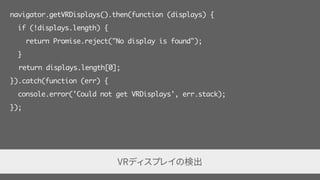
navigator.getVRDisplays().then(function (displays) {
if (!displays.length) {
return Promise.reject("No display is found");
}
return displays.length[0];
}).catch(function (err) {
console.error('Could not get VRDisplays', err.stack);
});
VRディスプレイの検出
var eyeParameter = vrDisplay.getEyeParameters("left");
// "left" か "right" が指定できる
var width = eyeParameter.renderWidth;
var height = eyeParameter.renderHeight;
視野情報の取得(例は左の視野情報を取得している)
var webglCanvas = document.querySelector("#webglcanvas");
var enterVRBtn = document.querySelector("#entervr");
enterVRBtn.addEventListener("click", function () {
// webglCanvas を vrDisplay に表示するよう要求
vrDisplay.requestPresent({source: webglCanvas});
});
vrDisplay.exitPresent(); // 表示をやめるメソッド
VRディスプレイに表示する canvas要素を設定
var id = vrDisplay.requestAnimationFrame(onAnimationFrame); // 登録
function onAnimationFrame(){
id = vrDisplay.requestAnimationFrame(onAnimationFrame);
var pose = vrDisplay.getPose();
// フレームの処理
vrDisplay.submitFrame(pose);
}
vrDisplay.cancelRequestAnimationFrame(id); // コールバックのキャンセル
アニメーションループ
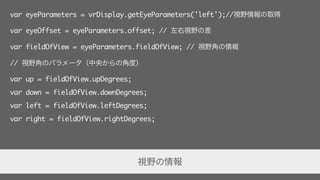
var eyeParameters = vrDisplay.getEyeParameters('left');//視野情報の取得
var eyeOffset = eyeParameters.offset; // 左右視野の差
var fieldOfView = eyeParameters.fieldOfView; // 視野角の情報
// 視野角のパラメータ(中央からの角度)
var up = fieldOfView.upDegrees;
var down = fieldOfView.downDegrees;
var left = fieldOfView.leftDegrees;
var right = fieldOfView.rightDegrees;
視野の情報
vrDisplay.resetPose(); // 今の位置、向きを原点 / 起点に設定
var pose = vrDisplay.getPose(); // 姿勢の情報を取得
var timeStamp = pose.timestamp; // センサーから値が取得された時刻
var position = pose.position; // 位置を3次元ベクトルで取得
var orientation = pose.orientation; // 向きを4次元ベクトルで取得
var x = position[0], y = position[1], z = position[2];
センサーの値を取得(対応していない時は null が返る)
interface VRPose {
readonly attribute DOMHighResTimeStamp timestamp;
readonly attribute Float32Array? position;
readonly attribute Float32Array? linearVelocity;
readonly attribute Float32Array? linearAcceleration;
readonly attribute Float32Array? orientation;
readonly attribute Float32Array? angularVelocity;
readonly attribute Float32Array? angularAcceleration;
};
function poseToMatrix (pose) {
var out = new Float32Array(16);
var q = pose.orientation ? pose.orientation : [0, 0, 0,
1];
var v = pose.position ? pose.position : [0, 0, 0];
// Compute some values for the quaternion math.
var x2 = q[0] + q[0];
var y2 = q[1] + q[1];
var z2 = q[2] + q[2];
var xx = q[0] * x2;
var xy = q[0] * y2;
var xz = q[0] * z2;
var yy = q[1] * y2;
var yz = q[1] * z2;
var zz = q[2] * z2;
var wx = q[3] * x2;
var wy = q[3] * y2;
var wz = q[3] * z2;
out[0] = 1 - (yy + zz);
out[1] = xy + wz;
out[2] = xz - wy;
out[3] = 0;
out[4] = xy - wz;
out[5] = 1 - (xx + zz);
out[6] = yz + wx;
out[7] = 0;
out[8] = xz + wy;
out[9] = yz - wx;
out[10] = 1 - (xx + yy);
out[11] = 0;
out[12] = v[0];
out[13] = v[1];
out[14] = v[2];
out[15] = 1;
return out;
}
function makeProjectionMatrix (display, eye) {
var d2r = Math.PI / 180.0;
var upTan = Math.tan(eye.fieldOfView.upDegrees * d2r);
var downTan = Math.tan(eye.fieldOfView.leftDegrees *
d2r);
var rightTan = Math.tan(eye.fieldOfView.rightDegrees *
d2r);
var leftTan = Math.tan(eye.fieldOfView.leftDegrees *
d2r);
var xScale = 2.0 / (leftTan + rightTan);
var yScale = 2.0 / (upTan + downTan);
var out = new Float32Array(16);
out[0] = xScale;
out[1] = 0.0;
out[2] = 0.0;
out[3] = 0.0;
out[4] = 0.0;
out[5] = yScale;
out[6] = 0.0;
out[7] = 0.0;
out[8] = -((leftTan - rightTan) * xScale * 0.5);
out[9] = (upTan - downTan) * yScale * 0.5;
out[10] = -(display.depthNear + display.depthFar) /
(display.depthFar - display.depthNear);
out[12] = 0.0;
out[13] = 0.0;
out[14] = -(2.0 * display.depthFar *
display.depthNear) / (display.depthFar -
display.depthNear);
out[15] = 0.0;
return out;
}


<a-scene>
<a-sphere position="0 1.25 -1" radius="1.25" color="#EF2D5E"></a-sphere>
<a-box position="-1 0.5 1" rotation="0 45 0" width="1" height="1" depth="1"
color="#4CC3D9"></a-box>
<a-cylinder position="1 0.75 1" radius="0.5" height="1.5"
color="#FFC65D"></a-cylinder>
<a-plane rotation="-90 0 0" width="4" height="4" color="#7BC8A4"></a-plane>
<a-sky color="#ECECEC"></a-sky>
</a-scene>
<a-scene>
<a-assets>
<img id="texture" src="texture.png">
</a-assets>
<a-box color="#FFF" width="4" height="10" depth="2"
position="-10 2 -5" rotation="0 0 45" scale="2 0.5 3"
src="#texture">
<a-animation attribute="rotation" repeat="indefinite" to="0 360 0"></a-
animation>
</a-box>
</a-scene>
A-Frame Editor: https://github.com/aframevr/aframe-editor
20160713 webvr
20160713 webvr
20160713 webvr
20160713 webvr

20160713 webvr

  • 6.
    Proudly non-profit, Mozillamakes products like Firefox with a mission to keep the power of the Web in the hands of users everywhere. Mozilla Mission (https://www.mozilla.org/en-US/mission/)
  • 7.
    Our mission isto promote openness, innovation & opportunity on the Web. Mozilla Mission(https://www.mozilla.org/en-US/mission/)
  • 10.
  • 11.
  • 12.
  • 13.
  • 17.
  • 18.
  • 19.
    Firefox Nightly /Firefox for Android Nightly / Firefox for iOS
  • 20.
    WebVR contents =WebGL x Web Audio x WebVR x Gempad API
  • 21.
  • 22.
  • 23.
  • 24.
  • 26.
  • 27.
  • 28.
  • 30.
    navigator.getVRDisplays().then(function (displays) { if(!displays.length) { return Promise.reject("No display is found"); } return displays.length[0]; }).catch(function (err) { console.error('Could not get VRDisplays', err.stack); }); VRディスプレイの検出
  • 31.
    var eyeParameter =vrDisplay.getEyeParameters("left"); // "left" か "right" が指定できる var width = eyeParameter.renderWidth; var height = eyeParameter.renderHeight; 視野情報の取得(例は左の視野情報を取得している)
  • 32.
    var webglCanvas =document.querySelector("#webglcanvas"); var enterVRBtn = document.querySelector("#entervr"); enterVRBtn.addEventListener("click", function () { // webglCanvas を vrDisplay に表示するよう要求 vrDisplay.requestPresent({source: webglCanvas}); }); vrDisplay.exitPresent(); // 表示をやめるメソッド VRディスプレイに表示する canvas要素を設定
  • 33.
    var id =vrDisplay.requestAnimationFrame(onAnimationFrame); // 登録 function onAnimationFrame(){ id = vrDisplay.requestAnimationFrame(onAnimationFrame); var pose = vrDisplay.getPose(); // フレームの処理 vrDisplay.submitFrame(pose); } vrDisplay.cancelRequestAnimationFrame(id); // コールバックのキャンセル アニメーションループ
  • 34.
    var eyeParameters =vrDisplay.getEyeParameters('left');//視野情報の取得 var eyeOffset = eyeParameters.offset; // 左右視野の差 var fieldOfView = eyeParameters.fieldOfView; // 視野角の情報 // 視野角のパラメータ(中央からの角度) var up = fieldOfView.upDegrees; var down = fieldOfView.downDegrees; var left = fieldOfView.leftDegrees; var right = fieldOfView.rightDegrees; 視野の情報
  • 35.
    vrDisplay.resetPose(); // 今の位置、向きを原点/ 起点に設定 var pose = vrDisplay.getPose(); // 姿勢の情報を取得 var timeStamp = pose.timestamp; // センサーから値が取得された時刻 var position = pose.position; // 位置を3次元ベクトルで取得 var orientation = pose.orientation; // 向きを4次元ベクトルで取得 var x = position[0], y = position[1], z = position[2]; センサーの値を取得(対応していない時は null が返る)
  • 36.
    interface VRPose { readonlyattribute DOMHighResTimeStamp timestamp; readonly attribute Float32Array? position; readonly attribute Float32Array? linearVelocity; readonly attribute Float32Array? linearAcceleration; readonly attribute Float32Array? orientation; readonly attribute Float32Array? angularVelocity; readonly attribute Float32Array? angularAcceleration; };
  • 43.
    function poseToMatrix (pose){ var out = new Float32Array(16); var q = pose.orientation ? pose.orientation : [0, 0, 0, 1]; var v = pose.position ? pose.position : [0, 0, 0]; // Compute some values for the quaternion math. var x2 = q[0] + q[0]; var y2 = q[1] + q[1]; var z2 = q[2] + q[2]; var xx = q[0] * x2; var xy = q[0] * y2; var xz = q[0] * z2; var yy = q[1] * y2; var yz = q[1] * z2; var zz = q[2] * z2; var wx = q[3] * x2; var wy = q[3] * y2; var wz = q[3] * z2; out[0] = 1 - (yy + zz); out[1] = xy + wz; out[2] = xz - wy; out[3] = 0; out[4] = xy - wz; out[5] = 1 - (xx + zz); out[6] = yz + wx; out[7] = 0; out[8] = xz + wy; out[9] = yz - wx; out[10] = 1 - (xx + yy); out[11] = 0; out[12] = v[0]; out[13] = v[1]; out[14] = v[2]; out[15] = 1; return out; }
  • 44.
    function makeProjectionMatrix (display,eye) { var d2r = Math.PI / 180.0; var upTan = Math.tan(eye.fieldOfView.upDegrees * d2r); var downTan = Math.tan(eye.fieldOfView.leftDegrees * d2r); var rightTan = Math.tan(eye.fieldOfView.rightDegrees * d2r); var leftTan = Math.tan(eye.fieldOfView.leftDegrees * d2r); var xScale = 2.0 / (leftTan + rightTan); var yScale = 2.0 / (upTan + downTan); var out = new Float32Array(16); out[0] = xScale; out[1] = 0.0; out[2] = 0.0; out[3] = 0.0; out[4] = 0.0; out[5] = yScale; out[6] = 0.0; out[7] = 0.0; out[8] = -((leftTan - rightTan) * xScale * 0.5); out[9] = (upTan - downTan) * yScale * 0.5; out[10] = -(display.depthNear + display.depthFar) / (display.depthFar - display.depthNear); out[12] = 0.0; out[13] = 0.0; out[14] = -(2.0 * display.depthFar * display.depthNear) / (display.depthFar - display.depthNear); out[15] = 0.0; return out; }
  • 46.
  • 48.
    <a-scene> <a-sphere position="0 1.25-1" radius="1.25" color="#EF2D5E"></a-sphere> <a-box position="-1 0.5 1" rotation="0 45 0" width="1" height="1" depth="1" color="#4CC3D9"></a-box> <a-cylinder position="1 0.75 1" radius="0.5" height="1.5" color="#FFC65D"></a-cylinder> <a-plane rotation="-90 0 0" width="4" height="4" color="#7BC8A4"></a-plane> <a-sky color="#ECECEC"></a-sky> </a-scene>
  • 50.
    <a-scene> <a-assets> <img id="texture" src="texture.png"> </a-assets> <a-boxcolor="#FFF" width="4" height="10" depth="2" position="-10 2 -5" rotation="0 0 45" scale="2 0.5 3" src="#texture"> <a-animation attribute="rotation" repeat="indefinite" to="0 360 0"></a- animation> </a-box> </a-scene>
  • 51.