1Copyright © 2012. Infor. All Rights Reserved. www.infor.comCopyright © 2012. Infor. All Rights Reserved. www.infor.com 1
Evolution
Mark Pinder
Release 12 – Quick Wins
2Copyright © 2012. Infor. All Rights Reserved. www.infor.com
Evolution 12 – Quick Wins
• Web Client – Standard Features
• Desktop Builder - Customizations
• Report Wizard
• PDF Documents
• Creator
• Archiver
3Copyright © 2012. Infor. All Rights Reserved. www.infor.com
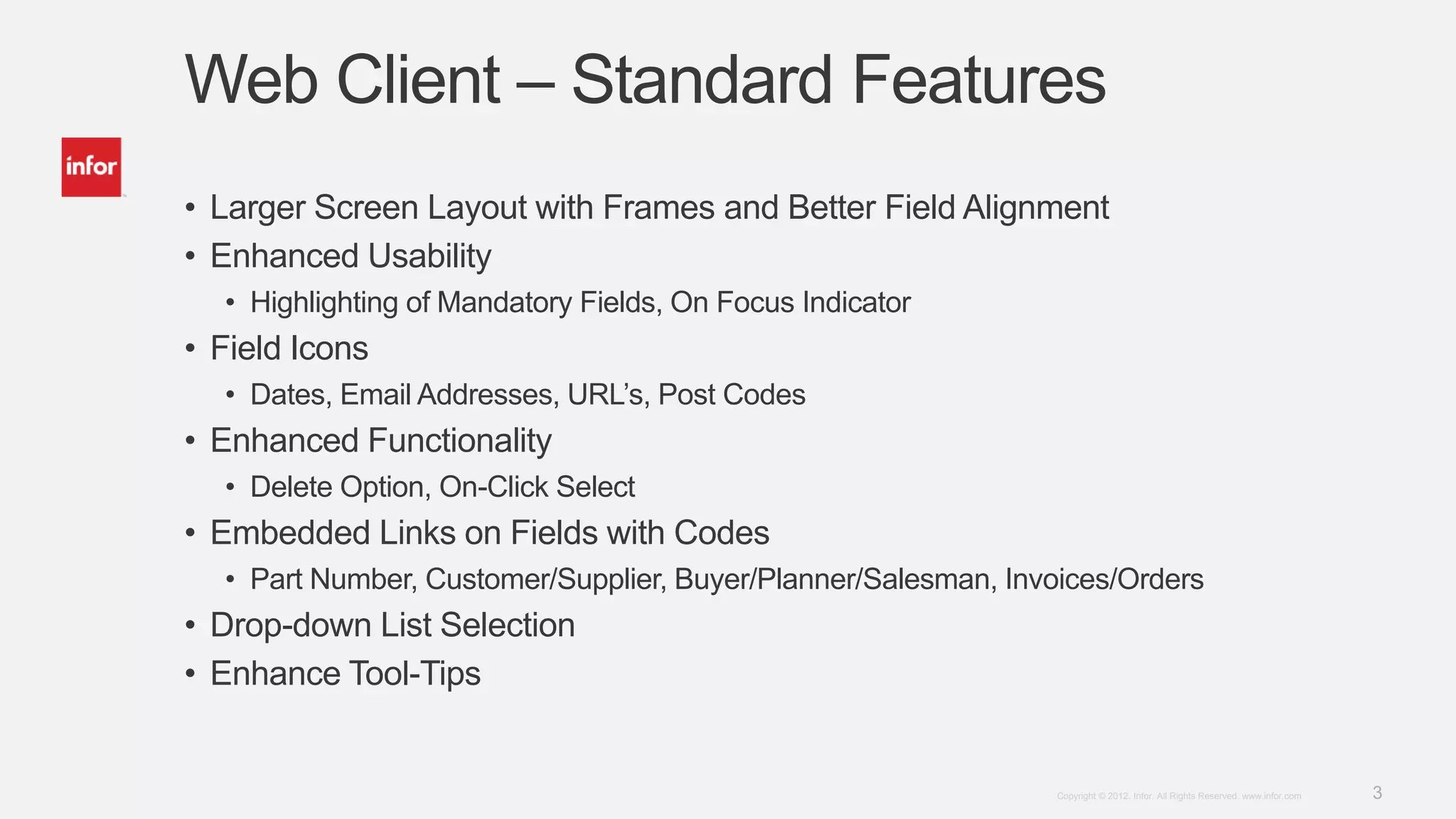
Web Client – Standard Features
• Larger Screen Layout with Frames and Better Field Alignment
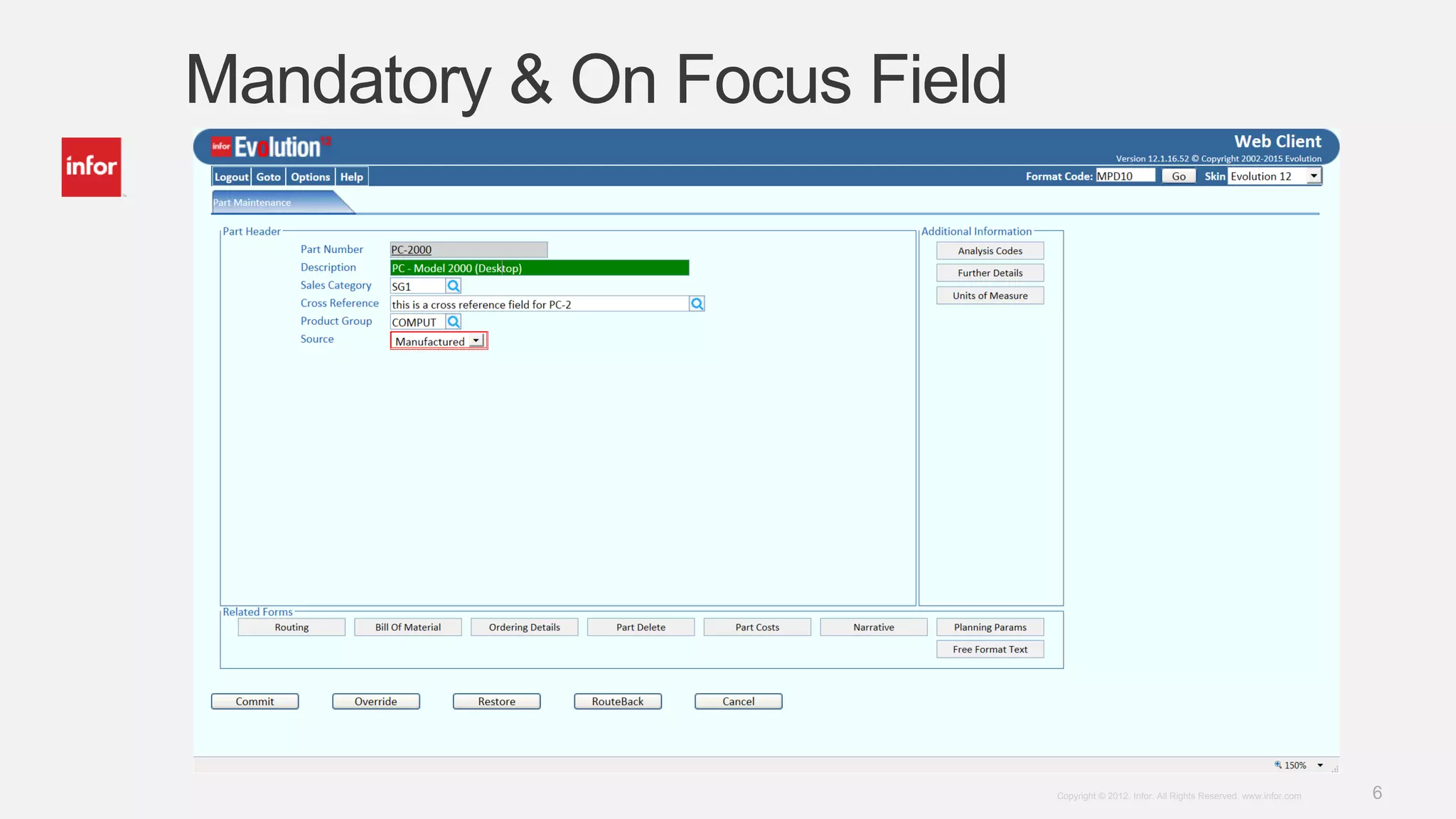
• Enhanced Usability
• Highlighting of Mandatory Fields, On Focus Indicator
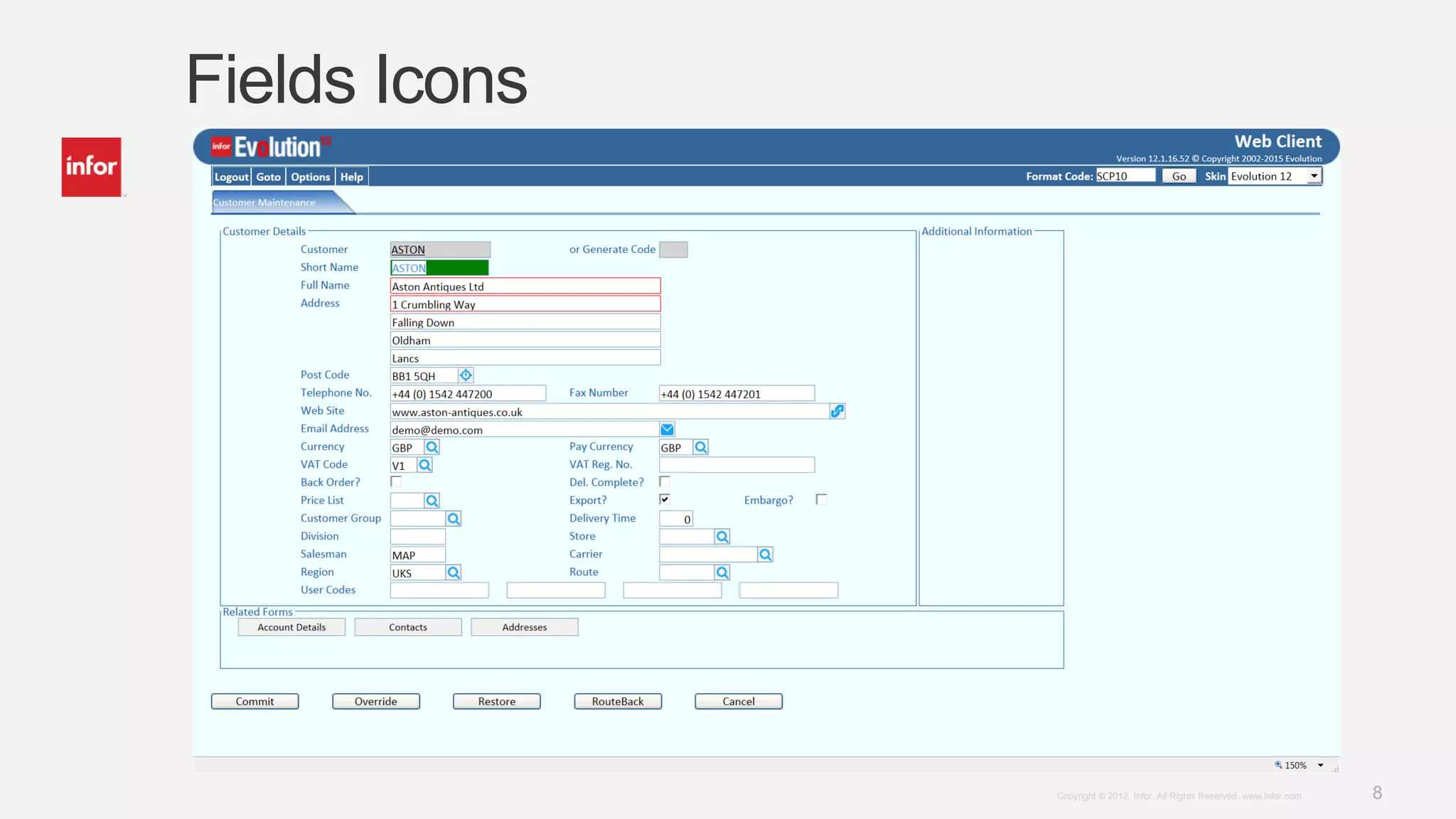
• Field Icons
• Dates, Email Addresses, URL’s, Post Codes
• Enhanced Functionality
• Delete Option, On-Click Select
• Embedded Links on Fields with Codes
• Part Number, Customer/Supplier, Buyer/Planner/Salesman, Invoices/Orders
• Drop-down List Selection
• Enhance Tool-Tips
4Copyright © 2012. Infor. All Rights Reserved. www.infor.com
Web Client – Standard Features
• Standard Triggers
• Generic Narrative
• Bespoke Menus
5Copyright © 2012. Infor. All Rights Reserved. www.infor.com
Larger Screen Layout with Frames
6Copyright © 2012. Infor. All Rights Reserved. www.infor.com
Mandatory & On Focus Field
7Copyright © 2012. Infor. All Rights Reserved. www.infor.com
Fields Icons
• Browses – Wildcard Searches
• Dates – Calendar or Date Picker
• Post Codes – Link to Google Maps
• Email Addresses – Mail To Option
• URL Links – Open Link in New Window
• Delete – Delete the Selected Item
8Copyright © 2012. Infor. All Rights Reserved. www.infor.com
Fields Icons
9Copyright © 2012. Infor. All Rights Reserved. www.infor.com
Fields Icons - Browse
10Copyright © 2012. Infor. All Rights Reserved. www.infor.com
Fields Icons – Post Code
11Copyright © 2012. Infor. All Rights Reserved. www.infor.com
Delete & On-Click Features
• Delete
• On Multi-Line Screens (Emulates to *** Feature)
• Checks to see if there is anything to delete (pop-up)
• Confirmation of delete request with details (pop-up)
• On-Click
• On Multi-Line Screens
• Tool-Tip Indicator
• Copies Output Fields to Input Fields
12Copyright © 2012. Infor. All Rights Reserved. www.infor.com
Delete Feature
13Copyright © 2012. Infor. All Rights Reserved. www.infor.com
Delete Feature
14Copyright © 2012. Infor. All Rights Reserved. www.infor.com
On-Click Feature
15Copyright © 2012. Infor. All Rights Reserved. www.infor.com
On-Click Feature
16Copyright © 2012. Infor. All Rights Reserved. www.infor.com
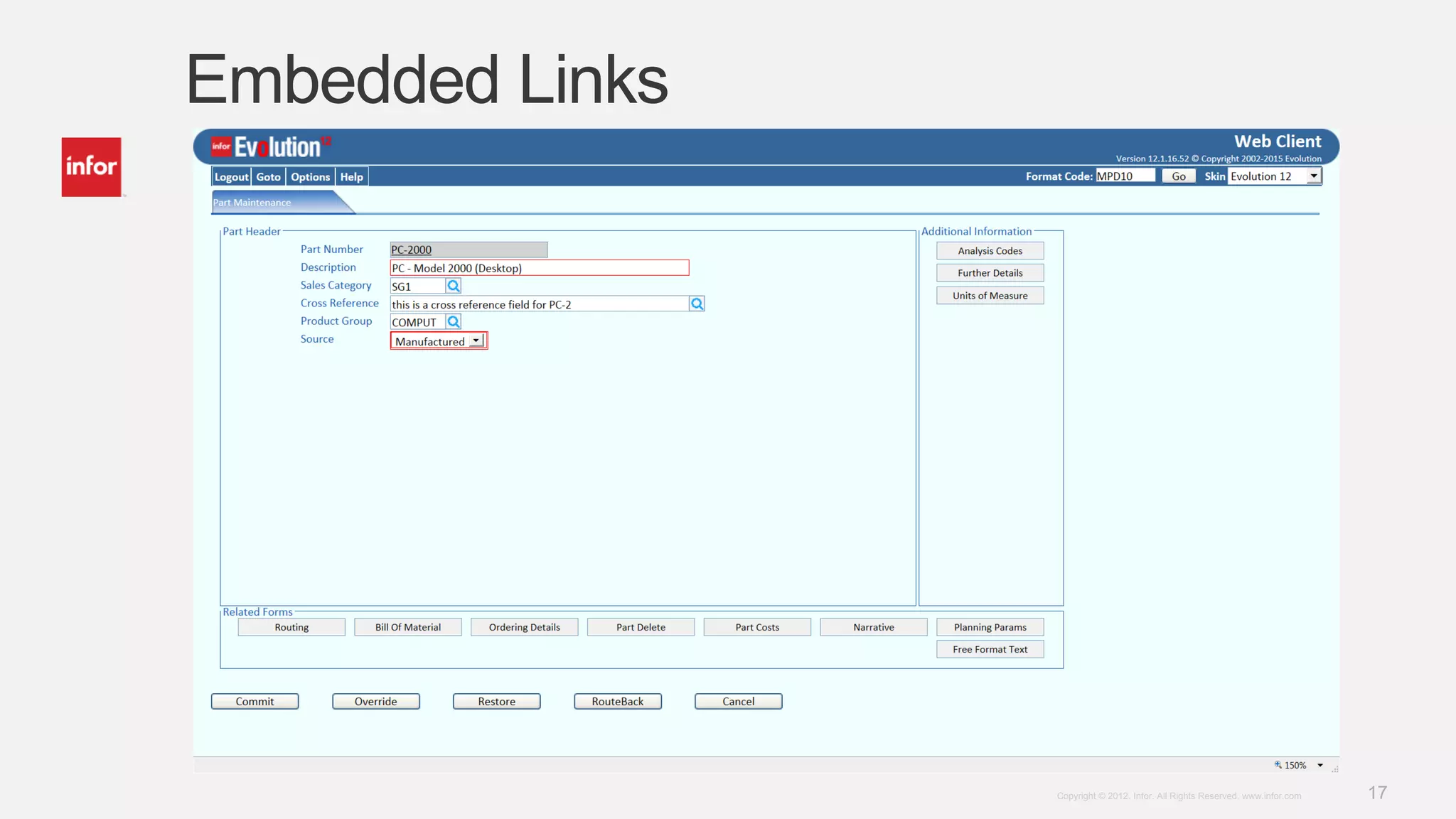
Embedded Links
• On Fields that Contain Codes
• Part & Drawing Number
• Customer & Supplier Code
• Buyer/Planner/Salesman/Employee/Requestor
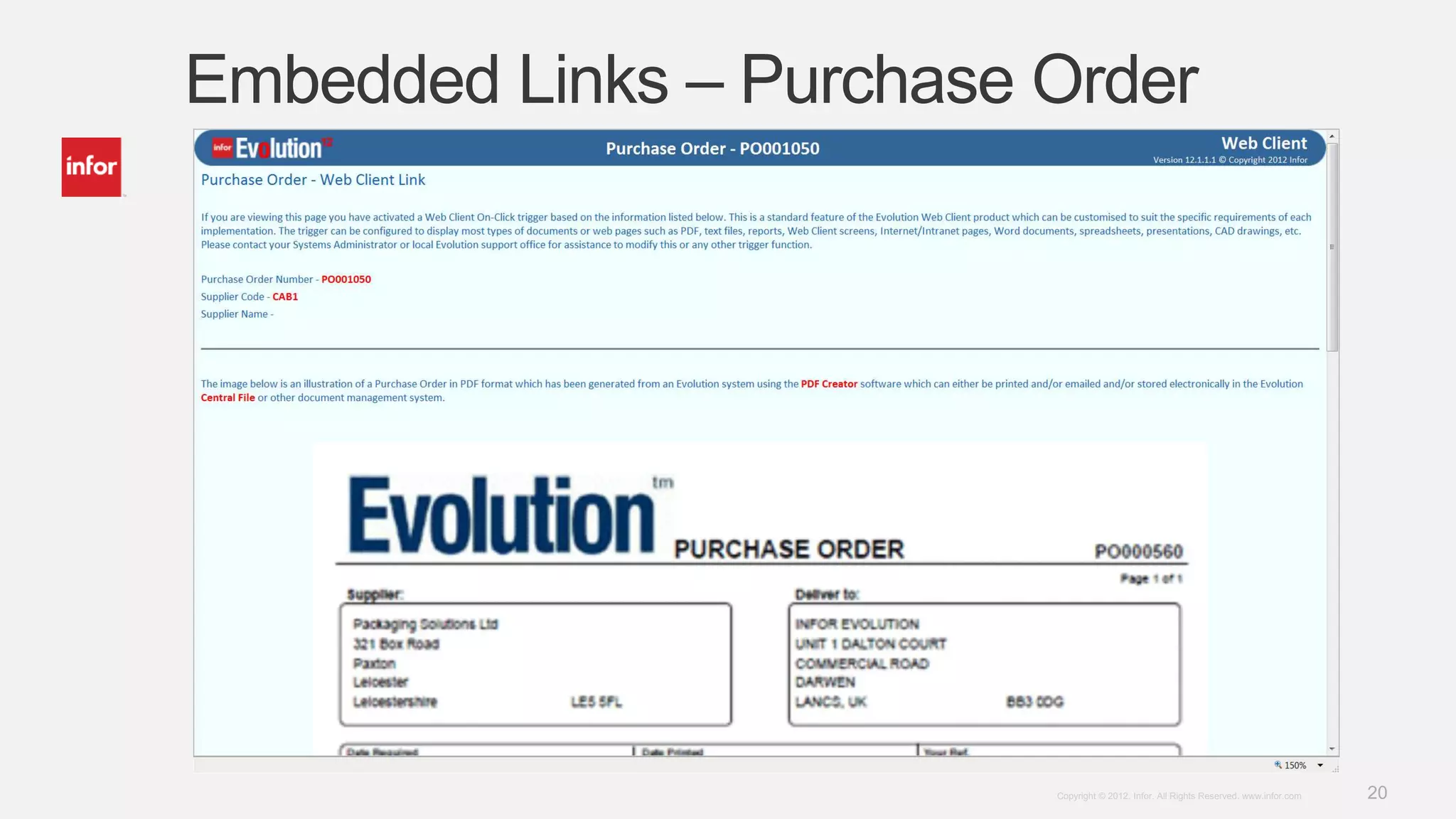
• Invoices, Orders & Credit Notes
• Goods Receiving & Despatch Notes
• Requisitions & Quotations
• Sample ASP Pages (27) which open in a new Window
• Pass the parameters to the ASP Page
• Link to other systems, web pages, documents, etc.
• Uses Triggers – up to 4 per screen – fixed or occurs
17Copyright © 2012. Infor. All Rights Reserved. www.infor.com
Embedded Links
18Copyright © 2012. Infor. All Rights Reserved. www.infor.com
Embedded Links – Part Number
19Copyright © 2012. Infor. All Rights Reserved. www.infor.com
Embedded Links – Customer Code
20Copyright © 2012. Infor. All Rights Reserved. www.infor.com
Embedded Links – Purchase Order
21Copyright © 2012. Infor. All Rights Reserved. www.infor.com
Drop-Down Lists
• 43 Pre-Defined Selection Lists (Text Files)
• Displays Words rather than Codes
• Restricts Entry to Items in the List
• Reduces Errors
22Copyright © 2012. Infor. All Rights Reserved. www.infor.com
Drop-Down Lists (BSC72)
23Copyright © 2012. Infor. All Rights Reserved. www.infor.com
Enhanced Tool-Tips
• Provide Additional Information
• Details of Print Indicators
• Provide Instructions
• Click to Select
• Clarify Details
• Delete Item ‘X’
• Identify a Field/Usage
• Narrative Line Number
24Copyright © 2012. Infor. All Rights Reserved. www.infor.com
Enhanced Tool-Tips
25Copyright © 2012. Infor. All Rights Reserved. www.infor.com
The Numbers
• 800+ Screens Modified
• 500+ Date Fields
• 120+ Post Code Fields
• 30+ Email Address Fields
• 25+ URL Linked Fields
• 3,400+ Delete Events
• 3,300+ On-Click Events
• 4,200+ Embedded Links (27 variants)
• 200+ Drop-Down lists
26Copyright © 2012. Infor. All Rights Reserved. www.infor.com
Standard Triggers
• Standard Trigger Provide to Deliver the Previous List of Features
• Global Field Triggers (Individual Fields and Occurs Fields)
• Other Screen Specific Triggers (Including ‘Field Toggle’)
• Can be used on Customized Screens
• Recommend Copying and Editing Existing Triggers
27Copyright © 2012. Infor. All Rights Reserved. www.infor.com
Generic Narrative
• Can be used in conjunction with the Standard 60 Character Narrative
• Assign Specific Narrative Lines
• Free Format Entry
• Cut and Paste Text
• Tick to Select Print Indicators
• Create ‘blocks’ of Narrative with Specific Print Indicators
• Linked with Standard Narrative
28Copyright © 2012. Infor. All Rights Reserved. www.infor.com
Generic Narrative
29Copyright © 2012. Infor. All Rights Reserved. www.infor.com
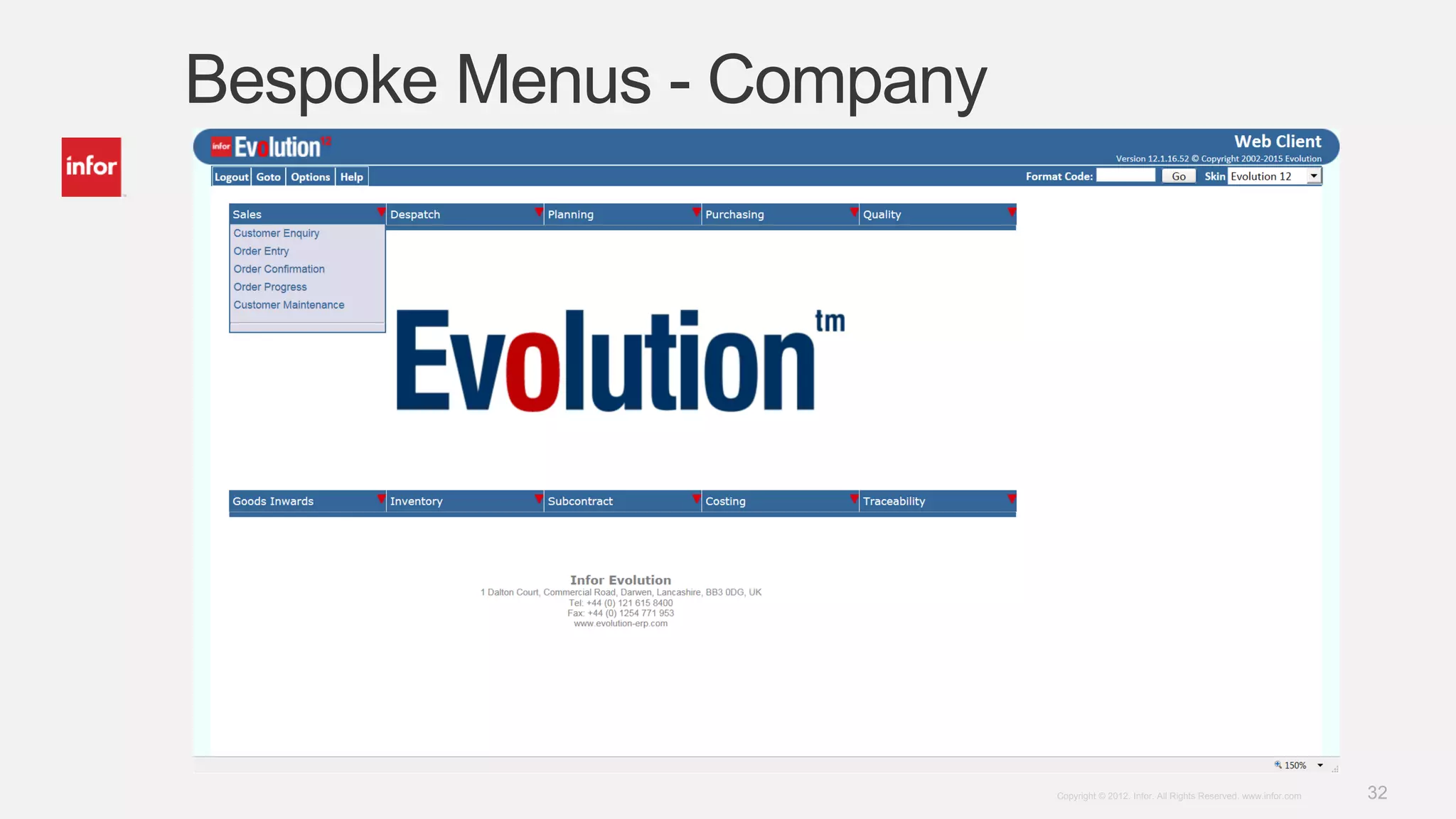
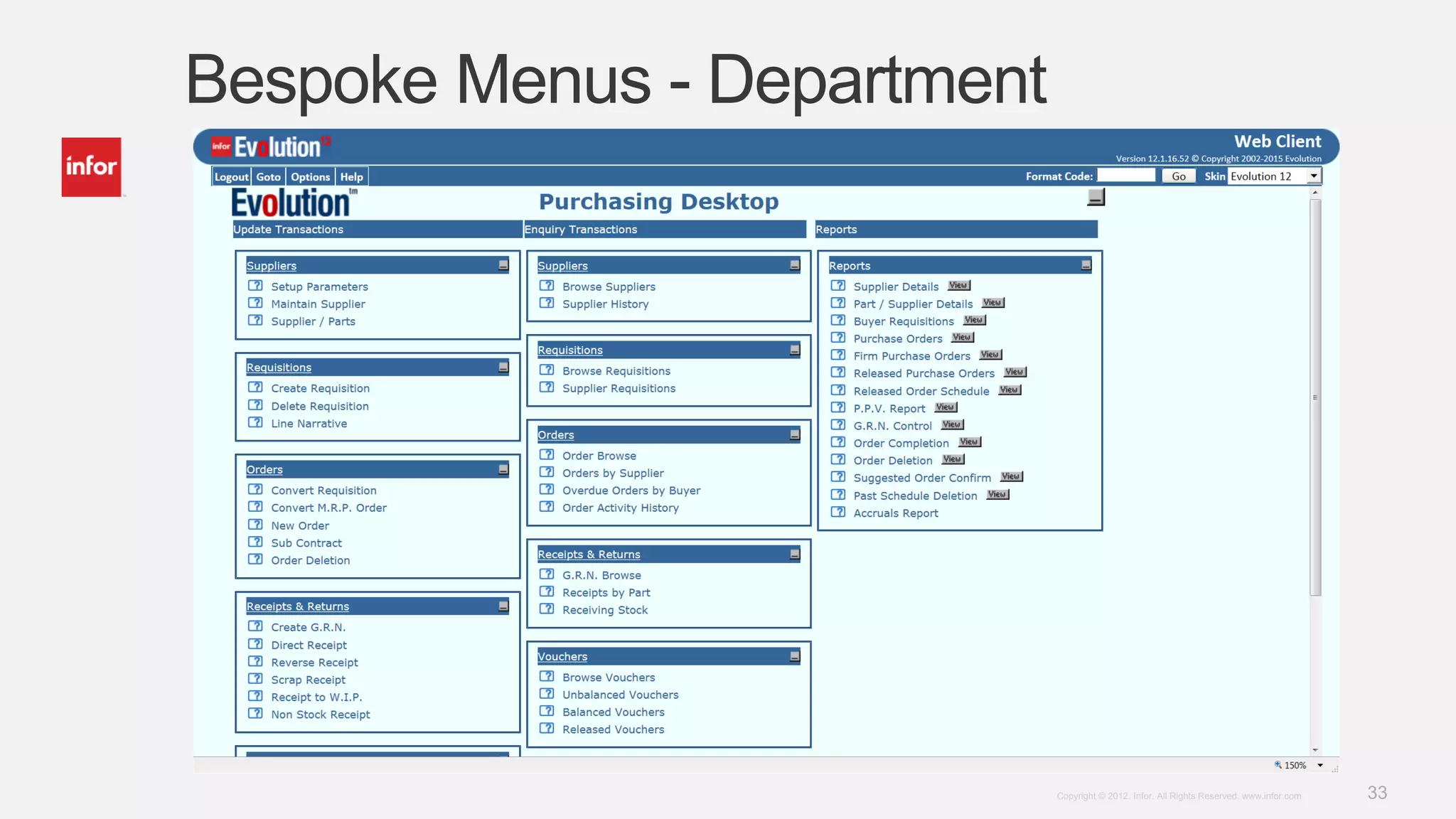
Bespoke Menus
• Hierarchy Approach
• User
• Section
• Company
• Default
• Bespoke ASP Pages
• Include Links to Other Documents/Pages
30Copyright © 2012. Infor. All Rights Reserved. www.infor.com
Bespoke Menus – Main Menu
31Copyright © 2012. Infor. All Rights Reserved. www.infor.com
Bespoke Menus – Module Menu
32Copyright © 2012. Infor. All Rights Reserved. www.infor.com
Bespoke Menus - Company
33Copyright © 2012. Infor. All Rights Reserved. www.infor.com
Bespoke Menus - Department
34Copyright © 2012. Infor. All Rights Reserved. www.infor.com
Desktop Builder – Standard Features
• Snap To Grid
• Enhanced Frame Control
• Expand/Collapse, Embedded Objects
• Enhanced Button Control
• Images
• URL Builder
• Dropdown Lists
• Standard Triggers
35Copyright © 2012. Infor. All Rights Reserved. www.infor.com
Snap To Grid
36Copyright © 2012. Infor. All Rights Reserved. www.infor.com
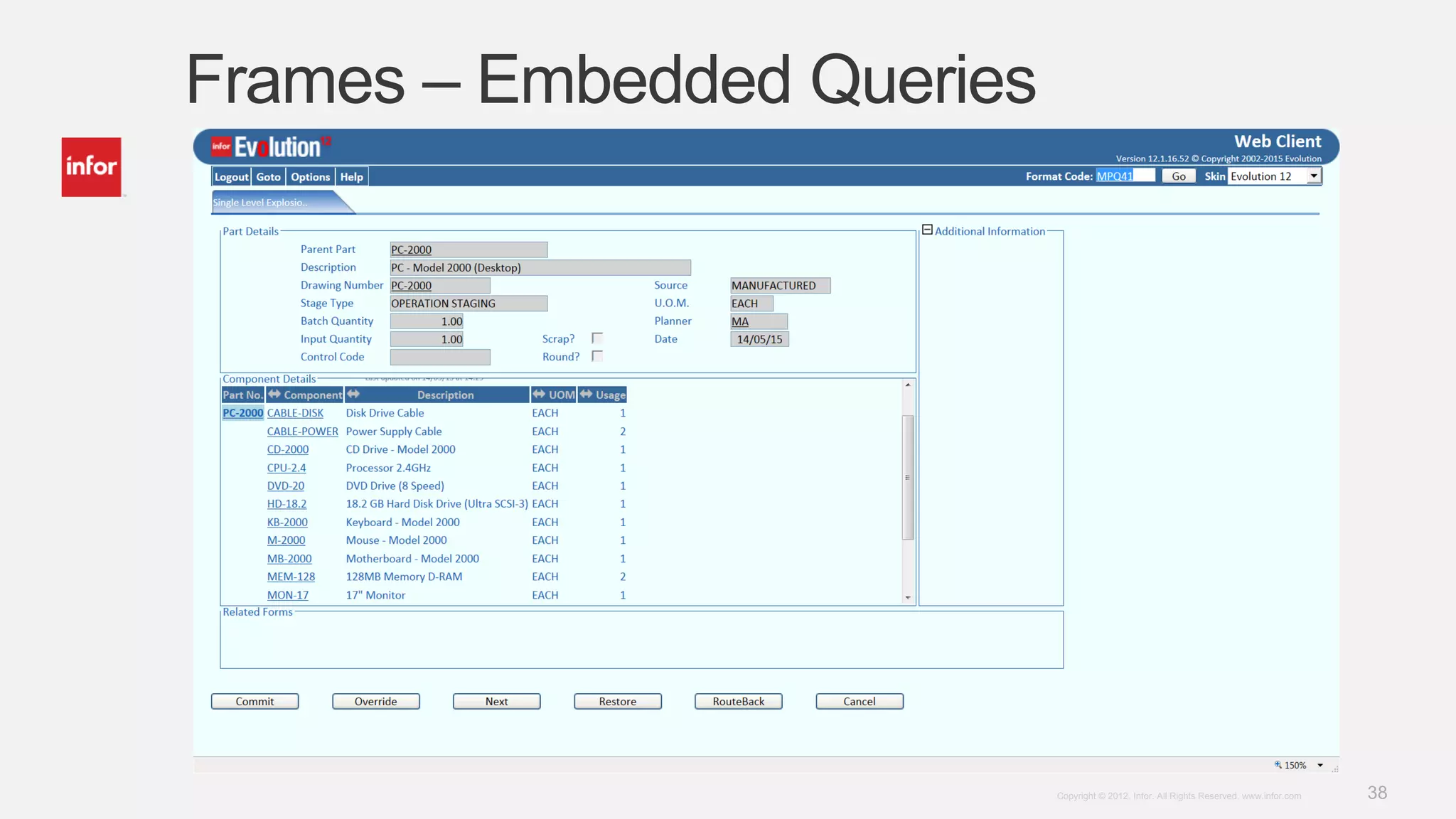
Desktop Builder – Frames
• Expand/Collapse
• On Screen Entry
• On Demand
• Embedded Objects
• Fixed Links or Based on Linkage/Field Content
• Link to Documents, Web Pages, Other Systems
• URL Builder
37Copyright © 2012. Infor. All Rights Reserved. www.infor.com
Frames – Embedded Documents
38Copyright © 2012. Infor. All Rights Reserved. www.infor.com
Frames – Embedded Queries
39Copyright © 2012. Infor. All Rights Reserved. www.infor.com
Frames – Linked Documents
40Copyright © 2012. Infor. All Rights Reserved. www.infor.com
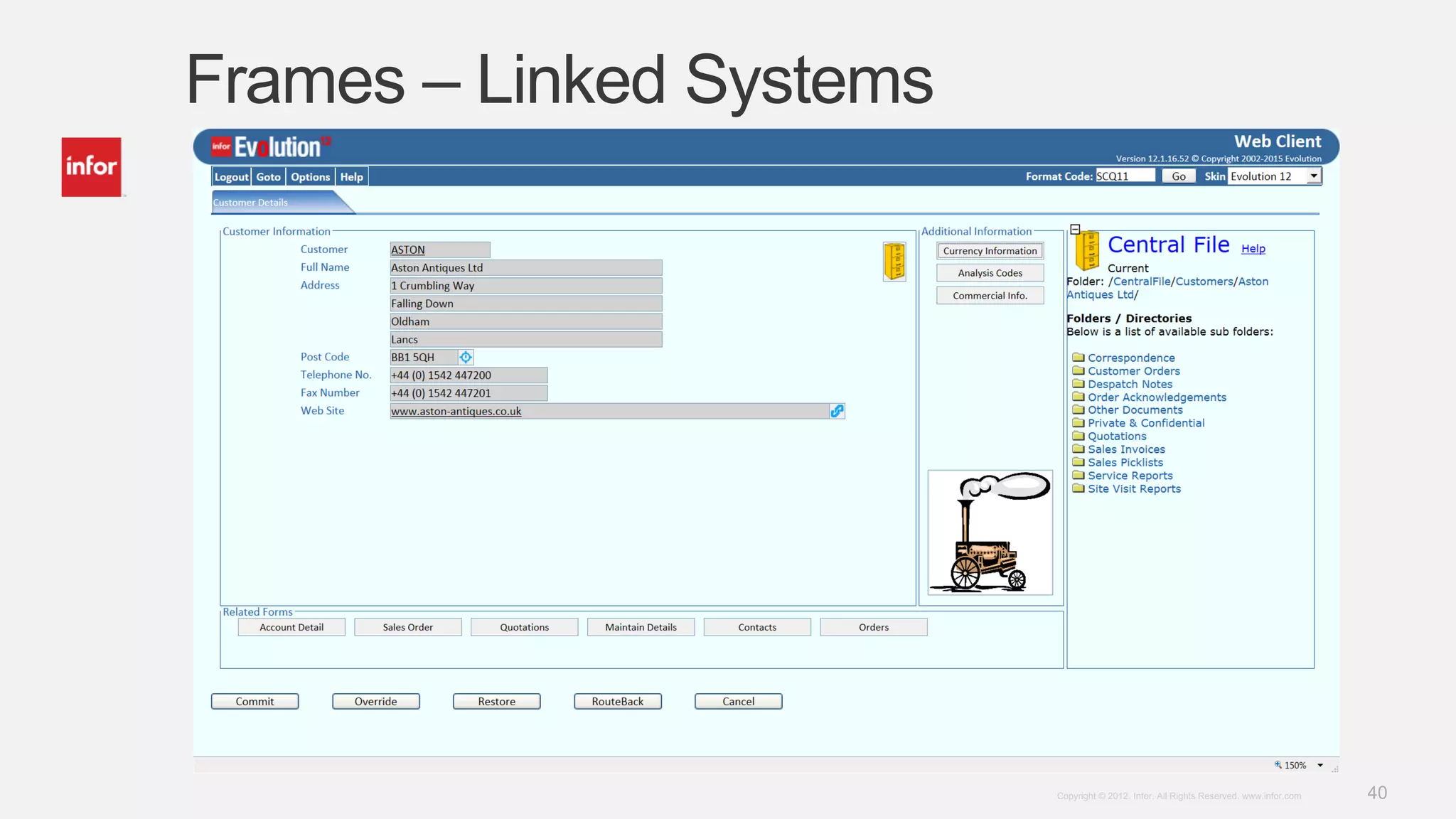
Frames – Linked Systems
41Copyright © 2012. Infor. All Rights Reserved. www.infor.com
Desktop Builder – Buttons
• Image or Text Display
• Options
• Sub-Form
• Evolution Transaction (Inc. Generic Narrative)
• Refresh Frame Content
• Open In New Window
• No action
• Links
• Fixed Links or Based on Linkage/Field Content
• Link to Documents, Web Pages, Other Systems
• URL Builder
42Copyright © 2012. Infor. All Rights Reserved. www.infor.com
Buttons with Images
43Copyright © 2012. Infor. All Rights Reserved. www.infor.com
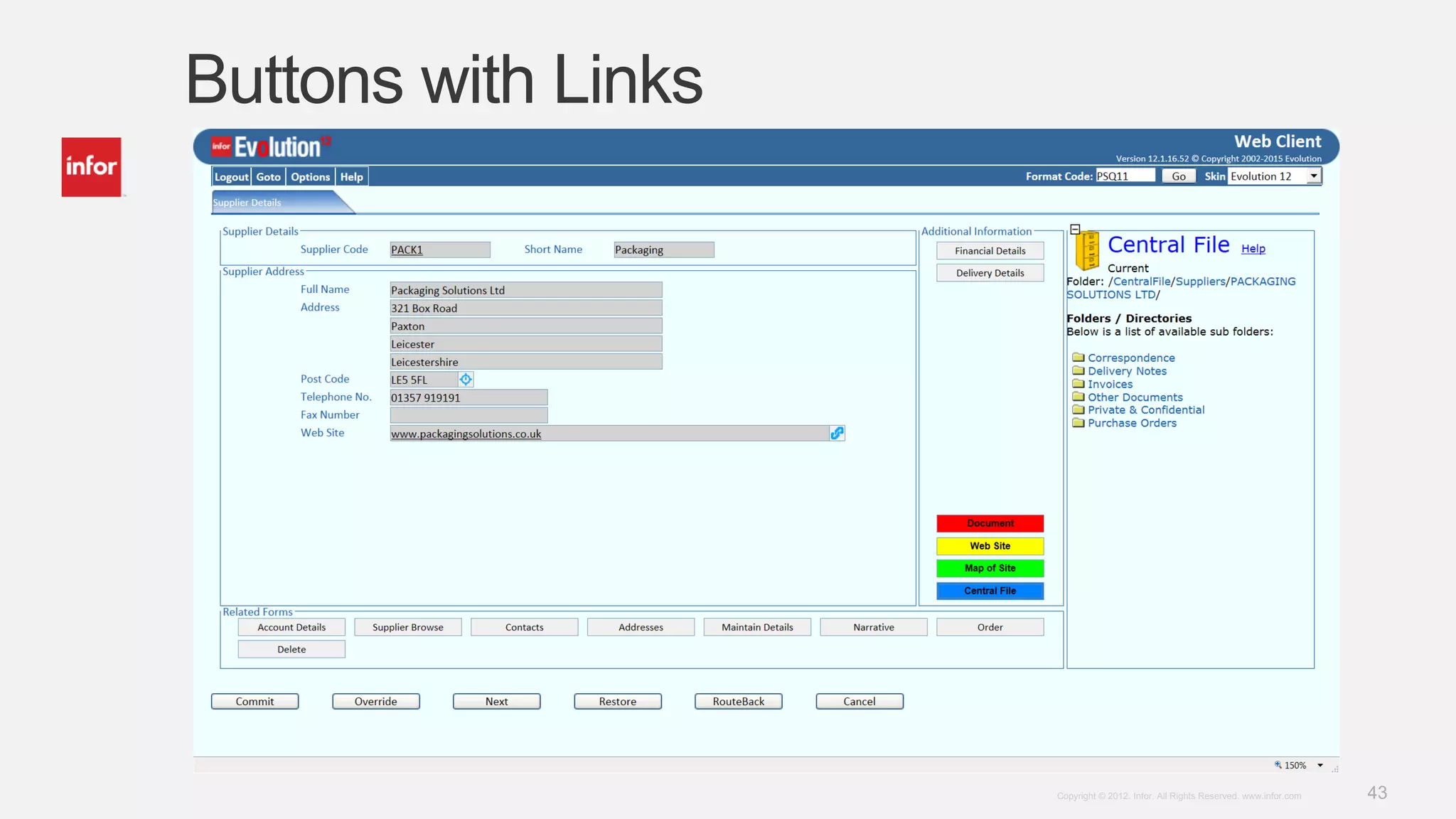
Buttons with Links
44Copyright © 2012. Infor. All Rights Reserved. www.infor.com
Desktop Builder – Dropdown Lists
• Hardcoded List
• List from a Text File
• List from Default Values Table
• Dynamic List from SQL Command
45Copyright © 2012. Infor. All Rights Reserved. www.infor.com
Report Wizard
• 65+ Sample Reports
• 40+ Catalogues, spanning 8 areas of Evolution
• 650+ Dataset Catalogues
• 10 Report Styles/Layouts (Tables, Bar Chart, Filters, Index)
• Sample Schedules
• Generic and User Specific Reports
• Customizable Links on Each Field
• Fixed Links or Based on Field Content
• Link to Documents, Web Pages, Other Systems
• Include Images
• Cascade Reports
• Embed in Web Client or Corporate Portal
46Copyright © 2012. Infor. All Rights Reserved. www.infor.com
Report Wizard
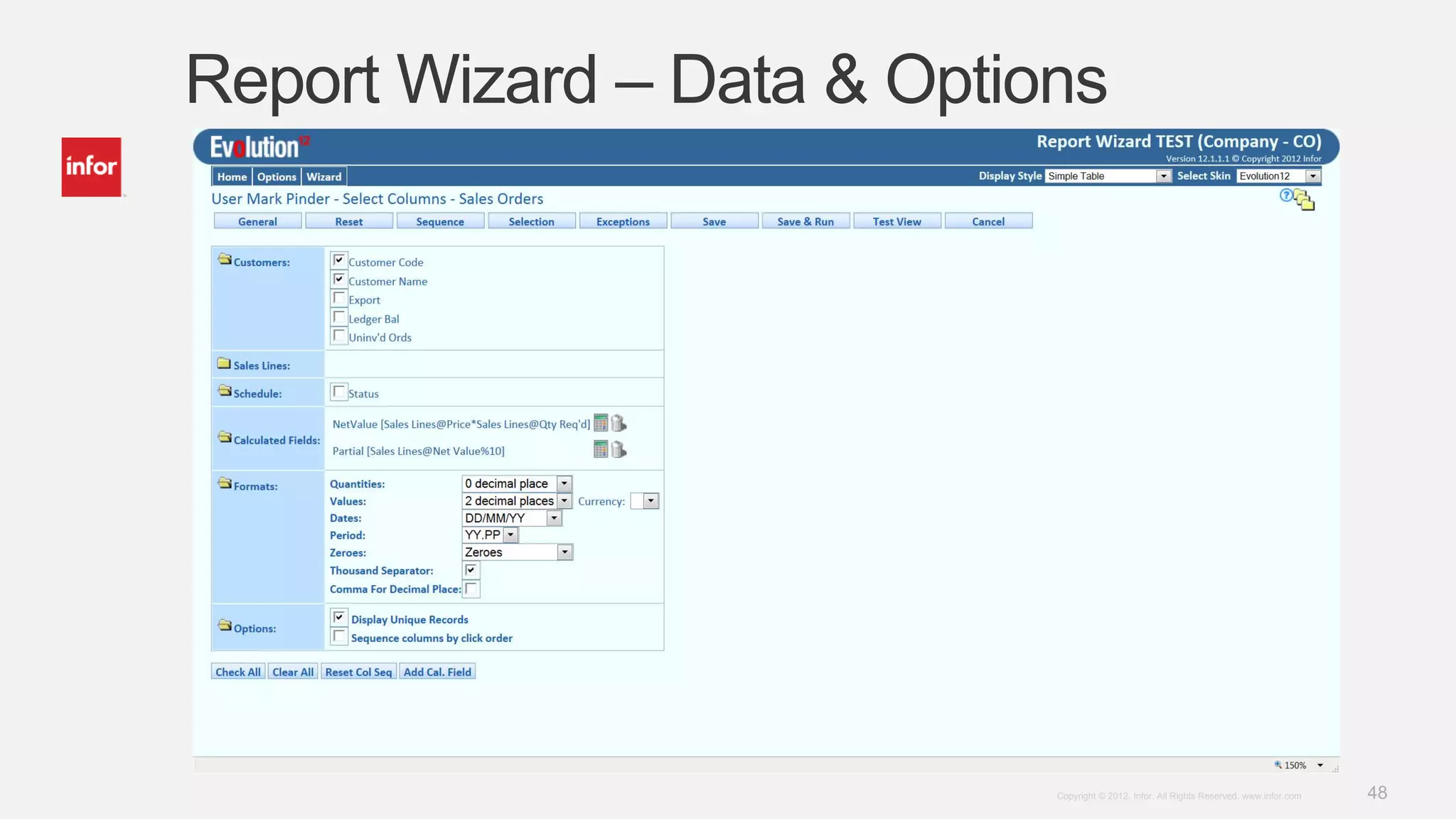
• Choose the Output Fields from the Catalogue
• Create any Calculated Fields and Select Formatting Options
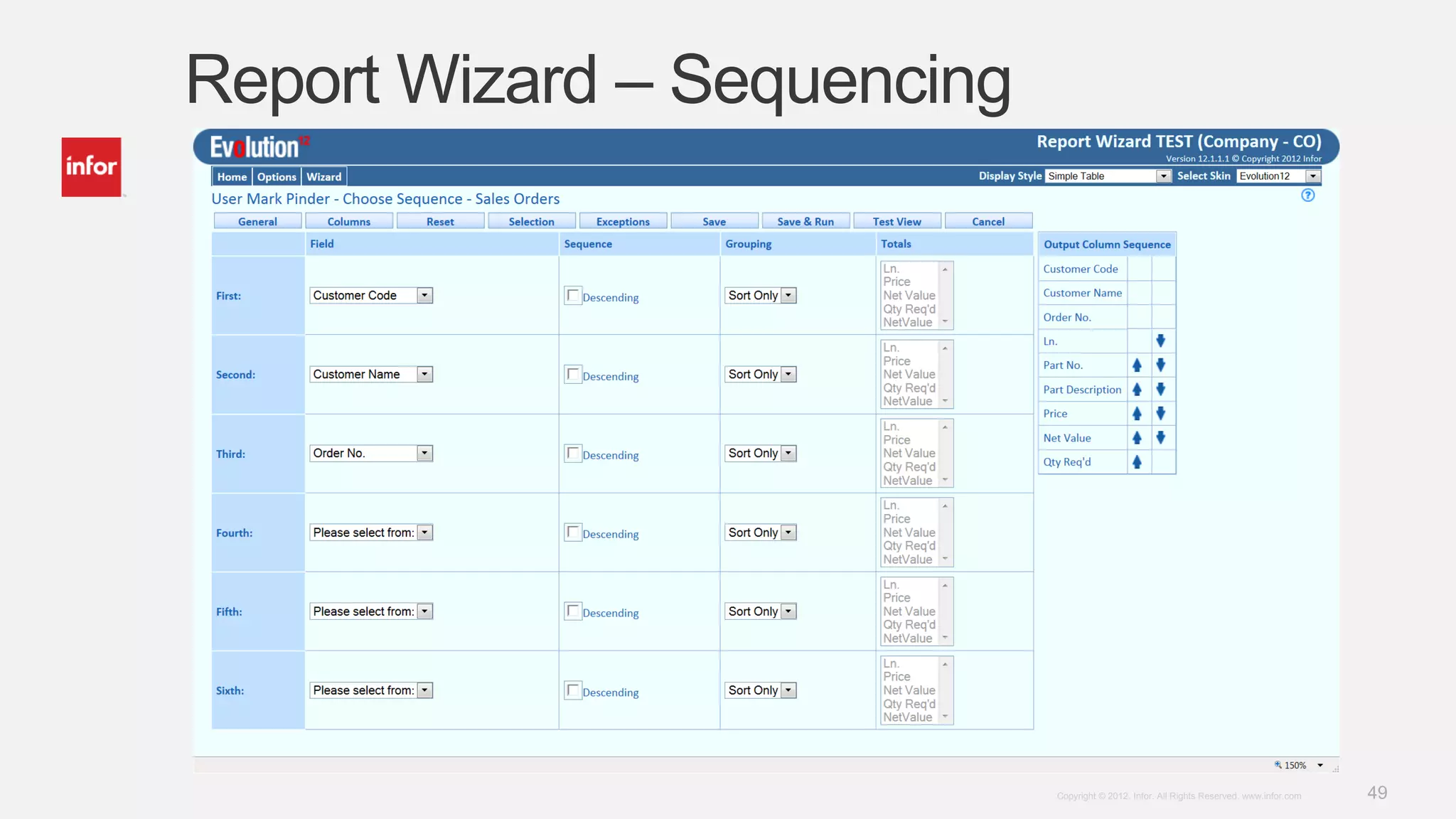
• Decide how to Sequence the Output (Grouping, sorting, etc.)
• Apply Selection Criteria to Filter the Results (Any field)
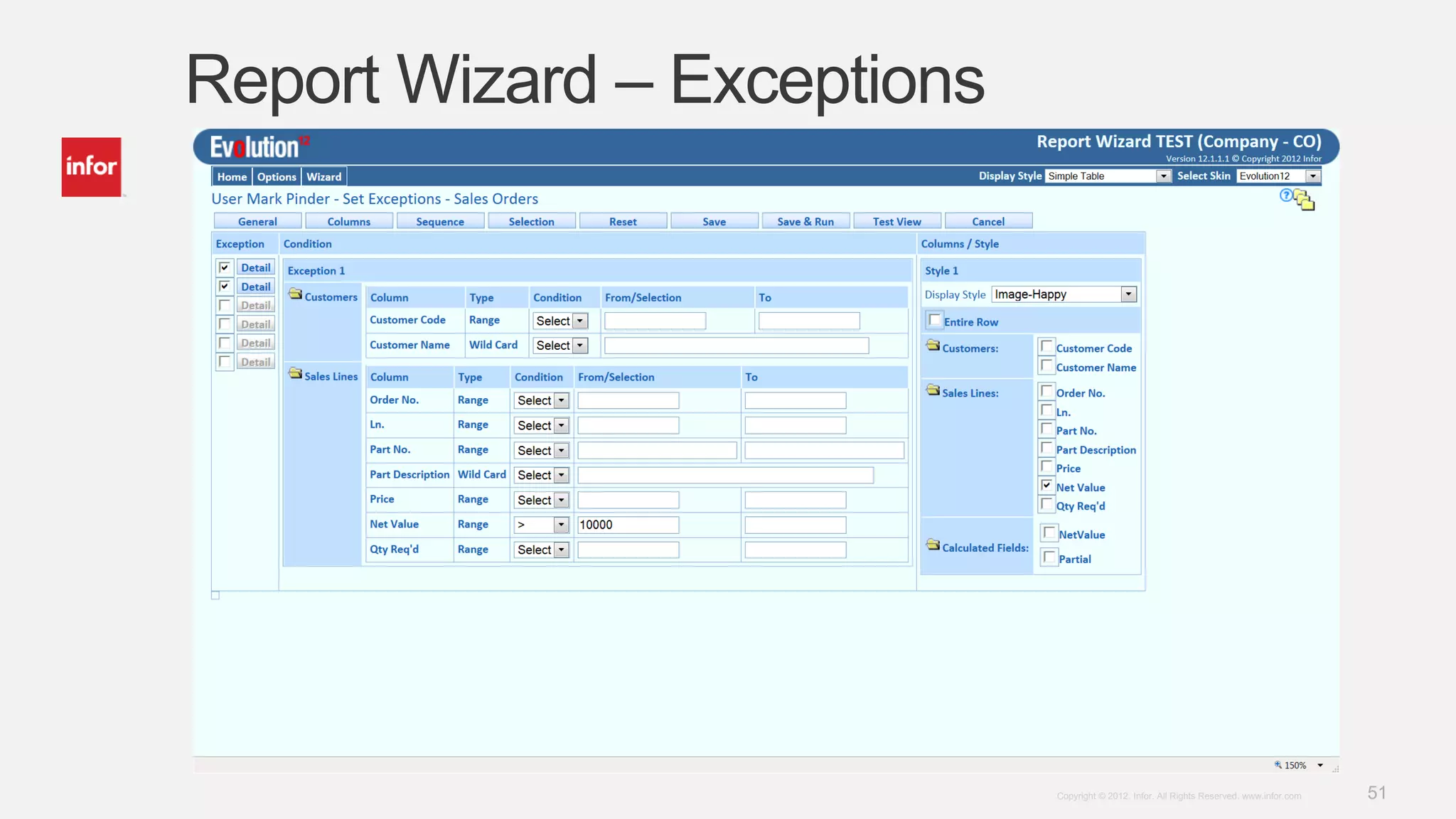
• Include any Exception Conditions (Style sheet classes)
• Select the Output Style
• Email the Output Data as a CSV file
• Publish the Report as an HTML Document
• Extract the Output Data to Excel
• Schedule the Report to Run when Required
47Copyright © 2012. Infor. All Rights Reserved. www.infor.com
Report Wizard
48Copyright © 2012. Infor. All Rights Reserved. www.infor.com
Report Wizard – Data & Options
49Copyright © 2012. Infor. All Rights Reserved. www.infor.com
Report Wizard – Sequencing
50Copyright © 2012. Infor. All Rights Reserved. www.infor.com
Report Wizard – Selection
51Copyright © 2012. Infor. All Rights Reserved. www.infor.com
Report Wizard – Exceptions
52Copyright © 2012. Infor. All Rights Reserved. www.infor.com
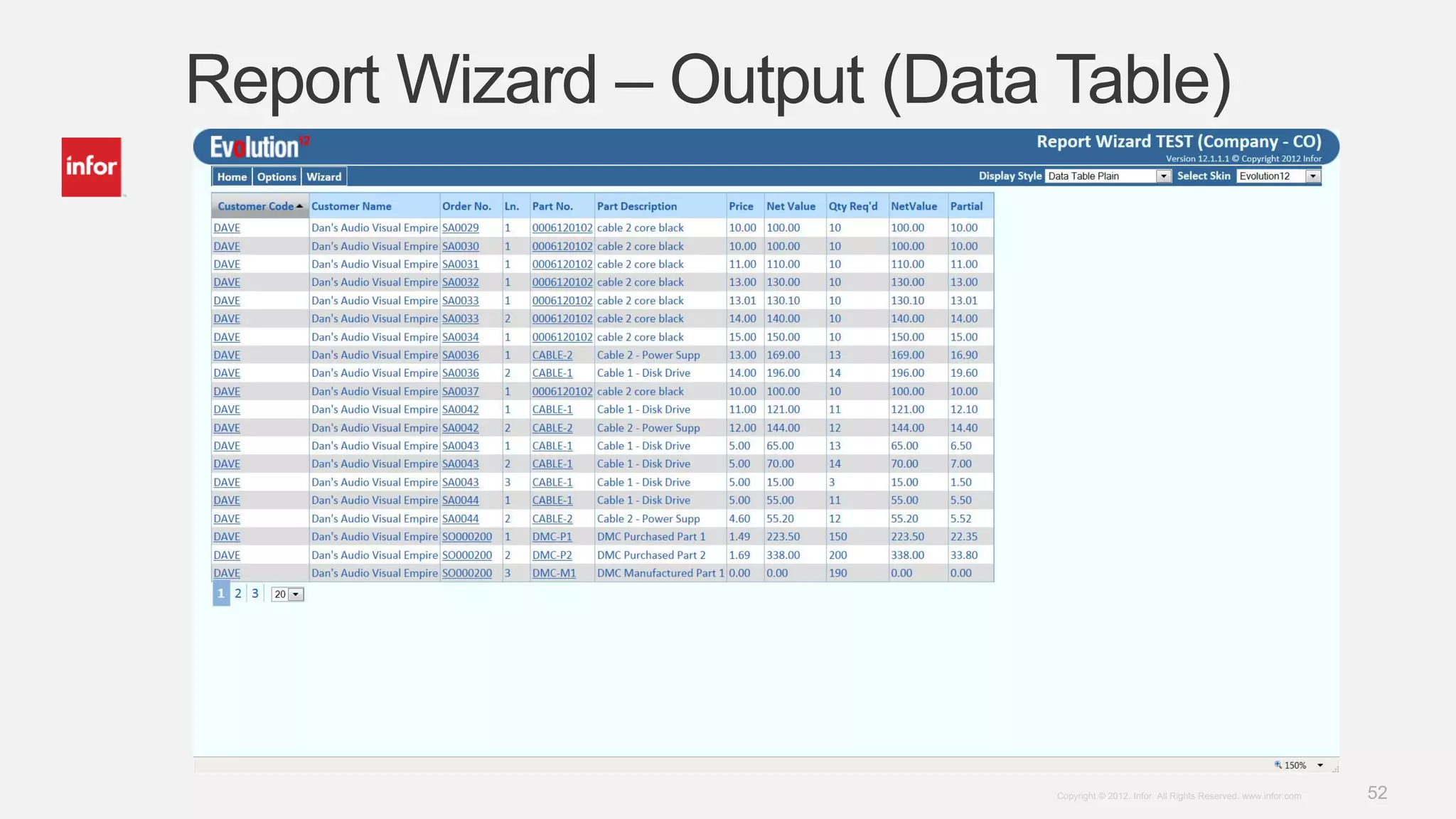
Report Wizard – Output (Data Table)
53Copyright © 2012. Infor. All Rights Reserved. www.infor.com
Report Wizard – Output (Bar Chart)
54Copyright © 2012. Infor. All Rights Reserved. www.infor.com
PDF Creator
• Produce Professional Looking Documentation in PDF Format
• Deliver Output as Email and/or Print and/or Electronics Store
• Delivery Mechanism Based on Setup and Configuration
• Attach Additional Documents to Emails (e.g. Terms & Conditions)
• Include logos, images, barcodes, etc.
• Requires and XML Data Output File and a Forms Layout
• PDF Creator merges the data and the layout then delivers the resulting document
as configured.
• Documents can be accessed through Web Client and Report Wizard
• Requires PDF Creator Engine
55Copyright © 2012. Infor. All Rights Reserved. www.infor.com
PDF Creator
56Copyright © 2012. Infor. All Rights Reserved. www.infor.com
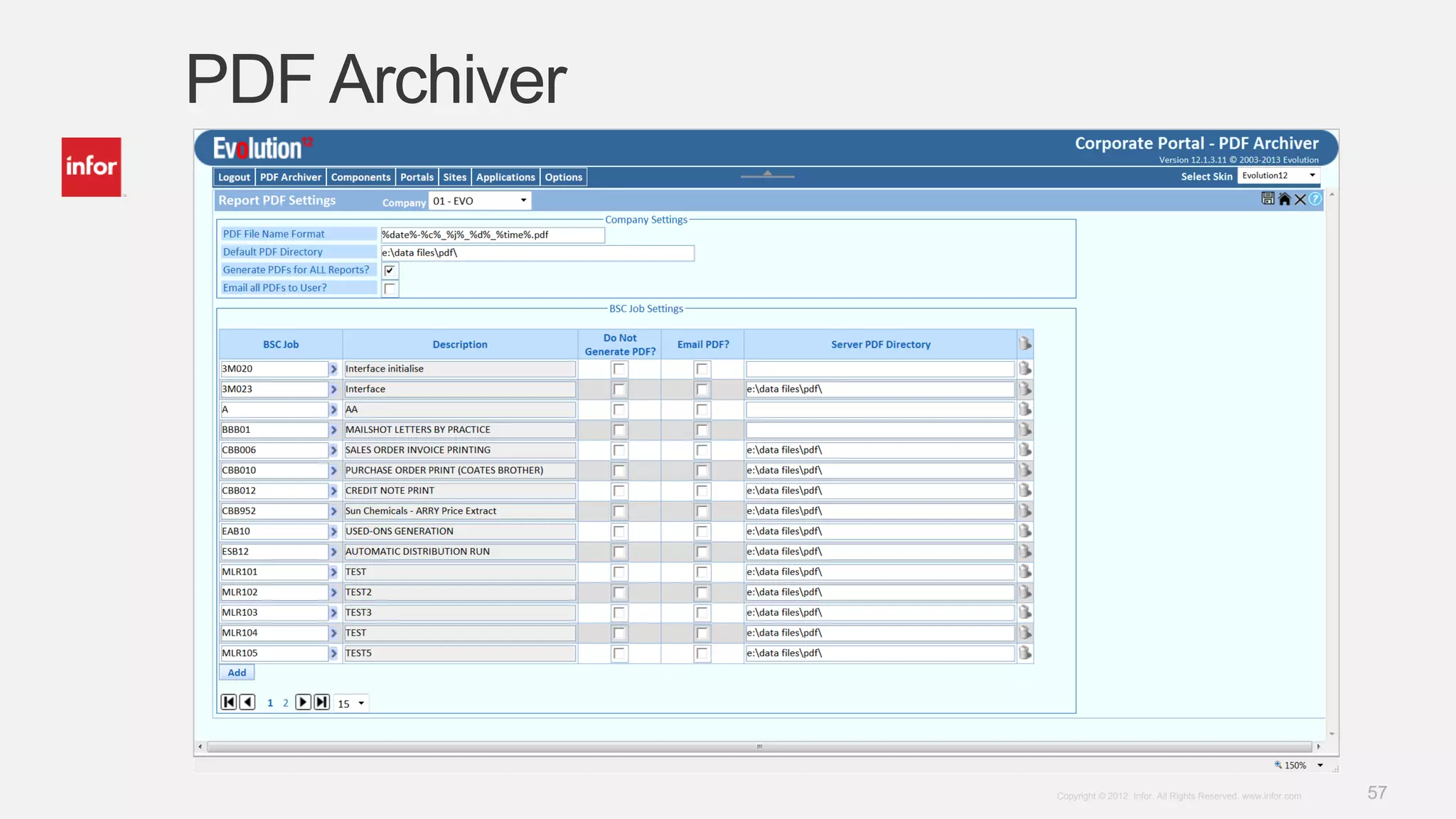
PDF Archiver
• Convert Any Evolution Reporter Output to PDF
• Email to Requestor
• Store in Designated Location
• Configurable File Naming
• Configurable Storage Location
• Auto Landscape/Portrait Function
• Component of the Corporate Portal
• Requires PDF Creator Engine
57Copyright © 2012. Infor. All Rights Reserved. www.infor.com
PDF Archiver
58Copyright © 2012. Infor. All Rights Reserved. www.infor.com
PDF Archiver
59Copyright © 2012. Infor. All Rights Reserved. www.infor.com

201505 Gear - Infor update

  • 1.
    1Copyright © 2012.Infor. All Rights Reserved. www.infor.comCopyright © 2012. Infor. All Rights Reserved. www.infor.com 1 Evolution Mark Pinder Release 12 – Quick Wins
  • 2.
    2Copyright © 2012.Infor. All Rights Reserved. www.infor.com Evolution 12 – Quick Wins • Web Client – Standard Features • Desktop Builder - Customizations • Report Wizard • PDF Documents • Creator • Archiver
  • 3.
    3Copyright © 2012.Infor. All Rights Reserved. www.infor.com Web Client – Standard Features • Larger Screen Layout with Frames and Better Field Alignment • Enhanced Usability • Highlighting of Mandatory Fields, On Focus Indicator • Field Icons • Dates, Email Addresses, URL’s, Post Codes • Enhanced Functionality • Delete Option, On-Click Select • Embedded Links on Fields with Codes • Part Number, Customer/Supplier, Buyer/Planner/Salesman, Invoices/Orders • Drop-down List Selection • Enhance Tool-Tips
  • 4.
    4Copyright © 2012.Infor. All Rights Reserved. www.infor.com Web Client – Standard Features • Standard Triggers • Generic Narrative • Bespoke Menus
  • 5.
    5Copyright © 2012.Infor. All Rights Reserved. www.infor.com Larger Screen Layout with Frames
  • 6.
    6Copyright © 2012.Infor. All Rights Reserved. www.infor.com Mandatory & On Focus Field
  • 7.
    7Copyright © 2012.Infor. All Rights Reserved. www.infor.com Fields Icons • Browses – Wildcard Searches • Dates – Calendar or Date Picker • Post Codes – Link to Google Maps • Email Addresses – Mail To Option • URL Links – Open Link in New Window • Delete – Delete the Selected Item
  • 8.
    8Copyright © 2012.Infor. All Rights Reserved. www.infor.com Fields Icons
  • 9.
    9Copyright © 2012.Infor. All Rights Reserved. www.infor.com Fields Icons - Browse
  • 10.
    10Copyright © 2012.Infor. All Rights Reserved. www.infor.com Fields Icons – Post Code
  • 11.
    11Copyright © 2012.Infor. All Rights Reserved. www.infor.com Delete & On-Click Features • Delete • On Multi-Line Screens (Emulates to *** Feature) • Checks to see if there is anything to delete (pop-up) • Confirmation of delete request with details (pop-up) • On-Click • On Multi-Line Screens • Tool-Tip Indicator • Copies Output Fields to Input Fields
  • 12.
    12Copyright © 2012.Infor. All Rights Reserved. www.infor.com Delete Feature
  • 13.
    13Copyright © 2012.Infor. All Rights Reserved. www.infor.com Delete Feature
  • 14.
    14Copyright © 2012.Infor. All Rights Reserved. www.infor.com On-Click Feature
  • 15.
    15Copyright © 2012.Infor. All Rights Reserved. www.infor.com On-Click Feature
  • 16.
    16Copyright © 2012.Infor. All Rights Reserved. www.infor.com Embedded Links • On Fields that Contain Codes • Part & Drawing Number • Customer & Supplier Code • Buyer/Planner/Salesman/Employee/Requestor • Invoices, Orders & Credit Notes • Goods Receiving & Despatch Notes • Requisitions & Quotations • Sample ASP Pages (27) which open in a new Window • Pass the parameters to the ASP Page • Link to other systems, web pages, documents, etc. • Uses Triggers – up to 4 per screen – fixed or occurs
  • 17.
    17Copyright © 2012.Infor. All Rights Reserved. www.infor.com Embedded Links
  • 18.
    18Copyright © 2012.Infor. All Rights Reserved. www.infor.com Embedded Links – Part Number
  • 19.
    19Copyright © 2012.Infor. All Rights Reserved. www.infor.com Embedded Links – Customer Code
  • 20.
    20Copyright © 2012.Infor. All Rights Reserved. www.infor.com Embedded Links – Purchase Order
  • 21.
    21Copyright © 2012.Infor. All Rights Reserved. www.infor.com Drop-Down Lists • 43 Pre-Defined Selection Lists (Text Files) • Displays Words rather than Codes • Restricts Entry to Items in the List • Reduces Errors
  • 22.
    22Copyright © 2012.Infor. All Rights Reserved. www.infor.com Drop-Down Lists (BSC72)
  • 23.
    23Copyright © 2012.Infor. All Rights Reserved. www.infor.com Enhanced Tool-Tips • Provide Additional Information • Details of Print Indicators • Provide Instructions • Click to Select • Clarify Details • Delete Item ‘X’ • Identify a Field/Usage • Narrative Line Number
  • 24.
    24Copyright © 2012.Infor. All Rights Reserved. www.infor.com Enhanced Tool-Tips
  • 25.
    25Copyright © 2012.Infor. All Rights Reserved. www.infor.com The Numbers • 800+ Screens Modified • 500+ Date Fields • 120+ Post Code Fields • 30+ Email Address Fields • 25+ URL Linked Fields • 3,400+ Delete Events • 3,300+ On-Click Events • 4,200+ Embedded Links (27 variants) • 200+ Drop-Down lists
  • 26.
    26Copyright © 2012.Infor. All Rights Reserved. www.infor.com Standard Triggers • Standard Trigger Provide to Deliver the Previous List of Features • Global Field Triggers (Individual Fields and Occurs Fields) • Other Screen Specific Triggers (Including ‘Field Toggle’) • Can be used on Customized Screens • Recommend Copying and Editing Existing Triggers
  • 27.
    27Copyright © 2012.Infor. All Rights Reserved. www.infor.com Generic Narrative • Can be used in conjunction with the Standard 60 Character Narrative • Assign Specific Narrative Lines • Free Format Entry • Cut and Paste Text • Tick to Select Print Indicators • Create ‘blocks’ of Narrative with Specific Print Indicators • Linked with Standard Narrative
  • 28.
    28Copyright © 2012.Infor. All Rights Reserved. www.infor.com Generic Narrative
  • 29.
    29Copyright © 2012.Infor. All Rights Reserved. www.infor.com Bespoke Menus • Hierarchy Approach • User • Section • Company • Default • Bespoke ASP Pages • Include Links to Other Documents/Pages
  • 30.
    30Copyright © 2012.Infor. All Rights Reserved. www.infor.com Bespoke Menus – Main Menu
  • 31.
    31Copyright © 2012.Infor. All Rights Reserved. www.infor.com Bespoke Menus – Module Menu
  • 32.
    32Copyright © 2012.Infor. All Rights Reserved. www.infor.com Bespoke Menus - Company
  • 33.
    33Copyright © 2012.Infor. All Rights Reserved. www.infor.com Bespoke Menus - Department
  • 34.
    34Copyright © 2012.Infor. All Rights Reserved. www.infor.com Desktop Builder – Standard Features • Snap To Grid • Enhanced Frame Control • Expand/Collapse, Embedded Objects • Enhanced Button Control • Images • URL Builder • Dropdown Lists • Standard Triggers
  • 35.
    35Copyright © 2012.Infor. All Rights Reserved. www.infor.com Snap To Grid
  • 36.
    36Copyright © 2012.Infor. All Rights Reserved. www.infor.com Desktop Builder – Frames • Expand/Collapse • On Screen Entry • On Demand • Embedded Objects • Fixed Links or Based on Linkage/Field Content • Link to Documents, Web Pages, Other Systems • URL Builder
  • 37.
    37Copyright © 2012.Infor. All Rights Reserved. www.infor.com Frames – Embedded Documents
  • 38.
    38Copyright © 2012.Infor. All Rights Reserved. www.infor.com Frames – Embedded Queries
  • 39.
    39Copyright © 2012.Infor. All Rights Reserved. www.infor.com Frames – Linked Documents
  • 40.
    40Copyright © 2012.Infor. All Rights Reserved. www.infor.com Frames – Linked Systems
  • 41.
    41Copyright © 2012.Infor. All Rights Reserved. www.infor.com Desktop Builder – Buttons • Image or Text Display • Options • Sub-Form • Evolution Transaction (Inc. Generic Narrative) • Refresh Frame Content • Open In New Window • No action • Links • Fixed Links or Based on Linkage/Field Content • Link to Documents, Web Pages, Other Systems • URL Builder
  • 42.
    42Copyright © 2012.Infor. All Rights Reserved. www.infor.com Buttons with Images
  • 43.
    43Copyright © 2012.Infor. All Rights Reserved. www.infor.com Buttons with Links
  • 44.
    44Copyright © 2012.Infor. All Rights Reserved. www.infor.com Desktop Builder – Dropdown Lists • Hardcoded List • List from a Text File • List from Default Values Table • Dynamic List from SQL Command
  • 45.
    45Copyright © 2012.Infor. All Rights Reserved. www.infor.com Report Wizard • 65+ Sample Reports • 40+ Catalogues, spanning 8 areas of Evolution • 650+ Dataset Catalogues • 10 Report Styles/Layouts (Tables, Bar Chart, Filters, Index) • Sample Schedules • Generic and User Specific Reports • Customizable Links on Each Field • Fixed Links or Based on Field Content • Link to Documents, Web Pages, Other Systems • Include Images • Cascade Reports • Embed in Web Client or Corporate Portal
  • 46.
    46Copyright © 2012.Infor. All Rights Reserved. www.infor.com Report Wizard • Choose the Output Fields from the Catalogue • Create any Calculated Fields and Select Formatting Options • Decide how to Sequence the Output (Grouping, sorting, etc.) • Apply Selection Criteria to Filter the Results (Any field) • Include any Exception Conditions (Style sheet classes) • Select the Output Style • Email the Output Data as a CSV file • Publish the Report as an HTML Document • Extract the Output Data to Excel • Schedule the Report to Run when Required
  • 47.
    47Copyright © 2012.Infor. All Rights Reserved. www.infor.com Report Wizard
  • 48.
    48Copyright © 2012.Infor. All Rights Reserved. www.infor.com Report Wizard – Data & Options
  • 49.
    49Copyright © 2012.Infor. All Rights Reserved. www.infor.com Report Wizard – Sequencing
  • 50.
    50Copyright © 2012.Infor. All Rights Reserved. www.infor.com Report Wizard – Selection
  • 51.
    51Copyright © 2012.Infor. All Rights Reserved. www.infor.com Report Wizard – Exceptions
  • 52.
    52Copyright © 2012.Infor. All Rights Reserved. www.infor.com Report Wizard – Output (Data Table)
  • 53.
    53Copyright © 2012.Infor. All Rights Reserved. www.infor.com Report Wizard – Output (Bar Chart)
  • 54.
    54Copyright © 2012.Infor. All Rights Reserved. www.infor.com PDF Creator • Produce Professional Looking Documentation in PDF Format • Deliver Output as Email and/or Print and/or Electronics Store • Delivery Mechanism Based on Setup and Configuration • Attach Additional Documents to Emails (e.g. Terms & Conditions) • Include logos, images, barcodes, etc. • Requires and XML Data Output File and a Forms Layout • PDF Creator merges the data and the layout then delivers the resulting document as configured. • Documents can be accessed through Web Client and Report Wizard • Requires PDF Creator Engine
  • 55.
    55Copyright © 2012.Infor. All Rights Reserved. www.infor.com PDF Creator
  • 56.
    56Copyright © 2012.Infor. All Rights Reserved. www.infor.com PDF Archiver • Convert Any Evolution Reporter Output to PDF • Email to Requestor • Store in Designated Location • Configurable File Naming • Configurable Storage Location • Auto Landscape/Portrait Function • Component of the Corporate Portal • Requires PDF Creator Engine
  • 57.
    57Copyright © 2012.Infor. All Rights Reserved. www.infor.com PDF Archiver
  • 58.
    58Copyright © 2012.Infor. All Rights Reserved. www.infor.com PDF Archiver
  • 59.
    59Copyright © 2012.Infor. All Rights Reserved. www.infor.com