
What’s New With Reporting
and Infor M3 / Infor Lawson
Gui Windels – BI Architect – Infor
guillaume.windels@infor.com


                                     Copyright © 2012. Infor. All Rights Reserved. www.infor.com   1
Targeted Audience
• Customers who implemented LBI or with a sound knowledge of BI
  combined with Infor M3 or Infor Lawson (ex-S3)
• Customers looking to streamline reports through the suite of reporting tools
• Customers building a reporting strategy in line with a recent or upcoming
  Infor M3, Infor Lawson implementation


                                                             Copyright © 2012. Infor. All Rights Reserved. www.infor.com   2
Trends Across Lawson Reporting
• Externalize reporting tasks such as presentation and rendering outside of
  the core ERP system
• Bring BI into the Infor M3, Infor Lawson workspace
• Improve user experience and overall flexibility
• Deliver results faster


                                                            Copyright © 2012. Infor. All Rights Reserved. www.infor.com   3
What Is New With Version 10


                              Copyright © 2012. Infor. All Rights Reserved. www.infor.com   4
What’s New
• Auditing capabilities with Reporting Services and Smart Notifications
  • Find out who runs what
  • Audit the performance of your reports
• Browser support
  • LBI now supported on Firefox, on top of IE9
• ViewPoint – the new OLAP cube viewer
  • Brings BI into Smart Office, coexists with a web version (dashboard-ready)
  • Better User Experience where data consumers can build their own views
  • Beautiful interactive views on top of existing content


                                                                   Copyright © 2012. Infor. All Rights Reserved. www.infor.com   5
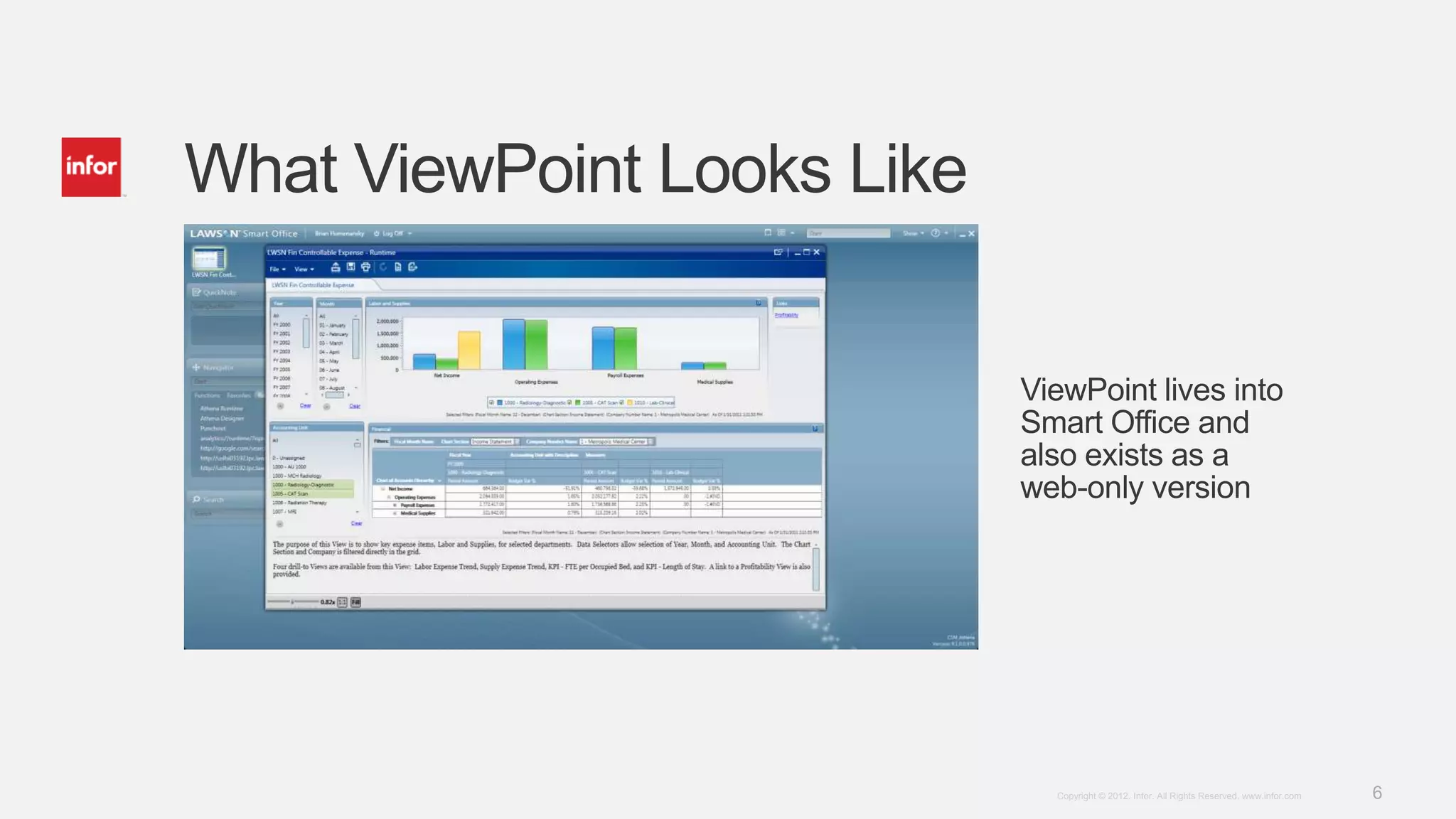
What ViewPoint Looks Like


                            ViewPoint lives into
                            Smart Office and
                            also exists as a
                            web-only version


                              Copyright © 2012. Infor. All Rights Reserved. www.infor.com   6
Still Supplementing BI
• Business Performance Warehouse (BPW) to build a state-of-the-art data
  warehouse
  •   Liberate your Infor Lawson and Infor M3 data
  •   Aggregate Lawson/Infor and other data sources
  •   Separate your production environment from reporting
  •   Interoperable with 3rd-party tools
• Reporting Services
  • Deploy Crystal Reports seamlessly and securely to business users
• Smart Notifications
  • Proactively monitor Infor Lawson and Infor M3 for exceptions
• Framework Services
  • Build dashboards and spaces for each business area
                                                                   Copyright © 2012. Infor. All Rights Reserved. www.infor.com   7
Still Supplementing BI
• Analytics
  • BI accelerator that builds a datawarehouse, and user views on top of Infor M3 data
  • Rapid Time to Value
• Infor M3 Analytics
  • Pre-defined views for Finance, Sales, Warehouse, Procurement
  • Specific packages for the Equipment and Fashion industries
• Infor Lawson (ex-S3) Analytics
  • Financial, Labor, Supply Chain analytics for Healthcare


                                                                   Copyright © 2012. Infor. All Rights Reserved. www.infor.com   8
Smart Reports (LSR)
Streamline Backoffice Reports
(Infor M3 Only, BE > 13.1, LBI > 9.0.4)


                                          Copyright © 2012. Infor. All Rights Reserved. www.infor.com   9
What Is Smart Reports
• Externalize M3 backoffice reports to LBI
  • Improves usability and flexibility (export)
• Modify existing backoffice reports without code
  • Point and click in Smart Office, or via a web interface
  • Relies on M3 APIs
• 600+ reports currently supported through Smart Reports
  • Edit and customize templates via Crystal Reports


                                                              Copyright © 2012. Infor. All Rights Reserved. www.infor.com   10
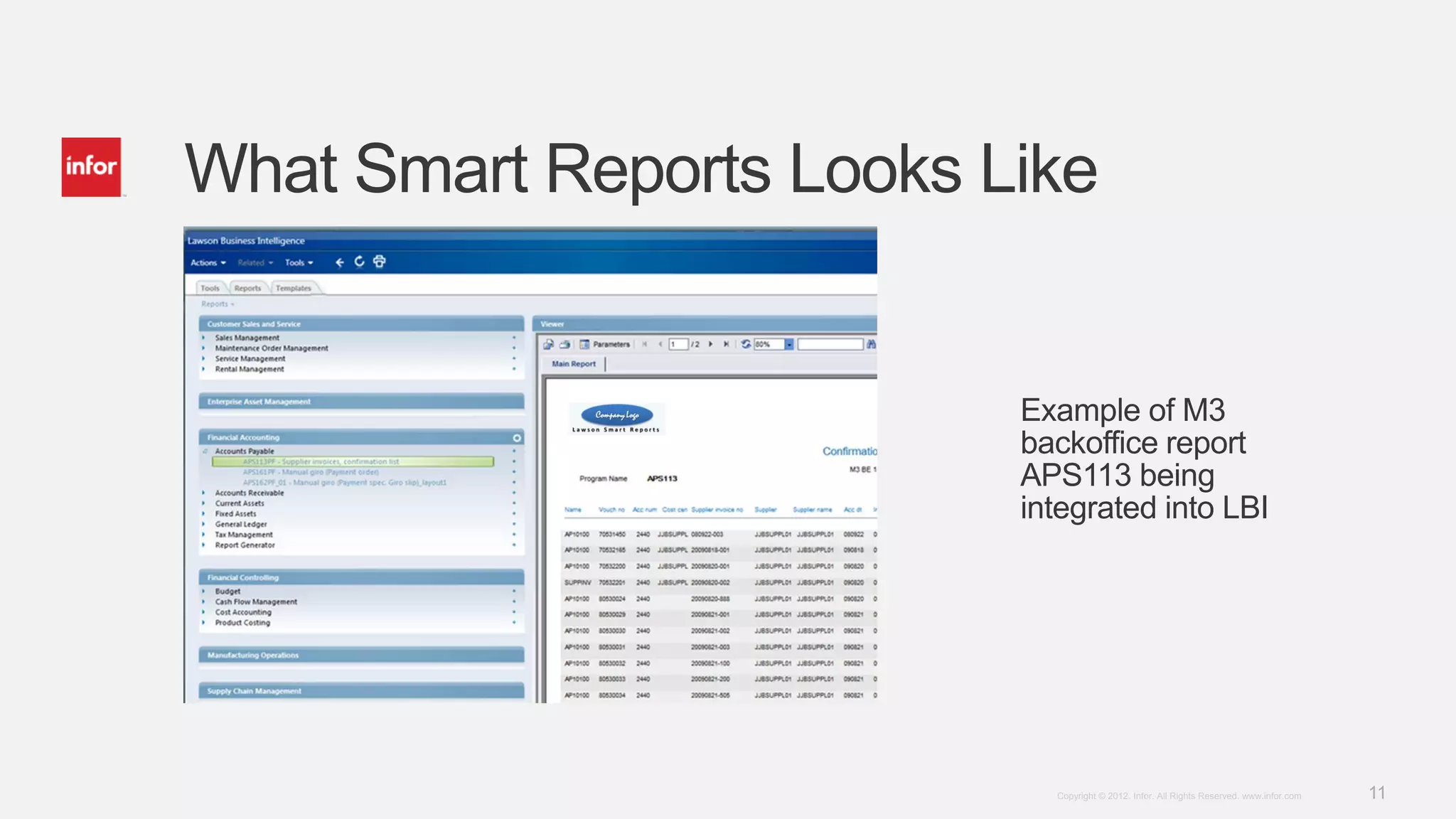
What Smart Reports Looks Like


                          Example of M3
                          backoffice report
                          APS113 being
                          integrated into LBI


                            Copyright © 2012. Infor. All Rights Reserved. www.infor.com   11
Ad Hoc Reporting
Create Operational Reports from the M3 database
(Infor M3 Only, BE > 14.1)


                                                  Copyright © 2012. Infor. All Rights Reserved. www.infor.com   12
What Is Ad Hoc Reporting
• Command the creation of a structured file (XML) from M3 BE
  • XML file can then be processed universally by LBI or 3rd-party applications
• Design reports within Smart Offices with a WYSIWYG tool
  • Join M3 tables according to your requirements
  • No coding required, no application customization
• Data extract can be scheduled through M3’s job scheduler


                                                                     Copyright © 2012. Infor. All Rights Reserved. www.infor.com   13
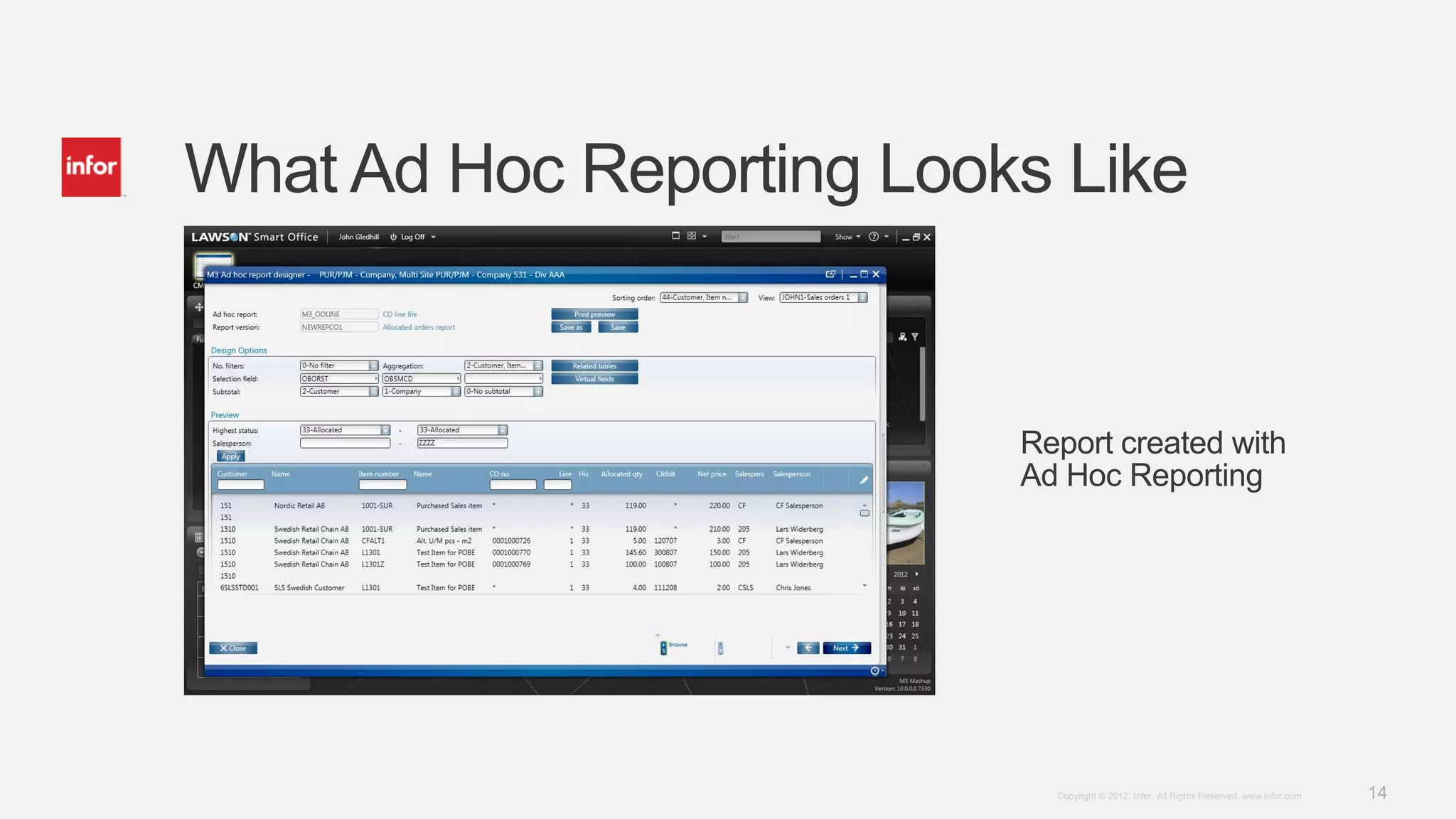
What Ad Hoc Reporting Looks Like


                          Report created with
                          Ad Hoc Reporting


                            Copyright © 2012. Infor. All Rights Reserved. www.infor.com   14
Copyright © 2012. Infor. All Rights Reserved. www.infor.com   15

What’s New With Lawson Reporting?

  • 1.
    What’s New WithReporting and Infor M3 / Infor Lawson Gui Windels – BI Architect – Infor guillaume.windels@infor.com Copyright © 2012. Infor. All Rights Reserved. www.infor.com 1
  • 2.
    Targeted Audience • Customerswho implemented LBI or with a sound knowledge of BI combined with Infor M3 or Infor Lawson (ex-S3) • Customers looking to streamline reports through the suite of reporting tools • Customers building a reporting strategy in line with a recent or upcoming Infor M3, Infor Lawson implementation Copyright © 2012. Infor. All Rights Reserved. www.infor.com 2
  • 3.
    Trends Across LawsonReporting • Externalize reporting tasks such as presentation and rendering outside of the core ERP system • Bring BI into the Infor M3, Infor Lawson workspace • Improve user experience and overall flexibility • Deliver results faster Copyright © 2012. Infor. All Rights Reserved. www.infor.com 3
  • 4.
    What Is NewWith Version 10 Copyright © 2012. Infor. All Rights Reserved. www.infor.com 4
  • 5.
    What’s New • Auditingcapabilities with Reporting Services and Smart Notifications • Find out who runs what • Audit the performance of your reports • Browser support • LBI now supported on Firefox, on top of IE9 • ViewPoint – the new OLAP cube viewer • Brings BI into Smart Office, coexists with a web version (dashboard-ready) • Better User Experience where data consumers can build their own views • Beautiful interactive views on top of existing content Copyright © 2012. Infor. All Rights Reserved. www.infor.com 5
  • 6.
    What ViewPoint LooksLike ViewPoint lives into Smart Office and also exists as a web-only version Copyright © 2012. Infor. All Rights Reserved. www.infor.com 6
  • 7.
    Still Supplementing BI •Business Performance Warehouse (BPW) to build a state-of-the-art data warehouse • Liberate your Infor Lawson and Infor M3 data • Aggregate Lawson/Infor and other data sources • Separate your production environment from reporting • Interoperable with 3rd-party tools • Reporting Services • Deploy Crystal Reports seamlessly and securely to business users • Smart Notifications • Proactively monitor Infor Lawson and Infor M3 for exceptions • Framework Services • Build dashboards and spaces for each business area Copyright © 2012. Infor. All Rights Reserved. www.infor.com 7
  • 8.
    Still Supplementing BI •Analytics • BI accelerator that builds a datawarehouse, and user views on top of Infor M3 data • Rapid Time to Value • Infor M3 Analytics • Pre-defined views for Finance, Sales, Warehouse, Procurement • Specific packages for the Equipment and Fashion industries • Infor Lawson (ex-S3) Analytics • Financial, Labor, Supply Chain analytics for Healthcare Copyright © 2012. Infor. All Rights Reserved. www.infor.com 8
  • 9.
    Smart Reports (LSR) StreamlineBackoffice Reports (Infor M3 Only, BE > 13.1, LBI > 9.0.4) Copyright © 2012. Infor. All Rights Reserved. www.infor.com 9
  • 10.
    What Is SmartReports • Externalize M3 backoffice reports to LBI • Improves usability and flexibility (export) • Modify existing backoffice reports without code • Point and click in Smart Office, or via a web interface • Relies on M3 APIs • 600+ reports currently supported through Smart Reports • Edit and customize templates via Crystal Reports Copyright © 2012. Infor. All Rights Reserved. www.infor.com 10
  • 11.
    What Smart ReportsLooks Like Example of M3 backoffice report APS113 being integrated into LBI Copyright © 2012. Infor. All Rights Reserved. www.infor.com 11
  • 12.
    Ad Hoc Reporting CreateOperational Reports from the M3 database (Infor M3 Only, BE > 14.1) Copyright © 2012. Infor. All Rights Reserved. www.infor.com 12
  • 13.
    What Is AdHoc Reporting • Command the creation of a structured file (XML) from M3 BE • XML file can then be processed universally by LBI or 3rd-party applications • Design reports within Smart Offices with a WYSIWYG tool • Join M3 tables according to your requirements • No coding required, no application customization • Data extract can be scheduled through M3’s job scheduler Copyright © 2012. Infor. All Rights Reserved. www.infor.com 13
  • 14.
    What Ad HocReporting Looks Like Report created with Ad Hoc Reporting Copyright © 2012. Infor. All Rights Reserved. www.infor.com 14
  • 15.
    Copyright © 2012.Infor. All Rights Reserved. www.infor.com 15