The 2010 Tool Forum
               Denver
       American Translators Association
                 Index to Participating Tool Vendors
                    (and selected product names)
          [in alphabetical order by vendor company name]

page

3      Across (Personal, Language Server)

5      Atril [exhibited by PowerLing] (Déjà Vu)

7      Kilgray (MemoQ)

9      Lionbridge (Translation Workspace)

11     Multiling (Fortis, Semantis)

13     SDL (Trados Studio and Multiterm)

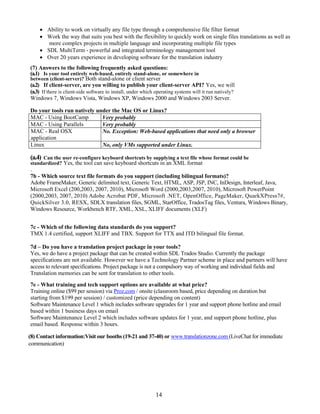
15     STAR (Transit, TermStar, WebTerm, James, MindReader and
       GRIPS)

17     Terminotix (LogiTermWeb, LogiTermPro, AlignFactory,
       TranSearch and SynchroTermPro)

19     Western (Fluency)

21     Wordfast (Classic, Pro, Anywhere)


                              1
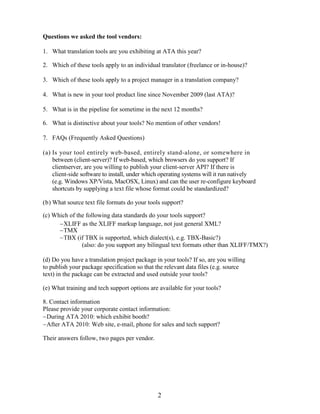
Questions we asked the tool vendors:

1. What translation tools are you exhibiting at ATA this year?

2. Which of these tools apply to an individual translator (freelance or in-house)?

3. Which of these tools apply to a project manager in a translation company?

4. What is new in your tool product line since November 2009 (last ATA)?

5. What is in the pipeline for sometime in the next 12 months?

6. What is distinctive about your tools? No mention of other vendors!

7. FAQs (Frequently Asked Questions)

(a) Is your tool entirely web-based, entirely stand-alone, or somewhere in
    between (client-server)? If web-based, which browsers do you support? If
    clientserver, are you willing to publish your client-server API? If there is
    client-side software to install, under which operating systems will it run natively
    (e.g. Windows XP/Vista, MacOSX, Linux) and can the user re-configure keyboard
    shortcuts by supplying a text file whose format could be standardized?

(b) What source text file formats do your tools support?

(c) Which of the following data standards do your tools support?
      XLIFF as the XLIFF markup language, not just general XML?
      TMX
      TBX (if TBX is supported, which dialect(s), e.g. TBX-Basic?)
               (also: do you support any bilingual text formats other than XLIFF/TMX?)

(d) Do you have a translation project package in your tools? If so, are you willing
to publish your package specification so that the relevant data files (e.g. source
text) in the package can be extracted and used outside your tools?

(e) What training and tech support options are available for your tools?

8. Contact information
Please provide your corporate contact information:
During ATA 2010: which exhibit booth?
After ATA 2010: Web site, e-mail, phone for sales and tech support?

Their answers follow, two pages per vendor.


                                               2
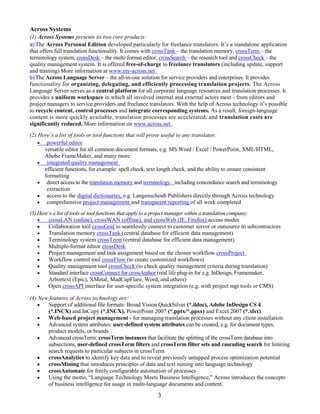
Across Systems
(1) Across Systems presents its two core products:
a) The Across Personal Edition developed particularly for freelance translators. It’s a standalone application
that offers full translation functionality. It comes with crossTank – the translation memory, crossTerm – the
terminology system, crossDesk – the multi-format editor, crossSearch – the research tool and crossCheck – the
quality management system. It is offered free-of-charge to freelance translators (including update, support
and training) More information at www.my-across.net
b) The Across Language Server – the all-in-one solution for service providers and enterprises. It provides
functionality for organizing, delegating, and efficiently processing translation projects. The Across
Language Server serves as a central platform for all corporate language resources and translation processes. It
provides a uniform workspace in which all involved internal and external actors meet - from editors and
project managers to service providers and freelance translators. With the help of Across technology it’s possible
to recycle content, control processes and integrate corresponding systems. As a result, foreign-language
content is more quickly available, translation processes are accelerated, and translation costs are
significantly reduced. More information on www.across.net
(2) Here’s a list of tools or tool functions that will prove useful to any translator:
     powerful editor
      versatile editor for all common document formats, e.g. MS Word / Excel / PowerPoint, XML/HTML,
      Abobe FrameMaker, and many more
     integrated quality management
      efficient functions, for example: spell check, text length check, and the ability to ensure consistent
      formatting
     direct access to the translation memory and terminology including concordance search and terminology
       extraction
     access to the digital dictionaries, e.g. Langenscheidt Publishers directly through Across technology
     comprehensive project management and transparent reporting of all work completed

(3) Here’s a list of tools or tool functions that apply to a project manager within a translation company:
       crossLAN (online), crossWAN (offline), and crossWeb (IE, Firefox) access modes
       Collaboration tool crossGrid to seamlessly connect to customer server or outsource to subcontractors
       Translation memory crossTank (central database for efficient data management)
       Terminology system crossTerm (central database for efficient data management)
       Multiple-format editor crossDesk
       Project management and task assignment based on the chosen workflow crossProject
       Workflow control tool crossFlow (to create customized workflows)
       Quality management tool crossCheck (to check quality management criteria during translation)
       Standard interface crossConnect for crossAuthor (real life plug-in for e.g. InDesign, Framemaker,
        Arbortext (Epic), XMetal, MadCapFlare, Word, and others)
       Open crossAPI interface for user-specific system integration (e.g. with project mgt tools or CMS)

(4) New features of Across technology are:
      Support of additional file formats: Broad Vision QuickSilver (*.ildoc), Adobe InDesign CS 4
       (*.INCX) and InCopy (*.INCX), PowerPoint 2007 (*.pptx/*.ppsx) and Excel 2007 (*.xlsx)
      Web-based project management - for managing translation processes without any client installation
      Advanced system attributes: user-defined system attributes can be created, e.g. for document types,
       product models, or brands
      Advanced crossTerm: crossTerm instances that facilitate the splitting of the crossTerm database into
       subsections, user-defined crossTerm filters and crossTerm filter sets and cascading search for limiting
       search requests to particular subjects in crossTerm
      crossAnalytics to identify key data and to reveal previously untapped process optimization potential
      crossMining that introduces principles of data and text mining into language technology
      crossAutomate for freely configurable automation of processes
      Using the motto, “Language Technology Meets Business Intelligence,” Across introduces the concepts
       of business intelligence for usage in multi-language documents and content.

                                                        3
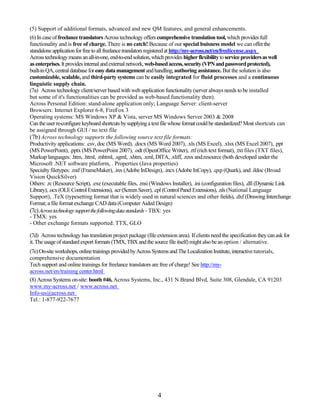
(5) Support of additional formats, advanced and new QM features, and general enhancements.
(6) In case of freelance translators Across technology offers comprehensive translation tool, which provides full
functionality and is free of charge. There is no catch! Because of our special buisness model we can offer the
standalone application for free to all freelance translators registered at http://my-across.net/en/freelicense.aspx
Across technology means an all-in-one, end-to-end solution, which provides higher flexibility to service providers as well
as enterprises. It provides internal and external network, web-based access, security (VPN and password protected),
built-in QA, central database for easy data management and handling, authoring assistance. But the solution is also
customizable, scalable, and third-party systems can be easily integrated for fluid processes and a continuous
linguistic supply chain.
(7a) Across technology client/server based with web application functionality (server always needs to be installed
but some of it's functionalities can be provided as web-based functionality then).
Across Personal Edition: stand-alone application only; Language Server: client-server
Browsers: Internet Explorer 6-8, FireFox 3
Operating systems: MS Windows XP & Vista, server MS Windows Server 2003 & 2008
Can the user re-configure keyboard shortcuts by supplying a text file whose format could be standardized? Most shortcuts can
be assigned through GUI / no text file
(7b) Across technology supports the following source text file formats:
Productivity applications: .csv, doc (MS Word), .docx (MS Word 2007), .xls (MS Excel), .xlsx (MS Excel 2007), .ppt
(MS PowerPoint), .pptx (MS PowerPoint 2007), .odt (OpenOffice Writer), .rtf (rich text format), .txt files (TXT files),
Markup languages: .htm, .html, .mhtml, .sgml, .xhtm, .xml, DITA, .xliff, .resx and.resource (both developed under the
Microsoft .NET software platform, . Properties (Java properties)
Specialty filetypes: .mif (FrameMaker), .inx (Adobe InDesign), .incx (Adobe InCopy), .qxp (Quark), and .ildoc (Broad
Vision QuickSilver)
Others: .rc (Resource Script), .exe (executable files, .msi (Windows Installer), .ini (configuration files), .dll (Dynamic Link
Library), .ocx (OLE Control Extensions), .scr (Screen Saver), .cpl (Control Panel Extensions), .nls (National Language
Support), .TeX (typesetting format that is widely used in natural sciences and other fields), .dxf (Drawing Interchange
Format; a file format exchange CAD data (Computer Aided Design)
(7c) Acrosstechnologysupportthefollowingdatastandards - TBX: yes
- TMX: yes
- Other exchange formats supported: TTX, GLO

(7d) Across technology has translation project package (file extension area). If clients need the specification they can ask for
it. The usage of standard export formats (TMX, TBX and the source file itself) might also be an option / alternative.
(7e) On-site workshops, online trainings provided by Across Systems and The Localization Institute, interactive tutorials,
comprehensive documentation
Tech support and online trainings for freelance translators are free of charge! See http://my-
across.net/en/training center.html
(8) Across Systems on-site: booth #46, Across Systems, Inc., 431 N Brand Blvd, Suite 308, Glendale, CA 91203
www.my-across.net / www.across.net
Info-us@across.net
Tel.: 1-877-922-7677


                                                               4
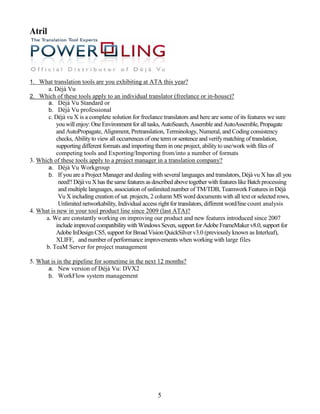
Atril


1. What translation tools are you exhibiting at ATA this year?
        a. Déjà Vu
2. Which of these tools apply to an individual translator (freelance or in-house)?
     a. Déjà Vu Standard or
     b. Déjà Vu professional
       c. Déjà vu X is a complete solution for freelance translators and here are some of its features we sure
          you will enjoy: One Environment for all tasks, AutoSearch, Assemble and AutoAssemble, Propagate
          and AutoPropagate, Alignment, Pretranslation, Terminology, Numeral, and Coding consistency
          checks, Ability to view all occurrences of one term or sentence and verify matching of translation,
          supporting different formats and importing them in one project, ability to use/work with files of
          competing tools and Exporting/Importing from/into a number of formats
3. Which of these tools apply to a project manager in a translation company?
       a. Déjà Vu Workgroup
       b. If you are a Project Manager and dealing with several languages and translators, Déjà vu X has all you
           need!! Déjà vu X has the same features as described above together with features like Batch processing
           and multiple languages, association of unlimited number of TM/TDB, Teamwork Features in Déjà
           Vu X including creation of sat. projects, 2 column MS word documents with all text or selected rows,
           Unlimited networkability, Individual access right for translators, different word/line count analysis
4. What is new in your tool product line since 2009 (last ATA)?
      a. We are constantly working on improving our product and new features introduced since 2007
          include improved compatibility with Windows Seven, support for Adobe FrameMaker v8.0, support for
          Adobe InDesign CS5, support for Broad Vision QuickSilver v3.0 (previously known as Interleaf),
          XLIFF, and number of performance improvements when working with large files
      b. TeaM Server for project management

5. What is in the pipeline for sometime in the next 12 months?
      a. New version of Déjà Vu: DVX2
      b. WorkFlow system management


                                                       5
6. What is distinctive about your tools?
“Déjà Vu X is more advanced than traditional translation memory tools. While other systems only show identical
and similar matches, Déjà Vu X intelligently uses the translation memory, the terminology database and the project
lexicon to increase the quality of “fuzzy matches” by combining those with words, terms and phrases in the
databases. Déjà Vu X isn’t just a simple translation memory tool; it’s a totally integrated translation environment
that increases a translator’s productivity and consistency.”
No matter what the format Déjà Vu X always shows a single, uniform translation interface. Translatable text is
clearly shown and the translator is able to focus on translating without the hassle of document formatting or
having to learn DTP or software development skills. Déjà Vu X is Unicode-based and supports the same
languages as Microsoft Windows 98/NT4/2000/ME/XP/Seven, along with non-western character sets (Chinese,
Arabic, Hebrew, Cyrillic, etc.).
Atril and PowerLing provide extensive customer-focused technical support for Déjà Vu X. Inputs from users are
often the source of product enhancements.
7. FAQs (Frequently Asked Questions)
    Full support for Windows Seven, Support for the new Office 2007 and 2010 XML based formats (such as
        .docx, .pptx, .xlsx etc) and the new filter imports files with embedded objects.
    DVX 7.5 currently runs on a Mac under Windows, using BootCamp, however it does not support
        Parallels. It is not possible to run DVX 7.5 on a Linux computer without a Windows virtual machine or as
        a native OSX application.
    DVX 7.5 is able to handle a great variety of external formats including text based and complex DTP
        formats such as Adobe PageMaker, Adobe FrameMaker, QuarkXpress, Interleaf/Quicksilver. Moreover,
        DVX 7.5 continues to develop an ever-growing list of supported file formats, now including Adobe
        InDesign, OpenOffice/StarOffice, EBU subtitle files, and GNU/gettext open source files. There is a close
        integration with other CAT applications such as Trados by supporting Trados RTF, Word, BIF, and TTX
        as well as database formats.
    DVX 7.5 supports TMX (1 .4b) for translation memory and terminology database exchange. We are
        currently working on the support for SRX, TBX and XLIFF which will be available in DVX2. Most
        XLIFF files can currently be processed using the XML filter, however a separate filter will be available in
        DVX2.
8. Contact information
Please provide your corporate contact information:
- During ATA 2010: visit our booth Déjà Vu with PowerLing
Contacts: Yannick Betis, Wulfran Brunet
 - After ATA 2010:
Power Ling
40 rue Milton
75009 PARIS
Tél: 00 33 (1) 40 79 95 60
www.powerling.com
contact@powerling.com
sales@powerling.com for special conditions
support@powerling.com Universal support in French, English, German, Spanish...


                                                       6
memoQ from Kilgray
1. Translation tools exhibited at ATA this year: memoQ translator standard, memoQ translator pro,
memoQ serverFive, memoQ enterprise, qTerm
2. Tools that apply to an individual translator (freelance or in-house): memoQ translator standard,
memoQ translator pro
3. Tools that apply to a project manager in a translation company: memoQ serverFive, memoQ
enterprise
4. What is new in your tool product line since November 2009 (last ATA)?
memoQ 4.0 (January 2010) introduced a new look and feel, project management functionality
(multilingual projects and the unified management of shareable resources), enhanced QA checks and a
brand new text editor with real-time spell checking, multi-tier undo/redo, drag’n’drop, etc. and good
support for bidirectional languages.
memoQ 4.2 (May 2010) introduced eight new file format filters, editing in alignment, and integration
with EuroTermBank. It also introduced a bilingual Word table file format that is useful for customer
review, as changes made in Word can be imported back into memoQ.
memoQ 4.5 (October 2010) introduced many new technologies: LiveAlign™ shifts the alignment into
the translation workflow, and allows you to import document pairs for alignment and use them for
matching without creating a translation memory first. If there’s a problem with the alignment, you open
the document at the right place from the Translation Results window and fix the alignment. memoQ will
realign the rest automatically. ActiveTM™ enables you to use bilingual documents directly for
matching, and offers sophisticated database management functionality. Library™ allows you to import
monolingual documents to help you establish whether an expression exists in the target language or not.
For project managers, memoQ 4.5 introduces online projects with desktop documents. You can create a
project on the memoQ server and translators may work on this project even if they go offline through
memoQ’s synchronization technology. This enables almost-real-time progress reporting, easy
reallocation of documents, etc. memoQ 4.5 has an 8x faster translation memory engine, an alignment
algorithm that takes advantage of your term base, and structural alignment for software localization
projects, based on resource IDs. memoQ 4.5 also integrates machine translation.
qTerm is a brand new web-based terminology management tool that enables term base record
customization and is tightly integrated with memoQ. It’s ideal for language service providers and
enterprises.
memoQ has been integrated closely with Plunet Business Manager and XTRF, two major project
management systems.
5. What is in the pipeline for sometime in the next 12 months
memoQ 5.0 (Q2 2010) will include terminology extraction and a secondary filter to process e.g.
embedded HTML in Excel/XML files. It will also include many usability improvements and even better
collaboration with other translation tools. We’ll offer a browser-based review and translation tool.
memoQ will be integrated with LTC Worx and Kilgray’s TM Repository, Kilgray’s translation memory
management tool meant for large enterprises
6. Leverage: memoQ provides the same or better leverage than its competitors thanks to innovative
solutions such as LiveAlign™, ActiveTM™, automatic assembly, TM fragment matching, automated
concordancing, etc.
Interoperability: memoQ users can work on projects created by other tools such as SDL Trados, Star
Transit, SDL Worldserver, Wordfast, etc. or create XLIFF packages that most other tools can process.

                                                   7
memoQ fits into any workflow and there is no lock-in
Flexibility: memoQ does not impose a single workflow on you. The system's user interface is also very
customizable.
Ease of use: non-tech-savvy translators can be up and running in two hours with the use of our resource
center (http://rc.kilgray.com) and webinars.
Eye for details: we understand that not all features can be sales arguments, but they can still make life
easier.
Collaboration: got a big job to process? Split it up into pieces and allow a team to work on this, sharing
translation memories, term bases, communicating or even working on the same document at the same
time. Your vendors can work online all the time or go offline if you enable them to.
7. (a) memoQ is not a browser-based tool but has its own client and server application. The software
runs under Windows XP/2003/Vista/7/Server 2008. The user can re-configure keyboard shortcuts.
Client-server APIs are published and memoQ can be connected to any project or workflow management
tool or you can create web interfaces. qTerm is browser based and requires IIS.
7. (b, c) What source text file formats and data standards do your tools support?
With real-time preview: Word/RTF, DOCX, Excel, PowerPoint PPT, PPTX, XML, HTML Without
real-time preview: Adobe InDesign INX (CS2-CS4), Adobe InDesign IDML, Adobe Framemaker MIF,
plain text, plain text from PDF files (useful for alignment), Microsoft Visio (VDX), DITA documents,
Freemind mindmaps (MM), Typo3 pages (XML), AuthorIT projects (XML), MS Help Workshop files
(HHC, HHK), SVG drawings
User interface localization: .NET resource files, Java properties files
Formats of other translation tools: bilingual RTF/DOC files and SDL Trados TTX files, Star Transit
PXF and PPF project files, XLIFF incl. SDLXLIFF
Data standards: XLIFF as markup language (memoQ can create XLIFF from all files and process
XLIFF from other tools), TMX, SRX, bilingual DOC (memoQ can create a bilingual DOC from any file,
regardless of the source format and can update the memoQ grid with the changes to the DOC file),
two-column RTF table (same as bilingual DOC)
7. (d) The translation project package (*.mqout) is a zipped archive. The package specification is open, it
contains XLIFF, TMX, CSV and a couple of XML-based memoQ resources for which there is no
standard. There’s a description on our website.
7. (e) Training: online or in person, several locations. Kilgray offers free webinars. Tech support: users
are entitled to four hours of free product support and unlimited bug-related support. Primarily channel:
email, telephone support and remote desktop access also available as necessary. Community support at
the memoQ Yahoo! mailing list.
8. Contact information: ATA: booth 35. Web: http://www.kilgray.com. Email:
patricia.bown@kilgray.com or sales@kilgray.com. Phone: +1 512 820 4925.


                                                    8
Lionbridge (Translation Workspace)
1. What translation tools are you exhibiting at ATA this year?
       Lionbridge will be exhibiting Translation Workspace, our software-as-a-service translator productivity
       solution.
2. Which of these tools apply to an individual translator (freelance or in-house)?
       Translation Workspace offers plans for freelance translators as well as agencies and enterprises that
       employ in-house translators.
3. Which of these tools apply to a project manager in a translation company?
       Translation Workspace can be used by project managers to create and manage TMs, glossaries and
       customer review cycles, and to perform file analyses.
4. What is new in your tool product line since November 2009 (last ATA)?
       Translation Workspace was launched in April of 2010. However, while new to the market as a technology
       offering from Lionbridge, the entire solution is based on the Logoport system, which has been in use in
       Lionbridge since 2005. This was the first release that allowed users to do their own work in the system, in
       addition to work for Lionbridge. Specific new functionality introduced since last year includes:
             Subscription access, allowing users to sign up for flexible plans based on word usage and licenses.
             GeoWorkz Directory, allowing subscribers to list and promote themselves as Translation
                 Workspace users.
             Asset Aliasing, the patent-pending technology allowing subscribers to share language assets with
                 each other across their respective tenancies.
             Asset Tagging and Asset Retrieval, allowing users to categorize and search for tagged assets.
             TDA integration, allowing TDA members to search, upload and download language assets
                 directly through the Translation Workspace interface.
5. What is in the pipeline for sometime in the next 12 months?
       Lionbridge will be adding more supported file formats, introducing more sophisticated preview for
       document formats, enhancing glossary management functionality, enhancing system infrastructure (to
       increase performance) and adding more community functionality to GeoWorkz.
6. What is distinctive about your tools?
       Translation Workspace brings cloud computing power to language asset management, and represents a
       new generation of translation productivity. Translation Workspace provides a comprehensive and
       sophisticated work environment to streamline the translation process for freelance translators, agencies
       and enterprises.
       Translators can also get access to a powerful TM and glossary tool in a flexible, affordable
       software-as-a-service model. There is no server infrastructure necessary, as the application is hosted in a
       GeoWorkz datacenter.
       The system enables translators, editors, reviewers and other language professionals to share TM, glossary
       and review material in real time, for optimal collaboration on large, distributed projects.
7. FAQs (Frequently Asked Questions)
  (a) Is your tool entirely web-based, entirely stand-alone, or somewhere in between
       (client-server)? If web-based, which browsers do you support? If client-server, are you willing to
       publish your client-server API? If there is client-side software to install, under which operating systems
       will it run natively (e.g. Windows XP/Vista, MacOSX, Linux) and can the user re-configure keyboard
       shortcuts by supplying a text file whose format could be standardized?

        Translation Workspace is a client-server application, with both browser-based and client-side
        interfaces. The client-side translation editing and batch processing environments run on Windows
        (XP/Vista/7). Keyboard shortcuts cannot be customized at this time. Lionbridge will be exposing API
                                                      9
functionality in future releases.
  (b) What source text file formats do your tools support?
  Translation Workspace supports XLIFF, TXT, XML, HTML, SGML, XHTML, ASP, JSP, RESX, HHC, HHK,
        Microsoft Word, Microsoft Excel, Microsoft PowerPoint, Adobe InDesign, Adobe FrameMaker,
        TRADOS TTX, and Idiom WorldServer XLIFF kits.
  (c) Which of the following data standards do your tools support?
              XLIFF as the XLIFF markup language, not just general XML?
              TMX
              TBX (if TBX is supported, which dialect(s), e.g. TBX-Basic?)
                                          (also: do you support any bilingual text formats other than XLIFF/TMX?)
  Translation Workspace supports XLIFF and TMX.
  (d) Do you have a translation project package in your tools? If so, are you willing to publish your
        package specification so that the relevant data files (e.g. source text) in the package can be
        extracted and used outside your tools?
  Translation Workspace does not produce a “package” but rather XLIFF (for Translation Workspace) or
        RTF files for translation, containing source and target content and relevant TM and glossary
        matches. Opening these formats for access by other tools is under consideration.
  (e) What training and tech support options are available for your tools?
  All Translation Workspace plans include basic support, including downloadable or streaming training,
        instructor-led training, and access to FAQs and to email-based interaction with the GeoWorkz Customer
        Success team. An extended support option is also available as an add-on to any plan, offering more direct
        access to advanced support personnel and escalation of support tickets.
8. Contact information
Please provide your corporate contact information:
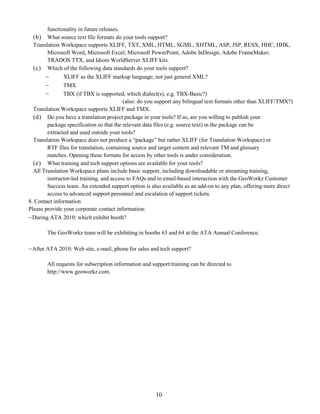
 During ATA 2010: which exhibit booth?

        The GeoWorkz team will be exhibiting in booths 63 and 64 at the ATA Annual Conference.

 After ATA 2010: Web site, e-mail, phone for sales and tech support?

        All requests for subscription information and support/training can be directed to
        http://www.geoworkz.com.


                                                       10
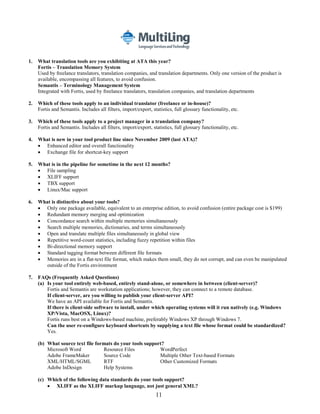
1.   What translation tools are you exhibiting at ATA this year?
     Fortis – Translation Memory System
     Used by freelance translators, translation companies, and translation departments. Only one version of the product is
     available, encompassing all features, to avoid confusion.
     Semantis – Terminology Management System
     Integrated with Fortis, used by freelance translators, translation companies, and translation departments

2.   Which of these tools apply to an individual translator (freelance or in-house)?
     Fortis and Semantis. Includes all filters, import/export, statistics, full glossary functionality, etc.

3.   Which of these tools apply to a project manager in a translation company?
     Fortis and Semantis. Includes all filters, import/export, statistics, full glossary functionality, etc.

4.   What is new in your tool product line since November 2009 (last ATA)?
      Enhanced editor and overall functionality
      Exchange file for shortcut-key support

5.   What is in the pipeline for sometime in the next 12 months?
      File sampling
      XLIFF support
      TBX support
      Linux/Mac support

6.   What is distinctive about your tools?
      Only one package available, equivalent to an enterprise edition, to avoid confusion (entire package cost is $199)
      Redundant memory merging and optimization
      Concordance search within multiple memories simultaneously
      Search multiple memories, dictionaries, and terms simultaneously
      Open and translate multiple files simultaneously in global view
      Repetitive word-count statistics, including fuzzy repetition within files
      Bi-directional memory support
      Standard tagging format between different file formats
      Memories are in a flat-text file format, which makes them small, they do not corrupt, and can even be manipulated
        outside of the Fortis environment

7.   FAQs (Frequently Asked Questions)
     (a) Is your tool entirely web-based, entirely stand-alone, or somewhere in between (client-server)?
         Fortis and Semantis are workstation applications; however, they can connect to a remote database.
         If client-server, are you willing to publish your client-server API?
         We have an API available for Fortis and Semantis.
         If there is client-side software to install, under which operating systems will it run natively (e.g. Windows
         XP/Vista, MacOSX, Linux)?
         Fortis runs best on a Windows-based machine, preferably Windows XP through Windows 7.
         Can the user re-configure keyboard shortcuts by supplying a text file whose format could be standardized?
         Yes.

     (b) What source text file formats do your tools support?
         Microsoft Word           Resource Files           WordPerfect
         Adobe FrameMaker         Source Code              Multiple Other Text-based Formats
         XML/HTML/SGML            RTF                      Other Customized Formats
         Adobe InDesign           Help Systems

     (c) Which of the following data standards do your tools support?
          XLIFF as the XLIFF markup language, not just general XML?
                                                                 11
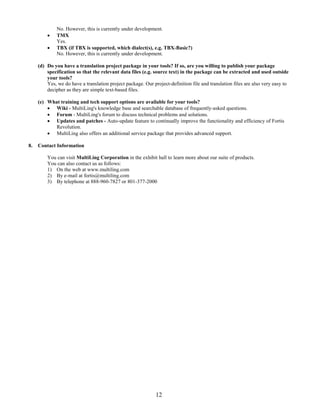
No. However, this is currently under development.
             TMX
              Yes.
             TBX (if TBX is supported, which dialect(s), e.g. TBX-Basic?)
              No. However, this is currently under development.

     (d) Do you have a translation project package in your tools? If so, are you willing to publish your package
         specification so that the relevant data files (e.g. source text) in the package can be extracted and used outside
         your tools?
         Yes, we do have a translation project package. Our project-definition file and translation files are also very easy to
         decipher as they are simple text-based files.

     (e) What training and tech support options are available for your tools?
          Wiki - MultiLing's knowledge base and searchable database of frequently-asked questions.
          Forum - MultiLing's forum to discuss technical problems and solutions.
          Updates and patches - Auto-update feature to continually improve the functionality and efficiency of Fortis
            Revolution.
          MultiLing also offers an additional service package that provides advanced support.

8.   Contact Information

         You can visit MultiLing Corporation in the exhibit hall to learn more about our suite of products.
         You can also contact us as follows:
         1) On the web at www.multiling.com
         2) By e-mail at fortis@multiling.com
         3) By telephone at 888-960-7827 or 801-377-2000


                                                              12
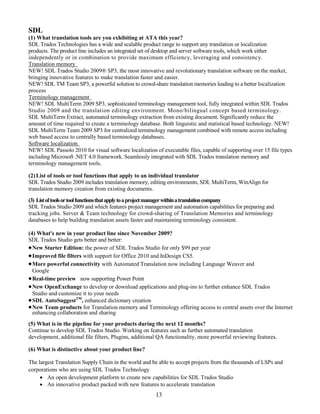
SDL
(1) What translation tools are you exhibiting at ATA this year?
SDL Trados Technologies has a wide and scalable product range to support any translation or localization
products. The product line includes an integrated set of desktop and server software tools, which work either
independently or in combination to provide maximum efficiency, leveraging and consistency.
Translation memory
NEW! SDL Trados Studio 2009® SP3, the most innovative and revolutionary translation software on the market,
bringing innovative features to make translation faster and easier.
NEW! SDL TM Team SP3, a powerful solution to crowd-share translation memories leading to a better localization
process
Terminology management
NEW! SDL MultiTerm 2009 SP3, sophisticated terminology management tool, fully integrated within SDL Trados
Studio 2009 and the translation editing environment. Mono/bilingual concept based terminology.
SDL MultiTerm Extract, automated terminology extraction from existing document. Significantly reduce the
amount of time required to create a terminology database. Both linguistic and statistical based technology. NEW!
SDL MultiTerm Team 2009 SP3 for centralized terminology management combined with remote access including
web based access to centrally based terminology databases.
Software localization
NEW! SDL Passolo 2010 for visual software localization of executable files, capable of supporting over 15 file types
including Microsoft .NET 4.0 framework. Seamlessly integrated with SDL Trados translation memory and
terminology management tools.

(2) List of tools or tool functions that apply to an individual translator
SDL Trados Studio 2009 includes translation memory, editing environments, SDL MultiTerm, WinAlign for
translation memory creation from existing documents.
(3) List of tools ortool functions that applyto aproject manager withinatranslationcompany
SDL Trados Studio 2009 and which features project management and automation capabilities for preparing and
tracking jobs. Server & Team technology for crowd-sharing of Translation Memories and terminology
databases to help building translation assets faster and maintaining terminology consistent.

(4) What's new in your product line since November 2009?
SDL Trados Studio gets better and better:
 New Starter Edition: the power of SDL Trados Studio for only $99 per year
 Improved file filters with support for Office 2010 and InDesign CS5.
 More powerful connectivity with Automated Translation now including Language Weaver and
  Google
 Real-time preview now supporting Power Point
 New OpenExchange to develop or download applications and plug-ins to further enhance SDL Trados
  Studio and customize it to your needs
 SDL AutoSuggestTM, enhanced dictionary creation
 New Team products for Translation memory and Terminology offering access to central assets over the Internet
  enhancing collaboration and sharing
(5) What is in the pipeline for your products during the next 12 months?
Continue to develop SDL Trados Studio. Working on features such as further automated translation
development, additional file filters, Plugins, additional QA functionality, more powerful reviewing features.

(6) What is distinctive about your product line?

The largest Translation Supply Chain in the world and be able to accept projects from the thousands of LSPs and
corporations who are using SDL Trados Technology
      An open development platform to create new capabilities for SDL Trados Studio
      An innovative product packed with new features to accelerate translation
                                                       13
 Ability to work on virtually any file type through a comprehensive file filter format
     Work the way that suits you best with the flexibility to quickly work on single files translations as well as
       more complex projects in multiple language and incorporating multiple file types
     SDL MultiTerm - powerful and integrated terminology management tool
     Over 20 years experience in developing software for the translation industry
(7) Answers to the following frequently asked questions:
(a.1) Is your tool entirely web-based, entirely stand-alone, or somewhere in
between (client-server)? Both stand-alone or client server
(a.2) If client-server, are you willing to publish your client-server API? Yes, we will
(a.3) If there is client-side software to install, under which operating systems will it run natively?
Windows 7, Windows Vista, Windows XP, Windows 2000 and Windows 2003 Server.

Do your tools run natively under the Mac OS or Linux?
MAC - Using BootCamp         Very probably
MAC - Using Parallels        Very probably
MAC - Real OSX               No. Exception: Web-based applications that need only a browser
application
Linux                        No, only VMs supported under Linux.

(a.4)Can the user re-configure keyboard shortcuts by supplying a text file whose format could be
standardized? Yes, the tool can save keyboard shortcuts in an XML format
.
7b - Which source text file formats do you support (including bilingual formats)?
Adobe FrameMaker, Generic delimited text, Generic Text, HTML, ASP, JSP, INC, InDesign, Interleaf, Java,
Microsoft Excel (200,2003, 2007, 2010), Microsoft Word (2000,2003,2007, 2010), Microsoft PowerPoint
(2000,2003, 2007, 2010) Adobe Acrobat PDF, Microsoft .NET, OpenOffice, PageMaker, QuarkXPress7#,
QuickSilver 3.0, RESX, SDLX translation files, SGML, StarOffice, TradosTag files, Ventura, Windows Binary,
Windows Resource, Workbench RTF, XML, XSL, XLIFF documents (XLF)


7c - Which of the following data standards do you support?
TMX 1.4 certified, support XLIFF and TBX. Support for TTX and ITD bilingual file format.

7d – Do you have a translation project package in your tools?
Yes, we do have a project package that can be created within SDL Trados Studio. Currently the package
specifications are not available. However we have a Technology Partner scheme in place and partners will have
access to relevant specifications. Project package is not a compulsory way of working and individual fields and
Translation memories can be sent for translation to other tools.
7e - What training and tech support options are available at what price?
Training online ($99 per session) via Proz.com / onsite (classroom based, price depending on duration but
starting from $199 per session) / customized (price depending on content)
Software Maintenance Level 1 which includes software upgrades for 1 year and support phone hotline and email
based within 1 business days on email
Software Maintenance Level 2 which includes software updates for 1 year, and support phone hotline, plus
email based. Response within 3 hours.

(8) Contact information:Visit our booths (19-21 and 37-40) or www.translationzone.com (LiveChat for immediate
communication)


                                                              14
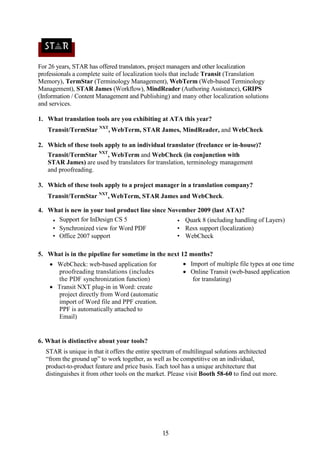
For 26 years, STAR has offered translators, project managers and other localization
professionals a complete suite of localization tools that include Transit (Translation
Memory), TermStar (Terminology Management), WebTerm (Web-based Terminology
Management), STAR James (Workflow), MindReader (Authoring Assistance), GRIPS
(Information / Content Management and Publishing) and many other localization solutions
and services.

1. What translation tools are you exhibiting at ATA this year?
   Transit/TermStar NXT, WebTerm, STAR James, MindReader, and WebCheck

2. Which of these tools apply to an individual translator (freelance or in-house)?
   Transit/TermStar NXT, WebTerm and WebCheck (in conjunction with
   STAR James) are used by translators for translation, terminology management
   and proofreading.

3. Which of these tools apply to a project manager in a translation company?
   Transit/TermStar NXT, WebTerm, STAR James and WebCheck.

4. What is new in your tool product line since November 2009 (last ATA)?
    • Support for InDesign CS 5                   • Quark 8 (including handling of Layers)
    • Synchronized view for Word PDF              • Resx support (localization)
    • Office 2007 support                         • WebCheck

5. What is in the pipeline for sometime in the next 12 months?
     WebCheck: web-based application for               Import of multiple file types at one time
      proofreading translations (includes               Online Transit (web-based application
      the PDF synchronization function)                   for translating)
     Transit NXT plug-in in Word: create
      project directly from Word (automatic
      import of Word file and PPF creation.
      PPF is automatically attached to
      Email)


6. What is distinctive about your tools?
  STAR is unique in that it offers the entire spectrum of multilingual solutions architected
  “from the ground up” to work together, as well as be competitive on an individual,
  product-to-product feature and price basis. Each tool has a unique architecture that
  distinguishes it from other tools on the market. Please visit Booth 58-60 to find out more.


                                               15
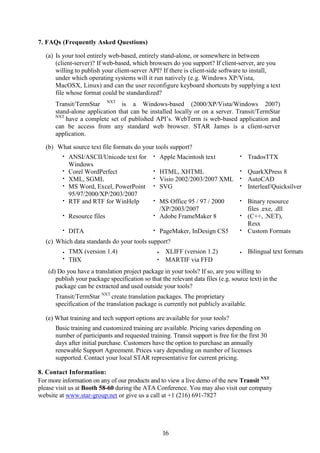
7. FAQs (Frequently Asked Questions)

   (a) Is your tool entirely web-based, entirely stand-alone, or somewhere in between
       (client-server)? If web-based, which browsers do you support? If client-server, are you
       willing to publish your client-server API? If there is client-side software to install,
       under which operating systems will it run natively (e.g. Windows XP/Vista,
       MacOSX, Linux) and can the user reconfigure keyboard shortcuts by supplying a text
       file whose format could be standardized?
      Transit/TermStar NXT is a Windows-based (2000/XP/Vista/Windows 2007)
      stand-alone application that can be installed locally or on a server. Transit/TermStar
      NXT
          have a complete set of published API’s. WebTerm is web-based application and
      can be access from any standard web browser. STAR James is a client-server
      application.

   (b) What source text file formats do your tools support?
         •   ANSI/ASCII/Unicode text for      •       Apple Macintosh text        •   TradosTTX
             Windows
         •   Corel WordPerfect                •       HTML, XHTML              • QuarkXPress 8
         •   XML, SGML                        •       Visio 2002/2003/2007 XML • AutoCAD
         •   MS Word, Excel, PowerPoint       •       SVG                      • Interleaf/Quicksilver
             95/97/2000/XP/2003/2007
         •   RTF and RTF for WinHelp          • MS Office 95 / 97 / 2000          • Binary resource
                                                /XP/2003/2007                       files .exe, .dll
         •   Resource files                   • Adobe FrameMaker 8                • (C++, .NET),
                                                                                    Resx
         •   DITA                             •       PageMaker, InDesign CS5     • Custom Formats

   (c) Which data standards do your tools support?
         •   TMX (version 1.4)                    •     XLIFF (version 1.2)       •   Bilingual text formats
         •   TBX                                  •     MARTIF via FFD
   (d) Do you have a translation project package in your tools? If so, are you willing to
      publish your package specification so that the relevant data files (e.g. source text) in the
      package can be extracted and used outside your tools?
      Transit/TermStar NXT create translation packages. The proprietary
      specification of the translation package is currently not publicly available.

   (e) What training and tech support options are available for your tools?
      Basic training and customized training are available. Pricing varies depending on
      number of participants and requested training. Transit support is free for the first 30
      days after initial purchase. Customers have the option to purchase an annually
      renewable Support Agreement. Prices vary depending on number of licenses
      supported. Contact your local STAR representative for current pricing.

8. Contact Information:
For more information on any of our products and to view a live demo of the new Transit NXT,
please visit us at Booth 58-60 during the ATA Conference. You may also visit our company
website at www.star-group.net or give us a call at +1 (216) 691-7827


                                                       16
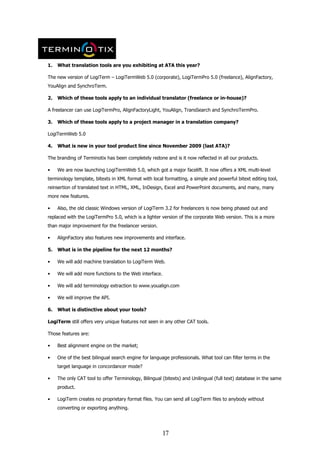
1.   What translation tools are you exhibiting at ATA this year?

The new version of LogiTerm – LogiTermWeb 5.0 (corporate), LogiTermPro 5.0 (freelance), AlignFactory,
YouAlign and SynchroTerm.

2.   Which of these tools apply to an individual translator (freelance or in-house)?

A freelancer can use LogiTermPro, AlignFactoryLight, YouAlign, TransSearch and SynchroTermPro.

3.   Which of these tools apply to a project manager in a translation company?

LogiTermWeb 5.0

4.   What is new in your tool product line since November 2009 (last ATA)?

The branding of Terminotix has been completely redone and is it now reflected in all our products.

•    We are now launching LogiTermWeb 5.0, which got a major facelift. It now offers a XML multi-level
terminology template, bitexts in XML format with local formatting, a simple and powerful bitext editing tool,
reinsertion of translated text in HTML, XML, InDesign, Excel and PowerPoint documents, and many, many
more new features.

•    Also, the old classic Windows version of LogiTerm 3.2 for freelancers is now being phased out and
replaced with the LogiTermPro 5.0, which is a lighter version of the corporate Web version. This is a more
than major improvement for the freelancer version.

•    AlignFactory also features new improvements and interface.

5.   What is in the pipeline for the next 12 months?

•    We will add machine translation to LogiTerm Web.

•    We will add more functions to the Web interface.

•    We will add terminology extraction to www.youalign.com

•    We will improve the API.

6.   What is distinctive about your tools?

LogiTerm still offers very unique features not seen in any other CAT tools.

Those features are:

•    Best alignment engine on the market;

•    One of the best bilingual search engine for language professionals. What tool can filter terms in the
     target language in concordancer mode?

•    The only CAT tool to offer Terminology, Bilingual (bitexts) and Unilingual (full text) database in the same
     product.

•    LogiTerm creates no proprietary format files. You can send all LogiTerm files to anybody without
     converting or exporting anything.


                                                        17
•    The pretranslation tool is also a very unique and powerful unilingual comparison tool.

•    You want to translate a document using a bilingual Website? LogiTerm is the fastest tool on the market
     to take off-the-shelf documents and pretranslate with them. Skeptical? Come and see us.

•    The way you translate PPT, XLS, HTML, XML and InDesign files is very unique and intuitive.

•    LogiTerm offers one of the best, if not the best term extraction engine on the market. You want to
     create terminology records fast? LogiTerm or SynchroTerm are the best tools for this task.

•    Our XML terminology template, record schemas and display templates make LogiTermWeb a highly
     flexible terminology tool. If you are not satisfied with the flexibility of our XML template, you will never
     be with any other tool.

AlignFactory is now renowned worldwide as an excellent complement to boost the quality of any TM. Bring
your documents at our booth and test it for yourself. You can try our alignment engine for free at
www.youalign.com.

SynchroTerm is a standalone automatic and bilingual term extraction tool that can feed any CAT tool with
lightning speed. Eight languages supported.

7.   a) Is your tool entirely web-based, entirely stand-alone, or somewhere in between
(client-server)? LogiTermWeb is a client/server application and we also provide a Web interface for
searching. If web-based, which browsers do you support? Firefox, Explorer, Safari and Chrome.

If client-server, are you willing to publish your client-server API? Yes.

If there is client-side software to install, under which operating systems will it run natively and
can the user re-configure keyboard shortcuts by supplying a text file whose format could be
standardized? Windows XP/Vista/7. The user cannot reconfigure the keyboard shortcuts.

(b) What source text file formats do your tools support?

doc; wpd; lwp; prz; sam; xls; ppt; rtf; txt; pdf; html; shtm; shtml; docx; xlsx; pptx; xml; inx.

(c) Which of the following data standards do your tools support?

TMX, XLIFF, TBX-Basic (API and import functions only)

(also: do you support any bilingual text formats other than XLIFF/TMX?)

Bilingual documents in any format. TTX, Trados Word files.

(d) Do you have a translation project package in your tools? Yes.

If so, are you willing to publish your package specification so that the relevant data files (e.g.
source text) in the package can be extracted and used outside your tools? Yes.

(e) What training and tech support options are available for your tools?

On-site training with portable computers and tutorials provided. We provide training for freelancers in our
Montreal office. Web seminar training sessions are also available.

8. Contact information 1751, rue Richardson, Bur. 6.101 Montreal, Quebec H3K 1G6 Canada Tel.:
514-989-9465 ATA - Booth 72


                                                        18
1. What translation tools are you exhibiting at ATA this year?

               Fluency and Fluency Enterprise
   2. Which of these tools apply to an individual translator?

               Fluency Translation Suite 2011

   3. Which of these tools apply to a project manager in a translation company?

               We will be releasing FluencyFlow Project Management Q1, 2011

   4. What is new in your tool product line since November 2009?

               Everything about Fluency is new, take a look!

   5. What is in the pipeline for sometime in the next 12 months?
               FluencyFlow Project Management
               Improved terminology
               Translation analytics
               Whatever our customers ask for
   6. What is distinctive about your tools?

               Fluency is a complete translation environment designed around the workflow of the
                translator.

               Integrated Terminology, TM and Internet resources in a convenient interface

               Transcription tools and OCR built-in

               Includes terminology for over 35 languages

               Supports MS Publisher and WordPerfect files

               Price

FAQs (Frequently Asked Questions)

   1. Is your tool entirely web-based, entirely stand-alone, or somewhere in between

               Stand-alone or client-server (Enterprise)

   2. If clientserver, are you willing to publish your client-server API?

               Yes

   3. If there is client-side software to install, under which operating systems will it run natively

               Windows (XP, Vista, Windows 7), OSX (with Parallels, or Bootcamp), Linux (with Vine)

   4. Can the user re-configure keyboard shortcuts by supplying a text file whose format could be
      standardized?


                                                      19
   Not at this time

    5. What source text file formats do your tools support?

               Doc, docx, xls, xlsx, ppt, pptx, pub, rtf, txt, xliff, inx, mif, ttx, Bilingual Doc(x),
                htm(l), xml, pdf, wpd

    6. Which data standards does your tool support?
               XLIFF (SDLXLIFF)
               TMX 1.4b
               TBX-Basic
               TBX (limited)

    7. Do you support any bilingual text formats other than XLIFF/TMX?

               TTX, Bilingual Doc(x), xls(x)

    8. Do you have a translation project package in your tools?

               Yes

    9. If so, are you willing to publish your package specification so that the relevant data files (e.g.
       source text) in the package can be extracted and used outside your tools?

               We are currently working on this

    10. What training options are available for your tools?

               Fluency was designed to be easy to learn and easy to use. Fluency integrates user
                documentation and tutorial videos directly into the application.

    11. What tech support is available for your tools?

               We pride ourselves on our prompt and free tech support.
Contact information
 Please come visit booth 5 and see what Fluency can do for you.

Western Standard
801-224-7404
977 South Orem Blvd.
Orem, UT 84097
http://products.westernstandard.com
info@westernstandard.com
support@westernstandard.com


                                                       20
Wordfast is the world's second largest provider of translation memory solutions. The company currently has over
20,000 active customer deployments in the marketplace. Driven primarily by the positive reviews of users and
industry experts, Wordfast's client base has grown to include the United Nations, NASA, McGraw-Hill, Nomura
Securities, a wide array of educational institutions, and thousands of freelance linguists. For more information,
please visit www.wordfast.com.

Wordfast Products
The Wordfast Translation Studio:
      Wordfast Classic – The industry’s #1 MS Word-based TM tool
      Wordfast Pro – The leading standalone TM tool designed to run on any platform – Windows, Mac, and
     Linux
      Wordfast Anywhere – The largest and fastest growing FREE web-based TM tool
Wordfast Pro Plus – An upgrade to Wordfast Pro, which facilitates unlimited high-speed batch processing of files
and extraction of frequent segments
VLTM (Very Large Translation Memory) – Free, public translation memory database donated by the Wordfast
community, accessible over the internet
Wordfast Server - A powerful TM server application designed to address translation efficiency at the enterprise
level

Tools for Freelance Translators
Wordfast Translation Studio and the VLTM

Tools for Translation Agencies
Wordfast Translation Studio, Wordfast Pro Plus, and Wordfast Server

What’s New
In 2010, Wordfast has added several new features. The major enhancements are listed below:

Wordfast Classic:
       ·      AutoComplete (AC) – Suggests terms, phrases, and numbers automatically as you type
       ·       LAN Support – Enables an unlimited number of users to share TMS and glossaries in real-time
               over a LAN
       ·      Enhanced QA functionality including proper name typo detection and punctuation checks
       ·      PDF Support (Windows version only)
Wordfast Pro
       ·      Transcheck options including numbers, untranslatables, terminology, and blacklist
       ·      Machine translation integration via Google Translate
       ·      Alignment module (Windows version only)
       ·      MIF, TTX, and PDF Support (Windows version only)
       ·      TM Administation module
       ·          AutoComplete (AC) – Suggests terms, phrases, and numbers automatically as you type
Wordfast Anywhere
       ·      Instant workgroup facility for real-time collaboration and TM sharing
       ·      Support for mobile device platforms including iPad, iPhone, Android, Windows Mobile, and Palm
               OS
       ·      Web-based alignment tool for certain languages

The Future of Wordfast

Beginning in 2011, Wordfast Classic and Wordfast Pro will be sold separately with an option to purchase
the package at a discounted price. New features will include:

Wordfast Classic –
       ·       XLIFF Support
       ·       Compatibility with MS Word 2011 for Mac
Wordfast Pro -
       ·       Redesigned WYSIWYG User Interface
       ·       Multi-format Preview
       ·       Enhanced Project Workflow
         ·      XLIFF Support
       ·       File Progress indicator


                                                           21
Wordfast Anywhere –
       ·      File Management System
       ·      XLIFF Support
       ·      HTML Filter
       ·      Aligner Enhancement (Speed and Languages supported)
       ·      Rich Text Preview
       ·      SMS Alerts

What Makes Wordfast Unique
    Freedom to choose your work environment – Wordfast offers users the ability to work on Windows,
       Mac, or Linux platforms in an MS Word-based, standalone, or browser-based environment with the
       option to customize the interface to either text or table mode and reconfigure their shortcut keys.
    User-friendliness – Wordfast is consistently ranked the easiest tool on the market to learn and use.
    Exceptional Support –Wordfast offers both professional and peer support that is unsrupassed in the
       industry.
    Try-Before-You-Buy – Wordfast offers a full-featured demo version with no time limitation, making it
       possible to use the software on actual translation projects before deciding to purchase.
    Compatibility with Industry Standards – Wordfast is compatible with industry standard exchange
       formats such as TMX and TBX, making migration to and from Wordfast simple and seamless.
    Generous Licensing Agreement – Wordfast license holders are entitled to any new releases for three
       years from date of purchase without having to pay costly upgrade fees.
    Highest Value – At less than half the cost of our closest competitor, Wordfast offers the best value on the
       market.
    Input into our Product Roadmap – Wordfast is committed to developing tools based on the specific
       needs and feedback of our users.

FAQs (Frequently Asked Questions)

(a) Is your tool entirely web-based, entirely stand-alone, or somewhere in between (client-server)? If web-based,
which browsers do you support? If server, are you willing to publish your client-server API? If there is client-side
software to install, under which operating systems will it run natively (e.g. Windows XP/Vista, MacOSX, Linux) and
can the user re-configure keyboard shortcuts by supplying a text file whose format could be standardized? Wordfast
Anywhere is an entirely web-based TM tool that supports Internet Explorer, Firefox, Safari, and Chrome
browsers. Wordfast also offers two client-side TM tools, Wordfast Classic and Wordfast Pro, that can
interact with our TM Server application, Wordfast Server. We currently do not publish APIs. Wordfast
Products can run on Windows, Mac, and Linux. (Note: Wordfast Classic cannot run inside of Word
2008 for Mac but it can run inside of MS Word 2011 for Mac, currently in beta testing.) Wordfast
allows users to reconfigure their keyboard shortcuts to match the key bindings of other CAT tools.

(b) What source text file formats do your tools support?
Wordfast Classic - DOC, PPT, XLS, HTML, RTF, TTX, TXML and PDF
Wordfast Pro - DOC, PPT, XLS, HTML, XML, INX, ASP/JSP

(c) Which of the following data standards do your tools support?
Wordfast products are compatible with industry standard exchange formats including TMX, TBX and
tab-delimited formation. Future versions of Wordfast Pro will also support XLIFF.

(d) Do you have a translation project package in your tools? If so, are you
willing to publish your package specification so that the relevant data files (e.g.
source te xt ) i n t he pa c k age c a n b e e xt r a c t e d a nd us e d o ut si d e
y o u r t oo ls ? No.

(e) What training and tech support options are available for your tools?
Customers who purchase a Wordfast license receive FREE email hotline support for one year from the
date of purchase. Also, Wordfast users can benefit from extensive peer support through active online
forums available in multiple languages. Several live training sessions are being held by Wordfast
trainers around the world. To check the schedule, visit our website here
http://www.wordfast.net/index.php?whichpage=tra announce . Also, Wordfast offers both on-site and
online training with qualified trainers, available upon request.

Contact Us
Please visit the Wordfast booth for more information on Wordfast products. Special pricing is available
during the conference. You can also learn more at www.wordfast.com or email us at info@wordfast.com.


                                                               22

2010 tool forum ata handout

  • 1.
    The 2010 ToolForum Denver American Translators Association Index to Participating Tool Vendors (and selected product names) [in alphabetical order by vendor company name] page 3 Across (Personal, Language Server) 5 Atril [exhibited by PowerLing] (Déjà Vu) 7 Kilgray (MemoQ) 9 Lionbridge (Translation Workspace) 11 Multiling (Fortis, Semantis) 13 SDL (Trados Studio and Multiterm) 15 STAR (Transit, TermStar, WebTerm, James, MindReader and GRIPS) 17 Terminotix (LogiTermWeb, LogiTermPro, AlignFactory, TranSearch and SynchroTermPro) 19 Western (Fluency) 21 Wordfast (Classic, Pro, Anywhere) 1
  • 2.
    Questions we askedthe tool vendors: 1. What translation tools are you exhibiting at ATA this year? 2. Which of these tools apply to an individual translator (freelance or in-house)? 3. Which of these tools apply to a project manager in a translation company? 4. What is new in your tool product line since November 2009 (last ATA)? 5. What is in the pipeline for sometime in the next 12 months? 6. What is distinctive about your tools? No mention of other vendors! 7. FAQs (Frequently Asked Questions) (a) Is your tool entirely web-based, entirely stand-alone, or somewhere in between (client-server)? If web-based, which browsers do you support? If clientserver, are you willing to publish your client-server API? If there is client-side software to install, under which operating systems will it run natively (e.g. Windows XP/Vista, MacOSX, Linux) and can the user re-configure keyboard shortcuts by supplying a text file whose format could be standardized? (b) What source text file formats do your tools support? (c) Which of the following data standards do your tools support? XLIFF as the XLIFF markup language, not just general XML? TMX TBX (if TBX is supported, which dialect(s), e.g. TBX-Basic?) (also: do you support any bilingual text formats other than XLIFF/TMX?) (d) Do you have a translation project package in your tools? If so, are you willing to publish your package specification so that the relevant data files (e.g. source text) in the package can be extracted and used outside your tools? (e) What training and tech support options are available for your tools? 8. Contact information Please provide your corporate contact information: During ATA 2010: which exhibit booth? After ATA 2010: Web site, e-mail, phone for sales and tech support? Their answers follow, two pages per vendor. 2
  • 3.
    Across Systems (1) AcrossSystems presents its two core products: a) The Across Personal Edition developed particularly for freelance translators. It’s a standalone application that offers full translation functionality. It comes with crossTank – the translation memory, crossTerm – the terminology system, crossDesk – the multi-format editor, crossSearch – the research tool and crossCheck – the quality management system. It is offered free-of-charge to freelance translators (including update, support and training) More information at www.my-across.net b) The Across Language Server – the all-in-one solution for service providers and enterprises. It provides functionality for organizing, delegating, and efficiently processing translation projects. The Across Language Server serves as a central platform for all corporate language resources and translation processes. It provides a uniform workspace in which all involved internal and external actors meet - from editors and project managers to service providers and freelance translators. With the help of Across technology it’s possible to recycle content, control processes and integrate corresponding systems. As a result, foreign-language content is more quickly available, translation processes are accelerated, and translation costs are significantly reduced. More information on www.across.net (2) Here’s a list of tools or tool functions that will prove useful to any translator:  powerful editor versatile editor for all common document formats, e.g. MS Word / Excel / PowerPoint, XML/HTML, Abobe FrameMaker, and many more  integrated quality management efficient functions, for example: spell check, text length check, and the ability to ensure consistent formatting  direct access to the translation memory and terminology including concordance search and terminology extraction  access to the digital dictionaries, e.g. Langenscheidt Publishers directly through Across technology  comprehensive project management and transparent reporting of all work completed (3) Here’s a list of tools or tool functions that apply to a project manager within a translation company:  crossLAN (online), crossWAN (offline), and crossWeb (IE, Firefox) access modes  Collaboration tool crossGrid to seamlessly connect to customer server or outsource to subcontractors  Translation memory crossTank (central database for efficient data management)  Terminology system crossTerm (central database for efficient data management)  Multiple-format editor crossDesk  Project management and task assignment based on the chosen workflow crossProject  Workflow control tool crossFlow (to create customized workflows)  Quality management tool crossCheck (to check quality management criteria during translation)  Standard interface crossConnect for crossAuthor (real life plug-in for e.g. InDesign, Framemaker, Arbortext (Epic), XMetal, MadCapFlare, Word, and others)  Open crossAPI interface for user-specific system integration (e.g. with project mgt tools or CMS) (4) New features of Across technology are:  Support of additional file formats: Broad Vision QuickSilver (*.ildoc), Adobe InDesign CS 4 (*.INCX) and InCopy (*.INCX), PowerPoint 2007 (*.pptx/*.ppsx) and Excel 2007 (*.xlsx)  Web-based project management - for managing translation processes without any client installation  Advanced system attributes: user-defined system attributes can be created, e.g. for document types, product models, or brands  Advanced crossTerm: crossTerm instances that facilitate the splitting of the crossTerm database into subsections, user-defined crossTerm filters and crossTerm filter sets and cascading search for limiting search requests to particular subjects in crossTerm  crossAnalytics to identify key data and to reveal previously untapped process optimization potential  crossMining that introduces principles of data and text mining into language technology  crossAutomate for freely configurable automation of processes  Using the motto, “Language Technology Meets Business Intelligence,” Across introduces the concepts of business intelligence for usage in multi-language documents and content. 3
  • 4.
    (5) Support ofadditional formats, advanced and new QM features, and general enhancements. (6) In case of freelance translators Across technology offers comprehensive translation tool, which provides full functionality and is free of charge. There is no catch! Because of our special buisness model we can offer the standalone application for free to all freelance translators registered at http://my-across.net/en/freelicense.aspx Across technology means an all-in-one, end-to-end solution, which provides higher flexibility to service providers as well as enterprises. It provides internal and external network, web-based access, security (VPN and password protected), built-in QA, central database for easy data management and handling, authoring assistance. But the solution is also customizable, scalable, and third-party systems can be easily integrated for fluid processes and a continuous linguistic supply chain. (7a) Across technology client/server based with web application functionality (server always needs to be installed but some of it's functionalities can be provided as web-based functionality then). Across Personal Edition: stand-alone application only; Language Server: client-server Browsers: Internet Explorer 6-8, FireFox 3 Operating systems: MS Windows XP & Vista, server MS Windows Server 2003 & 2008 Can the user re-configure keyboard shortcuts by supplying a text file whose format could be standardized? Most shortcuts can be assigned through GUI / no text file (7b) Across technology supports the following source text file formats: Productivity applications: .csv, doc (MS Word), .docx (MS Word 2007), .xls (MS Excel), .xlsx (MS Excel 2007), .ppt (MS PowerPoint), .pptx (MS PowerPoint 2007), .odt (OpenOffice Writer), .rtf (rich text format), .txt files (TXT files), Markup languages: .htm, .html, .mhtml, .sgml, .xhtm, .xml, DITA, .xliff, .resx and.resource (both developed under the Microsoft .NET software platform, . Properties (Java properties) Specialty filetypes: .mif (FrameMaker), .inx (Adobe InDesign), .incx (Adobe InCopy), .qxp (Quark), and .ildoc (Broad Vision QuickSilver) Others: .rc (Resource Script), .exe (executable files, .msi (Windows Installer), .ini (configuration files), .dll (Dynamic Link Library), .ocx (OLE Control Extensions), .scr (Screen Saver), .cpl (Control Panel Extensions), .nls (National Language Support), .TeX (typesetting format that is widely used in natural sciences and other fields), .dxf (Drawing Interchange Format; a file format exchange CAD data (Computer Aided Design) (7c) Acrosstechnologysupportthefollowingdatastandards - TBX: yes - TMX: yes - Other exchange formats supported: TTX, GLO (7d) Across technology has translation project package (file extension area). If clients need the specification they can ask for it. The usage of standard export formats (TMX, TBX and the source file itself) might also be an option / alternative. (7e) On-site workshops, online trainings provided by Across Systems and The Localization Institute, interactive tutorials, comprehensive documentation Tech support and online trainings for freelance translators are free of charge! See http://my- across.net/en/training center.html (8) Across Systems on-site: booth #46, Across Systems, Inc., 431 N Brand Blvd, Suite 308, Glendale, CA 91203 www.my-across.net / www.across.net Info-us@across.net Tel.: 1-877-922-7677 4
  • 5.
    Atril 1. What translationtools are you exhibiting at ATA this year? a. Déjà Vu 2. Which of these tools apply to an individual translator (freelance or in-house)? a. Déjà Vu Standard or b. Déjà Vu professional c. Déjà vu X is a complete solution for freelance translators and here are some of its features we sure you will enjoy: One Environment for all tasks, AutoSearch, Assemble and AutoAssemble, Propagate and AutoPropagate, Alignment, Pretranslation, Terminology, Numeral, and Coding consistency checks, Ability to view all occurrences of one term or sentence and verify matching of translation, supporting different formats and importing them in one project, ability to use/work with files of competing tools and Exporting/Importing from/into a number of formats 3. Which of these tools apply to a project manager in a translation company? a. Déjà Vu Workgroup b. If you are a Project Manager and dealing with several languages and translators, Déjà vu X has all you need!! Déjà vu X has the same features as described above together with features like Batch processing and multiple languages, association of unlimited number of TM/TDB, Teamwork Features in Déjà Vu X including creation of sat. projects, 2 column MS word documents with all text or selected rows, Unlimited networkability, Individual access right for translators, different word/line count analysis 4. What is new in your tool product line since 2009 (last ATA)? a. We are constantly working on improving our product and new features introduced since 2007 include improved compatibility with Windows Seven, support for Adobe FrameMaker v8.0, support for Adobe InDesign CS5, support for Broad Vision QuickSilver v3.0 (previously known as Interleaf), XLIFF, and number of performance improvements when working with large files b. TeaM Server for project management 5. What is in the pipeline for sometime in the next 12 months? a. New version of Déjà Vu: DVX2 b. WorkFlow system management 5
  • 6.
    6. What isdistinctive about your tools? “Déjà Vu X is more advanced than traditional translation memory tools. While other systems only show identical and similar matches, Déjà Vu X intelligently uses the translation memory, the terminology database and the project lexicon to increase the quality of “fuzzy matches” by combining those with words, terms and phrases in the databases. Déjà Vu X isn’t just a simple translation memory tool; it’s a totally integrated translation environment that increases a translator’s productivity and consistency.” No matter what the format Déjà Vu X always shows a single, uniform translation interface. Translatable text is clearly shown and the translator is able to focus on translating without the hassle of document formatting or having to learn DTP or software development skills. Déjà Vu X is Unicode-based and supports the same languages as Microsoft Windows 98/NT4/2000/ME/XP/Seven, along with non-western character sets (Chinese, Arabic, Hebrew, Cyrillic, etc.). Atril and PowerLing provide extensive customer-focused technical support for Déjà Vu X. Inputs from users are often the source of product enhancements. 7. FAQs (Frequently Asked Questions)  Full support for Windows Seven, Support for the new Office 2007 and 2010 XML based formats (such as .docx, .pptx, .xlsx etc) and the new filter imports files with embedded objects.  DVX 7.5 currently runs on a Mac under Windows, using BootCamp, however it does not support Parallels. It is not possible to run DVX 7.5 on a Linux computer without a Windows virtual machine or as a native OSX application.  DVX 7.5 is able to handle a great variety of external formats including text based and complex DTP formats such as Adobe PageMaker, Adobe FrameMaker, QuarkXpress, Interleaf/Quicksilver. Moreover, DVX 7.5 continues to develop an ever-growing list of supported file formats, now including Adobe InDesign, OpenOffice/StarOffice, EBU subtitle files, and GNU/gettext open source files. There is a close integration with other CAT applications such as Trados by supporting Trados RTF, Word, BIF, and TTX as well as database formats.  DVX 7.5 supports TMX (1 .4b) for translation memory and terminology database exchange. We are currently working on the support for SRX, TBX and XLIFF which will be available in DVX2. Most XLIFF files can currently be processed using the XML filter, however a separate filter will be available in DVX2. 8. Contact information Please provide your corporate contact information: - During ATA 2010: visit our booth Déjà Vu with PowerLing Contacts: Yannick Betis, Wulfran Brunet - After ATA 2010: Power Ling 40 rue Milton 75009 PARIS Tél: 00 33 (1) 40 79 95 60 www.powerling.com contact@powerling.com sales@powerling.com for special conditions support@powerling.com Universal support in French, English, German, Spanish... 6
  • 7.
    memoQ from Kilgray 1.Translation tools exhibited at ATA this year: memoQ translator standard, memoQ translator pro, memoQ serverFive, memoQ enterprise, qTerm 2. Tools that apply to an individual translator (freelance or in-house): memoQ translator standard, memoQ translator pro 3. Tools that apply to a project manager in a translation company: memoQ serverFive, memoQ enterprise 4. What is new in your tool product line since November 2009 (last ATA)? memoQ 4.0 (January 2010) introduced a new look and feel, project management functionality (multilingual projects and the unified management of shareable resources), enhanced QA checks and a brand new text editor with real-time spell checking, multi-tier undo/redo, drag’n’drop, etc. and good support for bidirectional languages. memoQ 4.2 (May 2010) introduced eight new file format filters, editing in alignment, and integration with EuroTermBank. It also introduced a bilingual Word table file format that is useful for customer review, as changes made in Word can be imported back into memoQ. memoQ 4.5 (October 2010) introduced many new technologies: LiveAlign™ shifts the alignment into the translation workflow, and allows you to import document pairs for alignment and use them for matching without creating a translation memory first. If there’s a problem with the alignment, you open the document at the right place from the Translation Results window and fix the alignment. memoQ will realign the rest automatically. ActiveTM™ enables you to use bilingual documents directly for matching, and offers sophisticated database management functionality. Library™ allows you to import monolingual documents to help you establish whether an expression exists in the target language or not. For project managers, memoQ 4.5 introduces online projects with desktop documents. You can create a project on the memoQ server and translators may work on this project even if they go offline through memoQ’s synchronization technology. This enables almost-real-time progress reporting, easy reallocation of documents, etc. memoQ 4.5 has an 8x faster translation memory engine, an alignment algorithm that takes advantage of your term base, and structural alignment for software localization projects, based on resource IDs. memoQ 4.5 also integrates machine translation. qTerm is a brand new web-based terminology management tool that enables term base record customization and is tightly integrated with memoQ. It’s ideal for language service providers and enterprises. memoQ has been integrated closely with Plunet Business Manager and XTRF, two major project management systems. 5. What is in the pipeline for sometime in the next 12 months memoQ 5.0 (Q2 2010) will include terminology extraction and a secondary filter to process e.g. embedded HTML in Excel/XML files. It will also include many usability improvements and even better collaboration with other translation tools. We’ll offer a browser-based review and translation tool. memoQ will be integrated with LTC Worx and Kilgray’s TM Repository, Kilgray’s translation memory management tool meant for large enterprises 6. Leverage: memoQ provides the same or better leverage than its competitors thanks to innovative solutions such as LiveAlign™, ActiveTM™, automatic assembly, TM fragment matching, automated concordancing, etc. Interoperability: memoQ users can work on projects created by other tools such as SDL Trados, Star Transit, SDL Worldserver, Wordfast, etc. or create XLIFF packages that most other tools can process. 7
  • 8.
    memoQ fits intoany workflow and there is no lock-in Flexibility: memoQ does not impose a single workflow on you. The system's user interface is also very customizable. Ease of use: non-tech-savvy translators can be up and running in two hours with the use of our resource center (http://rc.kilgray.com) and webinars. Eye for details: we understand that not all features can be sales arguments, but they can still make life easier. Collaboration: got a big job to process? Split it up into pieces and allow a team to work on this, sharing translation memories, term bases, communicating or even working on the same document at the same time. Your vendors can work online all the time or go offline if you enable them to. 7. (a) memoQ is not a browser-based tool but has its own client and server application. The software runs under Windows XP/2003/Vista/7/Server 2008. The user can re-configure keyboard shortcuts. Client-server APIs are published and memoQ can be connected to any project or workflow management tool or you can create web interfaces. qTerm is browser based and requires IIS. 7. (b, c) What source text file formats and data standards do your tools support? With real-time preview: Word/RTF, DOCX, Excel, PowerPoint PPT, PPTX, XML, HTML Without real-time preview: Adobe InDesign INX (CS2-CS4), Adobe InDesign IDML, Adobe Framemaker MIF, plain text, plain text from PDF files (useful for alignment), Microsoft Visio (VDX), DITA documents, Freemind mindmaps (MM), Typo3 pages (XML), AuthorIT projects (XML), MS Help Workshop files (HHC, HHK), SVG drawings User interface localization: .NET resource files, Java properties files Formats of other translation tools: bilingual RTF/DOC files and SDL Trados TTX files, Star Transit PXF and PPF project files, XLIFF incl. SDLXLIFF Data standards: XLIFF as markup language (memoQ can create XLIFF from all files and process XLIFF from other tools), TMX, SRX, bilingual DOC (memoQ can create a bilingual DOC from any file, regardless of the source format and can update the memoQ grid with the changes to the DOC file), two-column RTF table (same as bilingual DOC) 7. (d) The translation project package (*.mqout) is a zipped archive. The package specification is open, it contains XLIFF, TMX, CSV and a couple of XML-based memoQ resources for which there is no standard. There’s a description on our website. 7. (e) Training: online or in person, several locations. Kilgray offers free webinars. Tech support: users are entitled to four hours of free product support and unlimited bug-related support. Primarily channel: email, telephone support and remote desktop access also available as necessary. Community support at the memoQ Yahoo! mailing list. 8. Contact information: ATA: booth 35. Web: http://www.kilgray.com. Email: patricia.bown@kilgray.com or sales@kilgray.com. Phone: +1 512 820 4925. 8
  • 9.
    Lionbridge (Translation Workspace) 1.What translation tools are you exhibiting at ATA this year? Lionbridge will be exhibiting Translation Workspace, our software-as-a-service translator productivity solution. 2. Which of these tools apply to an individual translator (freelance or in-house)? Translation Workspace offers plans for freelance translators as well as agencies and enterprises that employ in-house translators. 3. Which of these tools apply to a project manager in a translation company? Translation Workspace can be used by project managers to create and manage TMs, glossaries and customer review cycles, and to perform file analyses. 4. What is new in your tool product line since November 2009 (last ATA)? Translation Workspace was launched in April of 2010. However, while new to the market as a technology offering from Lionbridge, the entire solution is based on the Logoport system, which has been in use in Lionbridge since 2005. This was the first release that allowed users to do their own work in the system, in addition to work for Lionbridge. Specific new functionality introduced since last year includes:  Subscription access, allowing users to sign up for flexible plans based on word usage and licenses.  GeoWorkz Directory, allowing subscribers to list and promote themselves as Translation Workspace users.  Asset Aliasing, the patent-pending technology allowing subscribers to share language assets with each other across their respective tenancies.  Asset Tagging and Asset Retrieval, allowing users to categorize and search for tagged assets.  TDA integration, allowing TDA members to search, upload and download language assets directly through the Translation Workspace interface. 5. What is in the pipeline for sometime in the next 12 months? Lionbridge will be adding more supported file formats, introducing more sophisticated preview for document formats, enhancing glossary management functionality, enhancing system infrastructure (to increase performance) and adding more community functionality to GeoWorkz. 6. What is distinctive about your tools? Translation Workspace brings cloud computing power to language asset management, and represents a new generation of translation productivity. Translation Workspace provides a comprehensive and sophisticated work environment to streamline the translation process for freelance translators, agencies and enterprises. Translators can also get access to a powerful TM and glossary tool in a flexible, affordable software-as-a-service model. There is no server infrastructure necessary, as the application is hosted in a GeoWorkz datacenter. The system enables translators, editors, reviewers and other language professionals to share TM, glossary and review material in real time, for optimal collaboration on large, distributed projects. 7. FAQs (Frequently Asked Questions) (a) Is your tool entirely web-based, entirely stand-alone, or somewhere in between (client-server)? If web-based, which browsers do you support? If client-server, are you willing to publish your client-server API? If there is client-side software to install, under which operating systems will it run natively (e.g. Windows XP/Vista, MacOSX, Linux) and can the user re-configure keyboard shortcuts by supplying a text file whose format could be standardized? Translation Workspace is a client-server application, with both browser-based and client-side interfaces. The client-side translation editing and batch processing environments run on Windows (XP/Vista/7). Keyboard shortcuts cannot be customized at this time. Lionbridge will be exposing API 9
  • 10.
    functionality in futurereleases. (b) What source text file formats do your tools support? Translation Workspace supports XLIFF, TXT, XML, HTML, SGML, XHTML, ASP, JSP, RESX, HHC, HHK, Microsoft Word, Microsoft Excel, Microsoft PowerPoint, Adobe InDesign, Adobe FrameMaker, TRADOS TTX, and Idiom WorldServer XLIFF kits. (c) Which of the following data standards do your tools support?  XLIFF as the XLIFF markup language, not just general XML?  TMX  TBX (if TBX is supported, which dialect(s), e.g. TBX-Basic?) (also: do you support any bilingual text formats other than XLIFF/TMX?) Translation Workspace supports XLIFF and TMX. (d) Do you have a translation project package in your tools? If so, are you willing to publish your package specification so that the relevant data files (e.g. source text) in the package can be extracted and used outside your tools? Translation Workspace does not produce a “package” but rather XLIFF (for Translation Workspace) or RTF files for translation, containing source and target content and relevant TM and glossary matches. Opening these formats for access by other tools is under consideration. (e) What training and tech support options are available for your tools? All Translation Workspace plans include basic support, including downloadable or streaming training, instructor-led training, and access to FAQs and to email-based interaction with the GeoWorkz Customer Success team. An extended support option is also available as an add-on to any plan, offering more direct access to advanced support personnel and escalation of support tickets. 8. Contact information Please provide your corporate contact information:  During ATA 2010: which exhibit booth? The GeoWorkz team will be exhibiting in booths 63 and 64 at the ATA Annual Conference.  After ATA 2010: Web site, e-mail, phone for sales and tech support? All requests for subscription information and support/training can be directed to http://www.geoworkz.com. 10
  • 11.
    1. What translation tools are you exhibiting at ATA this year? Fortis – Translation Memory System Used by freelance translators, translation companies, and translation departments. Only one version of the product is available, encompassing all features, to avoid confusion. Semantis – Terminology Management System Integrated with Fortis, used by freelance translators, translation companies, and translation departments 2. Which of these tools apply to an individual translator (freelance or in-house)? Fortis and Semantis. Includes all filters, import/export, statistics, full glossary functionality, etc. 3. Which of these tools apply to a project manager in a translation company? Fortis and Semantis. Includes all filters, import/export, statistics, full glossary functionality, etc. 4. What is new in your tool product line since November 2009 (last ATA)?  Enhanced editor and overall functionality  Exchange file for shortcut-key support 5. What is in the pipeline for sometime in the next 12 months?  File sampling  XLIFF support  TBX support  Linux/Mac support 6. What is distinctive about your tools?  Only one package available, equivalent to an enterprise edition, to avoid confusion (entire package cost is $199)  Redundant memory merging and optimization  Concordance search within multiple memories simultaneously  Search multiple memories, dictionaries, and terms simultaneously  Open and translate multiple files simultaneously in global view  Repetitive word-count statistics, including fuzzy repetition within files  Bi-directional memory support  Standard tagging format between different file formats  Memories are in a flat-text file format, which makes them small, they do not corrupt, and can even be manipulated outside of the Fortis environment 7. FAQs (Frequently Asked Questions) (a) Is your tool entirely web-based, entirely stand-alone, or somewhere in between (client-server)? Fortis and Semantis are workstation applications; however, they can connect to a remote database. If client-server, are you willing to publish your client-server API? We have an API available for Fortis and Semantis. If there is client-side software to install, under which operating systems will it run natively (e.g. Windows XP/Vista, MacOSX, Linux)? Fortis runs best on a Windows-based machine, preferably Windows XP through Windows 7. Can the user re-configure keyboard shortcuts by supplying a text file whose format could be standardized? Yes. (b) What source text file formats do your tools support? Microsoft Word Resource Files WordPerfect Adobe FrameMaker Source Code Multiple Other Text-based Formats XML/HTML/SGML RTF Other Customized Formats Adobe InDesign Help Systems (c) Which of the following data standards do your tools support?  XLIFF as the XLIFF markup language, not just general XML? 11
  • 12.
    No. However, thisis currently under development.  TMX Yes.  TBX (if TBX is supported, which dialect(s), e.g. TBX-Basic?) No. However, this is currently under development. (d) Do you have a translation project package in your tools? If so, are you willing to publish your package specification so that the relevant data files (e.g. source text) in the package can be extracted and used outside your tools? Yes, we do have a translation project package. Our project-definition file and translation files are also very easy to decipher as they are simple text-based files. (e) What training and tech support options are available for your tools?  Wiki - MultiLing's knowledge base and searchable database of frequently-asked questions.  Forum - MultiLing's forum to discuss technical problems and solutions.  Updates and patches - Auto-update feature to continually improve the functionality and efficiency of Fortis Revolution.  MultiLing also offers an additional service package that provides advanced support. 8. Contact Information You can visit MultiLing Corporation in the exhibit hall to learn more about our suite of products. You can also contact us as follows: 1) On the web at www.multiling.com 2) By e-mail at fortis@multiling.com 3) By telephone at 888-960-7827 or 801-377-2000 12
  • 13.
    SDL (1) What translationtools are you exhibiting at ATA this year? SDL Trados Technologies has a wide and scalable product range to support any translation or localization products. The product line includes an integrated set of desktop and server software tools, which work either independently or in combination to provide maximum efficiency, leveraging and consistency. Translation memory NEW! SDL Trados Studio 2009® SP3, the most innovative and revolutionary translation software on the market, bringing innovative features to make translation faster and easier. NEW! SDL TM Team SP3, a powerful solution to crowd-share translation memories leading to a better localization process Terminology management NEW! SDL MultiTerm 2009 SP3, sophisticated terminology management tool, fully integrated within SDL Trados Studio 2009 and the translation editing environment. Mono/bilingual concept based terminology. SDL MultiTerm Extract, automated terminology extraction from existing document. Significantly reduce the amount of time required to create a terminology database. Both linguistic and statistical based technology. NEW! SDL MultiTerm Team 2009 SP3 for centralized terminology management combined with remote access including web based access to centrally based terminology databases. Software localization NEW! SDL Passolo 2010 for visual software localization of executable files, capable of supporting over 15 file types including Microsoft .NET 4.0 framework. Seamlessly integrated with SDL Trados translation memory and terminology management tools. (2) List of tools or tool functions that apply to an individual translator SDL Trados Studio 2009 includes translation memory, editing environments, SDL MultiTerm, WinAlign for translation memory creation from existing documents. (3) List of tools ortool functions that applyto aproject manager withinatranslationcompany SDL Trados Studio 2009 and which features project management and automation capabilities for preparing and tracking jobs. Server & Team technology for crowd-sharing of Translation Memories and terminology databases to help building translation assets faster and maintaining terminology consistent. (4) What's new in your product line since November 2009? SDL Trados Studio gets better and better:  New Starter Edition: the power of SDL Trados Studio for only $99 per year  Improved file filters with support for Office 2010 and InDesign CS5.  More powerful connectivity with Automated Translation now including Language Weaver and Google  Real-time preview now supporting Power Point  New OpenExchange to develop or download applications and plug-ins to further enhance SDL Trados Studio and customize it to your needs  SDL AutoSuggestTM, enhanced dictionary creation  New Team products for Translation memory and Terminology offering access to central assets over the Internet enhancing collaboration and sharing (5) What is in the pipeline for your products during the next 12 months? Continue to develop SDL Trados Studio. Working on features such as further automated translation development, additional file filters, Plugins, additional QA functionality, more powerful reviewing features. (6) What is distinctive about your product line? The largest Translation Supply Chain in the world and be able to accept projects from the thousands of LSPs and corporations who are using SDL Trados Technology  An open development platform to create new capabilities for SDL Trados Studio  An innovative product packed with new features to accelerate translation 13
  • 14.
     Ability towork on virtually any file type through a comprehensive file filter format  Work the way that suits you best with the flexibility to quickly work on single files translations as well as more complex projects in multiple language and incorporating multiple file types  SDL MultiTerm - powerful and integrated terminology management tool  Over 20 years experience in developing software for the translation industry (7) Answers to the following frequently asked questions: (a.1) Is your tool entirely web-based, entirely stand-alone, or somewhere in between (client-server)? Both stand-alone or client server (a.2) If client-server, are you willing to publish your client-server API? Yes, we will (a.3) If there is client-side software to install, under which operating systems will it run natively? Windows 7, Windows Vista, Windows XP, Windows 2000 and Windows 2003 Server. Do your tools run natively under the Mac OS or Linux? MAC - Using BootCamp Very probably MAC - Using Parallels Very probably MAC - Real OSX No. Exception: Web-based applications that need only a browser application Linux No, only VMs supported under Linux. (a.4)Can the user re-configure keyboard shortcuts by supplying a text file whose format could be standardized? Yes, the tool can save keyboard shortcuts in an XML format . 7b - Which source text file formats do you support (including bilingual formats)? Adobe FrameMaker, Generic delimited text, Generic Text, HTML, ASP, JSP, INC, InDesign, Interleaf, Java, Microsoft Excel (200,2003, 2007, 2010), Microsoft Word (2000,2003,2007, 2010), Microsoft PowerPoint (2000,2003, 2007, 2010) Adobe Acrobat PDF, Microsoft .NET, OpenOffice, PageMaker, QuarkXPress7#, QuickSilver 3.0, RESX, SDLX translation files, SGML, StarOffice, TradosTag files, Ventura, Windows Binary, Windows Resource, Workbench RTF, XML, XSL, XLIFF documents (XLF) 7c - Which of the following data standards do you support? TMX 1.4 certified, support XLIFF and TBX. Support for TTX and ITD bilingual file format. 7d – Do you have a translation project package in your tools? Yes, we do have a project package that can be created within SDL Trados Studio. Currently the package specifications are not available. However we have a Technology Partner scheme in place and partners will have access to relevant specifications. Project package is not a compulsory way of working and individual fields and Translation memories can be sent for translation to other tools. 7e - What training and tech support options are available at what price? Training online ($99 per session) via Proz.com / onsite (classroom based, price depending on duration but starting from $199 per session) / customized (price depending on content) Software Maintenance Level 1 which includes software upgrades for 1 year and support phone hotline and email based within 1 business days on email Software Maintenance Level 2 which includes software updates for 1 year, and support phone hotline, plus email based. Response within 3 hours. (8) Contact information:Visit our booths (19-21 and 37-40) or www.translationzone.com (LiveChat for immediate communication) 14
  • 15.
    For 26 years,STAR has offered translators, project managers and other localization professionals a complete suite of localization tools that include Transit (Translation Memory), TermStar (Terminology Management), WebTerm (Web-based Terminology Management), STAR James (Workflow), MindReader (Authoring Assistance), GRIPS (Information / Content Management and Publishing) and many other localization solutions and services. 1. What translation tools are you exhibiting at ATA this year? Transit/TermStar NXT, WebTerm, STAR James, MindReader, and WebCheck 2. Which of these tools apply to an individual translator (freelance or in-house)? Transit/TermStar NXT, WebTerm and WebCheck (in conjunction with STAR James) are used by translators for translation, terminology management and proofreading. 3. Which of these tools apply to a project manager in a translation company? Transit/TermStar NXT, WebTerm, STAR James and WebCheck. 4. What is new in your tool product line since November 2009 (last ATA)? • Support for InDesign CS 5 • Quark 8 (including handling of Layers) • Synchronized view for Word PDF • Resx support (localization) • Office 2007 support • WebCheck 5. What is in the pipeline for sometime in the next 12 months?  WebCheck: web-based application for  Import of multiple file types at one time proofreading translations (includes  Online Transit (web-based application the PDF synchronization function) for translating)  Transit NXT plug-in in Word: create project directly from Word (automatic import of Word file and PPF creation. PPF is automatically attached to Email) 6. What is distinctive about your tools? STAR is unique in that it offers the entire spectrum of multilingual solutions architected “from the ground up” to work together, as well as be competitive on an individual, product-to-product feature and price basis. Each tool has a unique architecture that distinguishes it from other tools on the market. Please visit Booth 58-60 to find out more. 15
  • 16.
    7. FAQs (FrequentlyAsked Questions) (a) Is your tool entirely web-based, entirely stand-alone, or somewhere in between (client-server)? If web-based, which browsers do you support? If client-server, are you willing to publish your client-server API? If there is client-side software to install, under which operating systems will it run natively (e.g. Windows XP/Vista, MacOSX, Linux) and can the user reconfigure keyboard shortcuts by supplying a text file whose format could be standardized? Transit/TermStar NXT is a Windows-based (2000/XP/Vista/Windows 2007) stand-alone application that can be installed locally or on a server. Transit/TermStar NXT have a complete set of published API’s. WebTerm is web-based application and can be access from any standard web browser. STAR James is a client-server application. (b) What source text file formats do your tools support? • ANSI/ASCII/Unicode text for • Apple Macintosh text • TradosTTX Windows • Corel WordPerfect • HTML, XHTML • QuarkXPress 8 • XML, SGML • Visio 2002/2003/2007 XML • AutoCAD • MS Word, Excel, PowerPoint • SVG • Interleaf/Quicksilver 95/97/2000/XP/2003/2007 • RTF and RTF for WinHelp • MS Office 95 / 97 / 2000 • Binary resource /XP/2003/2007 files .exe, .dll • Resource files • Adobe FrameMaker 8 • (C++, .NET), Resx • DITA • PageMaker, InDesign CS5 • Custom Formats (c) Which data standards do your tools support? • TMX (version 1.4) • XLIFF (version 1.2) • Bilingual text formats • TBX • MARTIF via FFD (d) Do you have a translation project package in your tools? If so, are you willing to publish your package specification so that the relevant data files (e.g. source text) in the package can be extracted and used outside your tools? Transit/TermStar NXT create translation packages. The proprietary specification of the translation package is currently not publicly available. (e) What training and tech support options are available for your tools? Basic training and customized training are available. Pricing varies depending on number of participants and requested training. Transit support is free for the first 30 days after initial purchase. Customers have the option to purchase an annually renewable Support Agreement. Prices vary depending on number of licenses supported. Contact your local STAR representative for current pricing. 8. Contact Information: For more information on any of our products and to view a live demo of the new Transit NXT, please visit us at Booth 58-60 during the ATA Conference. You may also visit our company website at www.star-group.net or give us a call at +1 (216) 691-7827 16
  • 17.
    1. What translation tools are you exhibiting at ATA this year? The new version of LogiTerm – LogiTermWeb 5.0 (corporate), LogiTermPro 5.0 (freelance), AlignFactory, YouAlign and SynchroTerm. 2. Which of these tools apply to an individual translator (freelance or in-house)? A freelancer can use LogiTermPro, AlignFactoryLight, YouAlign, TransSearch and SynchroTermPro. 3. Which of these tools apply to a project manager in a translation company? LogiTermWeb 5.0 4. What is new in your tool product line since November 2009 (last ATA)? The branding of Terminotix has been completely redone and is it now reflected in all our products. • We are now launching LogiTermWeb 5.0, which got a major facelift. It now offers a XML multi-level terminology template, bitexts in XML format with local formatting, a simple and powerful bitext editing tool, reinsertion of translated text in HTML, XML, InDesign, Excel and PowerPoint documents, and many, many more new features. • Also, the old classic Windows version of LogiTerm 3.2 for freelancers is now being phased out and replaced with the LogiTermPro 5.0, which is a lighter version of the corporate Web version. This is a more than major improvement for the freelancer version. • AlignFactory also features new improvements and interface. 5. What is in the pipeline for the next 12 months? • We will add machine translation to LogiTerm Web. • We will add more functions to the Web interface. • We will add terminology extraction to www.youalign.com • We will improve the API. 6. What is distinctive about your tools? LogiTerm still offers very unique features not seen in any other CAT tools. Those features are: • Best alignment engine on the market; • One of the best bilingual search engine for language professionals. What tool can filter terms in the target language in concordancer mode? • The only CAT tool to offer Terminology, Bilingual (bitexts) and Unilingual (full text) database in the same product. • LogiTerm creates no proprietary format files. You can send all LogiTerm files to anybody without converting or exporting anything. 17
  • 18.
    The pretranslation tool is also a very unique and powerful unilingual comparison tool. • You want to translate a document using a bilingual Website? LogiTerm is the fastest tool on the market to take off-the-shelf documents and pretranslate with them. Skeptical? Come and see us. • The way you translate PPT, XLS, HTML, XML and InDesign files is very unique and intuitive. • LogiTerm offers one of the best, if not the best term extraction engine on the market. You want to create terminology records fast? LogiTerm or SynchroTerm are the best tools for this task. • Our XML terminology template, record schemas and display templates make LogiTermWeb a highly flexible terminology tool. If you are not satisfied with the flexibility of our XML template, you will never be with any other tool. AlignFactory is now renowned worldwide as an excellent complement to boost the quality of any TM. Bring your documents at our booth and test it for yourself. You can try our alignment engine for free at www.youalign.com. SynchroTerm is a standalone automatic and bilingual term extraction tool that can feed any CAT tool with lightning speed. Eight languages supported. 7. a) Is your tool entirely web-based, entirely stand-alone, or somewhere in between (client-server)? LogiTermWeb is a client/server application and we also provide a Web interface for searching. If web-based, which browsers do you support? Firefox, Explorer, Safari and Chrome. If client-server, are you willing to publish your client-server API? Yes. If there is client-side software to install, under which operating systems will it run natively and can the user re-configure keyboard shortcuts by supplying a text file whose format could be standardized? Windows XP/Vista/7. The user cannot reconfigure the keyboard shortcuts. (b) What source text file formats do your tools support? doc; wpd; lwp; prz; sam; xls; ppt; rtf; txt; pdf; html; shtm; shtml; docx; xlsx; pptx; xml; inx. (c) Which of the following data standards do your tools support? TMX, XLIFF, TBX-Basic (API and import functions only) (also: do you support any bilingual text formats other than XLIFF/TMX?) Bilingual documents in any format. TTX, Trados Word files. (d) Do you have a translation project package in your tools? Yes. If so, are you willing to publish your package specification so that the relevant data files (e.g. source text) in the package can be extracted and used outside your tools? Yes. (e) What training and tech support options are available for your tools? On-site training with portable computers and tutorials provided. We provide training for freelancers in our Montreal office. Web seminar training sessions are also available. 8. Contact information 1751, rue Richardson, Bur. 6.101 Montreal, Quebec H3K 1G6 Canada Tel.: 514-989-9465 ATA - Booth 72 18
  • 19.
    1. What translationtools are you exhibiting at ATA this year?  Fluency and Fluency Enterprise 2. Which of these tools apply to an individual translator?  Fluency Translation Suite 2011 3. Which of these tools apply to a project manager in a translation company?  We will be releasing FluencyFlow Project Management Q1, 2011 4. What is new in your tool product line since November 2009?  Everything about Fluency is new, take a look! 5. What is in the pipeline for sometime in the next 12 months?  FluencyFlow Project Management  Improved terminology  Translation analytics  Whatever our customers ask for 6. What is distinctive about your tools?  Fluency is a complete translation environment designed around the workflow of the translator.  Integrated Terminology, TM and Internet resources in a convenient interface  Transcription tools and OCR built-in  Includes terminology for over 35 languages  Supports MS Publisher and WordPerfect files  Price FAQs (Frequently Asked Questions) 1. Is your tool entirely web-based, entirely stand-alone, or somewhere in between  Stand-alone or client-server (Enterprise) 2. If clientserver, are you willing to publish your client-server API?  Yes 3. If there is client-side software to install, under which operating systems will it run natively  Windows (XP, Vista, Windows 7), OSX (with Parallels, or Bootcamp), Linux (with Vine) 4. Can the user re-configure keyboard shortcuts by supplying a text file whose format could be standardized? 19
  • 20.
    Not at this time 5. What source text file formats do your tools support?  Doc, docx, xls, xlsx, ppt, pptx, pub, rtf, txt, xliff, inx, mif, ttx, Bilingual Doc(x), htm(l), xml, pdf, wpd 6. Which data standards does your tool support?  XLIFF (SDLXLIFF)  TMX 1.4b  TBX-Basic  TBX (limited) 7. Do you support any bilingual text formats other than XLIFF/TMX?  TTX, Bilingual Doc(x), xls(x) 8. Do you have a translation project package in your tools?  Yes 9. If so, are you willing to publish your package specification so that the relevant data files (e.g. source text) in the package can be extracted and used outside your tools?  We are currently working on this 10. What training options are available for your tools?  Fluency was designed to be easy to learn and easy to use. Fluency integrates user documentation and tutorial videos directly into the application. 11. What tech support is available for your tools?  We pride ourselves on our prompt and free tech support. Contact information  Please come visit booth 5 and see what Fluency can do for you. Western Standard 801-224-7404 977 South Orem Blvd. Orem, UT 84097 http://products.westernstandard.com info@westernstandard.com support@westernstandard.com 20
  • 21.
    Wordfast is theworld's second largest provider of translation memory solutions. The company currently has over 20,000 active customer deployments in the marketplace. Driven primarily by the positive reviews of users and industry experts, Wordfast's client base has grown to include the United Nations, NASA, McGraw-Hill, Nomura Securities, a wide array of educational institutions, and thousands of freelance linguists. For more information, please visit www.wordfast.com. Wordfast Products The Wordfast Translation Studio:  Wordfast Classic – The industry’s #1 MS Word-based TM tool  Wordfast Pro – The leading standalone TM tool designed to run on any platform – Windows, Mac, and Linux  Wordfast Anywhere – The largest and fastest growing FREE web-based TM tool Wordfast Pro Plus – An upgrade to Wordfast Pro, which facilitates unlimited high-speed batch processing of files and extraction of frequent segments VLTM (Very Large Translation Memory) – Free, public translation memory database donated by the Wordfast community, accessible over the internet Wordfast Server - A powerful TM server application designed to address translation efficiency at the enterprise level Tools for Freelance Translators Wordfast Translation Studio and the VLTM Tools for Translation Agencies Wordfast Translation Studio, Wordfast Pro Plus, and Wordfast Server What’s New In 2010, Wordfast has added several new features. The major enhancements are listed below: Wordfast Classic: · AutoComplete (AC) – Suggests terms, phrases, and numbers automatically as you type · LAN Support – Enables an unlimited number of users to share TMS and glossaries in real-time over a LAN · Enhanced QA functionality including proper name typo detection and punctuation checks · PDF Support (Windows version only) Wordfast Pro · Transcheck options including numbers, untranslatables, terminology, and blacklist · Machine translation integration via Google Translate · Alignment module (Windows version only) · MIF, TTX, and PDF Support (Windows version only) · TM Administation module · AutoComplete (AC) – Suggests terms, phrases, and numbers automatically as you type Wordfast Anywhere · Instant workgroup facility for real-time collaboration and TM sharing · Support for mobile device platforms including iPad, iPhone, Android, Windows Mobile, and Palm OS · Web-based alignment tool for certain languages The Future of Wordfast Beginning in 2011, Wordfast Classic and Wordfast Pro will be sold separately with an option to purchase the package at a discounted price. New features will include: Wordfast Classic – · XLIFF Support · Compatibility with MS Word 2011 for Mac Wordfast Pro - · Redesigned WYSIWYG User Interface · Multi-format Preview · Enhanced Project Workflow · XLIFF Support · File Progress indicator 21
  • 22.
    Wordfast Anywhere – · File Management System · XLIFF Support · HTML Filter · Aligner Enhancement (Speed and Languages supported) · Rich Text Preview · SMS Alerts What Makes Wordfast Unique  Freedom to choose your work environment – Wordfast offers users the ability to work on Windows, Mac, or Linux platforms in an MS Word-based, standalone, or browser-based environment with the option to customize the interface to either text or table mode and reconfigure their shortcut keys.  User-friendliness – Wordfast is consistently ranked the easiest tool on the market to learn and use.  Exceptional Support –Wordfast offers both professional and peer support that is unsrupassed in the industry.  Try-Before-You-Buy – Wordfast offers a full-featured demo version with no time limitation, making it possible to use the software on actual translation projects before deciding to purchase.  Compatibility with Industry Standards – Wordfast is compatible with industry standard exchange formats such as TMX and TBX, making migration to and from Wordfast simple and seamless.  Generous Licensing Agreement – Wordfast license holders are entitled to any new releases for three years from date of purchase without having to pay costly upgrade fees.  Highest Value – At less than half the cost of our closest competitor, Wordfast offers the best value on the market.  Input into our Product Roadmap – Wordfast is committed to developing tools based on the specific needs and feedback of our users. FAQs (Frequently Asked Questions) (a) Is your tool entirely web-based, entirely stand-alone, or somewhere in between (client-server)? If web-based, which browsers do you support? If server, are you willing to publish your client-server API? If there is client-side software to install, under which operating systems will it run natively (e.g. Windows XP/Vista, MacOSX, Linux) and can the user re-configure keyboard shortcuts by supplying a text file whose format could be standardized? Wordfast Anywhere is an entirely web-based TM tool that supports Internet Explorer, Firefox, Safari, and Chrome browsers. Wordfast also offers two client-side TM tools, Wordfast Classic and Wordfast Pro, that can interact with our TM Server application, Wordfast Server. We currently do not publish APIs. Wordfast Products can run on Windows, Mac, and Linux. (Note: Wordfast Classic cannot run inside of Word 2008 for Mac but it can run inside of MS Word 2011 for Mac, currently in beta testing.) Wordfast allows users to reconfigure their keyboard shortcuts to match the key bindings of other CAT tools. (b) What source text file formats do your tools support? Wordfast Classic - DOC, PPT, XLS, HTML, RTF, TTX, TXML and PDF Wordfast Pro - DOC, PPT, XLS, HTML, XML, INX, ASP/JSP (c) Which of the following data standards do your tools support? Wordfast products are compatible with industry standard exchange formats including TMX, TBX and tab-delimited formation. Future versions of Wordfast Pro will also support XLIFF. (d) Do you have a translation project package in your tools? If so, are you willing to publish your package specification so that the relevant data files (e.g. source te xt ) i n t he pa c k age c a n b e e xt r a c t e d a nd us e d o ut si d e y o u r t oo ls ? No. (e) What training and tech support options are available for your tools? Customers who purchase a Wordfast license receive FREE email hotline support for one year from the date of purchase. Also, Wordfast users can benefit from extensive peer support through active online forums available in multiple languages. Several live training sessions are being held by Wordfast trainers around the world. To check the schedule, visit our website here http://www.wordfast.net/index.php?whichpage=tra announce . Also, Wordfast offers both on-site and online training with qualified trainers, available upon request. Contact Us Please visit the Wordfast booth for more information on Wordfast products. Special pricing is available during the conference. You can also learn more at www.wordfast.com or email us at info@wordfast.com. 22