e-Publishing บุญเลิศ อรุณพิบูลย์ ศูนย์บริการความรู้ทางวิทยาศาสตร์และเทคโนโลยี สำนักงานพัฒนาวิทยาศาสตร์และเทคโนโลยีแห่งชาติ www.stks.or.th
e-Publishing ข้อความ ภาพ และสื่อมัลติมีเดียที่นำเสนอในรูปแบบอิเล็กทรอนิกส์ เนื้อหา เรื่องเล่าในฟอร์แมต งานเขียน วรรณกรรมออนไลน์  (Blog, Wiki, Webpages) บทกวีที่ส่งผ่าน  e-Mail  e-Publishing is a form of publishing in which books are produced and stored electronically rather than in print
e - Publishing กระบวนการผลิตสร้างสรรค์สิ่งพิมพ์ในรูปแบบอิเล็กทรอนิกส์ รูปแบบ  ( Formatted) การเข้ารหัส  ( Encrypted) การป้องกันความปลอดภัย  (Security) การเผยแพร่  (Published)
ประโยชน์ของ  e - Publishing ลดการใช้กระดาษ ,  พลังงาน ,  สิ่งแวดล้อม ,  ธรรมชาติ  ง่ายต่อการปรับปรุงแก้ไข  ได้เอกสารที่มีคุณค่า ด้วยกรรมวิธีที่รวดเร็ว เช่น  Video Clips  ได้เอกสารที่สามารถโต้ตอบกับผู้อ่านได้  ง่าย สะดวกต่อการอ่าน  ง่ายต่อการสืบค้น  มีความคงทน  นำเสนอสื่อมัลติมีเดียได้
ประโยชน์ของ  e - Publishing สร้างโอกาสให้กับนักเขียนหน้าใหม่ ,  นักอยากเขียน พัฒนาสื่อความรู้ สร้างโอกาสทางด้านการศึกษา สร้างโอกาสทางธุรกิจ เพิ่มมูลค่าให้กับ  e-Library, e-Learning
จุดอ่อนของ  e - Publishing ลงทุนสูงในขั้นต้น  ปัญหาในการอ่าน เช่น ขนาดจอภาพ ,  ความคมชัด  การละเมิดลิขสิทธิ์  ไม่ให้ความสำคัญกับมาตรฐาน เทคโนโลยียังมีการพัฒนาอย่างต่อเนื่อง
องค์ประกอบที่เกี่ยวข้องกับ  e - Publishing Publishers  Conversion Services / Tool Developers  Distributors  e - Retailers Device Manufactures  Software Vendors  Reader / User
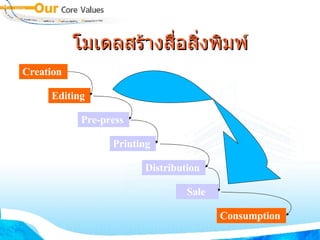
โมเดลสร้างสื่อสิ่งพิมพ์ Creation   Editing   Pre-press   Printing   Distribution   Sale   Consumption
ประเภทของ  e - Publishing Free e-Publishing  Commercial e-Publishing  Pay per View e-Publishing  Purchased e-Publishing  Leased e-Publishing
องค์ประกอบ การพัฒนา Hardware Software Content Format & Standard Security / Protection Tools (DRM) & Standard DRM : Digital Right Management
Hardware  Specific Reader Handheld Readers  Desktop Readers Online
Software Authoring Converter Reader DNL Reader – Desktop Author FlipViewer – FlipAlbum, FlipPublisher Acrobat Reader – PDF Format TIFF Viewer – TIF Format
Content   Format Original Format from Word Processor & DTP Palm/PDA (PDB, PML: Peanut Markup Language) Acrobat (PDF: Portable Document Format) Graphics (TIFF format) Multimedia (FlipAlbum, Flash, MP3) Web Documents (HTML, XML: Extensive Markup Language)
Word Processor   & DTP ฟอนต์มาตรฐาน Style  หัวใจหลักในการสร้างผลงาน Layout  ดึงดูดความสนใจ อย่าลืมฝังฟอนต์  (Embedded) http :// www . stks . or . th / web / index2 . php?option = com_docman&task = doc_view&gid = 334&Itemid = 31
Palm/PDA Word Processor ---convert--> PDB PDF for Palm/PDA Specific Creator http :// www . thaiebook . org / t0103 / index . php?pgid = &PHPSESSID = a2958f6f27808d363d7024fd952c4ca2
PDF Acrobat Professional PDF Creator OpenOffice.org http://docs.google.com http://converttle.nectec.or.th
PDF การฝังฟอนต์ สารบัญ / Bookmark ระบบรักษาความปลอดภัย http :// www . stks . or . th / web / index2 . php?option = com_docman&task = doc_view&gid = 578&Itemid = 31
Special Format FlipAlbum/FlipPublisher Desktop Author Flip Flash http :// www . stks . or . th / web / index2 . php?option = com_docman&task = doc_view&gid = 662&Itemid = 31
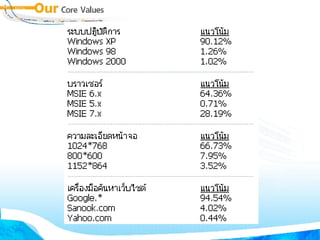
ขนาดของจอภาพ ปรับแต่งจอภาพสูงกว่า  1024 x 768 pixels กำหนดขนาดของจอภาพ  e-Book  ให้เหมาะสม พิจารณาจาก  http://truehits.net
 
 
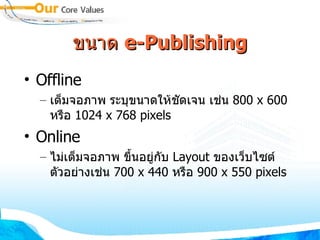
ขนาด  e- Publishing Offline เต็มจอภาพ ระบุขนาดให้ชัดเจน เช่น  800 x 600  หรือ  1024 x 768 pixels Online ไม่เต็มจอภาพ ขึ้นอยู่กับ  Layout  ของเว็บไซต์ ตัวอย่างเช่น  700 x 440  หรือ  900 x 550 pixels
โฟลเดอร์เฉพาะต่อผลงาน สร้างโฟลเดอร์   1  โฟลเดอร์ต่อ  1  ผลงาน Copy   ไฟล์ประกอบที่จำเป็นต้องใช้งานมารวมกันในโฟลเดอร์ กำหนดชื่อแฟ้มเอกสารตามมาตรฐาน
Server & Client WindowsXP IE Windows2000 IE Macintosh Windows98 Netscape พัฒนาเว็บด้วย HTML Editor, HTML Generator บน Windows Server : Unix/NT upload
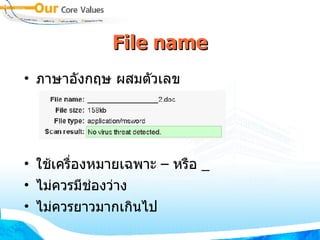
File name ภาษาอังกฤษ ผสมตัวเลข ใช้เครื่องหมายเฉพาะ  –  หรือ  _ ไม่ควรมีช่องว่าง ไม่ควรยาวมากเกินไป
ไฟล์ประกอบ Image .gif .jpg .bmp Video .avi .wmv Sound/Audio .wav .mp3 Flash Movie .swf PDF .pdf Original Documents .doc .xls .ppt
Text เลือกใช้ฟอนต์มาตรฐาน ตระกูล  New Tahoma MS Sans Serif
ภาพ กำหนดขนาดภาพให้เหมาะสมกับ  Layout เลือกใช้ภาพฟอร์แมต GIF  สำหรับภาพที่มีจำนวนสีไม่มาก หรือภาพขาวดำ JPEG สำหรับภาพที่ต้องการความคมชัด สีจำนวนมาก BMP สำหรับภาพที่ต้องการความถูกต้องของสี
RGB model RGB model used for lighting, video, and monitors So, computer’s monitor only has 3 colors Red Green Blue
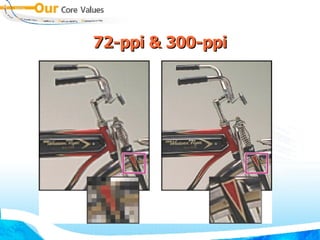
72-ppi & 300-ppi
JPEG Quality JPEG - 19K Low Quality JPEG - 60K Max Quality
Sound : PCM .wav 8-bit or 16-bit sound data Mono Preprocessing Sample Rate 5 kHz is barely acceptable for speech. 11 kHz is the lowest recommended quality for a short segment of music and is one-quarter of the standard CD rate. 22 kHz is a popular choice for Web playback and is half the standard CD rate. 44 kHz is the standard CD audio rate
Sound : MP3 Bit Rate 8 Kbps through 160 Kbps CBR (constant bit rate).  16 Kbps or higher for the best results Mono Preprocessing Quality Fast yields faster compression but lower sound quality.  Medium yields somewhat slower compression but higher sound quality.  Best yields the slowest compression and the highest sound quality.
VDO formats .MOV   Quicktime, an Apple standard. It is playable on  Macintosh and Windows machines.  .AVI   Microsoft standard that is playable on Windows  and Macintosh machines. .RM   Real streaming. They are playable on Windows,  MacOS, and Unix computers. .ASF   Microsoft streaming format, and play on  Windows, MacOS, and Solaris. .WMA/.WMV  Microsoft format used in Microsoft  MovieMaker .flv   Macromedia Flash Video
Web-based e-Publishing Webpages Blog Wiki
e-Publishing  ต้องคำนึงถึงลิขสิทธิ์ ซอฟต์แวร์ เนื้อหา Copyright Creative Commons Public Domain
ระวัง !  ตระหนัก ! ก่อนนำเนื้อหา หรือสื่อใดๆ มาใช้ ภาพ เสียง  video  หรือเนื้อหาที่นำมาใช้สร้างจะต้องไม่ละเมิดลิขสิทธิ์ผู้อื่น
Google Images ตระหนักในการให้บริการภาพออนไลน์
 
แต่เพื่อความปลอดภัย  100% การสร้างสรรค์เอง มีความสำคัญมากกว่าการนำมาใช้ เทคนิคการสร้างสรรค์ ตั้งวันที่ / เวลาให้ถูกต้องทั้งเครื่องส่วนตัว และ  Server ตาม พรบ . การกระทำความผิดทางคอมพิวเตอร์ .... เป็นเอกสารอ้างอิงในการฟ้องศาล เมื่อมีเหตุละเมิด ว่าเราเป็นเจ้าของผลงานที่ถูกต้องการ เก็บรักษาไฟล์ต้นฉบับ
วัน / เวลาคอมพิวเตอร์
 
 
Copyright สร้างข้อความประกาศการสงวนลิขสิทธิ์ให้ชัดเจนผ่านเว็บไซต์
 
 
Copyright & Copy Copyright 100% Copy 100% (CC) ‏
(cc)  คือพระเอก ไม่ควรหวังผล / กำไร  100% ตอบแทนสังคมบ้างก็ดี แนวทาง  PR  ที่ได้ผลลัพธ์สูงมาก แยกประเภทในข้อมูลในเว็บให้ชัดเจนว่า อะไร คือ  copyright 100% อะไร คือ  copyright  ไม่เต็ม  100
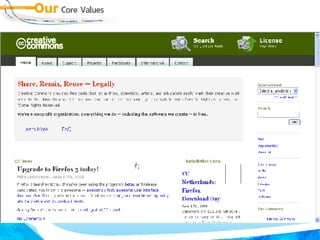
Copyright  ไม่เต็ม   100 คือ  Creative Commons การใช้สื่อที่   copyright  จะต้องได้รับอนุญาตเป็นลายลักษณ์อักษร การตอบจดหมายเป็นลายลักษณ์อักษร เป็นภาระ ไม่สร้างความประทับใจ สื่อใดที่ไม่ใช่  copyright 100%  ให้ลงทะเบียนเป็น  (cc)  แทน http://creativecommons.org
 
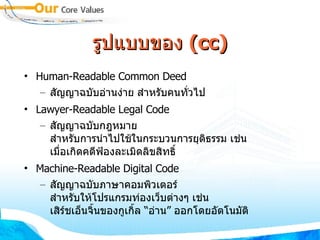
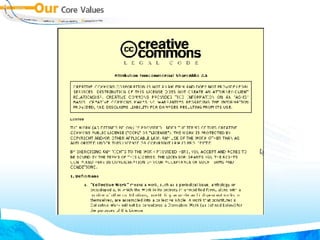
รูปแบบ ของ  (cc) Human-Readable Common Deed สัญญาฉบับอ่านง่าย สำหรับคนทั่วไป Lawyer-Readable Legal Code  สัญญาฉบับกฎหมาย สำหรับการนำไปใช้ในกระบวนการยุติธรรม เช่น เมื่อเกิดคดีฟ้องละเมิดลิขสิทธิ์ Machine-Readable Digital Code  สัญญาฉบับภาษาคอมพิวเตอร์ สำหรับให้โปรแกรมท่องเว็บต่างๆ เช่น เสิร์ชเอ็นจิ้นของกูเกิ้ล “อ่าน” ออกโดยอัตโนมัติ
เห็นแล้วรู้ อ่านเข้าใจง่าย


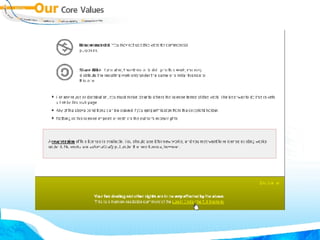
เงื่อนไข สัญญาอนุญาตแบบครีเอทีฟคอมมอนส์มีเงื่อนไขหลักสี่ข้อ  ผู้สร้างงานสามารถเลือกใช้ข้อใดข้อหนึ่งหรือหลายข้อรวมกันก็ได้  “ ยอมรับสิทธิของผู้สร้าง”  (Attribution ) - BY “ ไม่ใช้เพื่อการค้า”  (Noncommercial) - NC “ ไม่แก้ไขต้นฉบับ”  (No Derivative Works) - ND “ ใช้สัญญาอนุญาตแบบเดียวกัน”  (Share Alike) - SA
(cc)@Thailand http://creativecommons.org/international/th/ ร่างสัญญาอนุญาตของครีเอทีฟคอมมอนส์ แบบยอมรับสิทธิ ไม่ใช้เพื่อการค้าและอนุญาตแบบเดียวกัน  3.0  สำหรับประเทศไทย  จัดทำร่างโดยสำนักกฎหมายธรรมนิติ ขั้นตอนประชาพิจารณ์ วันที่  27  พฤศจิกายน ถึงวันที่  11  ธันวาคม  2550 http://cc.in.th/wiki/th_ccl
สร้าง (cc) เอกสารเว็บ เข้าเว็บไซต์  http://creativecommons.org/license/ เลือกรูปแบบ
เลือกรูปแบบ  Logo
สร้าง (cc) เอกสารเว็บ คัดลอก  Code  ไปแปะในเอกสารเว็บ
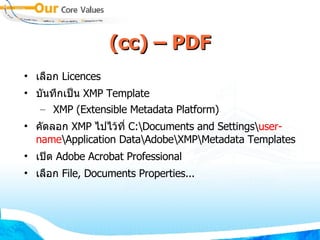
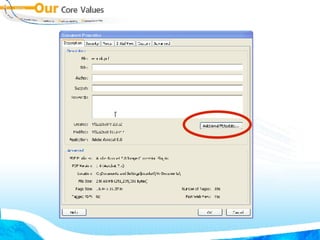
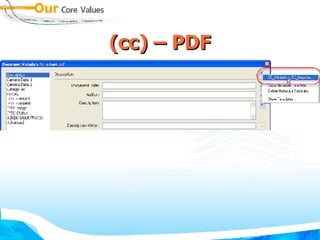
(cc) – PD F เลือก  Licences บันทึกเป็น  XMP Template XMP (Extensible Metadata Platform) ‏ คัดลอก  XMP  ไปไว้ที่  C:\Documents and Settings\ user-name \Application Data\Adobe\XMP\Metadata Templates เปิด  Adobe Acrobat Professional เลือก  File, Documents Properties...
บันทึกเป็น  XMF
(cc) – PDF
(cc) – PDF
(cc) – PDF
(cc) - Image ลักษณะเดียวกับ  PDF  แต่ให้เปิดโปรแกรม  Adobe PhotoShop เลือกคำสั่ง  File, File Info... เลือก  Advanced คลิกปุ่ม  Append โหลดไฟล์  .xmp  ที่ดาวน์โหลดจาก  (cc) web
(cc) - Image ลักษณะเดียวกับ  PDF  แต่ให้เปิดโปรแกรม  Adobe PhotoShop เลือกคำสั่ง  File, File Info...
Multi-Images
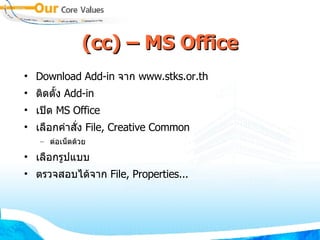
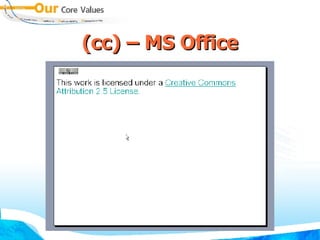
(cc) – MS Office Download Add-in  จาก  www.stks.or.th ติดตั้ง  Add-in เปิด  MS Office เลือกคำสั่ง  File, Creative Common ต่อเน็ตด้วย เลือกรูปแบบ ตรวจสอบได้จาก  File, Properties...
(cc) – MS Office
(cc) – MS Office
แหล่งข้อมูล http://stks.or.th http://www.stks.or.th/elearning http://creativecommons.org/ http://wiki.creativecommons.org http://cc.in.th http://www.dlo.co.th http://trnlab.org http://fuse.in.th

e-Publishing

  • 1.
    e-Publishing บุญเลิศ อรุณพิบูลย์ศูนย์บริการความรู้ทางวิทยาศาสตร์และเทคโนโลยี สำนักงานพัฒนาวิทยาศาสตร์และเทคโนโลยีแห่งชาติ www.stks.or.th
  • 2.
    e-Publishing ข้อความ ภาพและสื่อมัลติมีเดียที่นำเสนอในรูปแบบอิเล็กทรอนิกส์ เนื้อหา เรื่องเล่าในฟอร์แมต งานเขียน วรรณกรรมออนไลน์ (Blog, Wiki, Webpages) บทกวีที่ส่งผ่าน e-Mail e-Publishing is a form of publishing in which books are produced and stored electronically rather than in print
  • 3.
    e - Publishingกระบวนการผลิตสร้างสรรค์สิ่งพิมพ์ในรูปแบบอิเล็กทรอนิกส์ รูปแบบ ( Formatted) การเข้ารหัส ( Encrypted) การป้องกันความปลอดภัย (Security) การเผยแพร่ (Published)
  • 4.
    ประโยชน์ของ e- Publishing ลดการใช้กระดาษ , พลังงาน , สิ่งแวดล้อม , ธรรมชาติ ง่ายต่อการปรับปรุงแก้ไข ได้เอกสารที่มีคุณค่า ด้วยกรรมวิธีที่รวดเร็ว เช่น Video Clips ได้เอกสารที่สามารถโต้ตอบกับผู้อ่านได้ ง่าย สะดวกต่อการอ่าน ง่ายต่อการสืบค้น มีความคงทน นำเสนอสื่อมัลติมีเดียได้
  • 5.
    ประโยชน์ของ e- Publishing สร้างโอกาสให้กับนักเขียนหน้าใหม่ , นักอยากเขียน พัฒนาสื่อความรู้ สร้างโอกาสทางด้านการศึกษา สร้างโอกาสทางธุรกิจ เพิ่มมูลค่าให้กับ e-Library, e-Learning
  • 6.
    จุดอ่อนของ e- Publishing ลงทุนสูงในขั้นต้น ปัญหาในการอ่าน เช่น ขนาดจอภาพ , ความคมชัด การละเมิดลิขสิทธิ์ ไม่ให้ความสำคัญกับมาตรฐาน เทคโนโลยียังมีการพัฒนาอย่างต่อเนื่อง
  • 7.
    องค์ประกอบที่เกี่ยวข้องกับ e- Publishing Publishers Conversion Services / Tool Developers Distributors e - Retailers Device Manufactures Software Vendors Reader / User
  • 8.
    โมเดลสร้างสื่อสิ่งพิมพ์ Creation Editing Pre-press Printing Distribution Sale Consumption
  • 9.
    โมเดลสร้างสื่อสิ่งพิมพ์ Creation Editing Pre-press Printing Distribution Sale Consumption
  • 10.
    ประเภทของ e- Publishing Free e-Publishing Commercial e-Publishing Pay per View e-Publishing Purchased e-Publishing Leased e-Publishing
  • 11.
    องค์ประกอบ การพัฒนา HardwareSoftware Content Format & Standard Security / Protection Tools (DRM) & Standard DRM : Digital Right Management
  • 12.
    Hardware SpecificReader Handheld Readers Desktop Readers Online
  • 13.
    Software Authoring ConverterReader DNL Reader – Desktop Author FlipViewer – FlipAlbum, FlipPublisher Acrobat Reader – PDF Format TIFF Viewer – TIF Format
  • 14.
    Content Format Original Format from Word Processor & DTP Palm/PDA (PDB, PML: Peanut Markup Language) Acrobat (PDF: Portable Document Format) Graphics (TIFF format) Multimedia (FlipAlbum, Flash, MP3) Web Documents (HTML, XML: Extensive Markup Language)
  • 15.
    Word Processor & DTP ฟอนต์มาตรฐาน Style หัวใจหลักในการสร้างผลงาน Layout ดึงดูดความสนใจ อย่าลืมฝังฟอนต์ (Embedded) http :// www . stks . or . th / web / index2 . php?option = com_docman&task = doc_view&gid = 334&Itemid = 31
  • 16.
    Palm/PDA Word Processor---convert--> PDB PDF for Palm/PDA Specific Creator http :// www . thaiebook . org / t0103 / index . php?pgid = &PHPSESSID = a2958f6f27808d363d7024fd952c4ca2
  • 17.
    PDF Acrobat ProfessionalPDF Creator OpenOffice.org http://docs.google.com http://converttle.nectec.or.th
  • 18.
    PDF การฝังฟอนต์ สารบัญ/ Bookmark ระบบรักษาความปลอดภัย http :// www . stks . or . th / web / index2 . php?option = com_docman&task = doc_view&gid = 578&Itemid = 31
  • 19.
    Special Format FlipAlbum/FlipPublisherDesktop Author Flip Flash http :// www . stks . or . th / web / index2 . php?option = com_docman&task = doc_view&gid = 662&Itemid = 31
  • 20.
    ขนาดของจอภาพ ปรับแต่งจอภาพสูงกว่า 1024 x 768 pixels กำหนดขนาดของจอภาพ e-Book ให้เหมาะสม พิจารณาจาก http://truehits.net
  • 21.
  • 22.
  • 23.
    ขนาด e-Publishing Offline เต็มจอภาพ ระบุขนาดให้ชัดเจน เช่น 800 x 600 หรือ 1024 x 768 pixels Online ไม่เต็มจอภาพ ขึ้นอยู่กับ Layout ของเว็บไซต์ ตัวอย่างเช่น 700 x 440 หรือ 900 x 550 pixels
  • 24.
    โฟลเดอร์เฉพาะต่อผลงาน สร้างโฟลเดอร์ 1 โฟลเดอร์ต่อ 1 ผลงาน Copy ไฟล์ประกอบที่จำเป็นต้องใช้งานมารวมกันในโฟลเดอร์ กำหนดชื่อแฟ้มเอกสารตามมาตรฐาน
  • 25.
    Server & ClientWindowsXP IE Windows2000 IE Macintosh Windows98 Netscape พัฒนาเว็บด้วย HTML Editor, HTML Generator บน Windows Server : Unix/NT upload
  • 26.
    File name ภาษาอังกฤษผสมตัวเลข ใช้เครื่องหมายเฉพาะ – หรือ _ ไม่ควรมีช่องว่าง ไม่ควรยาวมากเกินไป
  • 27.
    ไฟล์ประกอบ Image .gif.jpg .bmp Video .avi .wmv Sound/Audio .wav .mp3 Flash Movie .swf PDF .pdf Original Documents .doc .xls .ppt
  • 28.
  • 29.
    ภาพ กำหนดขนาดภาพให้เหมาะสมกับ Layout เลือกใช้ภาพฟอร์แมต GIF สำหรับภาพที่มีจำนวนสีไม่มาก หรือภาพขาวดำ JPEG สำหรับภาพที่ต้องการความคมชัด สีจำนวนมาก BMP สำหรับภาพที่ต้องการความถูกต้องของสี
  • 30.
    RGB model RGBmodel used for lighting, video, and monitors So, computer’s monitor only has 3 colors Red Green Blue
  • 31.
  • 32.
    JPEG Quality JPEG- 19K Low Quality JPEG - 60K Max Quality
  • 33.
    Sound : PCM.wav 8-bit or 16-bit sound data Mono Preprocessing Sample Rate 5 kHz is barely acceptable for speech. 11 kHz is the lowest recommended quality for a short segment of music and is one-quarter of the standard CD rate. 22 kHz is a popular choice for Web playback and is half the standard CD rate. 44 kHz is the standard CD audio rate
  • 34.
    Sound : MP3Bit Rate 8 Kbps through 160 Kbps CBR (constant bit rate). 16 Kbps or higher for the best results Mono Preprocessing Quality Fast yields faster compression but lower sound quality. Medium yields somewhat slower compression but higher sound quality. Best yields the slowest compression and the highest sound quality.
  • 35.
    VDO formats .MOV Quicktime, an Apple standard. It is playable on Macintosh and Windows machines. .AVI Microsoft standard that is playable on Windows and Macintosh machines. .RM Real streaming. They are playable on Windows, MacOS, and Unix computers. .ASF Microsoft streaming format, and play on Windows, MacOS, and Solaris. .WMA/.WMV Microsoft format used in Microsoft MovieMaker .flv Macromedia Flash Video
  • 36.
  • 37.
    e-Publishing ต้องคำนึงถึงลิขสิทธิ์ซอฟต์แวร์ เนื้อหา Copyright Creative Commons Public Domain
  • 38.
    ระวัง ! ตระหนัก ! ก่อนนำเนื้อหา หรือสื่อใดๆ มาใช้ ภาพ เสียง video หรือเนื้อหาที่นำมาใช้สร้างจะต้องไม่ละเมิดลิขสิทธิ์ผู้อื่น
  • 39.
  • 40.
  • 41.
    แต่เพื่อความปลอดภัย 100%การสร้างสรรค์เอง มีความสำคัญมากกว่าการนำมาใช้ เทคนิคการสร้างสรรค์ ตั้งวันที่ / เวลาให้ถูกต้องทั้งเครื่องส่วนตัว และ Server ตาม พรบ . การกระทำความผิดทางคอมพิวเตอร์ .... เป็นเอกสารอ้างอิงในการฟ้องศาล เมื่อมีเหตุละเมิด ว่าเราเป็นเจ้าของผลงานที่ถูกต้องการ เก็บรักษาไฟล์ต้นฉบับ
  • 42.
  • 43.
  • 44.
  • 45.
  • 46.
  • 47.
  • 48.
    Copyright & CopyCopyright 100% Copy 100% (CC) ‏
  • 49.
    (cc) คือพระเอกไม่ควรหวังผล / กำไร 100% ตอบแทนสังคมบ้างก็ดี แนวทาง PR ที่ได้ผลลัพธ์สูงมาก แยกประเภทในข้อมูลในเว็บให้ชัดเจนว่า อะไร คือ copyright 100% อะไร คือ copyright ไม่เต็ม 100
  • 50.
    Copyright ไม่เต็ม 100 คือ Creative Commons การใช้สื่อที่ copyright จะต้องได้รับอนุญาตเป็นลายลักษณ์อักษร การตอบจดหมายเป็นลายลักษณ์อักษร เป็นภาระ ไม่สร้างความประทับใจ สื่อใดที่ไม่ใช่ copyright 100% ให้ลงทะเบียนเป็น (cc) แทน http://creativecommons.org
  • 51.
  • 52.
    รูปแบบ ของ (cc) Human-Readable Common Deed สัญญาฉบับอ่านง่าย สำหรับคนทั่วไป Lawyer-Readable Legal Code สัญญาฉบับกฎหมาย สำหรับการนำไปใช้ในกระบวนการยุติธรรม เช่น เมื่อเกิดคดีฟ้องละเมิดลิขสิทธิ์ Machine-Readable Digital Code สัญญาฉบับภาษาคอมพิวเตอร์ สำหรับให้โปรแกรมท่องเว็บต่างๆ เช่น เสิร์ชเอ็นจิ้นของกูเกิ้ล “อ่าน” ออกโดยอัตโนมัติ
  • 53.
  • 54.
  • 55.
  • 56.
  • 57.
    เงื่อนไข สัญญาอนุญาตแบบครีเอทีฟคอมมอนส์มีเงื่อนไขหลักสี่ข้อ ผู้สร้างงานสามารถเลือกใช้ข้อใดข้อหนึ่งหรือหลายข้อรวมกันก็ได้ “ ยอมรับสิทธิของผู้สร้าง” (Attribution ) - BY “ ไม่ใช้เพื่อการค้า” (Noncommercial) - NC “ ไม่แก้ไขต้นฉบับ” (No Derivative Works) - ND “ ใช้สัญญาอนุญาตแบบเดียวกัน” (Share Alike) - SA
  • 58.
    (cc)@Thailand http://creativecommons.org/international/th/ ร่างสัญญาอนุญาตของครีเอทีฟคอมมอนส์แบบยอมรับสิทธิ ไม่ใช้เพื่อการค้าและอนุญาตแบบเดียวกัน 3.0 สำหรับประเทศไทย จัดทำร่างโดยสำนักกฎหมายธรรมนิติ ขั้นตอนประชาพิจารณ์ วันที่ 27 พฤศจิกายน ถึงวันที่ 11 ธันวาคม 2550 http://cc.in.th/wiki/th_ccl
  • 59.
    สร้าง (cc) เอกสารเว็บเข้าเว็บไซต์ http://creativecommons.org/license/ เลือกรูปแบบ
  • 60.
  • 61.
    สร้าง (cc) เอกสารเว็บคัดลอก Code ไปแปะในเอกสารเว็บ
  • 62.
    (cc) – PDF เลือก Licences บันทึกเป็น XMP Template XMP (Extensible Metadata Platform) ‏ คัดลอก XMP ไปไว้ที่ C:\Documents and Settings\ user-name \Application Data\Adobe\XMP\Metadata Templates เปิด Adobe Acrobat Professional เลือก File, Documents Properties...
  • 63.
  • 64.
  • 65.
  • 66.
  • 67.
    (cc) - Imageลักษณะเดียวกับ PDF แต่ให้เปิดโปรแกรม Adobe PhotoShop เลือกคำสั่ง File, File Info... เลือก Advanced คลิกปุ่ม Append โหลดไฟล์ .xmp ที่ดาวน์โหลดจาก (cc) web
  • 68.
    (cc) - Imageลักษณะเดียวกับ PDF แต่ให้เปิดโปรแกรม Adobe PhotoShop เลือกคำสั่ง File, File Info...
  • 69.
  • 70.
    (cc) – MSOffice Download Add-in จาก www.stks.or.th ติดตั้ง Add-in เปิด MS Office เลือกคำสั่ง File, Creative Common ต่อเน็ตด้วย เลือกรูปแบบ ตรวจสอบได้จาก File, Properties...
  • 71.
  • 72.
  • 73.
    แหล่งข้อมูล http://stks.or.th http://www.stks.or.th/elearninghttp://creativecommons.org/ http://wiki.creativecommons.org http://cc.in.th http://www.dlo.co.th http://trnlab.org http://fuse.in.th