Confidential
www.vitalpointz.net1
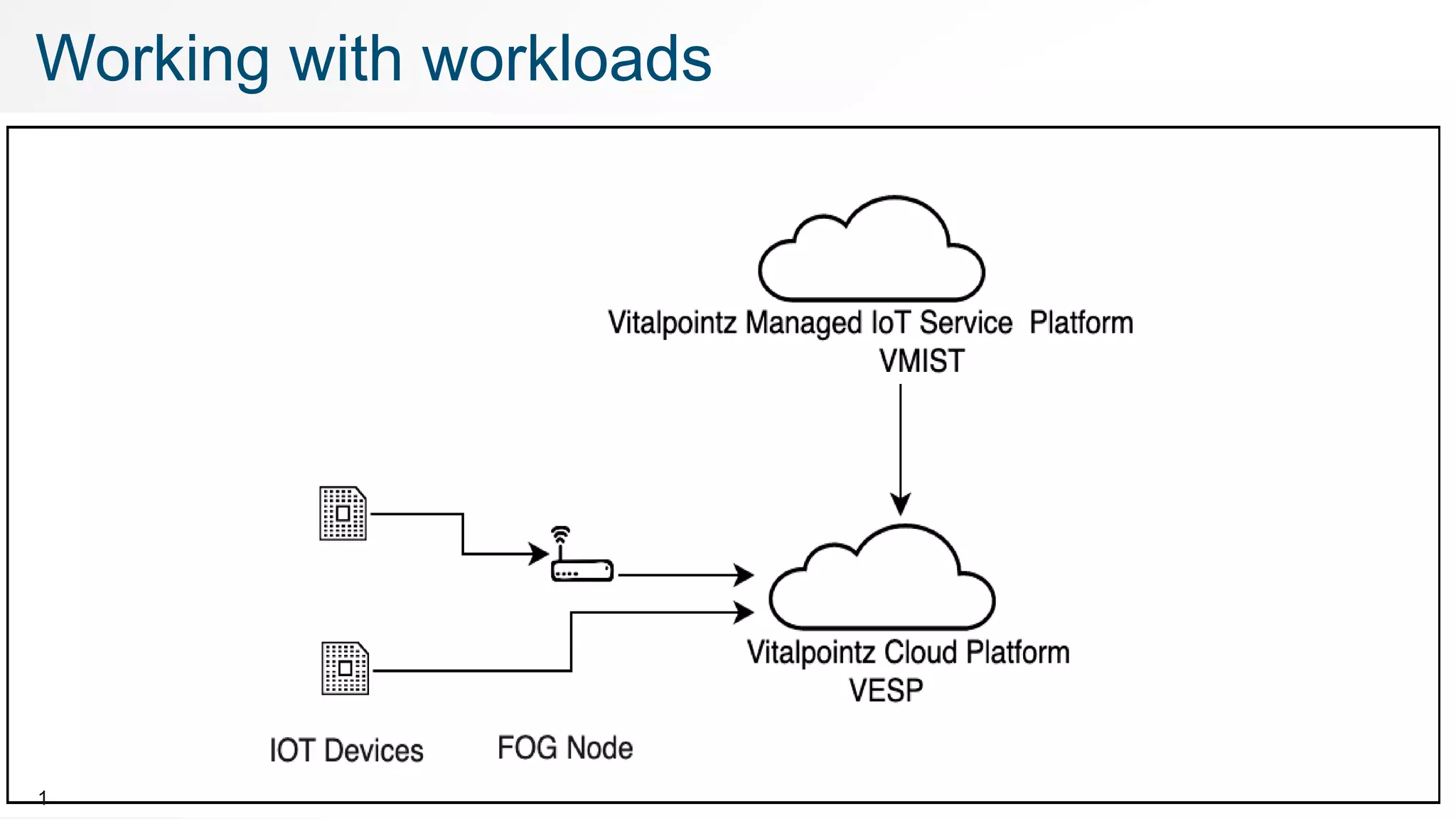
Working with workloads
Confidential
www.vitalpointz.net
©2017 , www.vitalpointz.net
vitalpointz IoT Core Lite v1.3 and above
Working with Workloads in
vitalpointz IoT Core Lite
Confidential
www.vitalpointz.net
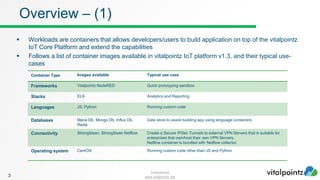
 Workloads are containers that allows developers/users to build application on top of the vitalpointz
IoT Core Platform and extend the capabilities
 Follows a list of container images available in vitalpointz IoT platform v1.3, and their typical use-
cases
3
Overview – (1)
Container Type Images available Typical use case
Frameworks Vitalpointz NodeRED Quick prototyping sandbox
Stacks ELK Analytics and Reporting
Languages JS, Python Running custom code
Databases Maria Db, Mongo Db, Influx Db,
Redis
Data store to assist building app using language containers
Connectivity StrongSwan, StrongSwan Netflow Create a Secure IPSec Tunnels to external VPN Servers that is suitable for
enterprises that own/host their own VPN Servers.
Netflow container is bundled with Netflow collector.
Operating system CentOS Running custom code other than JS and Python
Confidential
www.vitalpointz.net
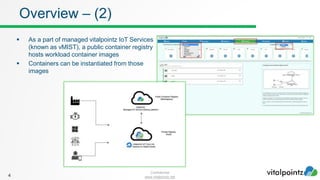
 As a part of managed vitalpointz IoT Services
(known as vMIST), a public container registry
hosts workload container images
 Containers can be instantiated from those
images
4
Overview – (2)
Confidential
www.vitalpointz.net5
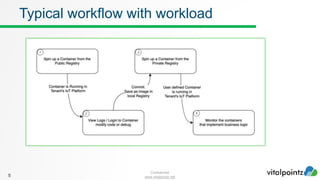
Typical workflow with workload
Confidential
www.vitalpointz.net
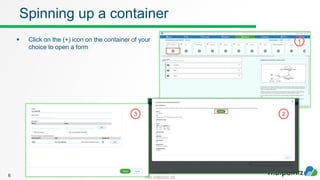
 Click on the (+) icon on the container of your
choice to open a form
6
Spinning up a container
2
1
3
Confidential
www.vitalpointz.net7
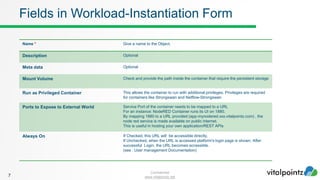
Fields in Workload-Instantiation Form
Name * Give a name to the Object.
Description Optional
Meta data Optional
Mount Volume Check and provide the path inside the container that require the persistent storage
Run as Privileged Container This allows the container to run with additional privileges. Privileges are required
for containers like Strongswan and Netflow-Strongswan
Ports to Expose to External World Service Port of the container needs to be mapped to a URL
For an instance: NodeRED Container runs its UI on 1880.
By mapping 1880 to a URL provided (app-mynodered.xxx.vitalpointz.com) , the
node red service is made available on public internet.
This is useful in hosting your own application/REST APIs
Always On If Checked, this URL will be accessible directly.
If Unchecked, when the URL is accessed platform's login page is shown. After
successful Login, the URL becomes accessible.
(see : User management Documentation)
Confidential
www.vitalpointz.net
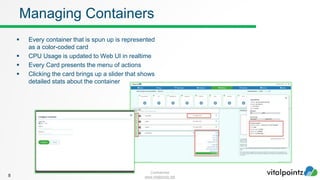
 Every container that is spun up is represented
as a color-coded card
 CPU Usage is updated to Web UI in realtime
 Every Card presents the menu of actions
 Clicking the card brings up a slider that shows
detailed stats about the container
8
Managing Containers
Confidential
www.vitalpointz.net
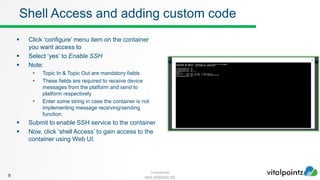
 Click ‘configure’ menu item on the container
you want access to
 Select ‘yes’ to Enable SSH
 Note:
 Topic In & Topic Out are mandatory fields
 These fields are required to receive device
messages from the platform and send to
platform respectively
 Enter some string in case the container is not
implementing message receiving/sending
function.
 Submit to enable SSH service to the container
 Now, click ‘shell Access’ to gain access to the
container using Web UI.
9
Shell Access and adding custom code
Confidential
www.vitalpointz.net
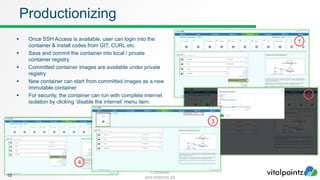
 Once SSH Access is available, user can login into the
container & install codes from GIT, CURL etc.
 Save and commit the container into local / private
container registry
 Committed container images are available under private
registry
 New container can start from committed images as a new
immutable container
 For security, the container can run with complete internet
isolation by clicking ‘disable the internet’ menu item.
10
Productionizing
1
2
3
4
Confidential
www.vitalpointz.net
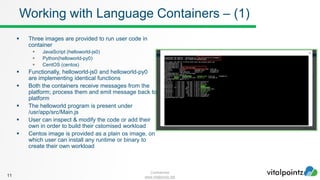
 Three images are provided to run user code in
container
 JavaScript (helloworld-js0)
 Python(helloworld-py0)
 CentOS (centos)
 Functionally, helloworld-js0 and helloworld-py0
are implementing identical functions
 Both the containers receive messages from the
platform; process them and emit message back to
platform
 The helloworld program is present under
/usr/app/src/Main.js
 User can inspect & modify the code or add their
own in order to build their cstomised workload
 Centos image is provided as a plain os image, on
which user can install any runtime or binary to
create their own workload
11
Working with Language Containers – (1)
Confidential
www.vitalpointz.net
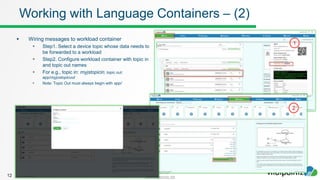
 Wiring messages to workload container
 Step1. Select a device topic whose data needs to
be forwarded to a workload
 Step2. Configure workload container with topic in
and topic out names
 For e.g., topic in: myjstopicin, topic out:
app/myjostopicout
 Note: Topic Out must always begin with app/
12
Working with Language Containers – (2)
1
2
Confidential
www.vitalpointz.net
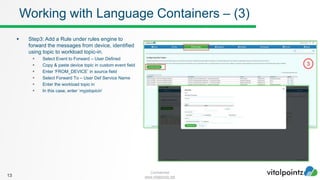
 Step3: Add a Rule under rules engine to
forward the messages from device, identified
using topic to workload topic-in.
 Select Event to Forward – User Defined
 Copy & paste device topic in custom event field
 Enter ‘FROM_DEVICE’ in source field
 Select Forward To – User Def Service Name
 Enter the workload topic in
 In this case, enter ‘myjstopicin’
13
Working with Language Containers – (3)
3
Confidential
www.vitalpointz.net
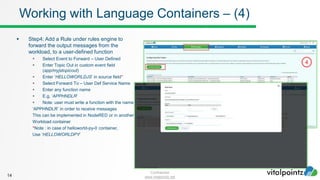
 Step4: Add a Rule under rules engine to
forward the output messages from the
workload, to a user-defined function
 Select Event to Forward – User Defined
 Enter Topic Out in custom event field
(app/myjstopicout)
 Enter ‘HELLOWORLDJS’ in source field*
 Select Forward To – User Def Service Name
 Enter any function name
 E.g, ‘APPHNDLR’
 Note: user must write a function with the name
‘APPHNDLR’ in order to receive messages
This can be implemented in NodeRED or in another
Workload container
*Note : in case of helloworld-py-0 container,
Use ‘HELLOWORLDPY’
14
Working with Language Containers – (4)
4
Confidential
www.vitalpointz.net
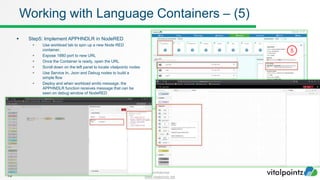
 Step5: Implement APPHNDLR in NodeRED
 Use workload tab to spin up a new Node RED
container.
 Expose 1880 port to new URL
 Once the Container is ready, open the URL
 Scroll down on the left panel to locate vitalpointz nodes
 Use Service In, Json and Debug nodes to build a
simple flow
 Deploy and when workload emits message, the
APPHNDLR function receives message that can be
seen on debug window of NodeRED
15
Working with Language Containers – (5)
5
Confidential
www.vitalpointz.net
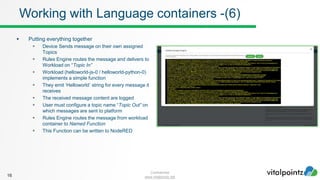
 Putting everything together
 Device Sends message on their own assigned
Topics
 Rules Engine routes the message and delivers to
Workload on “Topic In”
 Workload (helloworld-js-0 / helloworld-python-0)
implements a simple function
 They emit ‘Helloworld’ string for every message it
receives
 The received message content are logged
 User must configure a topic name “Topic Out” on
which messages are sent to platform
 Rules Engine routes the message from workload
container to Named Function
 This Function can be written to NodeRED
16
Working with Language containers -(6)
Confidential
www.vitalpointz.net
 In order to support application development, several
database images are hosted in Public registry
 On create new container form,
 Check the Mount Volume – this will mount the
container’s folder on host machine’s persistent
storage
 Enter the full folder path of the container to be
persisted
17
Working with Database containers
Confidential
www.vitalpointz.net
 Using Workload module of vitalpointz IoT Core,
 Developers can Port or build a new application on any language
 Receive messages from the Platform, process and return the result back platform
 The workload can remain private within the platform OR can be exposed to external world using a URL
18
Summary
Confidential
www.vitalpointz.net
©2017 , www.vitalpointz.net
Got a Questions ?
ask in our Slack support channel
search in our community forum community.vitalpointz.com

2. workload

  • 1.
  • 2.
    Confidential www.vitalpointz.net ©2017 , www.vitalpointz.net vitalpointzIoT Core Lite v1.3 and above Working with Workloads in vitalpointz IoT Core Lite
  • 3.
    Confidential www.vitalpointz.net  Workloads arecontainers that allows developers/users to build application on top of the vitalpointz IoT Core Platform and extend the capabilities  Follows a list of container images available in vitalpointz IoT platform v1.3, and their typical use- cases 3 Overview – (1) Container Type Images available Typical use case Frameworks Vitalpointz NodeRED Quick prototyping sandbox Stacks ELK Analytics and Reporting Languages JS, Python Running custom code Databases Maria Db, Mongo Db, Influx Db, Redis Data store to assist building app using language containers Connectivity StrongSwan, StrongSwan Netflow Create a Secure IPSec Tunnels to external VPN Servers that is suitable for enterprises that own/host their own VPN Servers. Netflow container is bundled with Netflow collector. Operating system CentOS Running custom code other than JS and Python
  • 4.
    Confidential www.vitalpointz.net  As apart of managed vitalpointz IoT Services (known as vMIST), a public container registry hosts workload container images  Containers can be instantiated from those images 4 Overview – (2)
  • 5.
  • 6.
    Confidential www.vitalpointz.net  Click onthe (+) icon on the container of your choice to open a form 6 Spinning up a container 2 1 3
  • 7.
    Confidential www.vitalpointz.net7 Fields in Workload-InstantiationForm Name * Give a name to the Object. Description Optional Meta data Optional Mount Volume Check and provide the path inside the container that require the persistent storage Run as Privileged Container This allows the container to run with additional privileges. Privileges are required for containers like Strongswan and Netflow-Strongswan Ports to Expose to External World Service Port of the container needs to be mapped to a URL For an instance: NodeRED Container runs its UI on 1880. By mapping 1880 to a URL provided (app-mynodered.xxx.vitalpointz.com) , the node red service is made available on public internet. This is useful in hosting your own application/REST APIs Always On If Checked, this URL will be accessible directly. If Unchecked, when the URL is accessed platform's login page is shown. After successful Login, the URL becomes accessible. (see : User management Documentation)
  • 8.
    Confidential www.vitalpointz.net  Every containerthat is spun up is represented as a color-coded card  CPU Usage is updated to Web UI in realtime  Every Card presents the menu of actions  Clicking the card brings up a slider that shows detailed stats about the container 8 Managing Containers
  • 9.
    Confidential www.vitalpointz.net  Click ‘configure’menu item on the container you want access to  Select ‘yes’ to Enable SSH  Note:  Topic In & Topic Out are mandatory fields  These fields are required to receive device messages from the platform and send to platform respectively  Enter some string in case the container is not implementing message receiving/sending function.  Submit to enable SSH service to the container  Now, click ‘shell Access’ to gain access to the container using Web UI. 9 Shell Access and adding custom code
  • 10.
    Confidential www.vitalpointz.net  Once SSHAccess is available, user can login into the container & install codes from GIT, CURL etc.  Save and commit the container into local / private container registry  Committed container images are available under private registry  New container can start from committed images as a new immutable container  For security, the container can run with complete internet isolation by clicking ‘disable the internet’ menu item. 10 Productionizing 1 2 3 4
  • 11.
    Confidential www.vitalpointz.net  Three imagesare provided to run user code in container  JavaScript (helloworld-js0)  Python(helloworld-py0)  CentOS (centos)  Functionally, helloworld-js0 and helloworld-py0 are implementing identical functions  Both the containers receive messages from the platform; process them and emit message back to platform  The helloworld program is present under /usr/app/src/Main.js  User can inspect & modify the code or add their own in order to build their cstomised workload  Centos image is provided as a plain os image, on which user can install any runtime or binary to create their own workload 11 Working with Language Containers – (1)
  • 12.
    Confidential www.vitalpointz.net  Wiring messagesto workload container  Step1. Select a device topic whose data needs to be forwarded to a workload  Step2. Configure workload container with topic in and topic out names  For e.g., topic in: myjstopicin, topic out: app/myjostopicout  Note: Topic Out must always begin with app/ 12 Working with Language Containers – (2) 1 2
  • 13.
    Confidential www.vitalpointz.net  Step3: Adda Rule under rules engine to forward the messages from device, identified using topic to workload topic-in.  Select Event to Forward – User Defined  Copy & paste device topic in custom event field  Enter ‘FROM_DEVICE’ in source field  Select Forward To – User Def Service Name  Enter the workload topic in  In this case, enter ‘myjstopicin’ 13 Working with Language Containers – (3) 3
  • 14.
    Confidential www.vitalpointz.net  Step4: Adda Rule under rules engine to forward the output messages from the workload, to a user-defined function  Select Event to Forward – User Defined  Enter Topic Out in custom event field (app/myjstopicout)  Enter ‘HELLOWORLDJS’ in source field*  Select Forward To – User Def Service Name  Enter any function name  E.g, ‘APPHNDLR’  Note: user must write a function with the name ‘APPHNDLR’ in order to receive messages This can be implemented in NodeRED or in another Workload container *Note : in case of helloworld-py-0 container, Use ‘HELLOWORLDPY’ 14 Working with Language Containers – (4) 4
  • 15.
    Confidential www.vitalpointz.net  Step5: ImplementAPPHNDLR in NodeRED  Use workload tab to spin up a new Node RED container.  Expose 1880 port to new URL  Once the Container is ready, open the URL  Scroll down on the left panel to locate vitalpointz nodes  Use Service In, Json and Debug nodes to build a simple flow  Deploy and when workload emits message, the APPHNDLR function receives message that can be seen on debug window of NodeRED 15 Working with Language Containers – (5) 5
  • 16.
    Confidential www.vitalpointz.net  Putting everythingtogether  Device Sends message on their own assigned Topics  Rules Engine routes the message and delivers to Workload on “Topic In”  Workload (helloworld-js-0 / helloworld-python-0) implements a simple function  They emit ‘Helloworld’ string for every message it receives  The received message content are logged  User must configure a topic name “Topic Out” on which messages are sent to platform  Rules Engine routes the message from workload container to Named Function  This Function can be written to NodeRED 16 Working with Language containers -(6)
  • 17.
    Confidential www.vitalpointz.net  In orderto support application development, several database images are hosted in Public registry  On create new container form,  Check the Mount Volume – this will mount the container’s folder on host machine’s persistent storage  Enter the full folder path of the container to be persisted 17 Working with Database containers
  • 18.
    Confidential www.vitalpointz.net  Using Workloadmodule of vitalpointz IoT Core,  Developers can Port or build a new application on any language  Receive messages from the Platform, process and return the result back platform  The workload can remain private within the platform OR can be exposed to external world using a URL 18 Summary
  • 19.
    Confidential www.vitalpointz.net ©2017 , www.vitalpointz.net Gota Questions ? ask in our Slack support channel search in our community forum community.vitalpointz.com