Fetch the latest state from upstream
In this exercise you will learn how to fetch the latest state from upstream. Fetching the latest
state will update the remote tracking branch(es) in your local repository. It will not try to change
any of your local branches or your working tree.
You may skip this step in the first part of the tutorial as no new changes will have been made
in the remote repository. You should nevertheless make it your habit to always create a new
feature branch on the latest state you have fetched from the remote repository. Later, in the
Gerrit exercises you will be referred to this exercise again when you have conflicts.
Before starting to develop a feature or doing a bug-fix you should fetch the latest state from the
central repository. This will update the remote tracking branch origin/master which will be
the base for your local changes.
● Go to the Git Repositories View
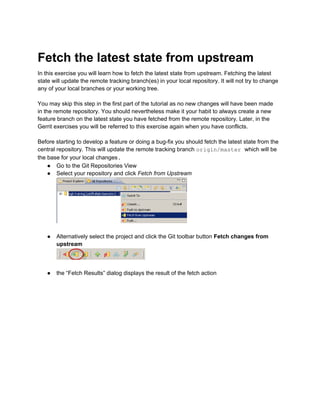
● Select your repository and click Fetch from Upstream
● Alternatively select the project and click the Git toolbar button Fetch changes from
upstream
● the “Fetch Results” dialog displays the result of the fetch action
● if new changes have been fetched it looks like this:
● if you already have the latest state available on the server it shows the message
“everything up to date” and the list is empty
● Now, after the remote tracking branch origin/master is up-to-date it is a good basis for
creating a new local feature branch
● In the History View the (updated) origin/master branch shows the status of the master
branch in the remote repository.
Copyright © 2014 by C. Halstrick, E. Kempin, S. Lay, S. Zivkov

Git Tutorial EclipseCon France 2014 - Gerrit Exercise 2 - fetch the latest state

  • 1.
    Fetch the lateststate from upstream In this exercise you will learn how to fetch the latest state from upstream. Fetching the latest state will update the remote tracking branch(es) in your local repository. It will not try to change any of your local branches or your working tree. You may skip this step in the first part of the tutorial as no new changes will have been made in the remote repository. You should nevertheless make it your habit to always create a new feature branch on the latest state you have fetched from the remote repository. Later, in the Gerrit exercises you will be referred to this exercise again when you have conflicts. Before starting to develop a feature or doing a bug-fix you should fetch the latest state from the central repository. This will update the remote tracking branch origin/master which will be the base for your local changes. ● Go to the Git Repositories View ● Select your repository and click Fetch from Upstream ● Alternatively select the project and click the Git toolbar button Fetch changes from upstream ● the “Fetch Results” dialog displays the result of the fetch action
  • 2.
    ● if newchanges have been fetched it looks like this: ● if you already have the latest state available on the server it shows the message “everything up to date” and the list is empty ● Now, after the remote tracking branch origin/master is up-to-date it is a good basis for creating a new local feature branch ● In the History View the (updated) origin/master branch shows the status of the master branch in the remote repository.
  • 3.
    Copyright © 2014by C. Halstrick, E. Kempin, S. Lay, S. Zivkov