Copyright © 2014 videantis 1
Marco Jacobs
May 29, 2014
Implementing Histogram of Oriented
Gradients on a Parallel Vision Processor
Copyright © 2014 videantis 2
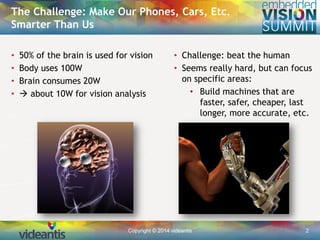
• 50% of the brain is used for vision
• Body uses 100W
• Brain consumes 20W
•  about 10W for vision analysis
The Challenge: Make Our Phones, Cars, Etc.
Smarter Than Us
• Challenge: beat the human
• Seems really hard, but can focus
on specific areas:
• Build machines that are
faster, safer, cheaper, last
longer, more accurate, etc.
Copyright © 2014 videantis 3
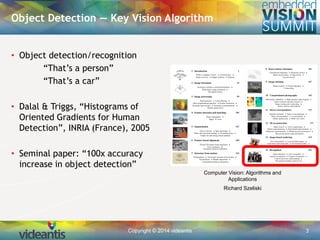
• Object detection/recognition
“That’s a person”
“That’s a car”
• Dalal & Triggs, “Histograms of
Oriented Gradients for Human
Detection”, INRIA (France), 2005
• Seminal paper: “100x accuracy
increase in object detection”
Object Detection — Key Vision Algorithm
Computer Vision: Algorithms and
Applications
Richard Szeliski
Copyright © 2014 videantis 4
Object Detection — Sample Applications
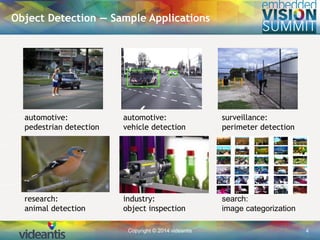
automotive:
pedestrian detection
automotive:
vehicle detection
surveillance:
perimeter detection
research:
animal detection
industry:
object inspection
search:
image categorization
Copyright © 2014 videantis 5
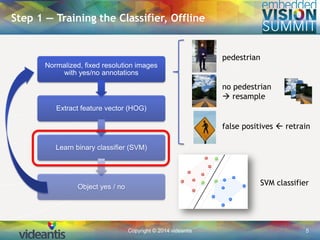
Step 1 — Training the Classifier, Offline
Normalized, fixed resolution images
with yes/no annotations
Extract feature vector (HOG)
Learn binary classifier (SVM)
Object yes / no
pedestrian
no pedestrian
 resample
false positives  retrain
SVM classifier
Copyright © 2014 videantis 6
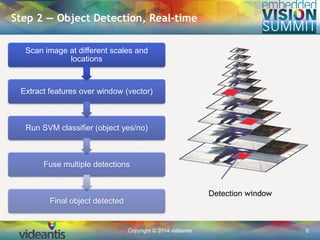
Step 2 — Object Detection, Real-time
Scan image at different scales and
locations
Extract features over window (vector)
Run SVM classifier (object yes/no)
Fuse multiple detections
Final object detected
Detection window
Copyright © 2014 videantis 7
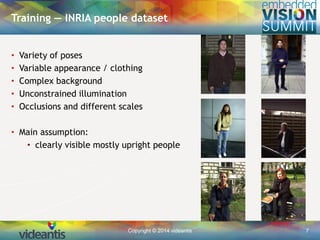
Training — INRIA people dataset
• Variety of poses
• Variable appearance / clothing
• Complex background
• Unconstrained illumination
• Occlusions and different scales
• Main assumption:
• clearly visible mostly upright people
Copyright © 2014 videantis 8
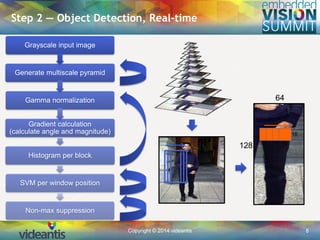
Step 2 — Object Detection, Real-time
Grayscale input image
Generate multiscale pyramid
Gamma normalization
Gradient calculation
(calculate angle and magnitude)
Histogram per block
SVM per window position
Non-max suppression
64
128 16
16
Copyright © 2014 videantis 9
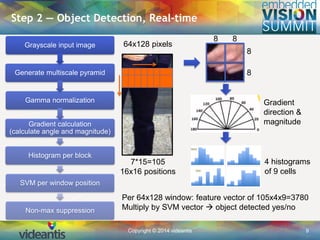
Step 2 — Object Detection, Real-time
Grayscale input image
Generate multiscale pyramid
Gamma normalization
Gradient calculation
(calculate angle and magnitude)
Histogram per block
SVM per window position
Non-max suppression
8 8
8
8
4 histograms
of 9 cells
Per 64x128 window: feature vector of 105x4x9=3780
Multiply by SVM vector  object detected yes/no
Gradient
direction &
magnitude
64x128 pixels
7*15=105
16x16 positions
Copyright © 2014 videantis 10
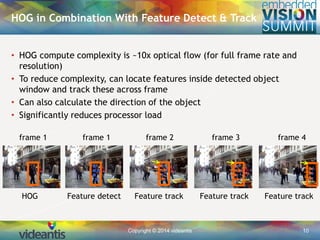
• HOG compute complexity is ~10x optical flow (for full frame rate and
resolution)
• To reduce complexity, can locate features inside detected object
window and track these across frame
• Can also calculate the direction of the object
• Significantly reduces processor load
HOG in Combination With Feature Detect & Track
frame 1 frame 1 frame 2 frame 3 frame 4
HOG Feature detect Feature track Feature track Feature track
Copyright © 2014 videantis 11
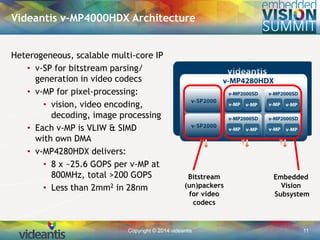
Videantis v-MP4000HDX Architecture
Embedded
Vision
Subsystem
Bitstream
(un)packers
for video
codecs
Heterogeneous, scalable multi-core IP
• v-SP for bitstream parsing/
generation in video codecs
• v-MP for pixel-processing:
• vision, video encoding,
decoding, image processing
• Each v-MP is VLIW & SIMD
with own DMA
• v-MP4280HDX delivers:
• 8 x ~25.6 GOPS per v-MP at
800MHz, total >200 GOPS
• Less than 2mm2 in 28nm
Copyright © 2014 videantis 12
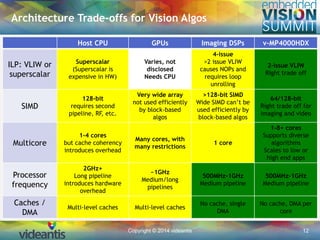
Host CPU GPUs Imaging DSPs v-MP4000HDX
ILP: VLIW or
superscalar
Superscalar
(Superscalar is
expensive in HW)
Varies, not
disclosed
Needs CPU
4-issue
>2 issue VLIW
causes NOPs and
requires loop
unrolling
2-issue VLIW
Right trade off
SIMD
128-bit
requires second
pipeline, RF, etc.
Very wide array
not used efficiently
by block-based
algos
>128-bit SIMD
Wide SIMD can’t be
used efficiently by
block-based algos
64/128-bit
Right trade off for
imaging and video
Multicore
1-4 cores
but cache coherency
introduces overhead
Many cores, with
many restrictions
1 core
1-8+ cores
Supports diverse
algorithms
Scales to low or
high end apps
Processor
frequency
2GHz+
Long pipeline
introduces hardware
overhead
~1GHz
Medium/long
pipelines
500MHz-1GHz
Medium pipeline
500MHz-1GHz
Medium pipeline
Caches /
DMA
Multi-level caches Multi-level caches
No cache, single
DMA
No cache, DMA per
core
Architecture Trade-offs for Vision Algos
Copyright © 2014 videantis 13
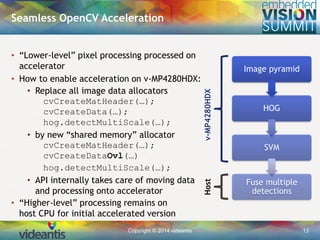
• “Lower-level” pixel processing processed on
accelerator
• How to enable acceleration on v-MP4280HDX:
• Replace all image data allocators
cvCreateMatHeader(…);
cvCreateData(…);
hog.detectMultiScale(…);
• by new “shared memory” allocator
cvCreateMatHeader(…);
cvCreateDataOvl(…)
hog.detectMultiScale(…);
• API internally takes care of moving data
and processing onto accelerator
• “Higher-level” processing remains on
host CPU for initial accelerated version
Seamless OpenCV Acceleration
Hostv-MP4280HDX
Image pyramid
HOG
SVM
Fuse multiple
detections
Copyright © 2014 videantis 14
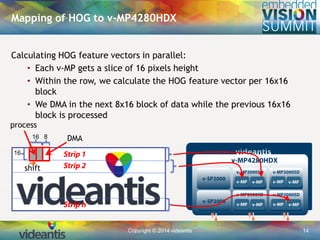
Calculating HOG feature vectors in parallel:
• Each v-MP gets a slice of 16 pixels height
• Within the row, we calculate the HOG feature vector per 16x16
block
• We DMA in the next 8x16 block of data while the previous 16x16
block is processed
Mapping of HOG to v-MP4280HDX
process
DMA
shift
816
16
Copyright © 2014 videantis 15
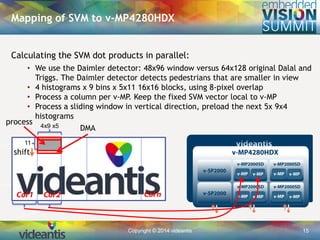
Calculating the SVM dot products in parallel:
• We use the Daimler detector: 48x96 window versus 64x128 original Dalal and
Triggs. The Daimler detector detects pedestrians that are smaller in view
• 4 histograms x 9 bins x 5x11 16x16 blocks, using 8-pixel overlap
• Process a column per v-MP. Keep the fixed SVM vector local to v-MP
• Process a sliding window in vertical direction, preload the next 5x 9x4
histograms
Mapping of SVM to v-MP4280HDX
process
DMA
shift
4x9 x5
11
Copyright © 2014 videantis 16
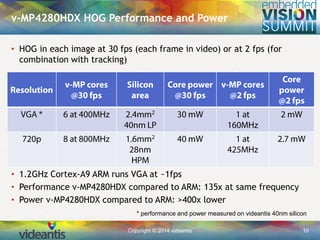
• HOG in each image at 30 fps (each frame in video) or at 2 fps (for
combination with tracking)
• 1.2GHz Cortex-A9 ARM runs VGA at ~1fps
• Performance v-MP4280HDX compared to ARM: 135x at same frequency
• Power v-MP4280HDX compared to ARM: >400x lower
v-MP4280HDX HOG Performance and Power
* performance and power measured on videantis 40nm silicon
Copyright © 2014 videantis 17
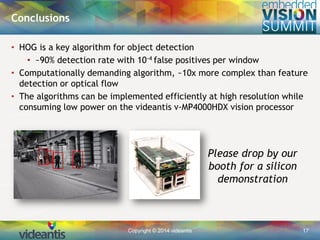
Conclusions
• HOG is a key algorithm for object detection
• ~90% detection rate with 10-4 false positives per window
• Computationally demanding algorithm, ~10x more complex than feature
detection or optical flow
• The algorithms can be implemented efficiently at high resolution while
consuming low power on the videantis v-MP4000HDX vision processor
Please drop by our
booth for a silicon
demonstration
Copyright © 2014 videantis 18
HOG:
• Histogram of Oriented Gradients (HOG) for Object
Detection in Images, Navneet Dalal
• https://www.youtube.com/watch?v=7S5qXET179I
• 19 mins: starts talking about HOG
• Histograms of Oriented Gradients, UCF Computer Vision
Video Lectures 2012, Mubarak Shah
• http://www.youtube.com/watch?v=0Zib1YEE4LU
SVM:
• Support Vector Machines, Scholastic Home Video Tutor
• https://www.youtube.com/watch?v=LXGaYVXkGtg
• Support Vector Machines, AI course Fall 2010, MIT
• https://www.youtube.com/watch?v=_PwhiWxHK8o
References — Videos
Copyright © 2014 videantis 19
Marco Jacobs
Thank you

"Implementing Histogram of Oriented Gradients on a Parallel Vision Processor," a Presentation from videantis

  • 1.
    Copyright © 2014videantis 1 Marco Jacobs May 29, 2014 Implementing Histogram of Oriented Gradients on a Parallel Vision Processor
  • 2.
    Copyright © 2014videantis 2 • 50% of the brain is used for vision • Body uses 100W • Brain consumes 20W •  about 10W for vision analysis The Challenge: Make Our Phones, Cars, Etc. Smarter Than Us • Challenge: beat the human • Seems really hard, but can focus on specific areas: • Build machines that are faster, safer, cheaper, last longer, more accurate, etc.
  • 3.
    Copyright © 2014videantis 3 • Object detection/recognition “That’s a person” “That’s a car” • Dalal & Triggs, “Histograms of Oriented Gradients for Human Detection”, INRIA (France), 2005 • Seminal paper: “100x accuracy increase in object detection” Object Detection — Key Vision Algorithm Computer Vision: Algorithms and Applications Richard Szeliski
  • 4.
    Copyright © 2014videantis 4 Object Detection — Sample Applications automotive: pedestrian detection automotive: vehicle detection surveillance: perimeter detection research: animal detection industry: object inspection search: image categorization
  • 5.
    Copyright © 2014videantis 5 Step 1 — Training the Classifier, Offline Normalized, fixed resolution images with yes/no annotations Extract feature vector (HOG) Learn binary classifier (SVM) Object yes / no pedestrian no pedestrian  resample false positives  retrain SVM classifier
  • 6.
    Copyright © 2014videantis 6 Step 2 — Object Detection, Real-time Scan image at different scales and locations Extract features over window (vector) Run SVM classifier (object yes/no) Fuse multiple detections Final object detected Detection window
  • 7.
    Copyright © 2014videantis 7 Training — INRIA people dataset • Variety of poses • Variable appearance / clothing • Complex background • Unconstrained illumination • Occlusions and different scales • Main assumption: • clearly visible mostly upright people
  • 8.
    Copyright © 2014videantis 8 Step 2 — Object Detection, Real-time Grayscale input image Generate multiscale pyramid Gamma normalization Gradient calculation (calculate angle and magnitude) Histogram per block SVM per window position Non-max suppression 64 128 16 16
  • 9.
    Copyright © 2014videantis 9 Step 2 — Object Detection, Real-time Grayscale input image Generate multiscale pyramid Gamma normalization Gradient calculation (calculate angle and magnitude) Histogram per block SVM per window position Non-max suppression 8 8 8 8 4 histograms of 9 cells Per 64x128 window: feature vector of 105x4x9=3780 Multiply by SVM vector  object detected yes/no Gradient direction & magnitude 64x128 pixels 7*15=105 16x16 positions
  • 10.
    Copyright © 2014videantis 10 • HOG compute complexity is ~10x optical flow (for full frame rate and resolution) • To reduce complexity, can locate features inside detected object window and track these across frame • Can also calculate the direction of the object • Significantly reduces processor load HOG in Combination With Feature Detect & Track frame 1 frame 1 frame 2 frame 3 frame 4 HOG Feature detect Feature track Feature track Feature track
  • 11.
    Copyright © 2014videantis 11 Videantis v-MP4000HDX Architecture Embedded Vision Subsystem Bitstream (un)packers for video codecs Heterogeneous, scalable multi-core IP • v-SP for bitstream parsing/ generation in video codecs • v-MP for pixel-processing: • vision, video encoding, decoding, image processing • Each v-MP is VLIW & SIMD with own DMA • v-MP4280HDX delivers: • 8 x ~25.6 GOPS per v-MP at 800MHz, total >200 GOPS • Less than 2mm2 in 28nm
  • 12.
    Copyright © 2014videantis 12 Host CPU GPUs Imaging DSPs v-MP4000HDX ILP: VLIW or superscalar Superscalar (Superscalar is expensive in HW) Varies, not disclosed Needs CPU 4-issue >2 issue VLIW causes NOPs and requires loop unrolling 2-issue VLIW Right trade off SIMD 128-bit requires second pipeline, RF, etc. Very wide array not used efficiently by block-based algos >128-bit SIMD Wide SIMD can’t be used efficiently by block-based algos 64/128-bit Right trade off for imaging and video Multicore 1-4 cores but cache coherency introduces overhead Many cores, with many restrictions 1 core 1-8+ cores Supports diverse algorithms Scales to low or high end apps Processor frequency 2GHz+ Long pipeline introduces hardware overhead ~1GHz Medium/long pipelines 500MHz-1GHz Medium pipeline 500MHz-1GHz Medium pipeline Caches / DMA Multi-level caches Multi-level caches No cache, single DMA No cache, DMA per core Architecture Trade-offs for Vision Algos
  • 13.
    Copyright © 2014videantis 13 • “Lower-level” pixel processing processed on accelerator • How to enable acceleration on v-MP4280HDX: • Replace all image data allocators cvCreateMatHeader(…); cvCreateData(…); hog.detectMultiScale(…); • by new “shared memory” allocator cvCreateMatHeader(…); cvCreateDataOvl(…) hog.detectMultiScale(…); • API internally takes care of moving data and processing onto accelerator • “Higher-level” processing remains on host CPU for initial accelerated version Seamless OpenCV Acceleration Hostv-MP4280HDX Image pyramid HOG SVM Fuse multiple detections
  • 14.
    Copyright © 2014videantis 14 Calculating HOG feature vectors in parallel: • Each v-MP gets a slice of 16 pixels height • Within the row, we calculate the HOG feature vector per 16x16 block • We DMA in the next 8x16 block of data while the previous 16x16 block is processed Mapping of HOG to v-MP4280HDX process DMA shift 816 16
  • 15.
    Copyright © 2014videantis 15 Calculating the SVM dot products in parallel: • We use the Daimler detector: 48x96 window versus 64x128 original Dalal and Triggs. The Daimler detector detects pedestrians that are smaller in view • 4 histograms x 9 bins x 5x11 16x16 blocks, using 8-pixel overlap • Process a column per v-MP. Keep the fixed SVM vector local to v-MP • Process a sliding window in vertical direction, preload the next 5x 9x4 histograms Mapping of SVM to v-MP4280HDX process DMA shift 4x9 x5 11
  • 16.
    Copyright © 2014videantis 16 • HOG in each image at 30 fps (each frame in video) or at 2 fps (for combination with tracking) • 1.2GHz Cortex-A9 ARM runs VGA at ~1fps • Performance v-MP4280HDX compared to ARM: 135x at same frequency • Power v-MP4280HDX compared to ARM: >400x lower v-MP4280HDX HOG Performance and Power * performance and power measured on videantis 40nm silicon
  • 17.
    Copyright © 2014videantis 17 Conclusions • HOG is a key algorithm for object detection • ~90% detection rate with 10-4 false positives per window • Computationally demanding algorithm, ~10x more complex than feature detection or optical flow • The algorithms can be implemented efficiently at high resolution while consuming low power on the videantis v-MP4000HDX vision processor Please drop by our booth for a silicon demonstration
  • 18.
    Copyright © 2014videantis 18 HOG: • Histogram of Oriented Gradients (HOG) for Object Detection in Images, Navneet Dalal • https://www.youtube.com/watch?v=7S5qXET179I • 19 mins: starts talking about HOG • Histograms of Oriented Gradients, UCF Computer Vision Video Lectures 2012, Mubarak Shah • http://www.youtube.com/watch?v=0Zib1YEE4LU SVM: • Support Vector Machines, Scholastic Home Video Tutor • https://www.youtube.com/watch?v=LXGaYVXkGtg • Support Vector Machines, AI course Fall 2010, MIT • https://www.youtube.com/watch?v=_PwhiWxHK8o References — Videos
  • 19.
    Copyright © 2014videantis 19 Marco Jacobs Thank you