

Mid-Year
2013/2014

180DaragaCpp course
BY: Moustafa Mohamed Ali

1
2

Outline












Variables, Data types , casting & I/O
Compilers and IDEs
Control Statements
Loops
Functions
Arrays & String
Structures & Files
Pointers and Dynamic allocation
Recursion
STL.

2013/2014
3

Introduction
 Why


programming languages !?

That’s how we communicate with the
machines and tell the computer what to
do.

2013/2014
4

Evolution of programming
languages
 Machine


code

Time consuming, very difficult

 Assembly


Written for one pc and can’t run on
another

 High

level programming languages

2013/2014
5

2013/2014

Why using C++ !?
 Maintainability



Modifying code is much easier
It’s OOP

 Portability


Can’t be written and compiled on any
CPU.

 C++

gives you access to some lower level
functionality (Pointers , bytes ,…etc)
6

Tools we will use
 Eclipse

(Recommended)
 Codeblocks (Recommended)
 Dev
 Netbeans
 MS c++

2013/2014
7

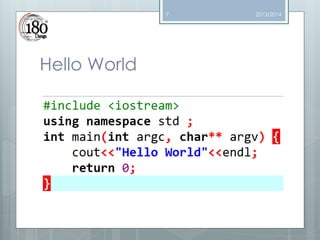
Hello World

2013/2014
8

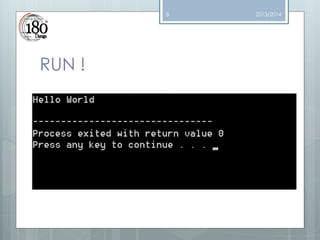
RUN !

2013/2014
9

2013/2014

IN DEEP (Libraries) !
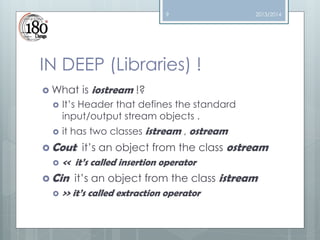
 What




is iostream !?

It’s Header that defines the standard
input/output stream objects .
it has two classes istream , ostream

 Cout

it’s an object from the class ostream
 << it’s called insertion operator

 Cin

it’s an object from the class istream
 >> it’s called extraction operator
10

2013/2014

IN DEEP (Cont.)
 Namespace




std

Sort of directory of names.
many standard C++ identifiers are
defined
When we use it we tell the compiler to look
for any identifier we haven’t defined in
the std (Standard) namespace.
11

2013/2014

IN DEEP (Cont.)
 Int


main ()

The program needs to know from where to
start executing the program, the main
function is the starting point

 Return
 It’s

0

a value that tells the operating system
that this program executed successfully
with no errors
12

IN DEEP (Cont.)
 (int


argc, char** argv)

They are called parameters and they will
be discussed next sessions (functions
session )

2013/2014
13

2013/2014

Important rules
 Semi-colon


“;“

It’s tell the compiler that this line of code is
finished

 Cin

takes this operator >> , while Cout
takes this operator <<
 Write a readable code



Use tabs
Don’t forget brackets … etc
14

2013/2014

Compiler VS IDE
 Compiler




It’s a program that transform from high level
languages to machine code to let the CPU
understands what you wrote, computers
doesn’t know but 0’s and 1’s
Best compiler is GNU
15

2013/2014

Compiler VS IDE (Cont.)
 Integrated

development environment it
provide the developer a set of features
like




Source code editor
Debugger
Intelligent code completion

 Eclipse

, NetBeans , Dev ….
16

Compilation process

2013/2014
17

2013/2014

Compilation process (Cont.)
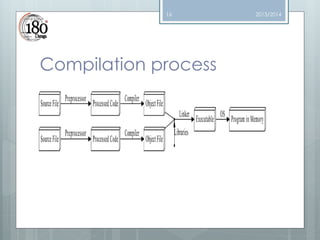
 Preprocessor


It processes include-files , replace the
#include with the content

 Compiler


Output an incomplete object code
(machine code, binary form 0’s and 1’s)

 Linker


Linking refers to the creation of a single
executable file from multiple object files.
18

2013/2014

Compilation process (Cont.)
 In

C++, all these steps are performed
early, before you start running a
program. In some other languages, they
are done during the execution
process, which takes time. This is one
of the reasons C++ code runs far
faster than code in many more recent
languages.
19

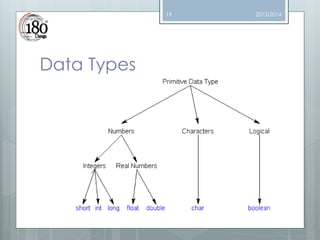
Data Types

2013/2014
20

2013/2014

How to declare a variables !?



A variable in C++ is a name for a piece of
memory that can be used to store information
DataType Variablename ;






Int x ;
Double y ;
Char c ;

Variables names can’t begin with numbers,
can’t be reserved in the langauge it self like
(return , int , double ..etc)
21

2013/2014

Variables
 We

can initialize it by setting a value using
assignment operator “=”




Int x = 5
Char y = ‘n’
….etc
22

Inputs
 We

can take inputs from user by using
cin>>variable name




Cin>>x;
Cin>>mychar ;
….etc

2013/2014
23

2013/2014

Outputs
 We

can print the value of the number by
using the cout << variable name




Cout<<x;
Cout<<myChar ;
….etc

 Note

that cout<<“x”  will print x on the
console
 Cout<<x;  it will print the value of x
24

2013/2014

How to write a code !?
 Think

in very primitive way . What do I
want to do ? What do I need?
 Don’t start writing code unless you know
what you will write
 We tell computers to do what we want
they are stupid but very fast
 Write readable code, organized sothat
you can trace it
25

2013/2014

Practice
 Write

a program that takes from the user
his age and print it
 Write a program to takes from the user his
gender and print it (M: Male , F:Female)
26

2013/2014

Readings
 More


http://faculty.cs.niu.edu/~mcmahon/CS241
/Notes/compile.html

 How


about compilation process

to design a program!?

http://www.learncpp.com/cpp-tutorial/110a-how-to-design-your-first-programs/
27

Questions

2013/2014

180 daraga cpp course session-1

  • 1.
  • 2.
    2 Outline           Variables, Data types, casting & I/O Compilers and IDEs Control Statements Loops Functions Arrays & String Structures & Files Pointers and Dynamic allocation Recursion STL. 2013/2014
  • 3.
    3 Introduction  Why  programming languages!? That’s how we communicate with the machines and tell the computer what to do. 2013/2014
  • 4.
    4 Evolution of programming languages Machine  code Time consuming, very difficult  Assembly  Written for one pc and can’t run on another  High level programming languages 2013/2014
  • 5.
    5 2013/2014 Why using C++!?  Maintainability   Modifying code is much easier It’s OOP  Portability  Can’t be written and compiled on any CPU.  C++ gives you access to some lower level functionality (Pointers , bytes ,…etc)
  • 6.
    6 Tools we willuse  Eclipse (Recommended)  Codeblocks (Recommended)  Dev  Netbeans  MS c++ 2013/2014
  • 7.
  • 8.
  • 9.
    9 2013/2014 IN DEEP (Libraries)!  What   is iostream !? It’s Header that defines the standard input/output stream objects . it has two classes istream , ostream  Cout it’s an object from the class ostream  << it’s called insertion operator  Cin it’s an object from the class istream  >> it’s called extraction operator
  • 10.
    10 2013/2014 IN DEEP (Cont.) Namespace    std Sort of directory of names. many standard C++ identifiers are defined When we use it we tell the compiler to look for any identifier we haven’t defined in the std (Standard) namespace.
  • 11.
    11 2013/2014 IN DEEP (Cont.) Int  main () The program needs to know from where to start executing the program, the main function is the starting point  Return  It’s 0 a value that tells the operating system that this program executed successfully with no errors
  • 12.
    12 IN DEEP (Cont.) (int  argc, char** argv) They are called parameters and they will be discussed next sessions (functions session ) 2013/2014
  • 13.
    13 2013/2014 Important rules  Semi-colon  “;“ It’stell the compiler that this line of code is finished  Cin takes this operator >> , while Cout takes this operator <<  Write a readable code   Use tabs Don’t forget brackets … etc
  • 14.
    14 2013/2014 Compiler VS IDE Compiler   It’s a program that transform from high level languages to machine code to let the CPU understands what you wrote, computers doesn’t know but 0’s and 1’s Best compiler is GNU
  • 15.
    15 2013/2014 Compiler VS IDE(Cont.)  Integrated development environment it provide the developer a set of features like    Source code editor Debugger Intelligent code completion  Eclipse , NetBeans , Dev ….
  • 16.
  • 17.
    17 2013/2014 Compilation process (Cont.) Preprocessor  It processes include-files , replace the #include with the content  Compiler  Output an incomplete object code (machine code, binary form 0’s and 1’s)  Linker  Linking refers to the creation of a single executable file from multiple object files.
  • 18.
    18 2013/2014 Compilation process (Cont.) In C++, all these steps are performed early, before you start running a program. In some other languages, they are done during the execution process, which takes time. This is one of the reasons C++ code runs far faster than code in many more recent languages.
  • 19.
  • 20.
    20 2013/2014 How to declarea variables !?   A variable in C++ is a name for a piece of memory that can be used to store information DataType Variablename ;     Int x ; Double y ; Char c ; Variables names can’t begin with numbers, can’t be reserved in the langauge it self like (return , int , double ..etc)
  • 21.
    21 2013/2014 Variables  We can initializeit by setting a value using assignment operator “=”    Int x = 5 Char y = ‘n’ ….etc
  • 22.
    22 Inputs  We can takeinputs from user by using cin>>variable name    Cin>>x; Cin>>mychar ; ….etc 2013/2014
  • 23.
    23 2013/2014 Outputs  We can printthe value of the number by using the cout << variable name    Cout<<x; Cout<<myChar ; ….etc  Note that cout<<“x”  will print x on the console  Cout<<x;  it will print the value of x
  • 24.
    24 2013/2014 How to writea code !?  Think in very primitive way . What do I want to do ? What do I need?  Don’t start writing code unless you know what you will write  We tell computers to do what we want they are stupid but very fast  Write readable code, organized sothat you can trace it
  • 25.
    25 2013/2014 Practice  Write a programthat takes from the user his age and print it  Write a program to takes from the user his gender and print it (M: Male , F:Female)
  • 26.
    26 2013/2014 Readings  More  http://faculty.cs.niu.edu/~mcmahon/CS241 /Notes/compile.html  How  aboutcompilation process to design a program!? http://www.learncpp.com/cpp-tutorial/110a-how-to-design-your-first-programs/
  • 27.