Chapter 7
Configuring and Managing Data Storage
MCITP Guide to Microsoft Windows Server 2008,
Server Administration (Exam #70-646)
2
Learning Objectives
• Understand storage options for Windows Server
2008
• Use the Disk Management tool to configure and
manage storage
• Explain and configure RAID disk storage fault
tolerance
• Understand storage enhancements in Windows
Server 2008
• Back up disk storage
Learning Objectives (cont’d.)
• Develop a data backup and recovery strategy
MCITP Guide to Microsoft Windows Server 2008,
Server Administration (Exam #70-646)
3
Windows Server 2008 Storage Options
• Storage systems
– Basic disk
• Traditional disk management techniques
• Contains: primary and extended partitions and logical
drives
– Dynamic disk
• Provides more flexibility
• No restriction on number of volumes
MCITP Guide to Microsoft Windows Server 2008,
Server Administration (Exam #70-646)
4
Basic Disks
• Partitioning
– Blocks a group of tracks and sectors to be used by a
particular file system
• Formatting
– Creates a table containing file and folder information
for a specific file system in a partition
• Volume
– Logical designation of disk storage
– Created out of one or more physical disk
• Recognize primary and extended partitions
MCITP Guide to Microsoft Windows Server 2008,
Server Administration (Exam #70-646)
5
Basic Disks (cont’d.)
• Can be configured for any of three RAID levels:
– Disk striping (RAID level 0)
– Disk mirroring (RAID level 1)
– Disk striping with parity (RAID level 5)
• RAID (Redundant array of inexpensive disks)
• Striping
– Spread data over multiple disks or volume
• Disk mirroring
– Creating a mirror image of all data on an original disk
MCITP Guide to Microsoft Windows Server 2008,
Server Administration (Exam #70-646)
6
Basic Disks (cont’d.)
• MBR and GPT Support
– Master Boot Record (MBR)
• Contains startup information about partitions and how
to access the disk
– Partition table
• Contains information about each partition created
– Globally Unique Identifier (GUID) Partition Table
(GPT)
• Newer way to partition disks
• Part of Unified Extensible Firmware Interface (UEFI)
approach
MCITP Guide to Microsoft Windows Server 2008,
Server Administration (Exam #70-646)
7
Basic Disks (cont’d.)
– GPT disks
• Store partition information in each partition using main
and backup tables
– GPT partition
• Can theoretically be up to 18 exabytes
– Can convert an MBR disk to GPT and vice versa
MCITP Guide to Microsoft Windows Server 2008,
Server Administration (Exam #70-646)
8
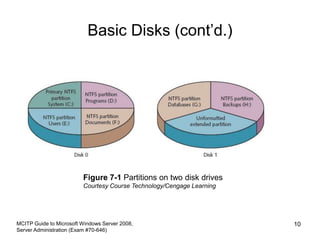
Basic Disks (cont’d.)
• Primary and Extended Partitions on MBR Disks
– Primary partition can boot an operating system
– Active partition where computer will look for
operating system startup files
– Extended partition created from space that is not yet
partitioned
• Exceed the four-partition limit of a basic disk
MCITP Guide to Microsoft Windows Server 2008,
Server Administration (Exam #70-646)
9
Basic Disks (cont’d.)
MCITP Guide to Microsoft Windows Server 2008,
Server Administration (Exam #70-646)
10
Figure 7-1 Partitions on two disk drives
Courtesy Course Technology/Cengage Learning
Basic Disks (cont’d.)
• Activity 7-1: Viewing the Active Partition
– Objective: Verify which partition is marked as active
• Activity 7-2: Customizing the MMC to Access Disk
Management Tools
– Objective: Create a customized console from which to
perform disk management and disk defragmentation
MCITP Guide to Microsoft Windows Server 2008,
Server Administration (Exam #70-646)
11
Basic Disks (cont’d.)
• Volume and Stripe Sets
– Volume set
• Two or more partitions that are combined to look like
one volume with a single drive letter
– Stripe set
• Two or more disks that are combined like a volume set,
but that are striped for RAID level 0 or RAID level 5
MCITP Guide to Microsoft Windows Server 2008,
Server Administration (Exam #70-646)
12
Dynamic Disks
• Do not use traditional partitioning
• Possible to set up a large number of volumes on
one disk
• Can be formatted for NTFS
• Convert basic disks to dynamic disks after you
install Windows Server 2008
• Simple Volume
– Portion of a disk or an entire disk that is set up as a
dynamic disk
MCITP Guide to Microsoft Windows Server 2008,
Server Administration (Exam #70-646)
13
Dynamic Disks (cont’d.)
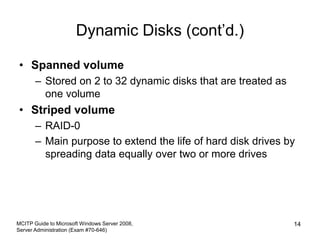
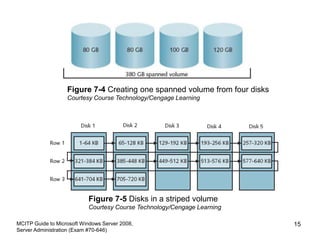
• Spanned volume
– Stored on 2 to 32 dynamic disks that are treated as
one volume
• Striped volume
– RAID-0
– Main purpose to extend the life of hard disk drives by
spreading data equally over two or more drives
MCITP Guide to Microsoft Windows Server 2008,
Server Administration (Exam #70-646)
14
MCITP Guide to Microsoft Windows Server 2008,
Server Administration (Exam #70-646)
15
Figure 7-4 Creating one spanned volume from four disks
Courtesy Course Technology/Cengage Learning
Figure 7-5 Disks in a striped volume
Courtesy Course Technology/Cengage Learning
Dynamic Disks (cont’d.)
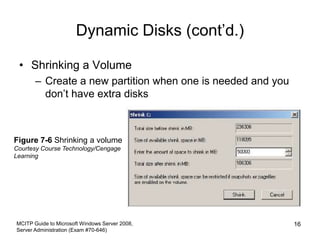
• Shrinking a Volume
– Create a new partition when one is needed and you
don’t have extra disks
MCITP Guide to Microsoft Windows Server 2008,
Server Administration (Exam #70-646)
16
Figure 7-6 Shrinking a volume
Courtesy Course Technology/Cengage
Learning
Disk Management
• Disk Management tool
– Central location for viewing disk information
– Perform tasks such as creating and deleting partitions
and volumes
MCITP Guide to Microsoft Windows Server 2008,
Server Administration (Exam #70-646)
17
Creating a Partition and Simple Volume
• Leave 1 MB or more of the disk space free
– Windows Server 2008 needs to convert a basic disk
to a dynamic disk, in case you want to upgrade later
• Partitions operate as separate storage units on a
hard disk
• Activity 7-3: Creating a Simple Volume
– Objective: Create a new partition from unpartitioned
disk space
• Once a partition is formatted
– It is called a volume
– Can be assigned a drive letter
MCITP Guide to Microsoft Windows Server 2008,
Server Administration (Exam #70-646)
18
Converting a Partitioned Basic Disk to
a Dynamic Disk
• Use Disk Management tool
• Be certain that 1 MB or more of free space is
available on the basic disk
• Activity 7-4: Converting a Basic Disk
– Objective: Convert a simple basic disk to a dynamic
disk
MCITP Guide to Microsoft Windows Server 2008,
Server Administration (Exam #70-646)
19
Mounting a Drive
• Mounted drive
– Appears as a folder
– Accessed through a path like any other folder
• Can mount
– Basic or dynamic disk drive
– CD/DVD drive
– Removable drive
MCITP Guide to Microsoft Windows Server 2008,
Server Administration (Exam #70-646)
20
Mounting a Drive (cont’d.)
• Home directory or home folder
– Server folder that is associated with a user’s account
– Designated workspace for the user to store files
• Activity 7-5: Configuring a Mounted Drive
– Objective: Learn how to set up a mounted drive
MCITP Guide to Microsoft Windows Server 2008,
Server Administration (Exam #70-646)
21
Managing Disks
• Using Disk Defragmenter
– Fragmented
• Data not stored contiguously
– Defragmenting
• Locates fragmented folders and files
• Moves them to a location on the physical disk so they
are in contiguous order
– Activity 7-6: Using the Disk Defragmenter
• Objective: Practice using Disk Defragmenter
MCITP Guide to Microsoft Windows Server 2008,
Server Administration (Exam #70-646)
22
Managing Disks (cont’d.)
• Using Disk Check
– Scan a disk for bad sectors and file system errors
– Options:
• Automatically fix file system errors
• Scan for and attempt recovery of bad sectors
• Activity 7-7: Using Disk Check
– Objective: Learn how to use Disk Check
MCITP Guide to Microsoft Windows Server 2008,
Server Administration (Exam #70-646)
23
Managing Disks (cont’d.)
• Using chkdsk
– Start from command prompt
– May run automatically
– Activity 7-8: Using chkdsk from the Command Line
• Objective: Learn how to use chkdsk from the command
line
MCITP Guide to Microsoft Windows Server 2008,
Server Administration (Exam #70-646)
24
Managing Disks (cont’d.)
MCITP Guide to Microsoft Windows Server 2008,
Server Administration (Exam #70-646)
25
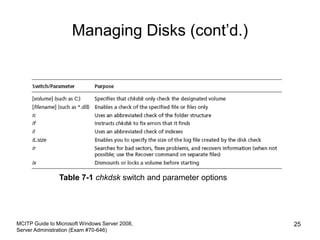
Table 7-1 chkdsk switch and parameter options
Introduction to Fault Tolerance
• Fault tolerance
– Ability of a system to gracefully recover from
hardware or software failure
• Software-level RAID
– Not meant as a replacement for performing regular
backups of data
MCITP Guide to Microsoft Windows Server 2008,
Server Administration (Exam #70-646)
26
RAID Volumes
• RAID
– Set of standards for lengthening disk life, preventing
data loss, and enabling relatively uninterrupted
access to data
• 6 Levels
– Striping
– Mirroring
– Duplexing
– Windows Server 2008 supports RAID levels 0, 1, and
5
MCITP Guide to Microsoft Windows Server 2008,
Server Administration (Exam #70-646)
27
MCITP Guide to Microsoft Windows Server 2008,
Server Administration (Exam #70-646)
28
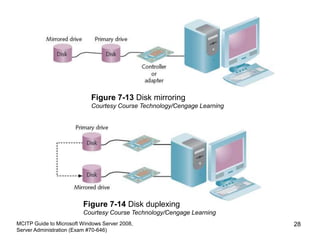
Figure 7-13 Disk mirroring
Courtesy Course Technology/Cengage Learning
Figure 7-14 Disk duplexing
Courtesy Course Technology/Cengage Learning
Using a Striped Volume (RAID-0)
• Reasons for using a RAID level 0
– Reduce the wear on multiple disk drives by equally
spreading the load
– Increase disk performance compared with other
methods for configuring dynamic disk volumes
MCITP Guide to Microsoft Windows Server 2008,
Server Administration (Exam #70-646)
29
Using a Mirrored Volume (RAID-1)
• Disk mirroring
– Creating a shadow copy of data on a backup disk
– RAID level 1
• Only dynamic disks
• Can be a slight performance degradation for disk
writes
• Well suited for situations in which data is mission-
critical and must not be lost under any
circumstances
MCITP Guide to Microsoft Windows Server 2008,
Server Administration (Exam #70-646)
30
Using a RAID-5 Volume
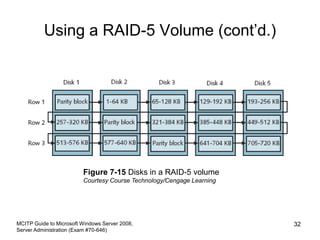
• RAID-5 volume
– Requires a minimum of three disk drives
• Performance is not as fast as with a striped volume
• Useful in a client/server system that uses a separate
database for queries and creating reports
• Amount of storage space used
– Based on the formula 1/n where n is the number of
physical disks in the volume
MCITP Guide to Microsoft Windows Server 2008,
Server Administration (Exam #70-646)
31
Using a RAID-5 Volume (cont’d.)
MCITP Guide to Microsoft Windows Server 2008,
Server Administration (Exam #70-646)
32
Figure 7-15 Disks in a RAID-5 volume
Courtesy Course Technology/Cengage Learning
Software RAID vs. Hardware RAID
• Software RAID
– Implements fault tolerance through the server’s
operating system
• Hardware RAID
– Implemented through the server hardware
– Independent of the operating system
– More expensive than software RAID
– Offers many advantages over software RAID
MCITP Guide to Microsoft Windows Server 2008,
Server Administration (Exam #70-646)
33
Windows Server 2008 Storage
Enhancements
• Management of Storage Area Networks
• Using multiple paths to storage for fault tolerance
• For medium to large networks
MCITP Guide to Microsoft Windows Server 2008,
Server Administration (Exam #70-646)
34
Storage Manager for SANs and LUNs
• Storage Area Network (SAN)
– Grouping of storage devices that forms a subnet
– Uses Fibre Channel or iSCSI technology
• Storage Manager for SANs
– Manage logical unit numbers for Small Computer
System Interface drives
• 32- or 64-bit computer adapter that transports data
between one or more attached devices
• Logical unit number (LUN)
– Identifies a physical SCSI drive or logical SCSI
targets
MCITP Guide to Microsoft Windows Server 2008,
Server Administration (Exam #70-646)
35
Storage Manager for SANs and LUNs
(cont’d.)
• Types of LUNs
– Simple
– Spanned
– Striped
– Mirrored
– Striped with parity
• Virtual Disk Service (VDS)
– Enables management of disk volumes in SANs
through one interface at a server
• Storage Manager for SANs
– Three windows of operation
MCITP Guide to Microsoft Windows Server 2008,
Server Administration (Exam #70-646)
36
Multipath Input/Output Enhancements
• Multipath I/O
– Establishes multiple paths between a server and its
disk storage
• Set up multipath I/O
– Create the multiple paths between the storage and
the server or servers
– Install Multipath I/O and Device Specific Module
(DSM)
• Windows Server 2008 DSM configuration models
– Six models to choose from
MCITP Guide to Microsoft Windows Server 2008,
Server Administration (Exam #70-646)
37
Disk Backup
• Advantages of performing backups from a backup
device installed on the server
– No extra load is produced on the network
– Can perform backups on a multiple-server network,
even if a backup device fails on one of the servers
MCITP Guide to Microsoft Windows Server 2008,
Server Administration (Exam #70-646)
38
Disk Backup (cont’d.)
• Advantages of performing a network backup
– Backup jobs can be stored on a single backup media
– One administrator can be responsible for backing up
multiple servers
• Disadvantage
– Increase in network traffic
MCITP Guide to Microsoft Windows Server 2008,
Server Administration (Exam #70-646)
39
Windows Server Backup
• Windows Server Backup tool
– Install with Server Manager
• Enhanced features
– Better options to recover specific objects
– More backup options including Volume Shadow
Copy Service (VSS)
– More reliable in recovering applications
– Provides information about disk use
– Offers the wbadmin command-line tool
– Full support to back up to optical media
MCITP Guide to Microsoft Windows Server 2008,
Server Administration (Exam #70-646)
40
Windows Server Backup (cont’d.)
• Considerations for using the Windows Server
Backup tool
– Only backs up NTFS volumes
– Does not back up to tape
– Cannot restore Windows Server 2003 backups
• Activity 7-9: Installing the Windows Server Backup
Tool
– Objective: Install the Windows Server Backup tool
MCITP Guide to Microsoft Windows Server 2008,
Server Administration (Exam #70-646)
41
Backup Options
• Full backup
– Backup of an entire system, including all system files,
programs, and data files
• Incremental backup
– Only backs up files that are new or that have been
updated
– Backs up only files that have the archive attribute
marked
• Custom backup
– Configure backups differently for each volume
MCITP Guide to Microsoft Windows Server 2008,
Server Administration (Exam #70-646)
42
Backup Options (cont’d.)
• Activity 7-10: Backing Up a Server
– Objective: Perform a full backup
MCITP Guide to Microsoft Windows Server 2008,
Server Administration (Exam #70-646)
43
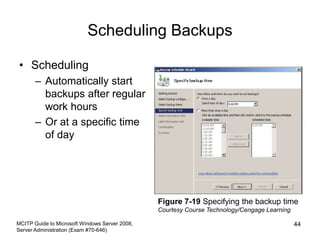
Scheduling Backups
• Scheduling
– Automatically start
backups after regular
work hours
– Or at a specific time
of day
MCITP Guide to Microsoft Windows Server 2008,
Server Administration (Exam #70-646)
44
Figure 7-19 Specifying the backup time
Courtesy Course Technology/Cengage Learning
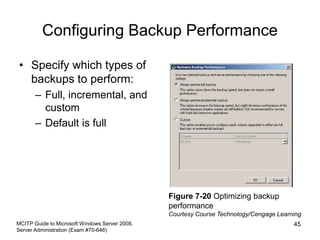
Configuring Backup Performance
• Specify which types of
backups to perform:
– Full, incremental, and
custom
– Default is full
MCITP Guide to Microsoft Windows Server 2008,
Server Administration (Exam #70-646)
45
Figure 7-20 Optimizing backup
performance
Courtesy Course Technology/Cengage Learning
Developing a Data Backup and
Recovery Strategy
• Advantage of a full backup
– Contains the system state data as well as all
applications and user data
• Use Backup Schedule Wizard to regularly schedule
backups
• Disaster recovery plan
– Store a copy of a backup off-site in case of fire,
flooding, or some other natural disaster
– Use off-site backup services or software
MCITP Guide to Microsoft Windows Server 2008,
Server Administration (Exam #70-646)
46
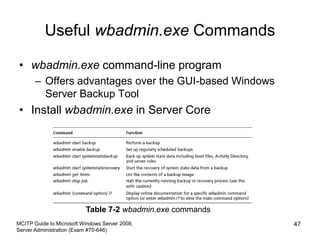
Useful wbadmin.exe Commands
• wbadmin.exe command-line program
– Offers advantages over the GUI-based Windows
Server Backup Tool
• Install wbadmin.exe in Server Core
MCITP Guide to Microsoft Windows Server 2008,
Server Administration (Exam #70-646)
47
Table 7-2 wbadmin.exe commands
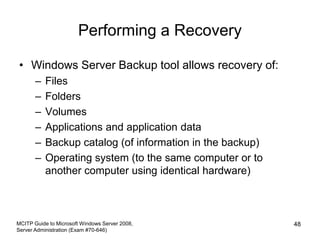
Performing a Recovery
• Windows Server Backup tool allows recovery of:
– Files
– Folders
– Volumes
– Applications and application data
– Backup catalog (of information in the backup)
– Operating system (to the same computer or to
another computer using identical hardware)
MCITP Guide to Microsoft Windows Server 2008,
Server Administration (Exam #70-646)
48
Summary
• Basic and dynamic disks
– Dynamic disks can be configured as simple, spanned,
striped, mirrored, and RAID-5 volumes
• Disk Management tool
– Create basic and dynamic disks
• Disk Check and chkdsk tools
– Find and repair disk problems
• Enhancements for Windows Server 2008 include
new features for Storage Manager for SANs and
features for Multipath I/O
MCITP Guide to Microsoft Windows Server 2008,
Server Administration (Exam #70-646)
49
Summary (cont’d.)
• Windows Server Backup
– Schedule backups, perform full or incremental
backups and recover data from backups
• wbadmin.exe tool
– Version of Windows Server Backup that can be used
from the command line
– Particularly important for Server Core users
MCITP Guide to Microsoft Windows Server 2008,
Server Administration (Exam #70-646)
50

1517307.ppt

  • 1.
    Chapter 7 Configuring andManaging Data Storage
  • 2.
    MCITP Guide toMicrosoft Windows Server 2008, Server Administration (Exam #70-646) 2 Learning Objectives • Understand storage options for Windows Server 2008 • Use the Disk Management tool to configure and manage storage • Explain and configure RAID disk storage fault tolerance • Understand storage enhancements in Windows Server 2008 • Back up disk storage
  • 3.
    Learning Objectives (cont’d.) •Develop a data backup and recovery strategy MCITP Guide to Microsoft Windows Server 2008, Server Administration (Exam #70-646) 3
  • 4.
    Windows Server 2008Storage Options • Storage systems – Basic disk • Traditional disk management techniques • Contains: primary and extended partitions and logical drives – Dynamic disk • Provides more flexibility • No restriction on number of volumes MCITP Guide to Microsoft Windows Server 2008, Server Administration (Exam #70-646) 4
  • 5.
    Basic Disks • Partitioning –Blocks a group of tracks and sectors to be used by a particular file system • Formatting – Creates a table containing file and folder information for a specific file system in a partition • Volume – Logical designation of disk storage – Created out of one or more physical disk • Recognize primary and extended partitions MCITP Guide to Microsoft Windows Server 2008, Server Administration (Exam #70-646) 5
  • 6.
    Basic Disks (cont’d.) •Can be configured for any of three RAID levels: – Disk striping (RAID level 0) – Disk mirroring (RAID level 1) – Disk striping with parity (RAID level 5) • RAID (Redundant array of inexpensive disks) • Striping – Spread data over multiple disks or volume • Disk mirroring – Creating a mirror image of all data on an original disk MCITP Guide to Microsoft Windows Server 2008, Server Administration (Exam #70-646) 6
  • 7.
    Basic Disks (cont’d.) •MBR and GPT Support – Master Boot Record (MBR) • Contains startup information about partitions and how to access the disk – Partition table • Contains information about each partition created – Globally Unique Identifier (GUID) Partition Table (GPT) • Newer way to partition disks • Part of Unified Extensible Firmware Interface (UEFI) approach MCITP Guide to Microsoft Windows Server 2008, Server Administration (Exam #70-646) 7
  • 8.
    Basic Disks (cont’d.) –GPT disks • Store partition information in each partition using main and backup tables – GPT partition • Can theoretically be up to 18 exabytes – Can convert an MBR disk to GPT and vice versa MCITP Guide to Microsoft Windows Server 2008, Server Administration (Exam #70-646) 8
  • 9.
    Basic Disks (cont’d.) •Primary and Extended Partitions on MBR Disks – Primary partition can boot an operating system – Active partition where computer will look for operating system startup files – Extended partition created from space that is not yet partitioned • Exceed the four-partition limit of a basic disk MCITP Guide to Microsoft Windows Server 2008, Server Administration (Exam #70-646) 9
  • 10.
    Basic Disks (cont’d.) MCITPGuide to Microsoft Windows Server 2008, Server Administration (Exam #70-646) 10 Figure 7-1 Partitions on two disk drives Courtesy Course Technology/Cengage Learning
  • 11.
    Basic Disks (cont’d.) •Activity 7-1: Viewing the Active Partition – Objective: Verify which partition is marked as active • Activity 7-2: Customizing the MMC to Access Disk Management Tools – Objective: Create a customized console from which to perform disk management and disk defragmentation MCITP Guide to Microsoft Windows Server 2008, Server Administration (Exam #70-646) 11
  • 12.
    Basic Disks (cont’d.) •Volume and Stripe Sets – Volume set • Two or more partitions that are combined to look like one volume with a single drive letter – Stripe set • Two or more disks that are combined like a volume set, but that are striped for RAID level 0 or RAID level 5 MCITP Guide to Microsoft Windows Server 2008, Server Administration (Exam #70-646) 12
  • 13.
    Dynamic Disks • Donot use traditional partitioning • Possible to set up a large number of volumes on one disk • Can be formatted for NTFS • Convert basic disks to dynamic disks after you install Windows Server 2008 • Simple Volume – Portion of a disk or an entire disk that is set up as a dynamic disk MCITP Guide to Microsoft Windows Server 2008, Server Administration (Exam #70-646) 13
  • 14.
    Dynamic Disks (cont’d.) •Spanned volume – Stored on 2 to 32 dynamic disks that are treated as one volume • Striped volume – RAID-0 – Main purpose to extend the life of hard disk drives by spreading data equally over two or more drives MCITP Guide to Microsoft Windows Server 2008, Server Administration (Exam #70-646) 14
  • 15.
    MCITP Guide toMicrosoft Windows Server 2008, Server Administration (Exam #70-646) 15 Figure 7-4 Creating one spanned volume from four disks Courtesy Course Technology/Cengage Learning Figure 7-5 Disks in a striped volume Courtesy Course Technology/Cengage Learning
  • 16.
    Dynamic Disks (cont’d.) •Shrinking a Volume – Create a new partition when one is needed and you don’t have extra disks MCITP Guide to Microsoft Windows Server 2008, Server Administration (Exam #70-646) 16 Figure 7-6 Shrinking a volume Courtesy Course Technology/Cengage Learning
  • 17.
    Disk Management • DiskManagement tool – Central location for viewing disk information – Perform tasks such as creating and deleting partitions and volumes MCITP Guide to Microsoft Windows Server 2008, Server Administration (Exam #70-646) 17
  • 18.
    Creating a Partitionand Simple Volume • Leave 1 MB or more of the disk space free – Windows Server 2008 needs to convert a basic disk to a dynamic disk, in case you want to upgrade later • Partitions operate as separate storage units on a hard disk • Activity 7-3: Creating a Simple Volume – Objective: Create a new partition from unpartitioned disk space • Once a partition is formatted – It is called a volume – Can be assigned a drive letter MCITP Guide to Microsoft Windows Server 2008, Server Administration (Exam #70-646) 18
  • 19.
    Converting a PartitionedBasic Disk to a Dynamic Disk • Use Disk Management tool • Be certain that 1 MB or more of free space is available on the basic disk • Activity 7-4: Converting a Basic Disk – Objective: Convert a simple basic disk to a dynamic disk MCITP Guide to Microsoft Windows Server 2008, Server Administration (Exam #70-646) 19
  • 20.
    Mounting a Drive •Mounted drive – Appears as a folder – Accessed through a path like any other folder • Can mount – Basic or dynamic disk drive – CD/DVD drive – Removable drive MCITP Guide to Microsoft Windows Server 2008, Server Administration (Exam #70-646) 20
  • 21.
    Mounting a Drive(cont’d.) • Home directory or home folder – Server folder that is associated with a user’s account – Designated workspace for the user to store files • Activity 7-5: Configuring a Mounted Drive – Objective: Learn how to set up a mounted drive MCITP Guide to Microsoft Windows Server 2008, Server Administration (Exam #70-646) 21
  • 22.
    Managing Disks • UsingDisk Defragmenter – Fragmented • Data not stored contiguously – Defragmenting • Locates fragmented folders and files • Moves them to a location on the physical disk so they are in contiguous order – Activity 7-6: Using the Disk Defragmenter • Objective: Practice using Disk Defragmenter MCITP Guide to Microsoft Windows Server 2008, Server Administration (Exam #70-646) 22
  • 23.
    Managing Disks (cont’d.) •Using Disk Check – Scan a disk for bad sectors and file system errors – Options: • Automatically fix file system errors • Scan for and attempt recovery of bad sectors • Activity 7-7: Using Disk Check – Objective: Learn how to use Disk Check MCITP Guide to Microsoft Windows Server 2008, Server Administration (Exam #70-646) 23
  • 24.
    Managing Disks (cont’d.) •Using chkdsk – Start from command prompt – May run automatically – Activity 7-8: Using chkdsk from the Command Line • Objective: Learn how to use chkdsk from the command line MCITP Guide to Microsoft Windows Server 2008, Server Administration (Exam #70-646) 24
  • 25.
    Managing Disks (cont’d.) MCITPGuide to Microsoft Windows Server 2008, Server Administration (Exam #70-646) 25 Table 7-1 chkdsk switch and parameter options
  • 26.
    Introduction to FaultTolerance • Fault tolerance – Ability of a system to gracefully recover from hardware or software failure • Software-level RAID – Not meant as a replacement for performing regular backups of data MCITP Guide to Microsoft Windows Server 2008, Server Administration (Exam #70-646) 26
  • 27.
    RAID Volumes • RAID –Set of standards for lengthening disk life, preventing data loss, and enabling relatively uninterrupted access to data • 6 Levels – Striping – Mirroring – Duplexing – Windows Server 2008 supports RAID levels 0, 1, and 5 MCITP Guide to Microsoft Windows Server 2008, Server Administration (Exam #70-646) 27
  • 28.
    MCITP Guide toMicrosoft Windows Server 2008, Server Administration (Exam #70-646) 28 Figure 7-13 Disk mirroring Courtesy Course Technology/Cengage Learning Figure 7-14 Disk duplexing Courtesy Course Technology/Cengage Learning
  • 29.
    Using a StripedVolume (RAID-0) • Reasons for using a RAID level 0 – Reduce the wear on multiple disk drives by equally spreading the load – Increase disk performance compared with other methods for configuring dynamic disk volumes MCITP Guide to Microsoft Windows Server 2008, Server Administration (Exam #70-646) 29
  • 30.
    Using a MirroredVolume (RAID-1) • Disk mirroring – Creating a shadow copy of data on a backup disk – RAID level 1 • Only dynamic disks • Can be a slight performance degradation for disk writes • Well suited for situations in which data is mission- critical and must not be lost under any circumstances MCITP Guide to Microsoft Windows Server 2008, Server Administration (Exam #70-646) 30
  • 31.
    Using a RAID-5Volume • RAID-5 volume – Requires a minimum of three disk drives • Performance is not as fast as with a striped volume • Useful in a client/server system that uses a separate database for queries and creating reports • Amount of storage space used – Based on the formula 1/n where n is the number of physical disks in the volume MCITP Guide to Microsoft Windows Server 2008, Server Administration (Exam #70-646) 31
  • 32.
    Using a RAID-5Volume (cont’d.) MCITP Guide to Microsoft Windows Server 2008, Server Administration (Exam #70-646) 32 Figure 7-15 Disks in a RAID-5 volume Courtesy Course Technology/Cengage Learning
  • 33.
    Software RAID vs.Hardware RAID • Software RAID – Implements fault tolerance through the server’s operating system • Hardware RAID – Implemented through the server hardware – Independent of the operating system – More expensive than software RAID – Offers many advantages over software RAID MCITP Guide to Microsoft Windows Server 2008, Server Administration (Exam #70-646) 33
  • 34.
    Windows Server 2008Storage Enhancements • Management of Storage Area Networks • Using multiple paths to storage for fault tolerance • For medium to large networks MCITP Guide to Microsoft Windows Server 2008, Server Administration (Exam #70-646) 34
  • 35.
    Storage Manager forSANs and LUNs • Storage Area Network (SAN) – Grouping of storage devices that forms a subnet – Uses Fibre Channel or iSCSI technology • Storage Manager for SANs – Manage logical unit numbers for Small Computer System Interface drives • 32- or 64-bit computer adapter that transports data between one or more attached devices • Logical unit number (LUN) – Identifies a physical SCSI drive or logical SCSI targets MCITP Guide to Microsoft Windows Server 2008, Server Administration (Exam #70-646) 35
  • 36.
    Storage Manager forSANs and LUNs (cont’d.) • Types of LUNs – Simple – Spanned – Striped – Mirrored – Striped with parity • Virtual Disk Service (VDS) – Enables management of disk volumes in SANs through one interface at a server • Storage Manager for SANs – Three windows of operation MCITP Guide to Microsoft Windows Server 2008, Server Administration (Exam #70-646) 36
  • 37.
    Multipath Input/Output Enhancements •Multipath I/O – Establishes multiple paths between a server and its disk storage • Set up multipath I/O – Create the multiple paths between the storage and the server or servers – Install Multipath I/O and Device Specific Module (DSM) • Windows Server 2008 DSM configuration models – Six models to choose from MCITP Guide to Microsoft Windows Server 2008, Server Administration (Exam #70-646) 37
  • 38.
    Disk Backup • Advantagesof performing backups from a backup device installed on the server – No extra load is produced on the network – Can perform backups on a multiple-server network, even if a backup device fails on one of the servers MCITP Guide to Microsoft Windows Server 2008, Server Administration (Exam #70-646) 38
  • 39.
    Disk Backup (cont’d.) •Advantages of performing a network backup – Backup jobs can be stored on a single backup media – One administrator can be responsible for backing up multiple servers • Disadvantage – Increase in network traffic MCITP Guide to Microsoft Windows Server 2008, Server Administration (Exam #70-646) 39
  • 40.
    Windows Server Backup •Windows Server Backup tool – Install with Server Manager • Enhanced features – Better options to recover specific objects – More backup options including Volume Shadow Copy Service (VSS) – More reliable in recovering applications – Provides information about disk use – Offers the wbadmin command-line tool – Full support to back up to optical media MCITP Guide to Microsoft Windows Server 2008, Server Administration (Exam #70-646) 40
  • 41.
    Windows Server Backup(cont’d.) • Considerations for using the Windows Server Backup tool – Only backs up NTFS volumes – Does not back up to tape – Cannot restore Windows Server 2003 backups • Activity 7-9: Installing the Windows Server Backup Tool – Objective: Install the Windows Server Backup tool MCITP Guide to Microsoft Windows Server 2008, Server Administration (Exam #70-646) 41
  • 42.
    Backup Options • Fullbackup – Backup of an entire system, including all system files, programs, and data files • Incremental backup – Only backs up files that are new or that have been updated – Backs up only files that have the archive attribute marked • Custom backup – Configure backups differently for each volume MCITP Guide to Microsoft Windows Server 2008, Server Administration (Exam #70-646) 42
  • 43.
    Backup Options (cont’d.) •Activity 7-10: Backing Up a Server – Objective: Perform a full backup MCITP Guide to Microsoft Windows Server 2008, Server Administration (Exam #70-646) 43
  • 44.
    Scheduling Backups • Scheduling –Automatically start backups after regular work hours – Or at a specific time of day MCITP Guide to Microsoft Windows Server 2008, Server Administration (Exam #70-646) 44 Figure 7-19 Specifying the backup time Courtesy Course Technology/Cengage Learning
  • 45.
    Configuring Backup Performance •Specify which types of backups to perform: – Full, incremental, and custom – Default is full MCITP Guide to Microsoft Windows Server 2008, Server Administration (Exam #70-646) 45 Figure 7-20 Optimizing backup performance Courtesy Course Technology/Cengage Learning
  • 46.
    Developing a DataBackup and Recovery Strategy • Advantage of a full backup – Contains the system state data as well as all applications and user data • Use Backup Schedule Wizard to regularly schedule backups • Disaster recovery plan – Store a copy of a backup off-site in case of fire, flooding, or some other natural disaster – Use off-site backup services or software MCITP Guide to Microsoft Windows Server 2008, Server Administration (Exam #70-646) 46
  • 47.
    Useful wbadmin.exe Commands •wbadmin.exe command-line program – Offers advantages over the GUI-based Windows Server Backup Tool • Install wbadmin.exe in Server Core MCITP Guide to Microsoft Windows Server 2008, Server Administration (Exam #70-646) 47 Table 7-2 wbadmin.exe commands
  • 48.
    Performing a Recovery •Windows Server Backup tool allows recovery of: – Files – Folders – Volumes – Applications and application data – Backup catalog (of information in the backup) – Operating system (to the same computer or to another computer using identical hardware) MCITP Guide to Microsoft Windows Server 2008, Server Administration (Exam #70-646) 48
  • 49.
    Summary • Basic anddynamic disks – Dynamic disks can be configured as simple, spanned, striped, mirrored, and RAID-5 volumes • Disk Management tool – Create basic and dynamic disks • Disk Check and chkdsk tools – Find and repair disk problems • Enhancements for Windows Server 2008 include new features for Storage Manager for SANs and features for Multipath I/O MCITP Guide to Microsoft Windows Server 2008, Server Administration (Exam #70-646) 49
  • 50.
    Summary (cont’d.) • WindowsServer Backup – Schedule backups, perform full or incremental backups and recover data from backups • wbadmin.exe tool – Version of Windows Server Backup that can be used from the command line – Particularly important for Server Core users MCITP Guide to Microsoft Windows Server 2008, Server Administration (Exam #70-646) 50