使用123D Circuits 
吳錫修 
September 29, 2014 
Dept. of Electronics Engineering
shape the future 
123D circuits簡介1/3 
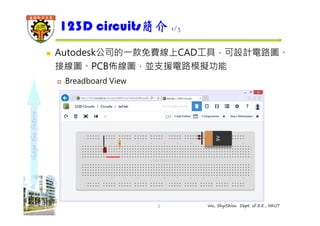
 Autodesk公司的⼀款免費線上CAD工具,可設計電路圖、 
接線圖、PCB佈線圖,並支援電路模擬功能 
2 Wu, ShyiShiou Dept. of E.E., NKUT 
 Breadboard View
shape the future 
123D circuits簡介2/3 
3 Wu, ShyiShiou Dept. of E.E., NKUT 
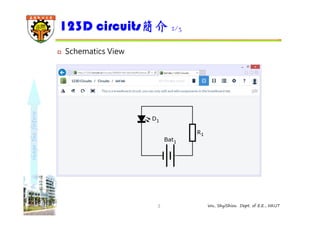
 Schematics View
shape the future 
123D circuits簡介3/3 
4 Wu, ShyiShiou Dept. of E.E., NKUT 
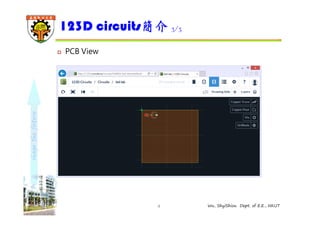
 PCB View
shape the future 
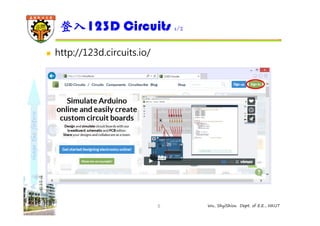
登入123D Circuits 1/2 
5 Wu, ShyiShiou Dept. of E.E., NKUT 
 http://123d.circuits.io/
shape the future 
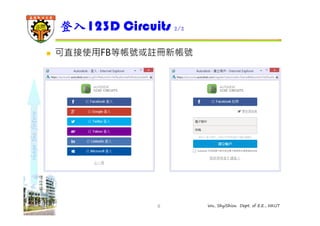
登入123D Circuits 2/2 
 可直接使用FB等帳號或註冊新帳號 
6 Wu, ShyiShiou Dept. of E.E., NKUT
shape the future 
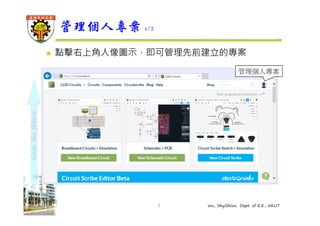
管理個人專案1/2 
 點擊右上角人像圖示,即可管理先前建立的專案 
管理個人專案 
7 Wu, ShyiShiou Dept. of E.E., NKUT
shape the future 
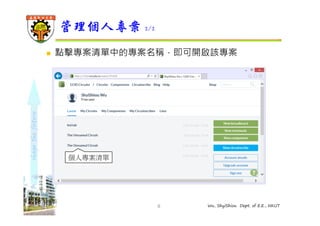
管理個人專案2/2 
 點擊專案清單中的專案名稱,即可開啟該專案 
8 Wu, ShyiShiou Dept. of E.E., NKUT 
個人專案清單
shape the future 
麵包板電路模擬1/6 
9 Wu, ShyiShiou Dept. of E.E., NKUT 
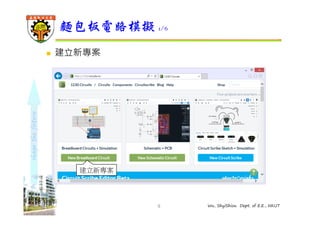
 建立新專案 
建立新專案
shape the future 
麵包板電路模擬2/6 
10 Wu, ShyiShiou Dept. of E.E., NKUT 
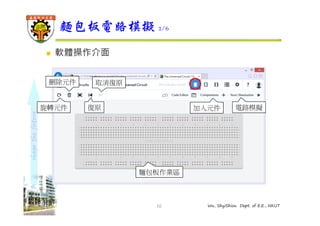
 軟體操作介面 
刪除元件取消復原 
旋轉元件 
復原加入元件電路模擬 
麵包板作業區
shape the future 
麵包板電路模擬3/6 
11 Wu, ShyiShiou Dept. of E.E., NKUT 
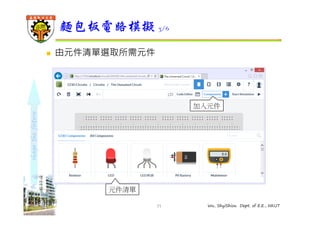
 由元件清單選取所需元件 
元件清單 
加入元件
shape the future 
麵包板電路模擬4/6 
12 Wu, ShyiShiou Dept. of E.E., NKUT 
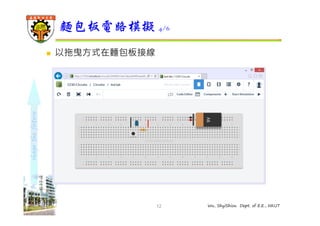
 以拖曳方式在麵包板接線
shape the future 
麵包板電路模擬5/6 
13 Wu, ShyiShiou Dept. of E.E., NKUT 
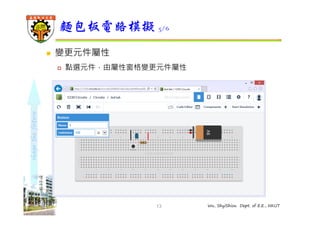
 變更元件屬性 
 點選元件,由屬性窗格變更元件屬性
shape the future 
麵包板電路模擬6/6 
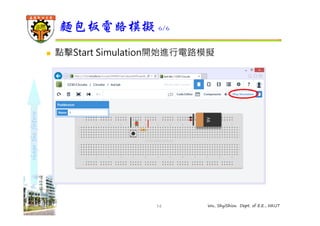
 點擊Start Simulation開始進行電路模擬 
14 Wu, ShyiShiou Dept. of E.E., NKUT
shape the future 
電路圖作業 
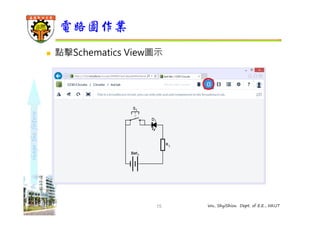
 點擊Schematics View圖示 
15 Wu, ShyiShiou Dept. of E.E., NKUT
shape the future 
PCB作業 
16 Wu, ShyiShiou Dept. of E.E., NKUT 
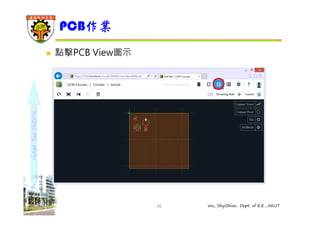
 點擊PCB View圖示
shape the future 
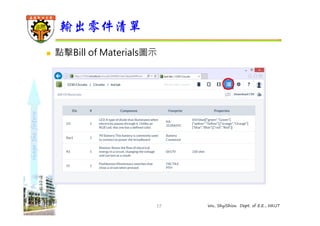
輸出零件清單 
 點擊Bill of Materials圖示 
17 Wu, ShyiShiou Dept. of E.E., NKUT
shape the future 
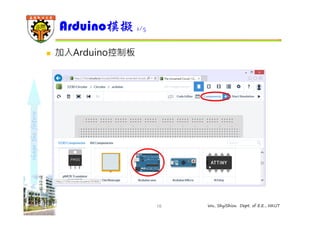
Arduino模擬1/5 
18 Wu, ShyiShiou Dept. of E.E., NKUT 
 加入Arduino控制板
shape the future 
Arduino模擬2/5 
19 Wu, ShyiShiou Dept. of E.E., NKUT 
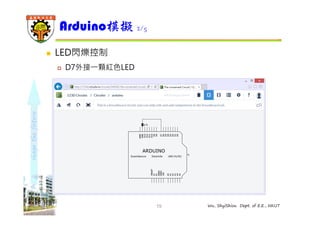
 LED閃爍控制 
 D7外接⼀顆紅⾊LED
shape the future 
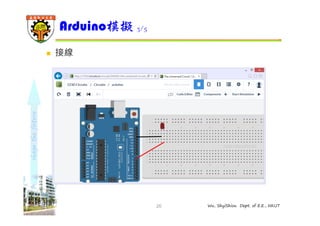
Arduino模擬3/5 
20 Wu, ShyiShiou Dept. of E.E., NKUT 
 接線
shape the future 
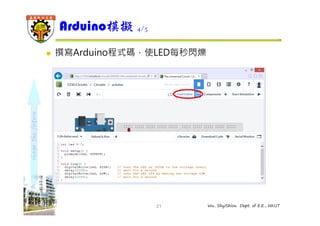
Arduino模擬4/5 
 撰寫Arduino程式碼,使LED每秒閃爍 
21 Wu, ShyiShiou Dept. of E.E., NKUT
shape the future 
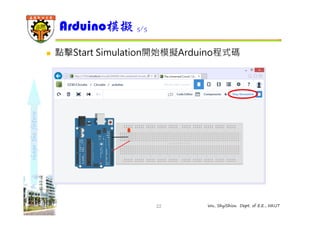
Arduino模擬5/5 
 點擊Start Simulation開始模擬Arduino程式碼 
22 Wu, ShyiShiou Dept. of E.E., NKUT

123D Circuits

  • 1.
    使用123D Circuits 吳錫修 September 29, 2014 Dept. of Electronics Engineering
  • 2.
    shape the future 123D circuits簡介1/3  Autodesk公司的⼀款免費線上CAD工具,可設計電路圖、 接線圖、PCB佈線圖,並支援電路模擬功能 2 Wu, ShyiShiou Dept. of E.E., NKUT  Breadboard View
  • 3.
    shape the future 123D circuits簡介2/3 3 Wu, ShyiShiou Dept. of E.E., NKUT  Schematics View
  • 4.
    shape the future 123D circuits簡介3/3 4 Wu, ShyiShiou Dept. of E.E., NKUT  PCB View
  • 5.
    shape the future 登入123D Circuits 1/2 5 Wu, ShyiShiou Dept. of E.E., NKUT  http://123d.circuits.io/
  • 6.
    shape the future 登入123D Circuits 2/2  可直接使用FB等帳號或註冊新帳號 6 Wu, ShyiShiou Dept. of E.E., NKUT
  • 7.
    shape the future 管理個人專案1/2  點擊右上角人像圖示,即可管理先前建立的專案 管理個人專案 7 Wu, ShyiShiou Dept. of E.E., NKUT
  • 8.
    shape the future 管理個人專案2/2  點擊專案清單中的專案名稱,即可開啟該專案 8 Wu, ShyiShiou Dept. of E.E., NKUT 個人專案清單
  • 9.
    shape the future 麵包板電路模擬1/6 9 Wu, ShyiShiou Dept. of E.E., NKUT  建立新專案 建立新專案
  • 10.
    shape the future 麵包板電路模擬2/6 10 Wu, ShyiShiou Dept. of E.E., NKUT  軟體操作介面 刪除元件取消復原 旋轉元件 復原加入元件電路模擬 麵包板作業區
  • 11.
    shape the future 麵包板電路模擬3/6 11 Wu, ShyiShiou Dept. of E.E., NKUT  由元件清單選取所需元件 元件清單 加入元件
  • 12.
    shape the future 麵包板電路模擬4/6 12 Wu, ShyiShiou Dept. of E.E., NKUT  以拖曳方式在麵包板接線
  • 13.
    shape the future 麵包板電路模擬5/6 13 Wu, ShyiShiou Dept. of E.E., NKUT  變更元件屬性  點選元件,由屬性窗格變更元件屬性
  • 14.
    shape the future 麵包板電路模擬6/6  點擊Start Simulation開始進行電路模擬 14 Wu, ShyiShiou Dept. of E.E., NKUT
  • 15.
    shape the future 電路圖作業  點擊Schematics View圖示 15 Wu, ShyiShiou Dept. of E.E., NKUT
  • 16.
    shape the future PCB作業 16 Wu, ShyiShiou Dept. of E.E., NKUT  點擊PCB View圖示
  • 17.
    shape the future 輸出零件清單  點擊Bill of Materials圖示 17 Wu, ShyiShiou Dept. of E.E., NKUT
  • 18.
    shape the future Arduino模擬1/5 18 Wu, ShyiShiou Dept. of E.E., NKUT  加入Arduino控制板
  • 19.
    shape the future Arduino模擬2/5 19 Wu, ShyiShiou Dept. of E.E., NKUT  LED閃爍控制  D7外接⼀顆紅⾊LED
  • 20.
    shape the future Arduino模擬3/5 20 Wu, ShyiShiou Dept. of E.E., NKUT  接線
  • 21.
    shape the future Arduino模擬4/5  撰寫Arduino程式碼,使LED每秒閃爍 21 Wu, ShyiShiou Dept. of E.E., NKUT
  • 22.
    shape the future Arduino模擬5/5  點擊Start Simulation開始模擬Arduino程式碼 22 Wu, ShyiShiou Dept. of E.E., NKUT