An Introduction To Software
Development Using Python
Spring Semester, 2014
Class #12:
Testing,
Continuous integration
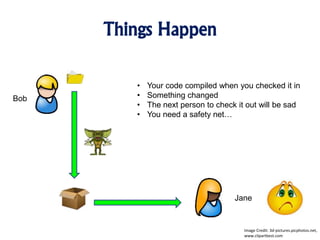
Things Happen
Bob
Jane
Image Credit: 3d-pictures.picphotos.net,
www.clipartbest.com
• Your code compiled when you checked it in
• Something changed
• The next person to check it out will be sad
• You need a safety net…
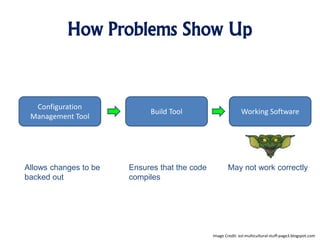
How Problems Show Up
Configuration
Management Tool
Build Tool Working Software
Allows changes to be
backed out
Ensures that the code
compiles
May not work correctly
Image Credit: esl-multicultural-stuff-page3.blogspot.com
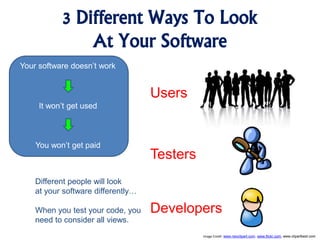
3 Different Ways To Look
At Your Software
Your software doesn’t work
It won’t get used
You won’t get paid
Image Credit: www.neoclipart.com, www.flickr.com, www.clipartbest.com
Users
Testers
Developers
Different people will look
at your software differently…
When you test your code, you
need to consider all views.
How Do Users Look At
Your Software?
• Don’t see code, don’t look into the
database.
• Don’t want to do any of these
things.
• Your code is a black box to them.
• It either works or doesn’t.
• Users are all about product
functionality…
Image Credit: www.neoclipart.com
How Do Testers See
Your Software?
• Looking for functionality, but…
• Poking around under the covers making
sure things are happening the way you said
they would.
• Your code is a gray box to them.
• Testers look into a database to make sure
that things got cleaned up
• Testers ensure that software closes ports,
drops network connections, and that
system memory usage remains constant.
Image Credit: www.flickr.com
How Do Developers See
Your Software?
• Developers see duplicated code, good /
bad design patterns, and
inconsistencies in representations.
• Your system is wide open to them.
• Developers see your system as a wide
open white box.
• Developers can be blinded by details
and miss broken functions or make
incorrect assumptions.
Image Credit: www.clipartbest.com
Black-Box Testing
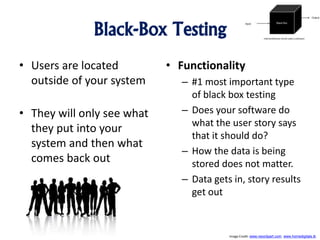
• Users are located
outside of your system
• They will only see what
they put into your
system and then what
comes back out
• Functionality
– #1 most important type
of black box testing
– Does your software do
what the user story says
that it should do?
– How the data is being
stored does not matter.
– Data gets in, story results
get out
Image Credit: www.neoclipart.com, www.homedigitals.tk
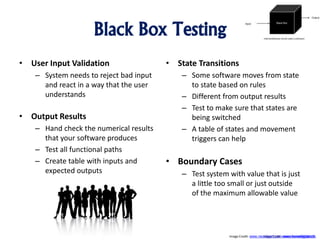
Black Box Testing
• User Input Validation
– System needs to reject bad input
and react in a way that the user
understands
• Output Results
– Hand check the numerical results
that your software produces
– Test all functional paths
– Create table with inputs and
expected outputs
• State Transitions
– Some software moves from state
to state based on rules
– Different from output results
– Test to make sure that states are
being switched
– A table of states and movement
triggers can help
• Boundary Cases
– Test system with value that is just
a little too small or just outside
of the maximum allowable value
Image Crdit: www.homedigitals.tkImage Credit: www.neoclipart.com, www.homedigitals.tk
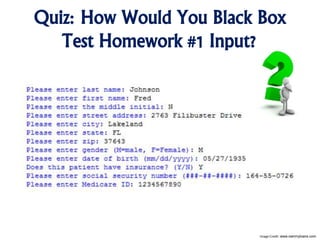
Quiz: How Would You Black Box
Test Homework #1 Input?
Image Credit: www.ownmyloans.com
Gray-Box Testing
• Required if you can’t get
results out of the system
without looking inside – at
least a bit.
• Good example: web apps
that move data around in a
database
• You need to check the
database and the web code
• Verifying Auditing and
Logging:
– Required when money is
involved
– Not available via the
user interface
– Use log viewing tool or
auditing report
– May have to query the
database
Image Credit: www.flickr.com, www.automationlearn.com
Gray-Box Testing
• Data Destined For Other
Systems
– Check output format
– Check data being sent to
other systems
• System Added information
– Hand check checksums and
data hashes
– Double check system
generated time stamps:
correct data and time zone
• Scraps
– Does system perform cleanup
after processing?
– Security risk and resource
leak
– Check for memory leaks
– Verify that uninstalling your
application leaves system
clean
Image Credit: www.flickr.com, www.automationlearn.com
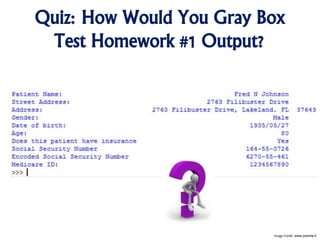
Quiz: How Would You Gray Box
Test Homework #1 Output?
Image Credit: www.joomla.it
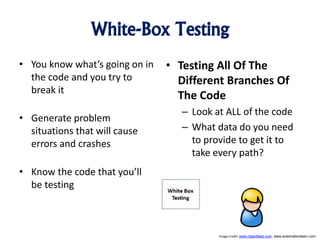
White-Box Testing
• You know what’s going on in
the code and you try to
break it
• Generate problem
situations that will cause
errors and crashes
• Know the code that you’ll
be testing
• Testing All Of The
Different Branches Of
The Code
– Look at ALL of the code
– What data do you need
to provide to get it to
take every path?
Image Credit: www.clipartbest.com, www.automationlearn.com
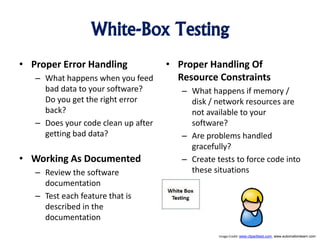
White-Box Testing
• Proper Error Handling
– What happens when you feed
bad data to your software?
Do you get the right error
back?
– Does your code clean up after
getting bad data?
• Working As Documented
– Review the software
documentation
– Test each feature that is
described in the
documentation
• Proper Handling Of
Resource Constraints
– What happens if memory /
disk / network resources are
not available to your
software?
– Are problems handled
gracefully?
– Create tests to force code into
these situations
Image Credit: www.clipartbest.com, www.automationlearn.com
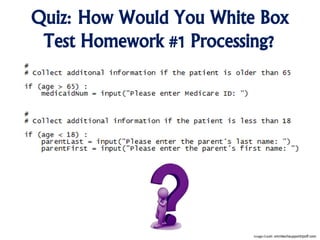
Quiz: How Would You White Box
Test Homework #1 Processing?
Image Credit: omnitechsupportripoff.com
Creating Tests
• You have to determine
what you will test
– What to test?
– How to test it?
– Types of testing:
• Functional testing
• Performance testing
• Boundary / edge cases
• Race conditions
• Security risks
• Valid data
• Invalid data
• Etc.
• You may need more than
one way to test your data
– Test the GUI
– Test the backend code
– Test security
Image Credit: www.clipartillustration.com
The Power Of Automating
Your Testing
• Create a library of tests
– As software gets bigger, so to will the number of tests
– May take days of developer time to run all tests
– Collect all tests into one library
• Run all tests with one command
– Create a suite of tests in the library that can be run with one command
– Making it easy to test software means that it will be tested
– Add new tests to the automated suite as they are created
• Always perform regression testing
– Adding bugs to existing code is called software regression
– Solve this problem by running tests for your newer code as well as for your older code
Image Credit www.clker.com
Fast Testing vs. Slow Testing
• Large test suites can become unwieldy and end up getting run
less.
• Separate fast tests from slow tests. This way developers can
run the fast tests more often.
• Run the full test suite when needed.
• What is in each test suite can change based on what code you
are working on.
Image Credit wondersofdisney2.yolasite.com
3 Different Types Of Testing
• Unit Testing
– Performed by developers
– Goal is to ensure that their code works correctly
• System Testing
– Performed by professional testers
– Goal is to ensure that the parts work together
• User Testing
– Performed by professional testers
– Goal is to ensure that the expected functions work
Image Credit www.fotosearch.com
What We Covered Today
1. How different groups of
people look at your
software
2. Black / Gray / White box
testing
3. Automated testing
4. Py.Test
Image Credit: http://www.tswdj.com/blog/2011/05/17/the-grooms-checklist/
What We’ll Be Covering Next Time
1. Test driven
development
Image Credit: http://merchantblog.thefind.com/2011/01/merchant-newsletter/resolve-to-take-advantage-of-these-5-e-commerce-trends/attachment/crystal-ball-fullsize/

An Introduction To Software Development - Testing, Continuous integration

  • 1.
    An Introduction ToSoftware Development Using Python Spring Semester, 2014 Class #12: Testing, Continuous integration
  • 2.
    Things Happen Bob Jane Image Credit:3d-pictures.picphotos.net, www.clipartbest.com • Your code compiled when you checked it in • Something changed • The next person to check it out will be sad • You need a safety net…
  • 3.
    How Problems ShowUp Configuration Management Tool Build Tool Working Software Allows changes to be backed out Ensures that the code compiles May not work correctly Image Credit: esl-multicultural-stuff-page3.blogspot.com
  • 4.
    3 Different WaysTo Look At Your Software Your software doesn’t work It won’t get used You won’t get paid Image Credit: www.neoclipart.com, www.flickr.com, www.clipartbest.com Users Testers Developers Different people will look at your software differently… When you test your code, you need to consider all views.
  • 5.
    How Do UsersLook At Your Software? • Don’t see code, don’t look into the database. • Don’t want to do any of these things. • Your code is a black box to them. • It either works or doesn’t. • Users are all about product functionality… Image Credit: www.neoclipart.com
  • 6.
    How Do TestersSee Your Software? • Looking for functionality, but… • Poking around under the covers making sure things are happening the way you said they would. • Your code is a gray box to them. • Testers look into a database to make sure that things got cleaned up • Testers ensure that software closes ports, drops network connections, and that system memory usage remains constant. Image Credit: www.flickr.com
  • 7.
    How Do DevelopersSee Your Software? • Developers see duplicated code, good / bad design patterns, and inconsistencies in representations. • Your system is wide open to them. • Developers see your system as a wide open white box. • Developers can be blinded by details and miss broken functions or make incorrect assumptions. Image Credit: www.clipartbest.com
  • 8.
    Black-Box Testing • Usersare located outside of your system • They will only see what they put into your system and then what comes back out • Functionality – #1 most important type of black box testing – Does your software do what the user story says that it should do? – How the data is being stored does not matter. – Data gets in, story results get out Image Credit: www.neoclipart.com, www.homedigitals.tk
  • 9.
    Black Box Testing •User Input Validation – System needs to reject bad input and react in a way that the user understands • Output Results – Hand check the numerical results that your software produces – Test all functional paths – Create table with inputs and expected outputs • State Transitions – Some software moves from state to state based on rules – Different from output results – Test to make sure that states are being switched – A table of states and movement triggers can help • Boundary Cases – Test system with value that is just a little too small or just outside of the maximum allowable value Image Crdit: www.homedigitals.tkImage Credit: www.neoclipart.com, www.homedigitals.tk
  • 10.
    Quiz: How WouldYou Black Box Test Homework #1 Input? Image Credit: www.ownmyloans.com
  • 11.
    Gray-Box Testing • Requiredif you can’t get results out of the system without looking inside – at least a bit. • Good example: web apps that move data around in a database • You need to check the database and the web code • Verifying Auditing and Logging: – Required when money is involved – Not available via the user interface – Use log viewing tool or auditing report – May have to query the database Image Credit: www.flickr.com, www.automationlearn.com
  • 12.
    Gray-Box Testing • DataDestined For Other Systems – Check output format – Check data being sent to other systems • System Added information – Hand check checksums and data hashes – Double check system generated time stamps: correct data and time zone • Scraps – Does system perform cleanup after processing? – Security risk and resource leak – Check for memory leaks – Verify that uninstalling your application leaves system clean Image Credit: www.flickr.com, www.automationlearn.com
  • 13.
    Quiz: How WouldYou Gray Box Test Homework #1 Output? Image Credit: www.joomla.it
  • 14.
    White-Box Testing • Youknow what’s going on in the code and you try to break it • Generate problem situations that will cause errors and crashes • Know the code that you’ll be testing • Testing All Of The Different Branches Of The Code – Look at ALL of the code – What data do you need to provide to get it to take every path? Image Credit: www.clipartbest.com, www.automationlearn.com
  • 15.
    White-Box Testing • ProperError Handling – What happens when you feed bad data to your software? Do you get the right error back? – Does your code clean up after getting bad data? • Working As Documented – Review the software documentation – Test each feature that is described in the documentation • Proper Handling Of Resource Constraints – What happens if memory / disk / network resources are not available to your software? – Are problems handled gracefully? – Create tests to force code into these situations Image Credit: www.clipartbest.com, www.automationlearn.com
  • 16.
    Quiz: How WouldYou White Box Test Homework #1 Processing? Image Credit: omnitechsupportripoff.com
  • 17.
    Creating Tests • Youhave to determine what you will test – What to test? – How to test it? – Types of testing: • Functional testing • Performance testing • Boundary / edge cases • Race conditions • Security risks • Valid data • Invalid data • Etc. • You may need more than one way to test your data – Test the GUI – Test the backend code – Test security Image Credit: www.clipartillustration.com
  • 18.
    The Power OfAutomating Your Testing • Create a library of tests – As software gets bigger, so to will the number of tests – May take days of developer time to run all tests – Collect all tests into one library • Run all tests with one command – Create a suite of tests in the library that can be run with one command – Making it easy to test software means that it will be tested – Add new tests to the automated suite as they are created • Always perform regression testing – Adding bugs to existing code is called software regression – Solve this problem by running tests for your newer code as well as for your older code Image Credit www.clker.com
  • 19.
    Fast Testing vs.Slow Testing • Large test suites can become unwieldy and end up getting run less. • Separate fast tests from slow tests. This way developers can run the fast tests more often. • Run the full test suite when needed. • What is in each test suite can change based on what code you are working on. Image Credit wondersofdisney2.yolasite.com
  • 20.
    3 Different TypesOf Testing • Unit Testing – Performed by developers – Goal is to ensure that their code works correctly • System Testing – Performed by professional testers – Goal is to ensure that the parts work together • User Testing – Performed by professional testers – Goal is to ensure that the expected functions work Image Credit www.fotosearch.com
  • 21.
    What We CoveredToday 1. How different groups of people look at your software 2. Black / Gray / White box testing 3. Automated testing 4. Py.Test Image Credit: http://www.tswdj.com/blog/2011/05/17/the-grooms-checklist/
  • 22.
    What We’ll BeCovering Next Time 1. Test driven development Image Credit: http://merchantblog.thefind.com/2011/01/merchant-newsletter/resolve-to-take-advantage-of-these-5-e-commerce-trends/attachment/crystal-ball-fullsize/

Editor's Notes

  • #2 New name for the class I know what this means Technical professionals are who get hired This means much more than just having a narrow vertical knowledge of some subject area. It means that you know how to produce an outcome that I value. I’m willing to pay you to do that.