Java programming with JNI

Scott Stricker (sstricke@us.ibm.com)                             Skill Level: Introductory
Developer
IBM                                                                   Date: 26 Mar 2002


 This tutorial describes and demonstrates the basic and most commonly used
 techniques of the Java Native Interface -- calling C or C++ code from Java
 programs, and calling Java code from C or C++ programs -- to help you develop
 your own JNI solutions quickly and efficiently.


Section 1. About this tutorial
What is this tutorial about?
The Java Native Interface (JNI) is a native programming interface that is part of
the Java Software Development Kit (SDK). JNI lets Java code use code and code
libraries written in other languages, such as C and C++. The Invocation API, which
is part of JNI, can be used to embed a Java virtual machine (JVM) into native
applications, thereby allowing programmers to call Java code from within native code.

This tutorial deals with the two most common applications of JNI: calling C/C++
code from Java programs, and calling Java code from C/C++ programs. We'll cover
both the essentials of the Java Native Interface and some of the more advanced
programming challenges that can arise.

Should I take this tutorial?
This tutorial will walk you through the steps of using the Java Native Interface. You'll
learn how to call native C/C++ code from within a Java application and how to call
Java code from within a native C/C++ application.

All the examples use Java, C, and C++ code, and are written to be portable to both
Windows and UNIX-based platforms. To follow the examples, you must have some
experience programming in the Java language. In addition, you will also need some
experience programming in C or C++. Strictly speaking, a JNI solution could be

© Copyright IBM Corporation 2002                                                Trademarks
Java programming with JNI                                                      Page 1 of 24
developerWorks®                                                ibm.com/developerWorks/


broken down between Java programming tasks and C/C++ programming tasks, with
separate programmers doing each task. However, to fully understand how JNI works
in both programming environments, you'll need to be able to understand both the
Java and C/C++ code.

We'll also cover a number of advanced topics, including exception handling and
multithreading with native methods. To get the most out of this part of the tutorial, you
should be familiar with the Java platform's security model and have some experience
in multithreaded application development.

The section on Advanced topics is separate from the more basic step-by-step
introduction to JNI. Beginning Java programmers may benefit from taking the first two
parts of the tutorial now and returning to the advanced topics at a later time.

See Resources for a listing of tutorials, articles, and other references that expand
upon the material presented here.

Tools and components
To run the examples in this tutorial, you will need the following tools and components:

   • A Java compiler: javac.exe ships with the SDK.
   • A Java virtual machine (JVM): java.exe ships with the SDK.
   • A native method C file generator: javah.exe ships with the SDK.
   • Library files and native header files that define JNI. The jni.h C header file,
     jvm.lib, and jvm.dll or jvm.so files all ship with the SDK.
   • A C and C++ compiler that can create a shared library. The two most common
     C compilers are Visual C++ for Windows and cc for UNIX-based systems.

Although you may use any development environment you like, the examples we'll
work with in this tutorial were written using the standard tools and components that
ship with the SDK. See Resources to download the SDK, complete source files,
and other tools essential for the completion of this tutorial. This tutorial specifically
addresses Sun's implementation of JNI, which should be regarded as the standard
for JNI solutions. The details of other JNI implementations are not addressed in this
tutorial.

Additional considerations
In the Java 2 SDK, the JVM and run-time support are located in the shared library
file named jvm.dll (Windows) or libjvm.so (UNIX). In the Java 1.1 JDK, the JVM and
run-time support were located in the shared library file named javai.dll (Windows) or
libjava.so (UNIX). The version 1.1 shared libraries contained the runtime and some
native methods for the class libraries, but in version 1.2, the runtime is removed and
the native methods are in java.dll and libjava.so. This change is important in Java
code that:

Java programming with JNI                                                        Page 2 of 24
ibm.com/developerWorks/                                                      developerWorks®


   • Is written using non-JNI native methods (as with the old native method interface
     from the JDK 1.0 JDK)
   • Uses an embedded JVM through the JNI Invocation Interface
In both cases, you'll need to relink your native libraries before they can be used with
version 1.2. Note that this change should not affect JNI programmers implementing
native methods -- only JNI code that invokes a JVM through the Invocation API.

If you use the jni.h file that comes with the SDK/JDK, that header file will use
the default JVM in the JDK/SDK installation directory (jvm.dll or libjvm.so). Any
implementation of a Java platform that supports JNI should do the same thing,
or allow you to specify a JVM shared library; however the details of how this is
done may be specific to that Java Platform/JVM implementation. Indeed, many
implementations of JVMs do not support JNI at all.


Section 2. Calling C/C++ code from Java programs
Overview
JNI allows you to use native code when an application cannot be written entirely in
the Java language. The following are typical situations where you might decide to use
native code:

   • You want to implement time-critical code in a lower-level, faster programming
     language.
   • You have legacy code or code libraries that you want to access from Java
     programs.
   • You need platform-dependent features not supported in the standard Java class
     library.

Six steps to call C/C++ from Java code
The process of calling C or C ++ from Java programs consists of six steps. We'll go
over each step in depth in the sections that follow, but let's start with a quick look at
each one.

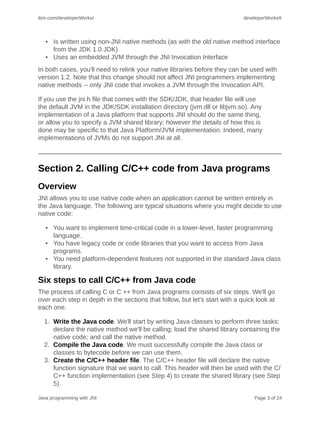
  1. Write the Java code. We'll start by writing Java classes to perform three tasks:
     declare the native method we'll be calling; load the shared library containing the
     native code; and call the native method.
  2. Compile the Java code. We must successfully compile the Java class or
     classes to bytecode before we can use them.
  3. Create the C/C++ header file. The C/C++ header file will declare the native
     function signature that we want to call. This header will then be used with the C/
     C++ function implementation (see Step 4) to create the shared library (see Step
     5).

Java programming with JNI                                                        Page 3 of 24
developerWorks®                                              ibm.com/developerWorks/


  4. Write the C/C++ code. This step consists of implementing the function in a C
     or C++ source code file. The C/C++ source file must include the header file we
     created in Step 3.
  5. Create the shared library file. We'll create a shared library file from the C
     source code file we created in Step 4.
  6. Run the Java program. We'll run the code and see if it works. We'll also go
     over some tips for dealing with the more commonly occurring errors.

Step 1: Write the Java code
We'll start by writing the Java source code file, which will declare the native method
(or methods), load the shared library containing the native code, and actually call the
native method.

Here's our example Java source code file, called Sample1.java:
 1. public class Sample1
 2. {
 3.   public native int intMethod(int n);
 4.   public native boolean booleanMethod(boolean bool);
 5.   public native String stringMethod(String text);
 6.   public native int intArrayMethod(int[] intArray);
 7.
 8.   public static void main(String[] args)
 9.   {
10.     System.loadLibrary("Sample1");
11.     Sample1 sample = new Sample1();
12.     int     square = sample.intMethod(5);
13.     boolean bool   = sample.booleanMethod(true);
14.     String text    = sample.stringMethod("JAVA");
15.     int     sum    = sample.intArrayMethod(
16.                         new int[]{1,1,2,3,5,8,13} );
17.
18.     System.out.println("intMethod: " + square);
19.     System.out.println("booleanMethod: " + bool);
20.     System.out.println("stringMethod: " + text);
21.     System.out.println("intArrayMethod: " + sum);
22.   }
23. }


What's happening in this code?
First of all, note the use of the native keyword, which can be used only with
methods. The native keyword tells the Java compiler that a method is implemented
in native code outside of the Java class in which it is being declared. Native methods
can only be declared in Java classes, not implemented, so a native method cannot
have a body.

Now, let's look at the code line by line:

   • In lines 3 through 6 we declare four native methods.
   • On line 10 we load the shared library file containing the implementation for
     these native methods. (We'll create the shared library file when we come to
     Step 5.)

Java programming with JNI                                                     Page 4 of 24
ibm.com/developerWorks/                                                   developerWorks®


   • Finally, in lines 12 through 15 we call the native methods. Note that this
     operation is no different from the operation of calling non-native Java methods.
Note: Shared library files on UNIX-based platforms are usually prefixed with "lib". In
this case, line 10 would be System.loadLibrary("libSample1"); . Be sure to take
notice of the shared library file name that you generate in Step 5: Create the shared
library file.

Step 2: Compile the Java code
Next, we need to compile the Java code down to bytecode. One way to do this is to
use the Java compiler, javac, which comes with the SDK. The command we use to
compile our Java code to bytecode is:
javac Sample2.java


Step 3: Create the C/C++ header file
The third step is to create a C/C++ header file that defines native function signatures.
One way to do this is to use the native method C stub generator tool, javah.exe,
which comes with the SDK. This tool is designed to create a header file that defines
C-style functions for each native method it finds in a Java source code file. The
command to use here is:
javah Sample1


Results of running javah.exe on Sample1.java
Sample1.h, below, is the C/C++ header file generated by running the javah tool on
our Java code:
 1.   /* DO NOT EDIT THIS FILE - it is machine generated */
 2.   #include <jni.h>
 3.   /* Header for class Sample1 */
 4.
 5.   #ifndef _Included_Sample1
 6.   #define _Included_Sample1
 7.   #ifdef __cplusplus
 8.   extern "C" {
 9.   #endif
10.
11.   JNIEXPORT jint JNICALL Java_Sample1_intMethod
12.     (JNIEnv *, jobject, jint);
13.
14.   JNIEXPORT jboolean JNICALL Java_Sample1_booleanMethod
15.     (JNIEnv *, jobject, jboolean);
16.
17.   JNIEXPORT jstring JNICALL Java_Sample1_stringMethod
18.    (JNIEnv *, jobject, jstring);
19.
20.   JNIEXPORT jint JNICALL Java_Sample1_intArrayMethod
21.    (JNIEnv *, jobject, jintArray);
22.
23.   #ifdef __cplusplus
24.   }


Java programming with JNI                                                     Page 5 of 24
developerWorks®                                                    ibm.com/developerWorks/


25. #endif
26. #endif


About the C/C++ header file
As you've probably noticed, the C/C++ function signatures in Sample1.h are quite
different from the Java native method declarations in Sample1.java. JNIEXPORT and
JNICALL are compiler-dependent specifiers for export functions. The return types are
C/C++ types that map to Java types. These types are fully explained in Appendix A:
JNI types

The parameter lists of all these functions have a pointer to a JNIEnv and a jobject,
in addition to normal parameters in the Java declaration. The pointer to JNIEnv is in
fact a pointer to a table of function pointers. As we'll see in Step 4, these functions
provide the various faculties to manipulate Java data in C and C++.

The jobject parameter refers to the current object. Thus, if the C or C++ code needs
to refer back to the Java side, this jobject acts as a reference, or pointer, back to the
calling Java object. The function name itself is made by the "Java_" prefix, followed
by the fully qualified class name, followed by an underscore and the method name.

Step 4: Write the C/C++ code
When it comes to writing the C/C++ function implementation, the important thing to
keep in mind is that our signatures must be exactly like the function declarations from
Sample1.h. We'll look at the complete code for both a C implementation and a C++
implementation, then discuss the differences between the two.

The C function implementation
Here is Sample1.c, an implementation written in C:
 1.   #include "Sample1.h"
 2.   #include <string.h>
 3.
 4.   JNIEXPORT jint JNICALL Java_Sample1_intMethod
 5.     (JNIEnv *env, jobject obj, jint num) {
 6.      return num * num;
 7.   }
 8.
 9.   JNIEXPORT jboolean JNICALL Java_Sample1_booleanMethod
10.     (JNIEnv *env, jobject obj, jboolean boolean) {
11.     return !boolean;
12.   }
13.
14.   JNIEXPORT jstring JNICALL Java_Sample1_stringMethod
15.     (JNIEnv *env, jobject obj, jstring string) {
16.       const char *str = (*env)->GetStringUTFChars(env, string, 0);
17.       char cap[128];
18.       strcpy(cap, str);
19.       (*env)->ReleaseStringUTFChars(env, string, str);
20.       return (*env)->NewStringUTF(env, strupr(cap));
21.   }
22.
23.   JNIEXPORT jint JNICALL Java_Sample1_intArrayMethod


Java programming with JNI                                                        Page 6 of 24
ibm.com/developerWorks/                                                     developerWorks®


24.   (JNIEnv *env, jobject obj, jintArray array) {
25.     int i, sum = 0;
26.     jsize len = (*env)->GetArrayLength(env, array);
27.     jint *body = (*env)->GetIntArrayElements(env, array, 0);
28.     for (i=0; i<len; i++)
29.     { sum += body[i];
30.     }
31.     (*env)->ReleaseIntArrayElements(env, array, body, 0);
32.     return sum;
33. }
34.
35. void main(){}


The C++ function implementation
And here's Sample1.cpp, the C++ implementation:
 1. #include "Sample1.h"
 2. #include <string.h>
 3.
 4.JNIEXPORT jint JNICALL Java_Sample1_intMethod
 5. (JNIEnv *env, jobject obj, jint num) {
 6.   return num * num;
 7. }
 8.
 9. JNIEXPORT jboolean JNICALL Java_Sample1_booleanMethod
10.   (JNIEnv *env, jobject obj, jboolean boolean) {
11.   return !boolean;
12. }
13.
14. JNIEXPORT jstring JNICALL Java_Sample1_stringMethod
15.   (JNIEnv *env, jobject obj, jstring string) {
16.     const char *str = env->GetStringUTFChars(string, 0);
17.     char cap[128];
18.     strcpy(cap, str);
19.     env->ReleaseStringUTFChars(string, str);
20.     return env->NewStringUTF(strupr(cap));
21. }
22.
23. JNIEXPORT jint JNICALL Java_Sample1_intArrayMethod
24.   (JNIEnv *env, jobject obj, jintArray array) {
25.     int i, sum = 0;
26.     jsize len = env->GetArrayLength(array);
27.     jint *body = env->GetIntArrayElements(array, 0);
28.     for (i=0; i<len; i++)
29.     { sum += body[i];
30.     }
31.     env->ReleaseIntArrayElements(array, body, 0);
32.     return sum;
33. }
34.
35. void main(){}


C and C++ function implementations compared
The C and C++ code is nearly identical; the only difference is the method used to
access JNI functions. In C, JNI function calls are prefixed with "(*env)->" in order
to de-reference the function pointer. In C++, the JNIEnv class has inline member
functions that handle the function pointer lookup. This slight difference is illustrated
below, where the two lines of code access the same function but the syntax is
specialized for each language.

Java programming with JNI                                                       Page 7 of 24
developerWorks®                                               ibm.com/developerWorks/


                                   C syntax: jsize len = (*env)-
                                             >GetArrayLength(env,array);

                                 C++ syntax: jsize len =env->GetArrayLength(array);


Step 5: Create the shared library file
Next, we create a shared library file that contains the native code. Most C and C++
compilers can create shared library files in addition to machine code executables.
The command you use to create the shared library file depends on the compiler
you're using. Below are the commands that will work on Windows and Solaris
systems.

                                   Windows: cl -Ic:jdkinclude -Ic:jdkincludewin32 -
                                            LD Sample1.c -FeSample1.dll

                                    Solaris: cc -G -I/usr/local/jdk/include -I/user/local/
                                             jdk/include/solaris Sample1.c -o Sample1.so


Step 6: Run the Java program
The last step is to run the Java program and make sure that the code works correctly.
Because all Java code must be executed in a Java virtual machine, we need to use
a Java runtime environment. One way to do this is to use the Java interpreter, java,
which comes with the SDK. The command to use is:
java Sample1


When we run the Sample1.class program, we should get the following result:
PROMPT>java Sample1
intMethod: 25
booleanMethod: false
stringMethod: JAVA
intArrayMethod: 33

PROMPT>


Troubleshooting
You can run into many problems when using JNI to access native code from Java
programs. The three most common errors you'll encounter are:

   • A dynamic link cannot be found. This results in the error message:
     java.lang.UnsatisfiedLinkError. This usually means that either the shared
     library cannot be found, or a specific native method inside the shared library
     cannot be found.
   • The shared library file cannot be found. When you load the library file using
     the file name with the System.loadLibrary(String libname) method, make
     sure that the file name is spelled correctly and that you do not specify the
     extension. Also, make sure that the library file is accessible to the JVM by
     ensuring that the library file's location is in the classpath.

Java programming with JNI                                                       Page 8 of 24
ibm.com/developerWorks/                                                    developerWorks®


   • A method with the specified signature cannot be found. Make sure that
     your C/C++ function implementation has a signature that is identical to the
     function signature in the header file.

Conclusion
Calling C or C++ native code from Java, while not trivial, is a well-integrated function
in the Java platform. Although JNI supports both C and C++, the C++ interface is
somewhat cleaner and is generally preferred over the C interface.

As you have seen, calling C or C++ native code requires that you give your functions
special names and create a shared library file. When taking advantage of existing
code libraries, it is generally not advisable to change the code. To avoid this, it
is common to create proxy code, or a proxy class in the case of C++, that has
the specially named functions required by JNI. These functions, then, can call
the underlying library functions, whose signatures and implementations remain
unchanged.


Section 3. Calling Java code from C/C++ programs
Overview
JNI allows you to invoke Java class methods from within native code. Often, to do
this, you must create and initialize a JVM within the native code using the Invocation
API. The following are typical situations where you might decide to call Java code
from C/C++ code:

   • You want to implement platform-independent portions of code for functionality
     that will be used across multiple platforms.
   • You have code or code libraries written in the Java language that you need to
     access in native applications.
   • You want to take advantage of the standard Java class library from native code.

Four steps to call Java code from a C/C++ program
The four steps in the process of calling Java methods from C/C++ are as follows:

  1. Write the Java code. This step consists of writing the Java class or classes
     that implement (or call other methods that implement) the functionality you want
     to access.
  2. Compile the Java code. The Java class or classes must be successfully
     compiled to bytecode before they can be used.
  3. Write the C/C++ code. This code will create and instantiate a JVM and call the
     correct Java methods.
  4. Run the native C/C++ application. We'll run the application to see if it works.
     We'll also go over some tips for dealing with common errors.

Java programming with JNI                                                      Page 9 of 24
developerWorks®                                                 ibm.com/developerWorks/


Step 1: Write the Java code
We start by writing the Java source code file or files, which will implement the
functionality we want to make available to the native C/C++ code.

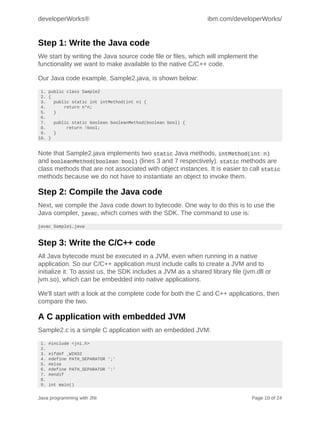
Our Java code example, Sample2.java, is shown below:
 1. public class Sample2
 2. {
 3.   public static int intMethod(int n) {
 4.       return n*n;
 5.   }
 6.
 7.   public static boolean booleanMethod(boolean bool) {
 8.        return !bool;
 9.   }
10. }


Note that Sample2.java implements two static Java methods, intMethod(int n)
and booleanMethod(boolean bool) (lines 3 and 7 respectively). static methods are
class methods that are not associated with object instances. It is easier to call static
methods because we do not have to instantiate an object to invoke them.

Step 2: Compile the Java code
Next, we compile the Java code down to bytecode. One way to do this is to use the
Java compiler, javac, which comes with the SDK. The command to use is:
javac Sample1.java


Step 3: Write the C/C++ code
All Java bytecode must be executed in a JVM, even when running in a native
application. So our C/C++ application must include calls to create a JVM and to
initialize it. To assist us, the SDK includes a JVM as a shared library file (jvm.dll or
jvm.so), which can be embedded into native applications.

We'll start with a look at the complete code for both the C and C++ applications, then
compare the two.

A C application with embedded JVM
Sample2.c is a simple C application with an embedded JVM:
 1.   #include <jni.h>
 2.
 3.   #ifdef _WIN32
 4.   #define PATH_SEPARATOR ';'
 5.   #else
 6.   #define PATH_SEPARATOR ':'
 7.   #endif
 8.
 9.   int main()


Java programming with JNI                                                       Page 10 of 24
ibm.com/developerWorks/                                                          developerWorks®


10. {
11.   JavaVMOption options[1];
12.   JNIEnv *env;
13.   JavaVM *jvm;
14.   JavaVMInitArgs vm_args;
15.   long status;
16.   jclass cls;
17.   jmethodID mid;
18.   jint square;
19.   jboolean not;
20.
21.   options[0].optionString = "-Djava.class.path=.";
22.   memset(&vm_args, 0, sizeof(vm_args));
23.   vm_args.version = JNI_VERSION_1_2;
24.   vm_args.nOptions = 1;
25.   vm_args.options = options;
26.   status = JNI_CreateJavaVM(&jvm, (void**)&env, &vm_args);
27.
28.   if (status != JNI_ERR)
29.   {
30.      cls = (*env)->FindClass(env, "Sample2");
31.      if(cls !=0)
32.      { mid = (*env)->GetStaticMethodID(env, cls, "intMethod", "(I)I");
33.        if(mid !=0)
34.        { square = (*env)->CallStaticIntMethod(env, cls, mid, 5);
35.     printf("Result of intMethod: %dn", square);
36.        }
37.
38.        mid = (*env)->GetStaticMethodID(env, cls, "booleanMethod", "(Z)Z");
39.        if(mid !=0)
40.   { not = (*env)->CallStaticBooleanMethod(env, cls, mid, 1);
41.          printf("Result of booleanMethod: %dn", not);
42.        }
43.      }
44.
45.      (*jvm)->DestroyJavaVM(jvm);
46.      return 0;
47/   }
48.   else
49.   return -1;
50. }


A C++ application with embedded JVM
Sample2.cpp is a C++ application with an embedded JVM:
 1.   #include <jni.h>
 2.
 3.   #ifdef _WIN32
 4.   #define PATH_SEPARATOR ';'
 5.   #else
 6.   #define PATH_SEPARATOR ':'
 7.   #endif
 8.
 9.   int main()
10.   {
11.     JavaVMOption options[1];
12.     JNIEnv *env;
13.     JavaVM *jvm;
14.     JavaVMInitArgs vm_args;
15.     long status;
16.     jclass cls;
17.     jmethodID mid;
18.     jint square;
19.     jboolean not;


Java programming with JNI                                                           Page 11 of 24
developerWorks®                                                      ibm.com/developerWorks/


20.
21.     options[0].optionString = "-Djava.class.path=.";
22.     memset(&vm_args, 0, sizeof(vm_args));
23.     vm_args.version = JNI_VERSION_1_2;
24.     vm_args.nOptions = 1;
25.     vm_args.options = options;
26.     status = JNI_CreateJavaVM(&jvm, (void**)&env, &vm_args);
27.
28.     if (status != JNI_ERR)
29.     {
30.       cls = (*env)->FindClass(env, "Sample2");
31.       if(cls !=0)
32.       {   mid = (*env)->GetStaticMethodID(env, cls, "intMethod", "(I)I");
33.           if(mid !=0)
34.           { square = (*env)->CallStaticIntMethod(env, cls, mid, 5);
35.           printf("Result of intMethod: %dn", square);
36.           }
37.
38.          mid = (*env)->GetStaticMethodID(env, cls, "booleanMethod", "(Z)Z");
39.          if(mid !=0)
40.          { not = (*env)->CallStaticBooleanMethod(env, cls, mid, 1);
41.          printf("Result of booleanMethod: %dn", not);
42.          }
43.      }
44.
45.       (*jvm)->DestroyJavaVM(jvm);
46.      return 0;
47.     }
48.     else
49.       return -1;
50. }


C and C++ implementations compared
The C and C++ code are nearly identical; the only difference is the method used
to access JNI functions. In C, JNI function calls are prefixed with (*env)-> in order
to de-reference the function pointer. In C++, the JNIEnv class has inline member
functions that handle the function pointer lookup. Thus, these two lines of code
access the same function, but the syntax is specialized for each language, as shown
below.

                                          C syntax: cls = (*env)->FindClass(env, "Sample2");

                                        C++ syntax: cls = env->FindClass("Sample2");


A closer look at the C application
We've just produced a lot of code, but what does it all do? Before we move on
to Step 4, let's take a closer look at the code for our C application. We'll walk
through the essential steps of preparing a native application to process Java code,
embedding a JVM in a native application, then finding and calling a Java method
from within that application.

Include the jni.h file
We start by including the jni.h C header file in the C application, as shown in the code
sample below.

Java programming with JNI                                                              Page 12 of 24
ibm.com/developerWorks/                                                    developerWorks®


#include <jni.h>


The jni.h file contains all the type and function definitions we need for JNI on the C
side.

Declare the variables
Next, we declare all the variables we want to use in the program. The JavaVMOption
options[] holds various optional settings for the JVM. When declaring variables, be
sure that you declare the JavaVMOption options[] array large enough to hold all the
options you want to use. In this case, the only option we're using is the classpath
option. We set the classpath to the current directory because in this example all of
our files are in the same directory. You can set the classpath to point to any directory
structure you would like to use.

Here's the code to declare the variables for Sample2.c:
JavaVMOption options[1];
JNIEnv *env;
JavaVM *jvm;
JavaVMInitArgs vm_args;


Notes:

   • JNIEnv *env represents JNI execution environment.
   • JavaVM jvm is a pointer to the JVM. We use this primarily to create, initialize,
     and destroy the JVM.
   • JavaVMInitArgs vm_args represents various JVM arguments that we can use to
     initialize our JVM.

Set the initialization arguments
The JavaVMInitArgs structure represents initialization arguments for the JVM. You
can use these arguments to customize the runtime environment before you execute
your Java code. As you can see, the options are one argument and the Java version
is another. We set these arguments as follows:
vm_args.version = JNI_VERSION_1_2;
vm_args.nOptions = 1;
vm_args.options = options;


Set the classpath
Next, we set the classpath for the JVM, to enable it to find the required Java classes.
In this particular case, we set the classpath to the current directory, because the
Sample2.class and Sample2.exe are located in the same directory. The code we use
to set the classpath for Sample2.c is shown below:
options[0].optionString = "-Djava.class.path=.";
// same text as command-line options for the java.exe JVM


Java programming with JNI                                                     Page 13 of 24
developerWorks®                                                   ibm.com/developerWorks/


Set aside memory for vm_args
Before we can use vm_args we need to set aside some memory for it. Once we've set
the memory, we can set the version and option arguments, as shown below:
    memset(&vm_args, 0, sizeof(vm_args));   // set aside enough memory for vm_args
    vm_args.version = JNI_VERSION_1_2;          // version of Java platform
    vm_args.nOptions = 1;                       // same as size of options[1]
    vm_args.options = options;


Create the JVM
With all the setup taken care of, we're ready to create a JVM. We start with a call to
the method:
JNI_CreateJavaVM(JavaVM **jvm, void** env, JavaVMInitArgs **vm_args)


This method returns zero if successful or JNI_ERR if the JVM could not be created.

Find and load the Java classes
Once we've created our JVM, we're ready to begin running Java code in the native
application. First, we need to find and load our Java class, using the FindClass()
function, shown here:
cls = (*env)->FindClass(env, "Sample2");


The cls variable stores the result of the FindClass() function. If the class is found,
the cls variable represents a handle to the Java class. If the class cannot be found,
cls will be zero.

Find a Java method
Next, we want to find a method inside of the class using the GetStaticMethodID()
function. We want to find the method intMethod, which takes an int parameter and
returns an int. Here's the code to find intMethod:
mid = (*env)->GetStaticMethodID(env, cls, "intMethod", "(I)I");


The mid variable stores the result of the GetStaticMethodID() function. If the method
is found, the mid variable represents a handle to the method. If the method cannot be
found, mid will be zero.

Remember that in this example, we are calling static Java methods. That is why
we're using the GetStaticMethodID() function. The GetMethodID() function does the
same thing, but it is used to find instance methods.

If we were calling a constructor, the name of the method would have been "<init>".
To learn more about calling a constructor, see Error handling. To learn more about

Java programming with JNI                                                            Page 14 of 24
ibm.com/developerWorks/                                                  developerWorks®


the code used to specify parameter types and about how JNI types map to the Java
primitive types, see Appendices .

Call a Java method
Finally, we call the Java method, as shown below:
square = (*env)->CallStaticIntMethod(env, cls, mid, 5);


The CallStaticIntMethod() method takes cls (representing our class), mid
(representing our method), and the parameter or parameters for the method. In this
case the parameter is int 5.

You will also run across methods of the types CallStaticXXXMethod() and
CallXXXMethod(). These call static methods and member methods, respectively,
replacing the variable (XXX) with the return type for the method (for example, Object,
Boolean, Byte, Char, Int, Long, and so on).

Step 4: Run the application
Now we're ready to run the C application and make sure that the code works
correctly. When you run Sample2.exe you should get a result like the following:
PROMPT>Sample2
Result of intMethod: 25
Result of booleanMethod: 0

PROMPT>


Troubleshooting
JNI's Invocation API is somewhat cumbersome because it is defined in C, a language
with minimal object-oriented programming support. As a result, it is easy to run into
problems. Below is a checklist that may help you avoid some of the more common
errors.

   • Always ensure that references are properly set. For example, when creating
     a JVM with the JNI_CreateJavaVM() method, make sure it returns a zero.
     Also make sure that references set with the FindClass() and GetMethodID()
     methods are not zero before you use them.
   • Check to see that your method names are spelled correctly and that
     you properly mangled the method signature. Also be sure that you use
     CallStaticXXXMethod() for static methods and CallXXXMethod() for member
     methods.
   • Make sure you initialize the JVM with any special arguments or options your
     Java class may need. For example, if your Java class requires a great deal of
     memory, you may need to increase the maximum heap size option.
   • Always be sure to set the classpath properly. A native application using an
     embedded JVM must be able to find the jvm.dll or jvm.so shared library.

Java programming with JNI                                                   Page 15 of 24
developerWorks®                                              ibm.com/developerWorks/


Conclusion
Calling Java methods from C is relatively straightforward for experienced C
programmers, although it does require fairly advanced quasi-object-oriented
programming techniques. Although JNI supports both C and C++, the C++ interface
is slightly cleaner and is generally preferred over the C interface.

One important point to remember is that a single JVM can be used to load and
execute multiple classes and methods. Creating and destroying a JVM every
time you interact with Java from native code can waste resources and decrease
performance.


Section 4. Advanced topics

Overview
Calling native code from within a Java program compromises the Java program's
portability and security. Although the compiled Java bytecode remains highly
portable, the native code must be recompiled for each platform on which you intend
to run the application. The native code also executes outside of the JVM, so it is not
necessarily constrained by the same security protocols as Java code.

Calling Java code from within a native program is also complicated. Because the
Java language is object-oriented, calling Java code from a native application typically
involves object-oriented techniques. In native languages that have no support or
limited support for object-oriented programming, such as C, calling Java methods can
be problematic. In this section, we'll explore some of the complexities that arise when
working with JNI, and look at ways to work around them.

Java strings versus C strings
Java strings are stored as sequences of 16-bit Unicode characters, while C strings
are stored as sequences of 8-bit null-terminated characters. JNI provides several
useful functions for converting between and manipulating Java strings and C strings.
The code snippet below demonstrates how to convert C strings to Java strings:
 1. /* Convert a C string to a Java String. */
 2. char[] str = "To be or not to be.n";
 3. jstring jstr = (*env)->NewStringUTF(env, str);


Next, we'll look at the code to convert Java strings to C strings. Note the call to the
ReleaseStringUTFChars() function on line 5. You should use this function to release
Java strings when you're no longer using them. Be sure you always release your

Java programming with JNI                                                    Page 16 of 24
ibm.com/developerWorks/                                                   developerWorks®


strings when the native code no longer needs to reference them. Failure to do so
could cause a memory leak.
 1.   /* Convert a Java String into a C string. */
 2.   char buf[128;
 3.   const char *newString = (*env)->GetStringUTFChars(env, jstr, 0);
 4.   ...
 5.   (*env)->ReleaseStringUTFChars(env, jstr, newString);


Java arrays versus C arrays
Like strings, Java arrays and C arrays are represented differently in memory.
Fortunately, a set of JNI functions provides you with pointers to the elements in
arrays. The image below shows how Java arrays are mapped to the JNI C types.

The C type jarray represents a generic array. In C, all of the array types are really
just type synonyms of jobject. In C++, however, all of the array types inherit from
jarray, which in turn inherits from jobject . See Appendix A: JNI types for an
inheritance diagram of all the C type objects.

s

Working with arrays
Generally, the first thing you want to do when dealing with an array is to determine its
size. For this, you should use the GetArrayLength() function, which returns a jsize
representing the array's size.

Next, you'll want to obtain a pointer to the array's elements. You can access elements
in an array using the GetXXXArrayElement() and SetXXXArrayElement() functions
(replace the XXX in the method name according to the type of the array: Object,
Boolean, Byte, Char, Int, Long, and so on).

When the native code is finished using a Java array, it must release it with a call to
the function ReleaseXXXArrayElements(). Otherwise, a memory leak may result. The
code snippet below shows how to loop through an array of integers and up all the
elements:
 1.   /* Looping through the elements in an array. */
 2.   int* elem = (*env)->GetIntArrayElements(env, intArray, 0);
 3.   for (i=0; I < (*env)->GetIntArrayLength(env, intArray); i++)
 4.      sum += elem[i]
 5.   (*env)->ReleaseIntArrayElements(env, intArray, elem, 0);


Local versus global references
When programming with JNI you will be required to use references to Java objects.
By default, JNI creates local references to ensure that they are liable for garbage
collection. Because of this, you may unintentionally write illegal code by trying to

Java programming with JNI                                                    Page 17 of 24
developerWorks®                                                     ibm.com/developerWorks/


store away a local reference so that you can reuse it later, as shown in the code
sample below:
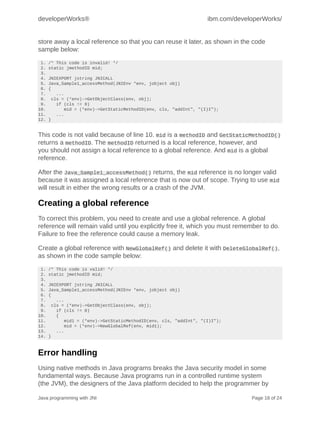
 1.   /* This code is invalid! */
 2.   static jmethodID mid;
 3.
 4.   JNIEXPORT jstring JNICALL
 5.   Java_Sample1_accessMethod(JNIEnv *env, jobject obj)
 6.   {
 7.       ...
 8.     cls = (*env)->GetObjectClass(env, obj);
 9.       if (cls != 0)
10.          mid = (*env)->GetStaticMethodID(env, cls, "addInt", "(I)I");
11.       ...
12.   }


This code is not valid because of line 10. mid is a methodID and GetStaticMethodID()
returns a methodID. The methodID returned is a local reference, however, and
you should not assign a local reference to a global reference. And mid is a global
reference.

After the Java_Sample1_accessMethod() returns, the mid reference is no longer valid
because it was assigned a local reference that is now out of scope. Trying to use mid
will result in either the wrong results or a crash of the JVM.

Creating a global reference
To correct this problem, you need to create and use a global reference. A global
reference will remain valid until you explicitly free it, which you must remember to do.
Failure to free the reference could cause a memory leak.

Create a global reference with NewGlobalRef() and delete it with DeleteGlobalRef(),
as shown in the code sample below:
 1.   /* This code is valid! */
 2.   static jmethodID mid;
 3.
 4.   JNIEXPORT jstring JNICALL
 5.   Java_Sample1_accessMethod(JNIEnv *env, jobject obj)
 6.   {
 7.       ...
 8.     cls = (*env)->GetObjectClass(env, obj);
 9.       if (cls != 0)
10.       {
11.          mid1 = (*env)->GetStaticMethodID(env, cls, "addInt", "(I)I");
12.          mid = (*env)->NewGlobalRef(env, mid1);
13.       ...
14.   }


Error handling
Using native methods in Java programs breaks the Java security model in some
fundamental ways. Because Java programs run in a controlled runtime system
(the JVM), the designers of the Java platform decided to help the programmer by

Java programming with JNI                                                        Page 18 of 24
ibm.com/developerWorks/                                                  developerWorks®


checking common runtime errors like array indices, out-of-bounds errors, and null
pointer errors. C and C++, on the other hand, use no such runtime error checking, so
native method programmers must handle all error conditions that would otherwise be
caught in the JVM at runtime.

For example, it is common and correct practice in Java programs to report errors to
the JVM by throwing an exception. C has no exceptions, so instead you must use the
exception handling functions of JNI.

JNI's exception handling functions
There are two ways to throw an exception in the native code: you can call the
Throw() function or the ThrowNew() function. Before calling Throw(), you first need
to create an object of type Throwable. By calling ThrowNew() you can skip this step
because this function creates the object for you. In the example code snippet below,
we throw an IOException using both functions:
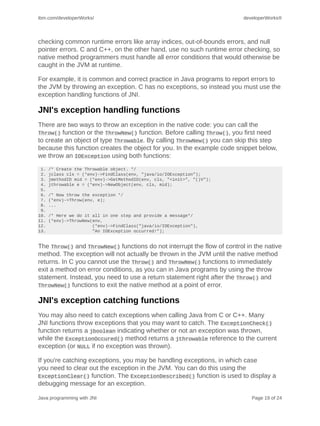
 1.   /* Create the Throwable object. */
 2.   jclass cls = (*env)->FindClass(env, "java/io/IOException");
 3.   jmethodID mid = (*env)->GetMethodID(env, cls, "<init>", "()V");
 4.   jthrowable e = (*env)->NewObject(env, cls, mid);
 5.
 6.   /* Now throw the exception */
 7.   (*env)->Throw(env, e);
 8.   ...
 9.
10.   /* Here we do it all in one step and provide a message*/
11.   (*env)->ThrowNew(env,
12.                    (*env)->FindClass("java/io/IOException"),
13.                    "An IOException occurred!");


The Throw() and ThrowNew() functions do not interrupt the flow of control in the native
method. The exception will not actually be thrown in the JVM until the native method
returns. In C you cannot use the Throw() and ThrowNew() functions to immediately
exit a method on error conditions, as you can in Java programs by using the throw
statement. Instead, you need to use a return statement right after the Throw() and
ThrowNew() functions to exit the native method at a point of error.

JNI's exception catching functions
You may also need to catch exceptions when calling Java from C or C++. Many
JNI functions throw exceptions that you may want to catch. The ExceptionCheck()
function returns a jboolean indicating whether or not an exception was thrown,
while the ExceptionOccured() method returns a jthrowable reference to the current
exception (or NULL if no exception was thrown).

If you're catching exceptions, you may be handling exceptions, in which case
you need to clear out the exception in the JVM. You can do this using the
ExceptionClear() function. The ExceptionDescribed() function is used to display a
debugging message for an exception.

Java programming with JNI                                                   Page 19 of 24
developerWorks®                                            ibm.com/developerWorks/


Multithreading in native methods
One of the more advanced issues you'll face when working with JNI is multithreading
with native methods. The Java platform is implemented as a multithreaded system,
even when running on platforms that don't necessarily support multithreading; so the
onus is on you to ensure that your native functions are thread safe.

In Java programs, you can implement thread-safe code by using synchronized
statements. The syntax of the synchronized statements allows you to obtain a lock
on an object. As long as you're in the synchronized block, you can perform whatever
data manipulation you like without fear that another thread may sneak in and access
the object for which you have the lock.

JNI provides a similar structure using the MonitorEnter() and MonitorExit()
functions. You obtain a monitor (lock) on the object you pass into the MonitorEnter()
function and you keep this lock until you release it with the MonitorExit() function.
All of the code between the MonitorEnter() and MonitorExit() functions is
guaranteed to be thread safe for the object you locked.

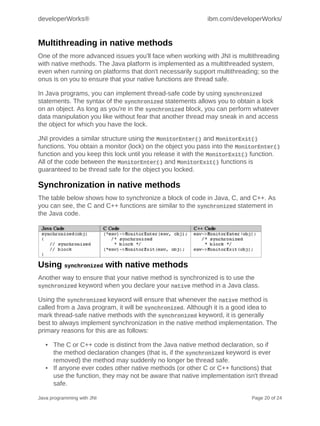
Synchronization in native methods
The table below shows how to synchronize a block of code in Java, C, and C++. As
you can see, the C and C++ functions are similar to the synchronized statement in
the Java code.


Using synchronized with native methods
Another way to ensure that your native method is synchronized is to use the
synchronized keyword when you declare your native method in a Java class.

Using the synchronized keyword will ensure that whenever the native method is
called from a Java program, it will be synchronized. Although it is a good idea to
mark thread-safe native methods with the synchronized keyword, it is generally
best to always implement synchronization in the native method implementation. The
primary reasons for this are as follows:

   • The C or C++ code is distinct from the Java native method declaration, so if
     the method declaration changes (that is, if the synchronized keyword is ever
     removed) the method may suddenly no longer be thread safe.
   • If anyone ever codes other native methods (or other C or C++ functions) that
     use the function, they may not be aware that native implementation isn't thread
     safe.

Java programming with JNI                                                  Page 20 of 24
ibm.com/developerWorks/                                                   developerWorks®


   • If the function is used outside of a Java program as a normal C function it will
     not be thread safe.

Other synchronization techniques
The Object.wait(), Object.notify(), and Object.notifyAll() methods also
support thread synchronization. Since all Java objects have the Object class as a
parent class, all Java objects have these methods. You can call these methods from
the native code as you would any other method, and use them in the same way you
would use them in Java code to implement thread synchronization.


Section 5. Wrap-up

Summary
The Java Native Interface is a well-designed and well-integrated API in the Java
platform. It is designed to allow you to incorporate native code into Java programs
as well as providing you a way to use Java code in programs written in other
programming languages.

Using JNI almost always breaks the portability of your Java code. When calling
native methods from Java programs, you will need to distribute native shared library
files for every platform on which you intend to run your program. On the other hand,
calling Java code from native programs can actually improve the portability of your
application.


Section 6. Appendices

Appendix A: JNI types
JNI uses several natively defined C types that map to Java types. These types can
be divided into two categories: primitive types and pseudo-classes. The pseudo-
classes are implemented as structures in C, but they are real classes in C++.

The Java primitive types map directly to C platform-dependent types, as shown here:

The C type jarray represents a generic array. In C, all of the array types are really
just type synonyms of jobject. In C++, however, all of the array types inherit from
jarray, which in turn inherits from jobject. The following table shows how the Java
array types map to JNI C array types.

Java programming with JNI                                                    Page 21 of 24
developerWorks®                                            ibm.com/developerWorks/


Here is an object tree that shows how the JNI pseudo-classes are related.

Appendix B: JNI method signature encoding
Native Java method parameter types are rendered, or mangled, into native code
using the encoding specified in the table below.


Notes:

   • The semicolon at the end of the class type L expression is the terminator of the
     type expression, not a separator between expressions.
   • You must use a forward slash (/) instead of a dot (.) to separate the package
     and class name. To specify an array type use an open bracket ([). For example,
     the Java method:
      boolean print(String[] parms, int n)


      has the following mangled signature:
      ([Ljava/lang/Sting;I)Z


Java programming with JNI                                                   Page 22 of 24
ibm.com/developerWorks/                                                developerWorks®


Resources
   • To learn more about the differences between programming in C/C++
     and programming in the Java language -- from a C/C++ programmer's
     perspective -- see the tutorial, "Introduction to Java for C/C++
     programmers" (developerWorks, April 1999).
   • The recent article "Weighing in on Java native compilation" (developerWorks,
     January 2002) uses comparative benchmarks to look at the pros and cons of
     the Java Native Interface.
   • To further your education in Java programming, see the complete listing of
     developerWorks tutorials on Java programming.
   • You'll find hundreds of articles about every aspect of Java programming in the
     IBM developerWorks Java technology zone.
   • To learn more about programming in C++, start with Bjarne Stroustrup's The C+
     + Programming Language, Third Edition (Addison-Wesley, 1996).
   • Another good reference is Kris Jamsa and Lars Klander's Jamsa's C/C++
     Programmer's Bible (Jamsa Press, 1998).
   • For a more object-oriented approach, see Cay S. Horstmann's Mastering
     Object-Oriented Design in C++ (John Wiley & Sons Inc., 1995).
   • Andrew C. Staugaard, Jr., wrote Structured and Object-Oriented Techniques:
     An Introduction using C++ (Prentice Hall, 1997).
   • Learn more about the Java Native Interface with Sheng Liang's Java Native
     Interface: Programmer's Guide and Specification (Sun Microsystems Press,
     1999).
   • David Flanagan's Java in a Nutshell, Third Edition is essential reading for any
     Java programmer (O'Reilly, 1999).
   • Also see volumes I and II of the Core Java 2 series by Cay S. Horstmann and
     Gary Cornell (Sun Microsystems Press, 2000).
   • The Java 2 Developer's Handbook by Philip Heller and Simon Roberts is an
     excellent resource (Sybex, 1999).
   • To learn more about the Java platform's security model, see Scott Oaks's Java
     Security, Second Edition (O'Reilly, 2001).
   • For an in-depth look at Java data structures and algorithms, see Robert Lafore's
     Data Structures & Algorithms in Java (Waite Group Press, 1998).
   • Download the complete source files, j-jni-source.zip, for this tutorial.
   • Download the Java 2 platform, Standard Edition, version 1.4.
   • If you're a Windows user, you'll likely use Visual C++ to compile your C/C++
     code.
   • If you're a UNIX user, you'll likely use cc to compile your C/C++ code. Of
     course, GCC is an equally viable, open-source option.
   • IBM's VisualAge for Java is a complete Java development package, including a
     C/C++ compiler.
   • Further explore your options with developerWorks' listing of IBM developer kits
     for Java technology.


Java programming with JNI                                                 Page 23 of 24
developerWorks®                                               ibm.com/developerWorks/


About the author
Scott Stricker

               Scott Stricker is an enterprise application developer working in Business
               Innovation Services, part of IBM Global Services. He specializes in
               object-oriented technologies, particularly in Java and C++ programming.
               Scott has a Bachelor of Science degree in Computer Science from the
               University of Cincinnati. He is a Sun Certified Java 2 Programmer and
               Developer.

© Copyright IBM Corporation 2002
(www.ibm.com/legal/copytrade.shtml)
Trademarks
(www.ibm.com/developerworks/ibm/trademarks/)


Java programming with JNI                                                    Page 24 of 24

109842496 jni

  • 1.
    Java programming withJNI Scott Stricker (sstricke@us.ibm.com) Skill Level: Introductory Developer IBM Date: 26 Mar 2002 This tutorial describes and demonstrates the basic and most commonly used techniques of the Java Native Interface -- calling C or C++ code from Java programs, and calling Java code from C or C++ programs -- to help you develop your own JNI solutions quickly and efficiently. Section 1. About this tutorial What is this tutorial about? The Java Native Interface (JNI) is a native programming interface that is part of the Java Software Development Kit (SDK). JNI lets Java code use code and code libraries written in other languages, such as C and C++. The Invocation API, which is part of JNI, can be used to embed a Java virtual machine (JVM) into native applications, thereby allowing programmers to call Java code from within native code. This tutorial deals with the two most common applications of JNI: calling C/C++ code from Java programs, and calling Java code from C/C++ programs. We'll cover both the essentials of the Java Native Interface and some of the more advanced programming challenges that can arise. Should I take this tutorial? This tutorial will walk you through the steps of using the Java Native Interface. You'll learn how to call native C/C++ code from within a Java application and how to call Java code from within a native C/C++ application. All the examples use Java, C, and C++ code, and are written to be portable to both Windows and UNIX-based platforms. To follow the examples, you must have some experience programming in the Java language. In addition, you will also need some experience programming in C or C++. Strictly speaking, a JNI solution could be © Copyright IBM Corporation 2002 Trademarks Java programming with JNI Page 1 of 24
  • 2.
    developerWorks® ibm.com/developerWorks/ broken down between Java programming tasks and C/C++ programming tasks, with separate programmers doing each task. However, to fully understand how JNI works in both programming environments, you'll need to be able to understand both the Java and C/C++ code. We'll also cover a number of advanced topics, including exception handling and multithreading with native methods. To get the most out of this part of the tutorial, you should be familiar with the Java platform's security model and have some experience in multithreaded application development. The section on Advanced topics is separate from the more basic step-by-step introduction to JNI. Beginning Java programmers may benefit from taking the first two parts of the tutorial now and returning to the advanced topics at a later time. See Resources for a listing of tutorials, articles, and other references that expand upon the material presented here. Tools and components To run the examples in this tutorial, you will need the following tools and components: • A Java compiler: javac.exe ships with the SDK. • A Java virtual machine (JVM): java.exe ships with the SDK. • A native method C file generator: javah.exe ships with the SDK. • Library files and native header files that define JNI. The jni.h C header file, jvm.lib, and jvm.dll or jvm.so files all ship with the SDK. • A C and C++ compiler that can create a shared library. The two most common C compilers are Visual C++ for Windows and cc for UNIX-based systems. Although you may use any development environment you like, the examples we'll work with in this tutorial were written using the standard tools and components that ship with the SDK. See Resources to download the SDK, complete source files, and other tools essential for the completion of this tutorial. This tutorial specifically addresses Sun's implementation of JNI, which should be regarded as the standard for JNI solutions. The details of other JNI implementations are not addressed in this tutorial. Additional considerations In the Java 2 SDK, the JVM and run-time support are located in the shared library file named jvm.dll (Windows) or libjvm.so (UNIX). In the Java 1.1 JDK, the JVM and run-time support were located in the shared library file named javai.dll (Windows) or libjava.so (UNIX). The version 1.1 shared libraries contained the runtime and some native methods for the class libraries, but in version 1.2, the runtime is removed and the native methods are in java.dll and libjava.so. This change is important in Java code that: Java programming with JNI Page 2 of 24
  • 3.
    ibm.com/developerWorks/ developerWorks® • Is written using non-JNI native methods (as with the old native method interface from the JDK 1.0 JDK) • Uses an embedded JVM through the JNI Invocation Interface In both cases, you'll need to relink your native libraries before they can be used with version 1.2. Note that this change should not affect JNI programmers implementing native methods -- only JNI code that invokes a JVM through the Invocation API. If you use the jni.h file that comes with the SDK/JDK, that header file will use the default JVM in the JDK/SDK installation directory (jvm.dll or libjvm.so). Any implementation of a Java platform that supports JNI should do the same thing, or allow you to specify a JVM shared library; however the details of how this is done may be specific to that Java Platform/JVM implementation. Indeed, many implementations of JVMs do not support JNI at all. Section 2. Calling C/C++ code from Java programs Overview JNI allows you to use native code when an application cannot be written entirely in the Java language. The following are typical situations where you might decide to use native code: • You want to implement time-critical code in a lower-level, faster programming language. • You have legacy code or code libraries that you want to access from Java programs. • You need platform-dependent features not supported in the standard Java class library. Six steps to call C/C++ from Java code The process of calling C or C ++ from Java programs consists of six steps. We'll go over each step in depth in the sections that follow, but let's start with a quick look at each one. 1. Write the Java code. We'll start by writing Java classes to perform three tasks: declare the native method we'll be calling; load the shared library containing the native code; and call the native method. 2. Compile the Java code. We must successfully compile the Java class or classes to bytecode before we can use them. 3. Create the C/C++ header file. The C/C++ header file will declare the native function signature that we want to call. This header will then be used with the C/ C++ function implementation (see Step 4) to create the shared library (see Step 5). Java programming with JNI Page 3 of 24
  • 4.
    developerWorks® ibm.com/developerWorks/ 4. Write the C/C++ code. This step consists of implementing the function in a C or C++ source code file. The C/C++ source file must include the header file we created in Step 3. 5. Create the shared library file. We'll create a shared library file from the C source code file we created in Step 4. 6. Run the Java program. We'll run the code and see if it works. We'll also go over some tips for dealing with the more commonly occurring errors. Step 1: Write the Java code We'll start by writing the Java source code file, which will declare the native method (or methods), load the shared library containing the native code, and actually call the native method. Here's our example Java source code file, called Sample1.java: 1. public class Sample1 2. { 3. public native int intMethod(int n); 4. public native boolean booleanMethod(boolean bool); 5. public native String stringMethod(String text); 6. public native int intArrayMethod(int[] intArray); 7. 8. public static void main(String[] args) 9. { 10. System.loadLibrary("Sample1"); 11. Sample1 sample = new Sample1(); 12. int square = sample.intMethod(5); 13. boolean bool = sample.booleanMethod(true); 14. String text = sample.stringMethod("JAVA"); 15. int sum = sample.intArrayMethod( 16. new int[]{1,1,2,3,5,8,13} ); 17. 18. System.out.println("intMethod: " + square); 19. System.out.println("booleanMethod: " + bool); 20. System.out.println("stringMethod: " + text); 21. System.out.println("intArrayMethod: " + sum); 22. } 23. } What's happening in this code? First of all, note the use of the native keyword, which can be used only with methods. The native keyword tells the Java compiler that a method is implemented in native code outside of the Java class in which it is being declared. Native methods can only be declared in Java classes, not implemented, so a native method cannot have a body. Now, let's look at the code line by line: • In lines 3 through 6 we declare four native methods. • On line 10 we load the shared library file containing the implementation for these native methods. (We'll create the shared library file when we come to Step 5.) Java programming with JNI Page 4 of 24
  • 5.
    ibm.com/developerWorks/ developerWorks® • Finally, in lines 12 through 15 we call the native methods. Note that this operation is no different from the operation of calling non-native Java methods. Note: Shared library files on UNIX-based platforms are usually prefixed with "lib". In this case, line 10 would be System.loadLibrary("libSample1"); . Be sure to take notice of the shared library file name that you generate in Step 5: Create the shared library file. Step 2: Compile the Java code Next, we need to compile the Java code down to bytecode. One way to do this is to use the Java compiler, javac, which comes with the SDK. The command we use to compile our Java code to bytecode is: javac Sample2.java Step 3: Create the C/C++ header file The third step is to create a C/C++ header file that defines native function signatures. One way to do this is to use the native method C stub generator tool, javah.exe, which comes with the SDK. This tool is designed to create a header file that defines C-style functions for each native method it finds in a Java source code file. The command to use here is: javah Sample1 Results of running javah.exe on Sample1.java Sample1.h, below, is the C/C++ header file generated by running the javah tool on our Java code: 1. /* DO NOT EDIT THIS FILE - it is machine generated */ 2. #include <jni.h> 3. /* Header for class Sample1 */ 4. 5. #ifndef _Included_Sample1 6. #define _Included_Sample1 7. #ifdef __cplusplus 8. extern "C" { 9. #endif 10. 11. JNIEXPORT jint JNICALL Java_Sample1_intMethod 12. (JNIEnv *, jobject, jint); 13. 14. JNIEXPORT jboolean JNICALL Java_Sample1_booleanMethod 15. (JNIEnv *, jobject, jboolean); 16. 17. JNIEXPORT jstring JNICALL Java_Sample1_stringMethod 18. (JNIEnv *, jobject, jstring); 19. 20. JNIEXPORT jint JNICALL Java_Sample1_intArrayMethod 21. (JNIEnv *, jobject, jintArray); 22. 23. #ifdef __cplusplus 24. } Java programming with JNI Page 5 of 24
  • 6.
    developerWorks® ibm.com/developerWorks/ 25. #endif 26. #endif About the C/C++ header file As you've probably noticed, the C/C++ function signatures in Sample1.h are quite different from the Java native method declarations in Sample1.java. JNIEXPORT and JNICALL are compiler-dependent specifiers for export functions. The return types are C/C++ types that map to Java types. These types are fully explained in Appendix A: JNI types The parameter lists of all these functions have a pointer to a JNIEnv and a jobject, in addition to normal parameters in the Java declaration. The pointer to JNIEnv is in fact a pointer to a table of function pointers. As we'll see in Step 4, these functions provide the various faculties to manipulate Java data in C and C++. The jobject parameter refers to the current object. Thus, if the C or C++ code needs to refer back to the Java side, this jobject acts as a reference, or pointer, back to the calling Java object. The function name itself is made by the "Java_" prefix, followed by the fully qualified class name, followed by an underscore and the method name. Step 4: Write the C/C++ code When it comes to writing the C/C++ function implementation, the important thing to keep in mind is that our signatures must be exactly like the function declarations from Sample1.h. We'll look at the complete code for both a C implementation and a C++ implementation, then discuss the differences between the two. The C function implementation Here is Sample1.c, an implementation written in C: 1. #include "Sample1.h" 2. #include <string.h> 3. 4. JNIEXPORT jint JNICALL Java_Sample1_intMethod 5. (JNIEnv *env, jobject obj, jint num) { 6. return num * num; 7. } 8. 9. JNIEXPORT jboolean JNICALL Java_Sample1_booleanMethod 10. (JNIEnv *env, jobject obj, jboolean boolean) { 11. return !boolean; 12. } 13. 14. JNIEXPORT jstring JNICALL Java_Sample1_stringMethod 15. (JNIEnv *env, jobject obj, jstring string) { 16. const char *str = (*env)->GetStringUTFChars(env, string, 0); 17. char cap[128]; 18. strcpy(cap, str); 19. (*env)->ReleaseStringUTFChars(env, string, str); 20. return (*env)->NewStringUTF(env, strupr(cap)); 21. } 22. 23. JNIEXPORT jint JNICALL Java_Sample1_intArrayMethod Java programming with JNI Page 6 of 24
  • 7.
    ibm.com/developerWorks/ developerWorks® 24. (JNIEnv *env, jobject obj, jintArray array) { 25. int i, sum = 0; 26. jsize len = (*env)->GetArrayLength(env, array); 27. jint *body = (*env)->GetIntArrayElements(env, array, 0); 28. for (i=0; i<len; i++) 29. { sum += body[i]; 30. } 31. (*env)->ReleaseIntArrayElements(env, array, body, 0); 32. return sum; 33. } 34. 35. void main(){} The C++ function implementation And here's Sample1.cpp, the C++ implementation: 1. #include "Sample1.h" 2. #include <string.h> 3. 4.JNIEXPORT jint JNICALL Java_Sample1_intMethod 5. (JNIEnv *env, jobject obj, jint num) { 6. return num * num; 7. } 8. 9. JNIEXPORT jboolean JNICALL Java_Sample1_booleanMethod 10. (JNIEnv *env, jobject obj, jboolean boolean) { 11. return !boolean; 12. } 13. 14. JNIEXPORT jstring JNICALL Java_Sample1_stringMethod 15. (JNIEnv *env, jobject obj, jstring string) { 16. const char *str = env->GetStringUTFChars(string, 0); 17. char cap[128]; 18. strcpy(cap, str); 19. env->ReleaseStringUTFChars(string, str); 20. return env->NewStringUTF(strupr(cap)); 21. } 22. 23. JNIEXPORT jint JNICALL Java_Sample1_intArrayMethod 24. (JNIEnv *env, jobject obj, jintArray array) { 25. int i, sum = 0; 26. jsize len = env->GetArrayLength(array); 27. jint *body = env->GetIntArrayElements(array, 0); 28. for (i=0; i<len; i++) 29. { sum += body[i]; 30. } 31. env->ReleaseIntArrayElements(array, body, 0); 32. return sum; 33. } 34. 35. void main(){} C and C++ function implementations compared The C and C++ code is nearly identical; the only difference is the method used to access JNI functions. In C, JNI function calls are prefixed with "(*env)->" in order to de-reference the function pointer. In C++, the JNIEnv class has inline member functions that handle the function pointer lookup. This slight difference is illustrated below, where the two lines of code access the same function but the syntax is specialized for each language. Java programming with JNI Page 7 of 24
  • 8.
    developerWorks® ibm.com/developerWorks/ C syntax: jsize len = (*env)- >GetArrayLength(env,array); C++ syntax: jsize len =env->GetArrayLength(array); Step 5: Create the shared library file Next, we create a shared library file that contains the native code. Most C and C++ compilers can create shared library files in addition to machine code executables. The command you use to create the shared library file depends on the compiler you're using. Below are the commands that will work on Windows and Solaris systems. Windows: cl -Ic:jdkinclude -Ic:jdkincludewin32 - LD Sample1.c -FeSample1.dll Solaris: cc -G -I/usr/local/jdk/include -I/user/local/ jdk/include/solaris Sample1.c -o Sample1.so Step 6: Run the Java program The last step is to run the Java program and make sure that the code works correctly. Because all Java code must be executed in a Java virtual machine, we need to use a Java runtime environment. One way to do this is to use the Java interpreter, java, which comes with the SDK. The command to use is: java Sample1 When we run the Sample1.class program, we should get the following result: PROMPT>java Sample1 intMethod: 25 booleanMethod: false stringMethod: JAVA intArrayMethod: 33 PROMPT> Troubleshooting You can run into many problems when using JNI to access native code from Java programs. The three most common errors you'll encounter are: • A dynamic link cannot be found. This results in the error message: java.lang.UnsatisfiedLinkError. This usually means that either the shared library cannot be found, or a specific native method inside the shared library cannot be found. • The shared library file cannot be found. When you load the library file using the file name with the System.loadLibrary(String libname) method, make sure that the file name is spelled correctly and that you do not specify the extension. Also, make sure that the library file is accessible to the JVM by ensuring that the library file's location is in the classpath. Java programming with JNI Page 8 of 24
  • 9.
    ibm.com/developerWorks/ developerWorks® • A method with the specified signature cannot be found. Make sure that your C/C++ function implementation has a signature that is identical to the function signature in the header file. Conclusion Calling C or C++ native code from Java, while not trivial, is a well-integrated function in the Java platform. Although JNI supports both C and C++, the C++ interface is somewhat cleaner and is generally preferred over the C interface. As you have seen, calling C or C++ native code requires that you give your functions special names and create a shared library file. When taking advantage of existing code libraries, it is generally not advisable to change the code. To avoid this, it is common to create proxy code, or a proxy class in the case of C++, that has the specially named functions required by JNI. These functions, then, can call the underlying library functions, whose signatures and implementations remain unchanged. Section 3. Calling Java code from C/C++ programs Overview JNI allows you to invoke Java class methods from within native code. Often, to do this, you must create and initialize a JVM within the native code using the Invocation API. The following are typical situations where you might decide to call Java code from C/C++ code: • You want to implement platform-independent portions of code for functionality that will be used across multiple platforms. • You have code or code libraries written in the Java language that you need to access in native applications. • You want to take advantage of the standard Java class library from native code. Four steps to call Java code from a C/C++ program The four steps in the process of calling Java methods from C/C++ are as follows: 1. Write the Java code. This step consists of writing the Java class or classes that implement (or call other methods that implement) the functionality you want to access. 2. Compile the Java code. The Java class or classes must be successfully compiled to bytecode before they can be used. 3. Write the C/C++ code. This code will create and instantiate a JVM and call the correct Java methods. 4. Run the native C/C++ application. We'll run the application to see if it works. We'll also go over some tips for dealing with common errors. Java programming with JNI Page 9 of 24
  • 10.
    developerWorks® ibm.com/developerWorks/ Step 1: Write the Java code We start by writing the Java source code file or files, which will implement the functionality we want to make available to the native C/C++ code. Our Java code example, Sample2.java, is shown below: 1. public class Sample2 2. { 3. public static int intMethod(int n) { 4. return n*n; 5. } 6. 7. public static boolean booleanMethod(boolean bool) { 8. return !bool; 9. } 10. } Note that Sample2.java implements two static Java methods, intMethod(int n) and booleanMethod(boolean bool) (lines 3 and 7 respectively). static methods are class methods that are not associated with object instances. It is easier to call static methods because we do not have to instantiate an object to invoke them. Step 2: Compile the Java code Next, we compile the Java code down to bytecode. One way to do this is to use the Java compiler, javac, which comes with the SDK. The command to use is: javac Sample1.java Step 3: Write the C/C++ code All Java bytecode must be executed in a JVM, even when running in a native application. So our C/C++ application must include calls to create a JVM and to initialize it. To assist us, the SDK includes a JVM as a shared library file (jvm.dll or jvm.so), which can be embedded into native applications. We'll start with a look at the complete code for both the C and C++ applications, then compare the two. A C application with embedded JVM Sample2.c is a simple C application with an embedded JVM: 1. #include <jni.h> 2. 3. #ifdef _WIN32 4. #define PATH_SEPARATOR ';' 5. #else 6. #define PATH_SEPARATOR ':' 7. #endif 8. 9. int main() Java programming with JNI Page 10 of 24
  • 11.
    ibm.com/developerWorks/ developerWorks® 10. { 11. JavaVMOption options[1]; 12. JNIEnv *env; 13. JavaVM *jvm; 14. JavaVMInitArgs vm_args; 15. long status; 16. jclass cls; 17. jmethodID mid; 18. jint square; 19. jboolean not; 20. 21. options[0].optionString = "-Djava.class.path=."; 22. memset(&vm_args, 0, sizeof(vm_args)); 23. vm_args.version = JNI_VERSION_1_2; 24. vm_args.nOptions = 1; 25. vm_args.options = options; 26. status = JNI_CreateJavaVM(&jvm, (void**)&env, &vm_args); 27. 28. if (status != JNI_ERR) 29. { 30. cls = (*env)->FindClass(env, "Sample2"); 31. if(cls !=0) 32. { mid = (*env)->GetStaticMethodID(env, cls, "intMethod", "(I)I"); 33. if(mid !=0) 34. { square = (*env)->CallStaticIntMethod(env, cls, mid, 5); 35. printf("Result of intMethod: %dn", square); 36. } 37. 38. mid = (*env)->GetStaticMethodID(env, cls, "booleanMethod", "(Z)Z"); 39. if(mid !=0) 40. { not = (*env)->CallStaticBooleanMethod(env, cls, mid, 1); 41. printf("Result of booleanMethod: %dn", not); 42. } 43. } 44. 45. (*jvm)->DestroyJavaVM(jvm); 46. return 0; 47/ } 48. else 49. return -1; 50. } A C++ application with embedded JVM Sample2.cpp is a C++ application with an embedded JVM: 1. #include <jni.h> 2. 3. #ifdef _WIN32 4. #define PATH_SEPARATOR ';' 5. #else 6. #define PATH_SEPARATOR ':' 7. #endif 8. 9. int main() 10. { 11. JavaVMOption options[1]; 12. JNIEnv *env; 13. JavaVM *jvm; 14. JavaVMInitArgs vm_args; 15. long status; 16. jclass cls; 17. jmethodID mid; 18. jint square; 19. jboolean not; Java programming with JNI Page 11 of 24
  • 12.
    developerWorks® ibm.com/developerWorks/ 20. 21. options[0].optionString = "-Djava.class.path=."; 22. memset(&vm_args, 0, sizeof(vm_args)); 23. vm_args.version = JNI_VERSION_1_2; 24. vm_args.nOptions = 1; 25. vm_args.options = options; 26. status = JNI_CreateJavaVM(&jvm, (void**)&env, &vm_args); 27. 28. if (status != JNI_ERR) 29. { 30. cls = (*env)->FindClass(env, "Sample2"); 31. if(cls !=0) 32. { mid = (*env)->GetStaticMethodID(env, cls, "intMethod", "(I)I"); 33. if(mid !=0) 34. { square = (*env)->CallStaticIntMethod(env, cls, mid, 5); 35. printf("Result of intMethod: %dn", square); 36. } 37. 38. mid = (*env)->GetStaticMethodID(env, cls, "booleanMethod", "(Z)Z"); 39. if(mid !=0) 40. { not = (*env)->CallStaticBooleanMethod(env, cls, mid, 1); 41. printf("Result of booleanMethod: %dn", not); 42. } 43. } 44. 45. (*jvm)->DestroyJavaVM(jvm); 46. return 0; 47. } 48. else 49. return -1; 50. } C and C++ implementations compared The C and C++ code are nearly identical; the only difference is the method used to access JNI functions. In C, JNI function calls are prefixed with (*env)-> in order to de-reference the function pointer. In C++, the JNIEnv class has inline member functions that handle the function pointer lookup. Thus, these two lines of code access the same function, but the syntax is specialized for each language, as shown below. C syntax: cls = (*env)->FindClass(env, "Sample2"); C++ syntax: cls = env->FindClass("Sample2"); A closer look at the C application We've just produced a lot of code, but what does it all do? Before we move on to Step 4, let's take a closer look at the code for our C application. We'll walk through the essential steps of preparing a native application to process Java code, embedding a JVM in a native application, then finding and calling a Java method from within that application. Include the jni.h file We start by including the jni.h C header file in the C application, as shown in the code sample below. Java programming with JNI Page 12 of 24
  • 13.
    ibm.com/developerWorks/ developerWorks® #include <jni.h> The jni.h file contains all the type and function definitions we need for JNI on the C side. Declare the variables Next, we declare all the variables we want to use in the program. The JavaVMOption options[] holds various optional settings for the JVM. When declaring variables, be sure that you declare the JavaVMOption options[] array large enough to hold all the options you want to use. In this case, the only option we're using is the classpath option. We set the classpath to the current directory because in this example all of our files are in the same directory. You can set the classpath to point to any directory structure you would like to use. Here's the code to declare the variables for Sample2.c: JavaVMOption options[1]; JNIEnv *env; JavaVM *jvm; JavaVMInitArgs vm_args; Notes: • JNIEnv *env represents JNI execution environment. • JavaVM jvm is a pointer to the JVM. We use this primarily to create, initialize, and destroy the JVM. • JavaVMInitArgs vm_args represents various JVM arguments that we can use to initialize our JVM. Set the initialization arguments The JavaVMInitArgs structure represents initialization arguments for the JVM. You can use these arguments to customize the runtime environment before you execute your Java code. As you can see, the options are one argument and the Java version is another. We set these arguments as follows: vm_args.version = JNI_VERSION_1_2; vm_args.nOptions = 1; vm_args.options = options; Set the classpath Next, we set the classpath for the JVM, to enable it to find the required Java classes. In this particular case, we set the classpath to the current directory, because the Sample2.class and Sample2.exe are located in the same directory. The code we use to set the classpath for Sample2.c is shown below: options[0].optionString = "-Djava.class.path=."; // same text as command-line options for the java.exe JVM Java programming with JNI Page 13 of 24
  • 14.
    developerWorks® ibm.com/developerWorks/ Set aside memory for vm_args Before we can use vm_args we need to set aside some memory for it. Once we've set the memory, we can set the version and option arguments, as shown below: memset(&vm_args, 0, sizeof(vm_args)); // set aside enough memory for vm_args vm_args.version = JNI_VERSION_1_2; // version of Java platform vm_args.nOptions = 1; // same as size of options[1] vm_args.options = options; Create the JVM With all the setup taken care of, we're ready to create a JVM. We start with a call to the method: JNI_CreateJavaVM(JavaVM **jvm, void** env, JavaVMInitArgs **vm_args) This method returns zero if successful or JNI_ERR if the JVM could not be created. Find and load the Java classes Once we've created our JVM, we're ready to begin running Java code in the native application. First, we need to find and load our Java class, using the FindClass() function, shown here: cls = (*env)->FindClass(env, "Sample2"); The cls variable stores the result of the FindClass() function. If the class is found, the cls variable represents a handle to the Java class. If the class cannot be found, cls will be zero. Find a Java method Next, we want to find a method inside of the class using the GetStaticMethodID() function. We want to find the method intMethod, which takes an int parameter and returns an int. Here's the code to find intMethod: mid = (*env)->GetStaticMethodID(env, cls, "intMethod", "(I)I"); The mid variable stores the result of the GetStaticMethodID() function. If the method is found, the mid variable represents a handle to the method. If the method cannot be found, mid will be zero. Remember that in this example, we are calling static Java methods. That is why we're using the GetStaticMethodID() function. The GetMethodID() function does the same thing, but it is used to find instance methods. If we were calling a constructor, the name of the method would have been "<init>". To learn more about calling a constructor, see Error handling. To learn more about Java programming with JNI Page 14 of 24
  • 15.
    ibm.com/developerWorks/ developerWorks® the code used to specify parameter types and about how JNI types map to the Java primitive types, see Appendices . Call a Java method Finally, we call the Java method, as shown below: square = (*env)->CallStaticIntMethod(env, cls, mid, 5); The CallStaticIntMethod() method takes cls (representing our class), mid (representing our method), and the parameter or parameters for the method. In this case the parameter is int 5. You will also run across methods of the types CallStaticXXXMethod() and CallXXXMethod(). These call static methods and member methods, respectively, replacing the variable (XXX) with the return type for the method (for example, Object, Boolean, Byte, Char, Int, Long, and so on). Step 4: Run the application Now we're ready to run the C application and make sure that the code works correctly. When you run Sample2.exe you should get a result like the following: PROMPT>Sample2 Result of intMethod: 25 Result of booleanMethod: 0 PROMPT> Troubleshooting JNI's Invocation API is somewhat cumbersome because it is defined in C, a language with minimal object-oriented programming support. As a result, it is easy to run into problems. Below is a checklist that may help you avoid some of the more common errors. • Always ensure that references are properly set. For example, when creating a JVM with the JNI_CreateJavaVM() method, make sure it returns a zero. Also make sure that references set with the FindClass() and GetMethodID() methods are not zero before you use them. • Check to see that your method names are spelled correctly and that you properly mangled the method signature. Also be sure that you use CallStaticXXXMethod() for static methods and CallXXXMethod() for member methods. • Make sure you initialize the JVM with any special arguments or options your Java class may need. For example, if your Java class requires a great deal of memory, you may need to increase the maximum heap size option. • Always be sure to set the classpath properly. A native application using an embedded JVM must be able to find the jvm.dll or jvm.so shared library. Java programming with JNI Page 15 of 24
  • 16.
    developerWorks® ibm.com/developerWorks/ Conclusion Calling Java methods from C is relatively straightforward for experienced C programmers, although it does require fairly advanced quasi-object-oriented programming techniques. Although JNI supports both C and C++, the C++ interface is slightly cleaner and is generally preferred over the C interface. One important point to remember is that a single JVM can be used to load and execute multiple classes and methods. Creating and destroying a JVM every time you interact with Java from native code can waste resources and decrease performance. Section 4. Advanced topics Overview Calling native code from within a Java program compromises the Java program's portability and security. Although the compiled Java bytecode remains highly portable, the native code must be recompiled for each platform on which you intend to run the application. The native code also executes outside of the JVM, so it is not necessarily constrained by the same security protocols as Java code. Calling Java code from within a native program is also complicated. Because the Java language is object-oriented, calling Java code from a native application typically involves object-oriented techniques. In native languages that have no support or limited support for object-oriented programming, such as C, calling Java methods can be problematic. In this section, we'll explore some of the complexities that arise when working with JNI, and look at ways to work around them. Java strings versus C strings Java strings are stored as sequences of 16-bit Unicode characters, while C strings are stored as sequences of 8-bit null-terminated characters. JNI provides several useful functions for converting between and manipulating Java strings and C strings. The code snippet below demonstrates how to convert C strings to Java strings: 1. /* Convert a C string to a Java String. */ 2. char[] str = "To be or not to be.n"; 3. jstring jstr = (*env)->NewStringUTF(env, str); Next, we'll look at the code to convert Java strings to C strings. Note the call to the ReleaseStringUTFChars() function on line 5. You should use this function to release Java strings when you're no longer using them. Be sure you always release your Java programming with JNI Page 16 of 24
  • 17.
    ibm.com/developerWorks/ developerWorks® strings when the native code no longer needs to reference them. Failure to do so could cause a memory leak. 1. /* Convert a Java String into a C string. */ 2. char buf[128; 3. const char *newString = (*env)->GetStringUTFChars(env, jstr, 0); 4. ... 5. (*env)->ReleaseStringUTFChars(env, jstr, newString); Java arrays versus C arrays Like strings, Java arrays and C arrays are represented differently in memory. Fortunately, a set of JNI functions provides you with pointers to the elements in arrays. The image below shows how Java arrays are mapped to the JNI C types. The C type jarray represents a generic array. In C, all of the array types are really just type synonyms of jobject. In C++, however, all of the array types inherit from jarray, which in turn inherits from jobject . See Appendix A: JNI types for an inheritance diagram of all the C type objects. s Working with arrays Generally, the first thing you want to do when dealing with an array is to determine its size. For this, you should use the GetArrayLength() function, which returns a jsize representing the array's size. Next, you'll want to obtain a pointer to the array's elements. You can access elements in an array using the GetXXXArrayElement() and SetXXXArrayElement() functions (replace the XXX in the method name according to the type of the array: Object, Boolean, Byte, Char, Int, Long, and so on). When the native code is finished using a Java array, it must release it with a call to the function ReleaseXXXArrayElements(). Otherwise, a memory leak may result. The code snippet below shows how to loop through an array of integers and up all the elements: 1. /* Looping through the elements in an array. */ 2. int* elem = (*env)->GetIntArrayElements(env, intArray, 0); 3. for (i=0; I < (*env)->GetIntArrayLength(env, intArray); i++) 4. sum += elem[i] 5. (*env)->ReleaseIntArrayElements(env, intArray, elem, 0); Local versus global references When programming with JNI you will be required to use references to Java objects. By default, JNI creates local references to ensure that they are liable for garbage collection. Because of this, you may unintentionally write illegal code by trying to Java programming with JNI Page 17 of 24
  • 18.
    developerWorks® ibm.com/developerWorks/ store away a local reference so that you can reuse it later, as shown in the code sample below: 1. /* This code is invalid! */ 2. static jmethodID mid; 3. 4. JNIEXPORT jstring JNICALL 5. Java_Sample1_accessMethod(JNIEnv *env, jobject obj) 6. { 7. ... 8. cls = (*env)->GetObjectClass(env, obj); 9. if (cls != 0) 10. mid = (*env)->GetStaticMethodID(env, cls, "addInt", "(I)I"); 11. ... 12. } This code is not valid because of line 10. mid is a methodID and GetStaticMethodID() returns a methodID. The methodID returned is a local reference, however, and you should not assign a local reference to a global reference. And mid is a global reference. After the Java_Sample1_accessMethod() returns, the mid reference is no longer valid because it was assigned a local reference that is now out of scope. Trying to use mid will result in either the wrong results or a crash of the JVM. Creating a global reference To correct this problem, you need to create and use a global reference. A global reference will remain valid until you explicitly free it, which you must remember to do. Failure to free the reference could cause a memory leak. Create a global reference with NewGlobalRef() and delete it with DeleteGlobalRef(), as shown in the code sample below: 1. /* This code is valid! */ 2. static jmethodID mid; 3. 4. JNIEXPORT jstring JNICALL 5. Java_Sample1_accessMethod(JNIEnv *env, jobject obj) 6. { 7. ... 8. cls = (*env)->GetObjectClass(env, obj); 9. if (cls != 0) 10. { 11. mid1 = (*env)->GetStaticMethodID(env, cls, "addInt", "(I)I"); 12. mid = (*env)->NewGlobalRef(env, mid1); 13. ... 14. } Error handling Using native methods in Java programs breaks the Java security model in some fundamental ways. Because Java programs run in a controlled runtime system (the JVM), the designers of the Java platform decided to help the programmer by Java programming with JNI Page 18 of 24
  • 19.
    ibm.com/developerWorks/ developerWorks® checking common runtime errors like array indices, out-of-bounds errors, and null pointer errors. C and C++, on the other hand, use no such runtime error checking, so native method programmers must handle all error conditions that would otherwise be caught in the JVM at runtime. For example, it is common and correct practice in Java programs to report errors to the JVM by throwing an exception. C has no exceptions, so instead you must use the exception handling functions of JNI. JNI's exception handling functions There are two ways to throw an exception in the native code: you can call the Throw() function or the ThrowNew() function. Before calling Throw(), you first need to create an object of type Throwable. By calling ThrowNew() you can skip this step because this function creates the object for you. In the example code snippet below, we throw an IOException using both functions: 1. /* Create the Throwable object. */ 2. jclass cls = (*env)->FindClass(env, "java/io/IOException"); 3. jmethodID mid = (*env)->GetMethodID(env, cls, "<init>", "()V"); 4. jthrowable e = (*env)->NewObject(env, cls, mid); 5. 6. /* Now throw the exception */ 7. (*env)->Throw(env, e); 8. ... 9. 10. /* Here we do it all in one step and provide a message*/ 11. (*env)->ThrowNew(env, 12. (*env)->FindClass("java/io/IOException"), 13. "An IOException occurred!"); The Throw() and ThrowNew() functions do not interrupt the flow of control in the native method. The exception will not actually be thrown in the JVM until the native method returns. In C you cannot use the Throw() and ThrowNew() functions to immediately exit a method on error conditions, as you can in Java programs by using the throw statement. Instead, you need to use a return statement right after the Throw() and ThrowNew() functions to exit the native method at a point of error. JNI's exception catching functions You may also need to catch exceptions when calling Java from C or C++. Many JNI functions throw exceptions that you may want to catch. The ExceptionCheck() function returns a jboolean indicating whether or not an exception was thrown, while the ExceptionOccured() method returns a jthrowable reference to the current exception (or NULL if no exception was thrown). If you're catching exceptions, you may be handling exceptions, in which case you need to clear out the exception in the JVM. You can do this using the ExceptionClear() function. The ExceptionDescribed() function is used to display a debugging message for an exception. Java programming with JNI Page 19 of 24
  • 20.
    developerWorks® ibm.com/developerWorks/ Multithreading in native methods One of the more advanced issues you'll face when working with JNI is multithreading with native methods. The Java platform is implemented as a multithreaded system, even when running on platforms that don't necessarily support multithreading; so the onus is on you to ensure that your native functions are thread safe. In Java programs, you can implement thread-safe code by using synchronized statements. The syntax of the synchronized statements allows you to obtain a lock on an object. As long as you're in the synchronized block, you can perform whatever data manipulation you like without fear that another thread may sneak in and access the object for which you have the lock. JNI provides a similar structure using the MonitorEnter() and MonitorExit() functions. You obtain a monitor (lock) on the object you pass into the MonitorEnter() function and you keep this lock until you release it with the MonitorExit() function. All of the code between the MonitorEnter() and MonitorExit() functions is guaranteed to be thread safe for the object you locked. Synchronization in native methods The table below shows how to synchronize a block of code in Java, C, and C++. As you can see, the C and C++ functions are similar to the synchronized statement in the Java code. Using synchronized with native methods Another way to ensure that your native method is synchronized is to use the synchronized keyword when you declare your native method in a Java class. Using the synchronized keyword will ensure that whenever the native method is called from a Java program, it will be synchronized. Although it is a good idea to mark thread-safe native methods with the synchronized keyword, it is generally best to always implement synchronization in the native method implementation. The primary reasons for this are as follows: • The C or C++ code is distinct from the Java native method declaration, so if the method declaration changes (that is, if the synchronized keyword is ever removed) the method may suddenly no longer be thread safe. • If anyone ever codes other native methods (or other C or C++ functions) that use the function, they may not be aware that native implementation isn't thread safe. Java programming with JNI Page 20 of 24
  • 21.
    ibm.com/developerWorks/ developerWorks® • If the function is used outside of a Java program as a normal C function it will not be thread safe. Other synchronization techniques The Object.wait(), Object.notify(), and Object.notifyAll() methods also support thread synchronization. Since all Java objects have the Object class as a parent class, all Java objects have these methods. You can call these methods from the native code as you would any other method, and use them in the same way you would use them in Java code to implement thread synchronization. Section 5. Wrap-up Summary The Java Native Interface is a well-designed and well-integrated API in the Java platform. It is designed to allow you to incorporate native code into Java programs as well as providing you a way to use Java code in programs written in other programming languages. Using JNI almost always breaks the portability of your Java code. When calling native methods from Java programs, you will need to distribute native shared library files for every platform on which you intend to run your program. On the other hand, calling Java code from native programs can actually improve the portability of your application. Section 6. Appendices Appendix A: JNI types JNI uses several natively defined C types that map to Java types. These types can be divided into two categories: primitive types and pseudo-classes. The pseudo- classes are implemented as structures in C, but they are real classes in C++. The Java primitive types map directly to C platform-dependent types, as shown here: The C type jarray represents a generic array. In C, all of the array types are really just type synonyms of jobject. In C++, however, all of the array types inherit from jarray, which in turn inherits from jobject. The following table shows how the Java array types map to JNI C array types. Java programming with JNI Page 21 of 24
  • 22.
    developerWorks® ibm.com/developerWorks/ Here is an object tree that shows how the JNI pseudo-classes are related. Appendix B: JNI method signature encoding Native Java method parameter types are rendered, or mangled, into native code using the encoding specified in the table below. Notes: • The semicolon at the end of the class type L expression is the terminator of the type expression, not a separator between expressions. • You must use a forward slash (/) instead of a dot (.) to separate the package and class name. To specify an array type use an open bracket ([). For example, the Java method: boolean print(String[] parms, int n) has the following mangled signature: ([Ljava/lang/Sting;I)Z Java programming with JNI Page 22 of 24
  • 23.
    ibm.com/developerWorks/ developerWorks® Resources • To learn more about the differences between programming in C/C++ and programming in the Java language -- from a C/C++ programmer's perspective -- see the tutorial, "Introduction to Java for C/C++ programmers" (developerWorks, April 1999). • The recent article "Weighing in on Java native compilation" (developerWorks, January 2002) uses comparative benchmarks to look at the pros and cons of the Java Native Interface. • To further your education in Java programming, see the complete listing of developerWorks tutorials on Java programming. • You'll find hundreds of articles about every aspect of Java programming in the IBM developerWorks Java technology zone. • To learn more about programming in C++, start with Bjarne Stroustrup's The C+ + Programming Language, Third Edition (Addison-Wesley, 1996). • Another good reference is Kris Jamsa and Lars Klander's Jamsa's C/C++ Programmer's Bible (Jamsa Press, 1998). • For a more object-oriented approach, see Cay S. Horstmann's Mastering Object-Oriented Design in C++ (John Wiley & Sons Inc., 1995). • Andrew C. Staugaard, Jr., wrote Structured and Object-Oriented Techniques: An Introduction using C++ (Prentice Hall, 1997). • Learn more about the Java Native Interface with Sheng Liang's Java Native Interface: Programmer's Guide and Specification (Sun Microsystems Press, 1999). • David Flanagan's Java in a Nutshell, Third Edition is essential reading for any Java programmer (O'Reilly, 1999). • Also see volumes I and II of the Core Java 2 series by Cay S. Horstmann and Gary Cornell (Sun Microsystems Press, 2000). • The Java 2 Developer's Handbook by Philip Heller and Simon Roberts is an excellent resource (Sybex, 1999). • To learn more about the Java platform's security model, see Scott Oaks's Java Security, Second Edition (O'Reilly, 2001). • For an in-depth look at Java data structures and algorithms, see Robert Lafore's Data Structures & Algorithms in Java (Waite Group Press, 1998). • Download the complete source files, j-jni-source.zip, for this tutorial. • Download the Java 2 platform, Standard Edition, version 1.4. • If you're a Windows user, you'll likely use Visual C++ to compile your C/C++ code. • If you're a UNIX user, you'll likely use cc to compile your C/C++ code. Of course, GCC is an equally viable, open-source option. • IBM's VisualAge for Java is a complete Java development package, including a C/C++ compiler. • Further explore your options with developerWorks' listing of IBM developer kits for Java technology. Java programming with JNI Page 23 of 24
  • 24.
    developerWorks® ibm.com/developerWorks/ About the author Scott Stricker Scott Stricker is an enterprise application developer working in Business Innovation Services, part of IBM Global Services. He specializes in object-oriented technologies, particularly in Java and C++ programming. Scott has a Bachelor of Science degree in Computer Science from the University of Cincinnati. He is a Sun Certified Java 2 Programmer and Developer. © Copyright IBM Corporation 2002 (www.ibm.com/legal/copytrade.shtml) Trademarks (www.ibm.com/developerworks/ibm/trademarks/) Java programming with JNI Page 24 of 24