10 | Introducing scripting and
toolmaking
Jeffrey Snover | Distinguished Engineer & Lead Architect
Jason Helmick | Senior Technologist, Concentrated
Technology
Course Topics
Getting Started with PowerShell
01 | Don’t fear the shell

06 | The pipeline : Deeper

02 | The Help system

07 | The Power in the Shell - Remoting

03 | The pipeline : Getting connected

08 | Getting prepared for automation

04 | Extending the shell

09 | Automation in scale - Remoting

05 | Objects for the Admin

10 | Introducing scripting and toolmaking
Module Overview
• The new ISE

• Making commands repeatable
• Adding parameters to your script
• Documenting your script
• Turning your script into a tool for others
• Storing your tools in a module
The new ISE
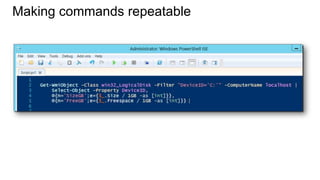
Making commands repeatable
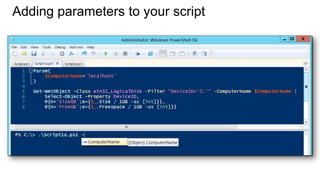
Adding parameters to your script
Documenting your script
Turning your script into a tool for others
Storing your tools in a module
Questions or comments?
©2013 Microsoft Corporation. All rights reserved. Microsoft, Windows, Office, Azure, System Center, Dynamics and other product names are or may be registered trademarks and/or trademarks in the
U.S. and/or other countries. The information herein is for informational purposes only and represents the current view of Microsoft Corporation as of the date of this presentation. Because Microsoft
must respond to changing market conditions, it should not be interpreted to be a commitment on the part of Microsoft, and Microsoft cannot guarantee the accuracy of any information provided after
the date of this presentation. MICROSOFT MAKES NO WARRANTIES, EXPRESS, IMPLIED OR STATUTORY, AS TO THE INFORMATION IN THIS PRESENTATION.

10 introducing scripting and toolmaking

  • 1.
    10 | Introducingscripting and toolmaking Jeffrey Snover | Distinguished Engineer & Lead Architect Jason Helmick | Senior Technologist, Concentrated Technology
  • 2.
    Course Topics Getting Startedwith PowerShell 01 | Don’t fear the shell 06 | The pipeline : Deeper 02 | The Help system 07 | The Power in the Shell - Remoting 03 | The pipeline : Getting connected 08 | Getting prepared for automation 04 | Extending the shell 09 | Automation in scale - Remoting 05 | Objects for the Admin 10 | Introducing scripting and toolmaking
  • 3.
    Module Overview • Thenew ISE • Making commands repeatable • Adding parameters to your script • Documenting your script • Turning your script into a tool for others • Storing your tools in a module
  • 4.
  • 5.
  • 6.
  • 7.
  • 8.
    Turning your scriptinto a tool for others
  • 9.
    Storing your toolsin a module
  • 10.
  • 11.
    ©2013 Microsoft Corporation.All rights reserved. Microsoft, Windows, Office, Azure, System Center, Dynamics and other product names are or may be registered trademarks and/or trademarks in the U.S. and/or other countries. The information herein is for informational purposes only and represents the current view of Microsoft Corporation as of the date of this presentation. Because Microsoft must respond to changing market conditions, it should not be interpreted to be a commitment on the part of Microsoft, and Microsoft cannot guarantee the accuracy of any information provided after the date of this presentation. MICROSOFT MAKES NO WARRANTIES, EXPRESS, IMPLIED OR STATUTORY, AS TO THE INFORMATION IN THIS PRESENTATION.