TRADITIONAL TELEPHONY
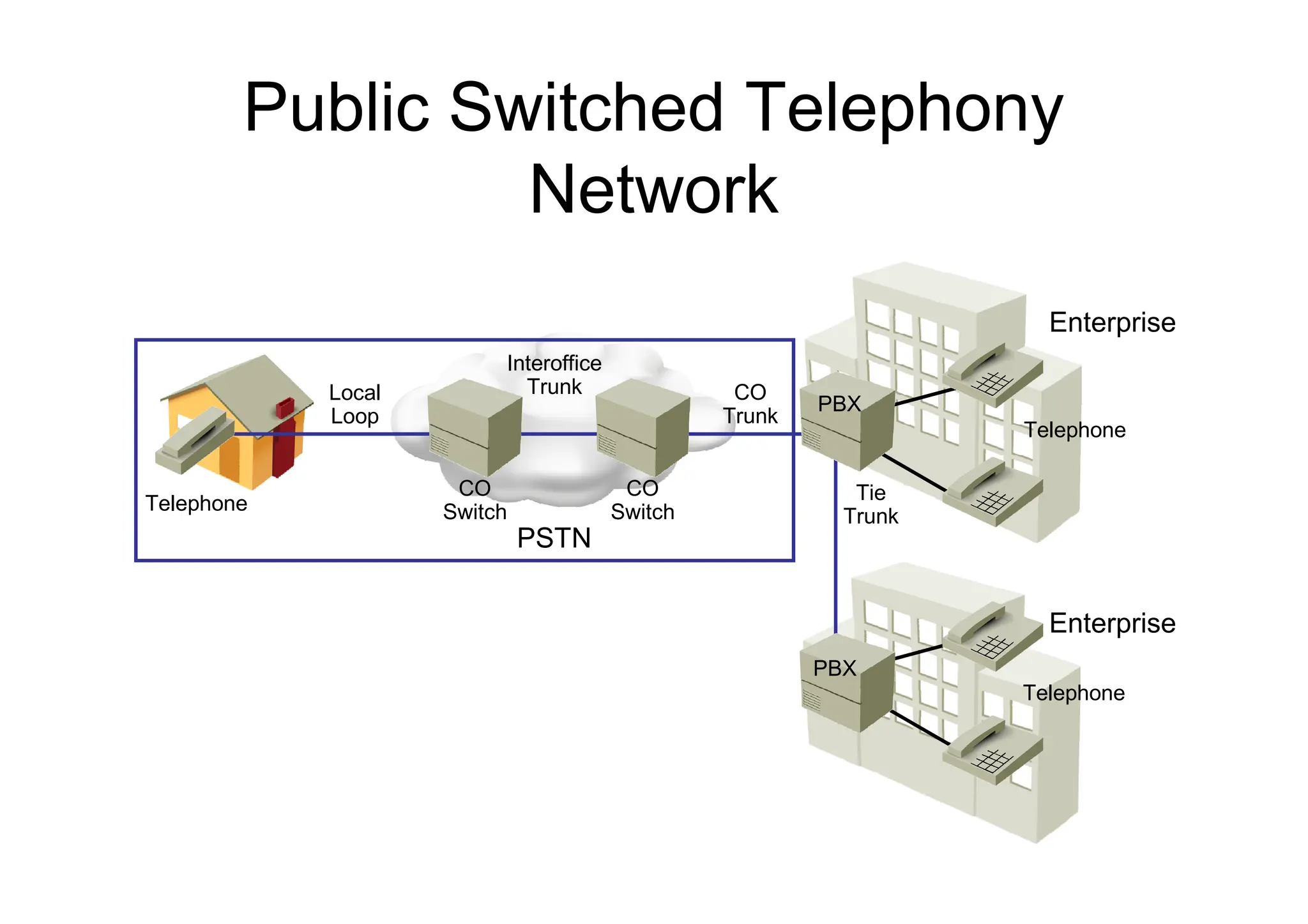
Public Switched Telephony
Network
Telephone
PBX
PBX
CO
Switch
CO
Switch
Telephone
Telephone
Interoffice
Trunk CO
Trunk
Tie
Trunk
Local
Loop
PSTN
Enterprise
Enterprise
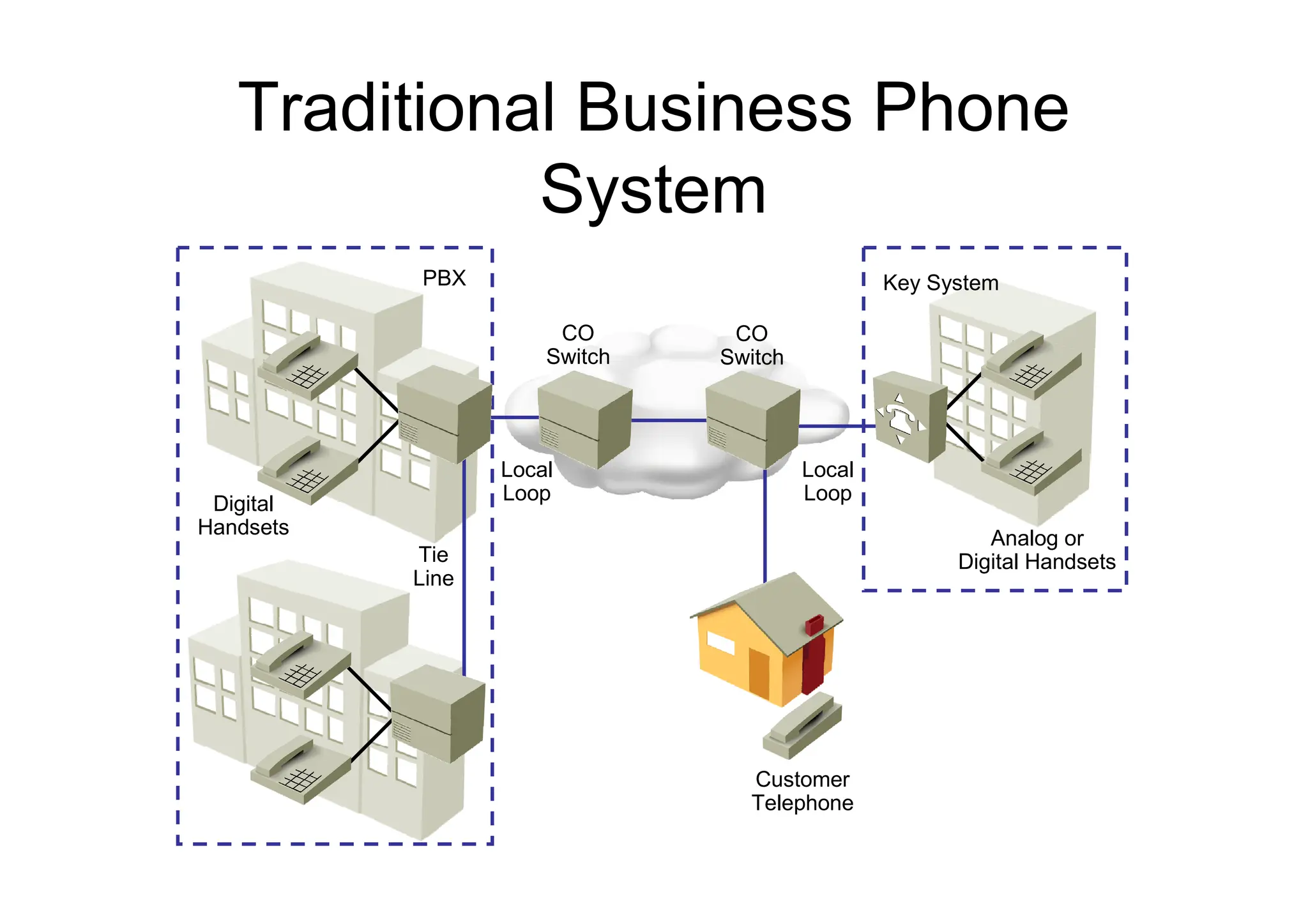
Traditional Business Phone
System
CO
Switch
PBX Key System
CO
Switch
Analog or
Digital Handsets
Digital
Handsets
Local
Loop
Local
Loop
Tie
Line
Customer
Telephone
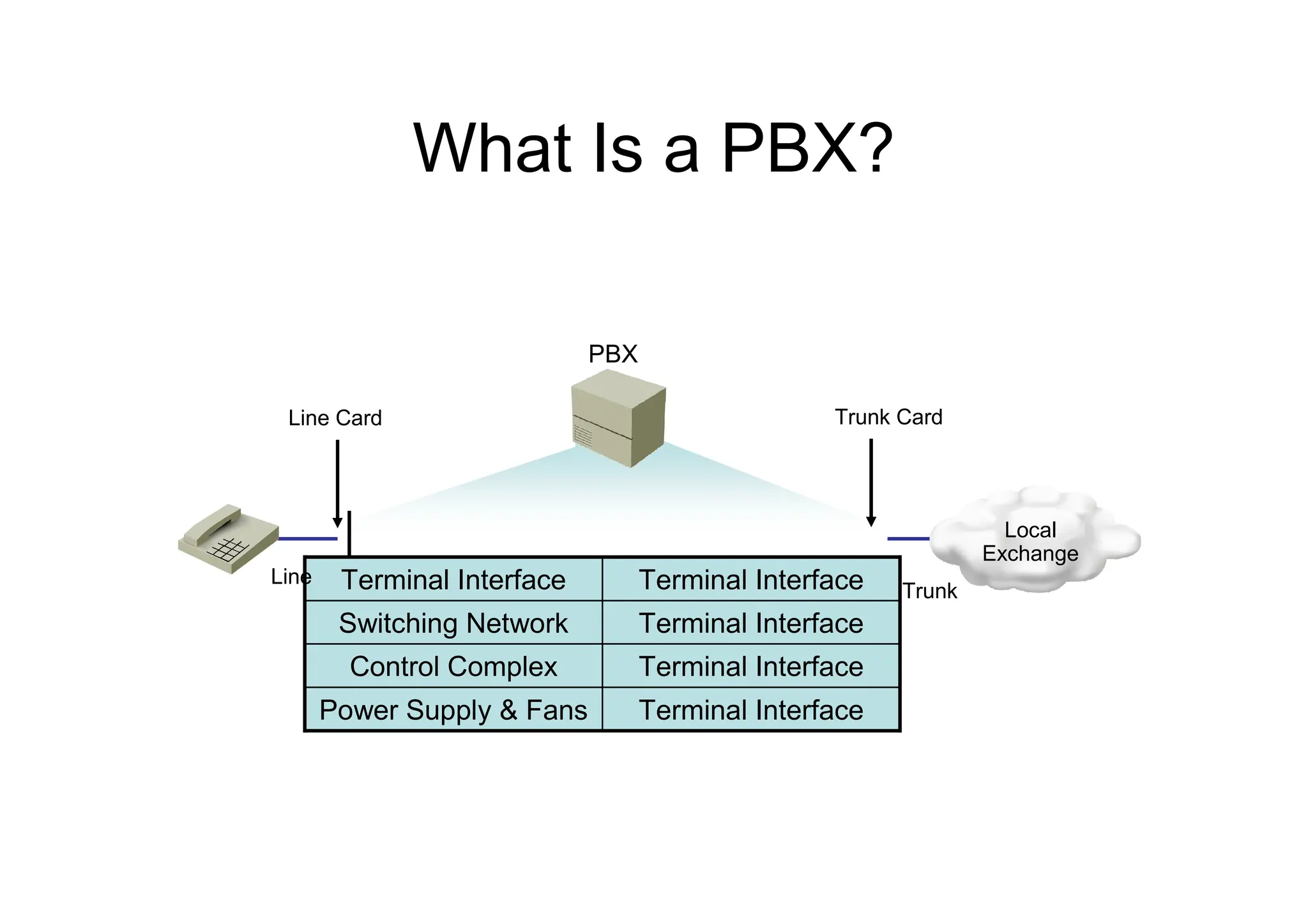
What Is a PBX?
PBX
Terminal Interface
Power Supply & Fans
Terminal Interface
Control Complex
Terminal Interface
Switching Network
Terminal Interface
Terminal Interface
Line Card Trunk Card
Line
Trunk
Local
Exchange
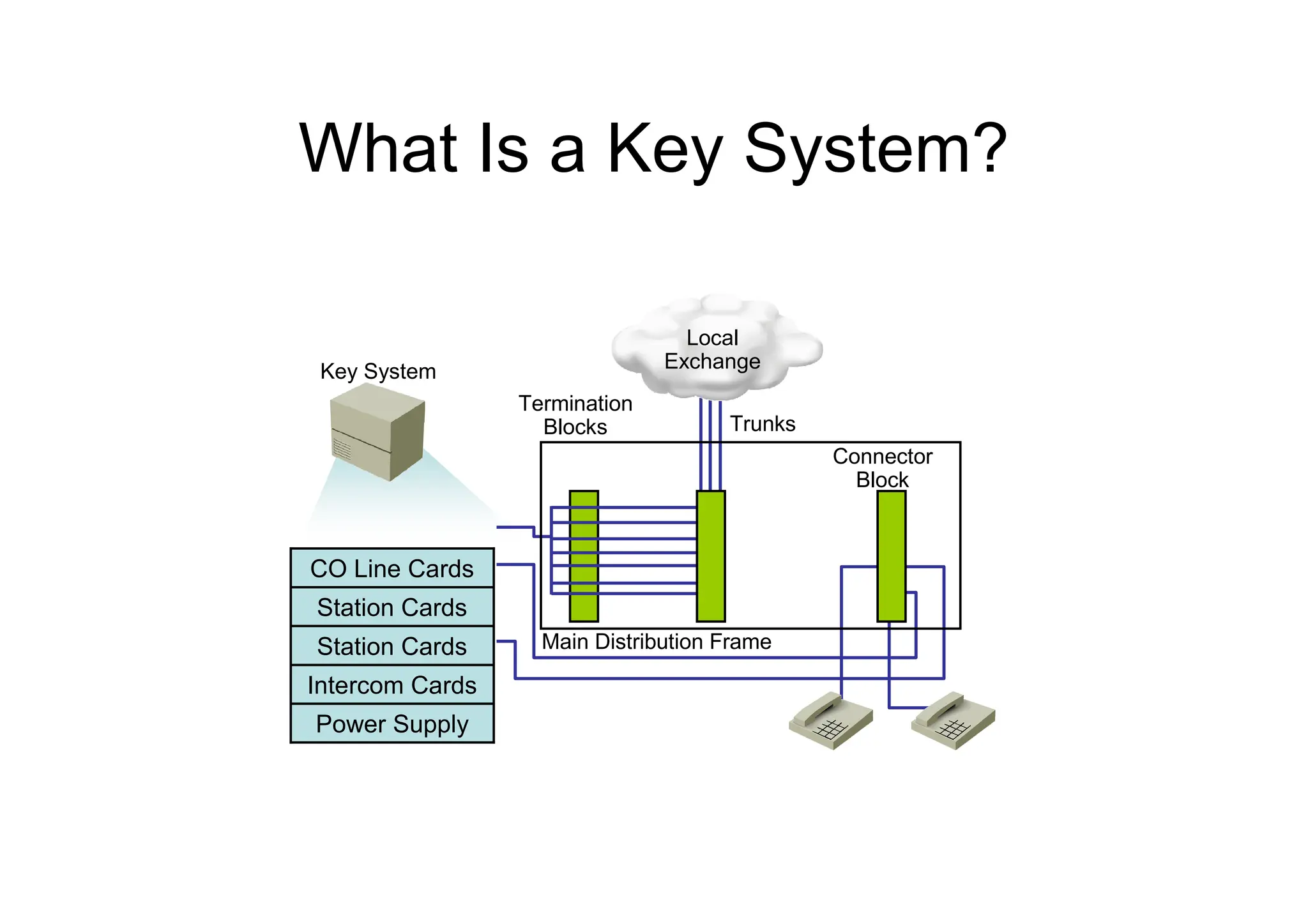
What Is a Key System?
Key System
Termination
Blocks
Connector
Block
Trunks
Main Distribution Frame
Power Supply
Intercom Cards
Station Cards
Station Cards
CO Line Cards
Local
Exchange
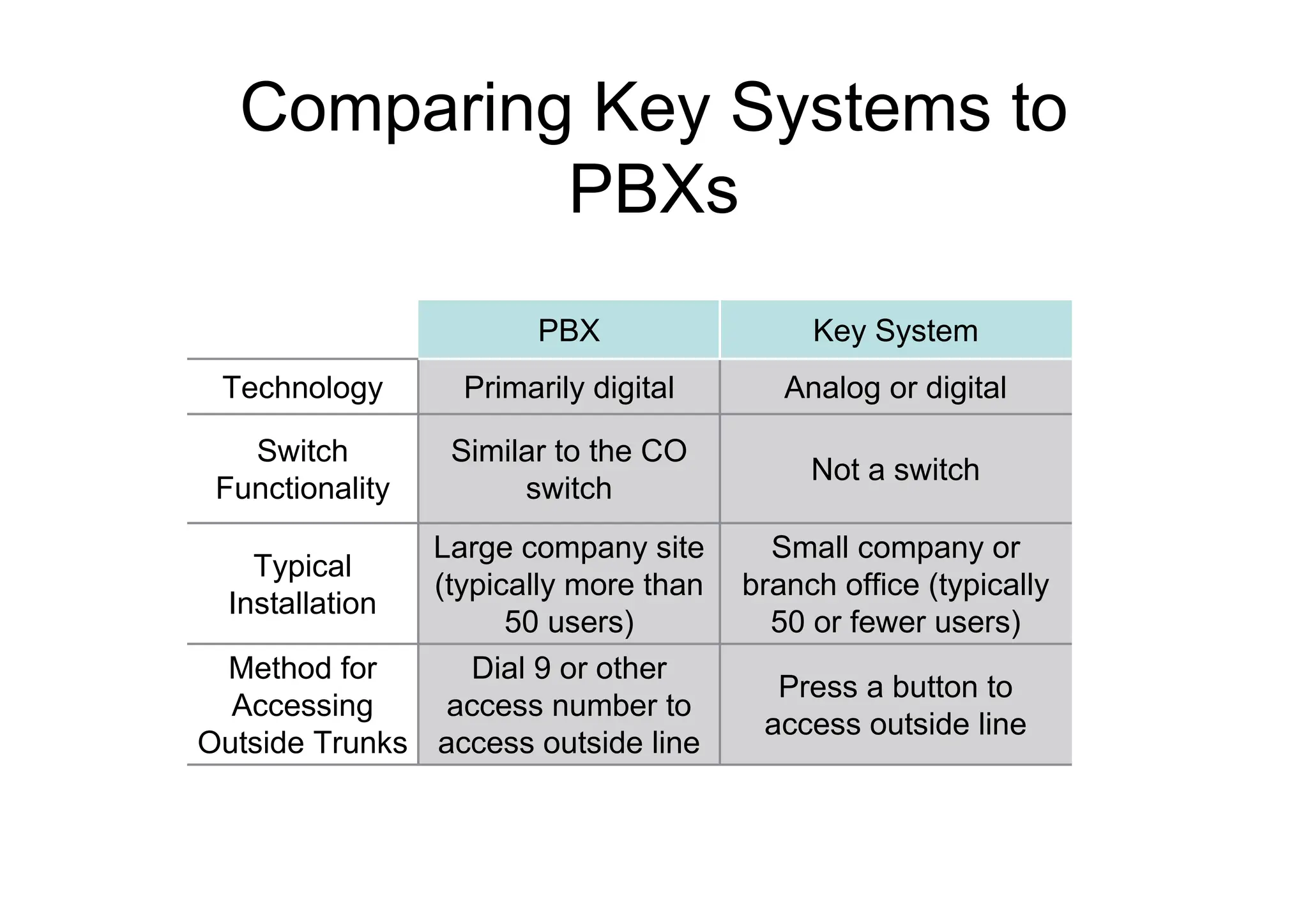
Comparing Key Systems to
PBXs
Press a button to
access outside line
Dial 9 or other
access number to
access outside line
Method for
Accessing
Outside Trunks
Small company or
branch office (typically
50 or fewer users)
Large company site
(typically more than
50 users)
Typical
Installation
Not a switch
Similar to the CO
switch
Switch
Functionality
Analog or digital
Primarily digital
Technology
Key System
PBX
Signaling Types
– There are three types of signaling used in a telephony
network:
• Supervisory signaling communicates the state of a
telephony device.
• Address signaling sends information about the digits
dialed.
• Informational signaling communicates the current
state of the call.
– Signaling can be sent either in-band or out-of-band.
• In-band signaling sends the signaling in the same
communications channel as the voice.
• Out-of-band signaling sends the signaling in a
separate communications channel from the voice.
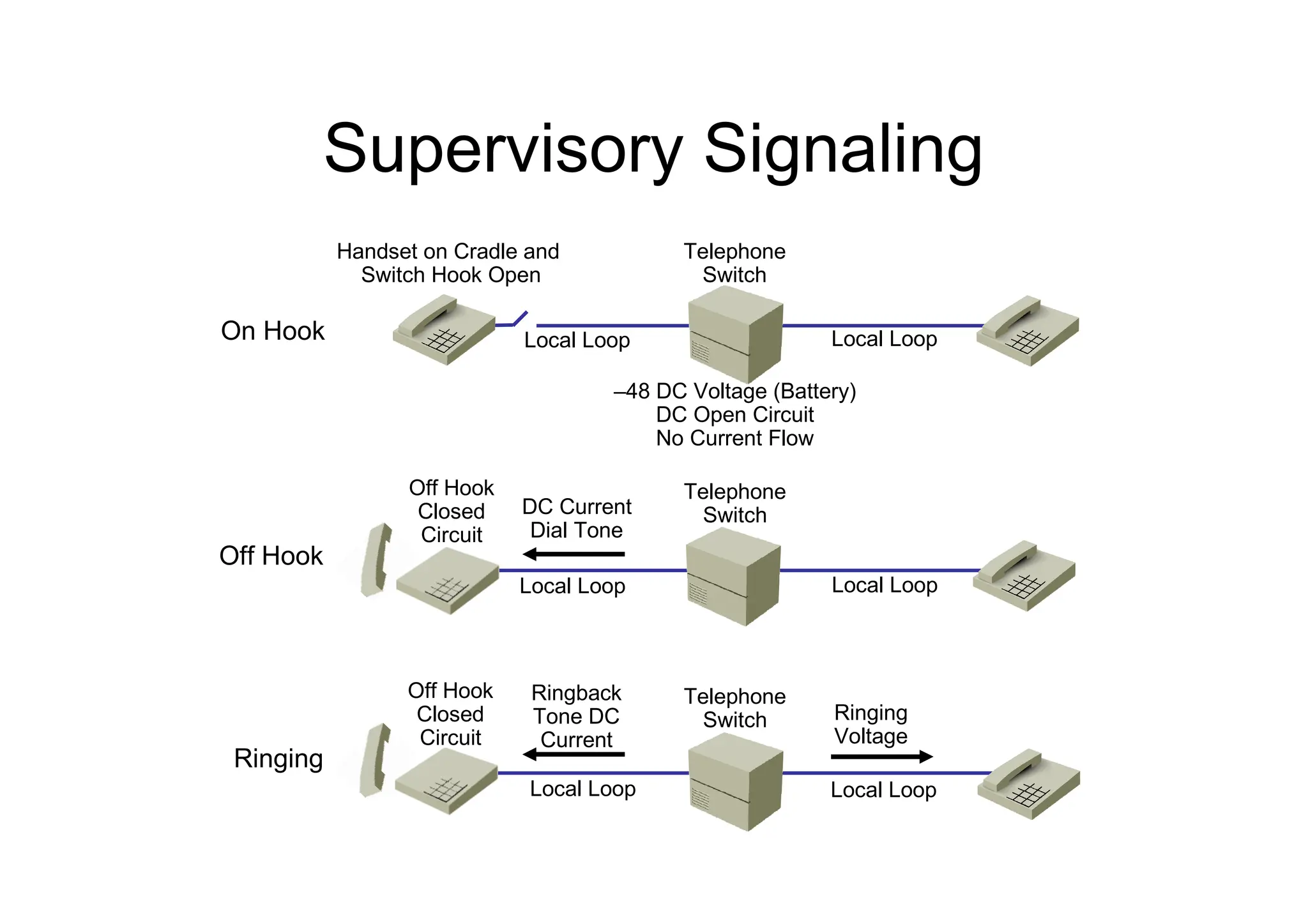
Supervisory Signaling
On Hook
Off Hook
Ringing
Handset on Cradle and
Switch Hook Open
Telephone
Switch
Telephone
Switch
Telephone
Switch
Local Loop
Local Loop
Local Loop
Local Loop
Local Loop
Local Loop
DC Current
Dial Tone
Ringback
Tone DC
Current
Off Hook
Closed
Circuit
Off Hook
Closed
Circuit
Ringing
Voltage
–48 DC Voltage (Battery)
DC Open Circuit
No Current Flow
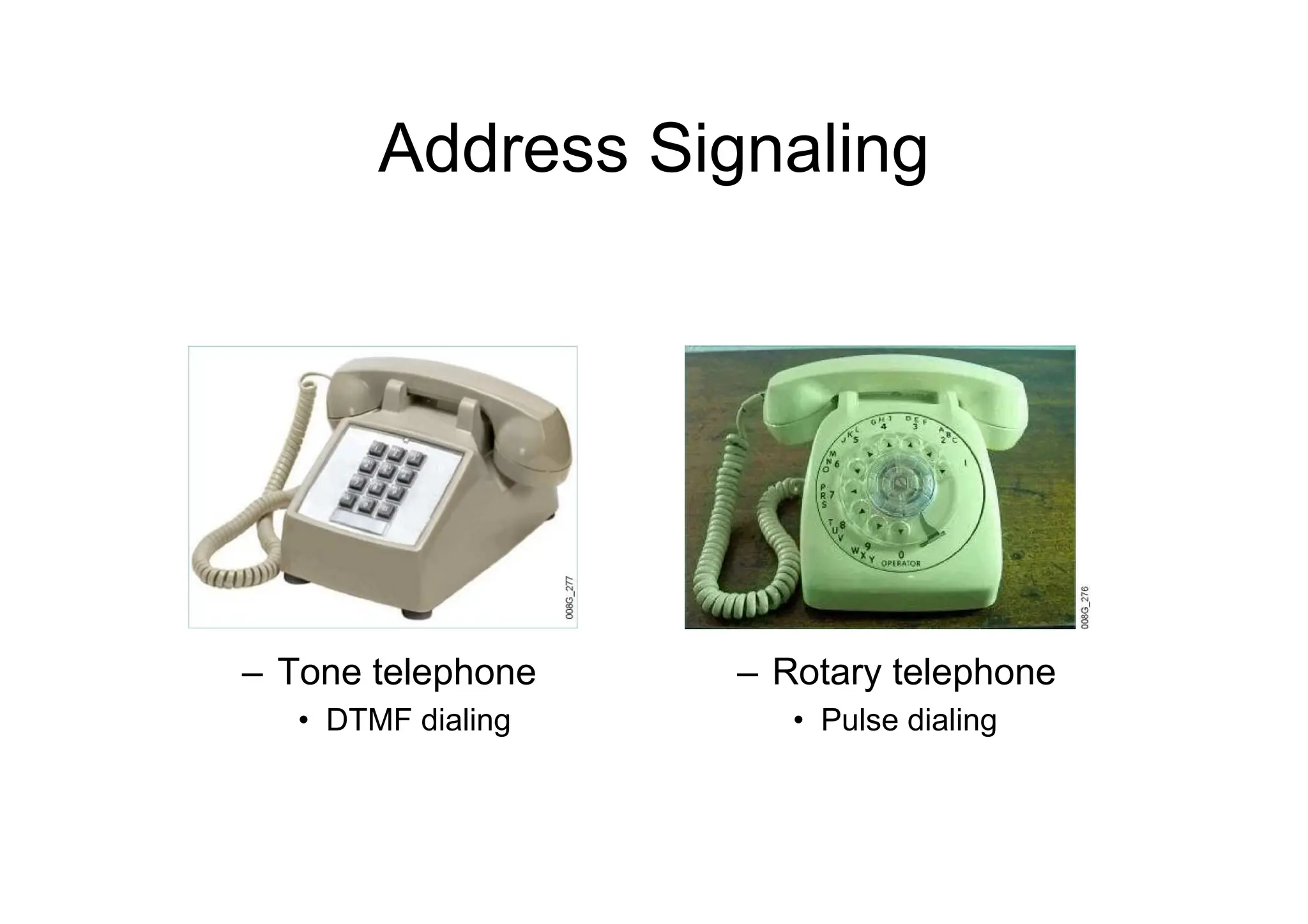
Address Signaling
– Tone telephone
• DTMF dialing
– Rotary telephone
• Pulse dialing
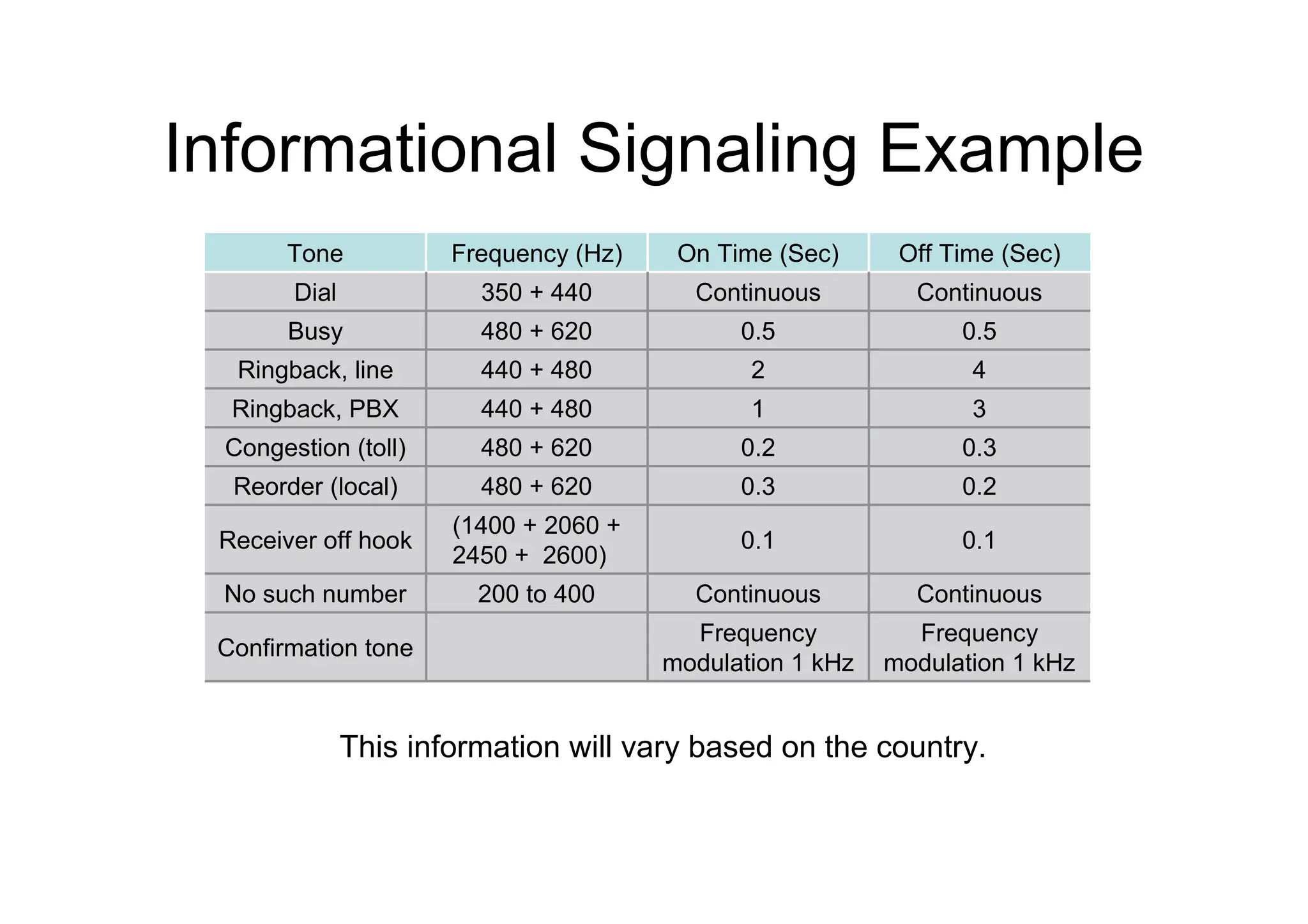
Informational Signaling Example
Frequency
modulation 1 kHz
Frequency
modulation 1 kHz
Confirmation tone
Continuous
Continuous
200 to 400
No such number
0.1
0.1
(1400 + 2060 +
2450 + 2600)
Receiver off hook
0.2
0.3
480 + 620
Reorder (local)
0.3
0.2
480 + 620
Congestion (toll)
3
1
440 + 480
Ringback, PBX
4
2
440 + 480
Ringback, line
0.5
0.5
480 + 620
Busy
Continuous
Continuous
350 + 440
Dial
Off Time (Sec)
On Time (Sec)
Frequency (Hz)
Tone
This information will vary based on the country.
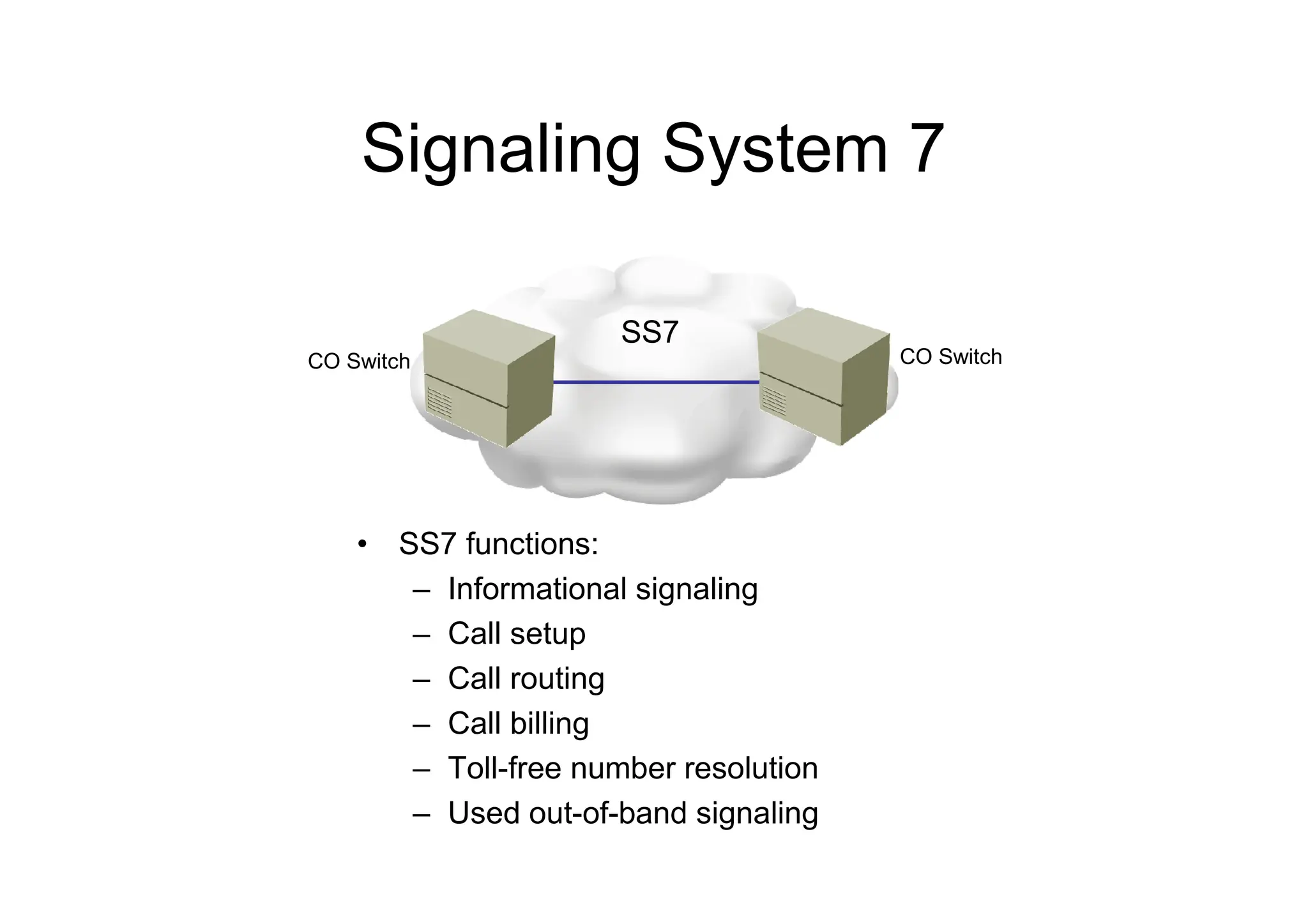
Signaling System 7
• SS7 functions:
– Informational signaling
– Call setup
– Call routing
– Call billing
– Toll-free number resolution
– Used out-of-band signaling
CO Switch CO Switch
SS7
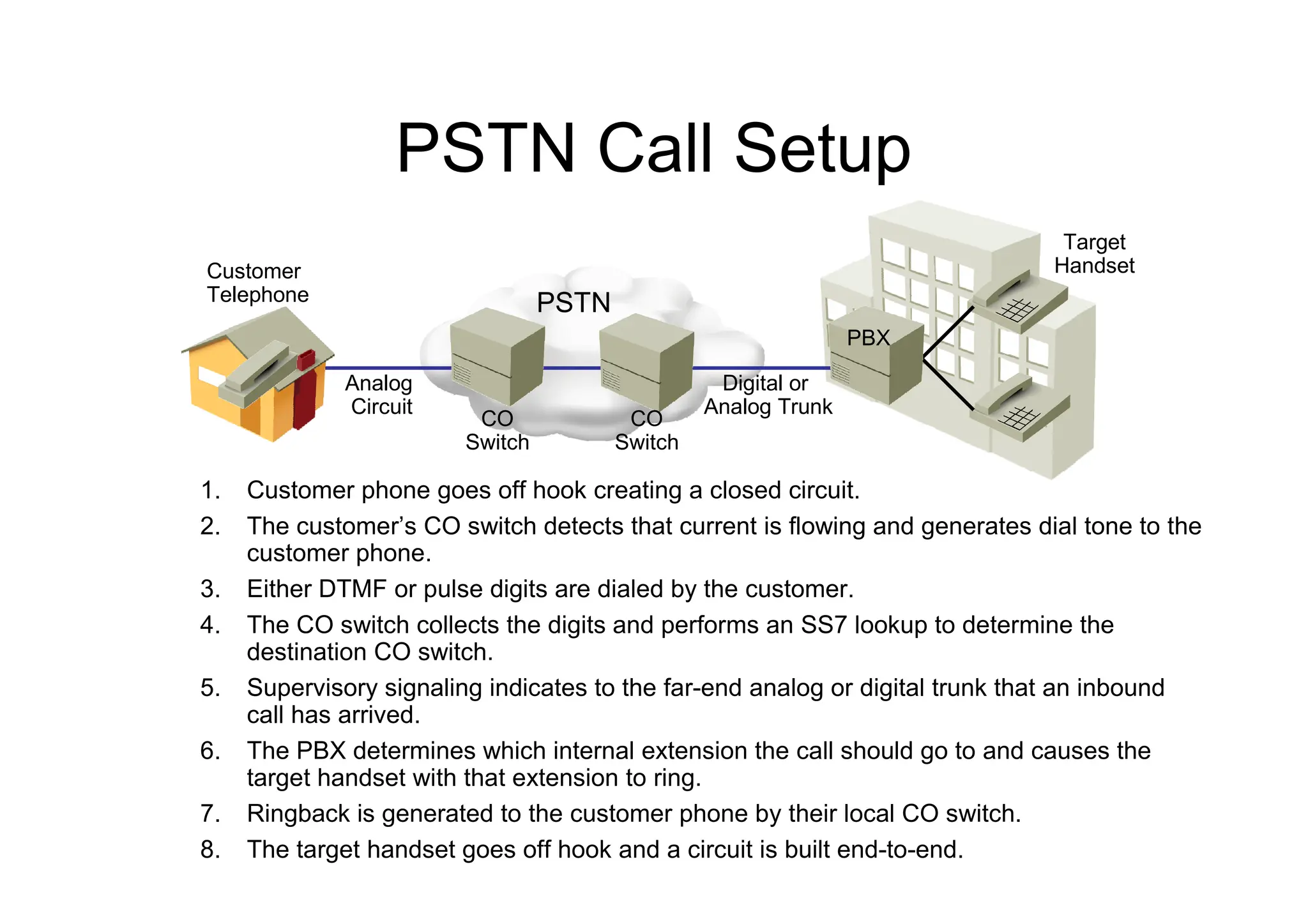
PSTN Call Setup
1. Customer phone goes off hook creating a closed circuit.
2. The customer’s CO switch detects that current is flowing and generates dial tone to the
customer phone.
3. Either DTMF or pulse digits are dialed by the customer.
4. The CO switch collects the digits and performs an SS7 lookup to determine the
destination CO switch.
5. Supervisory signaling indicates to the far-end analog or digital trunk that an inbound
call has arrived.
6. The PBX determines which internal extension the call should go to and causes the
target handset with that extension to ring.
7. Ringback is generated to the customer phone by their local CO switch.
8. The target handset goes off hook and a circuit is built end-to-end.
PSTN
Customer
Telephone
Analog
Circuit
Digital or
Analog Trunk
PBX
Target
Handset
CO
Switch
CO
Switch
Numbering Plans
– A numbering plan is a numbering scheme with the following
characteristics:
• Defines a set of rules to allocate numbers used in
telecommunications
• Is based on international telecommunications standards
• Is established by numbering plan authorities, which regulate the
distribution of numbers and codes in their territory
– Many regional and national numbering plans exist:
• NANP
• U.K. National Numbering Scheme
• ETNS
• Hong Kong
• Many countries have their own numbering plans
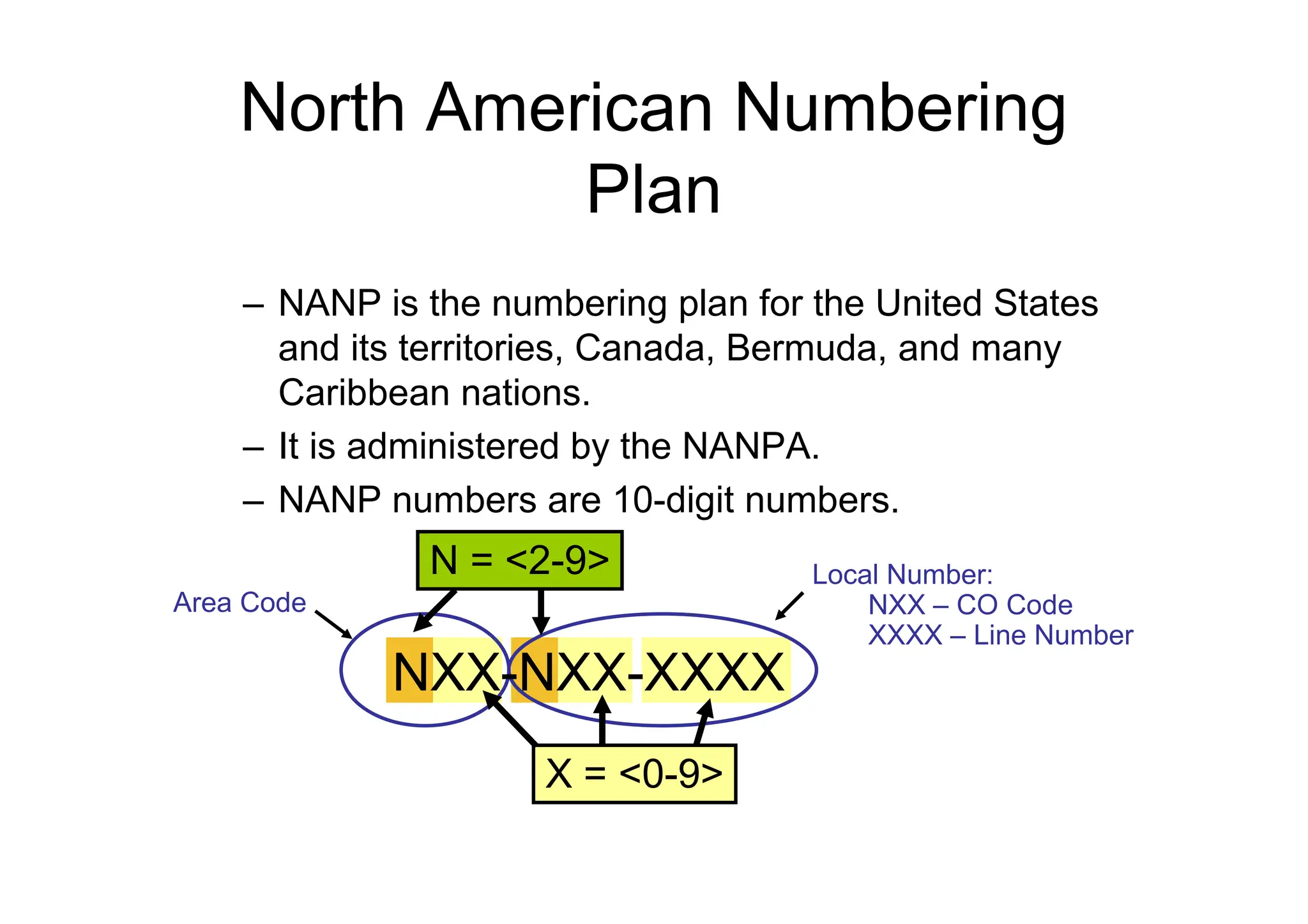
North American Numbering
Plan
– NANP is the numbering plan for the United States
and its territories, Canada, Bermuda, and many
Caribbean nations.
– It is administered by the NANPA.
– NANP numbers are 10-digit numbers.
X = <0-9>
Area Code
Local Number:
NXX – CO Code
XXXX – Line Number
N = <2-9>
NXX-NXX-XXXX
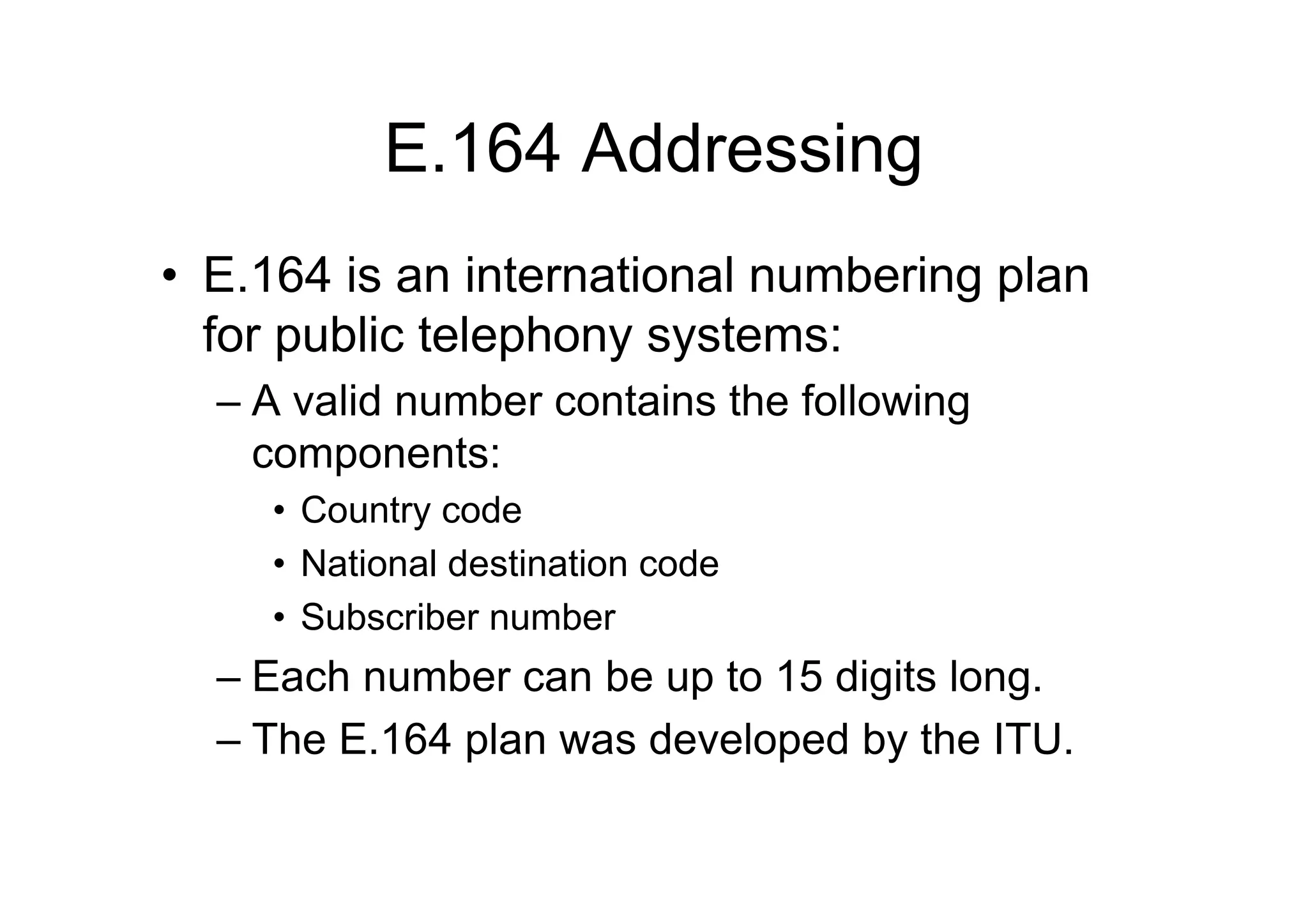
E.164 Addressing
• E.164 is an international numbering plan
for public telephony systems:
– A valid number contains the following
components:
• Country code
• National destination code
• Subscriber number
– Each number can be up to 15 digits long.
– The E.164 plan was developed by the ITU.
ANALOG TELEPHONY
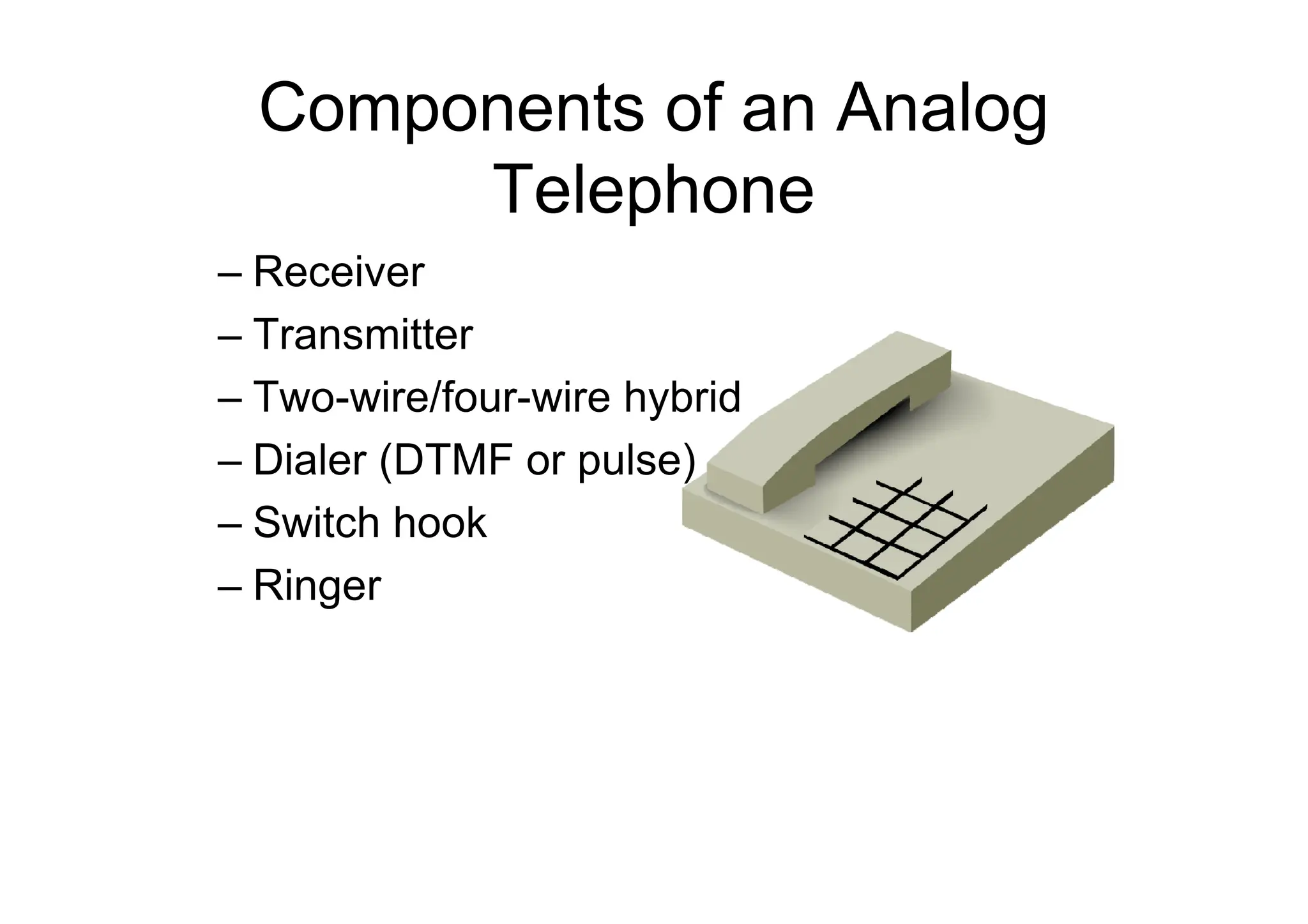
Components of an Analog
Telephone
– Receiver
– Transmitter
– Two-wire/four-wire hybrid
– Dialer (DTMF or pulse)
– Switch hook
– Ringer
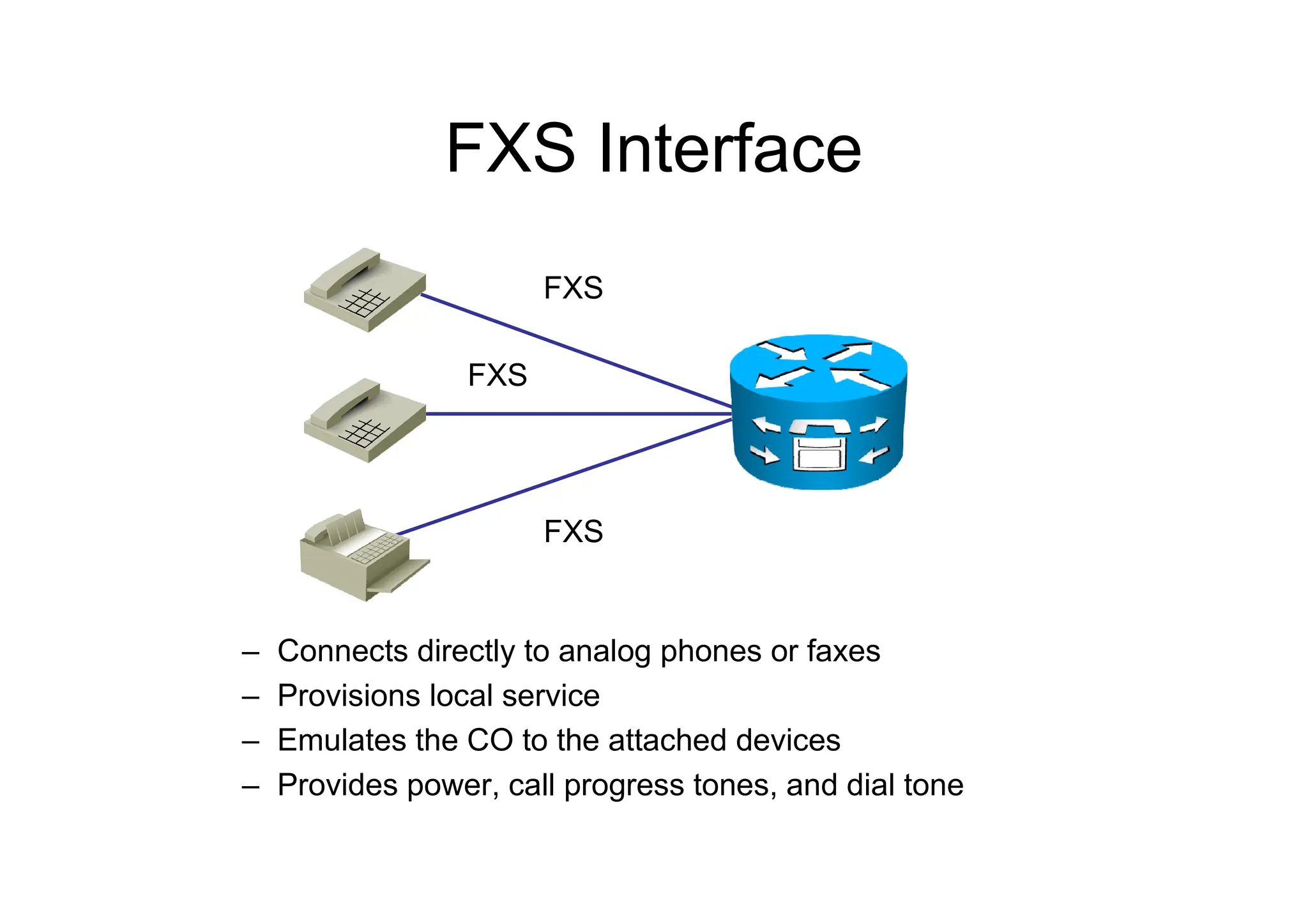
FXS Interface
– Connects directly to analog phones or faxes
– Provisions local service
– Emulates the CO to the attached devices
– Provides power, call progress tones, and dial tone
FXS
FXS
FXS
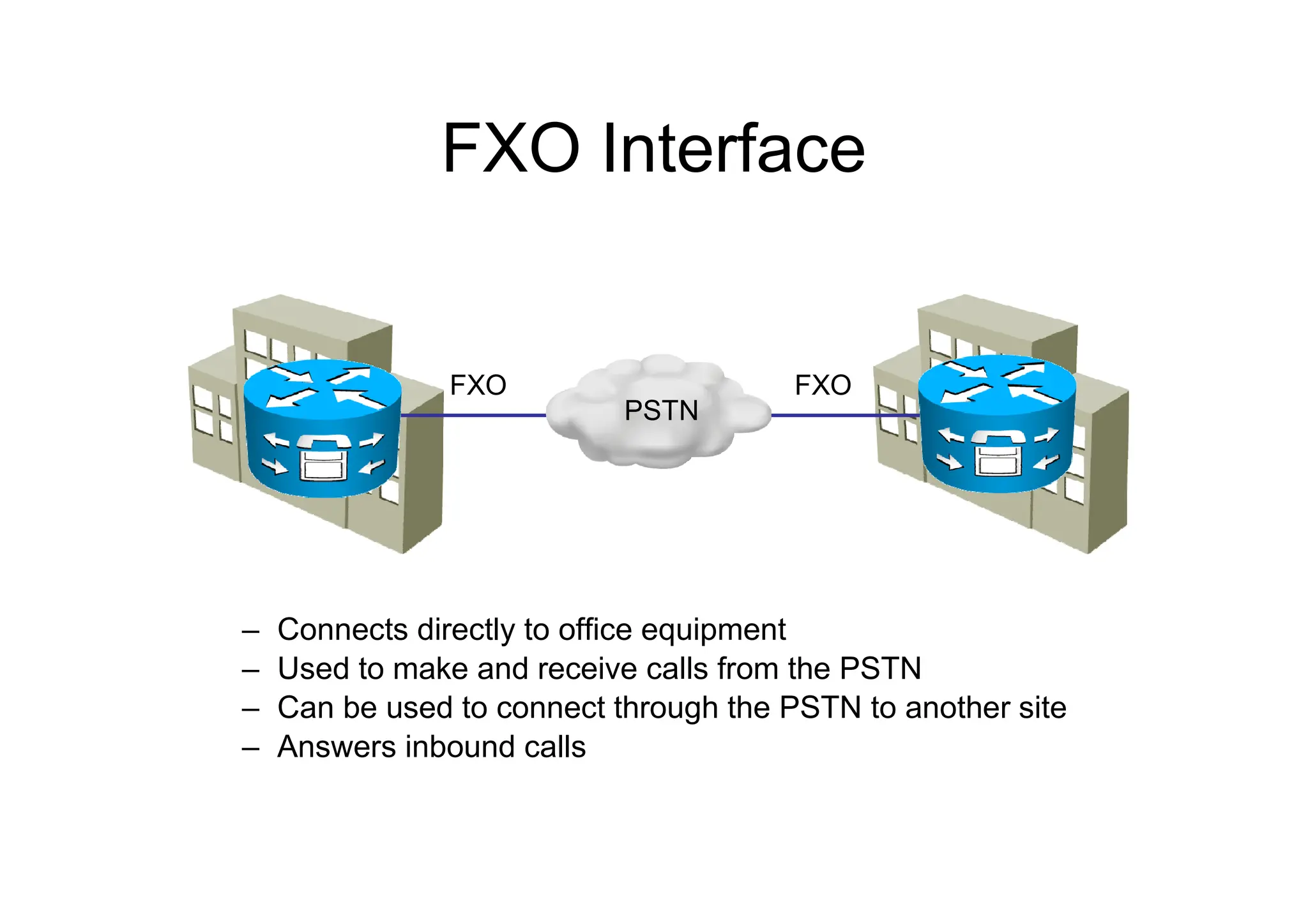
FXO Interface
– Connects directly to office equipment
– Used to make and receive calls from the PSTN
– Can be used to connect through the PSTN to another site
– Answers inbound calls
FXO FXO
PSTN
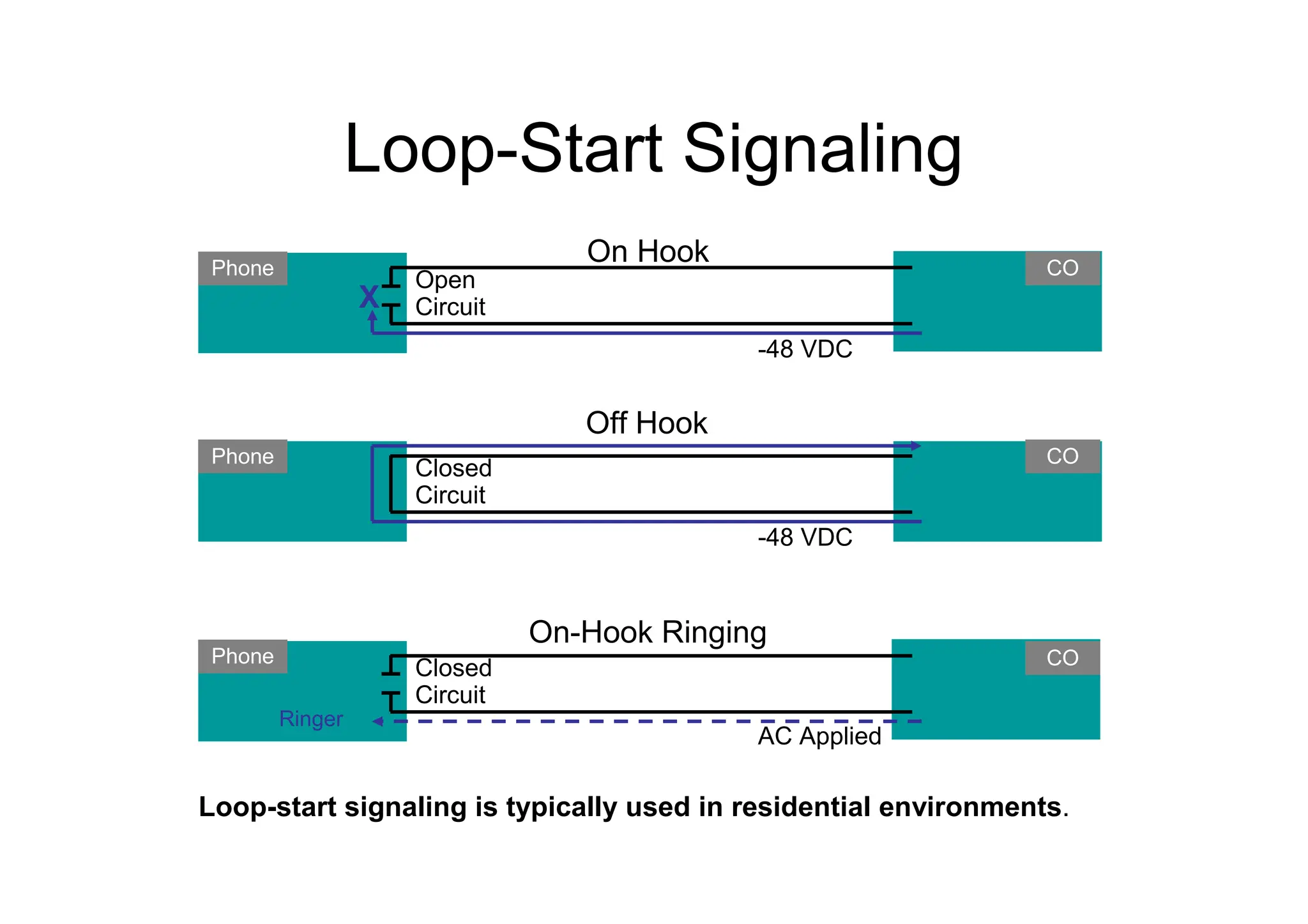
Loop-Start Signaling
CO
Phone
-48 VDC
Open
Circuit
On Hook
CO
Phone
-48 VDC
Closed
Circuit
Off Hook
CO
Phone
AC Applied
Closed
Circuit
On-Hook Ringing
Ringer
X
Loop-start signaling is typically used in residential environments.
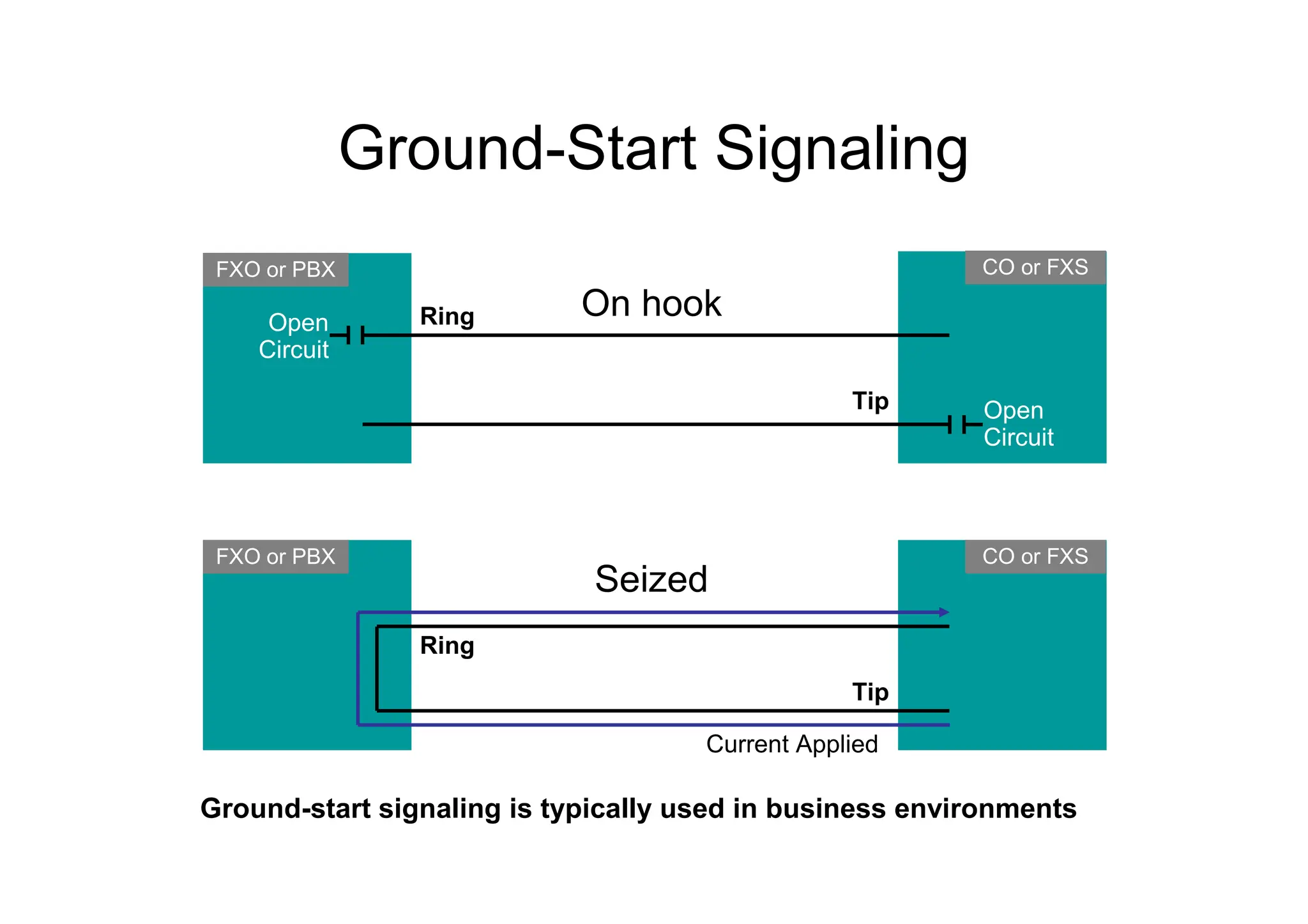
Ground-Start Signaling
CO or FXS
FXO or PBX
Open
Circuit
On hook
CO or FXS
Seized
Open
Circuit
FXO or PBX
Current Applied
Ring
Tip
Ring
Tip
Ground-start signaling is typically used in business environments
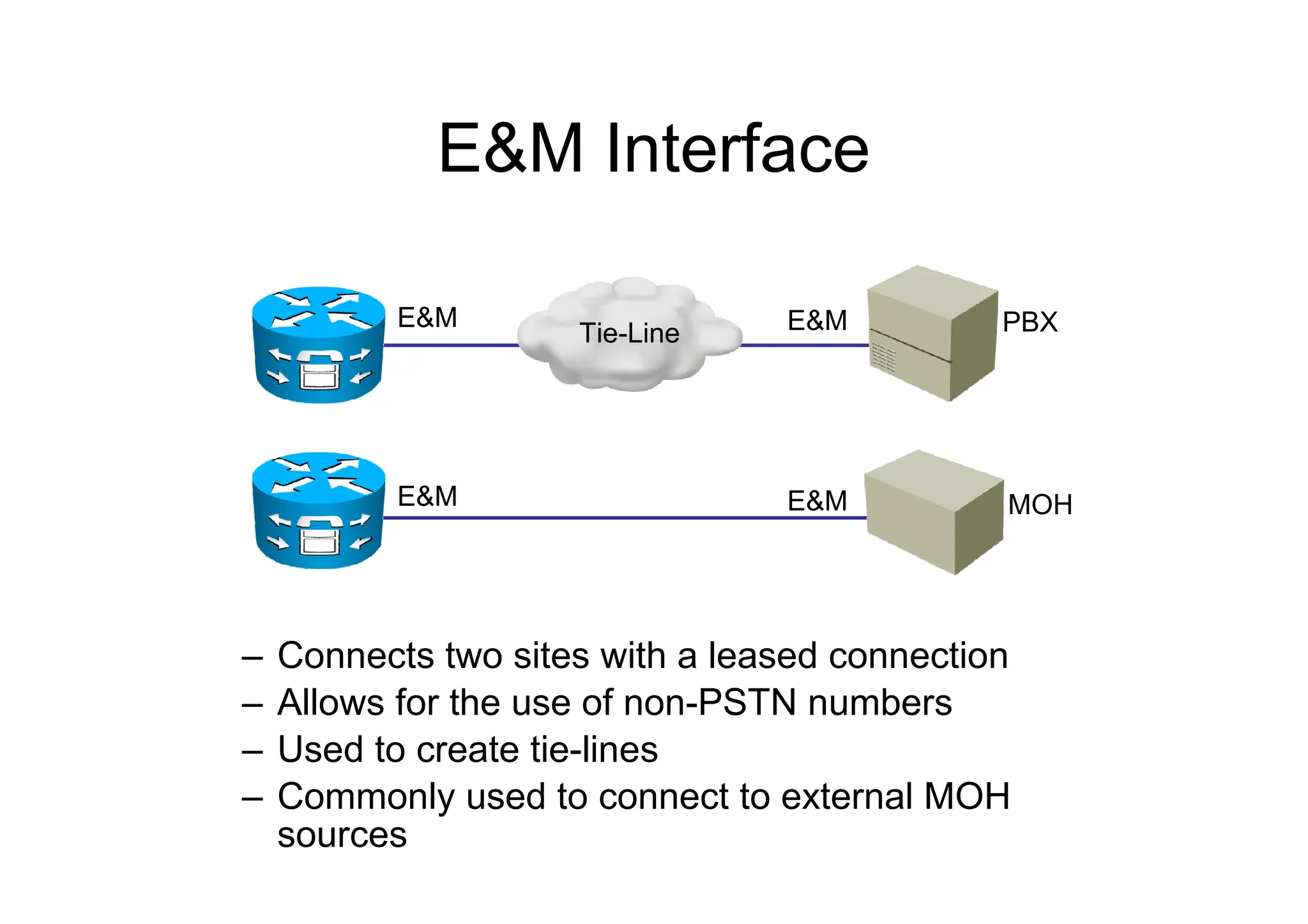
E&M Interface
– Connects two sites with a leased connection
– Allows for the use of non-PSTN numbers
– Used to create tie-lines
– Commonly used to connect to external MOH
sources
E&M E&M
E&M MOH
E&M
PBX
Tie-Line
DIGITAL TELEPHONY
Digitizing Analog Signals
1. Sample the analog signal regularly.
2. Quantize the sample.
3. Encode the value into a binary expression.
4. Compress the samples to reduce bandwidth
(optional).
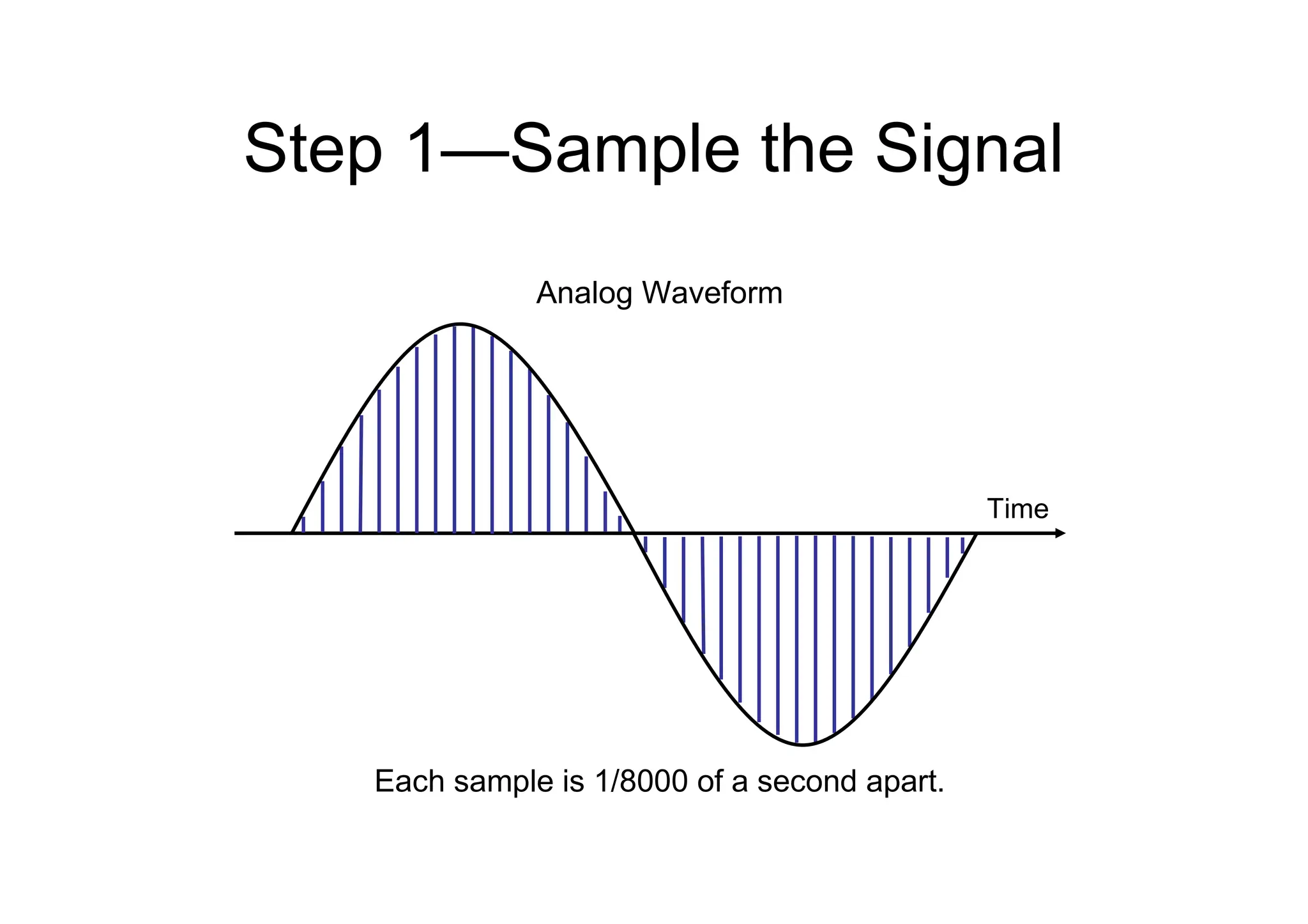
Step 1—Sample the Signal
Each sample is 1/8000 of a second apart.
Time
Analog Waveform
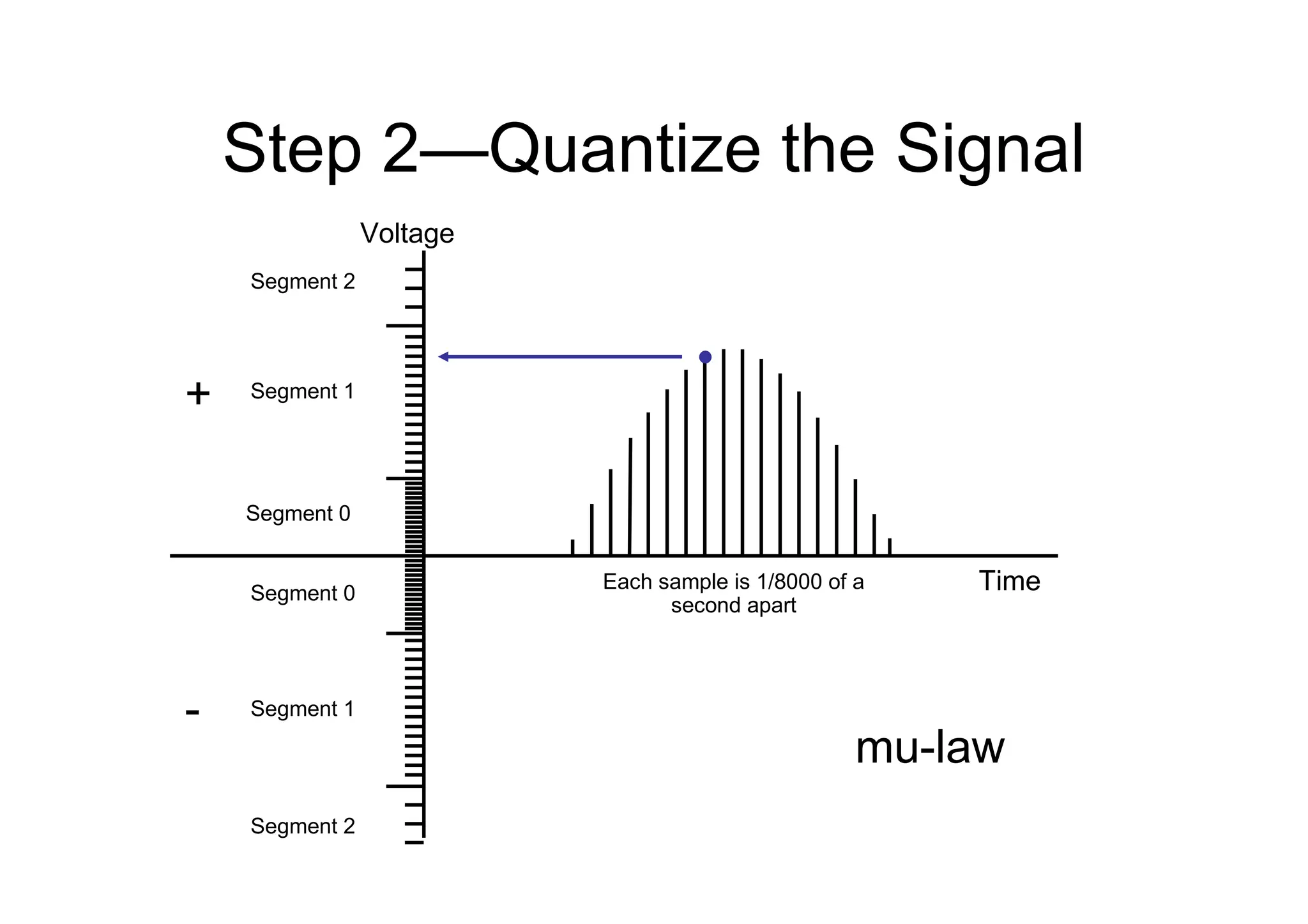
Step 2—Quantize the Signal
Segment 0
Segment 0
Segment 1
Segment 2
Segment 2
Segment 1
Time
Voltage
Each sample is 1/8000 of a
second apart
+
-
mu-law
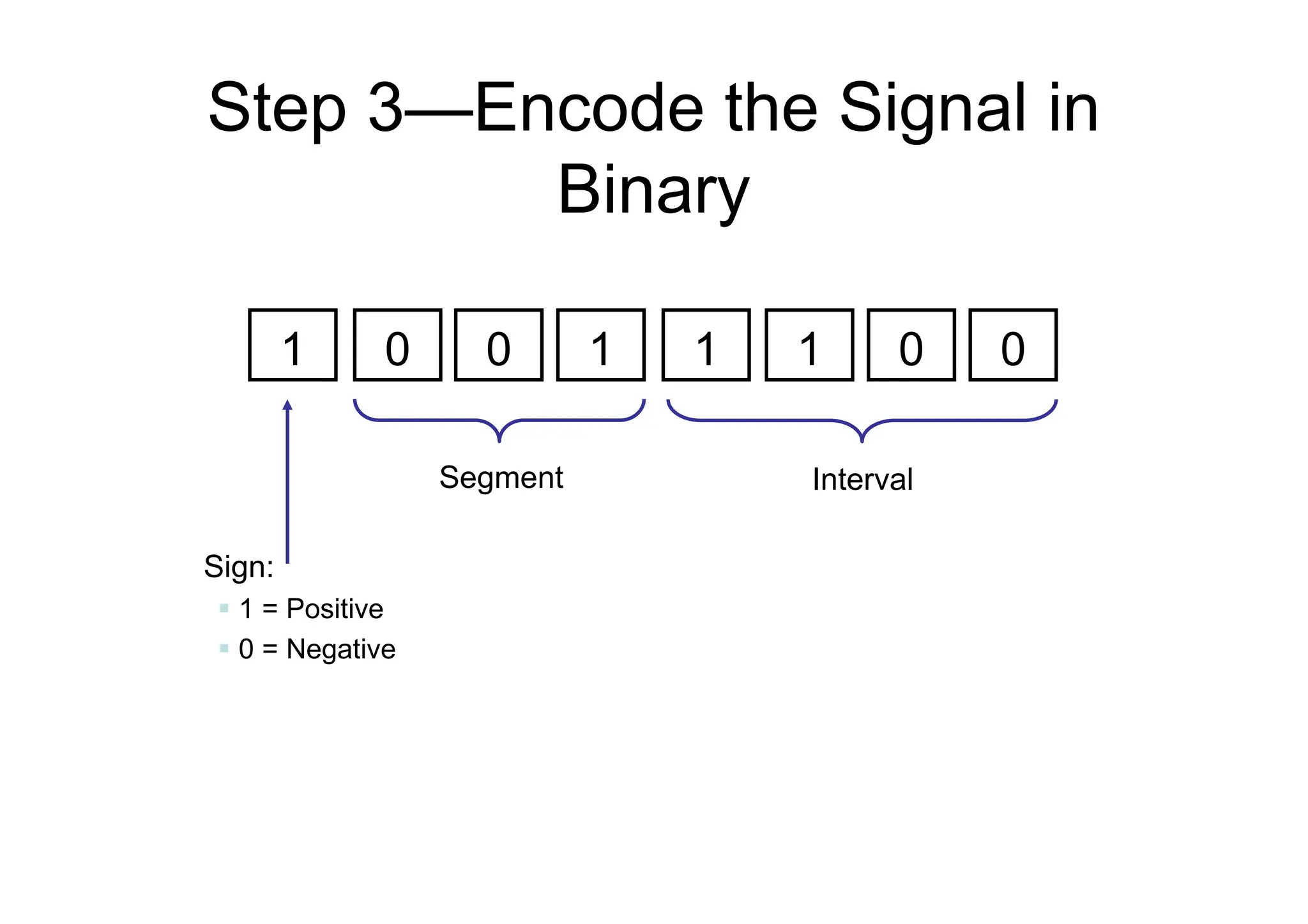
Step 3—Encode the Signal in
Binary
1 0 0 1 1 1 0 0
Sign:
 1 = Positive
 0 = Negative
Segment Interval
Step 4—Compress the Samples
(Optional)
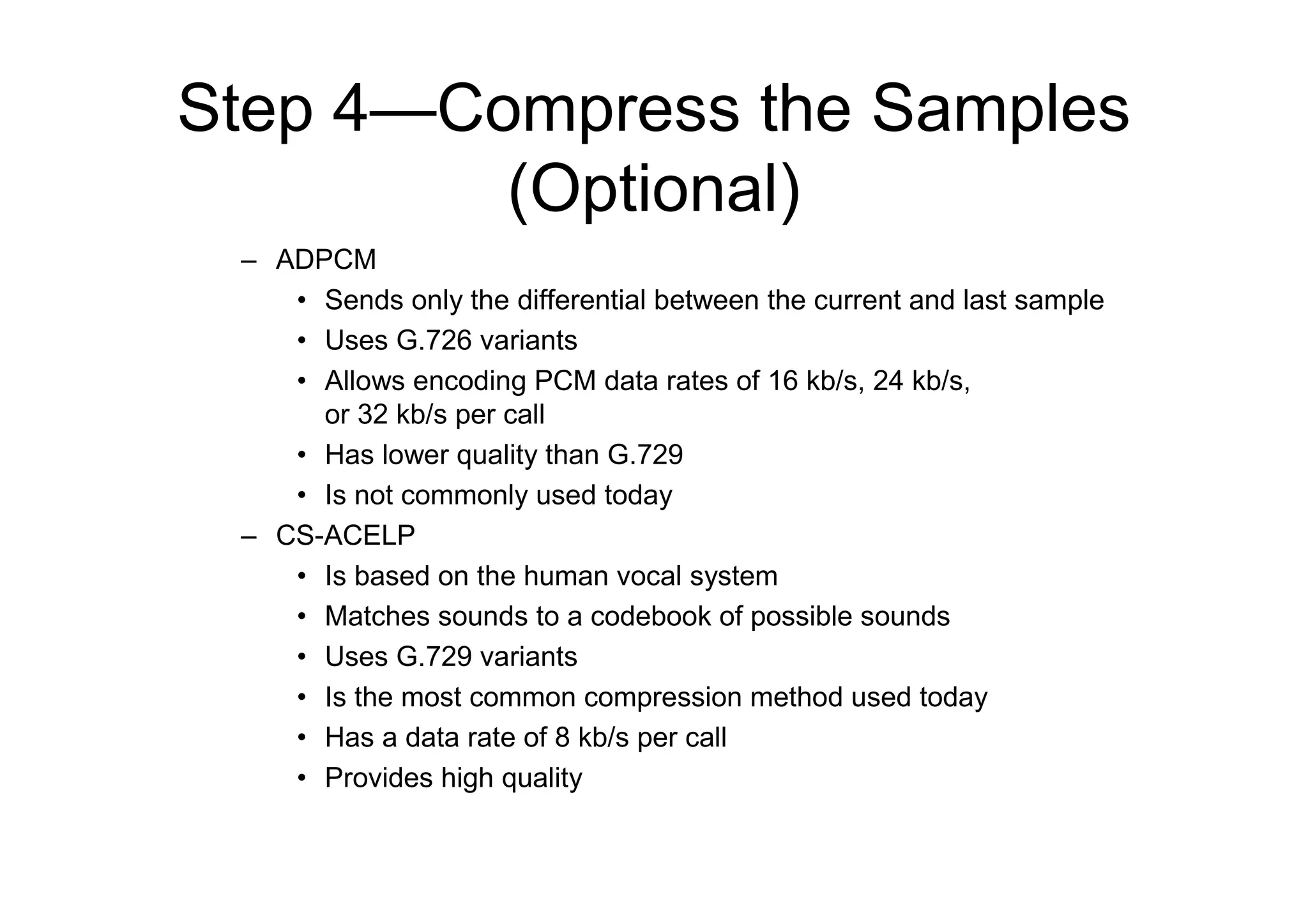
– ADPCM
• Sends only the differential between the current and last sample
• Uses G.726 variants
• Allows encoding PCM data rates of 16 kb/s, 24 kb/s,
or 32 kb/s per call
• Has lower quality than G.729
• Is not commonly used today
– CS-ACELP
• Is based on the human vocal system
• Matches sounds to a codebook of possible sounds
• Uses G.729 variants
• Is the most common compression method used today
• Has a data rate of 8 kb/s per call
• Provides high quality
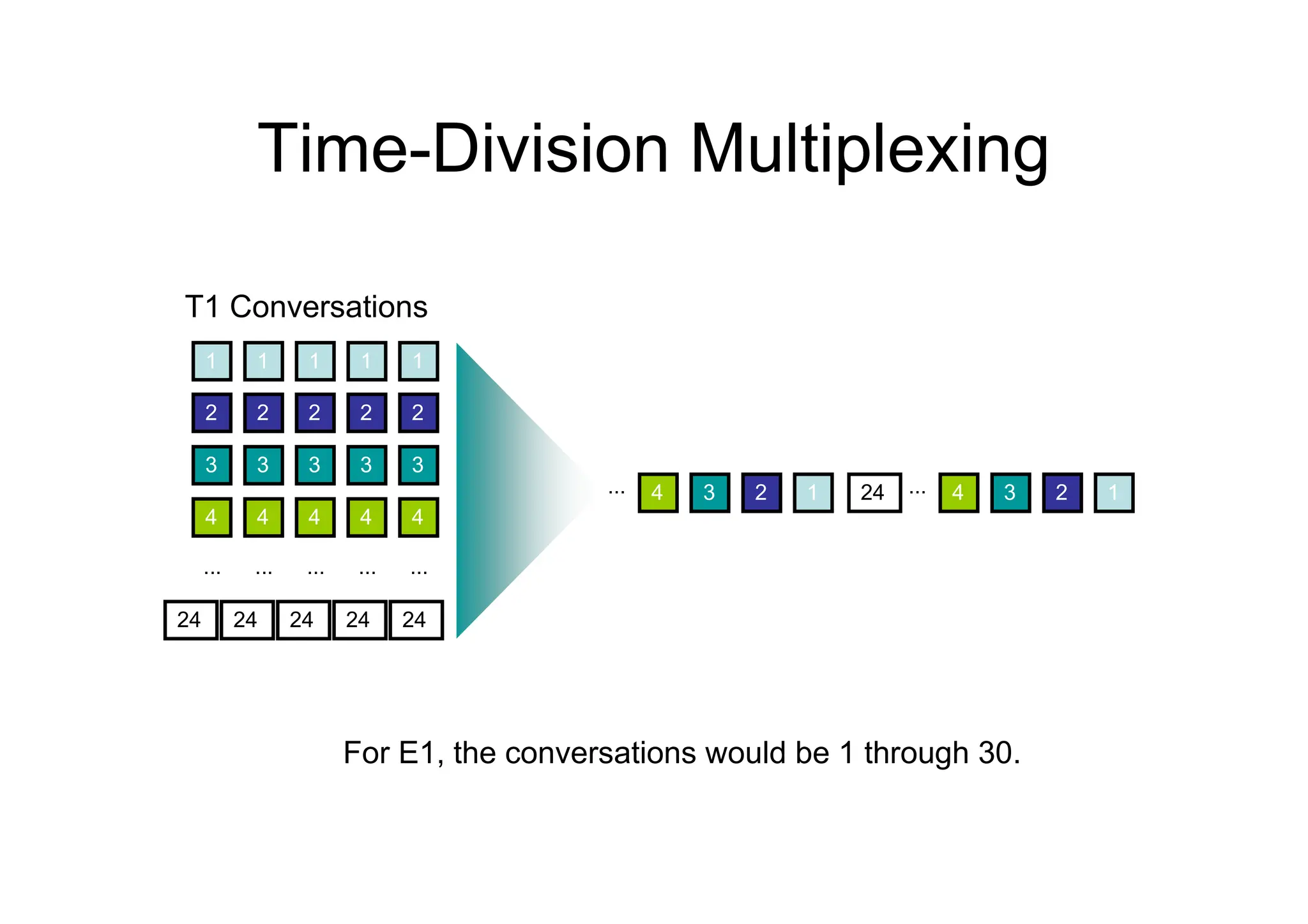
Time-Division Multiplexing
1 1 1 1 1
2 2 2 2 2
3 3 3 3 3
4 4 4 4 4
... ... ... ... ...
24 24 24 24 24
T1 Conversations
1
2
3
4 ...
24 1
2
3
4
...
For E1, the conversations would be 1 through 30.
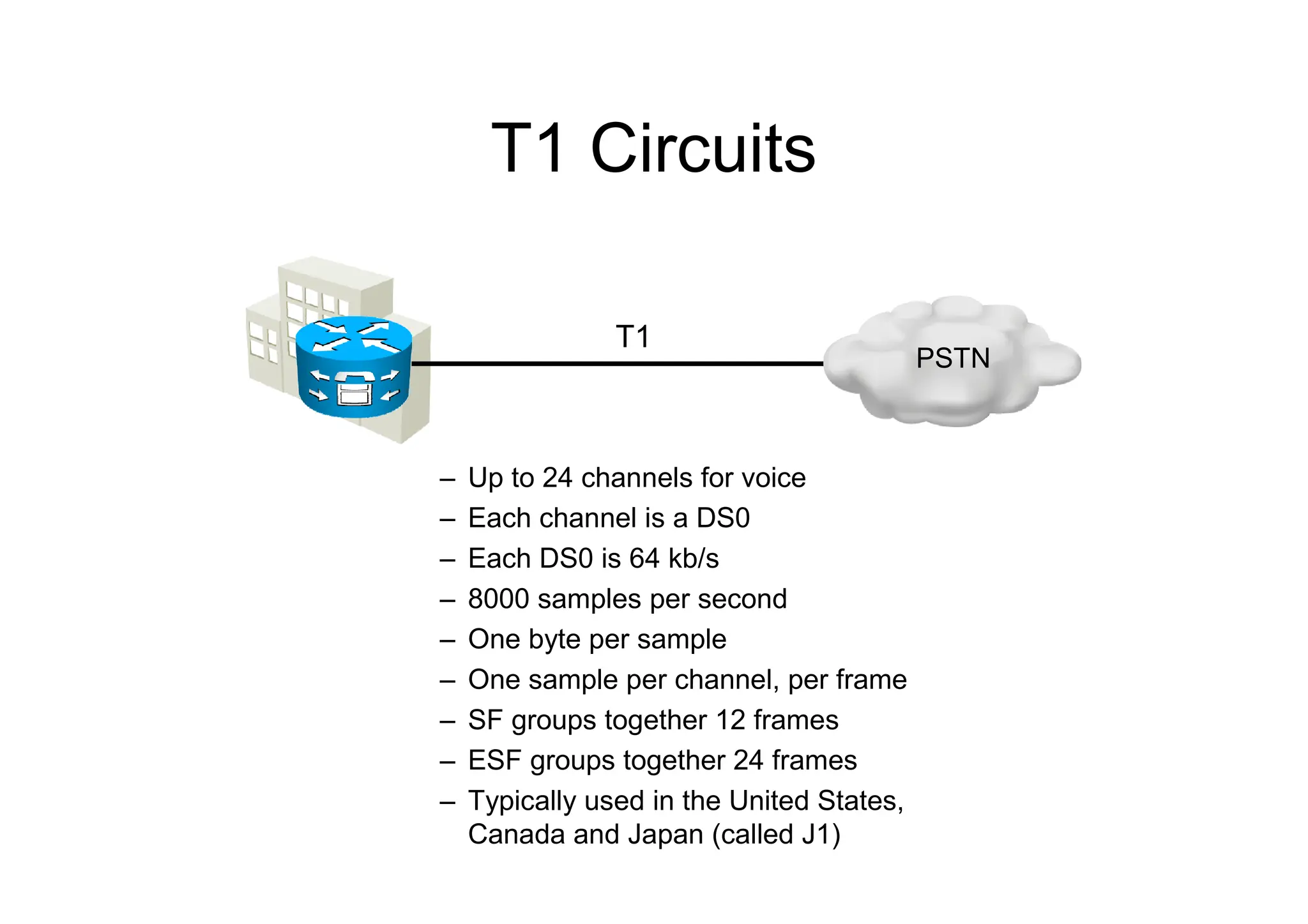
T1 Circuits
– Up to 24 channels for voice
– Each channel is a DS0
– Each DS0 is 64 kb/s
– 8000 samples per second
– One byte per sample
– One sample per channel, per frame
– SF groups together 12 frames
– ESF groups together 24 frames
– Typically used in the United States,
Canada and Japan (called J1)
T1
PSTN
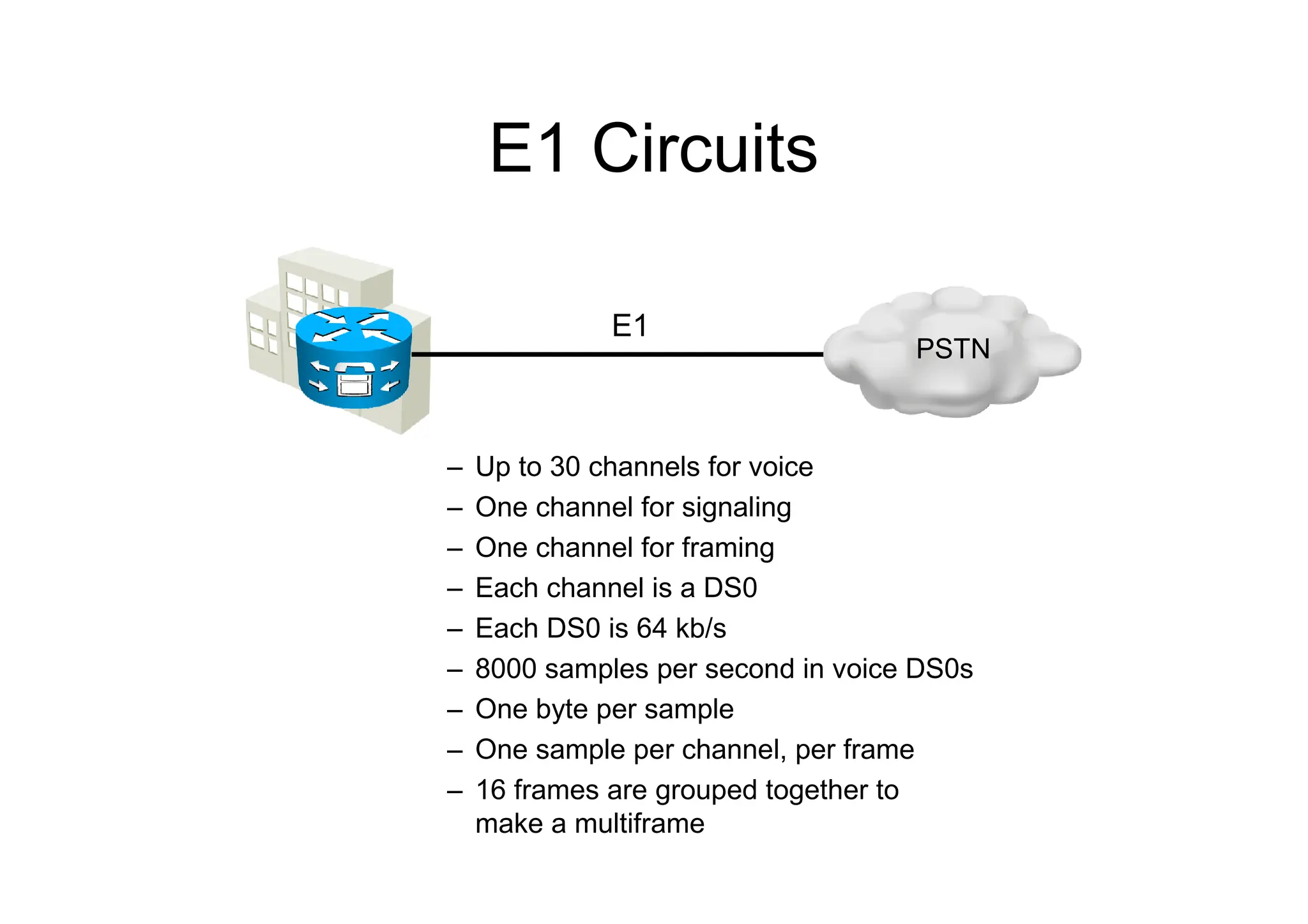
E1 Circuits
– Up to 30 channels for voice
– One channel for signaling
– One channel for framing
– Each channel is a DS0
– Each DS0 is 64 kb/s
– 8000 samples per second in voice DS0s
– One byte per sample
– One sample per channel, per frame
– 16 frames are grouped together to
make a multiframe
E1
PSTN
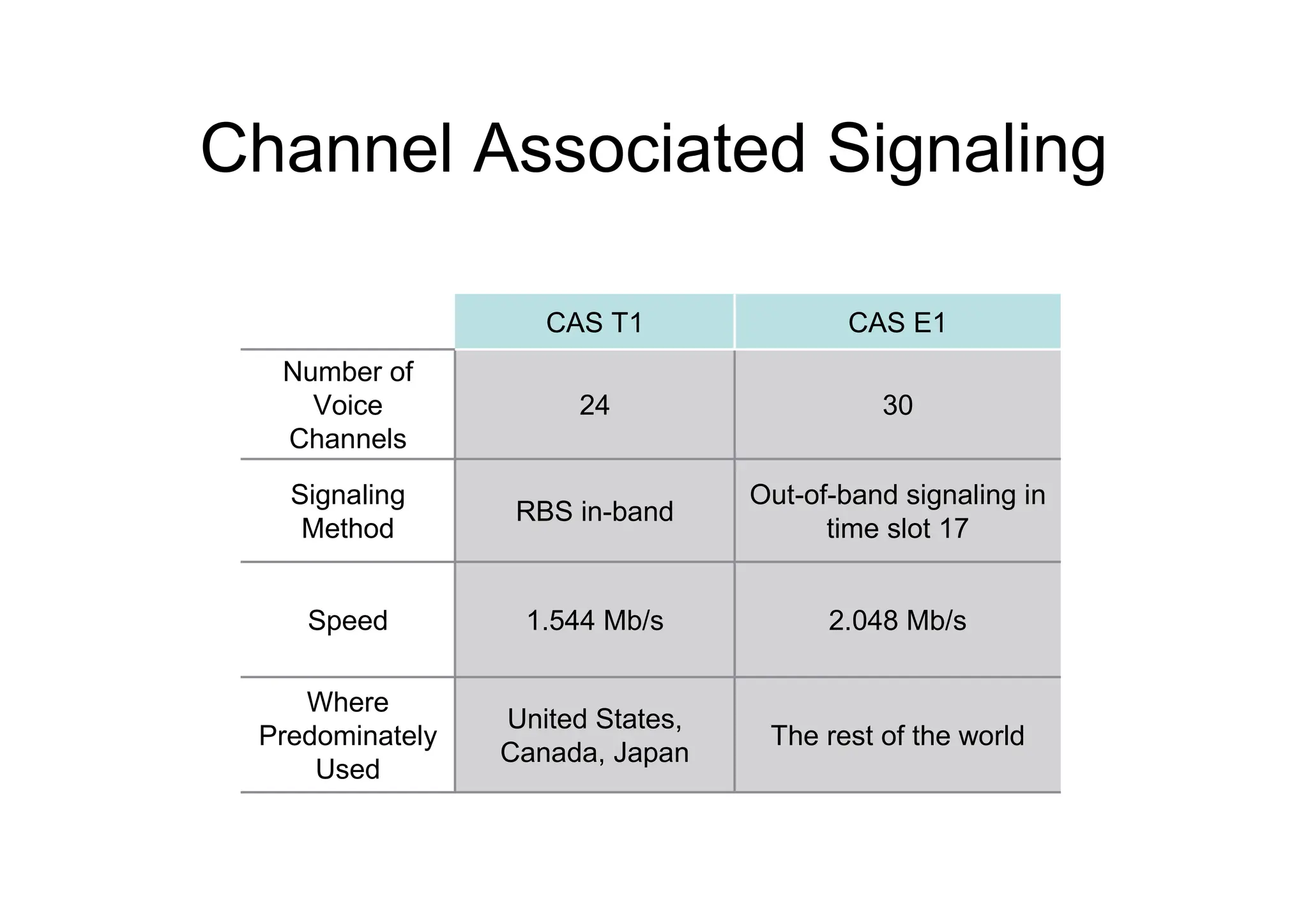
Channel Associated Signaling
2.048 Mb/s
1.544 Mb/s
Speed
The rest of the world
United States,
Canada, Japan
Where
Predominately
Used
Out-of-band signaling in
time slot 17
RBS in-band
Signaling
Method
30
24
Number of
Voice
Channels
CAS E1
CAS T1
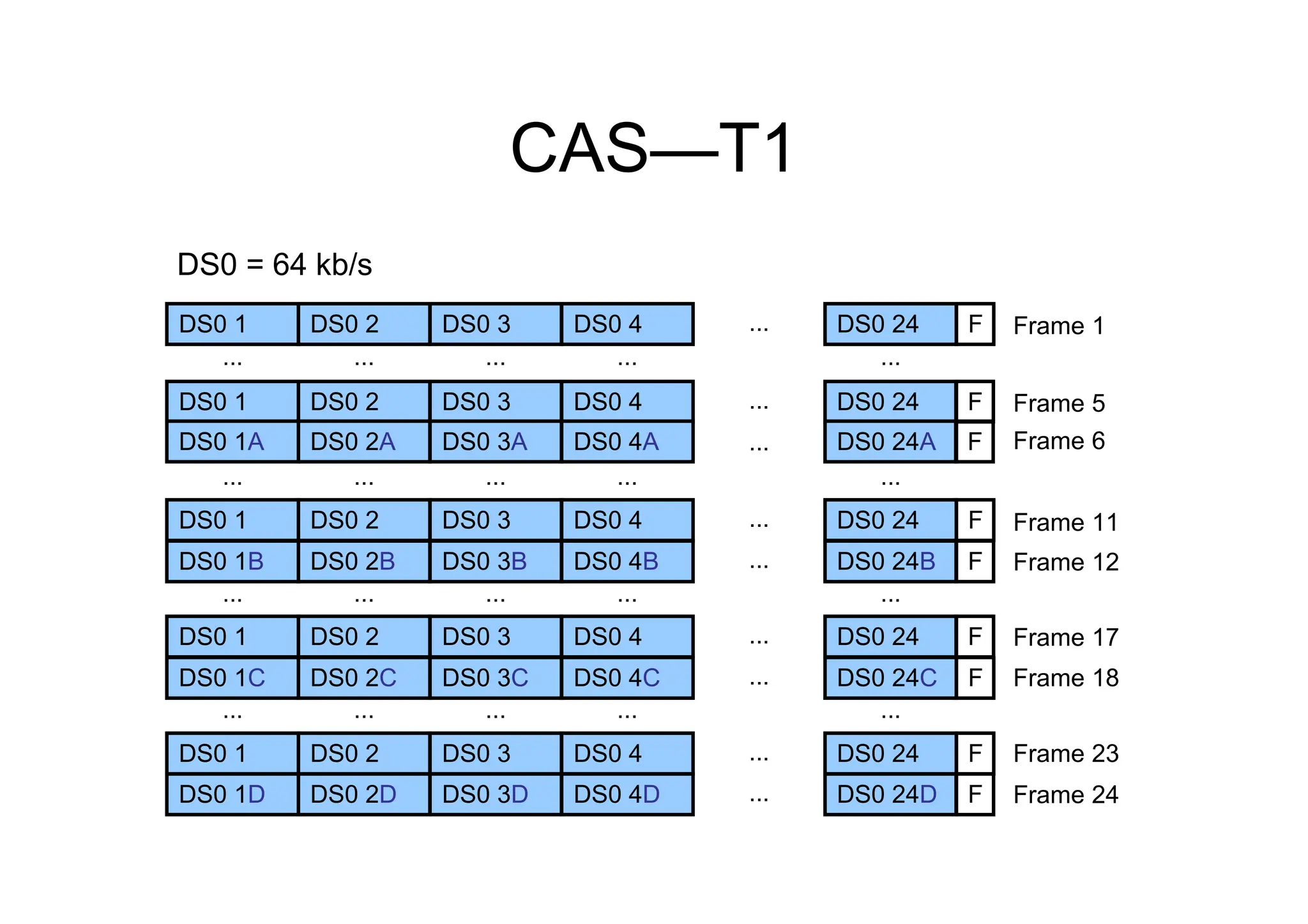
CAS—T1
DS0 1 DS0 2 DS0 3 DS0 4 ... DS0 24
... ... ... ... ...
DS0 1 DS0 2 DS0 3 DS0 4 ...
...
DS0 24
DS0 1A DS0 2A DS0 3A DS0 4A DS0 24A
... ... ... ... ...
DS0 1 DS0 2 DS0 3 DS0 4 ... DS0 24
DS0 1B DS0 2B DS0 3B DS0 4B ... DS0 24B
... ... ... ... ...
DS0 1 DS0 2 DS0 3 DS0 4 ... DS0 24
DS0 1C DS0 2C DS0 3C DS0 4C ... DS0 24C
... ... ... ... ...
F
F
F
F
F
F
F
DS0 1 DS0 2 DS0 3 DS0 4 ... DS0 24
DS0 1D DS0 2D DS0 3D DS0 4D ... DS0 24D
F
F
Frame 1
Frame 5
Frame 6
Frame 12
Frame 17
Frame 11
Frame 24
Frame 23
Frame 18
DS0 = 64 kb/s
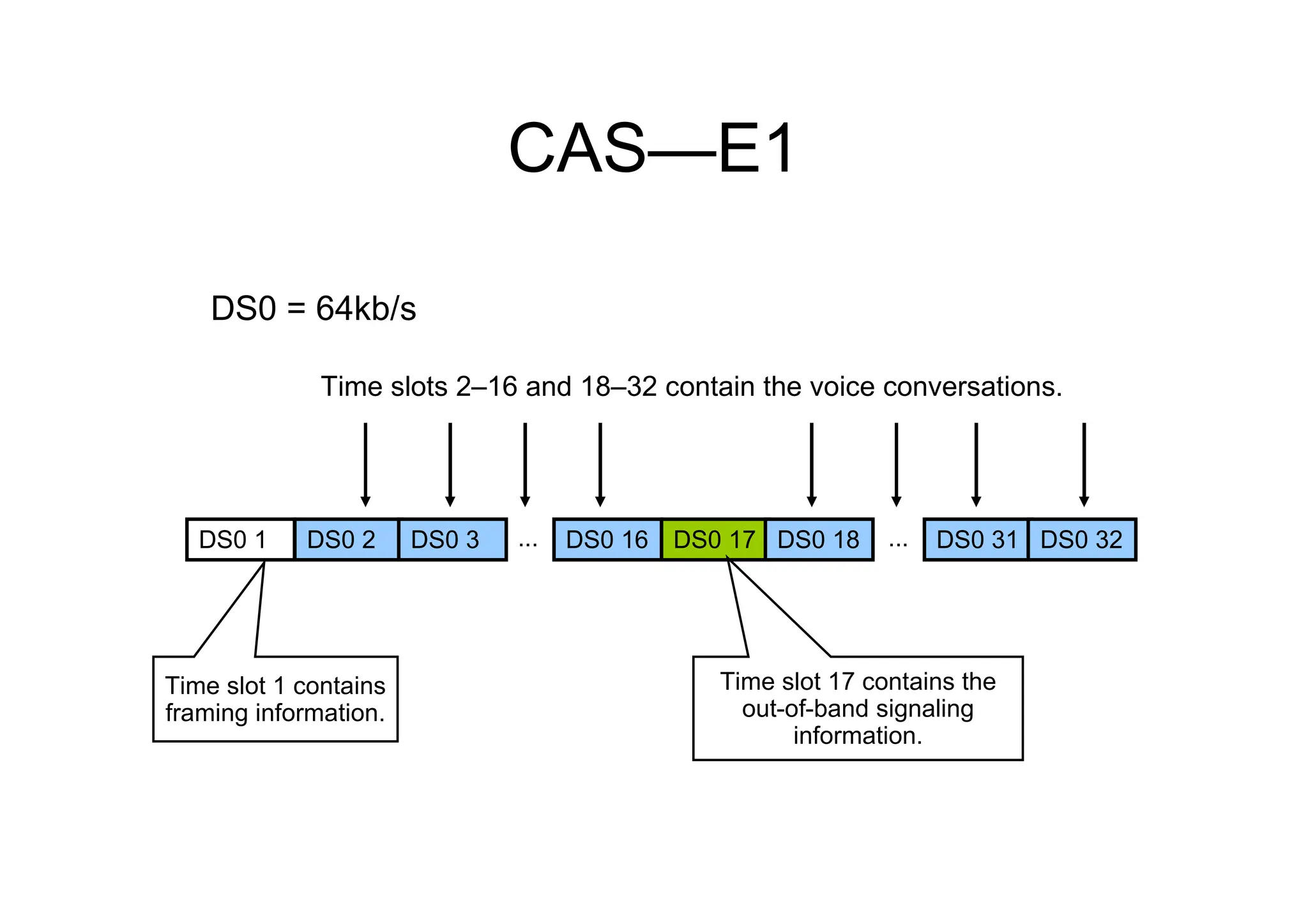
CAS—E1
DS0 1 DS0 2 DS0 3 ... DS0 31
DS0 = 64kb/s
DS0 16 DS0 17 ... DS0 32
DS0 18
Time slots 2–16 and 18–32 contain the voice conversations.
Time slot 1 contains
framing information.
Time slot 17 contains the
out-of-band signaling
information.
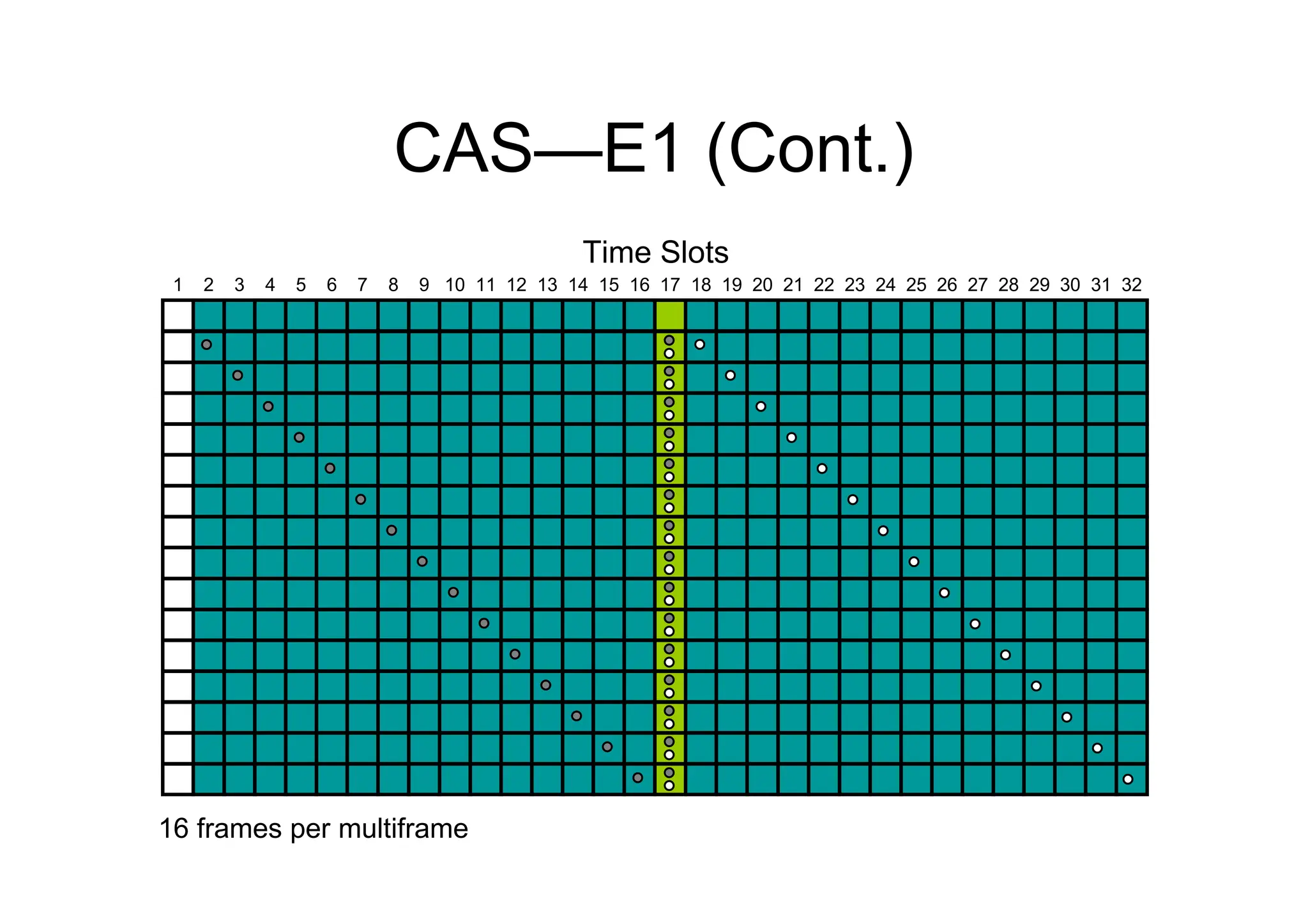
CAS—E1 (Cont.)
16 frames per multiframe
1 2 3 4 5 6 7 8 9 10 11 12 13 14 15 16 17 18 19 20 21 22 23 24 25 26 27 28 29 30 31 32
Time Slots
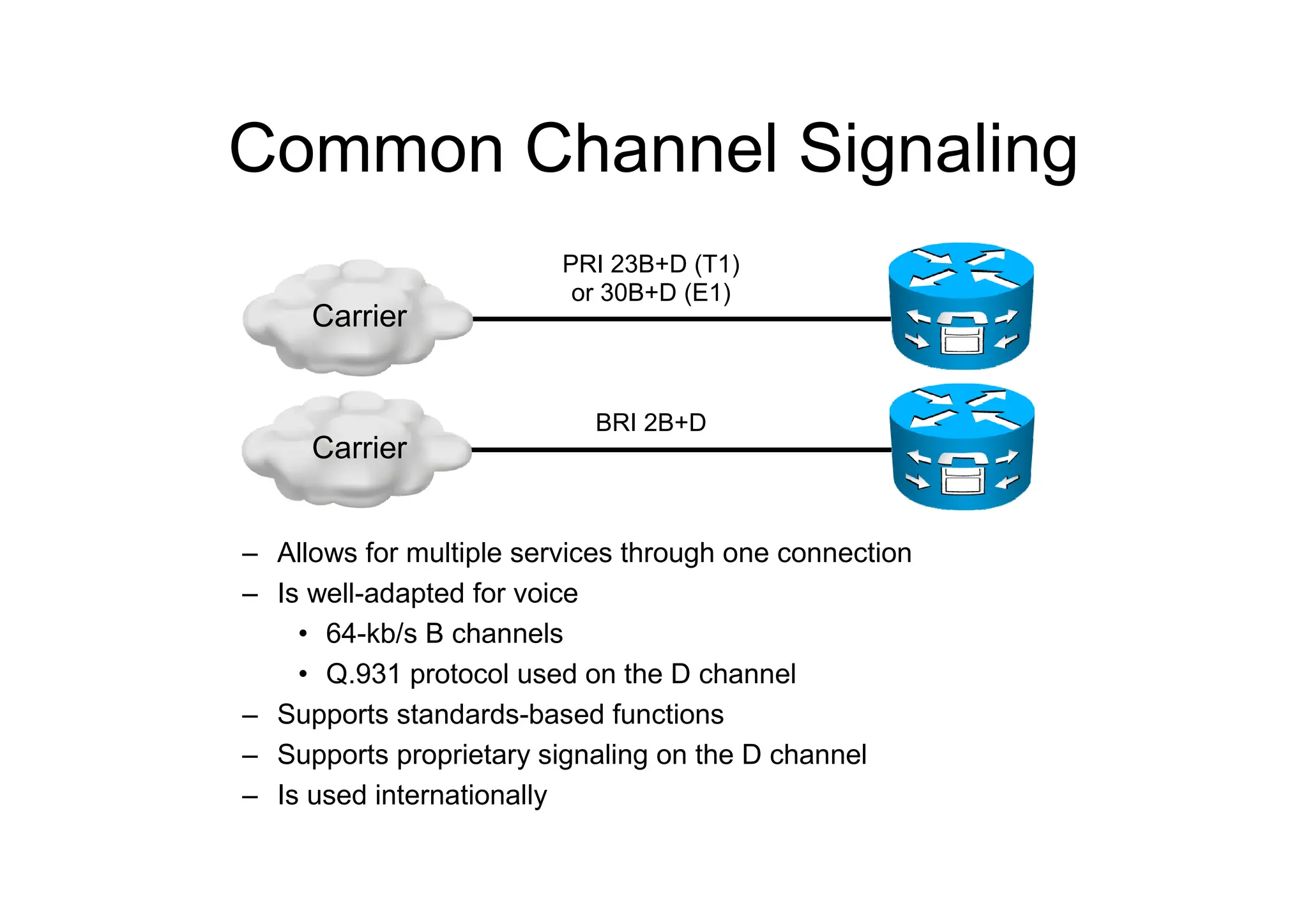
Common Channel Signaling
– Allows for multiple services through one connection
– Is well-adapted for voice
• 64-kb/s B channels
• Q.931 protocol used on the D channel
– Supports standards-based functions
– Supports proprietary signaling on the D channel
– Is used internationally
PRI 23B+D (T1)
or 30B+D (E1)
BRI 2B+D
Carrier
Carrier
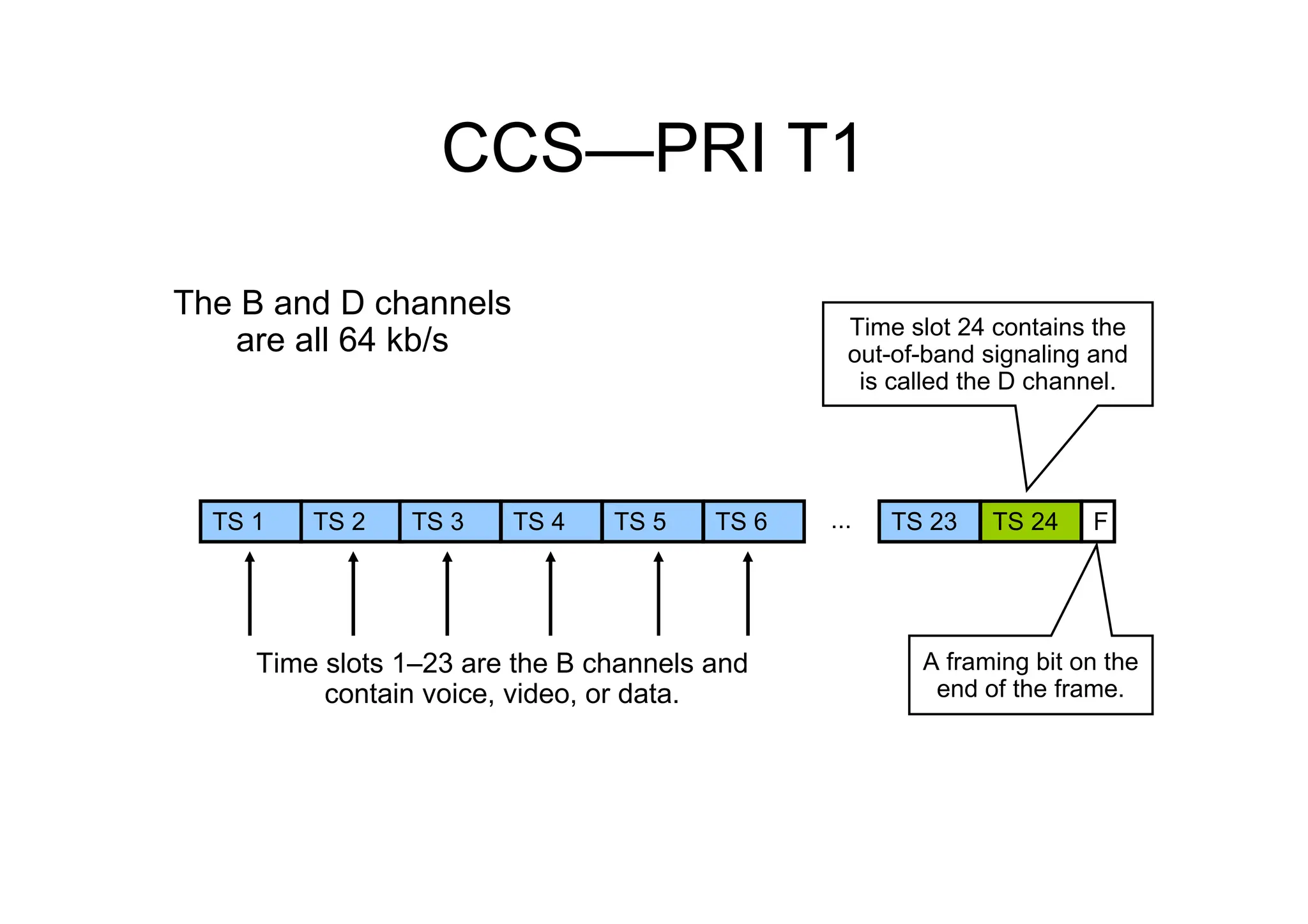
CCS—PRI T1
Time slots 1–23 are the B channels and
contain voice, video, or data.
TS 1 TS 2 TS 3 TS 4 TS 5 TS 6 ... TS 23 TS 24 F
The B and D channels
are all 64 kb/s Time slot 24 contains the
out-of-band signaling and
is called the D channel.
A framing bit on the
end of the frame.
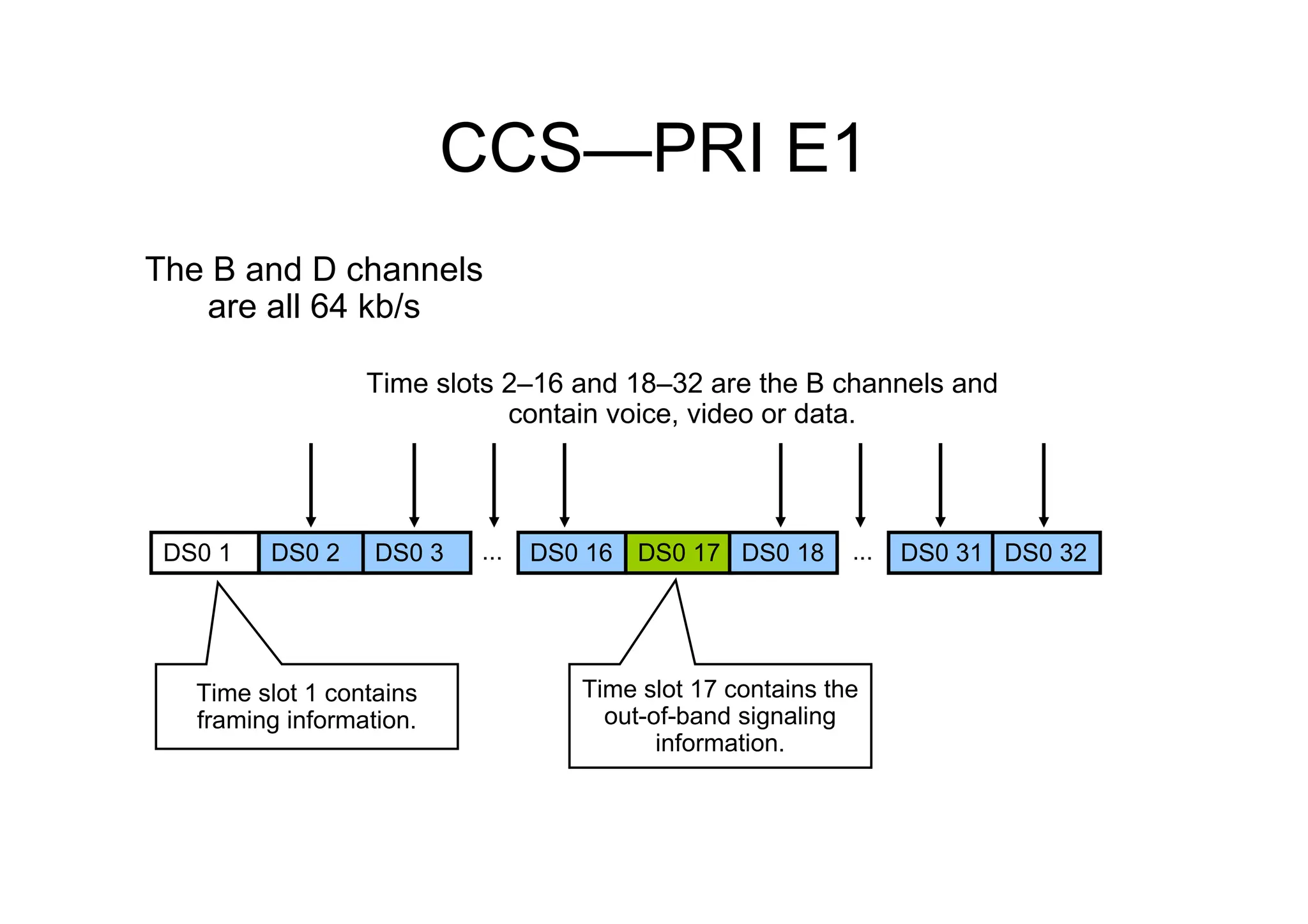
CCS—PRI E1
Time slots 2–16 and 18–32 are the B channels and
contain voice, video or data.
The B and D channels
are all 64 kb/s
Time slot 17 contains the
out-of-band signaling
information.
Time slot 1 contains
framing information.
DS0 1 DS0 2 DS0 3 ... DS0 31
DS0 16 DS0 17 ... DS0 32
DS0 18
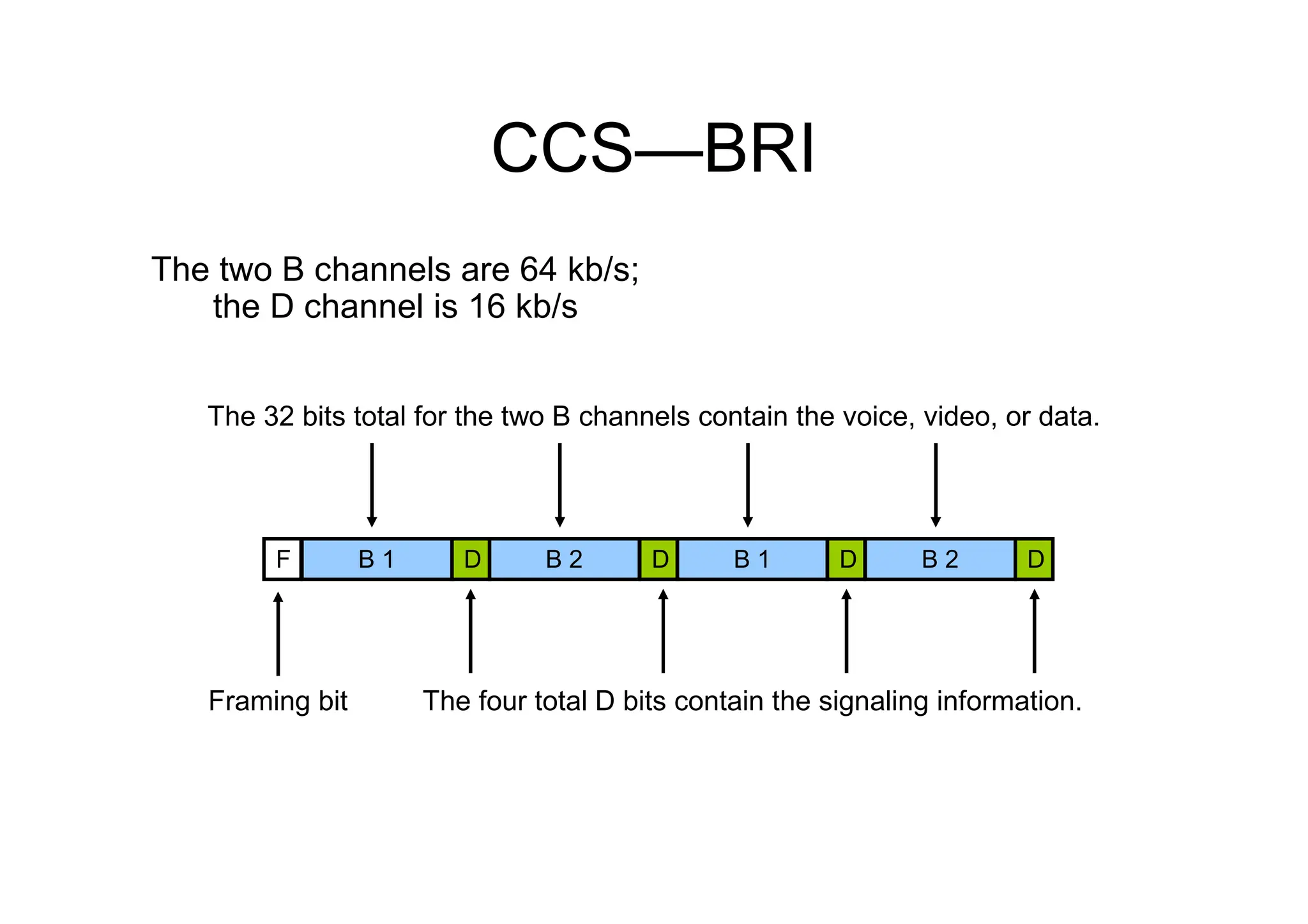
CCS—BRI
Framing bit
The 32 bits total for the two B channels contain the voice, video, or data.
The four total D bits contain the signaling information.
The two B channels are 64 kb/s;
the D channel is 16 kb/s
F B 1 B 2 B 1 B 2
D D D D
UNDERSTANDING
PACKETIZATION
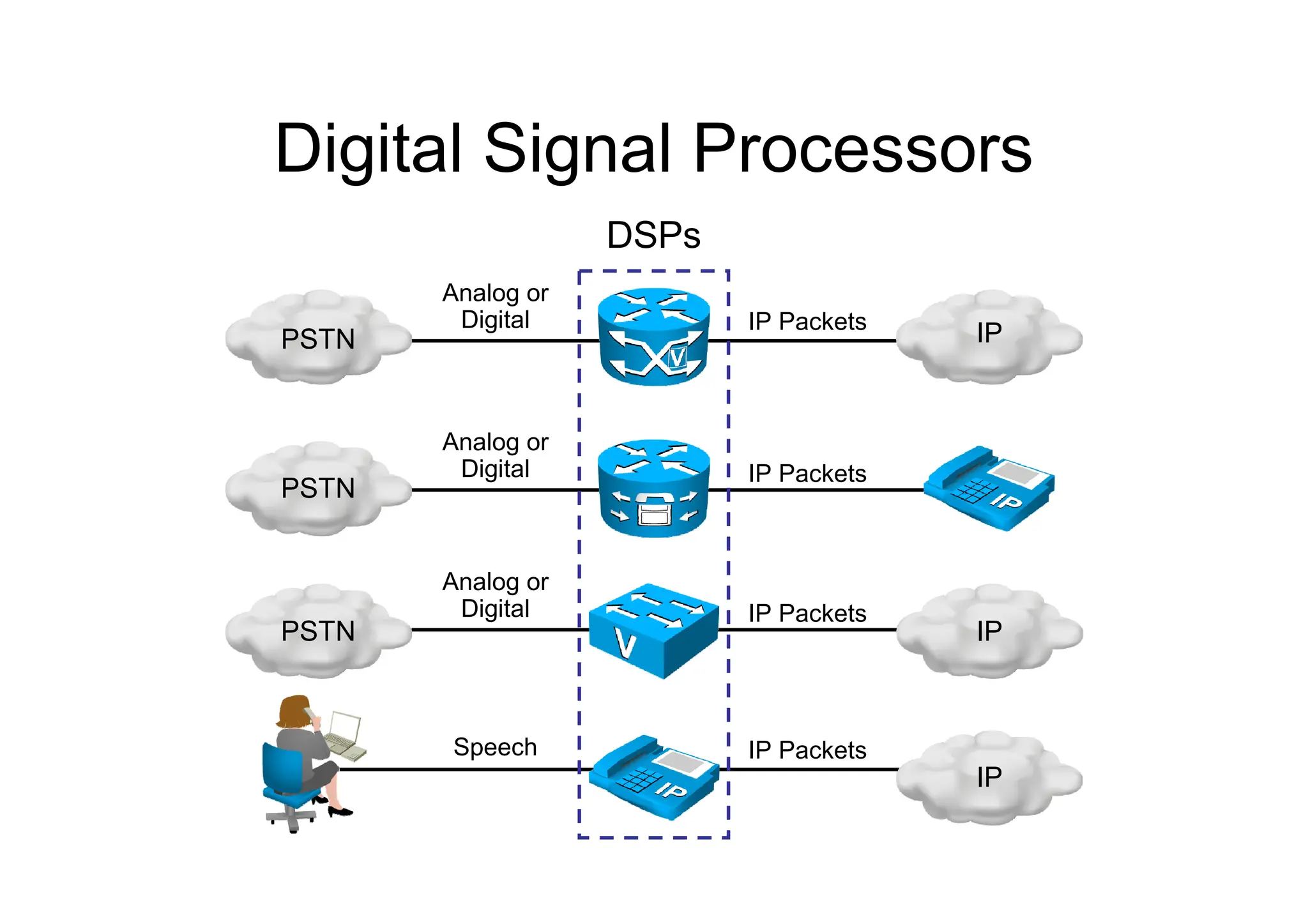
Digital Signal Processors
PSTN
PSTN
PSTN
IP
IP
IP
Analog or
Digital
Analog or
Digital
Analog or
Digital
Speech IP Packets
IP Packets
IP Packets
IP Packets
DSPs
Digital Signal Processors
(Cont.)
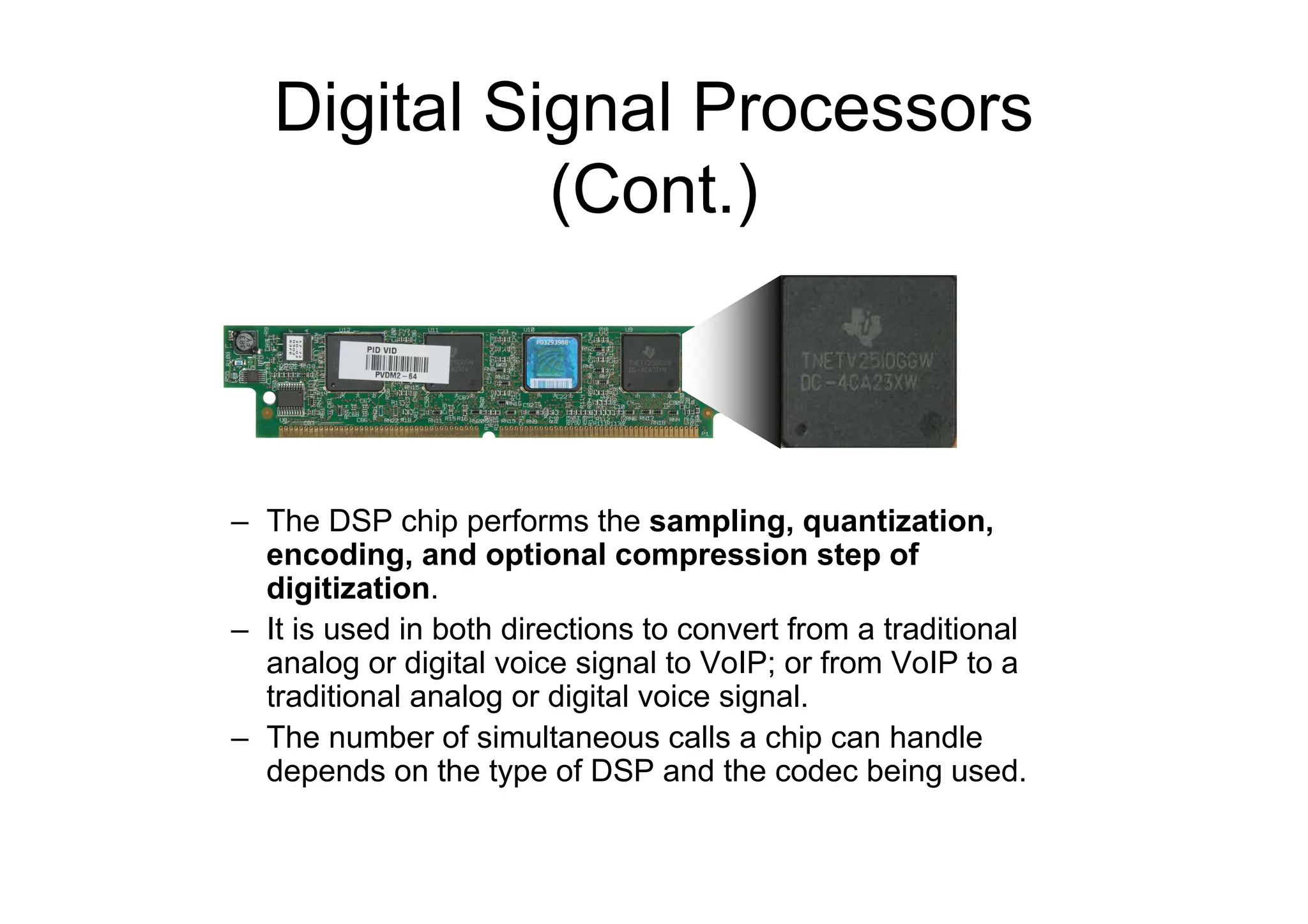
– The DSP chip performs the sampling, quantization,
encoding, and optional compression step of
digitization.
– It is used in both directions to convert from a traditional
analog or digital voice signal to VoIP; or from VoIP to a
traditional analog or digital voice signal.
– The number of simultaneous calls a chip can handle
depends on the type of DSP and the codec being used.
Real-Time Transport Protocol
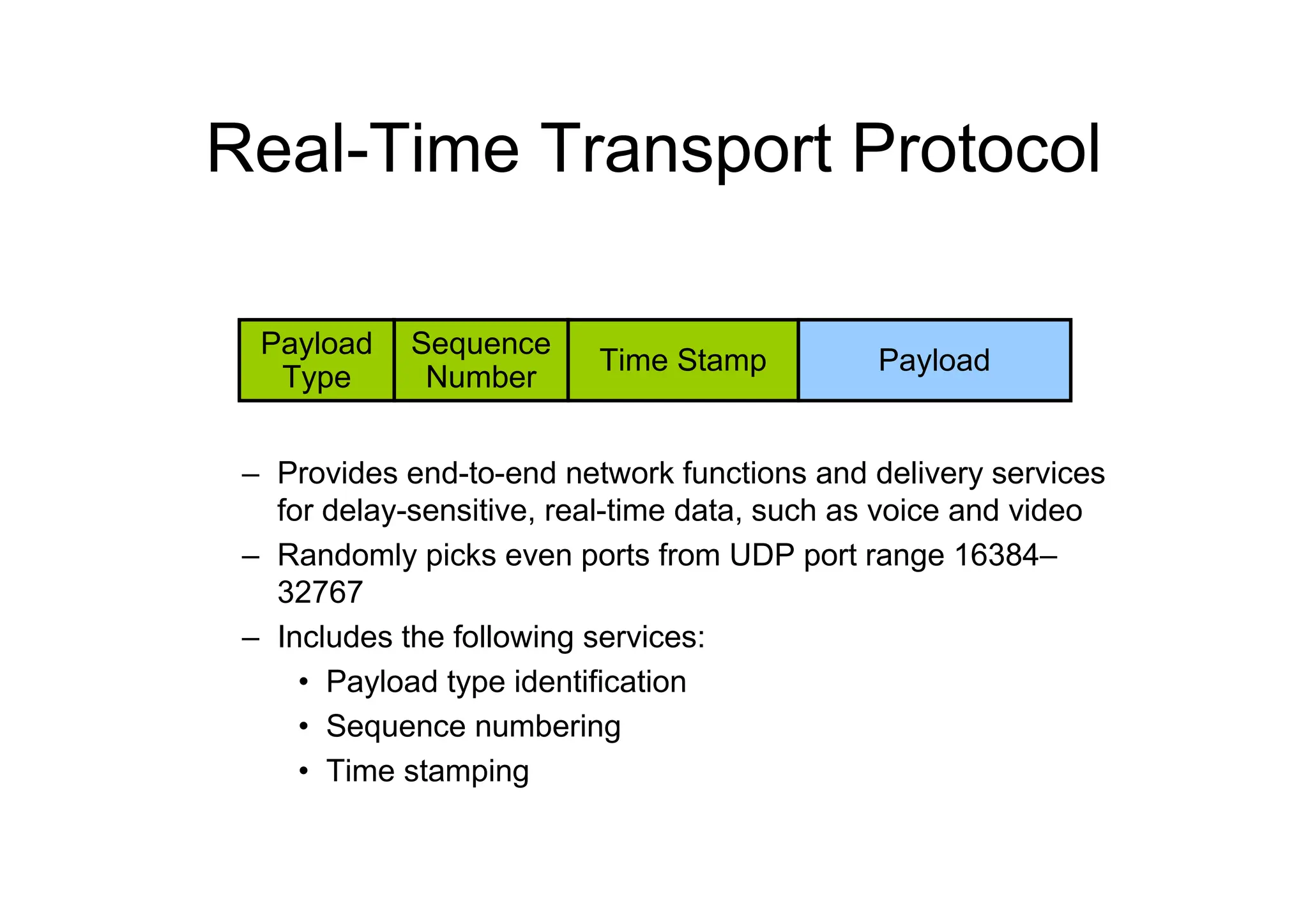
– Provides end-to-end network functions and delivery services
for delay-sensitive, real-time data, such as voice and video
– Randomly picks even ports from UDP port range 16384–
32767
– Includes the following services:
• Payload type identification
• Sequence numbering
• Time stamping
Payload
Type
Sequence
Number
Time Stamp Payload
RTP Control Protocol
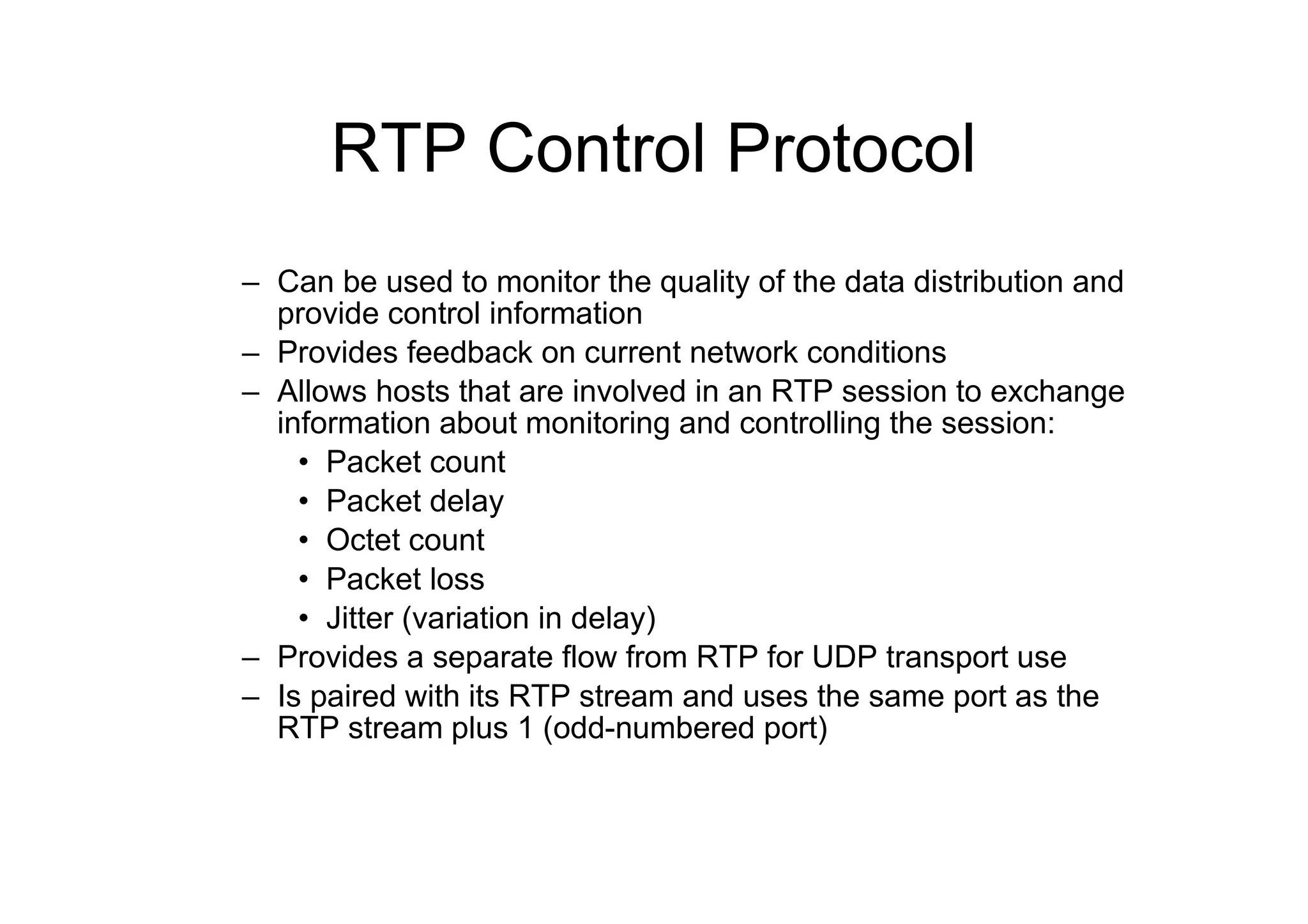
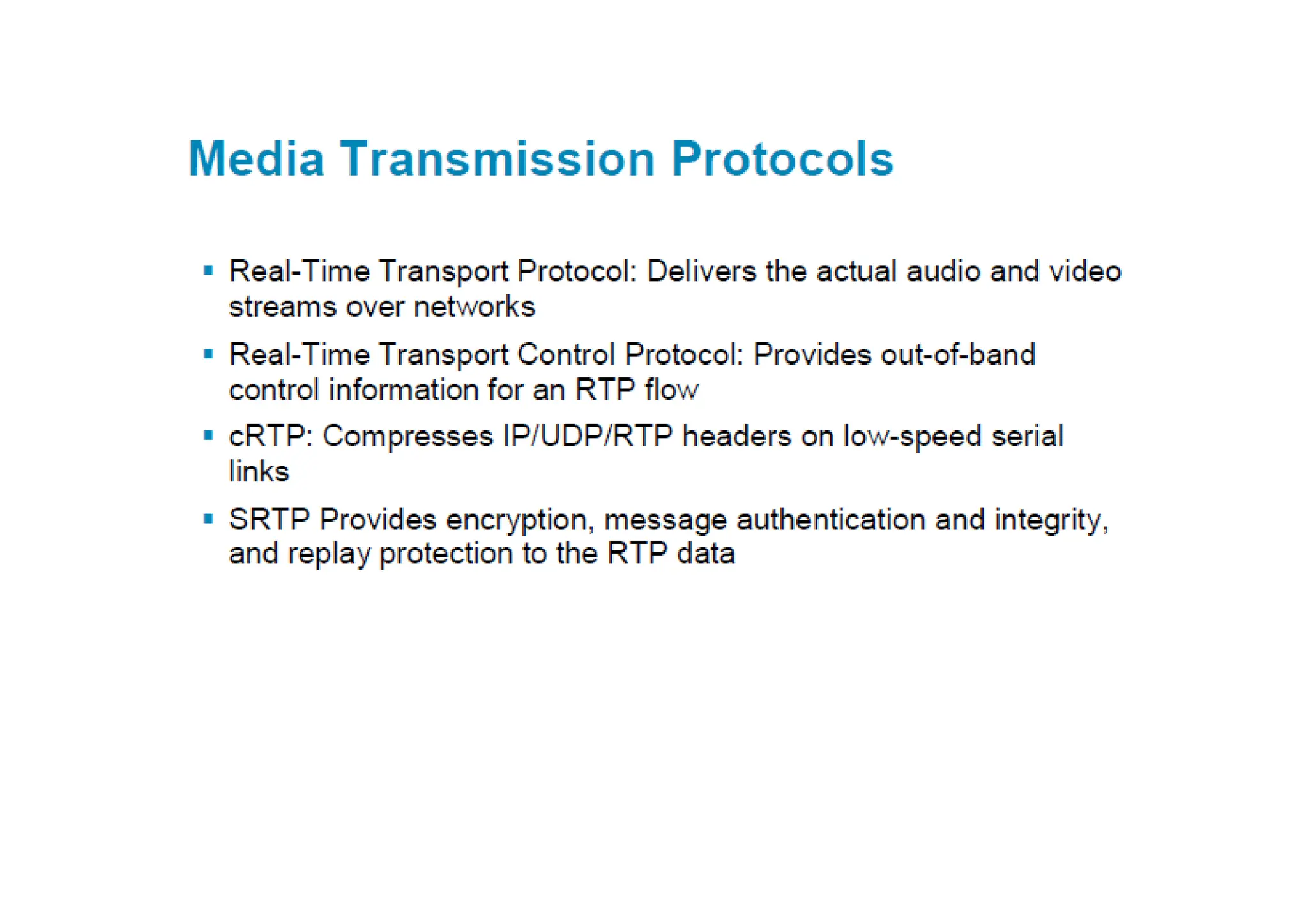
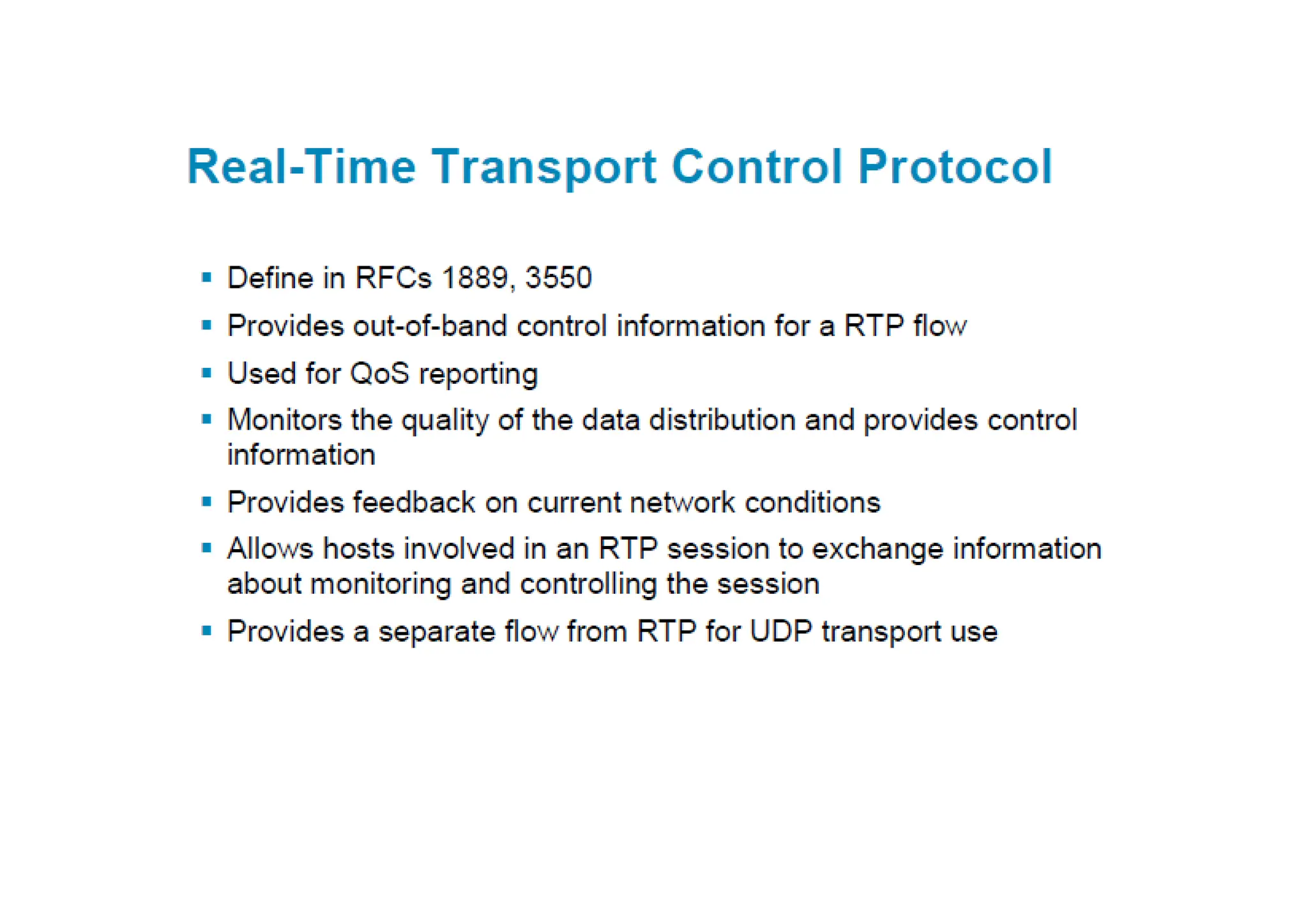
– Can be used to monitor the quality of the data distribution and
provide control information
– Provides feedback on current network conditions
– Allows hosts that are involved in an RTP session to exchange
information about monitoring and controlling the session:
• Packet count
• Packet delay
• Octet count
• Packet loss
• Jitter (variation in delay)
– Provides a separate flow from RTP for UDP transport use
– Is paired with its RTP stream and uses the same port as the
RTP stream plus 1 (odd-numbered port)
Packetization
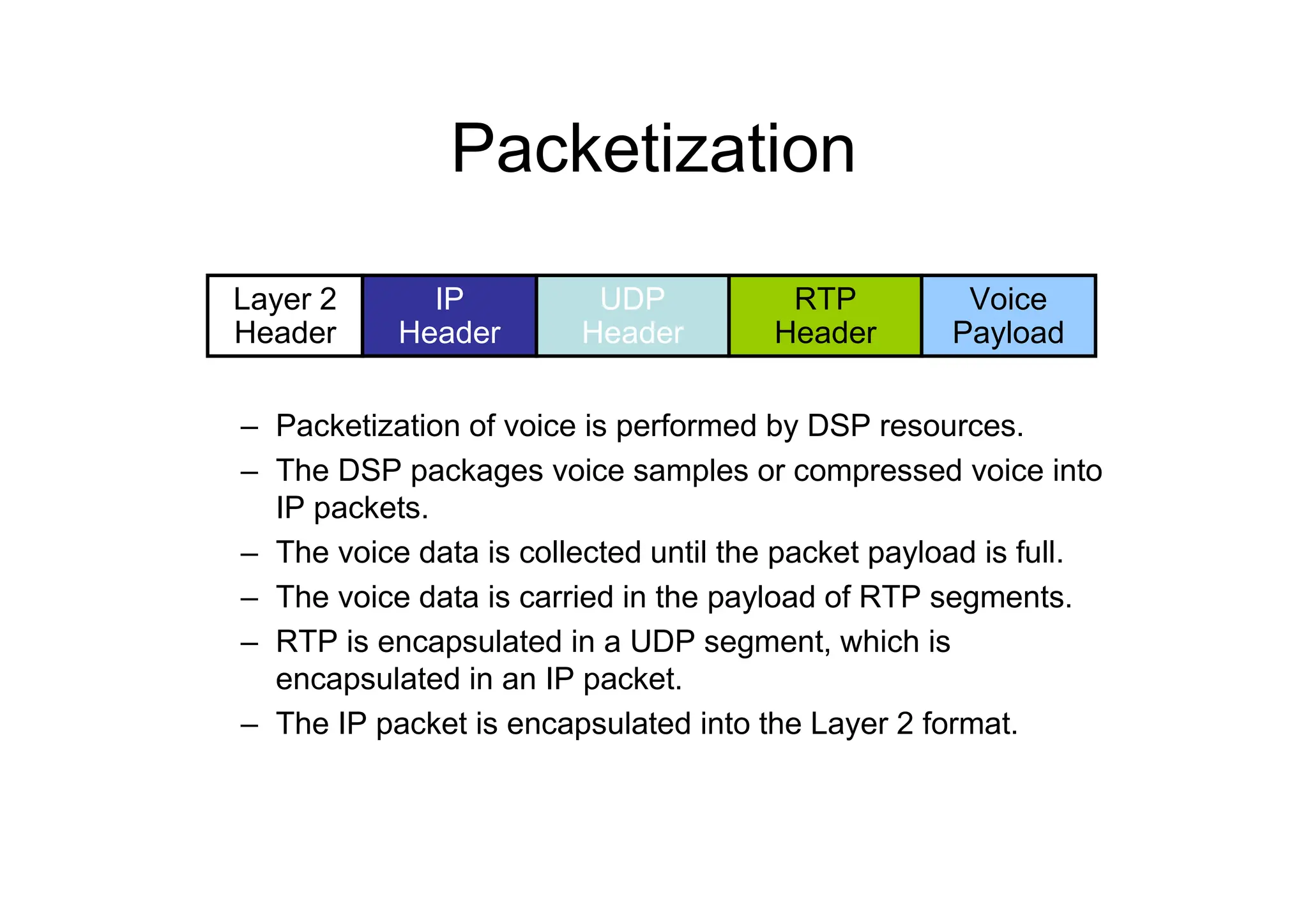
– Packetization of voice is performed by DSP resources.
– The DSP packages voice samples or compressed voice into
IP packets.
– The voice data is collected until the packet payload is full.
– The voice data is carried in the payload of RTP segments.
– RTP is encapsulated in a UDP segment, which is
encapsulated in an IP packet.
– The IP packet is encapsulated into the Layer 2 format.
Layer 2
Header
IP
Header
UDP
Header
Voice
Payload
RTP
Header
Packetization—G.711 Example
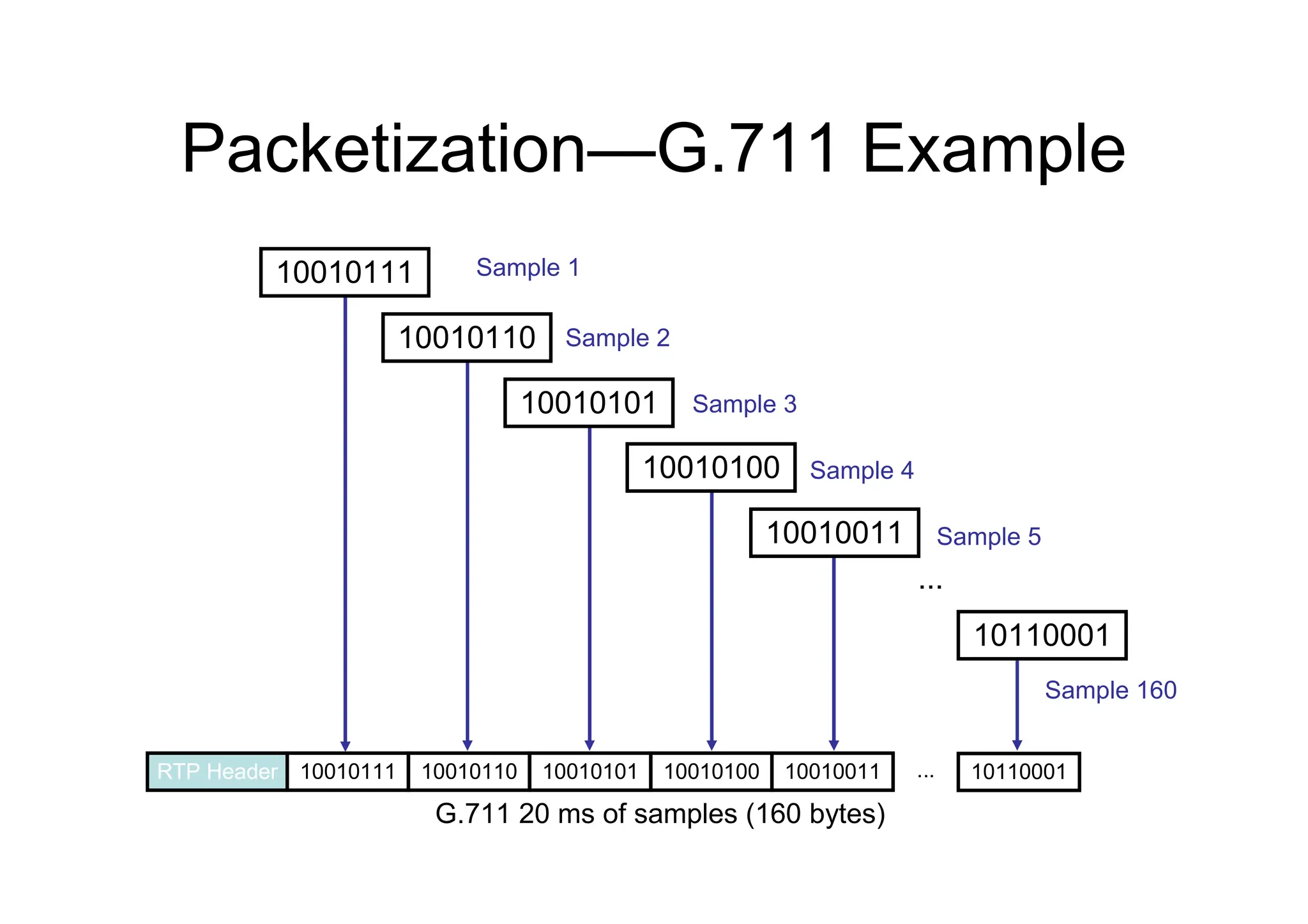
...
10010111 10010110 10010101 10010100 10010011 ... 10110001
RTP Header
Sample 1
Sample 2
Sample 3
Sample 4
Sample 5
Sample 160
G.711 20 ms of samples (160 bytes)
10010111
10010110
10010101
10010100
10010011
10110001
Packetization—G.729 Example
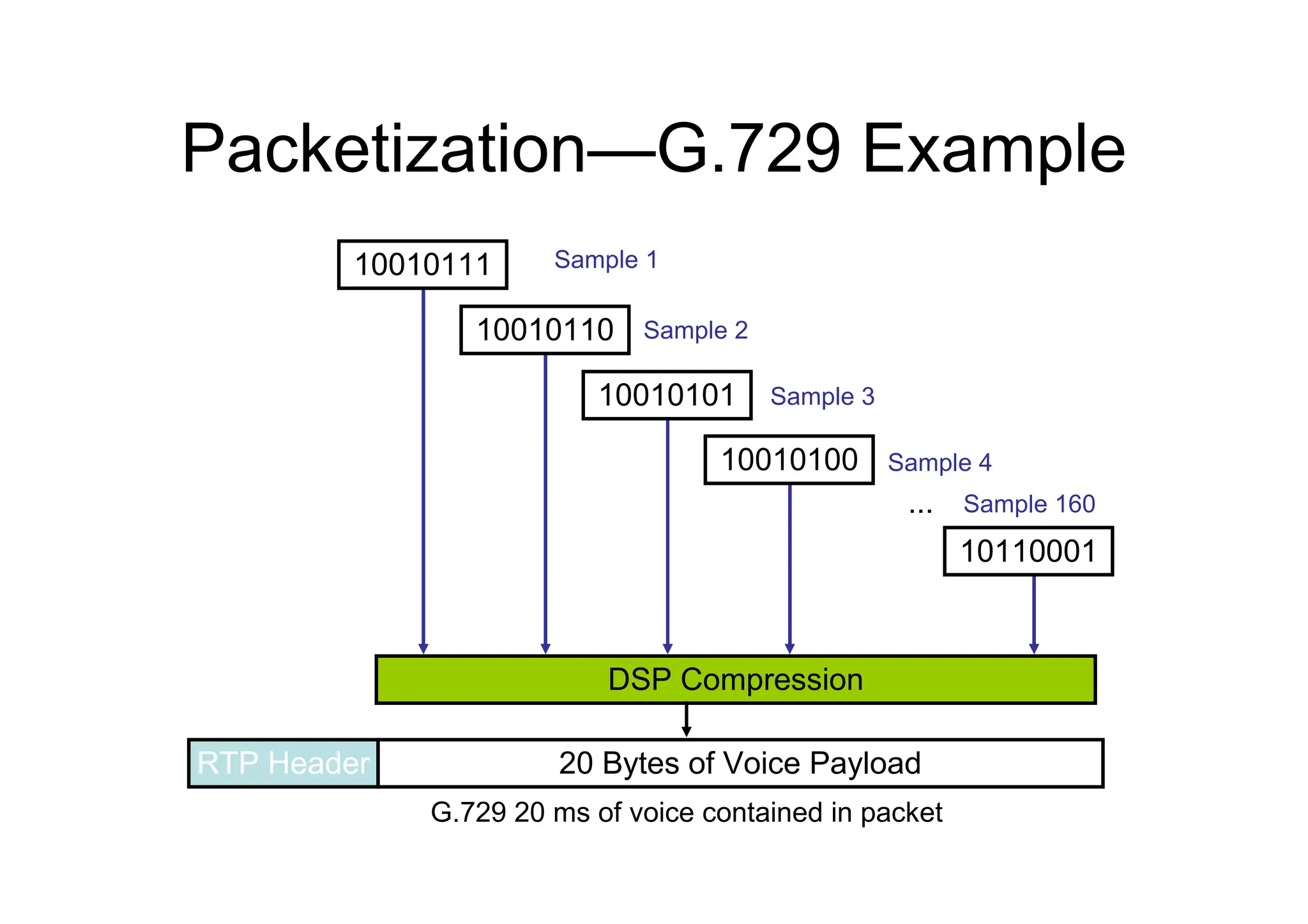
...
20 Bytes of Voice Payload
RTP Header
Sample 1
Sample 2
Sample 3
Sample 4
Sample 160
G.729 20 ms of voice contained in packet
DSP Compression
10010111
10010110
10010101
10010100
10110001
Codecs
• Standardized ways to encode voice for
transport across a data network:
– PCM
• G.711 rate: 64 kb/s = (2 x 4 kHz) x 8 bits/sample
– ADPCM
• G.726 rate: 32 kb/s = (2 x 4 kHz) x 4 bits/sample
• G.726 rate: 24 kb/s = (2 x 4 kHz) x 3 bits/sample
• G.726 rate: 16 kb/s = (2 x 4 kHz) x 2 bits/sample
– LD-CELP
• G.728 rate: 16 kb/s
– CS-ACELP
• G.729: rate 8kb/s
• Annex A variant—less processor-intensive and allows more
voice channels encoded per DSP
• Annex B variant—VAD and CNG
– iLBC
• Rate: 13.3 kb/s
Codecs—G.729 and G.729A
Comparison
– Both codecs are ITU standards.
– Both codecs are 8-kb/s CS-ACELP.
– G.729 is more complex and processor-intensive.
– G.729 is slightly higher quality than G.729A.
– The compression delay is the same (10 to 20 ms).
– The Annex B variant can be applied to either codec.
– The Annex B variant adds VAD and CNG.
Internet Low Bitrate Codec
– Was designed for packetized communications
– Is royalty free
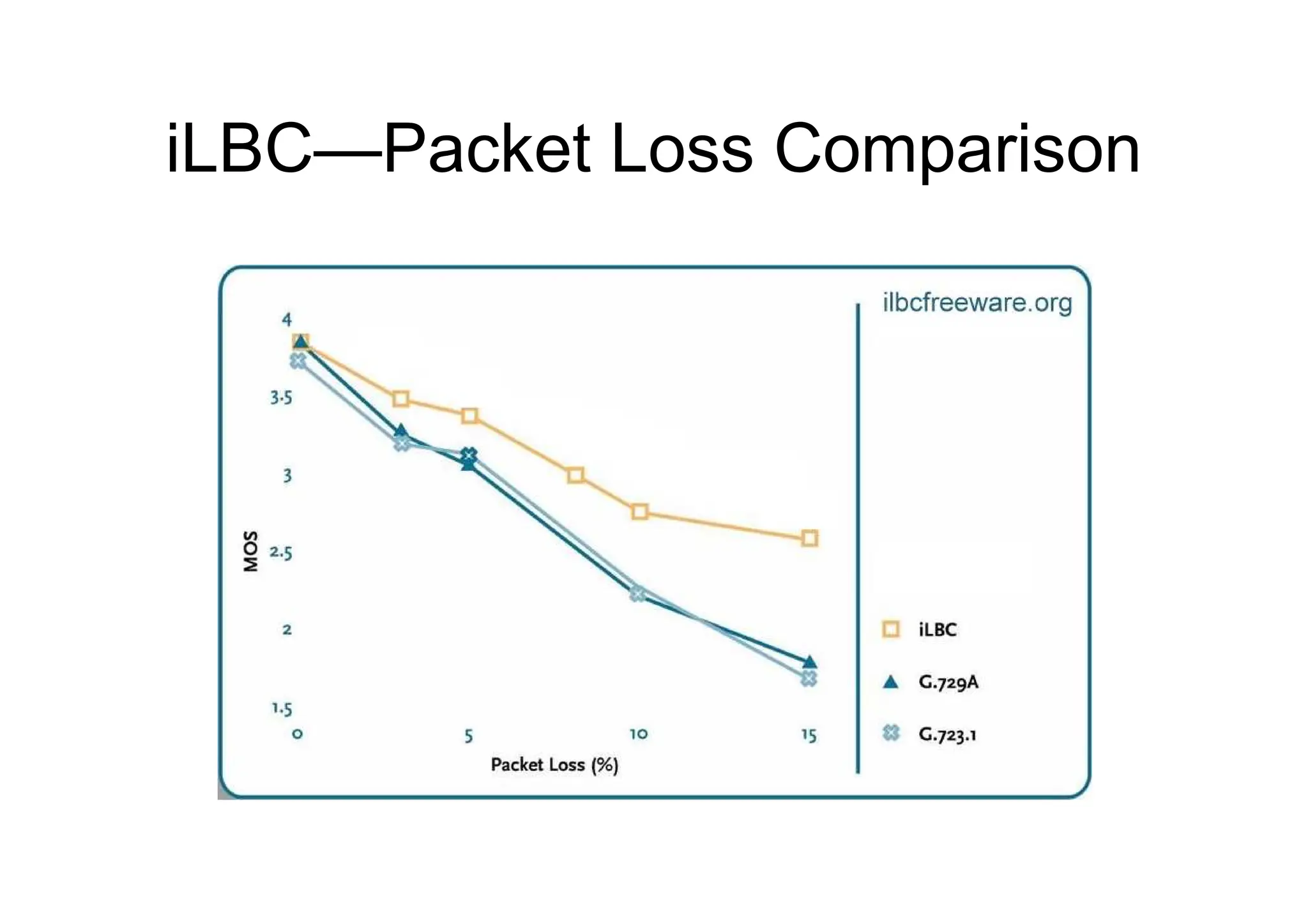
– Has better quality than G.729
– Has similar complexity as G.279
– Supports two fixed bit-rate frame lengths:
• A bit rate of 13.3 kb/s with an encoding frame length of 30 ms
• A bit rate of 15.2 kb/s with an encoding frame length of 20 ms
– Is supported only on newer Cisco Unified IP Phones:
• IP Phone 7975G – IP Phone 7942G
• IP Phone 7965G – IP Phone 7921G
• IP Phone 7962G – IP Phone 7911G
• IP Phone 7945G – IP Phone 7906G
– Is supported on the VoIP dial peers of Cisco voice gateways using the
following protocols:
• H.323
• SIP
iLBC—Packet Loss Comparison
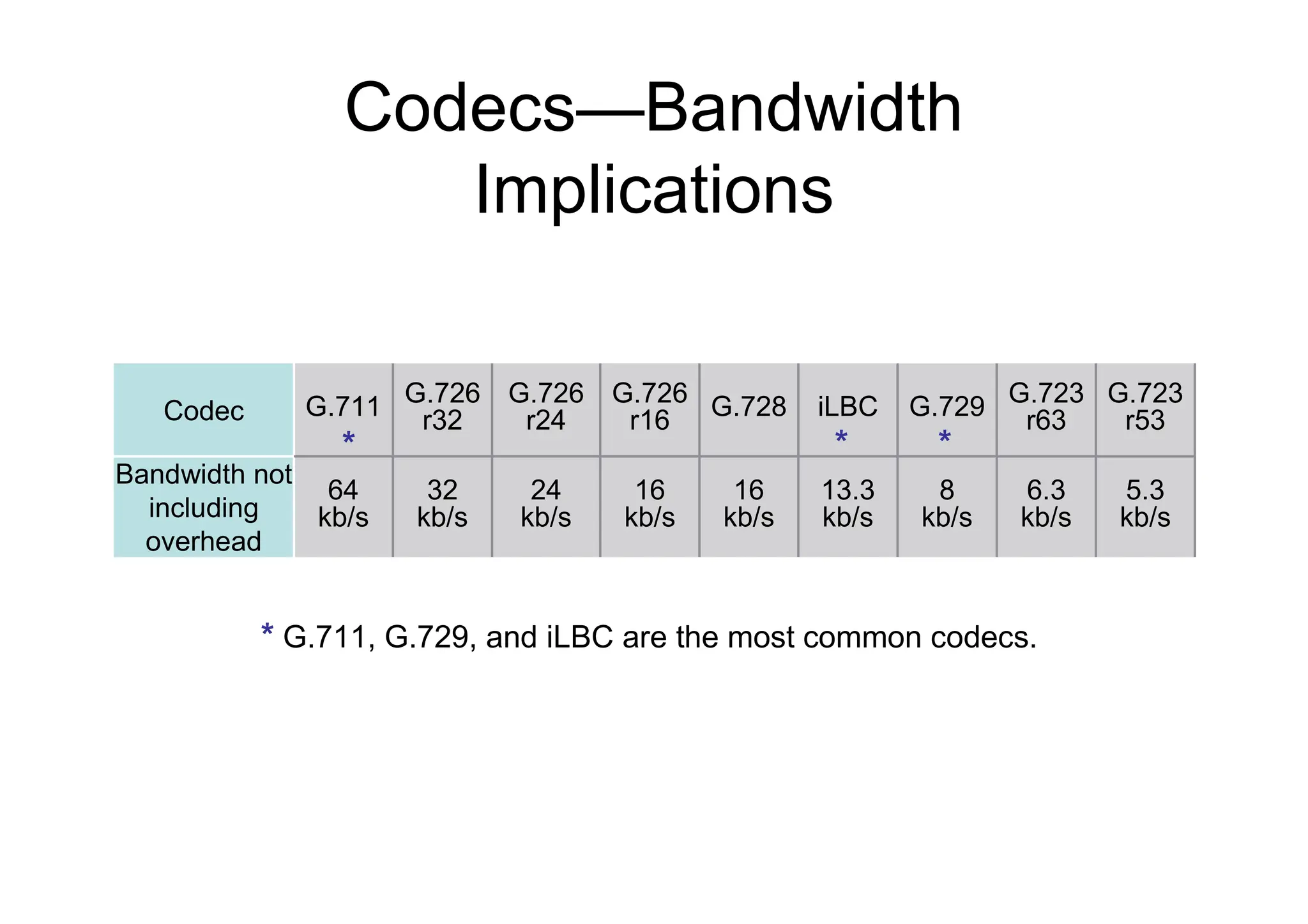
Codecs—Bandwidth
Implications
*
* G.711, G.729, and iLBC are the most common codecs.
13.3
kb/s
iLBC
16
kb/s
G.728
8
kb/s
G.729
6.3
kb/s
G.723
r63
16
kb/s
G.726
r16
5.3
kb/s
24
kb/s
32
kb/s
64
kb/s
Bandwidth not
including
overhead
G.723
r53
G.726
r24
G.726
r32
G.711
Codec
* *
*
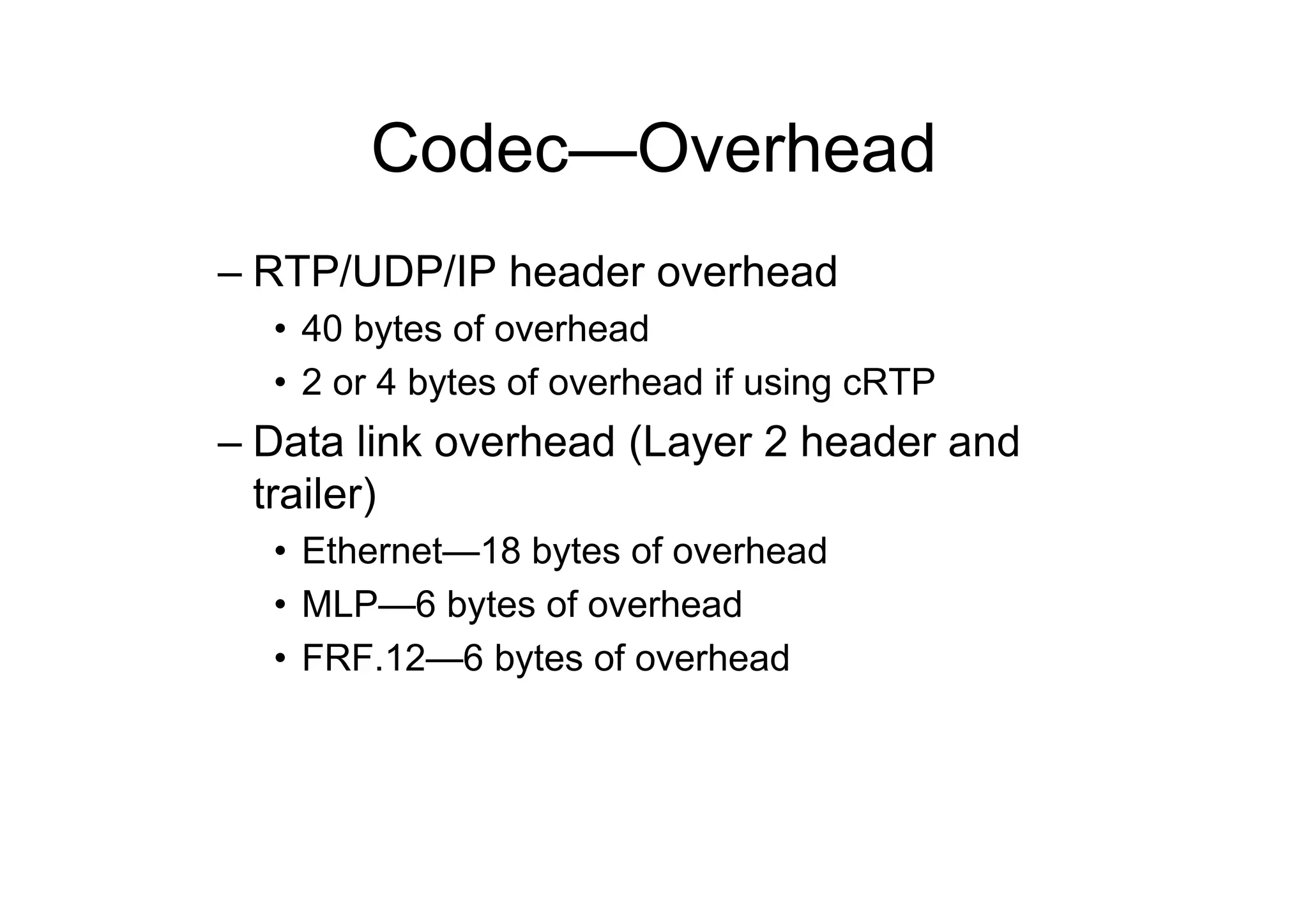
Codec—Overhead
– RTP/UDP/IP header overhead
• 40 bytes of overhead
• 2 or 4 bytes of overhead if using cRTP
– Data link overhead (Layer 2 header and
trailer)
• Ethernet—18 bytes of overhead
• MLP—6 bytes of overhead
• FRF.12—6 bytes of overhead
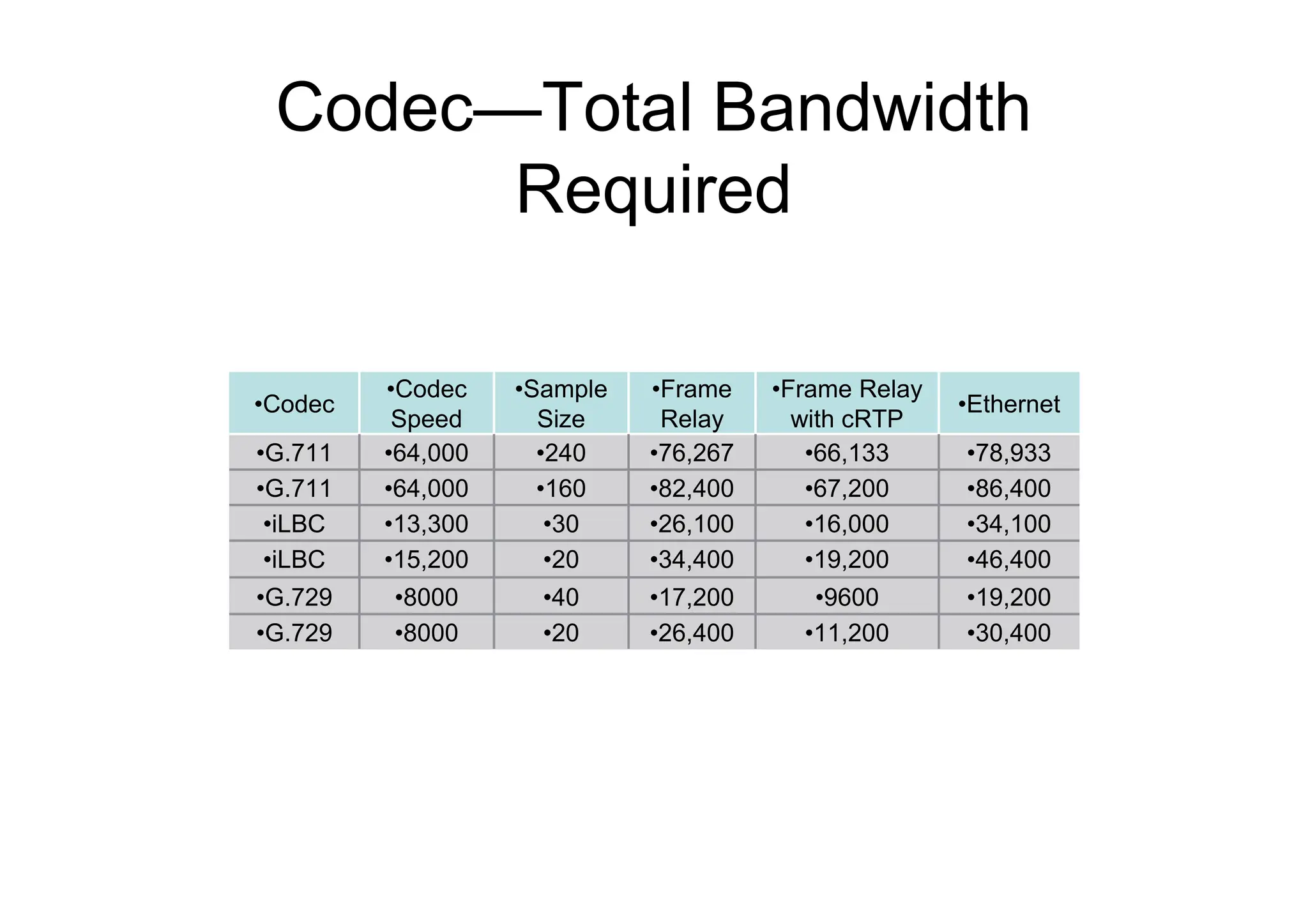
Codec—Total Bandwidth
Required
•30,400
•11,200
•26,400
•20
•8000
•G.729
•19,200
•9600
•17,200
•40
•8000
•G.729
•46,400
•19,200
•34,400
•20
•15,200
•iLBC
•34,100
•16,000
•26,100
•30
•13,300
•iLBC
•86,400
•67,200
•82,400
•160
•64,000
•G.711
•78,933
•66,133
•76,267
•240
•64,000
•G.711
•Ethernet
•Frame Relay
with cRTP
•Frame
Relay
•Sample
Size
•Codec
Speed
•Codec
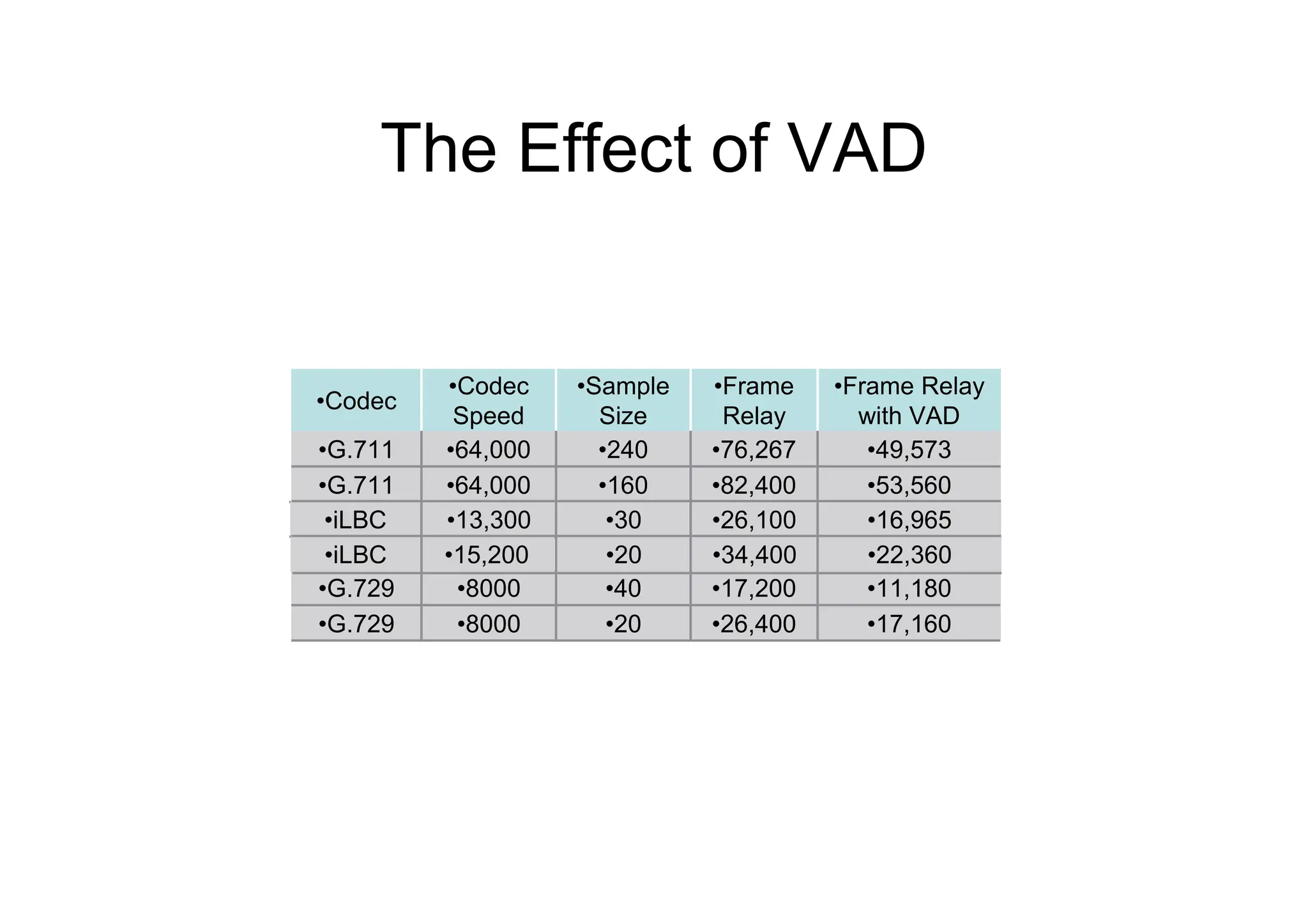
The Effect of VAD
•17,160
•26,400
•20
•8000
•G.729
•11,180
•17,200
•40
•8000
•G.729
•53,560
•82,400
•160
•64,000
•G.711
•49,573
•76,267
•240
•64,000
•G.711
•Frame Relay
with VAD
•Frame
Relay
•Sample
Size
•Codec
Speed
•Codec
•16,965
•26,100
•30
•13,300
•iLBC
•22,360
•34,400
•20
•15,200
•iLBC
Additional DSP Functions
– Hardware-based conferencing
– MTP
– Transcoding between two different codecs
– Echo cancellation
INTRODUCING SIGNALING
PROTOCOL
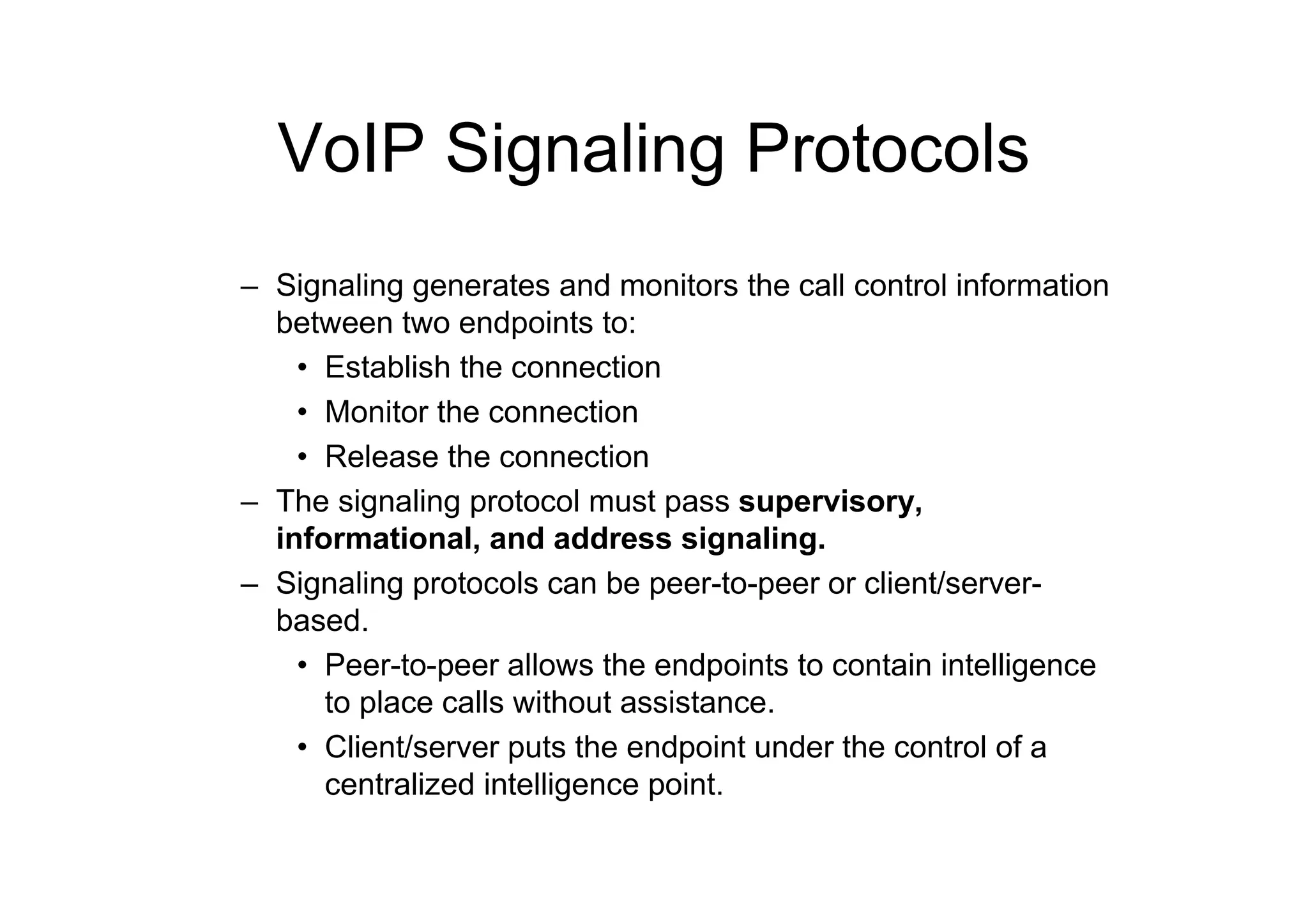
VoIP Signaling Protocols
– Signaling generates and monitors the call control information
between two endpoints to:
• Establish the connection
• Monitor the connection
• Release the connection
– The signaling protocol must pass supervisory,
informational, and address signaling.
– Signaling protocols can be peer-to-peer or client/server-
based.
• Peer-to-peer allows the endpoints to contain intelligence
to place calls without assistance.
• Client/server puts the endpoint under the control of a
centralized intelligence point.
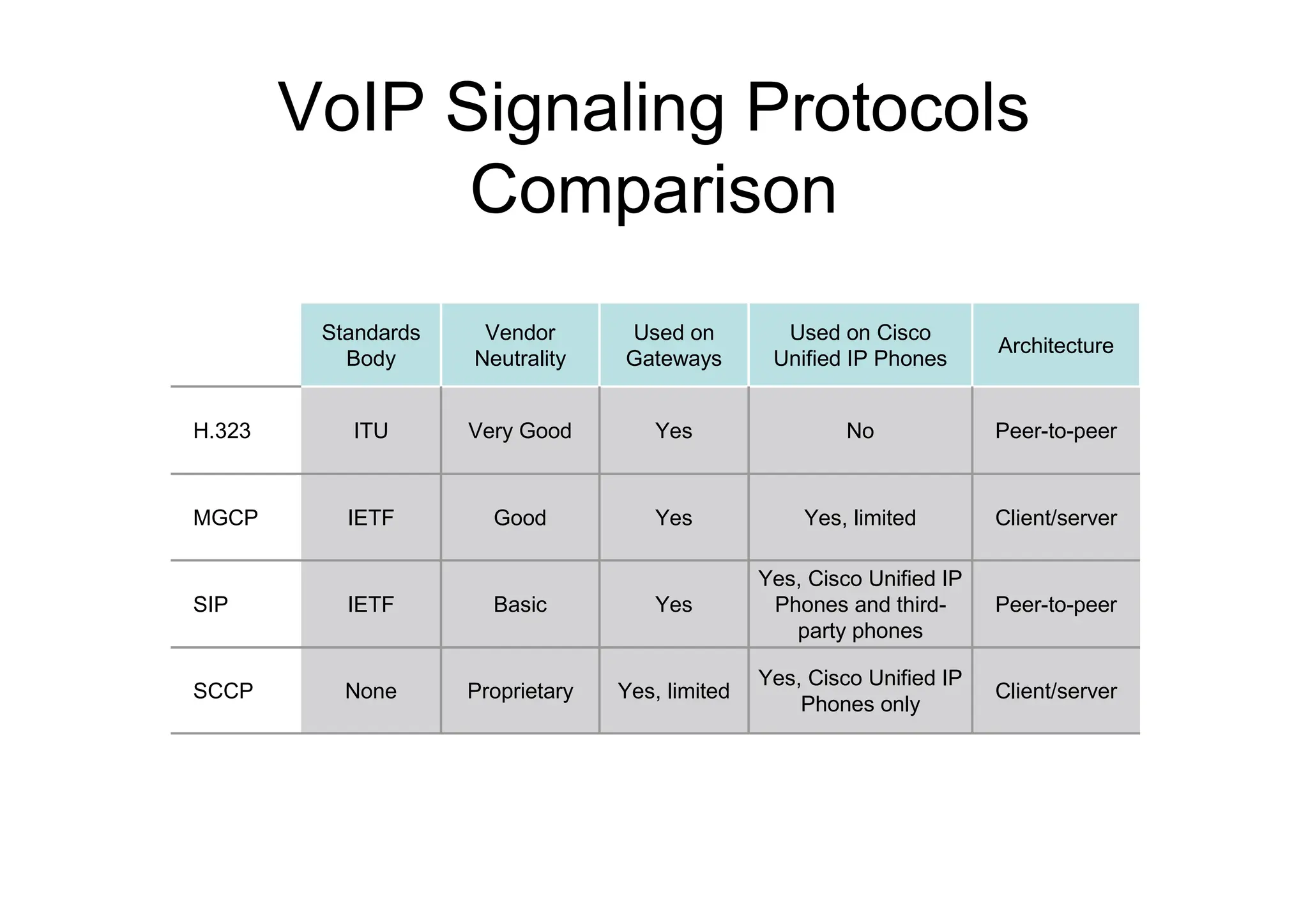
VoIP Signaling Protocols
Comparison
Peer-to-peer
Yes, Cisco Unified IP
Phones and third-
party phones
Yes
Basic
IETF
SIP
Client/server
Yes, Cisco Unified IP
Phones only
Yes, limited
Proprietary
None
SCCP
Client/server
Yes, limited
Yes
Good
IETF
MGCP
Peer-to-peer
No
Yes
Very Good
ITU
H.323
Architecture
Used on Cisco
Unified IP Phones
Used on
Gateways
Vendor
Neutrality
Standards
Body
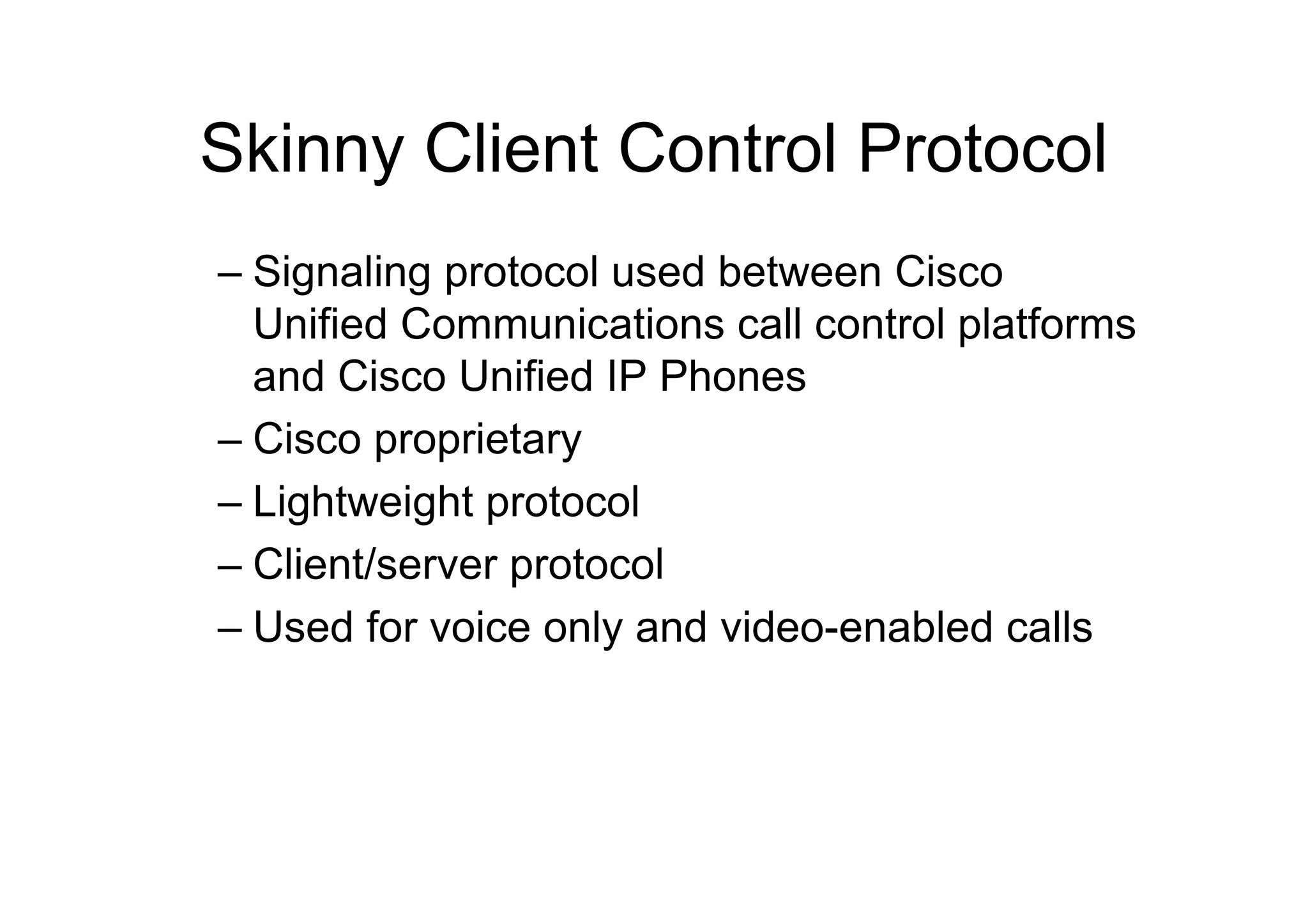
Skinny Client Control Protocol
– Signaling protocol used between Cisco
Unified Communications call control platforms
and Cisco Unified IP Phones
– Cisco proprietary
– Lightweight protocol
– Client/server protocol
– Used for voice only and video-enabled calls
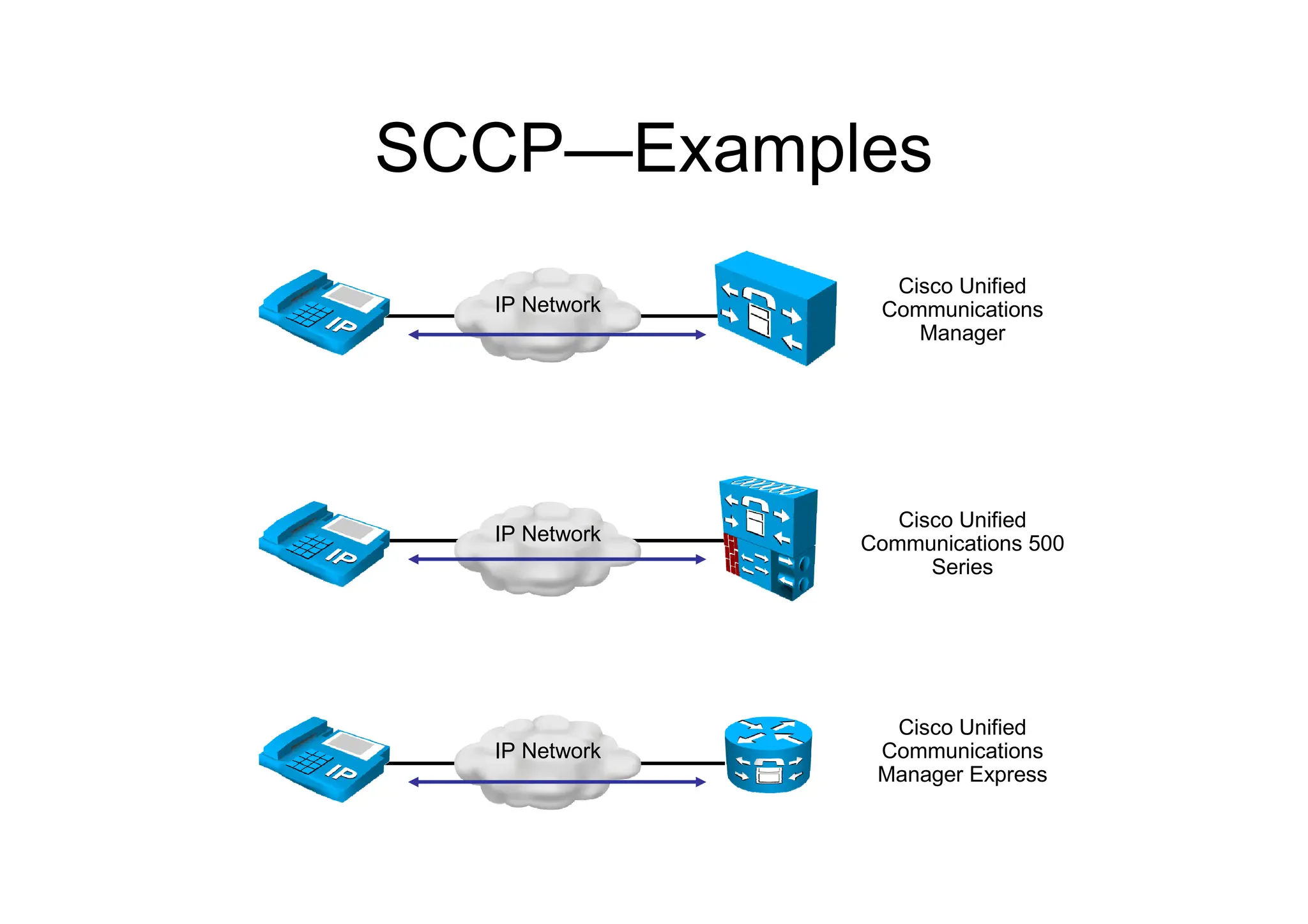
SCCP—Examples
IP Network
Cisco Unified
Communications 500
Series
IP Network
Cisco Unified
Communications
Manager Express
IP Network
Cisco Unified
Communications
Manager
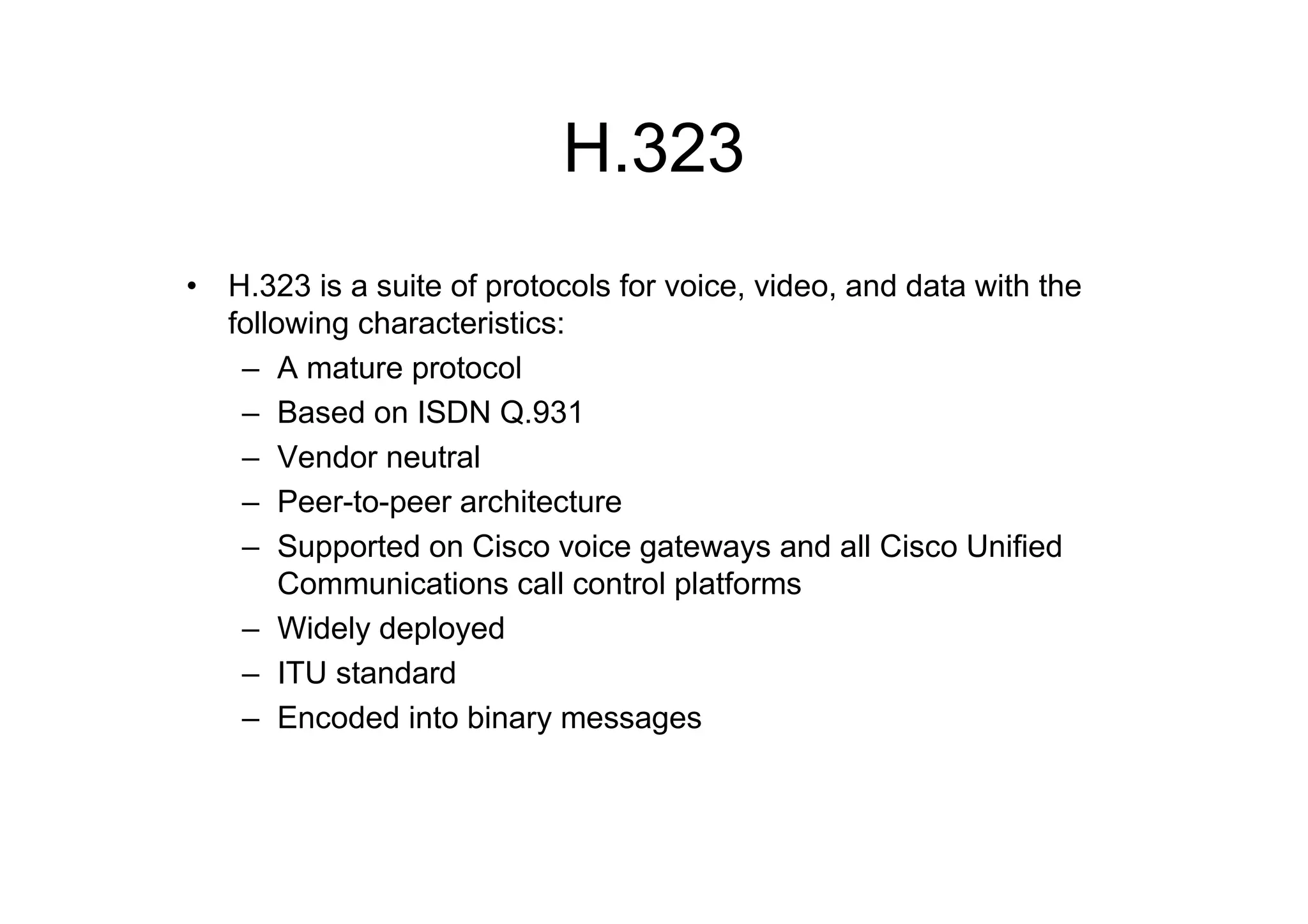
H.323
• H.323 is a suite of protocols for voice, video, and data with the
following characteristics:
– A mature protocol
– Based on ISDN Q.931
– Vendor neutral
– Peer-to-peer architecture
– Supported on Cisco voice gateways and all Cisco Unified
Communications call control platforms
– Widely deployed
– ITU standard
– Encoded into binary messages
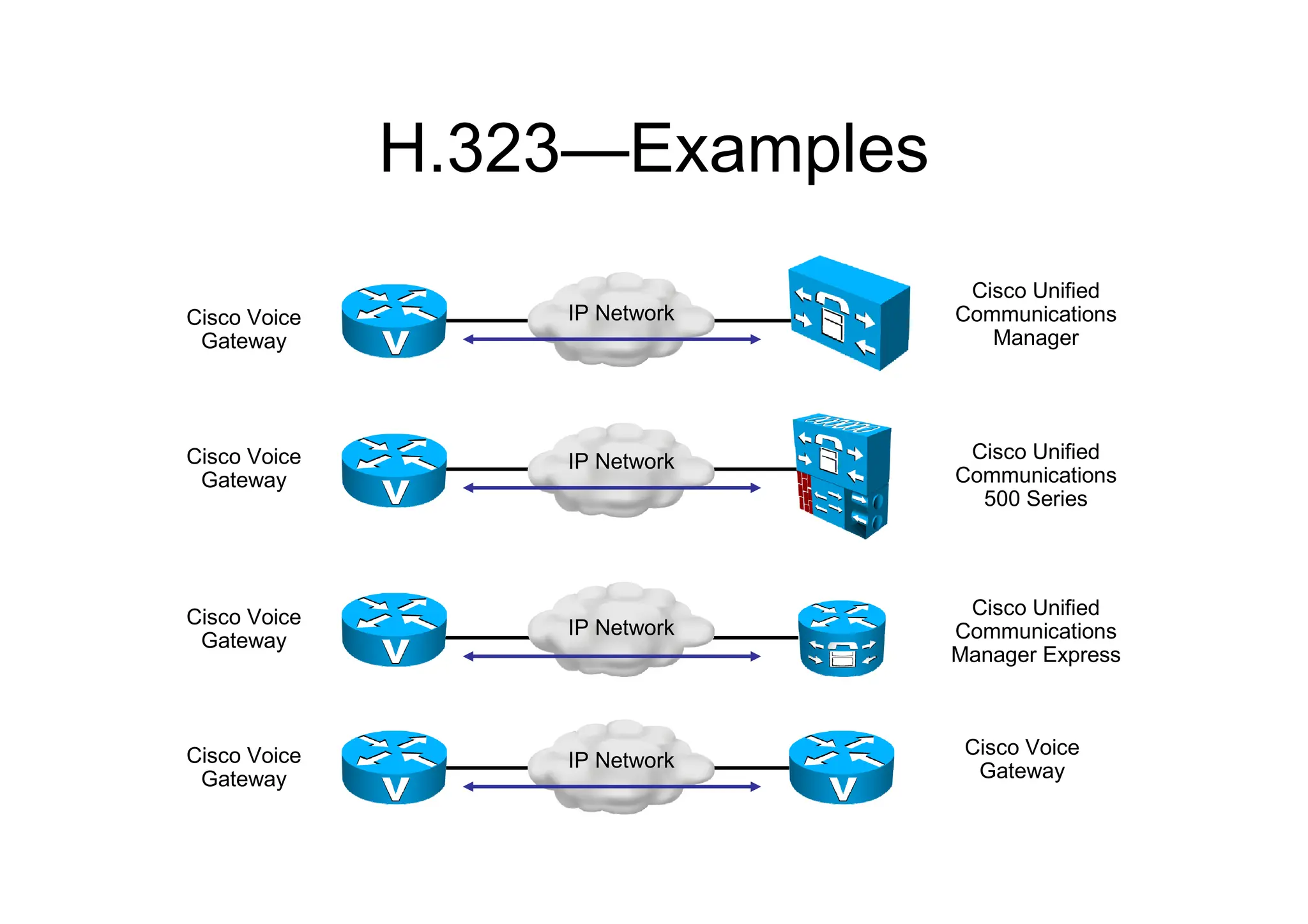
H.323—Examples
IP Network
Cisco Unified
Communications
Manager
Cisco Voice
Gateway
IP Network Cisco Unified
Communications
500 Series
Cisco Voice
Gateway
IP Network
Cisco Unified
Communications
Manager Express
Cisco Voice
Gateway
IP Network
Cisco Voice
Gateway
Cisco Voice
Gateway
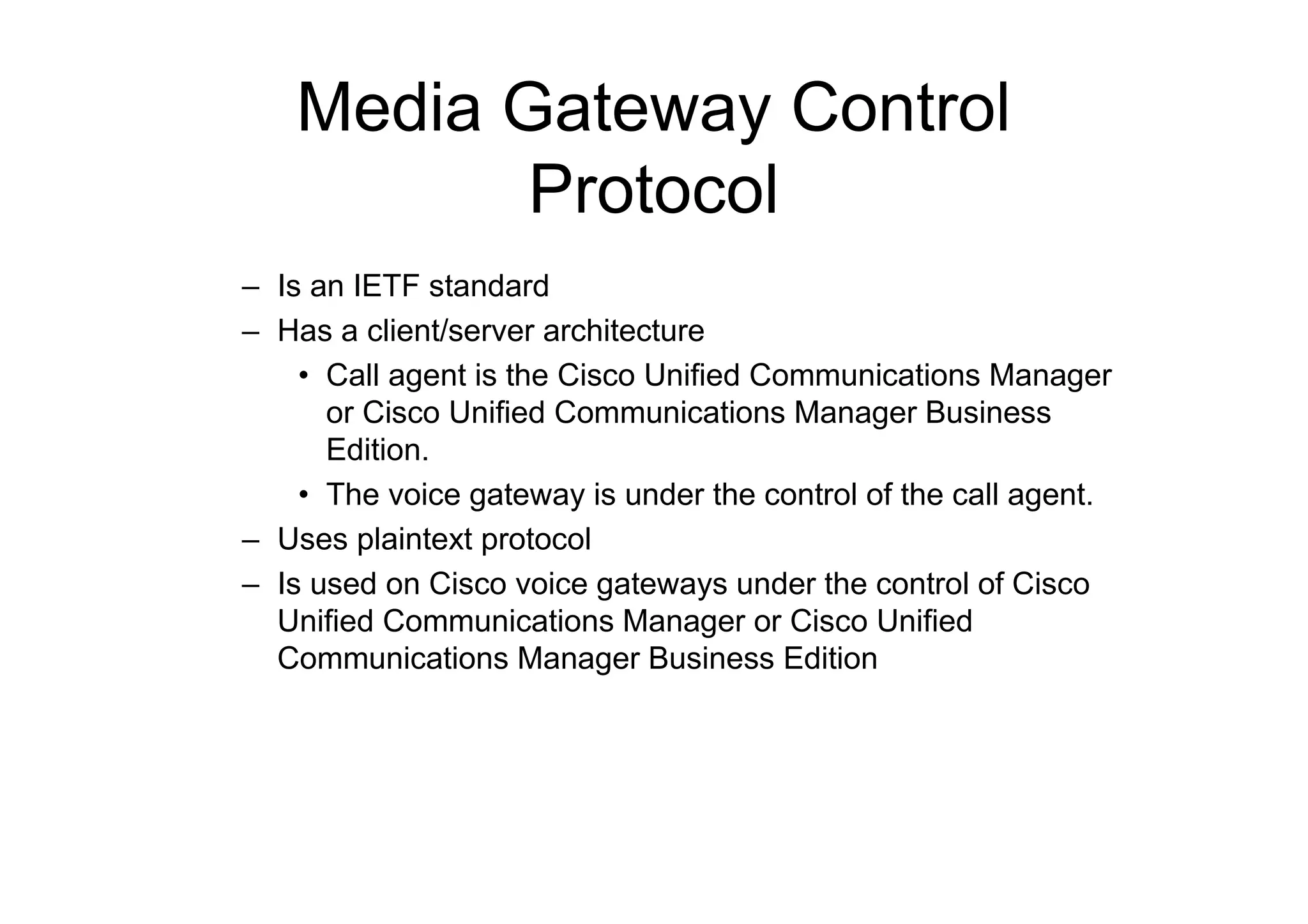
Media Gateway Control
Protocol
– Is an IETF standard
– Has a client/server architecture
• Call agent is the Cisco Unified Communications Manager
or Cisco Unified Communications Manager Business
Edition.
• The voice gateway is under the control of the call agent.
– Uses plaintext protocol
– Is used on Cisco voice gateways under the control of Cisco
Unified Communications Manager or Cisco Unified
Communications Manager Business Edition
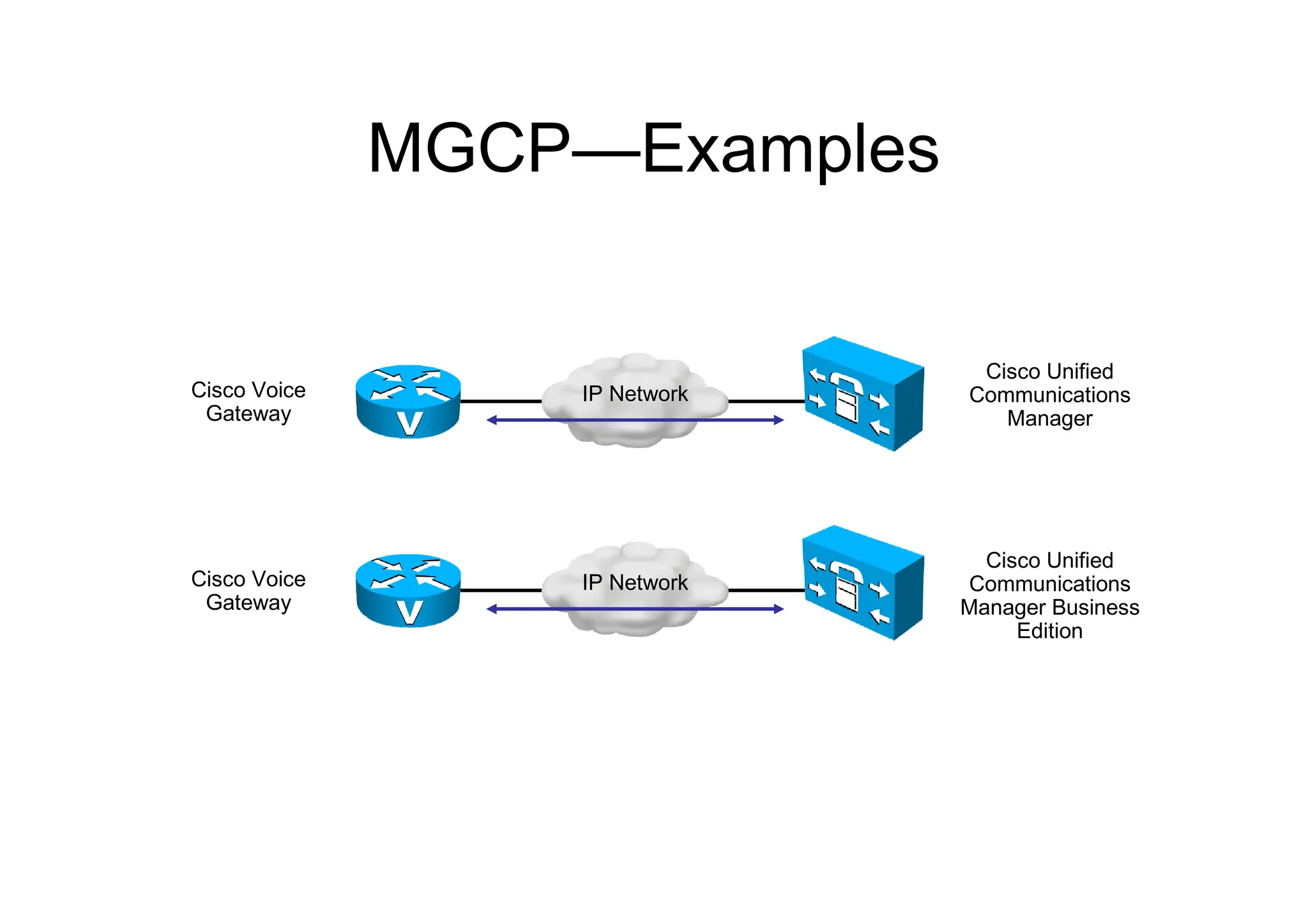
MGCP—Examples
IP Network
Cisco Unified
Communications
Manager
Cisco Voice
Gateway
IP Network
Cisco Unified
Communications
Manager Business
Edition
Cisco Voice
Gateway
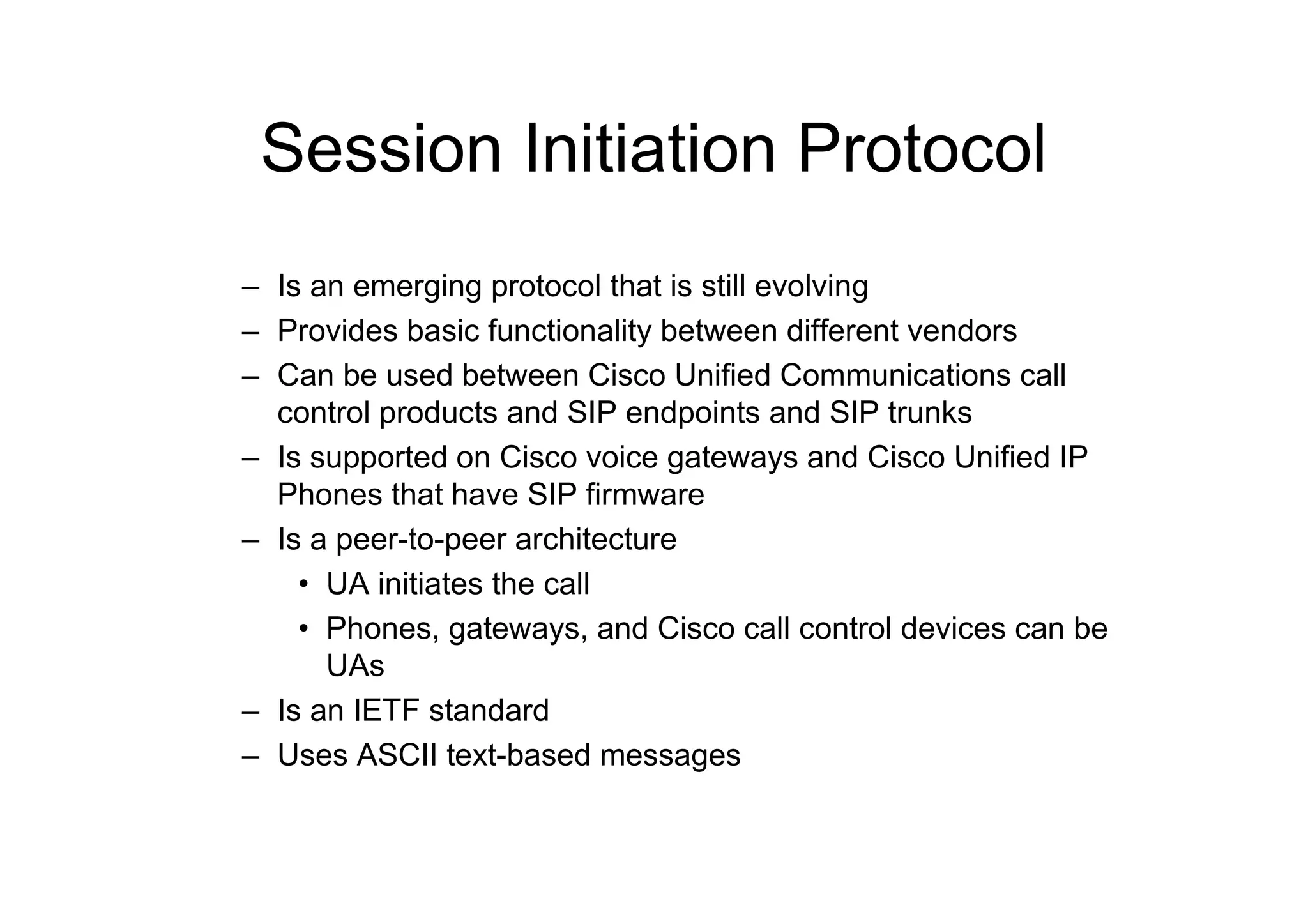
Session Initiation Protocol
– Is an emerging protocol that is still evolving
– Provides basic functionality between different vendors
– Can be used between Cisco Unified Communications call
control products and SIP endpoints and SIP trunks
– Is supported on Cisco voice gateways and Cisco Unified IP
Phones that have SIP firmware
– Is a peer-to-peer architecture
• UA initiates the call
• Phones, gateways, and Cisco call control devices can be
UAs
– Is an IETF standard
– Uses ASCII text-based messages
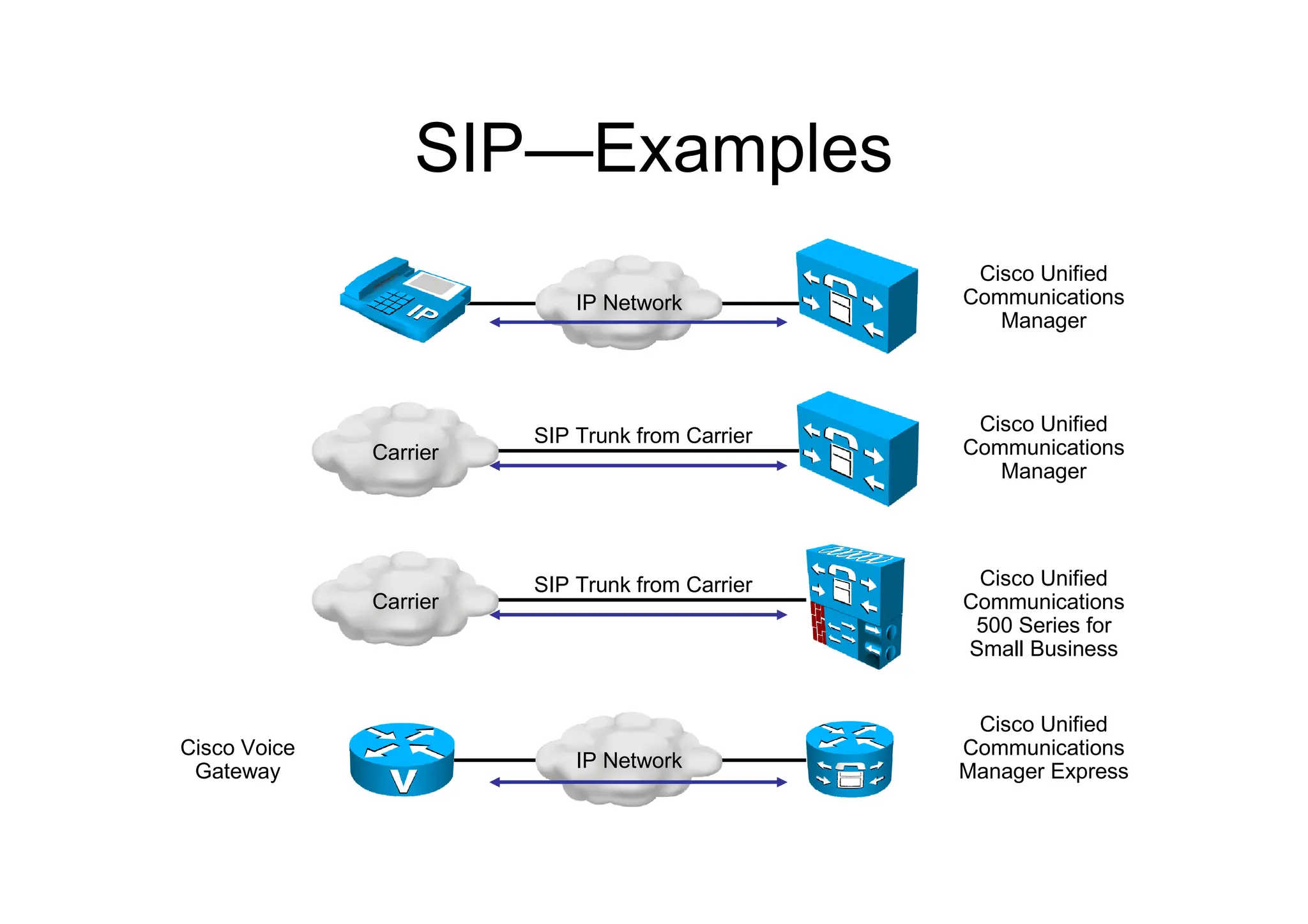
SIP—Examples
SIP Trunk from Carrier
Carrier
Cisco Unified
Communications
Manager
IP Network
Cisco Unified
Communications
Manager
IP Network
Cisco Unified
Communications
Manager Express
Cisco Voice
Gateway
SIP Trunk from Carrier
Carrier
Cisco Unified
Communications
500 Series for
Small Business
OVERVIEW OF PACKET
ORIENTED NETWORKS
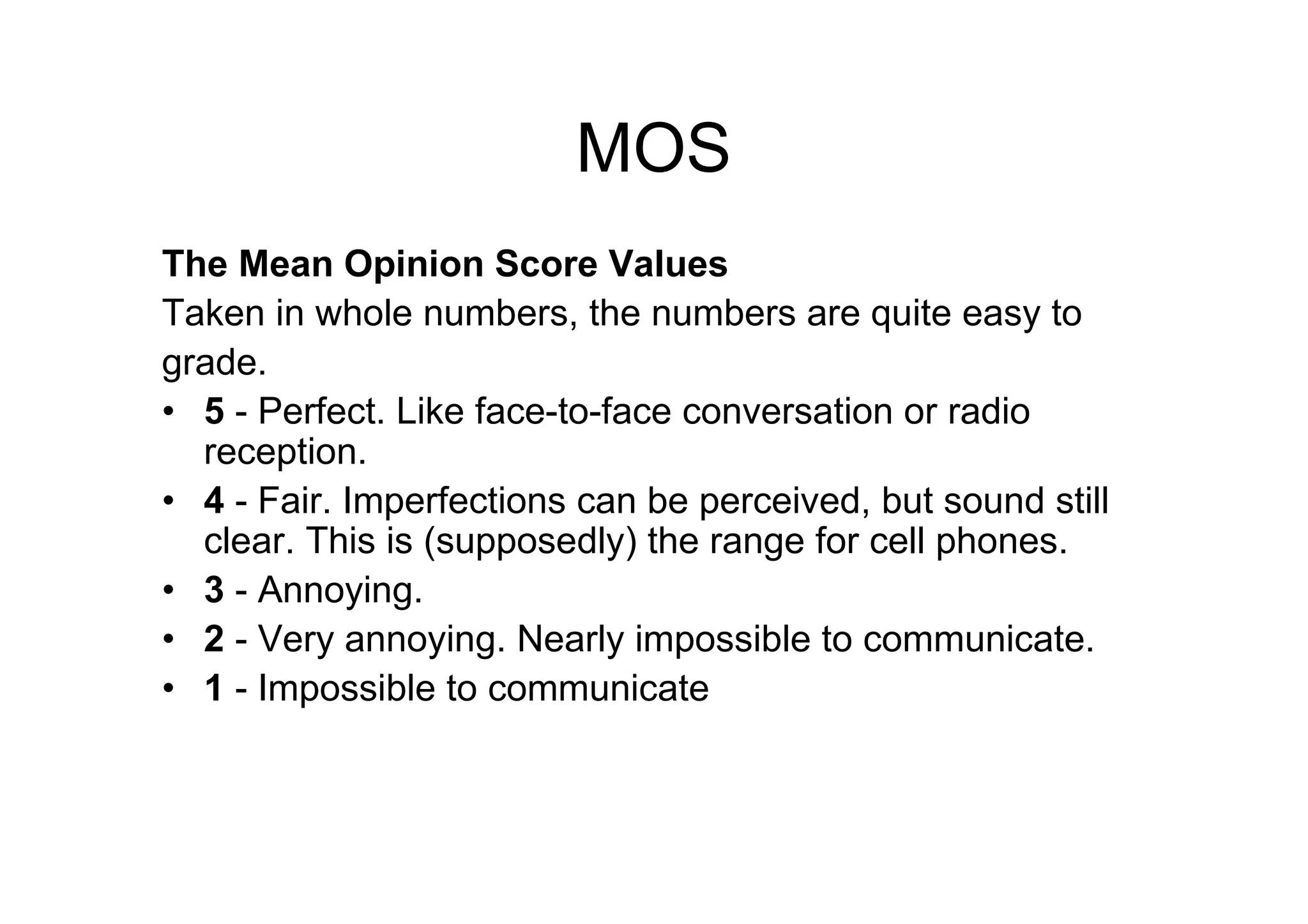
MOS
The Mean Opinion Score Values
Taken in whole numbers, the numbers are quite easy to
grade.
• 5 - Perfect. Like face-to-face conversation or radio
reception.
• 4 - Fair. Imperfections can be perceived, but sound still
clear. This is (supposedly) the range for cell phones.
• 3 - Annoying.
• 2 - Very annoying. Nearly impossible to communicate.
• 1 - Impossible to communicate
FACTOR AFFECTING VOICE
MEDIA TRANSPORT
PROTOCOLS
IMPLEMENTING VLANS
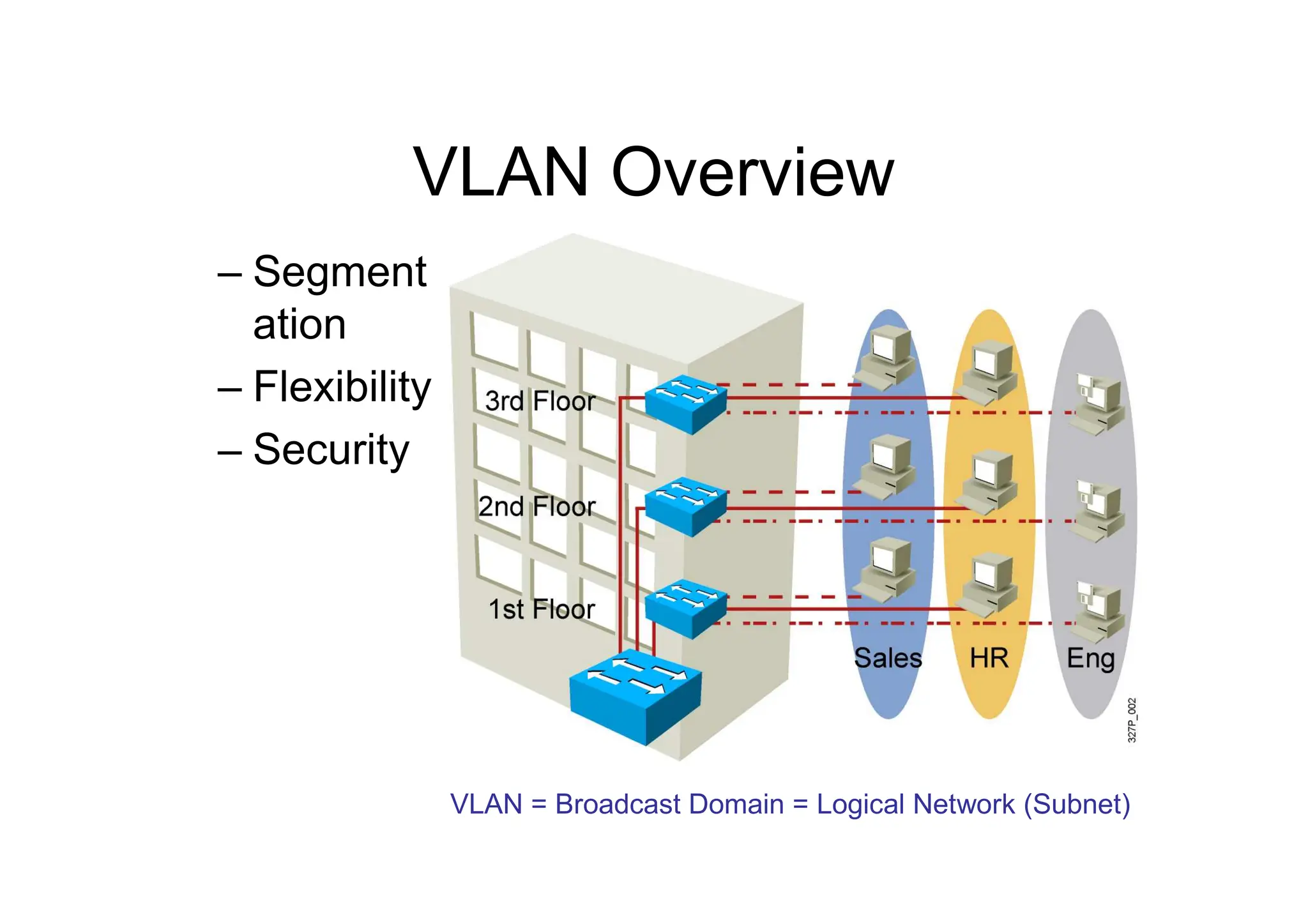
VLAN Overview
– Segment
ation
– Flexibility
– Security
VLAN = Broadcast Domain = Logical Network (Subnet)
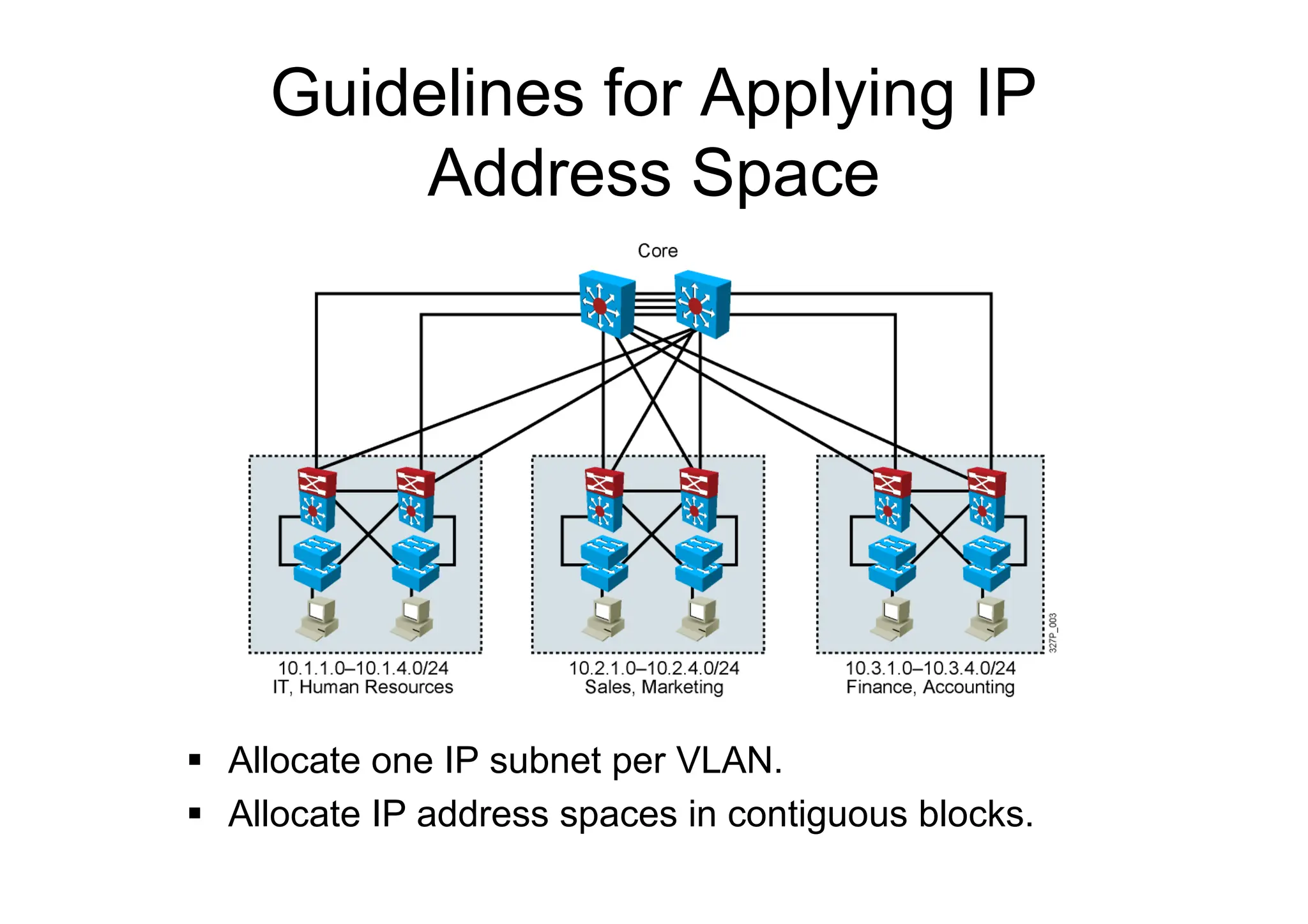
Guidelines for Applying IP
Address Space
 Allocate one IP subnet per VLAN.
 Allocate IP address spaces in contiguous blocks.
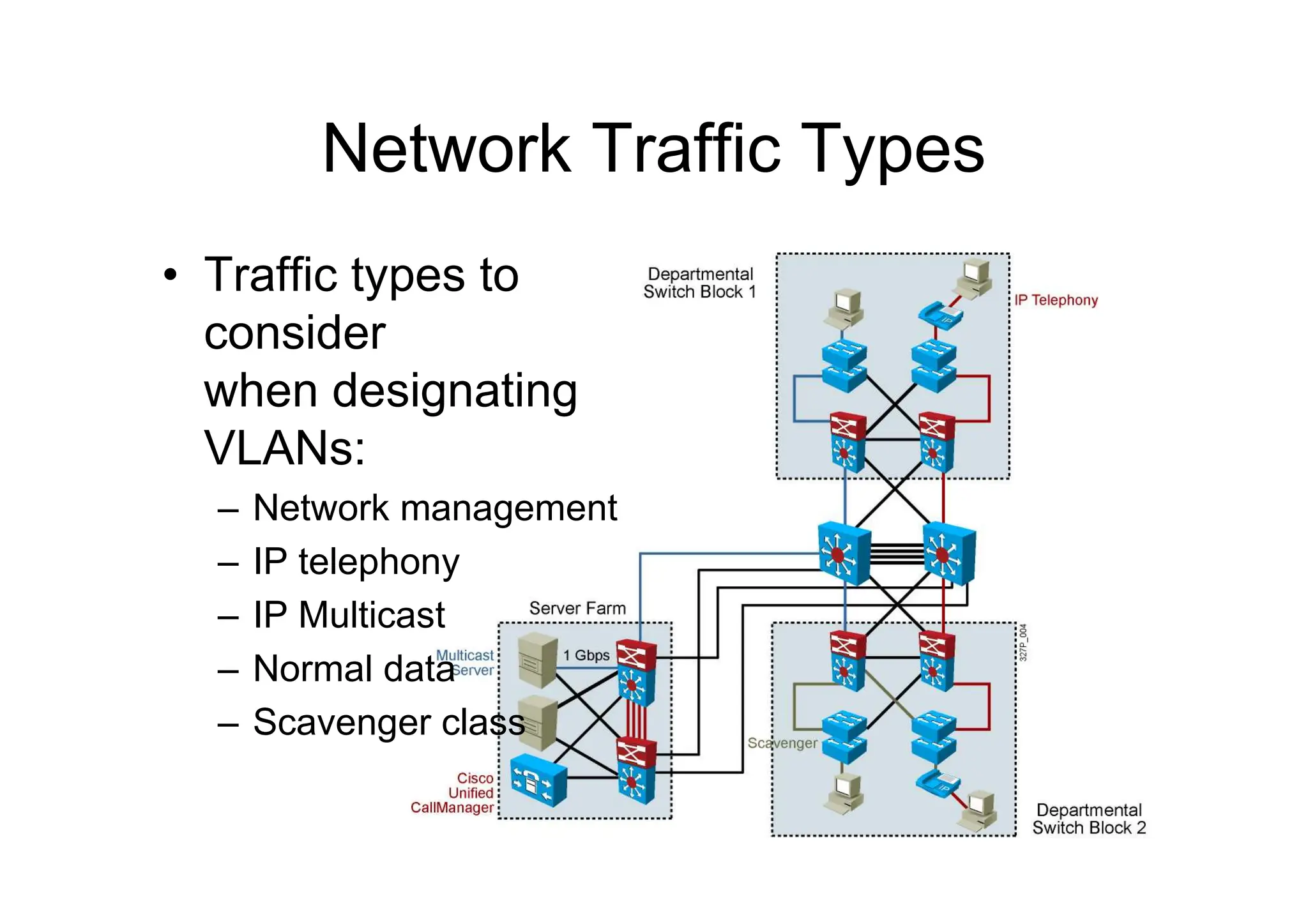
Network Traffic Types
• Traffic types to
consider
when designating
VLANs:
– Network management
– IP telephony
– IP Multicast
– Normal data
– Scavenger class
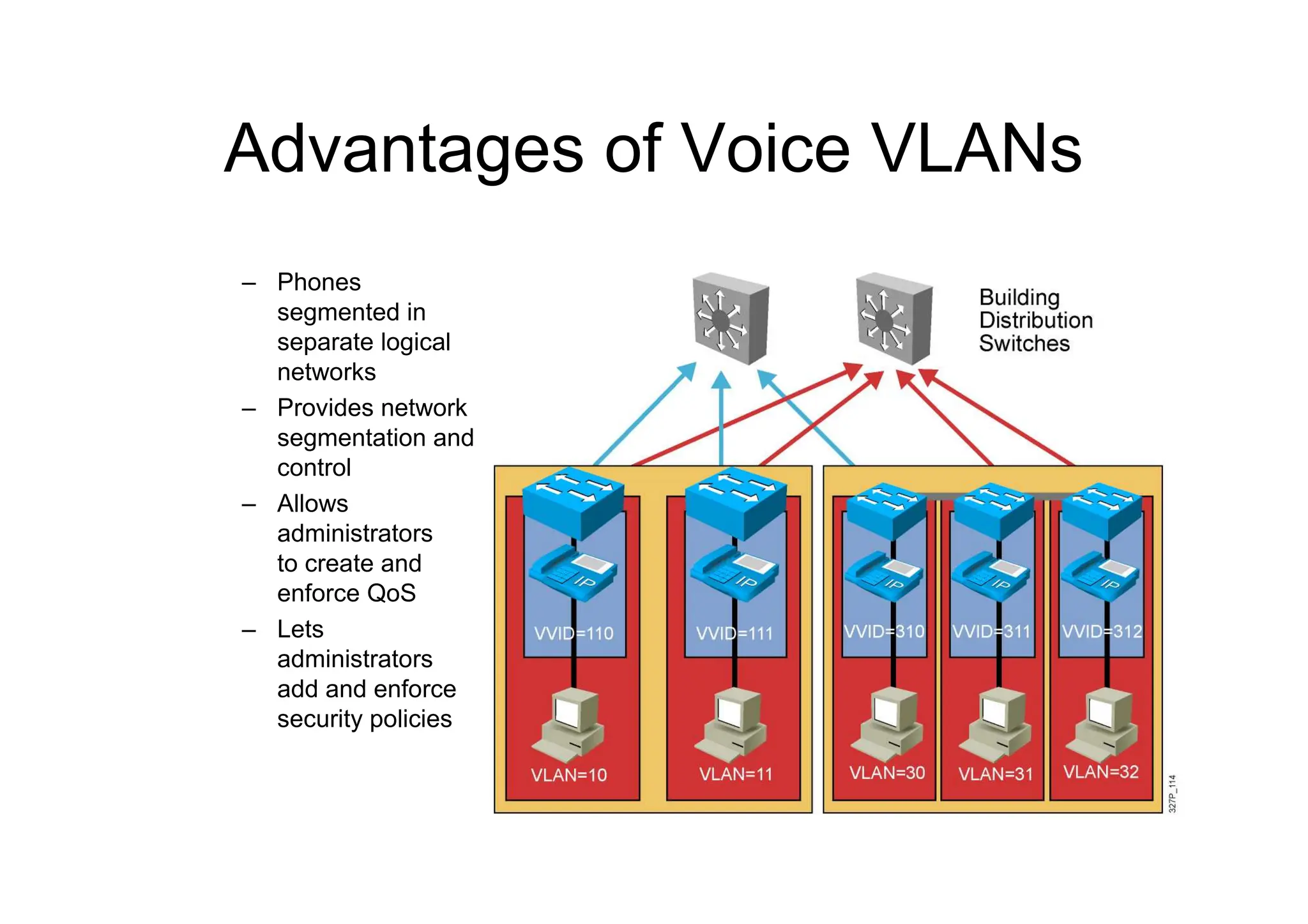
Advantages of Voice VLANs
– Phones
segmented in
separate logical
networks
– Provides network
segmentation and
control
– Allows
administrators
to create and
enforce QoS
– Lets
administrators
add and enforce
security policies
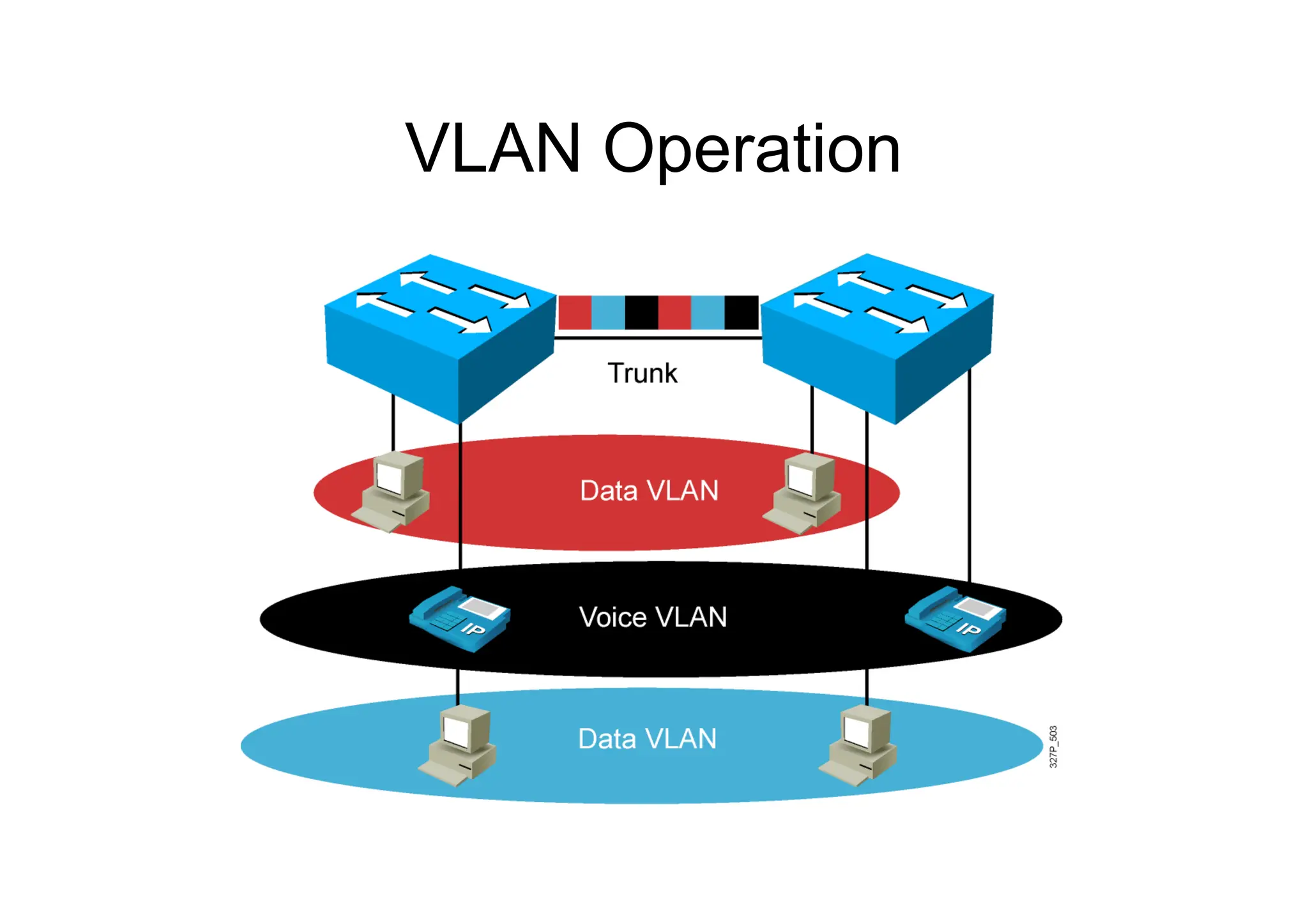
VLAN Operation
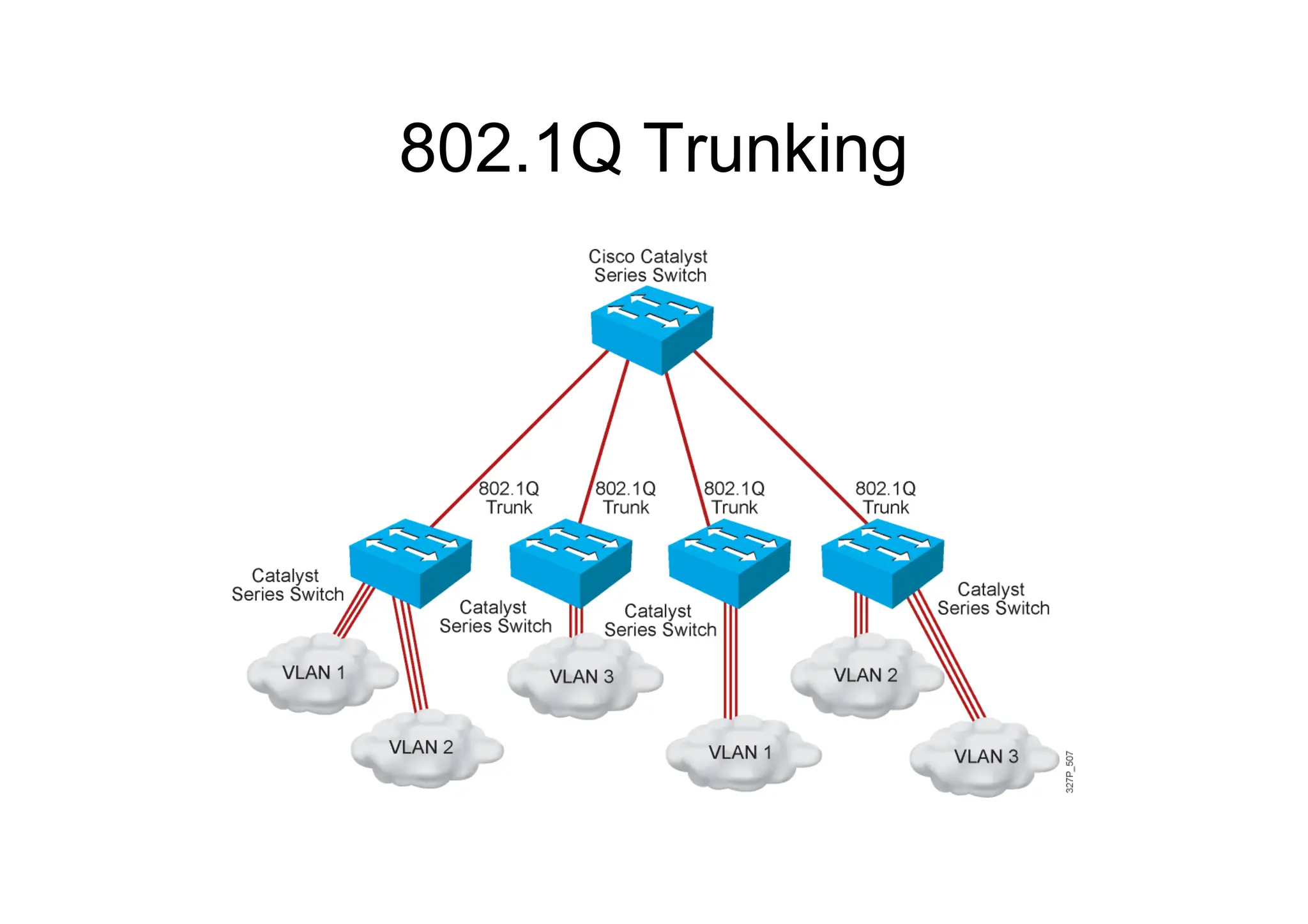
802.1Q Trunking
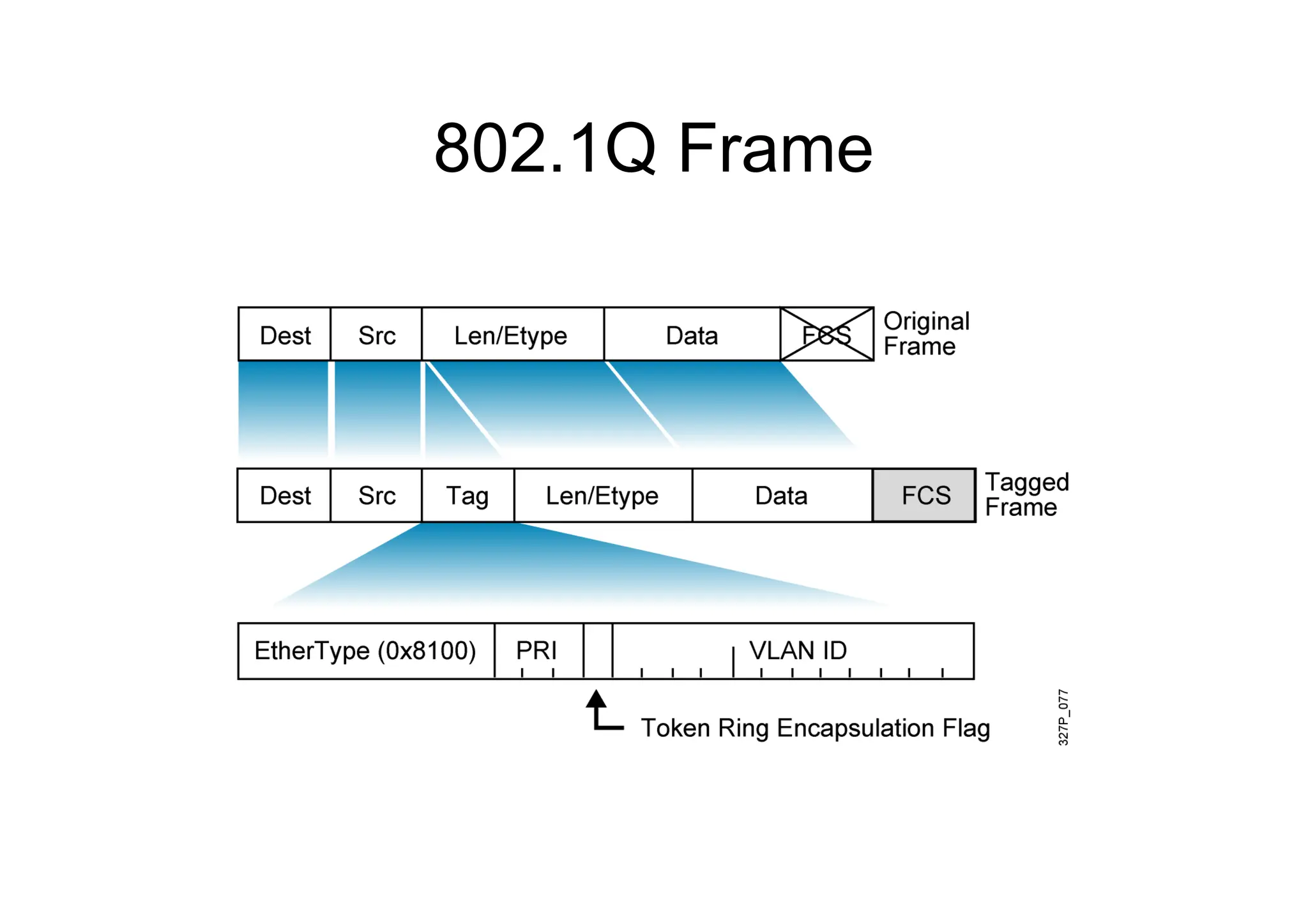
802.1Q Frame
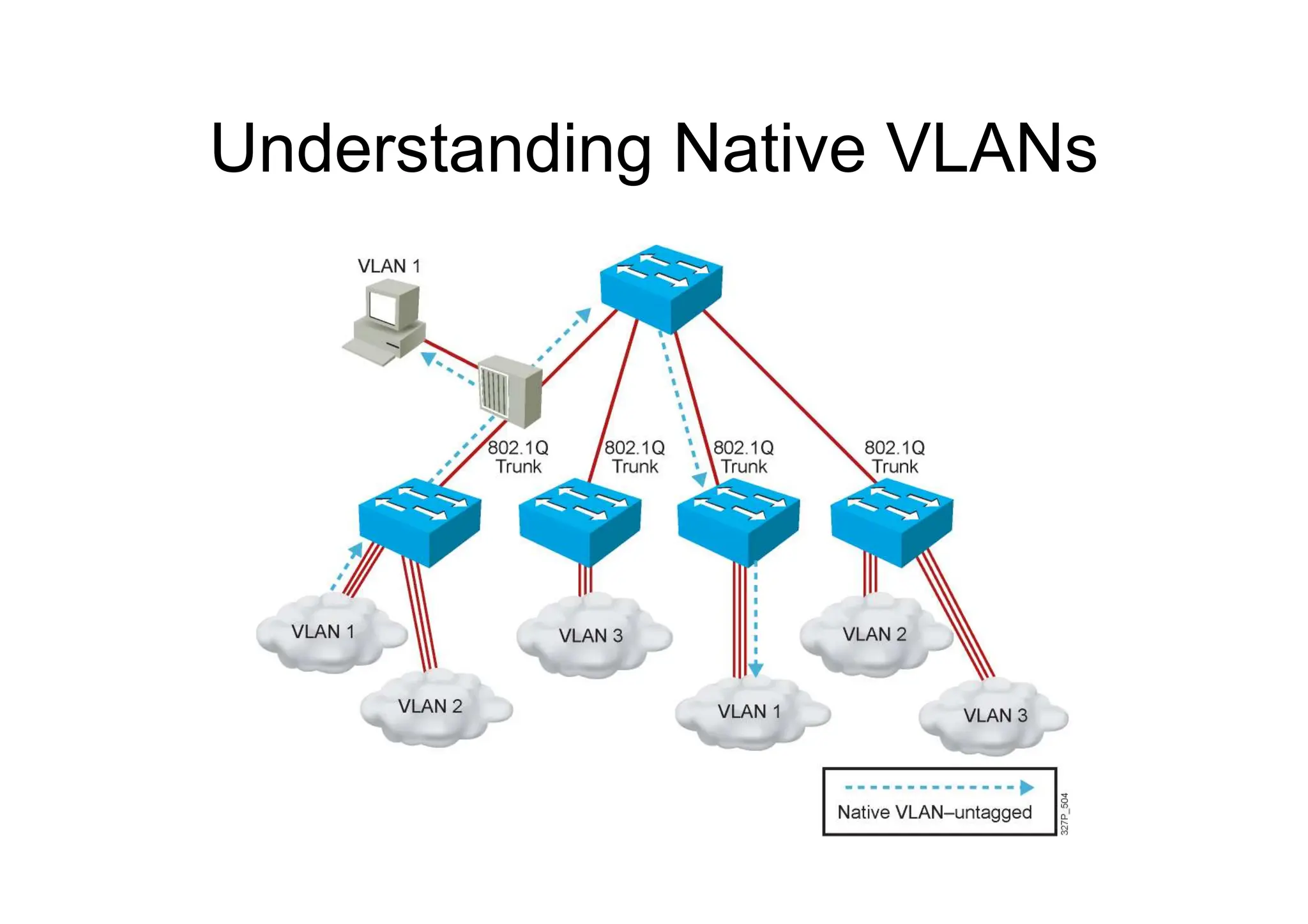
Understanding Native VLANs
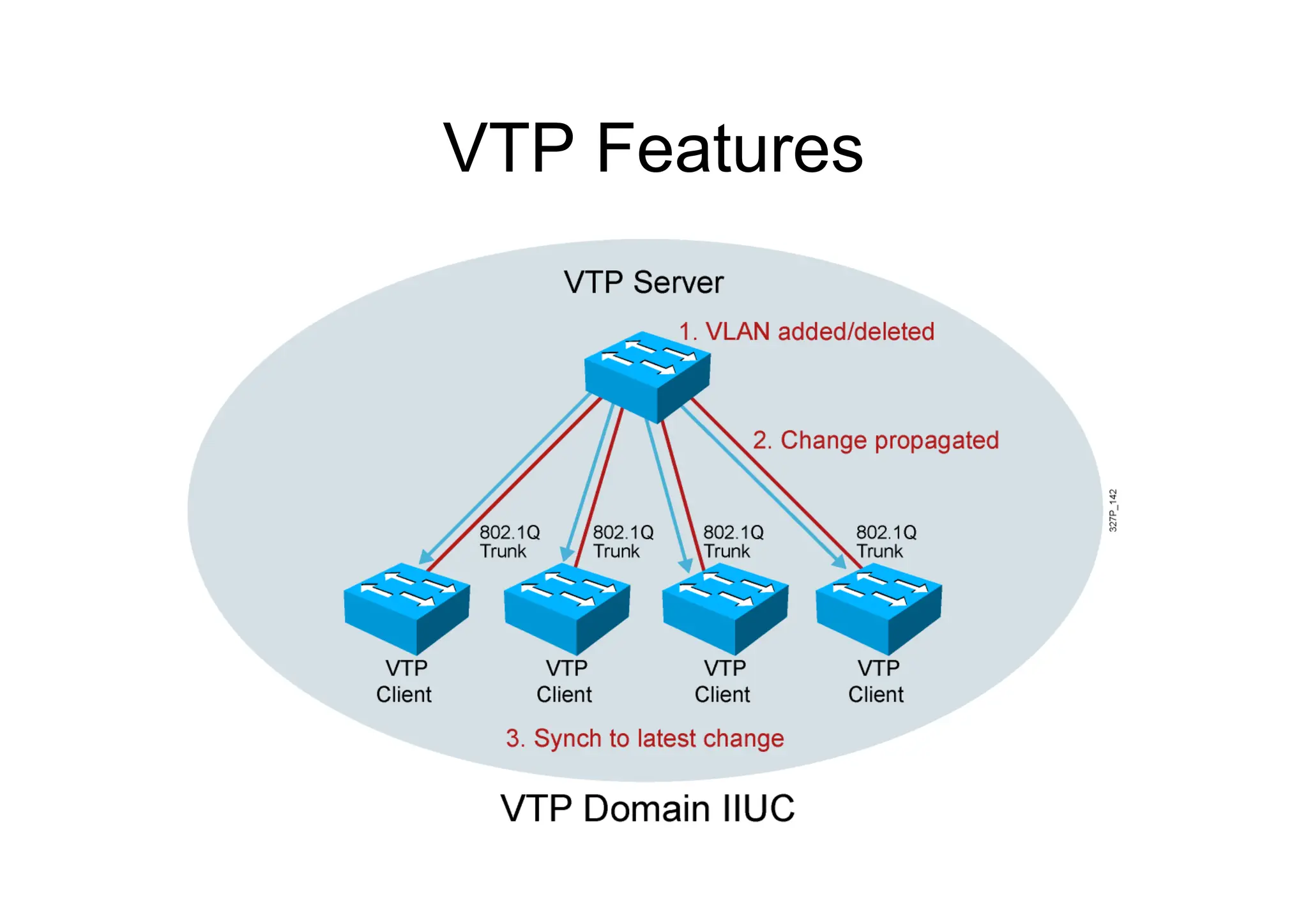
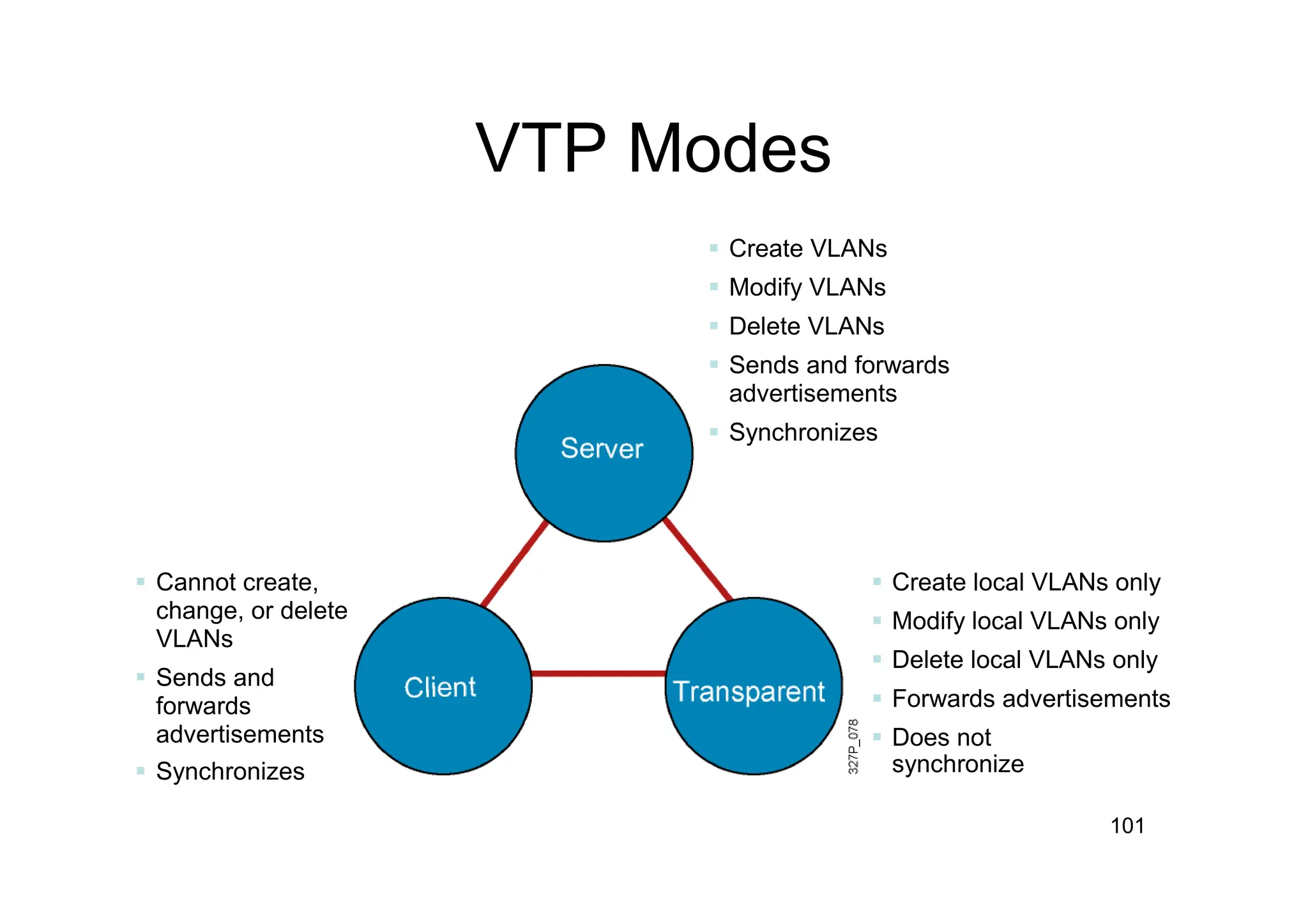
VTP Features
101
 Cannot create,
change, or delete
VLANs
 Sends and
forwards
advertisements
 Synchronizes
 Create VLANs
 Modify VLANs
 Delete VLANs
 Sends and forwards
advertisements
 Synchronizes
 Create local VLANs only
 Modify local VLANs only
 Delete local VLANs only
 Forwards advertisements
 Does not
synchronize
VTP Modes
SwitchX# configure terminal
SwitchX(config)# vtp mode [ server | client | transparent ]
SwitchX(config)# vtp domain domain-name
SwitchX(config)# vtp password password
SwitchX(config)# end
Creating a VTP Domain
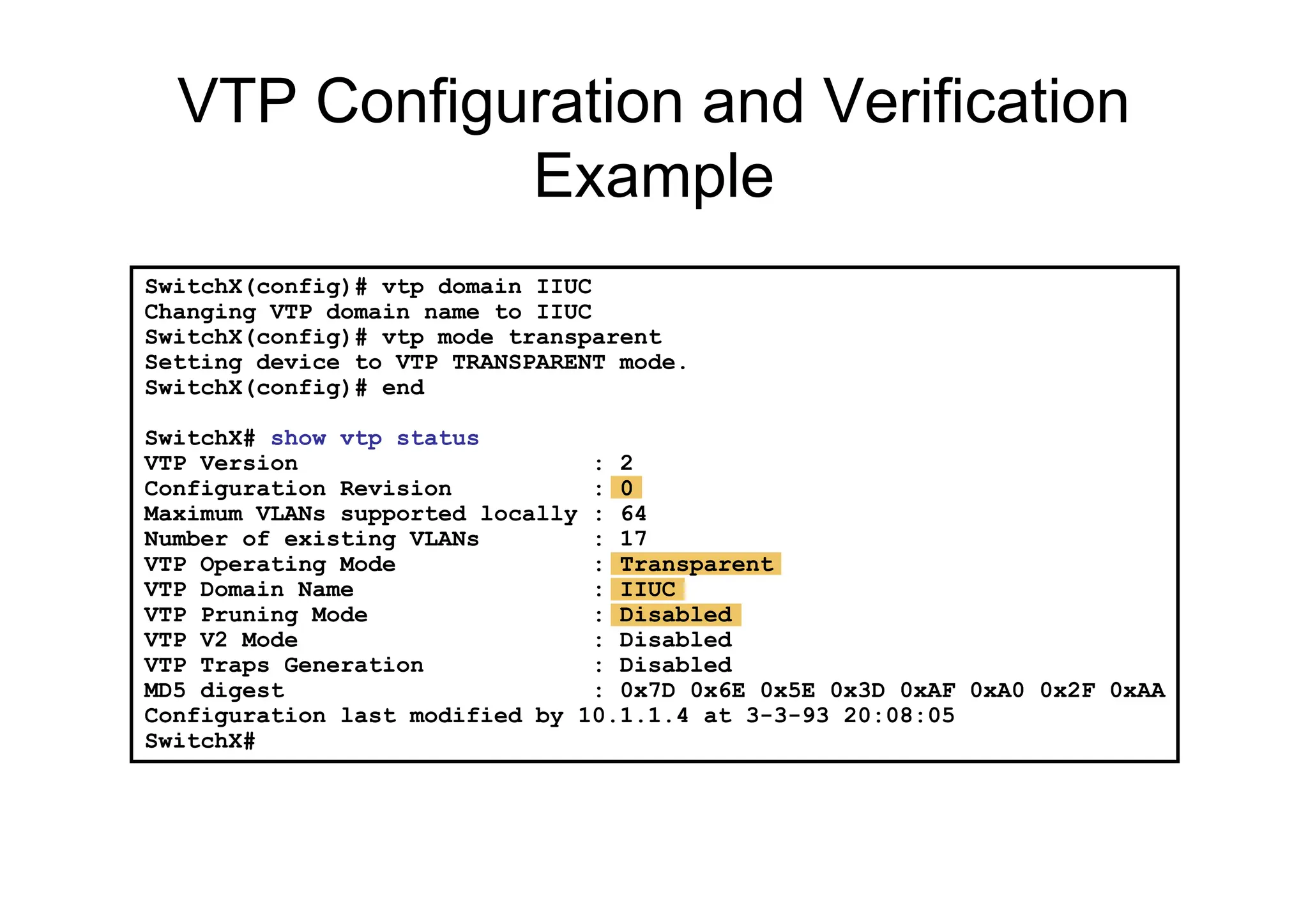
SwitchX(config)# vtp domain IIUC
Changing VTP domain name to IIUC
SwitchX(config)# vtp mode transparent
Setting device to VTP TRANSPARENT mode.
SwitchX(config)# end
SwitchX# show vtp status
VTP Version : 2
Configuration Revision : 0
Maximum VLANs supported locally : 64
Number of existing VLANs : 17
VTP Operating Mode : Transparent
VTP Domain Name : IIUC
VTP Pruning Mode : Disabled
VTP V2 Mode : Disabled
VTP Traps Generation : Disabled
MD5 digest : 0x7D 0x6E 0x5E 0x3D 0xAF 0xA0 0x2F 0xAA
Configuration last modified by 10.1.1.4 at 3-3-93 20:08:05
SwitchX#
VTP Configuration and Verification
Example
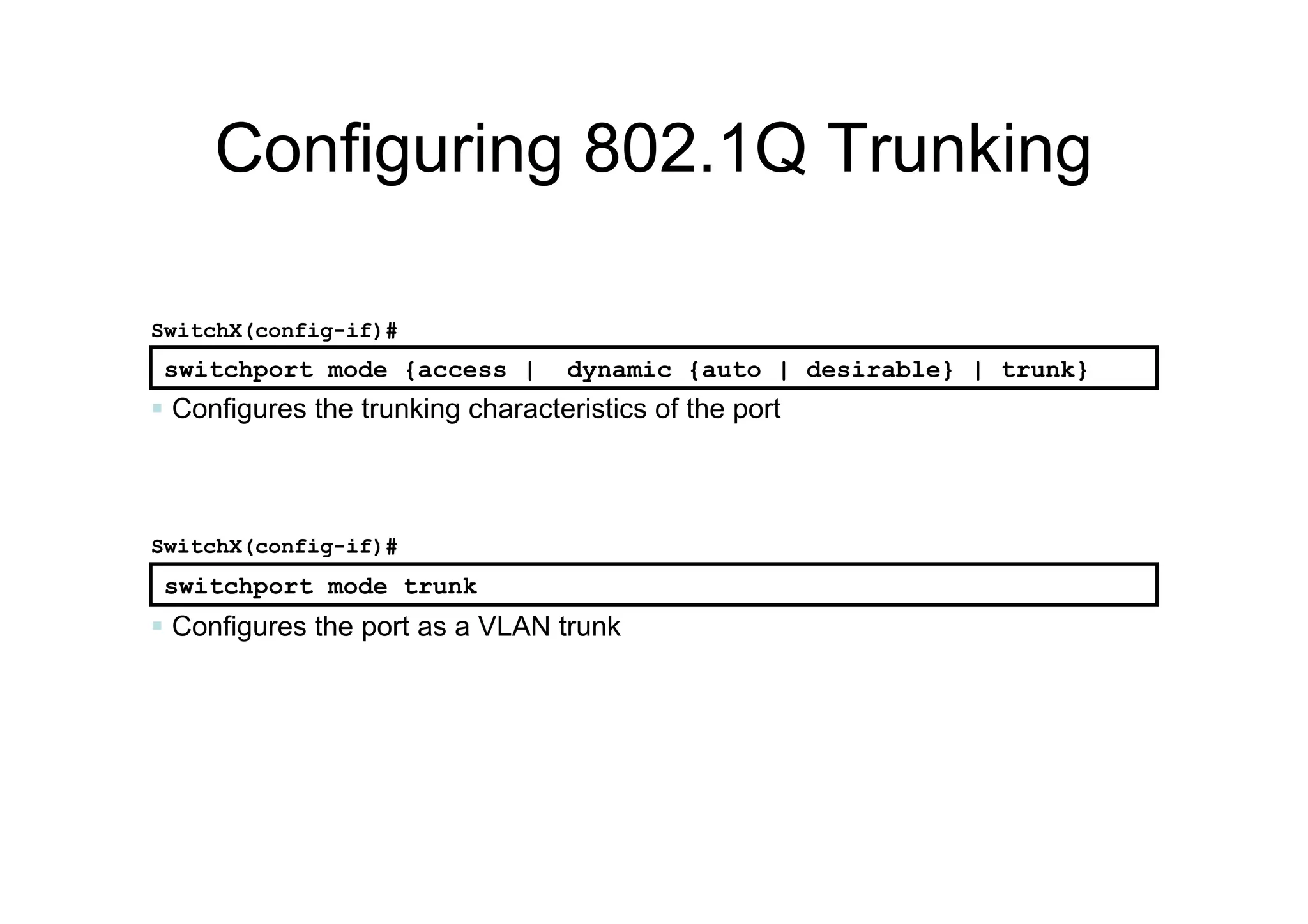
Configuring 802.1Q Trunking
 Configures the port as a VLAN trunk
SwitchX(config-if)#
switchport mode trunk
switchport mode {access | dynamic {auto | desirable} | trunk}
SwitchX(config-if)#
 Configures the trunking characteristics of the port
105
SwitchX# show interfaces fa0/11 trunk
Port Mode Encapsulation Status Native vlan
Fa0/11 desirable 802.1q trunking 1
Port Vlans allowed on trunk
Fa0/11 1-4094
Port Vlans allowed and active in management domain
Fa0/11 1-13
SwitchX# show interfaces fa0/11 switchport
Name: Fa0/11
Switchport: Enabled
Administrative Mode: trunk
Operational Mode: down
Administrative Trunking Encapsulation: dot1q
Negotiation of Trunking: On
Access Mode VLAN: 1 (default)
Trunking Native Mode VLAN: 1 (default)
. . .
Verifying a Trunk
SwitchX# show interfaces interface [switchport | trunk]
106
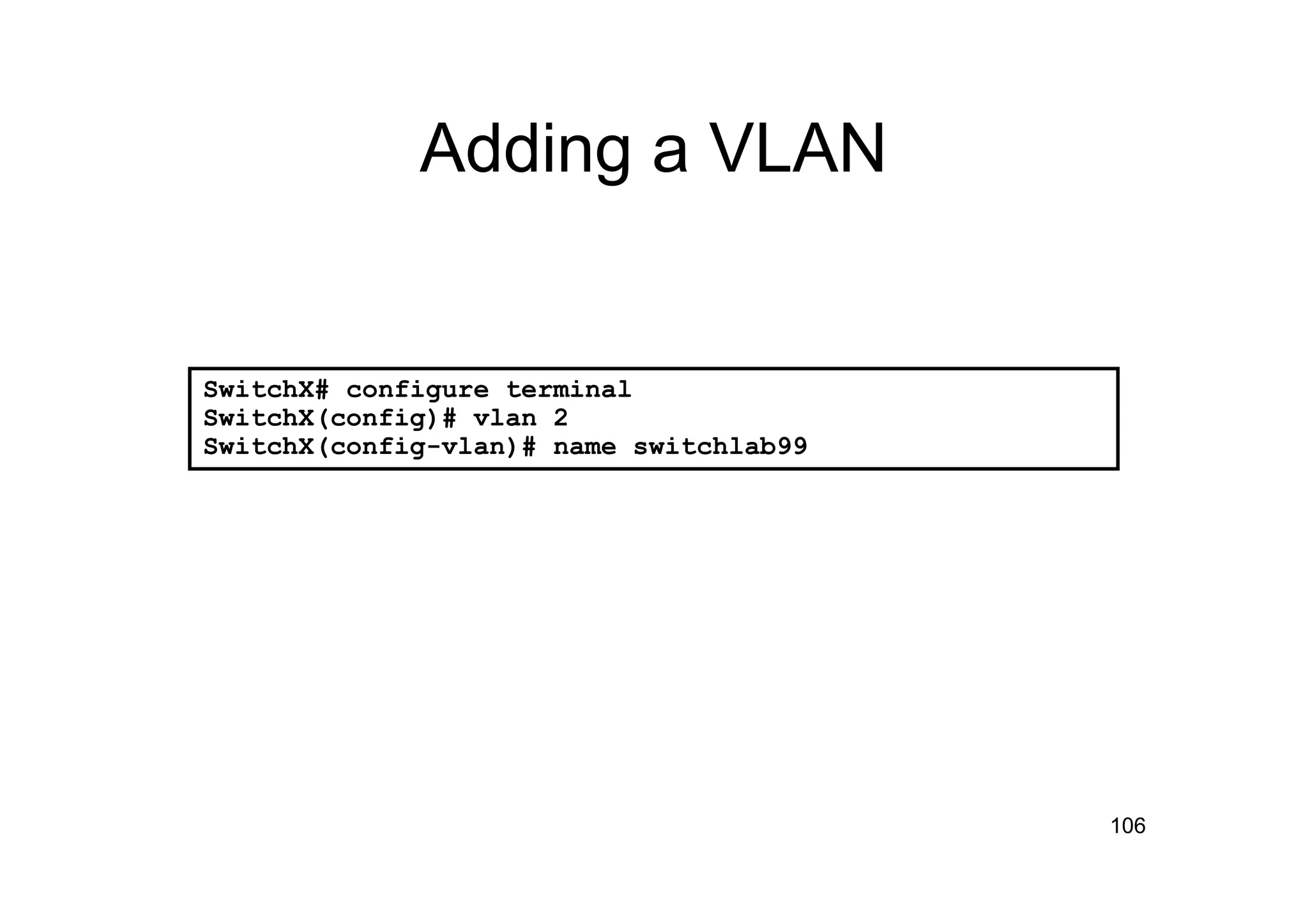
Adding a VLAN
SwitchX# configure terminal
SwitchX(config)# vlan 2
SwitchX(config-vlan)# name switchlab99
107
Assigning Switch Ports to a
VLAN
SwitchX# configure terminal
SwitchX(config)# interface range fastethernet 0/2 - 4
SwitchX(config-if)# switchport access vlan 2
SwitchX# show vlan
VLAN Name Status Ports
---- -------------------------------- --------- ----------------------
1 default active Fa0/1
2 switchlab99 active Fa0/2, Fa0/3, Fa0/4
switchport access [vlan vlan# | dynamic]
SwitchX(config-if)#
108
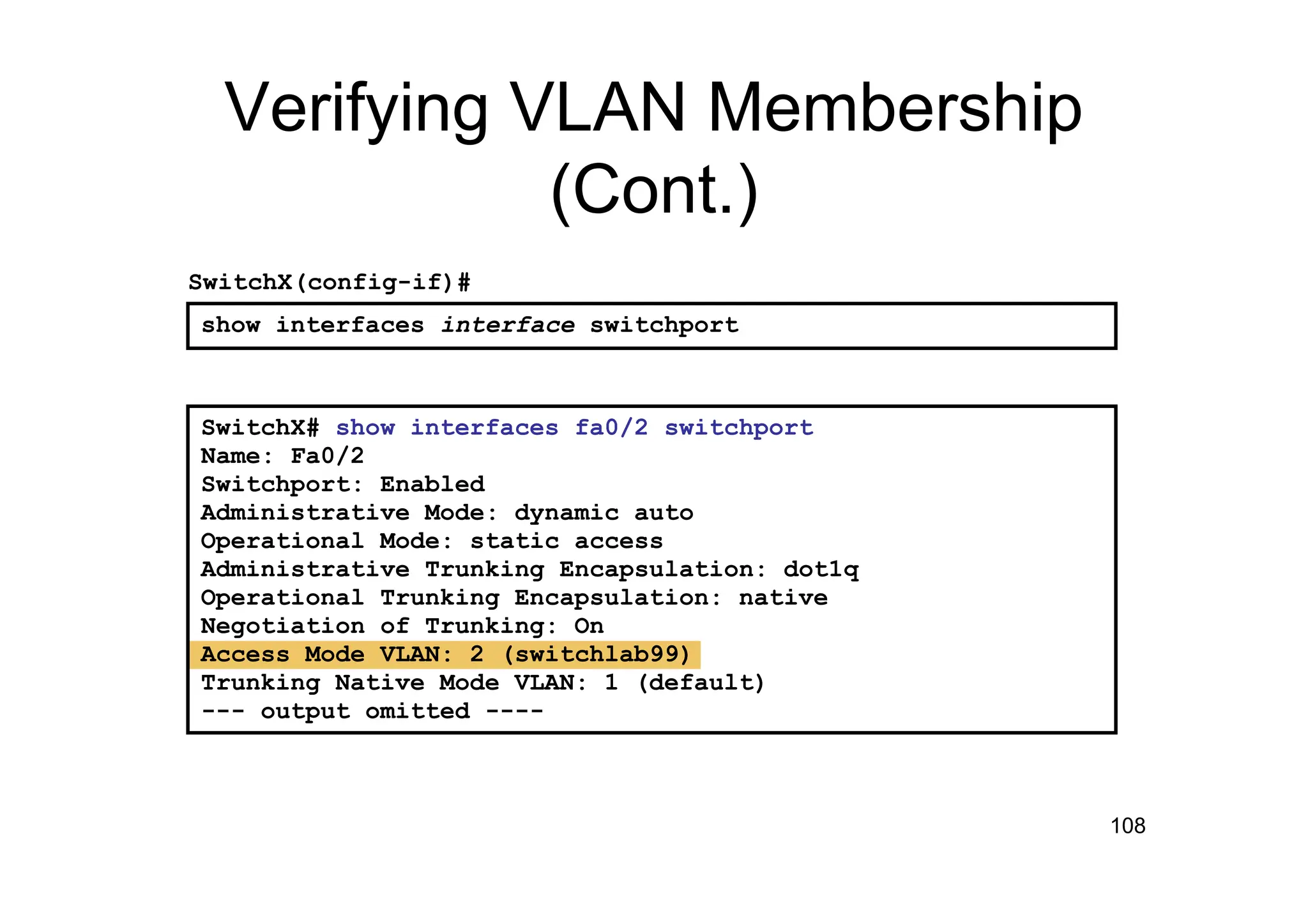
Verifying VLAN Membership
(Cont.)
SwitchX# show interfaces fa0/2 switchport
Name: Fa0/2
Switchport: Enabled
Administrative Mode: dynamic auto
Operational Mode: static access
Administrative Trunking Encapsulation: dot1q
Operational Trunking Encapsulation: native
Negotiation of Trunking: On
Access Mode VLAN: 2 (switchlab99)
Trunking Native Mode VLAN: 1 (default)
--- output omitted ----
show interfaces interface switchport
SwitchX(config-if)#
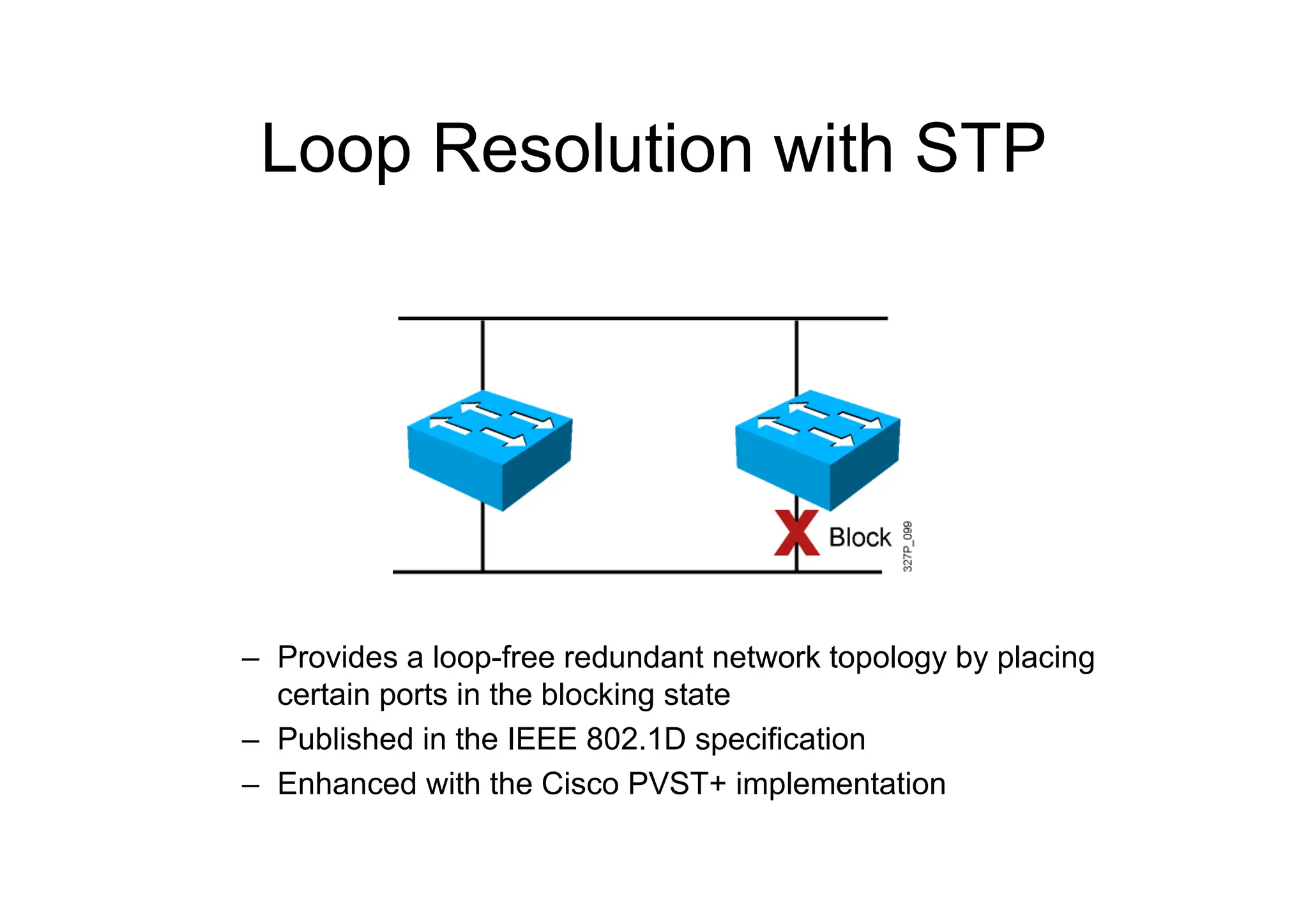
Loop Resolution with STP
– Provides a loop-free redundant network topology by placing
certain ports in the blocking state
– Published in the IEEE 802.1D specification
– Enhanced with the Cisco PVST+ implementation
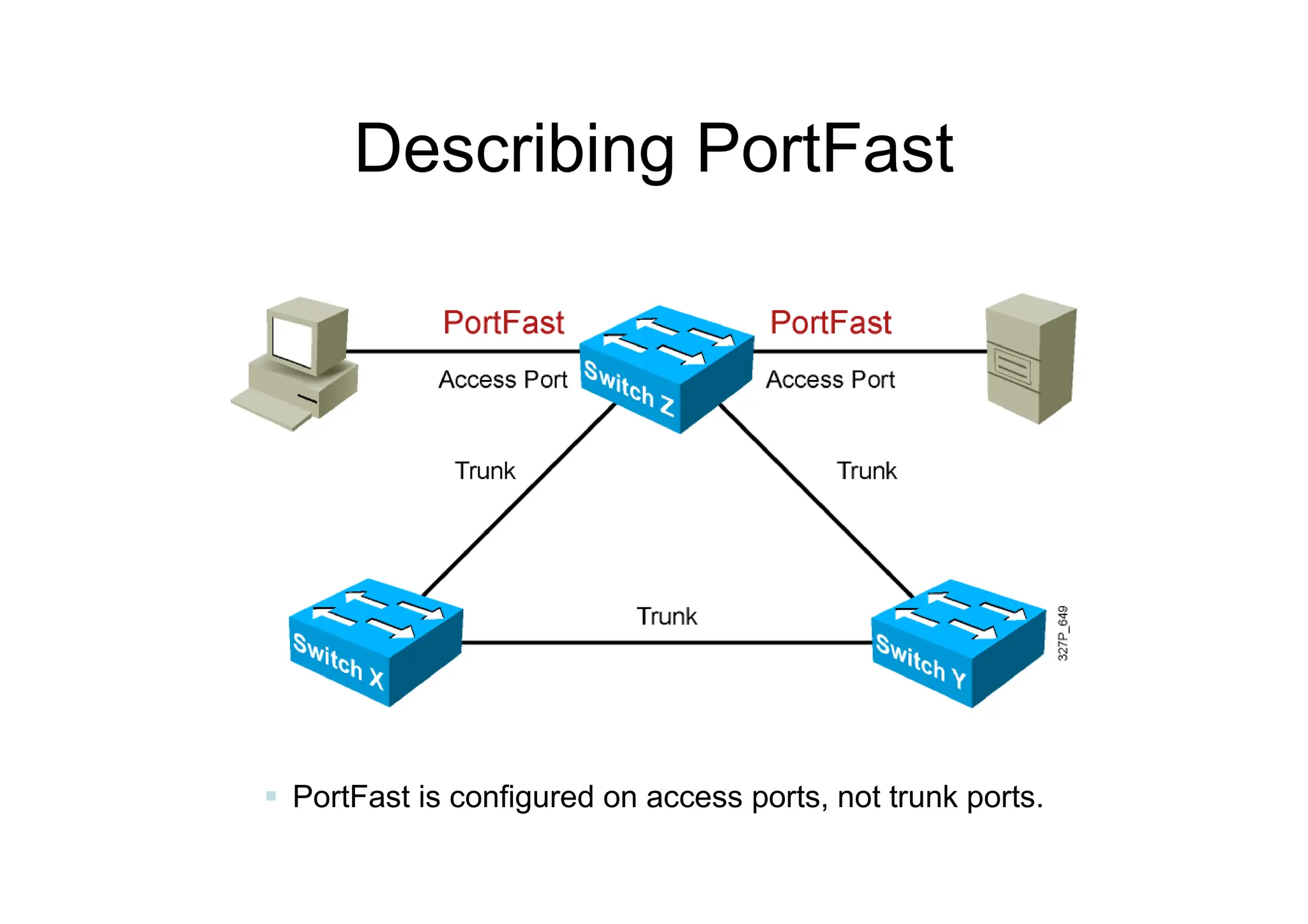
Describing PortFast
 PortFast is configured on access ports, not trunk ports.
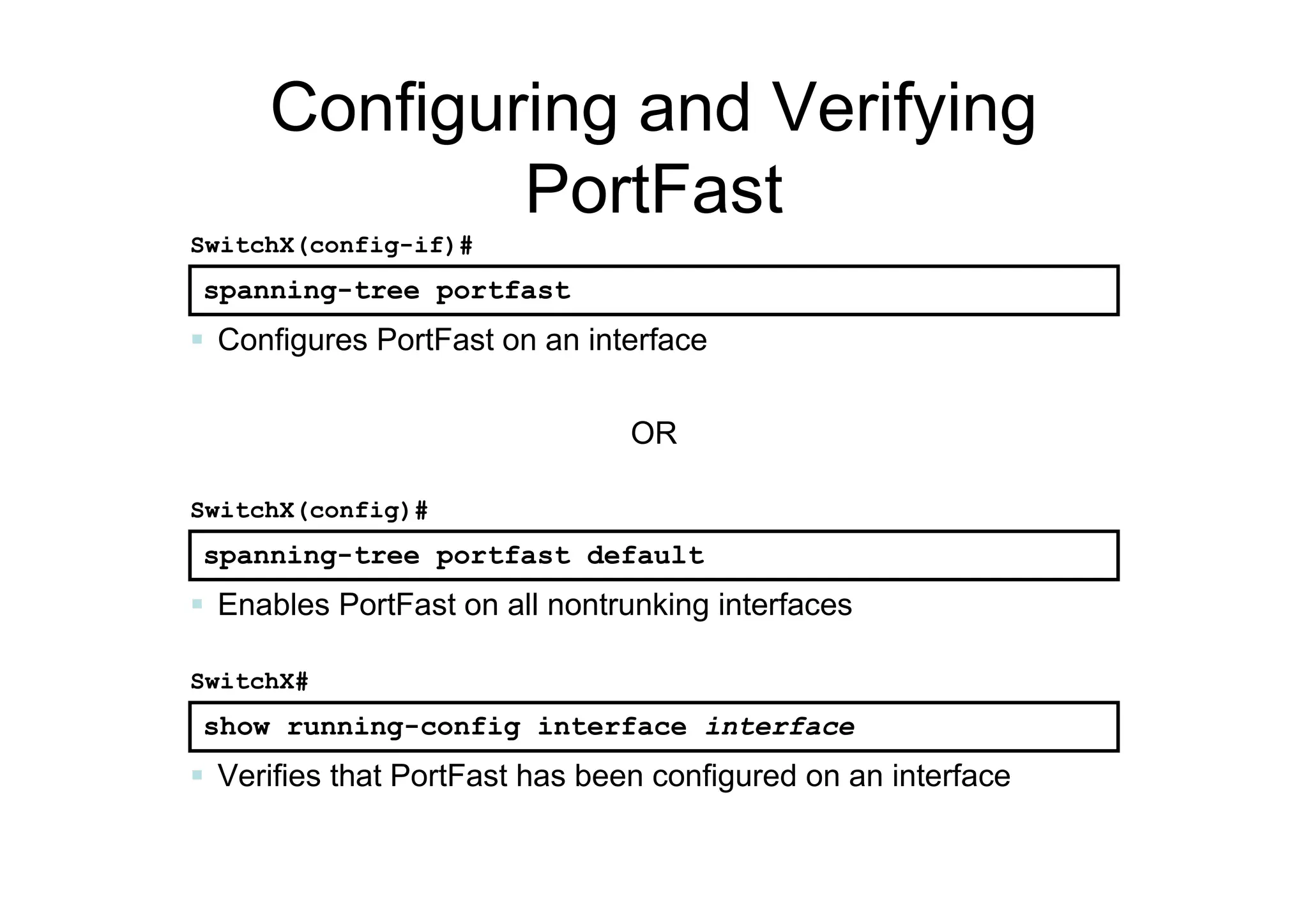
Configuring and Verifying
PortFast
spanning-tree portfast
SwitchX(config-if)#
 Configures PortFast on an interface
spanning-tree portfast default
SwitchX(config)#
 Enables PortFast on all nontrunking interfaces
show running-config interface interface
SwitchX#
 Verifies that PortFast has been configured on an interface
OR

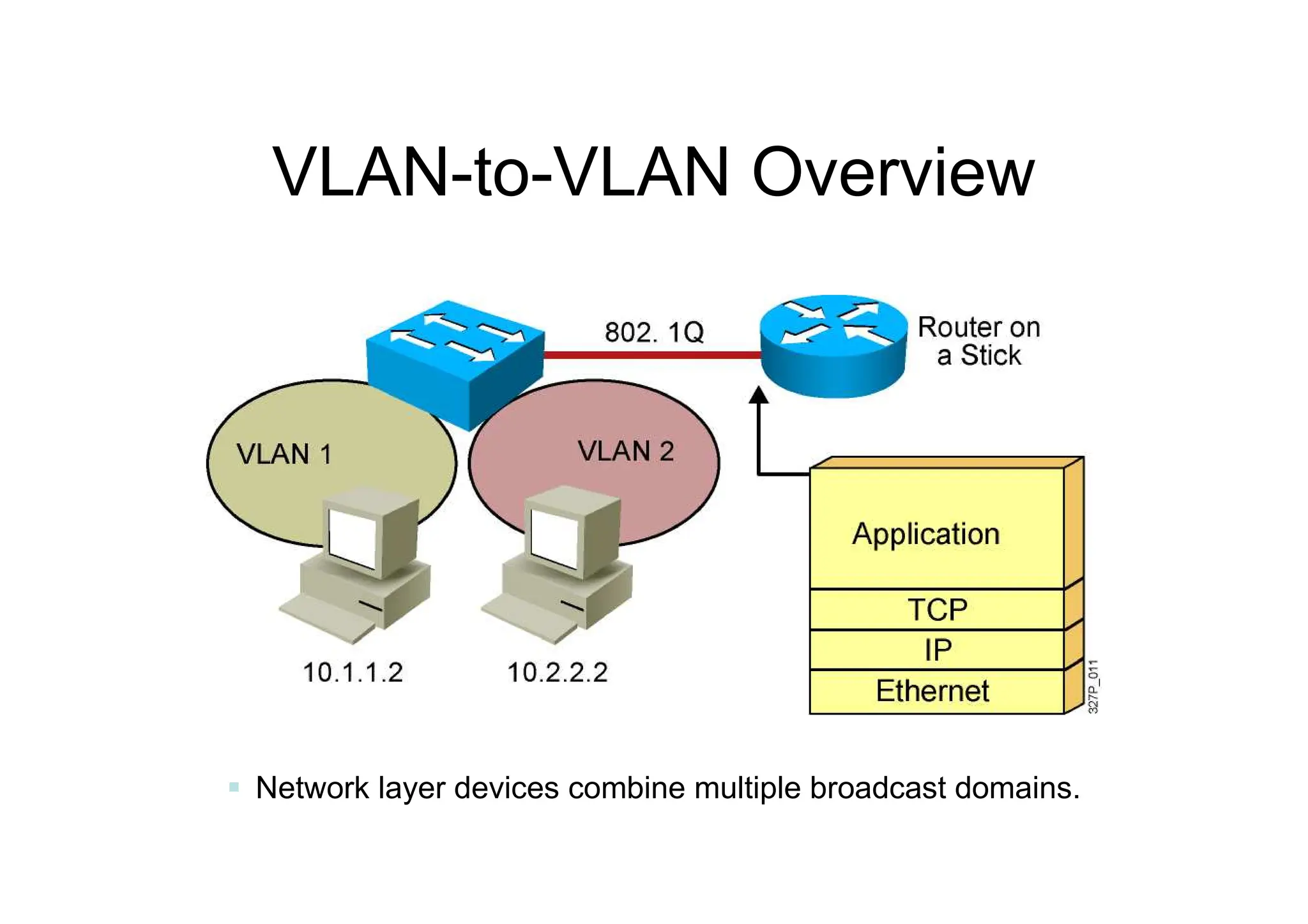
VLAN-to-VLAN Overview
 Network layer devices combine multiple broadcast domains.
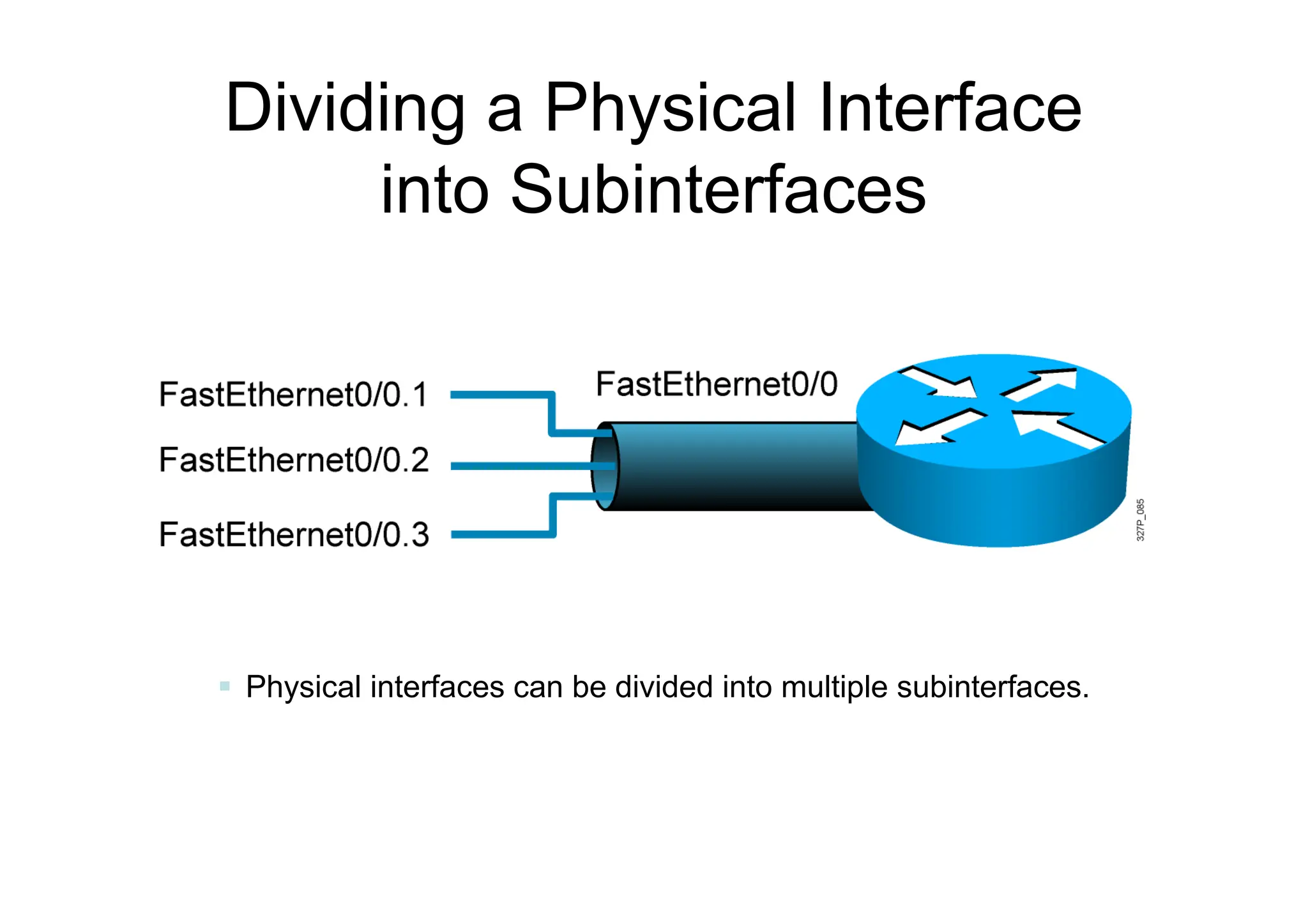
Dividing a Physical Interface
into Subinterfaces
 Physical interfaces can be divided into multiple subinterfaces.
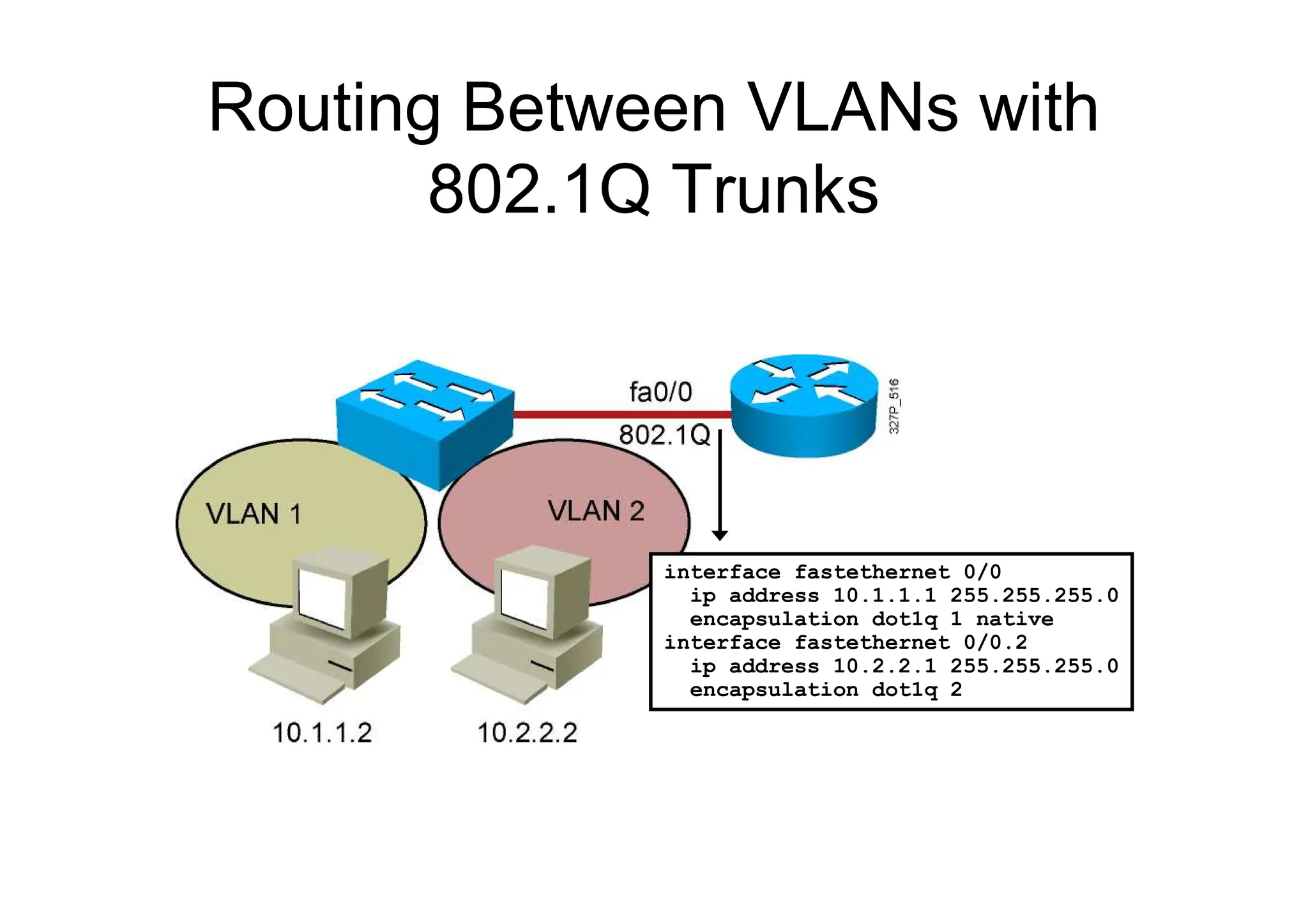
Routing Between VLANs with
802.1Q Trunks
interface fastethernet 0/0
ip address 10.1.1.1 255.255.255.0
encapsulation dot1q 1 native
interface fastethernet 0/0.2
ip address 10.2.2.1 255.255.255.0
encapsulation dot1q 2
© 2008 Cisco Systems, Inc. All rights reserved. CIPT1 v6.0—3-4
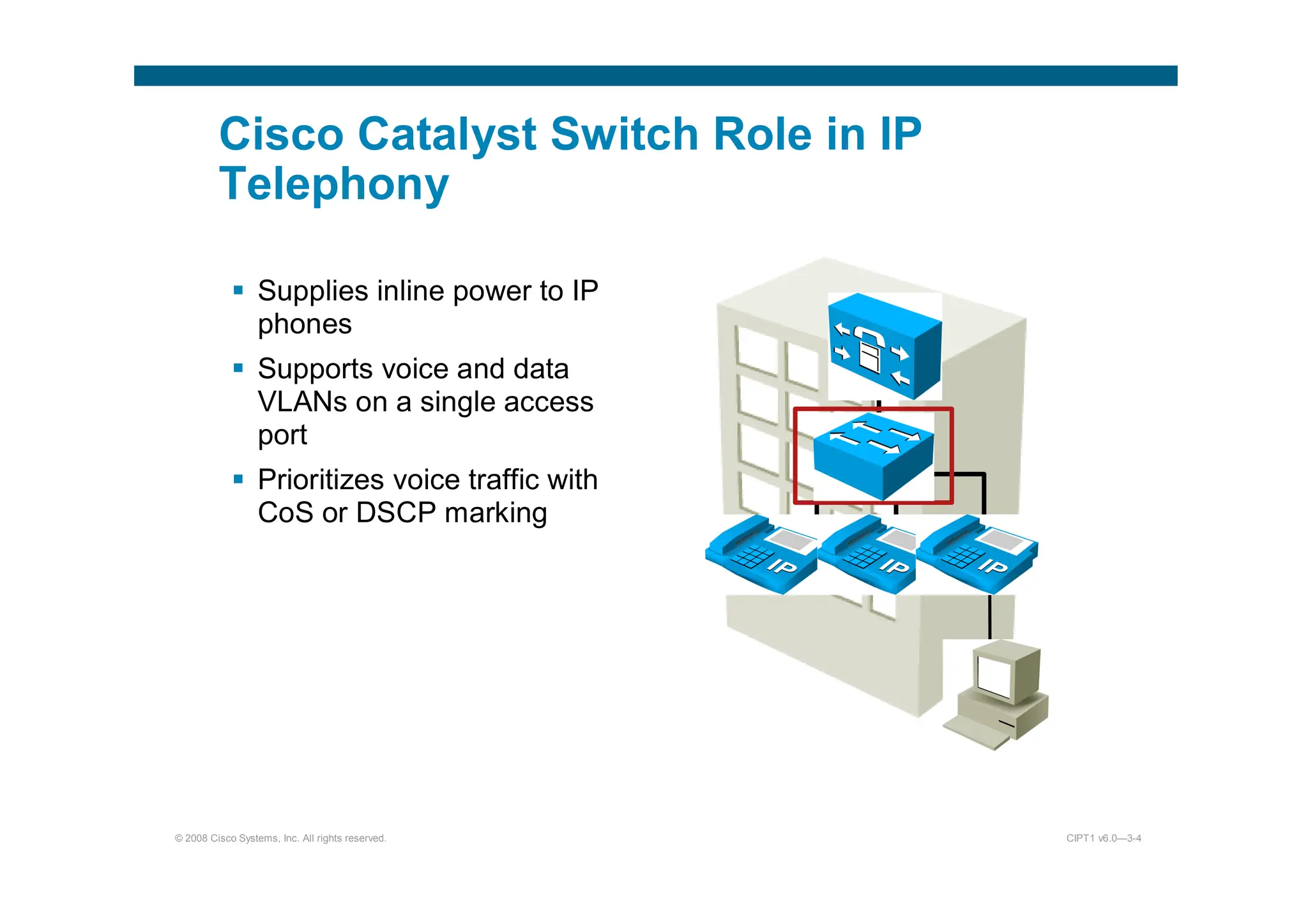
Cisco Catalyst Switch Role in IP
Telephony
 Supplies inline power to IP
phones
 Supports voice and data
VLANs on a single access
port
 Prioritizes voice traffic with
CoS or DSCP marking
© 2008 Cisco Systems, Inc. All rights reserved. CIPT1 v6.0—3-5
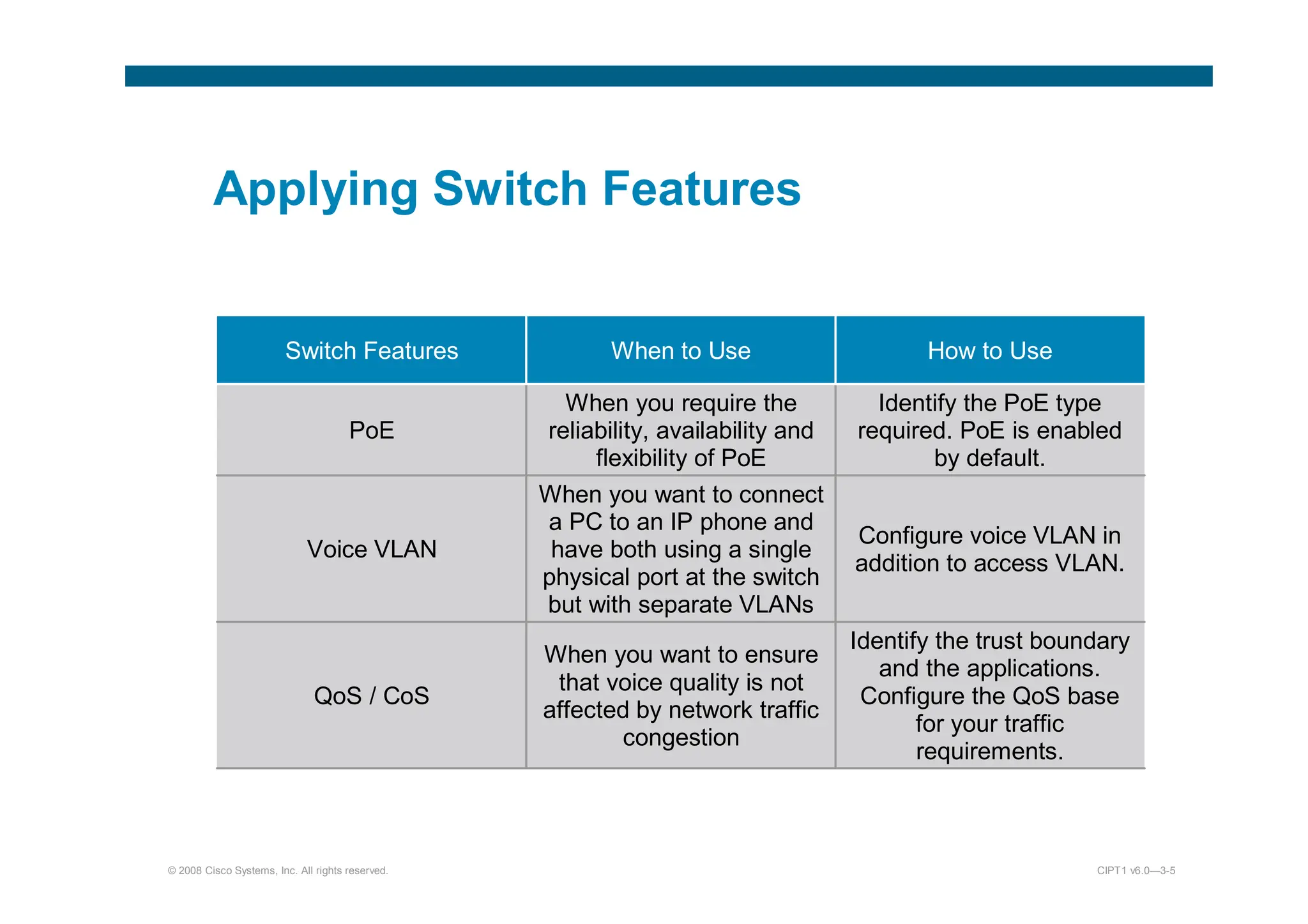
Applying Switch Features
Switch Features When to Use How to Use
PoE
When you require the
reliability, availability and
flexibility of PoE
Identify the PoE type
required. PoE is enabled
by default.
Voice VLAN
When you want to connect
a PC to an IP phone and
have both using a single
physical port at the switch
but with separate VLANs
Configure voice VLAN in
addition to access VLAN.
QoS / CoS
When you want to ensure
that voice quality is not
affected by network traffic
congestion
Identify the trust boundary
and the applications.
Configure the QoS base
for your traffic
requirements.
© 2008 Cisco Systems, Inc. All rights reserved. CIPT1 v6.0—3-6
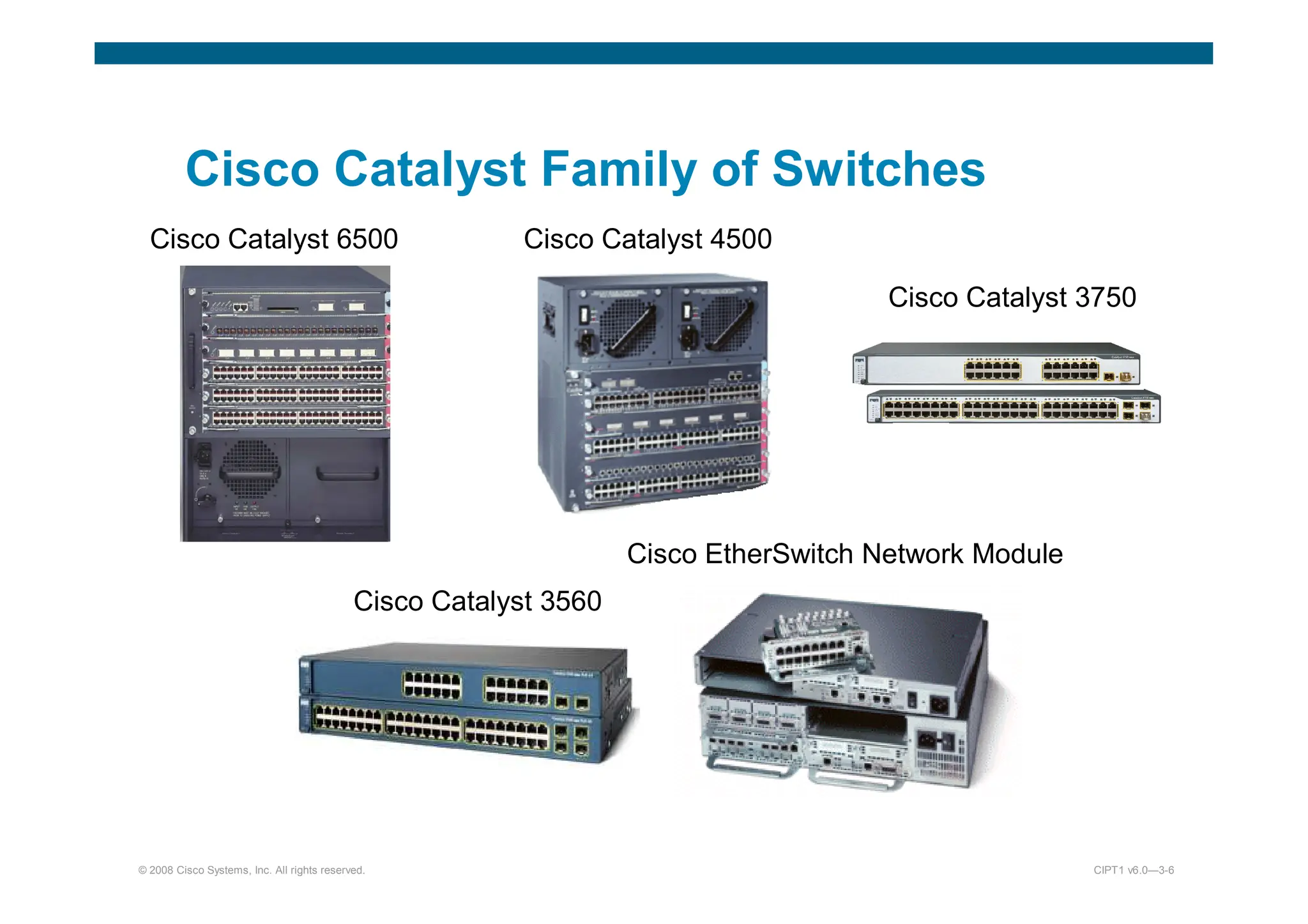
Cisco Catalyst Family of Switches
Cisco Catalyst 3560
Cisco Catalyst 3750
Cisco Catalyst 6500 Cisco Catalyst 4500
Cisco EtherSwitch Network Module
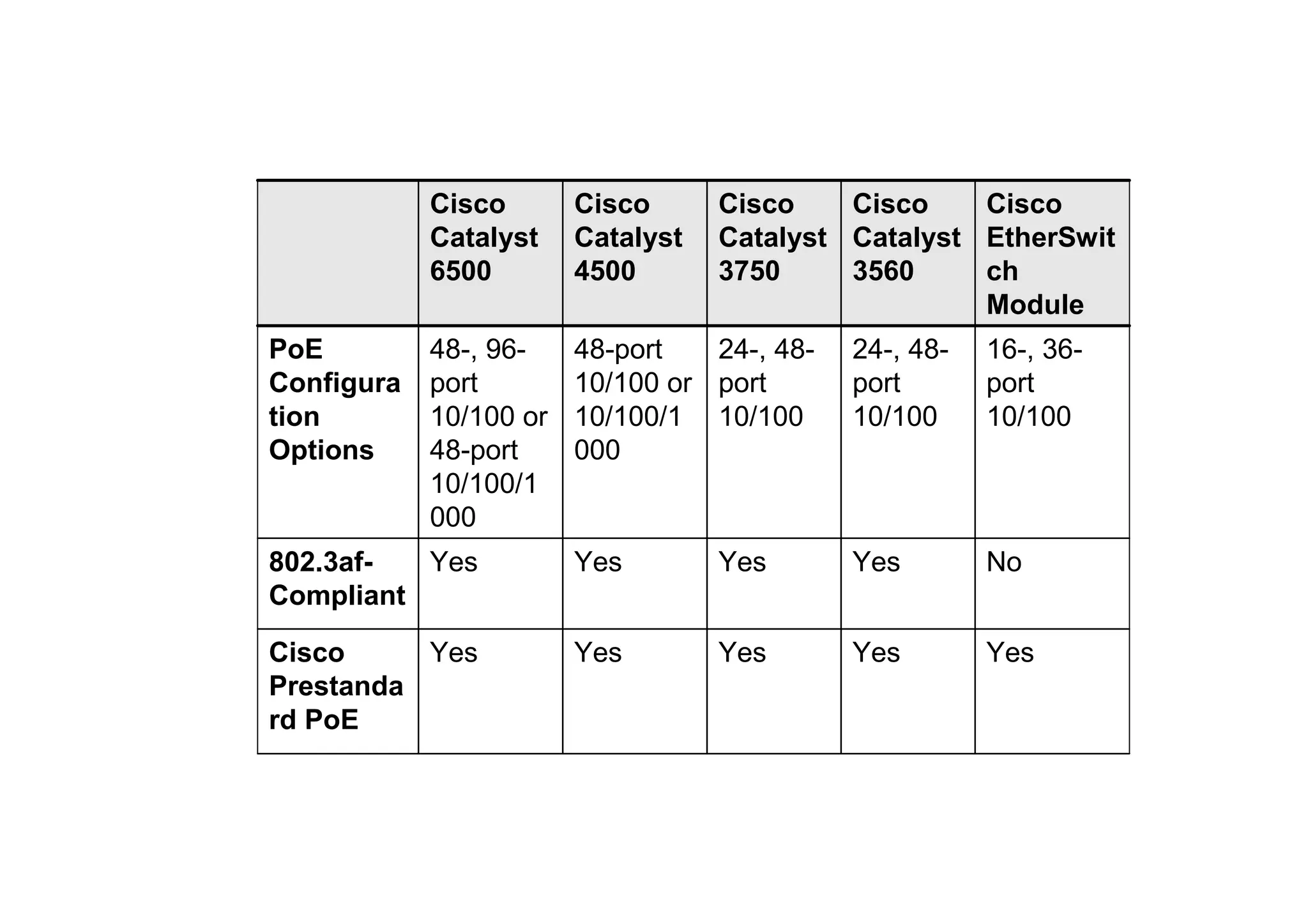
Yes
Yes
Yes
Yes
Yes
Cisco
Prestanda
rd PoE
No
Yes
Yes
Yes
Yes
802.3af-
Compliant
16-, 36-
port
10/100
24-, 48-
port
10/100
24-, 48-
port
10/100
48-port
10/100 or
10/100/1
000
48-, 96-
port
10/100 or
48-port
10/100/1
000
PoE
Configura
tion
Options
Cisco
EtherSwit
ch
Module
Cisco
Catalyst
3560
Cisco
Catalyst
3750
Cisco
Catalyst
4500
Cisco
Catalyst
6500
© 2008 Cisco Systems, Inc. All rights reserved. CIPT1 v6.0—3-8
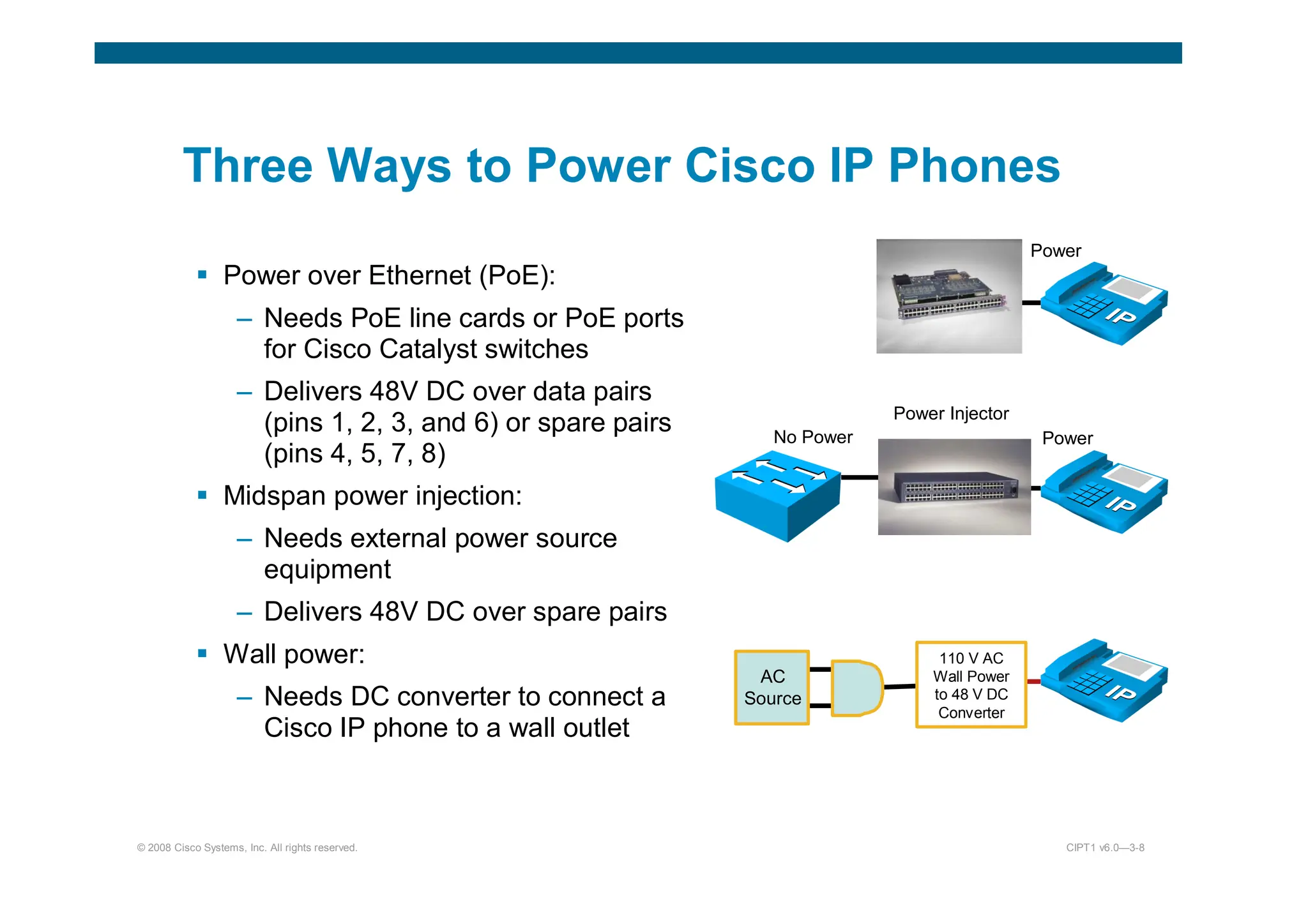
Three Ways to Power Cisco IP Phones
 Power over Ethernet (PoE):
– Needs PoE line cards or PoE ports
for Cisco Catalyst switches
– Delivers 48V DC over data pairs
(pins 1, 2, 3, and 6) or spare pairs
(pins 4, 5, 7, 8)
 Midspan power injection:
– Needs external power source
equipment
– Delivers 48V DC over spare pairs
 Wall power:
– Needs DC converter to connect a
Cisco IP phone to a wall outlet
110 V AC
Wall Power
to 48 V DC
Converter
AC
Source
No Power
Power Injector
Power
Power
© 2008 Cisco Systems, Inc. All rights reserved. CIPT1 v6.0—3-9
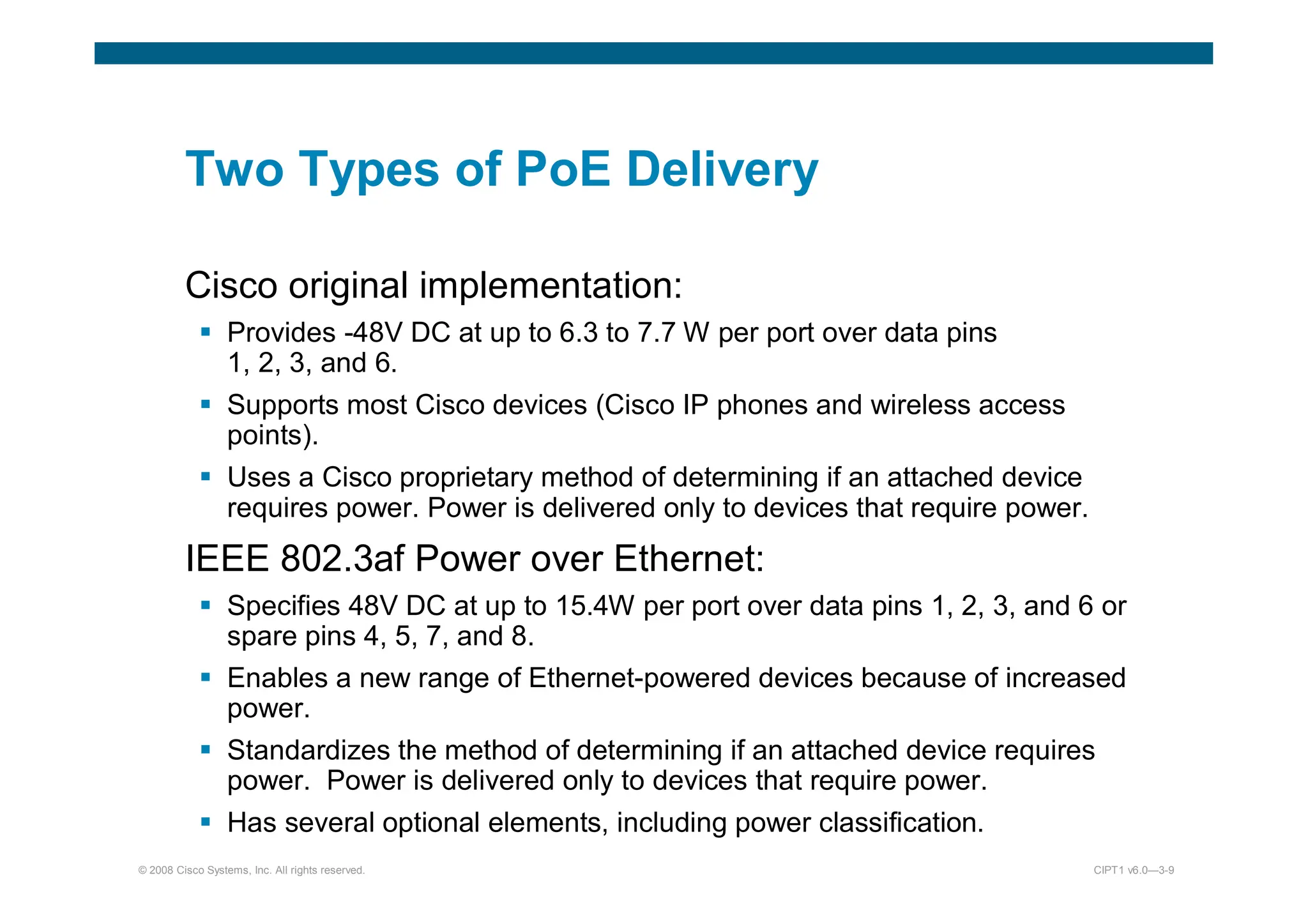
Two Types of PoE Delivery
Cisco original implementation:
 Provides -48V DC at up to 6.3 to 7.7 W per port over data pins
1, 2, 3, and 6.
 Supports most Cisco devices (Cisco IP phones and wireless access
points).
 Uses a Cisco proprietary method of determining if an attached device
requires power. Power is delivered only to devices that require power.
IEEE 802.3af Power over Ethernet:
 Specifies 48V DC at up to 15.4W per port over data pins 1, 2, 3, and 6 or
spare pins 4, 5, 7, and 8.
 Enables a new range of Ethernet-powered devices because of increased
power.
 Standardizes the method of determining if an attached device requires
power. Power is delivered only to devices that require power.
 Has several optional elements, including power classification.
© 2008 Cisco Systems, Inc. All rights reserved. CIPT1 v6.0—3-10
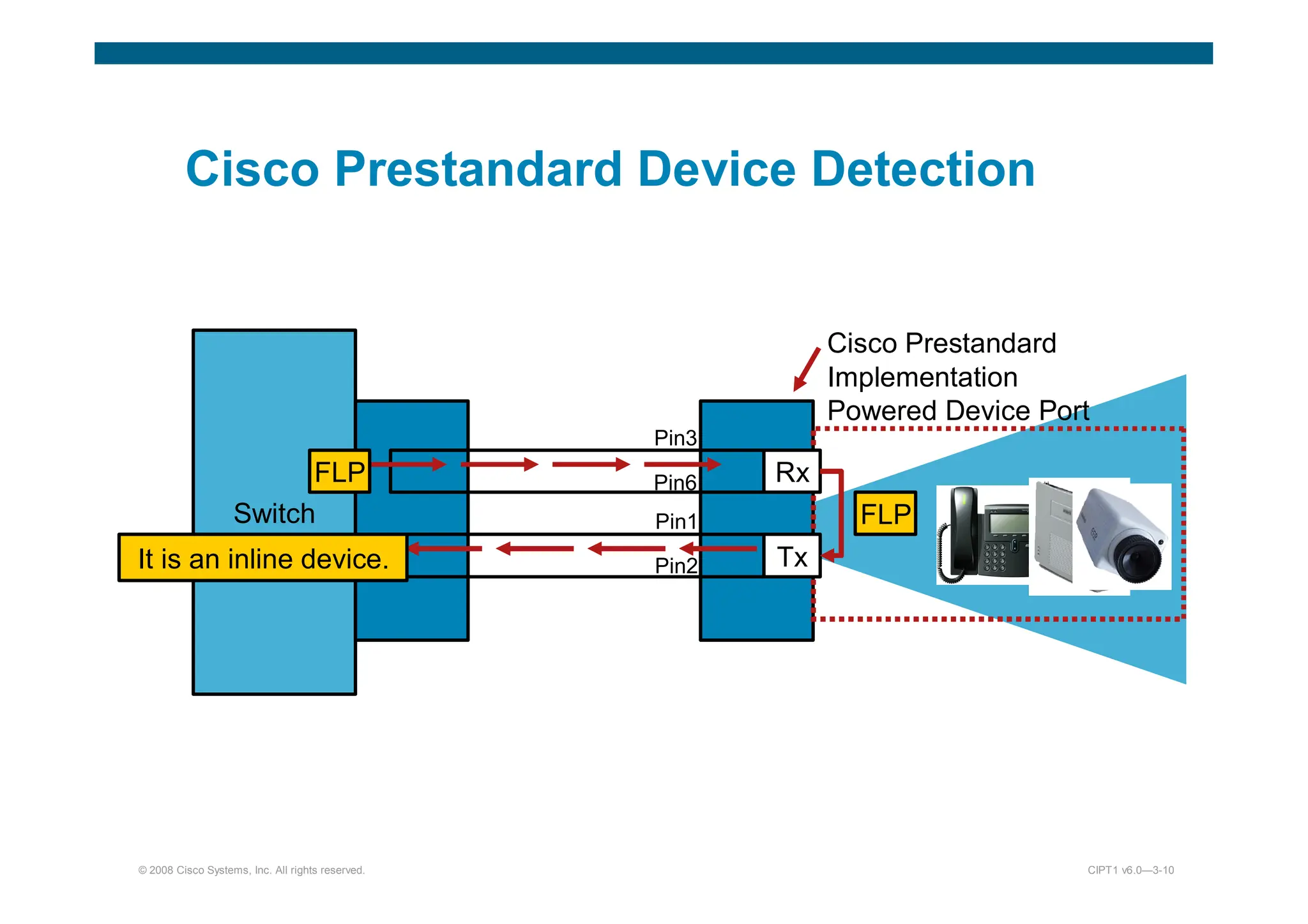
Cisco Prestandard Device Detection
Switch
Cisco Prestandard
Implementation
Powered Device Port
Rx
Tx
FLP
FLP
It is an inline device.
Pin3
Pin6
Pin1
Pin2
© 2008 Cisco Systems, Inc. All rights reserved. CIPT1 v6.0—3-11
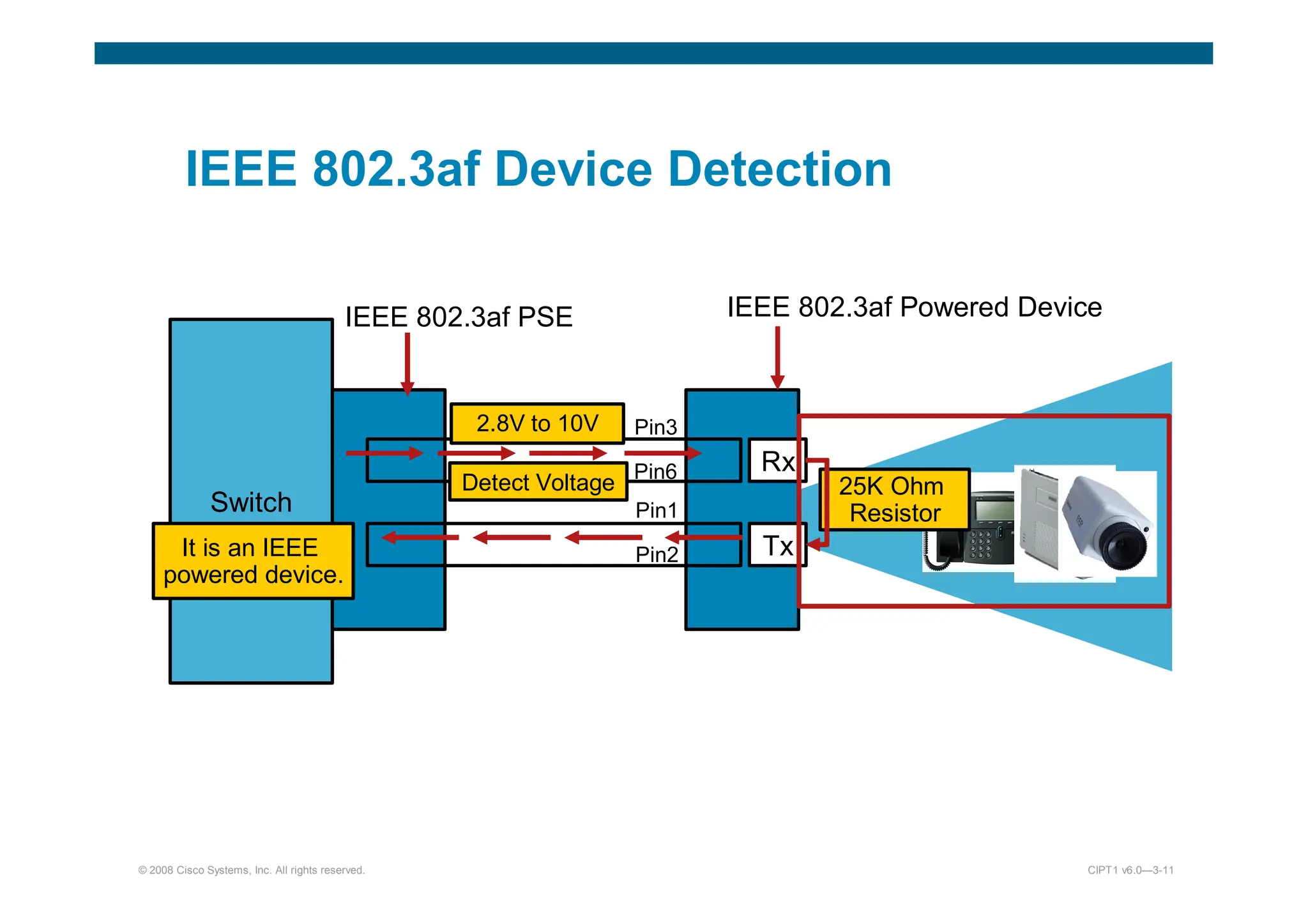
IEEE 802.3af Device Detection
Switch
IEEE 802.3af Powered Device
Rx
Tx
Detect Voltage 25K Ohm
Resistor
It is an IEEE
powered device.
Pin3
Pin6
Pin1
Pin2
2.8V to 10V
IEEE 802.3af PSE
© 2008 Cisco Systems, Inc. All rights reserved. CIPT1 v6.0—3-13
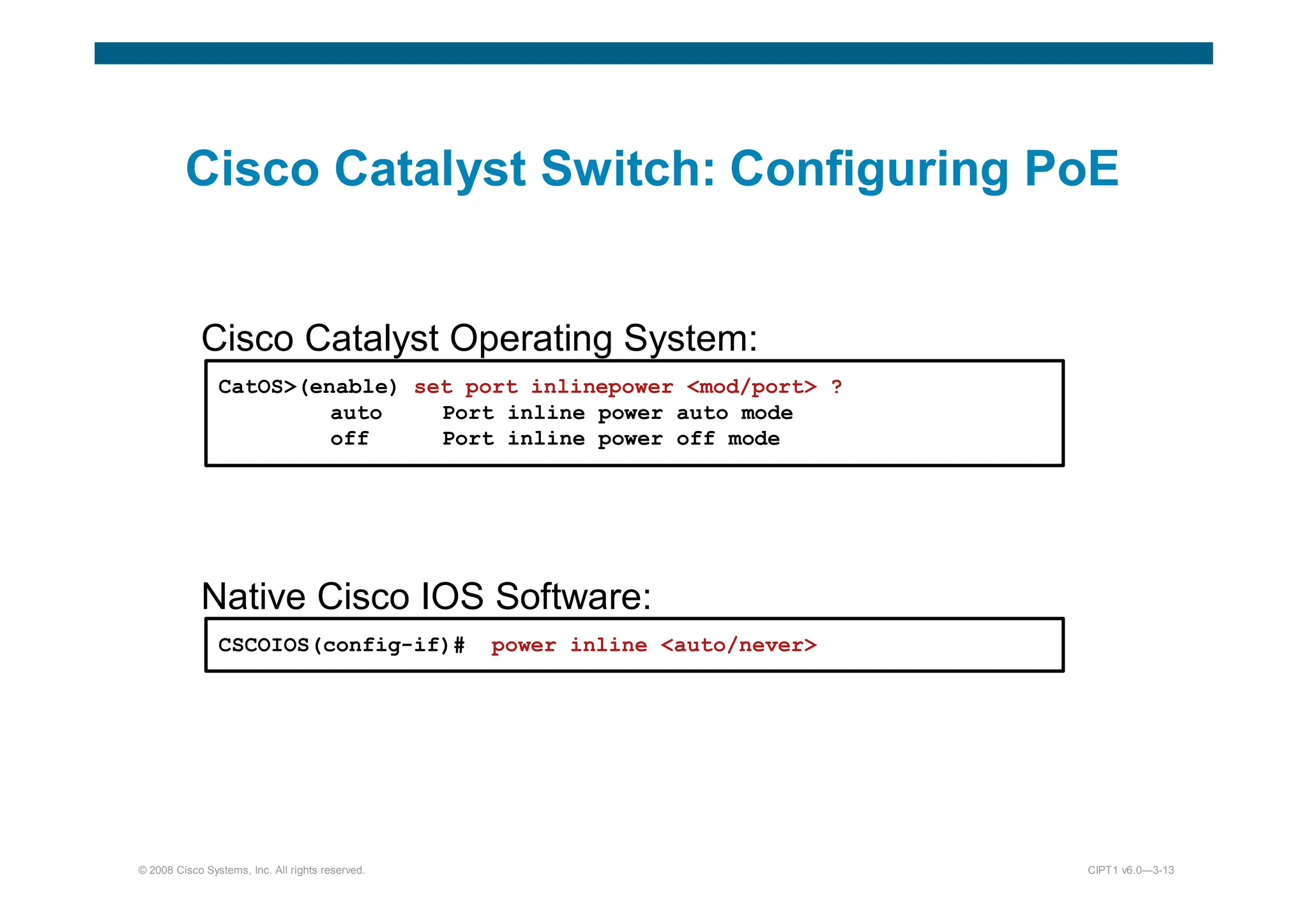
Cisco Catalyst Switch: Configuring PoE
Cisco Catalyst Operating System:
CatOS(enable) set port inlinepower mod/port ?
auto Port inline power auto mode
off Port inline power off mode
Native Cisco IOS Software:
CSCOIOS(config-if)# power inline auto/never
© 2008 Cisco Systems, Inc. All rights reserved. CIPT1 v6.0—3-14
Cisco Catalyst Switch: Show
Inline Power Status
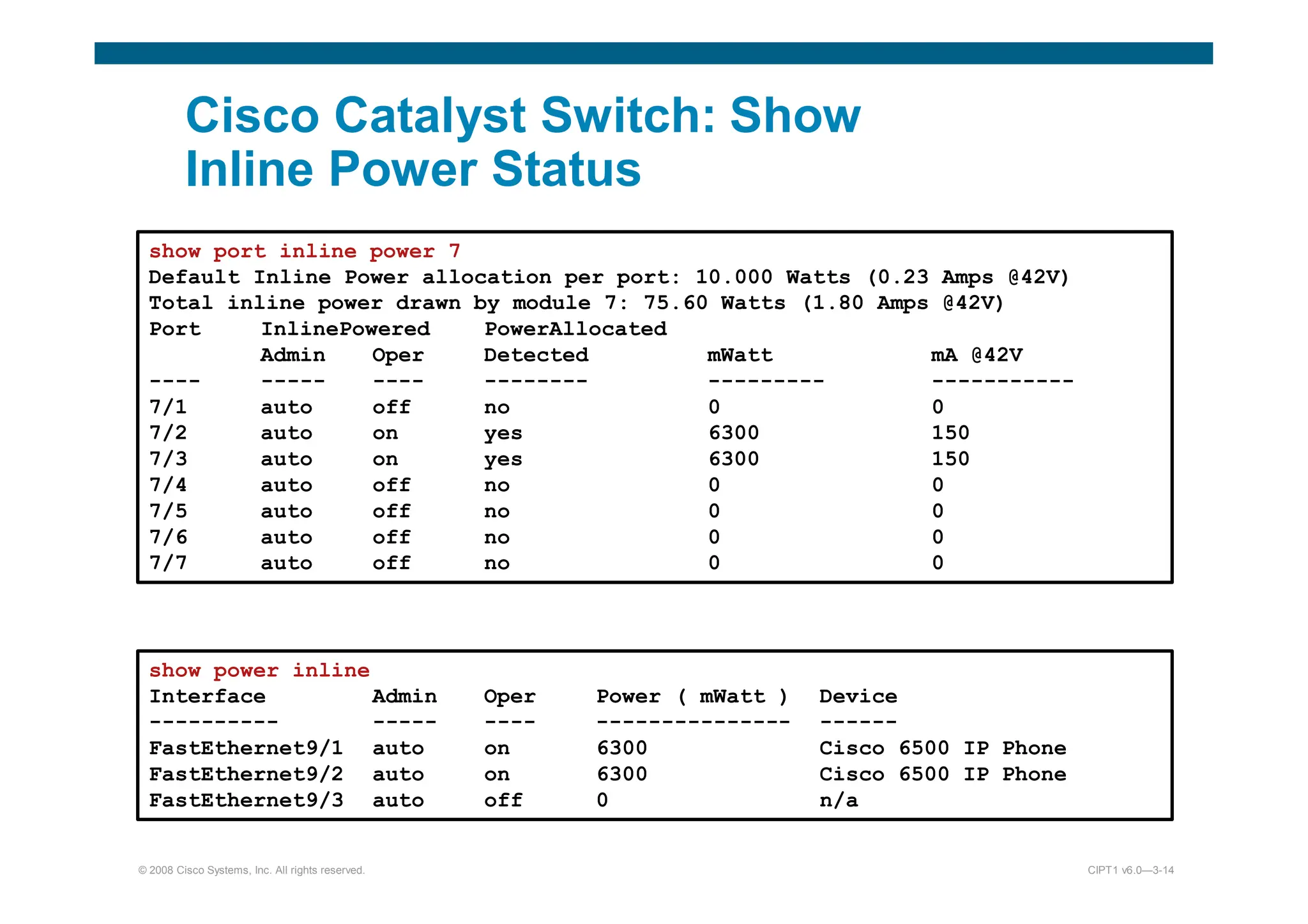
show port inline power 7
Default Inline Power allocation per port: 10.000 Watts (0.23 Amps @42V)
Total inline power drawn by module 7: 75.60 Watts (1.80 Amps @42V)
Port InlinePowered PowerAllocated
Admin Oper Detected mWatt mA @42V
---- ----- ---- -------- --------- -----------
7/1 auto off no 0 0
7/2 auto on yes 6300 150
7/3 auto on yes 6300 150
7/4 auto off no 0 0
7/5 auto off no 0 0
7/6 auto off no 0 0
7/7 auto off no 0 0
show power inline
Interface Admin Oper Power ( mWatt ) Device
---------- ----- ---- --------------- ------
FastEthernet9/1 auto on 6300 Cisco 6500 IP Phone
FastEthernet9/2 auto on 6300 Cisco 6500 IP Phone
FastEthernet9/3 auto off 0 n/a
© 2008 Cisco Systems, Inc. All rights reserved. CIPT1 v6.0—3-16
Cisco IP Phone Connected to the
Network
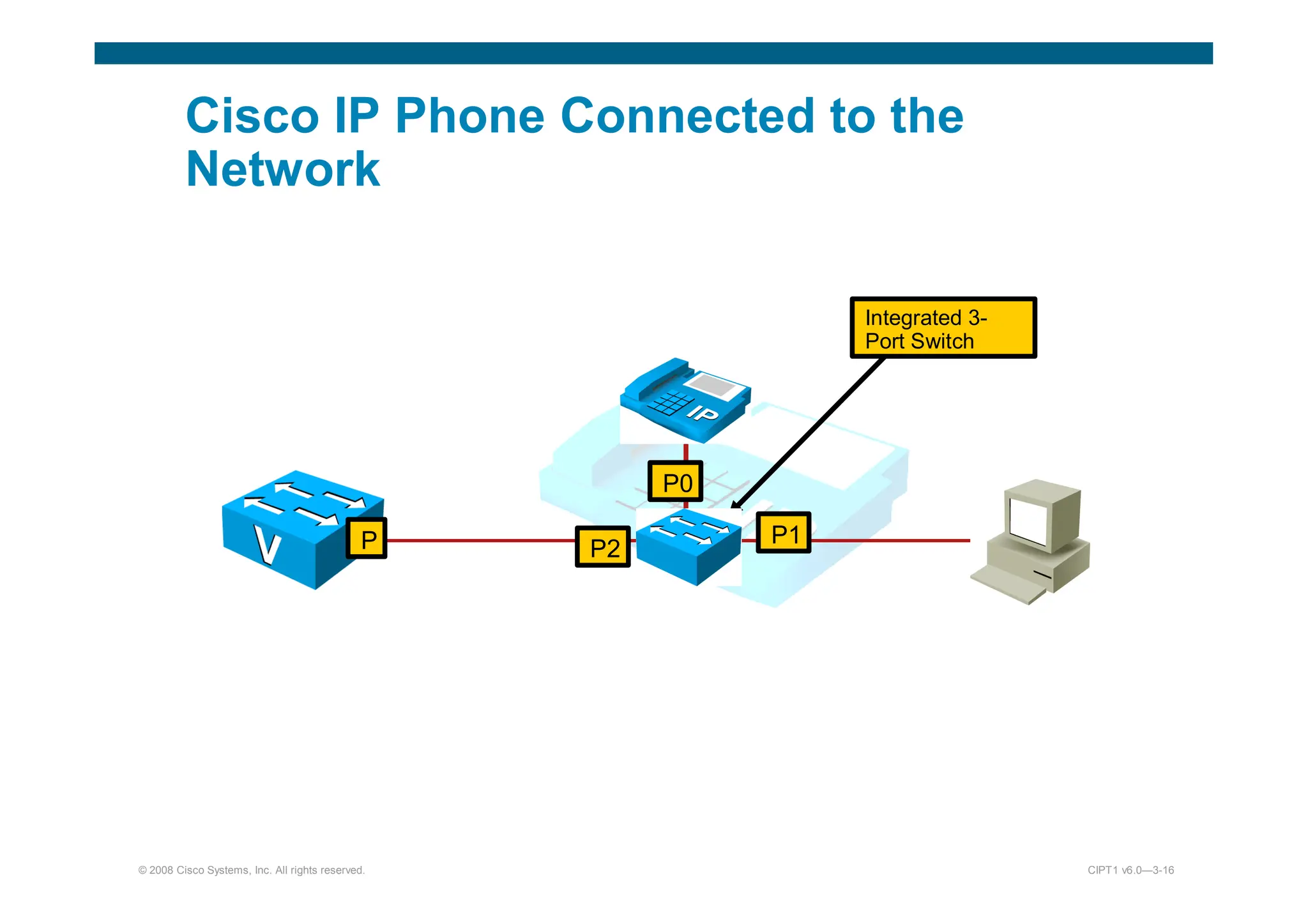
P0
P1
P2
P
Integrated 3-
Port Switch
© 2008 Cisco Systems, Inc. All rights reserved. CIPT1 v6.0—3-17
Voice VLAN Support
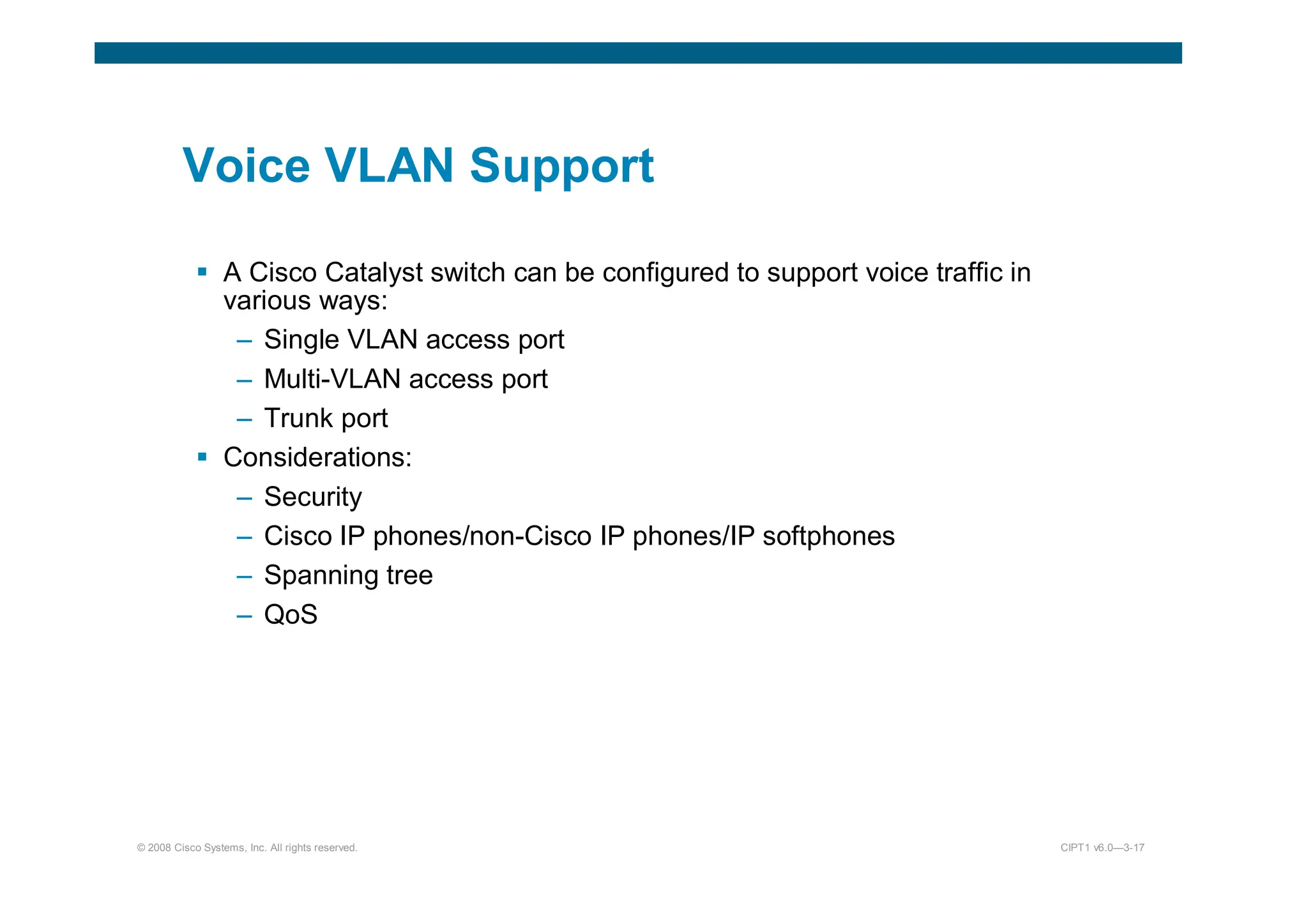
 A Cisco Catalyst switch can be configured to support voice traffic in
various ways:
– Single VLAN access port
– Multi-VLAN access port
– Trunk port
 Considerations:
– Security
– Cisco IP phones/non-Cisco IP phones/IP softphones
– Spanning tree
– QoS
© 2008 Cisco Systems, Inc. All rights reserved. CIPT1 v6.0—3-18
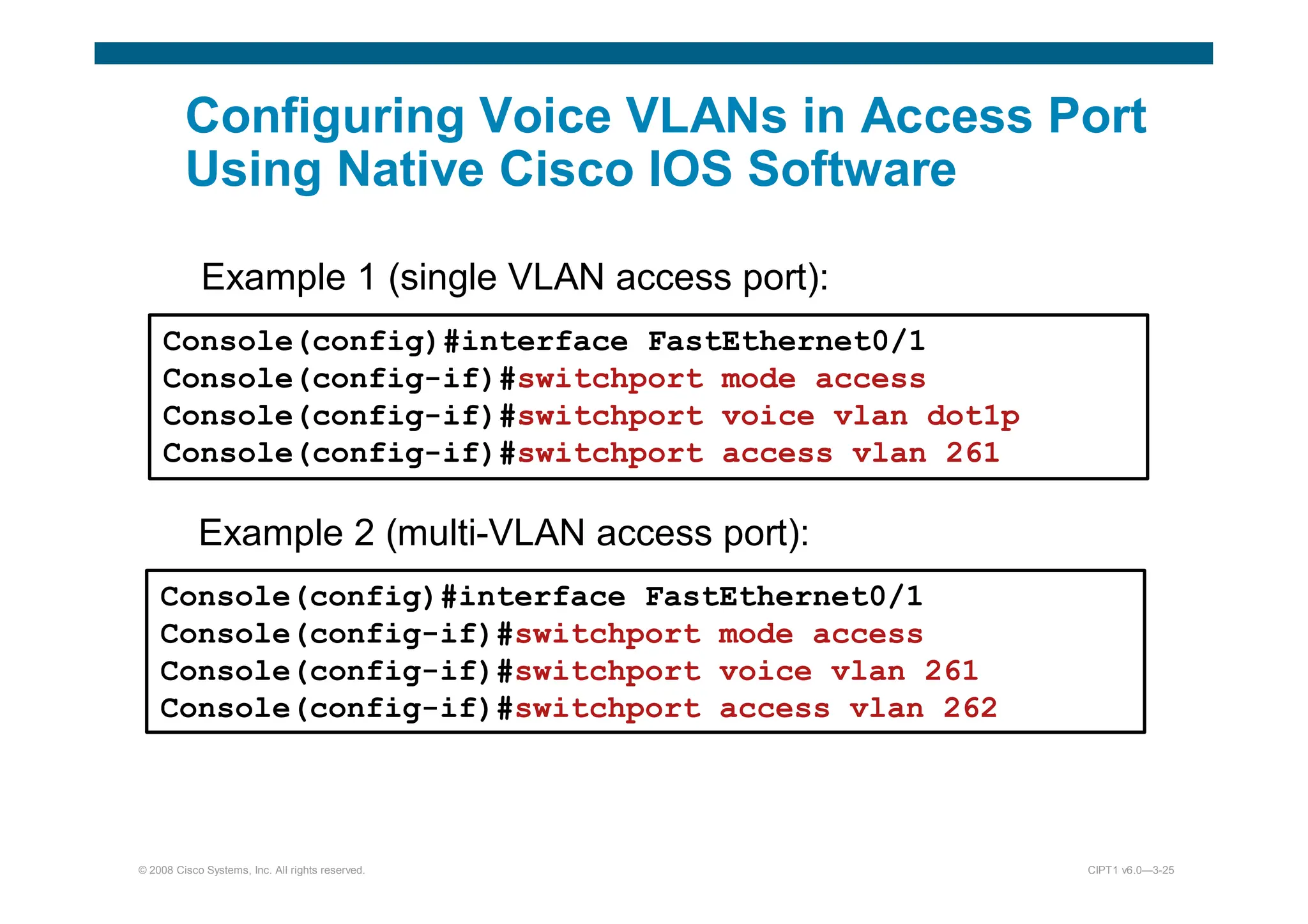
Single VLAN Access Port
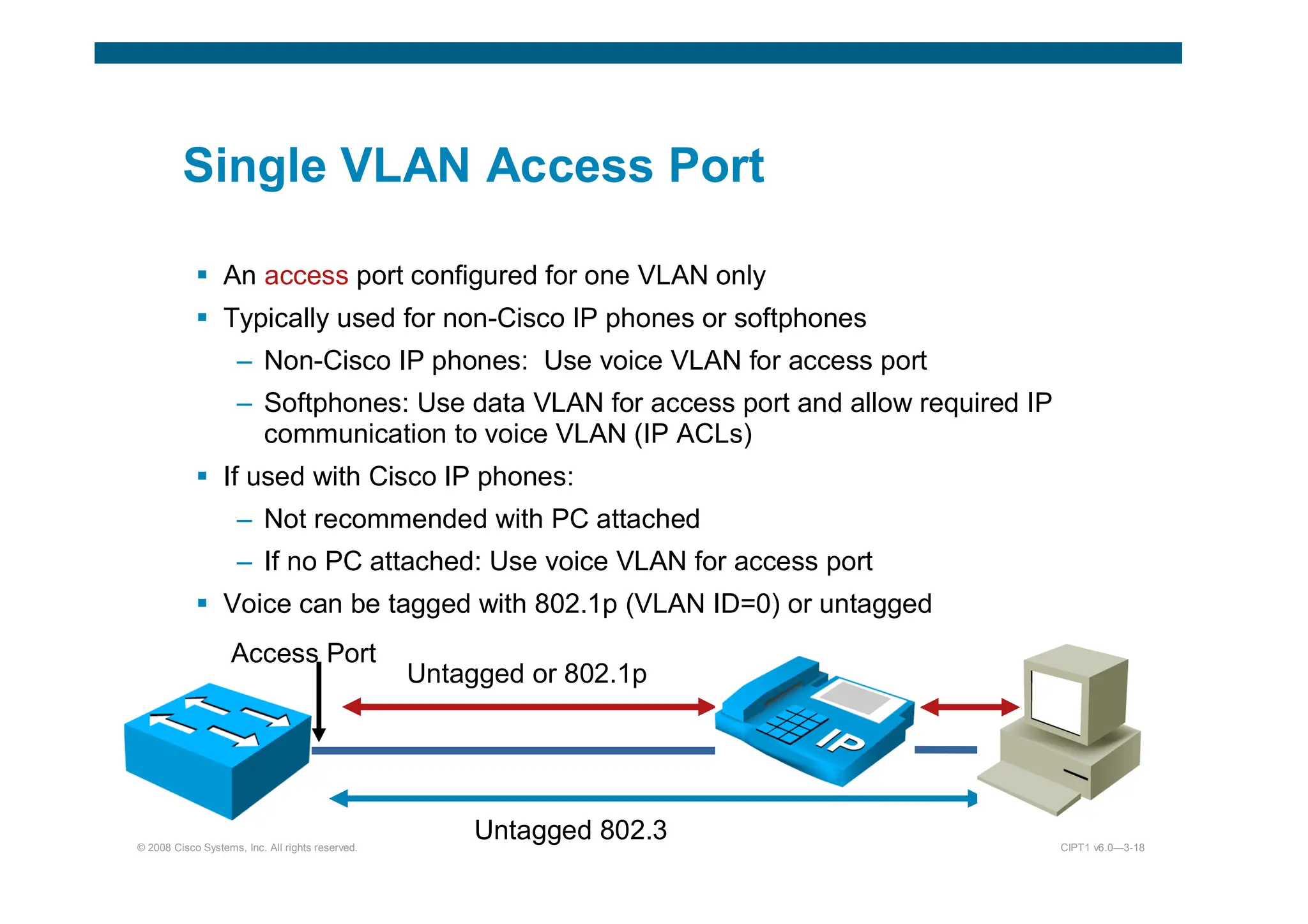
 An access port configured for one VLAN only
 Typically used for non-Cisco IP phones or softphones
– Non-Cisco IP phones: Use voice VLAN for access port
– Softphones: Use data VLAN for access port and allow required IP
communication to voice VLAN (IP ACLs)
 If used with Cisco IP phones:
– Not recommended with PC attached
– If no PC attached: Use voice VLAN for access port
 Voice can be tagged with 802.1p (VLAN ID=0) or untagged
Access Port
Untagged 802.3
Untagged or 802.1p
© 2008 Cisco Systems, Inc. All rights reserved. CIPT1 v6.0—3-19
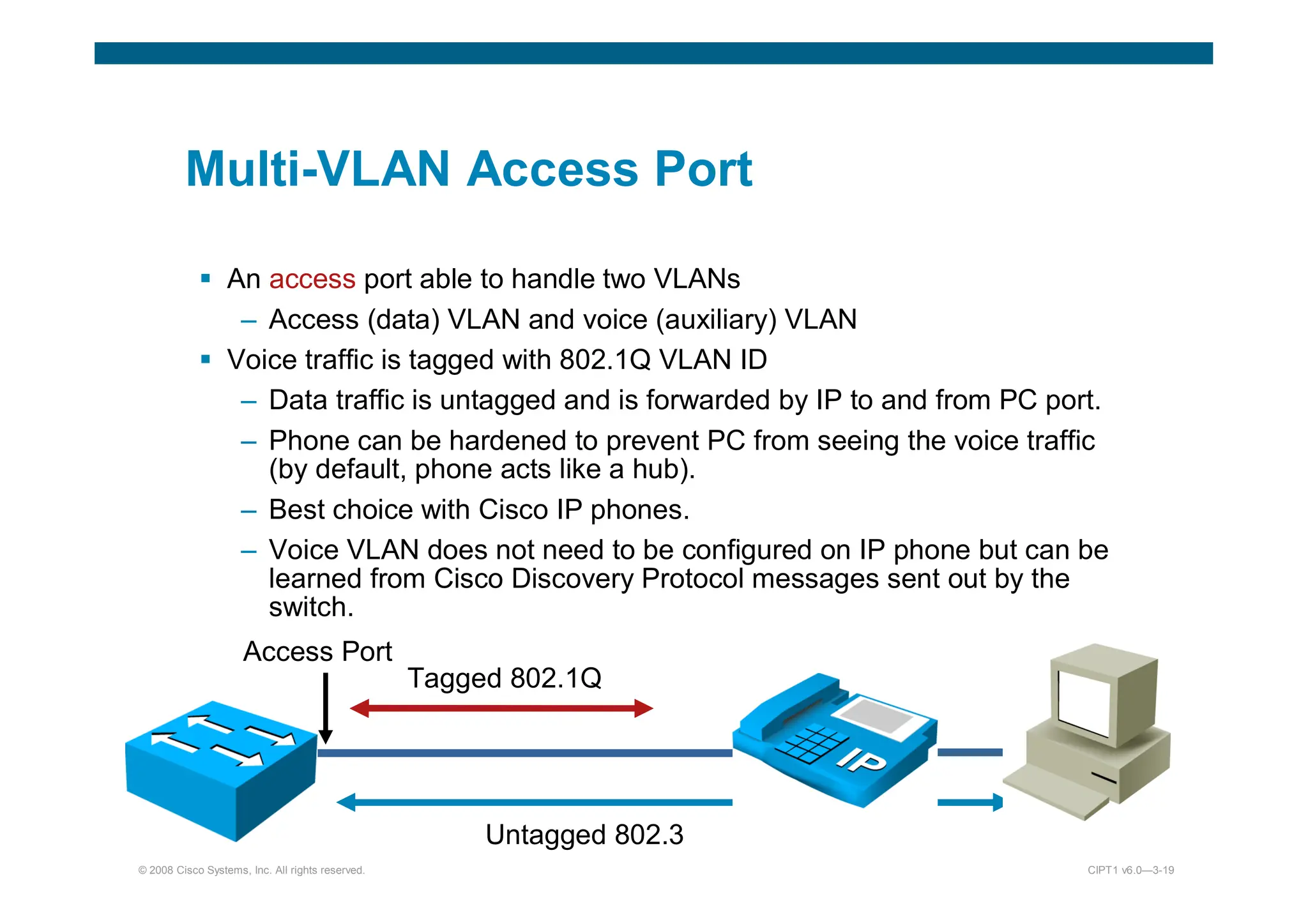
Multi-VLAN Access Port
 An access port able to handle two VLANs
– Access (data) VLAN and voice (auxiliary) VLAN
 Voice traffic is tagged with 802.1Q VLAN ID
– Data traffic is untagged and is forwarded by IP to and from PC port.
– Phone can be hardened to prevent PC from seeing the voice traffic
(by default, phone acts like a hub).
– Best choice with Cisco IP phones.
– Voice VLAN does not need to be configured on IP phone but can be
learned from Cisco Discovery Protocol messages sent out by the
switch.
Access Port
Untagged 802.3
Tagged 802.1Q
© 2008 Cisco Systems, Inc. All rights reserved. CIPT1 v6.0—3-20
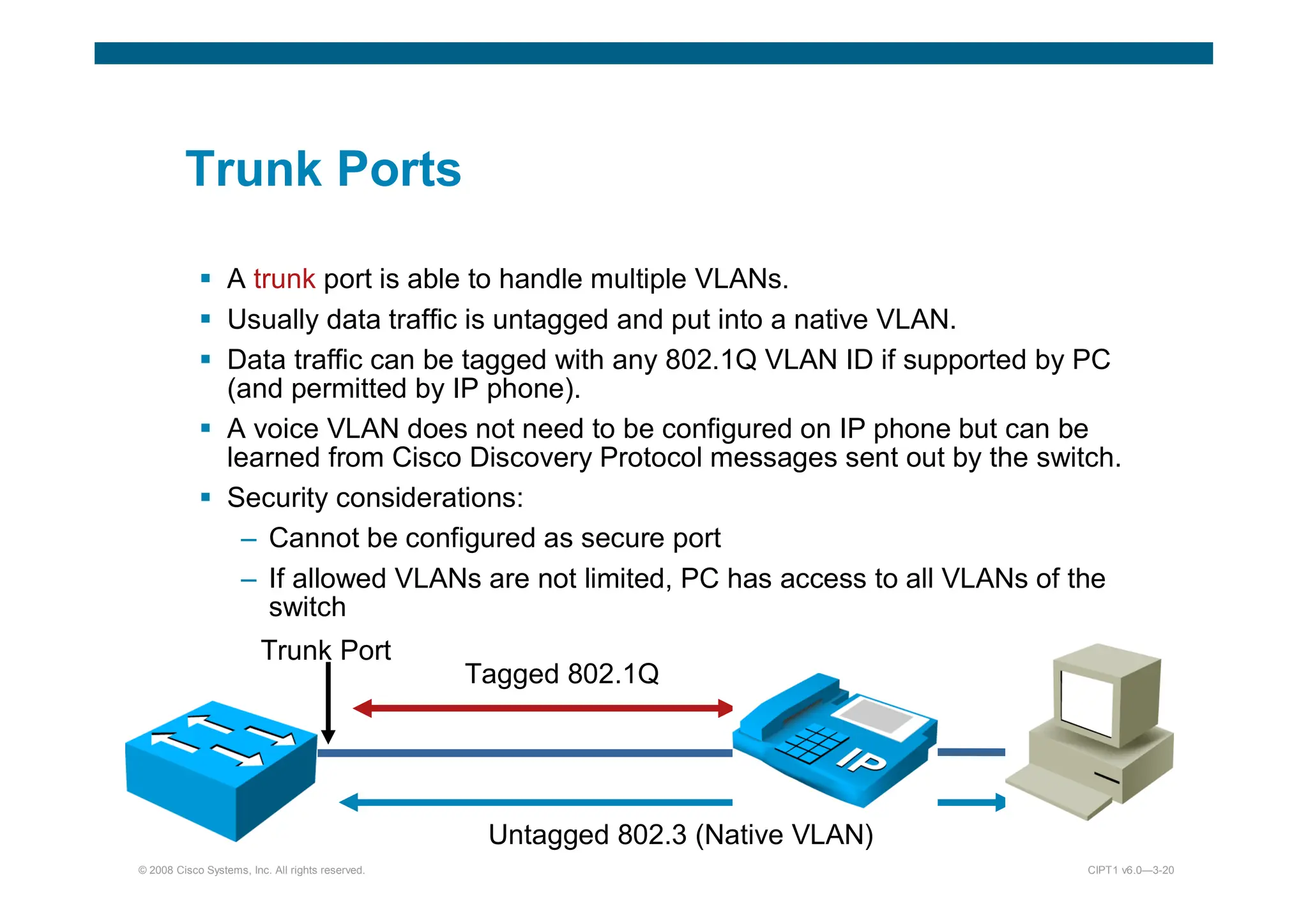
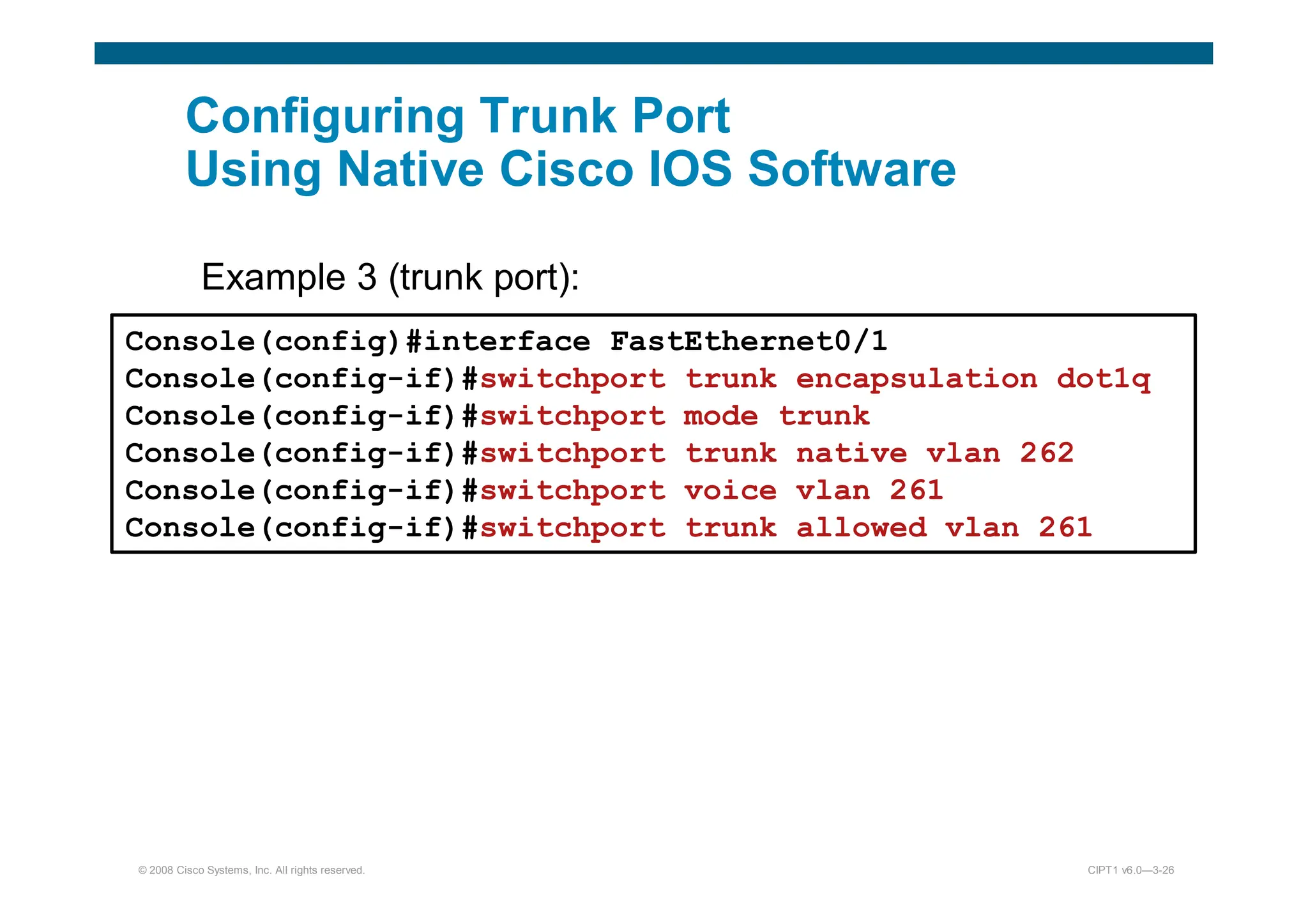
Trunk Ports
 A trunk port is able to handle multiple VLANs.
 Usually data traffic is untagged and put into a native VLAN.
 Data traffic can be tagged with any 802.1Q VLAN ID if supported by PC
(and permitted by IP phone).
 A voice VLAN does not need to be configured on IP phone but can be
learned from Cisco Discovery Protocol messages sent out by the switch.
 Security considerations:
– Cannot be configured as secure port
– If allowed VLANs are not limited, PC has access to all VLANs of the
switch
Trunk Port
Untagged 802.3 (Native VLAN)
Tagged 802.1Q
© 2008 Cisco Systems, Inc. All rights reserved. CIPT1 v6.0—3-22
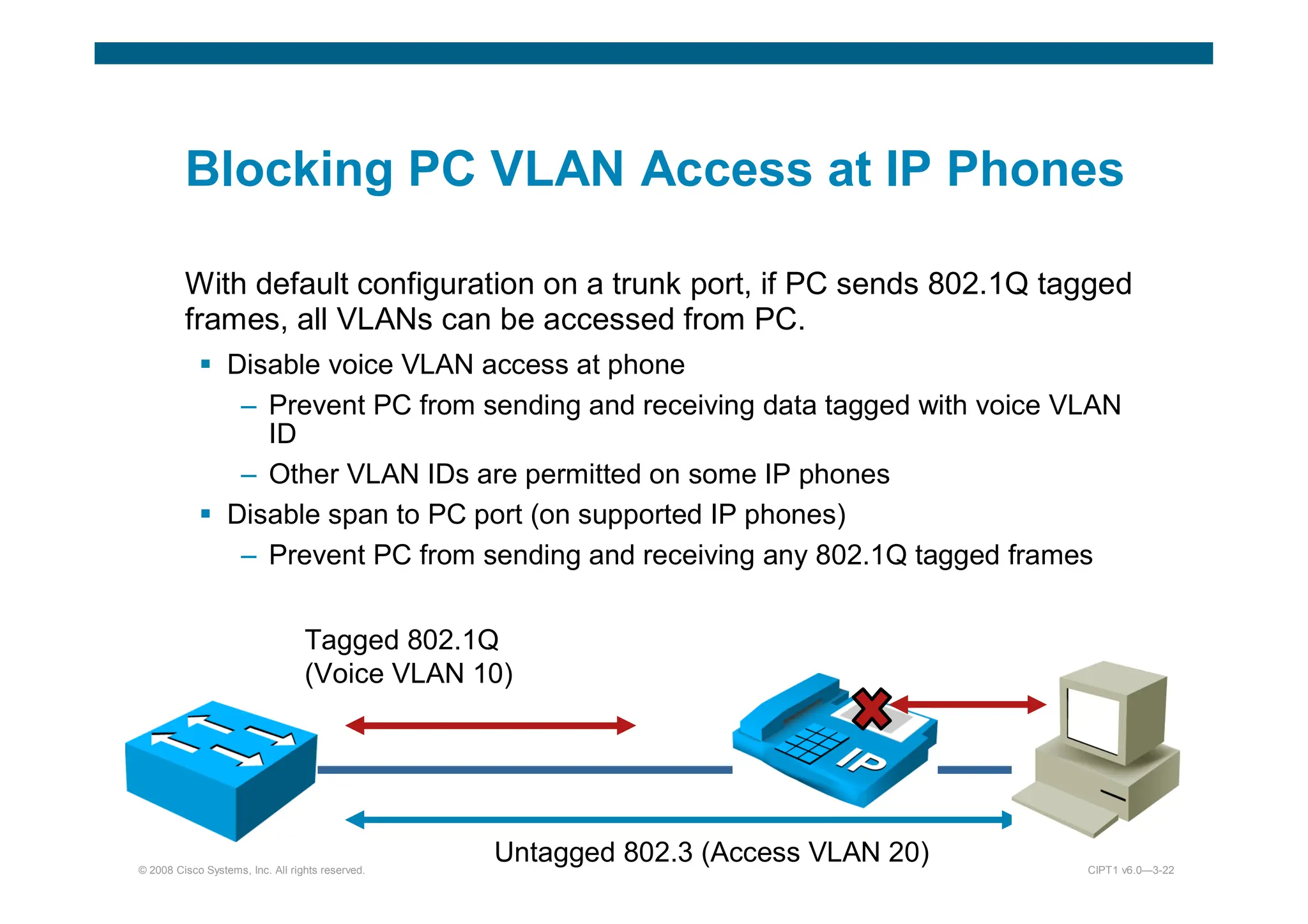
Blocking PC VLAN Access at IP Phones
With default configuration on a trunk port, if PC sends 802.1Q tagged
frames, all VLANs can be accessed from PC.
 Disable voice VLAN access at phone
– Prevent PC from sending and receiving data tagged with voice VLAN
ID
– Other VLAN IDs are permitted on some IP phones
 Disable span to PC port (on supported IP phones)
– Prevent PC from sending and receiving any 802.1Q tagged frames
Untagged 802.3 (Access VLAN 20)
Tagged 802.1Q
(Voice VLAN 10)
© 2008 Cisco Systems, Inc. All rights reserved. CIPT1 v6.0—3-23
Limiting VLANs on Trunk Ports at the Switch
 VLANs allowed on a trunk port can be configured at the switch.
 Recommendation is to only allow native VLAN and voice VLAN.
– Blocks PC access to all other VLANs, independent of IP phone
configuration and model
– Access to voice VLAN, can only be prevented by IP phone
configuration but is supported on all IP phone models with PC
ports
– Improves performance
– Improves stability – Minimizes STP issues
© 2008 Cisco Systems, Inc. All rights reserved. CIPT1 v6.0—3-25
Configuring Voice VLANs in Access Port
Using Native Cisco IOS Software
Example 1 (single VLAN access port):
Console(config)#interface FastEthernet0/1
Console(config-if)#switchport mode access
Console(config-if)#switchport voice vlan dot1p
Console(config-if)#switchport access vlan 261
Example 2 (multi-VLAN access port):
Console(config)#interface FastEthernet0/1
Console(config-if)#switchport mode access
Console(config-if)#switchport voice vlan 261
Console(config-if)#switchport access vlan 262
© 2008 Cisco Systems, Inc. All rights reserved. CIPT1 v6.0—3-26
Configuring Trunk Port
Using Native Cisco IOS Software
Example 3 (trunk port):
):
Console(config)#interface FastEthernet0/1
Console(config-if)#switchport trunk encapsulation dot1q
Console(config-if)#switchport mode trunk
Console(config-if)#switchport trunk native vlan 262
Console(config-if)#switchport voice vlan 261
Console(config-if)#switchport trunk allowed vlan 261
© 2008 Cisco Systems, Inc. All rights reserved. CIPT1 v6.0—3-27
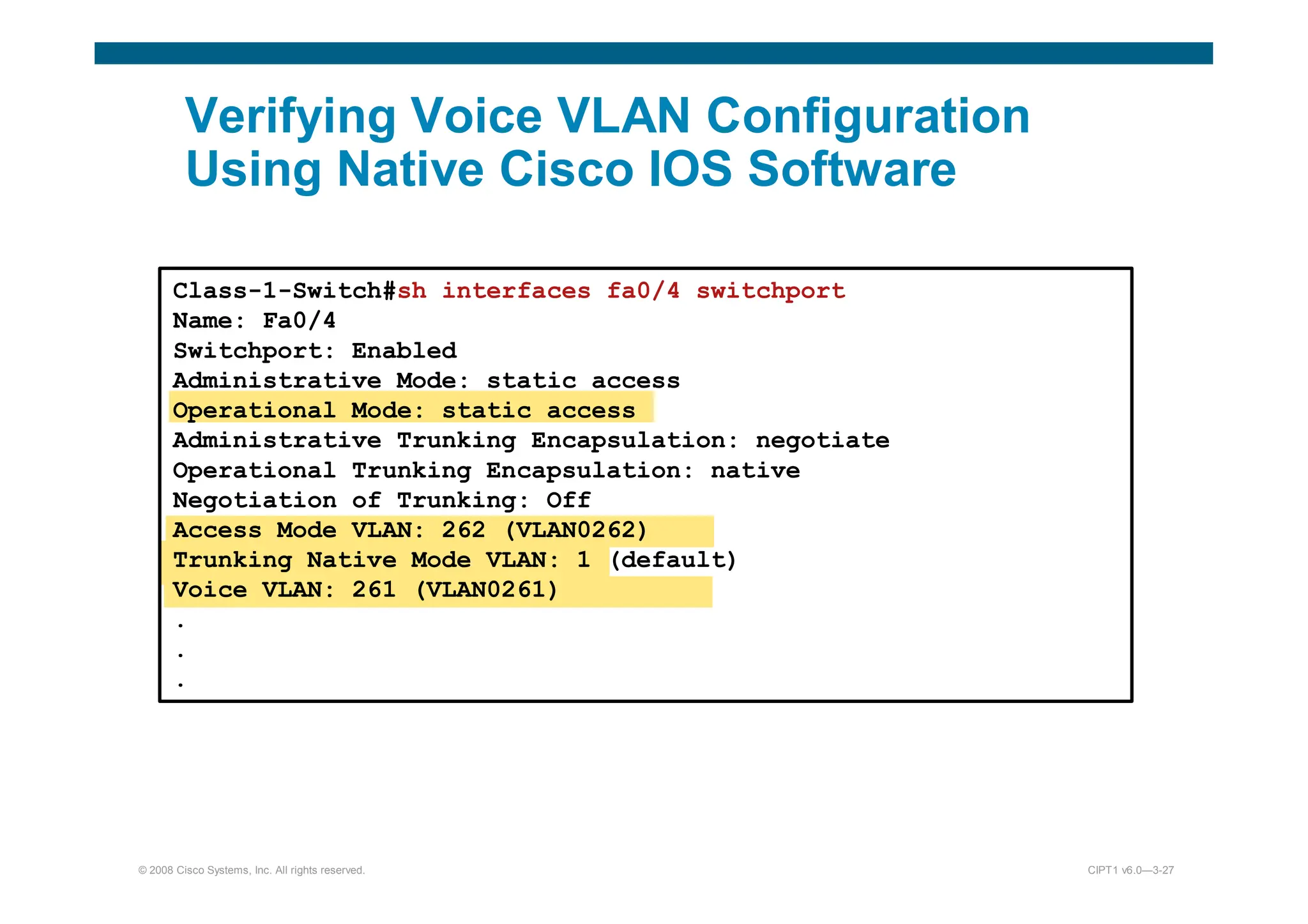
Verifying Voice VLAN Configuration
Using Native Cisco IOS Software
Class-1-Switch#sh interfaces fa0/4 switchport
Name: Fa0/4
Switchport: Enabled
Administrative Mode: static access
Operational Mode: static access
Administrative Trunking Encapsulation: negotiate
Operational Trunking Encapsulation: native
Negotiation of Trunking: Off
Access Mode VLAN: 262 (VLAN0262)
Trunking Native Mode VLAN: 1 (default)
Voice VLAN: 261 (VLAN0261)
.
.
.
© 2008 Cisco Systems, Inc. All rights reserved. CIPT1 v6.0—3-29
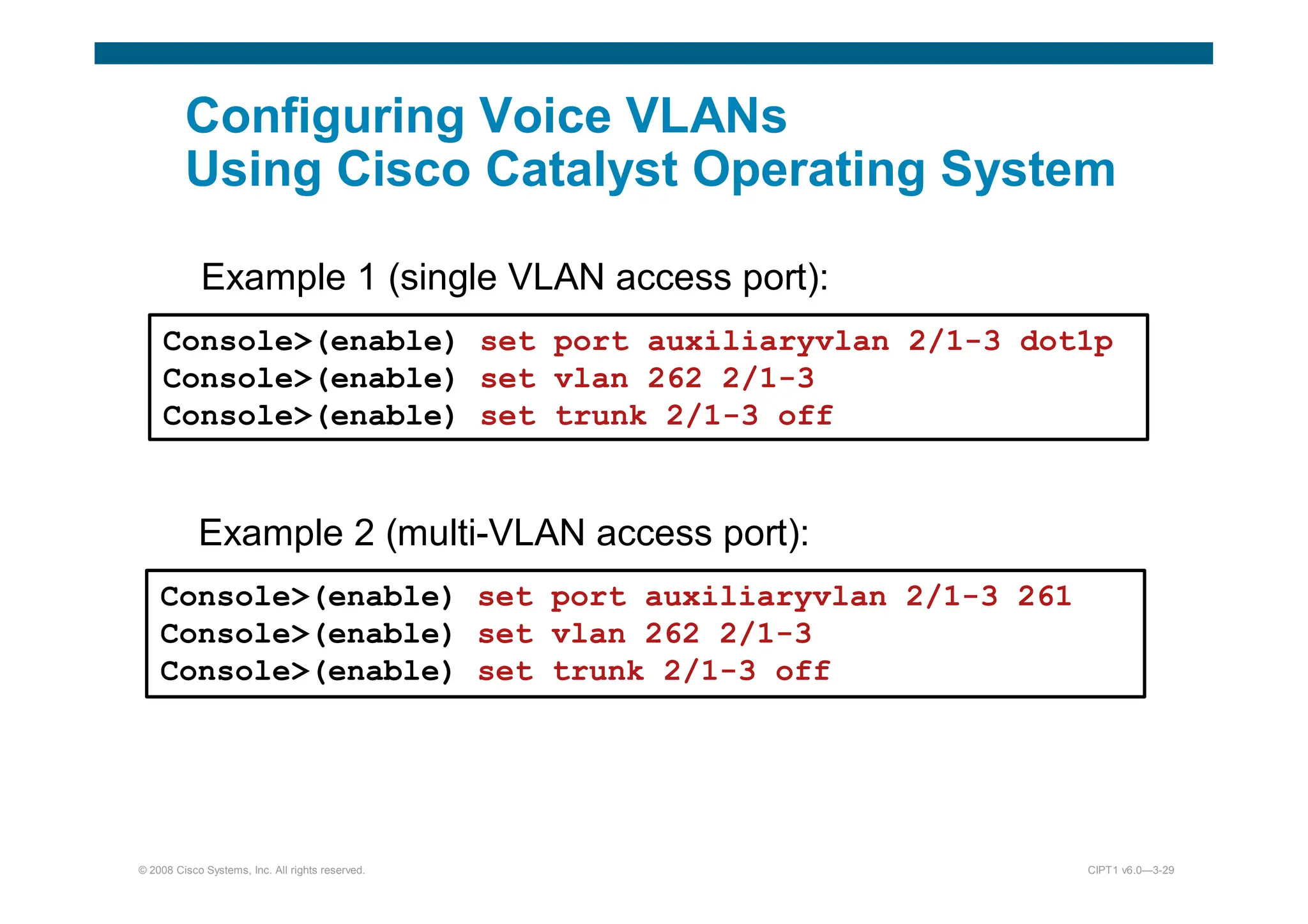
Configuring Voice VLANs
Using Cisco Catalyst Operating System
Example 1 (single VLAN access port):
Console(enable) set port auxiliaryvlan 2/1-3 dot1p
Console(enable) set vlan 262 2/1-3
Console(enable) set trunk 2/1-3 off
Example 2 (multi-VLAN access port):
Console(enable) set port auxiliaryvlan 2/1-3 261
Console(enable) set vlan 262 2/1-3
Console(enable) set trunk 2/1-3 off
© 2008 Cisco Systems, Inc. All rights reserved. CIPT1 v6.0—3-30
Configuring Trunk Ports
Using Cisco Catalyst Operating System
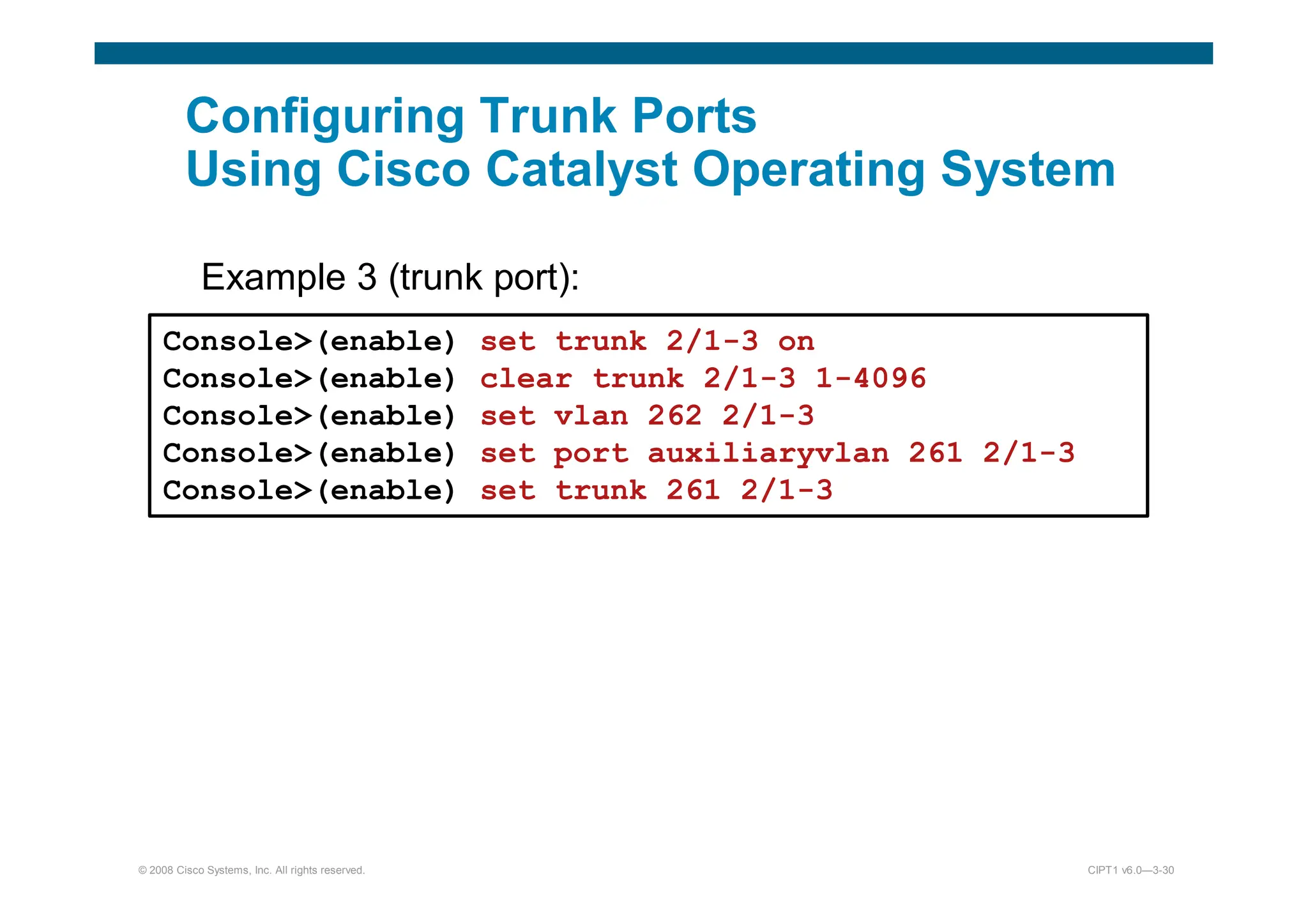
Example 3 (trunk port):
):
Console(enable) set trunk 2/1-3 on
Console(enable) clear trunk 2/1-3 1-4096
Console(enable) set vlan 262 2/1-3
Console(enable) set port auxiliaryvlan 261 2/1-3
Console(enable) set trunk 261 2/1-3
© 2008 Cisco Systems, Inc. All rights reserved. CIPT1 v6.0—3-31
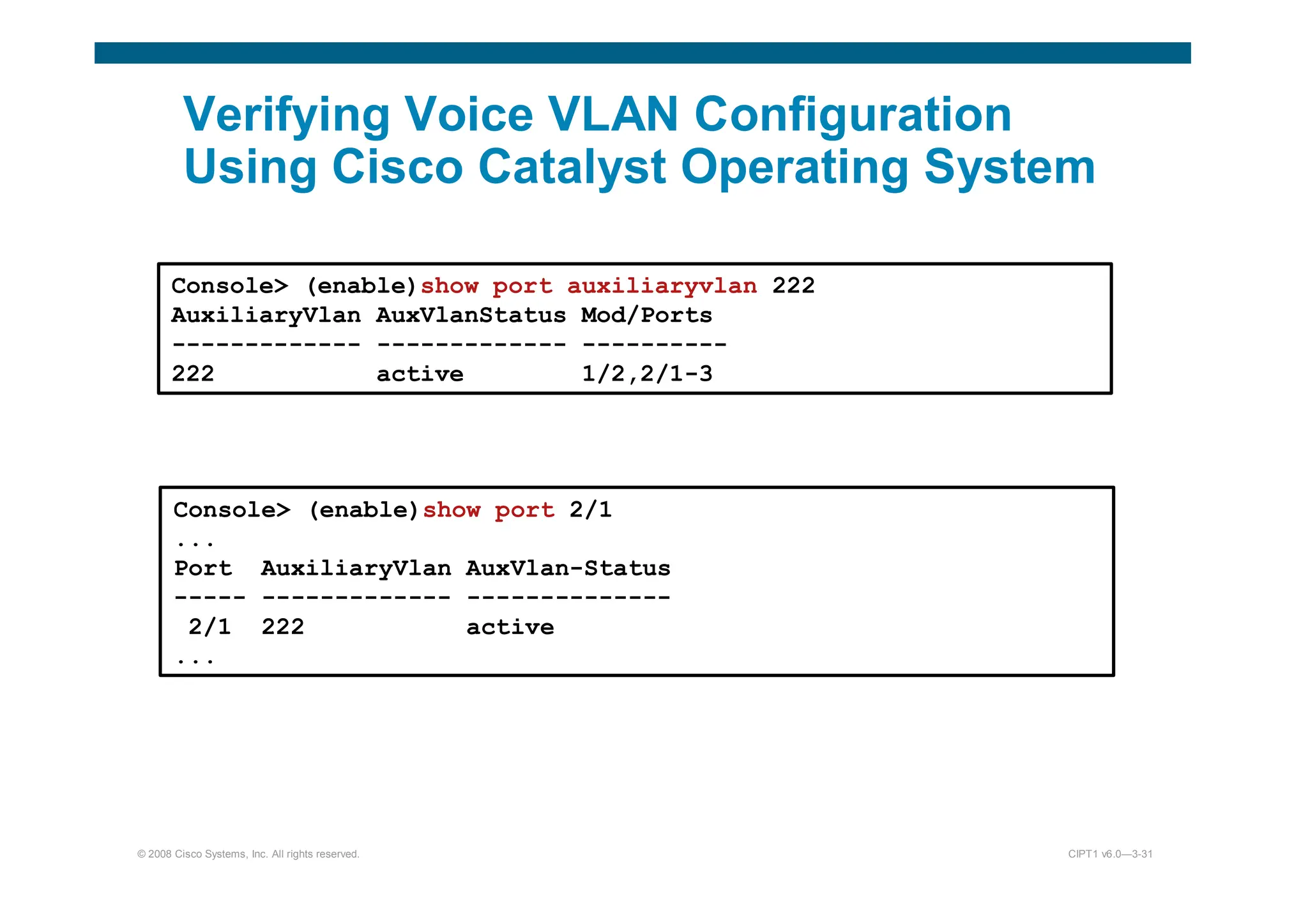
Verifying Voice VLAN Configuration
Using Cisco Catalyst Operating System
Console (enable)show port auxiliaryvlan 222
AuxiliaryVlan AuxVlanStatus Mod/Ports
------------- ------------- ----------
222 active 1/2,2/1-3
Console (enable)show port 2/1
...
Port AuxiliaryVlan AuxVlan-Status
----- ------------- --------------
2/1 222 active
...

1 - voip fundamentals engineering. .pdf

  • 1.
  • 2.
  • 3.
    Traditional Business Phone System CO Switch PBXKey System CO Switch Analog or Digital Handsets Digital Handsets Local Loop Local Loop Tie Line Customer Telephone
  • 4.
    What Is aPBX? PBX Terminal Interface Power Supply & Fans Terminal Interface Control Complex Terminal Interface Switching Network Terminal Interface Terminal Interface Line Card Trunk Card Line Trunk Local Exchange
  • 5.
    What Is aKey System? Key System Termination Blocks Connector Block Trunks Main Distribution Frame Power Supply Intercom Cards Station Cards Station Cards CO Line Cards Local Exchange
  • 6.
    Comparing Key Systemsto PBXs Press a button to access outside line Dial 9 or other access number to access outside line Method for Accessing Outside Trunks Small company or branch office (typically 50 or fewer users) Large company site (typically more than 50 users) Typical Installation Not a switch Similar to the CO switch Switch Functionality Analog or digital Primarily digital Technology Key System PBX
  • 7.
    Signaling Types – Thereare three types of signaling used in a telephony network: • Supervisory signaling communicates the state of a telephony device. • Address signaling sends information about the digits dialed. • Informational signaling communicates the current state of the call. – Signaling can be sent either in-band or out-of-band. • In-band signaling sends the signaling in the same communications channel as the voice. • Out-of-band signaling sends the signaling in a separate communications channel from the voice.
  • 8.
    Supervisory Signaling On Hook OffHook Ringing Handset on Cradle and Switch Hook Open Telephone Switch Telephone Switch Telephone Switch Local Loop Local Loop Local Loop Local Loop Local Loop Local Loop DC Current Dial Tone Ringback Tone DC Current Off Hook Closed Circuit Off Hook Closed Circuit Ringing Voltage –48 DC Voltage (Battery) DC Open Circuit No Current Flow
  • 9.
    Address Signaling – Tonetelephone • DTMF dialing – Rotary telephone • Pulse dialing
  • 10.
    Informational Signaling Example Frequency modulation1 kHz Frequency modulation 1 kHz Confirmation tone Continuous Continuous 200 to 400 No such number 0.1 0.1 (1400 + 2060 + 2450 + 2600) Receiver off hook 0.2 0.3 480 + 620 Reorder (local) 0.3 0.2 480 + 620 Congestion (toll) 3 1 440 + 480 Ringback, PBX 4 2 440 + 480 Ringback, line 0.5 0.5 480 + 620 Busy Continuous Continuous 350 + 440 Dial Off Time (Sec) On Time (Sec) Frequency (Hz) Tone This information will vary based on the country.
  • 11.
    Signaling System 7 •SS7 functions: – Informational signaling – Call setup – Call routing – Call billing – Toll-free number resolution – Used out-of-band signaling CO Switch CO Switch SS7
  • 12.
    PSTN Call Setup 1.Customer phone goes off hook creating a closed circuit. 2. The customer’s CO switch detects that current is flowing and generates dial tone to the customer phone. 3. Either DTMF or pulse digits are dialed by the customer. 4. The CO switch collects the digits and performs an SS7 lookup to determine the destination CO switch. 5. Supervisory signaling indicates to the far-end analog or digital trunk that an inbound call has arrived. 6. The PBX determines which internal extension the call should go to and causes the target handset with that extension to ring. 7. Ringback is generated to the customer phone by their local CO switch. 8. The target handset goes off hook and a circuit is built end-to-end. PSTN Customer Telephone Analog Circuit Digital or Analog Trunk PBX Target Handset CO Switch CO Switch
  • 13.
    Numbering Plans – Anumbering plan is a numbering scheme with the following characteristics: • Defines a set of rules to allocate numbers used in telecommunications • Is based on international telecommunications standards • Is established by numbering plan authorities, which regulate the distribution of numbers and codes in their territory – Many regional and national numbering plans exist: • NANP • U.K. National Numbering Scheme • ETNS • Hong Kong • Many countries have their own numbering plans
  • 14.
    North American Numbering Plan –NANP is the numbering plan for the United States and its territories, Canada, Bermuda, and many Caribbean nations. – It is administered by the NANPA. – NANP numbers are 10-digit numbers. X = <0-9> Area Code Local Number: NXX – CO Code XXXX – Line Number N = <2-9> NXX-NXX-XXXX
  • 15.
    E.164 Addressing • E.164is an international numbering plan for public telephony systems: – A valid number contains the following components: • Country code • National destination code • Subscriber number – Each number can be up to 15 digits long. – The E.164 plan was developed by the ITU.
  • 16.
  • 17.
    Components of anAnalog Telephone – Receiver – Transmitter – Two-wire/four-wire hybrid – Dialer (DTMF or pulse) – Switch hook – Ringer
  • 18.
    FXS Interface – Connectsdirectly to analog phones or faxes – Provisions local service – Emulates the CO to the attached devices – Provides power, call progress tones, and dial tone FXS FXS FXS
  • 19.
    FXO Interface – Connectsdirectly to office equipment – Used to make and receive calls from the PSTN – Can be used to connect through the PSTN to another site – Answers inbound calls FXO FXO PSTN
  • 20.
    Loop-Start Signaling CO Phone -48 VDC Open Circuit OnHook CO Phone -48 VDC Closed Circuit Off Hook CO Phone AC Applied Closed Circuit On-Hook Ringing Ringer X Loop-start signaling is typically used in residential environments.
  • 21.
    Ground-Start Signaling CO orFXS FXO or PBX Open Circuit On hook CO or FXS Seized Open Circuit FXO or PBX Current Applied Ring Tip Ring Tip Ground-start signaling is typically used in business environments
  • 22.
    E&M Interface – Connectstwo sites with a leased connection – Allows for the use of non-PSTN numbers – Used to create tie-lines – Commonly used to connect to external MOH sources E&M E&M E&M MOH E&M PBX Tie-Line
  • 23.
  • 24.
    Digitizing Analog Signals 1.Sample the analog signal regularly. 2. Quantize the sample. 3. Encode the value into a binary expression. 4. Compress the samples to reduce bandwidth (optional).
  • 25.
    Step 1—Sample theSignal Each sample is 1/8000 of a second apart. Time Analog Waveform
  • 26.
    Step 2—Quantize theSignal Segment 0 Segment 0 Segment 1 Segment 2 Segment 2 Segment 1 Time Voltage Each sample is 1/8000 of a second apart + - mu-law
  • 27.
    Step 3—Encode theSignal in Binary 1 0 0 1 1 1 0 0 Sign: 1 = Positive 0 = Negative Segment Interval
  • 28.
    Step 4—Compress theSamples (Optional) – ADPCM • Sends only the differential between the current and last sample • Uses G.726 variants • Allows encoding PCM data rates of 16 kb/s, 24 kb/s, or 32 kb/s per call • Has lower quality than G.729 • Is not commonly used today – CS-ACELP • Is based on the human vocal system • Matches sounds to a codebook of possible sounds • Uses G.729 variants • Is the most common compression method used today • Has a data rate of 8 kb/s per call • Provides high quality
  • 29.
    Time-Division Multiplexing 1 11 1 1 2 2 2 2 2 3 3 3 3 3 4 4 4 4 4 ... ... ... ... ... 24 24 24 24 24 T1 Conversations 1 2 3 4 ... 24 1 2 3 4 ... For E1, the conversations would be 1 through 30.
  • 30.
    T1 Circuits – Upto 24 channels for voice – Each channel is a DS0 – Each DS0 is 64 kb/s – 8000 samples per second – One byte per sample – One sample per channel, per frame – SF groups together 12 frames – ESF groups together 24 frames – Typically used in the United States, Canada and Japan (called J1) T1 PSTN
  • 31.
    E1 Circuits – Upto 30 channels for voice – One channel for signaling – One channel for framing – Each channel is a DS0 – Each DS0 is 64 kb/s – 8000 samples per second in voice DS0s – One byte per sample – One sample per channel, per frame – 16 frames are grouped together to make a multiframe E1 PSTN
  • 32.
    Channel Associated Signaling 2.048Mb/s 1.544 Mb/s Speed The rest of the world United States, Canada, Japan Where Predominately Used Out-of-band signaling in time slot 17 RBS in-band Signaling Method 30 24 Number of Voice Channels CAS E1 CAS T1
  • 33.
    CAS—T1 DS0 1 DS02 DS0 3 DS0 4 ... DS0 24 ... ... ... ... ... DS0 1 DS0 2 DS0 3 DS0 4 ... ... DS0 24 DS0 1A DS0 2A DS0 3A DS0 4A DS0 24A ... ... ... ... ... DS0 1 DS0 2 DS0 3 DS0 4 ... DS0 24 DS0 1B DS0 2B DS0 3B DS0 4B ... DS0 24B ... ... ... ... ... DS0 1 DS0 2 DS0 3 DS0 4 ... DS0 24 DS0 1C DS0 2C DS0 3C DS0 4C ... DS0 24C ... ... ... ... ... F F F F F F F DS0 1 DS0 2 DS0 3 DS0 4 ... DS0 24 DS0 1D DS0 2D DS0 3D DS0 4D ... DS0 24D F F Frame 1 Frame 5 Frame 6 Frame 12 Frame 17 Frame 11 Frame 24 Frame 23 Frame 18 DS0 = 64 kb/s
  • 34.
    CAS—E1 DS0 1 DS02 DS0 3 ... DS0 31 DS0 = 64kb/s DS0 16 DS0 17 ... DS0 32 DS0 18 Time slots 2–16 and 18–32 contain the voice conversations. Time slot 1 contains framing information. Time slot 17 contains the out-of-band signaling information.
  • 35.
    CAS—E1 (Cont.) 16 framesper multiframe 1 2 3 4 5 6 7 8 9 10 11 12 13 14 15 16 17 18 19 20 21 22 23 24 25 26 27 28 29 30 31 32 Time Slots
  • 36.
    Common Channel Signaling –Allows for multiple services through one connection – Is well-adapted for voice • 64-kb/s B channels • Q.931 protocol used on the D channel – Supports standards-based functions – Supports proprietary signaling on the D channel – Is used internationally PRI 23B+D (T1) or 30B+D (E1) BRI 2B+D Carrier Carrier
  • 37.
    CCS—PRI T1 Time slots1–23 are the B channels and contain voice, video, or data. TS 1 TS 2 TS 3 TS 4 TS 5 TS 6 ... TS 23 TS 24 F The B and D channels are all 64 kb/s Time slot 24 contains the out-of-band signaling and is called the D channel. A framing bit on the end of the frame.
  • 38.
    CCS—PRI E1 Time slots2–16 and 18–32 are the B channels and contain voice, video or data. The B and D channels are all 64 kb/s Time slot 17 contains the out-of-band signaling information. Time slot 1 contains framing information. DS0 1 DS0 2 DS0 3 ... DS0 31 DS0 16 DS0 17 ... DS0 32 DS0 18
  • 39.
    CCS—BRI Framing bit The 32bits total for the two B channels contain the voice, video, or data. The four total D bits contain the signaling information. The two B channels are 64 kb/s; the D channel is 16 kb/s F B 1 B 2 B 1 B 2 D D D D
  • 40.
  • 41.
    Digital Signal Processors PSTN PSTN PSTN IP IP IP Analogor Digital Analog or Digital Analog or Digital Speech IP Packets IP Packets IP Packets IP Packets DSPs
  • 42.
    Digital Signal Processors (Cont.) –The DSP chip performs the sampling, quantization, encoding, and optional compression step of digitization. – It is used in both directions to convert from a traditional analog or digital voice signal to VoIP; or from VoIP to a traditional analog or digital voice signal. – The number of simultaneous calls a chip can handle depends on the type of DSP and the codec being used.
  • 43.
    Real-Time Transport Protocol –Provides end-to-end network functions and delivery services for delay-sensitive, real-time data, such as voice and video – Randomly picks even ports from UDP port range 16384– 32767 – Includes the following services: • Payload type identification • Sequence numbering • Time stamping Payload Type Sequence Number Time Stamp Payload
  • 44.
    RTP Control Protocol –Can be used to monitor the quality of the data distribution and provide control information – Provides feedback on current network conditions – Allows hosts that are involved in an RTP session to exchange information about monitoring and controlling the session: • Packet count • Packet delay • Octet count • Packet loss • Jitter (variation in delay) – Provides a separate flow from RTP for UDP transport use – Is paired with its RTP stream and uses the same port as the RTP stream plus 1 (odd-numbered port)
  • 45.
    Packetization – Packetization ofvoice is performed by DSP resources. – The DSP packages voice samples or compressed voice into IP packets. – The voice data is collected until the packet payload is full. – The voice data is carried in the payload of RTP segments. – RTP is encapsulated in a UDP segment, which is encapsulated in an IP packet. – The IP packet is encapsulated into the Layer 2 format. Layer 2 Header IP Header UDP Header Voice Payload RTP Header
  • 46.
    Packetization—G.711 Example ... 10010111 1001011010010101 10010100 10010011 ... 10110001 RTP Header Sample 1 Sample 2 Sample 3 Sample 4 Sample 5 Sample 160 G.711 20 ms of samples (160 bytes) 10010111 10010110 10010101 10010100 10010011 10110001
  • 47.
    Packetization—G.729 Example ... 20 Bytesof Voice Payload RTP Header Sample 1 Sample 2 Sample 3 Sample 4 Sample 160 G.729 20 ms of voice contained in packet DSP Compression 10010111 10010110 10010101 10010100 10110001
  • 48.
    Codecs • Standardized waysto encode voice for transport across a data network: – PCM • G.711 rate: 64 kb/s = (2 x 4 kHz) x 8 bits/sample – ADPCM • G.726 rate: 32 kb/s = (2 x 4 kHz) x 4 bits/sample • G.726 rate: 24 kb/s = (2 x 4 kHz) x 3 bits/sample • G.726 rate: 16 kb/s = (2 x 4 kHz) x 2 bits/sample – LD-CELP • G.728 rate: 16 kb/s – CS-ACELP • G.729: rate 8kb/s • Annex A variant—less processor-intensive and allows more voice channels encoded per DSP • Annex B variant—VAD and CNG – iLBC • Rate: 13.3 kb/s
  • 49.
    Codecs—G.729 and G.729A Comparison –Both codecs are ITU standards. – Both codecs are 8-kb/s CS-ACELP. – G.729 is more complex and processor-intensive. – G.729 is slightly higher quality than G.729A. – The compression delay is the same (10 to 20 ms). – The Annex B variant can be applied to either codec. – The Annex B variant adds VAD and CNG.
  • 50.
    Internet Low BitrateCodec – Was designed for packetized communications – Is royalty free – Has better quality than G.729 – Has similar complexity as G.279 – Supports two fixed bit-rate frame lengths: • A bit rate of 13.3 kb/s with an encoding frame length of 30 ms • A bit rate of 15.2 kb/s with an encoding frame length of 20 ms – Is supported only on newer Cisco Unified IP Phones: • IP Phone 7975G – IP Phone 7942G • IP Phone 7965G – IP Phone 7921G • IP Phone 7962G – IP Phone 7911G • IP Phone 7945G – IP Phone 7906G – Is supported on the VoIP dial peers of Cisco voice gateways using the following protocols: • H.323 • SIP
  • 51.
  • 52.
    Codecs—Bandwidth Implications * * G.711, G.729,and iLBC are the most common codecs. 13.3 kb/s iLBC 16 kb/s G.728 8 kb/s G.729 6.3 kb/s G.723 r63 16 kb/s G.726 r16 5.3 kb/s 24 kb/s 32 kb/s 64 kb/s Bandwidth not including overhead G.723 r53 G.726 r24 G.726 r32 G.711 Codec * * *
  • 53.
    Codec—Overhead – RTP/UDP/IP headeroverhead • 40 bytes of overhead • 2 or 4 bytes of overhead if using cRTP – Data link overhead (Layer 2 header and trailer) • Ethernet—18 bytes of overhead • MLP—6 bytes of overhead • FRF.12—6 bytes of overhead
  • 54.
  • 55.
    The Effect ofVAD •17,160 •26,400 •20 •8000 •G.729 •11,180 •17,200 •40 •8000 •G.729 •53,560 •82,400 •160 •64,000 •G.711 •49,573 •76,267 •240 •64,000 •G.711 •Frame Relay with VAD •Frame Relay •Sample Size •Codec Speed •Codec •16,965 •26,100 •30 •13,300 •iLBC •22,360 •34,400 •20 •15,200 •iLBC
  • 56.
    Additional DSP Functions –Hardware-based conferencing – MTP – Transcoding between two different codecs – Echo cancellation
  • 57.
  • 58.
    VoIP Signaling Protocols –Signaling generates and monitors the call control information between two endpoints to: • Establish the connection • Monitor the connection • Release the connection – The signaling protocol must pass supervisory, informational, and address signaling. – Signaling protocols can be peer-to-peer or client/server- based. • Peer-to-peer allows the endpoints to contain intelligence to place calls without assistance. • Client/server puts the endpoint under the control of a centralized intelligence point.
  • 59.
    VoIP Signaling Protocols Comparison Peer-to-peer Yes,Cisco Unified IP Phones and third- party phones Yes Basic IETF SIP Client/server Yes, Cisco Unified IP Phones only Yes, limited Proprietary None SCCP Client/server Yes, limited Yes Good IETF MGCP Peer-to-peer No Yes Very Good ITU H.323 Architecture Used on Cisco Unified IP Phones Used on Gateways Vendor Neutrality Standards Body
  • 60.
    Skinny Client ControlProtocol – Signaling protocol used between Cisco Unified Communications call control platforms and Cisco Unified IP Phones – Cisco proprietary – Lightweight protocol – Client/server protocol – Used for voice only and video-enabled calls
  • 61.
    SCCP—Examples IP Network Cisco Unified Communications500 Series IP Network Cisco Unified Communications Manager Express IP Network Cisco Unified Communications Manager
  • 62.
    H.323 • H.323 isa suite of protocols for voice, video, and data with the following characteristics: – A mature protocol – Based on ISDN Q.931 – Vendor neutral – Peer-to-peer architecture – Supported on Cisco voice gateways and all Cisco Unified Communications call control platforms – Widely deployed – ITU standard – Encoded into binary messages
  • 63.
    H.323—Examples IP Network Cisco Unified Communications Manager CiscoVoice Gateway IP Network Cisco Unified Communications 500 Series Cisco Voice Gateway IP Network Cisco Unified Communications Manager Express Cisco Voice Gateway IP Network Cisco Voice Gateway Cisco Voice Gateway
  • 64.
    Media Gateway Control Protocol –Is an IETF standard – Has a client/server architecture • Call agent is the Cisco Unified Communications Manager or Cisco Unified Communications Manager Business Edition. • The voice gateway is under the control of the call agent. – Uses plaintext protocol – Is used on Cisco voice gateways under the control of Cisco Unified Communications Manager or Cisco Unified Communications Manager Business Edition
  • 65.
    MGCP—Examples IP Network Cisco Unified Communications Manager CiscoVoice Gateway IP Network Cisco Unified Communications Manager Business Edition Cisco Voice Gateway
  • 66.
    Session Initiation Protocol –Is an emerging protocol that is still evolving – Provides basic functionality between different vendors – Can be used between Cisco Unified Communications call control products and SIP endpoints and SIP trunks – Is supported on Cisco voice gateways and Cisco Unified IP Phones that have SIP firmware – Is a peer-to-peer architecture • UA initiates the call • Phones, gateways, and Cisco call control devices can be UAs – Is an IETF standard – Uses ASCII text-based messages
  • 67.
    SIP—Examples SIP Trunk fromCarrier Carrier Cisco Unified Communications Manager IP Network Cisco Unified Communications Manager IP Network Cisco Unified Communications Manager Express Cisco Voice Gateway SIP Trunk from Carrier Carrier Cisco Unified Communications 500 Series for Small Business
  • 68.
  • 69.
    MOS The Mean OpinionScore Values Taken in whole numbers, the numbers are quite easy to grade. • 5 - Perfect. Like face-to-face conversation or radio reception. • 4 - Fair. Imperfections can be perceived, but sound still clear. This is (supposedly) the range for cell phones. • 3 - Annoying. • 2 - Very annoying. Nearly impossible to communicate. • 1 - Impossible to communicate
  • 79.
  • 86.
  • 91.
  • 92.
    VLAN Overview – Segment ation –Flexibility – Security VLAN = Broadcast Domain = Logical Network (Subnet)
  • 93.
    Guidelines for ApplyingIP Address Space Allocate one IP subnet per VLAN. Allocate IP address spaces in contiguous blocks.
  • 94.
    Network Traffic Types •Traffic types to consider when designating VLANs: – Network management – IP telephony – IP Multicast – Normal data – Scavenger class
  • 95.
    Advantages of VoiceVLANs – Phones segmented in separate logical networks – Provides network segmentation and control – Allows administrators to create and enforce QoS – Lets administrators add and enforce security policies
  • 96.
  • 97.
  • 98.
  • 99.
  • 100.
  • 101.
    101 Cannot create, change,or delete VLANs Sends and forwards advertisements Synchronizes Create VLANs Modify VLANs Delete VLANs Sends and forwards advertisements Synchronizes Create local VLANs only Modify local VLANs only Delete local VLANs only Forwards advertisements Does not synchronize VTP Modes
  • 102.
    SwitchX# configure terminal SwitchX(config)#vtp mode [ server | client | transparent ] SwitchX(config)# vtp domain domain-name SwitchX(config)# vtp password password SwitchX(config)# end Creating a VTP Domain
  • 103.
    SwitchX(config)# vtp domainIIUC Changing VTP domain name to IIUC SwitchX(config)# vtp mode transparent Setting device to VTP TRANSPARENT mode. SwitchX(config)# end SwitchX# show vtp status VTP Version : 2 Configuration Revision : 0 Maximum VLANs supported locally : 64 Number of existing VLANs : 17 VTP Operating Mode : Transparent VTP Domain Name : IIUC VTP Pruning Mode : Disabled VTP V2 Mode : Disabled VTP Traps Generation : Disabled MD5 digest : 0x7D 0x6E 0x5E 0x3D 0xAF 0xA0 0x2F 0xAA Configuration last modified by 10.1.1.4 at 3-3-93 20:08:05 SwitchX# VTP Configuration and Verification Example
  • 104.
    Configuring 802.1Q Trunking Configures the port as a VLAN trunk SwitchX(config-if)# switchport mode trunk switchport mode {access | dynamic {auto | desirable} | trunk} SwitchX(config-if)# Configures the trunking characteristics of the port
  • 105.
    105 SwitchX# show interfacesfa0/11 trunk Port Mode Encapsulation Status Native vlan Fa0/11 desirable 802.1q trunking 1 Port Vlans allowed on trunk Fa0/11 1-4094 Port Vlans allowed and active in management domain Fa0/11 1-13 SwitchX# show interfaces fa0/11 switchport Name: Fa0/11 Switchport: Enabled Administrative Mode: trunk Operational Mode: down Administrative Trunking Encapsulation: dot1q Negotiation of Trunking: On Access Mode VLAN: 1 (default) Trunking Native Mode VLAN: 1 (default) . . . Verifying a Trunk SwitchX# show interfaces interface [switchport | trunk]
  • 106.
    106 Adding a VLAN SwitchX#configure terminal SwitchX(config)# vlan 2 SwitchX(config-vlan)# name switchlab99
  • 107.
    107 Assigning Switch Portsto a VLAN SwitchX# configure terminal SwitchX(config)# interface range fastethernet 0/2 - 4 SwitchX(config-if)# switchport access vlan 2 SwitchX# show vlan VLAN Name Status Ports ---- -------------------------------- --------- ---------------------- 1 default active Fa0/1 2 switchlab99 active Fa0/2, Fa0/3, Fa0/4 switchport access [vlan vlan# | dynamic] SwitchX(config-if)#
  • 108.
    108 Verifying VLAN Membership (Cont.) SwitchX#show interfaces fa0/2 switchport Name: Fa0/2 Switchport: Enabled Administrative Mode: dynamic auto Operational Mode: static access Administrative Trunking Encapsulation: dot1q Operational Trunking Encapsulation: native Negotiation of Trunking: On Access Mode VLAN: 2 (switchlab99) Trunking Native Mode VLAN: 1 (default) --- output omitted ---- show interfaces interface switchport SwitchX(config-if)#
  • 109.
    Loop Resolution withSTP – Provides a loop-free redundant network topology by placing certain ports in the blocking state – Published in the IEEE 802.1D specification – Enhanced with the Cisco PVST+ implementation
  • 110.
    Describing PortFast PortFastis configured on access ports, not trunk ports.
  • 111.
    Configuring and Verifying PortFast spanning-treeportfast SwitchX(config-if)# Configures PortFast on an interface spanning-tree portfast default SwitchX(config)# Enables PortFast on all nontrunking interfaces show running-config interface interface SwitchX# Verifies that PortFast has been configured on an interface OR
  • 112.
    VLAN-to-VLAN Overview Networklayer devices combine multiple broadcast domains.
  • 113.
    Dividing a PhysicalInterface into Subinterfaces Physical interfaces can be divided into multiple subinterfaces.
  • 114.
    Routing Between VLANswith 802.1Q Trunks interface fastethernet 0/0 ip address 10.1.1.1 255.255.255.0 encapsulation dot1q 1 native interface fastethernet 0/0.2 ip address 10.2.2.1 255.255.255.0 encapsulation dot1q 2
  • 115.
    © 2008 CiscoSystems, Inc. All rights reserved. CIPT1 v6.0—3-4 Cisco Catalyst Switch Role in IP Telephony Supplies inline power to IP phones Supports voice and data VLANs on a single access port Prioritizes voice traffic with CoS or DSCP marking
  • 116.
    © 2008 CiscoSystems, Inc. All rights reserved. CIPT1 v6.0—3-5 Applying Switch Features Switch Features When to Use How to Use PoE When you require the reliability, availability and flexibility of PoE Identify the PoE type required. PoE is enabled by default. Voice VLAN When you want to connect a PC to an IP phone and have both using a single physical port at the switch but with separate VLANs Configure voice VLAN in addition to access VLAN. QoS / CoS When you want to ensure that voice quality is not affected by network traffic congestion Identify the trust boundary and the applications. Configure the QoS base for your traffic requirements.
  • 117.
    © 2008 CiscoSystems, Inc. All rights reserved. CIPT1 v6.0—3-6 Cisco Catalyst Family of Switches Cisco Catalyst 3560 Cisco Catalyst 3750 Cisco Catalyst 6500 Cisco Catalyst 4500 Cisco EtherSwitch Network Module
  • 118.
    Yes Yes Yes Yes Yes Cisco Prestanda rd PoE No Yes Yes Yes Yes 802.3af- Compliant 16-, 36- port 10/100 24-,48- port 10/100 24-, 48- port 10/100 48-port 10/100 or 10/100/1 000 48-, 96- port 10/100 or 48-port 10/100/1 000 PoE Configura tion Options Cisco EtherSwit ch Module Cisco Catalyst 3560 Cisco Catalyst 3750 Cisco Catalyst 4500 Cisco Catalyst 6500
  • 119.
    © 2008 CiscoSystems, Inc. All rights reserved. CIPT1 v6.0—3-8 Three Ways to Power Cisco IP Phones Power over Ethernet (PoE): – Needs PoE line cards or PoE ports for Cisco Catalyst switches – Delivers 48V DC over data pairs (pins 1, 2, 3, and 6) or spare pairs (pins 4, 5, 7, 8) Midspan power injection: – Needs external power source equipment – Delivers 48V DC over spare pairs Wall power: – Needs DC converter to connect a Cisco IP phone to a wall outlet 110 V AC Wall Power to 48 V DC Converter AC Source No Power Power Injector Power Power
  • 120.
    © 2008 CiscoSystems, Inc. All rights reserved. CIPT1 v6.0—3-9 Two Types of PoE Delivery Cisco original implementation: Provides -48V DC at up to 6.3 to 7.7 W per port over data pins 1, 2, 3, and 6. Supports most Cisco devices (Cisco IP phones and wireless access points). Uses a Cisco proprietary method of determining if an attached device requires power. Power is delivered only to devices that require power. IEEE 802.3af Power over Ethernet: Specifies 48V DC at up to 15.4W per port over data pins 1, 2, 3, and 6 or spare pins 4, 5, 7, and 8. Enables a new range of Ethernet-powered devices because of increased power. Standardizes the method of determining if an attached device requires power. Power is delivered only to devices that require power. Has several optional elements, including power classification.
  • 121.
    © 2008 CiscoSystems, Inc. All rights reserved. CIPT1 v6.0—3-10 Cisco Prestandard Device Detection Switch Cisco Prestandard Implementation Powered Device Port Rx Tx FLP FLP It is an inline device. Pin3 Pin6 Pin1 Pin2
  • 122.
    © 2008 CiscoSystems, Inc. All rights reserved. CIPT1 v6.0—3-11 IEEE 802.3af Device Detection Switch IEEE 802.3af Powered Device Rx Tx Detect Voltage 25K Ohm Resistor It is an IEEE powered device. Pin3 Pin6 Pin1 Pin2 2.8V to 10V IEEE 802.3af PSE
  • 123.
    © 2008 CiscoSystems, Inc. All rights reserved. CIPT1 v6.0—3-13 Cisco Catalyst Switch: Configuring PoE Cisco Catalyst Operating System: CatOS(enable) set port inlinepower mod/port ? auto Port inline power auto mode off Port inline power off mode Native Cisco IOS Software: CSCOIOS(config-if)# power inline auto/never
  • 124.
    © 2008 CiscoSystems, Inc. All rights reserved. CIPT1 v6.0—3-14 Cisco Catalyst Switch: Show Inline Power Status show port inline power 7 Default Inline Power allocation per port: 10.000 Watts (0.23 Amps @42V) Total inline power drawn by module 7: 75.60 Watts (1.80 Amps @42V) Port InlinePowered PowerAllocated Admin Oper Detected mWatt mA @42V ---- ----- ---- -------- --------- ----------- 7/1 auto off no 0 0 7/2 auto on yes 6300 150 7/3 auto on yes 6300 150 7/4 auto off no 0 0 7/5 auto off no 0 0 7/6 auto off no 0 0 7/7 auto off no 0 0 show power inline Interface Admin Oper Power ( mWatt ) Device ---------- ----- ---- --------------- ------ FastEthernet9/1 auto on 6300 Cisco 6500 IP Phone FastEthernet9/2 auto on 6300 Cisco 6500 IP Phone FastEthernet9/3 auto off 0 n/a
  • 125.
    © 2008 CiscoSystems, Inc. All rights reserved. CIPT1 v6.0—3-16 Cisco IP Phone Connected to the Network P0 P1 P2 P Integrated 3- Port Switch
  • 126.
    © 2008 CiscoSystems, Inc. All rights reserved. CIPT1 v6.0—3-17 Voice VLAN Support A Cisco Catalyst switch can be configured to support voice traffic in various ways: – Single VLAN access port – Multi-VLAN access port – Trunk port Considerations: – Security – Cisco IP phones/non-Cisco IP phones/IP softphones – Spanning tree – QoS
  • 127.
    © 2008 CiscoSystems, Inc. All rights reserved. CIPT1 v6.0—3-18 Single VLAN Access Port An access port configured for one VLAN only Typically used for non-Cisco IP phones or softphones – Non-Cisco IP phones: Use voice VLAN for access port – Softphones: Use data VLAN for access port and allow required IP communication to voice VLAN (IP ACLs) If used with Cisco IP phones: – Not recommended with PC attached – If no PC attached: Use voice VLAN for access port Voice can be tagged with 802.1p (VLAN ID=0) or untagged Access Port Untagged 802.3 Untagged or 802.1p
  • 128.
    © 2008 CiscoSystems, Inc. All rights reserved. CIPT1 v6.0—3-19 Multi-VLAN Access Port An access port able to handle two VLANs – Access (data) VLAN and voice (auxiliary) VLAN Voice traffic is tagged with 802.1Q VLAN ID – Data traffic is untagged and is forwarded by IP to and from PC port. – Phone can be hardened to prevent PC from seeing the voice traffic (by default, phone acts like a hub). – Best choice with Cisco IP phones. – Voice VLAN does not need to be configured on IP phone but can be learned from Cisco Discovery Protocol messages sent out by the switch. Access Port Untagged 802.3 Tagged 802.1Q
  • 129.
    © 2008 CiscoSystems, Inc. All rights reserved. CIPT1 v6.0—3-20 Trunk Ports A trunk port is able to handle multiple VLANs. Usually data traffic is untagged and put into a native VLAN. Data traffic can be tagged with any 802.1Q VLAN ID if supported by PC (and permitted by IP phone). A voice VLAN does not need to be configured on IP phone but can be learned from Cisco Discovery Protocol messages sent out by the switch. Security considerations: – Cannot be configured as secure port – If allowed VLANs are not limited, PC has access to all VLANs of the switch Trunk Port Untagged 802.3 (Native VLAN) Tagged 802.1Q
  • 130.
    © 2008 CiscoSystems, Inc. All rights reserved. CIPT1 v6.0—3-22 Blocking PC VLAN Access at IP Phones With default configuration on a trunk port, if PC sends 802.1Q tagged frames, all VLANs can be accessed from PC. Disable voice VLAN access at phone – Prevent PC from sending and receiving data tagged with voice VLAN ID – Other VLAN IDs are permitted on some IP phones Disable span to PC port (on supported IP phones) – Prevent PC from sending and receiving any 802.1Q tagged frames Untagged 802.3 (Access VLAN 20) Tagged 802.1Q (Voice VLAN 10)
  • 131.
    © 2008 CiscoSystems, Inc. All rights reserved. CIPT1 v6.0—3-23 Limiting VLANs on Trunk Ports at the Switch VLANs allowed on a trunk port can be configured at the switch. Recommendation is to only allow native VLAN and voice VLAN. – Blocks PC access to all other VLANs, independent of IP phone configuration and model – Access to voice VLAN, can only be prevented by IP phone configuration but is supported on all IP phone models with PC ports – Improves performance – Improves stability – Minimizes STP issues
  • 132.
    © 2008 CiscoSystems, Inc. All rights reserved. CIPT1 v6.0—3-25 Configuring Voice VLANs in Access Port Using Native Cisco IOS Software Example 1 (single VLAN access port): Console(config)#interface FastEthernet0/1 Console(config-if)#switchport mode access Console(config-if)#switchport voice vlan dot1p Console(config-if)#switchport access vlan 261 Example 2 (multi-VLAN access port): Console(config)#interface FastEthernet0/1 Console(config-if)#switchport mode access Console(config-if)#switchport voice vlan 261 Console(config-if)#switchport access vlan 262
  • 133.
    © 2008 CiscoSystems, Inc. All rights reserved. CIPT1 v6.0—3-26 Configuring Trunk Port Using Native Cisco IOS Software Example 3 (trunk port): ): Console(config)#interface FastEthernet0/1 Console(config-if)#switchport trunk encapsulation dot1q Console(config-if)#switchport mode trunk Console(config-if)#switchport trunk native vlan 262 Console(config-if)#switchport voice vlan 261 Console(config-if)#switchport trunk allowed vlan 261
  • 134.
    © 2008 CiscoSystems, Inc. All rights reserved. CIPT1 v6.0—3-27 Verifying Voice VLAN Configuration Using Native Cisco IOS Software Class-1-Switch#sh interfaces fa0/4 switchport Name: Fa0/4 Switchport: Enabled Administrative Mode: static access Operational Mode: static access Administrative Trunking Encapsulation: negotiate Operational Trunking Encapsulation: native Negotiation of Trunking: Off Access Mode VLAN: 262 (VLAN0262) Trunking Native Mode VLAN: 1 (default) Voice VLAN: 261 (VLAN0261) . . .
  • 135.
    © 2008 CiscoSystems, Inc. All rights reserved. CIPT1 v6.0—3-29 Configuring Voice VLANs Using Cisco Catalyst Operating System Example 1 (single VLAN access port): Console(enable) set port auxiliaryvlan 2/1-3 dot1p Console(enable) set vlan 262 2/1-3 Console(enable) set trunk 2/1-3 off Example 2 (multi-VLAN access port): Console(enable) set port auxiliaryvlan 2/1-3 261 Console(enable) set vlan 262 2/1-3 Console(enable) set trunk 2/1-3 off
  • 136.
    © 2008 CiscoSystems, Inc. All rights reserved. CIPT1 v6.0—3-30 Configuring Trunk Ports Using Cisco Catalyst Operating System Example 3 (trunk port): ): Console(enable) set trunk 2/1-3 on Console(enable) clear trunk 2/1-3 1-4096 Console(enable) set vlan 262 2/1-3 Console(enable) set port auxiliaryvlan 261 2/1-3 Console(enable) set trunk 261 2/1-3
  • 137.
    © 2008 CiscoSystems, Inc. All rights reserved. CIPT1 v6.0—3-31 Verifying Voice VLAN Configuration Using Cisco Catalyst Operating System Console (enable)show port auxiliaryvlan 222 AuxiliaryVlan AuxVlanStatus Mod/Ports ------------- ------------- ---------- 222 active 1/2,2/1-3 Console (enable)show port 2/1 ... Port AuxiliaryVlan AuxVlan-Status ----- ------------- -------------- 2/1 222 active ...