UNIT I 3D graphics and game design
 EVALUATION OF VIDEO GAME PROGRAMMING
The first commercial video game, Computer Space ,
was released in 1971. Created by future Atari
founders Nolan Bushnell and Ted Dabney, the game
was not powered by a traditional computer. The
hardware had no processor or RAM; it simply was a
state machine created with several transistors. All of
the logic of Computer Space had to be implemented
entirely in hardware.
 But when the Atari Video Computer System (Atari 2600)
exploded onto the scene in 1977, developers were given a
standardized platform for games. This is when video game
creation became more about programming software as
opposed to designing complex hardware. Though games
have changed a great deal since the early Atari titles, some
of the core programming techniques developed during
that era are still used today. Unlike most of the book, no
algorithms will be presented in this section. But before the
programming begins, it’s good to have a bit of context on
how the video game industry arrived at its current state.
Atari Era (1977–1985)
 Though the Atari 2600 was not the first generalized
gaming system, it was the first extraordinarily
successful one. Unlike games for modern consoles,
most games for the Atari were created by a single
individual who was responsible for all the art, design,
and programming. Development cycles were also
substantially shorter—even the most complicated
games were finished in a matter of months.
 Programmers in this era also needed to have a much
greater understanding of the low-level operations of
the hardware. The processor ran at 1.1 MHz and there
was only 128 bytes of RAM. With these limitations,
usage of a high-level programming language such as
C was impractical due to performance reasons. This
meant that games had to be written entirely in
assembly. To make matters worse, debugging was
wholly up to the developer. There were no
development tools or a software development kit
(SDK).
NES and SNES Era (1985–1995)
 In 1983, the North American video game market
suffered a dramatic crash. Though there were
inarguably several contributing factors, the largest
might have been the saturation of the market. There
were dozens of gaming systems available and
thousands of games, some of which were notoriously
poor, such as the Atari port of Pac-Man or the
infamous E.T. movie tie-in.
 The release of the Nintendo Entertainment System
in 1985 is largely credited for bringing the industry
back on track. Since the NES was noticeably more
powerful than the Atari, it required more man hours
to create games. Many of the titles in the NES era
required a handful of programmers; the original
Legend of Zelda , for instance, had three credited
programmers.
 Games for the NES and SNES were still written
entirely in assembly, because the hardware still had
relatively small amounts of memory. However,
Nintendo did actually provide development kits with
some debugging functionality, so developers were
not completely in the dark as they were with the
Atari.
Playstation/Playstation 2 Era (1995–2005)
 The release of the Playstation and N64 in the mid
1990s finally brought high-level programming
languages to console development. Games for both
platforms were primarily written in C, although
assembly subroutines were still used for
performance-critical parts of code.
 The productivity gains of using a higher-level
programming language may at least partially be
responsible for the fact that team sizes did not grow
during the initial years of this era. Most early games
still only had eight to ten programmers in total. Even
relatively complex games, such as 2001’s Grand
Theft Auto III , had engineering teams of roughly
that size.
Xbox 360, PS3, and Wii Era (2005–2013)
 The first consoles to truly support high definition
caused game development to diverge on two paths.
AAA titles have become massive operations with
equally massive teams and budgets, whereas
independent titles have gone back to the much
smaller teams of yesteryear.
 For AAA titles, the growth has been staggering. For
example, 2008’s Grand Theft Auto IV had a core
programming team of about 30, with an additional
15 programmers from Rockstar’s technology
lOMoARcPSD|38300488 team. But that team size
would be considered tame compared to more recent
titles— 2011’s Assassin’s Creed: Revelations had a
programming team with a headcount well over 75.
 But to independent developers, digital distribution
platforms have been a big boon. With storefronts such as
XBLA, PSN, Steam, and the iOS App Store, it is possible
to reach a wide audience of gamers without the backing of
a traditional publisher. The scope of these independent
titles is typically much smaller than AAA ones, and in
several ways their development is more similar to earlier
eras. Many indie games are made with teams of five or
less. And some companies have one individual who’s
responsible for all the programming, art, and design,
essentially completing the full circle back to the Atari era.
Genres of games:
 Action games
Shooters
Fighting games
Survival games
 Action adventure games
Survival horror
Zombie games
 Adventure games
 Interactive movie
 Real time 3d adventures
 Simulation games
 Life simulation
 Vehicle simulation
 Sports games
 Cricket game
 Football game
 Badminton game
2D game avatar
 In computing, an avatar is a graphical representation
of a user, the user's character, or persona. Avatars
can be two-dimensional icons in Internet forums and
other online communities, where they are also
known as profile pictures, userpics, or formerly
picons (personal icons, or possibly "picture icons").
3D game avatar
 3D, or three dimensional, refers to the three spatial
dimensions of width, height and depth. The physical
world and everything that is observed in it are three
dimensional. While many flat images such as films
and photographs register visually as two dimensional
(2D) to the human brain, nothing can physically
exist without all three dimensions.
Key Components of Game Designing
 Game World
 The game world is crucial for any good video game.
After all, the game world makes gamers live their
gaming experience in the most authentic way. A
game design program will help you build a game that
will make the players forget that they are not living
it. The characters of the game should feel natural and
living. Usually, inline game designers, concept
artists, etc., are responsible for this part of game
design.
Game Storyline
 Mission designers are the ones who have the
responsibility of developing a storyline for a game.
They build the narrative of the game, develop
characters and events that will appeal to the gamers
and keep them engaged.
Video Game Characters
 You also have character artists and animators who
bring the characters of your imagination to life.
Character artists and animators work very closely
with game designers since they give that unique
personality to the characters, making them popular
among gamers. The visual aesthetic is crucial to a
good video game. Thus, we see that games with
heavy graphics and sharp visual appeal are usually
the most popular among gamers.
Music
 Another crucial aspect of making a video game
popular is its music. Music has the potential to take
the video game to the next level by adding a certain
mood to it. Music can set the right pace for the
gamer and get them hooked on an exciting battle
ahead. Without music, a video game is incomplete.
Quality Assurance
 For this step, we see the involvement of game testers.
They check the software and look out for any glitches
or bugs in the game. Game testers possess
exceptionally high technical knowledge and
evaluation skills.
Visual Design and Art Style
 Talented video game designers leverage aesthetics,
color schemes, and graphical fidelity to create
visually stunning worlds that resonate with players.
Whether it's a realistic setting or a stylized art
direction, visual design sets the tone, enhances
storytelling, and establishes a unique atmosphere
that contributes to the overall game experience.
Sound Design and Music
 Sound design and music are essential components of
video game design. The right sound design and
music choices can elevate gameplay moments,
intensify narrative beats, and leave a lasting
impression on players
User Interface and User Experience
 User interface (UI) and user experience (UX) are critical
component of video game design. A well-designed UI ensures
intuitive navigation, clear communication of information, and
seamless interaction between players and the game. By
prioritizing user experience, video game designers can create
interfaces that are visually appealing, easy to understand, and
enhance overall gameplay enjoyment. Recent Trends in Video
Game Design Recent trends include the rise of virtual reality (VR)
and augmented reality (AR), the incorporation of procedural
generation techniques for dynamic content creation, and the
integration of multiplayer and social interaction features. These
trends push the boundaries of video game designer, creating new
possibilities for immersive and engaging experiences.
2D and 3D Transformations
 2D Transformations
 Translation:
 Usage: Moves characters, enemies, items, or any other game objects across the
screen.
 Implementation: Apply a translation matrix or directly adjust the object's
position coordinates.
 Example: Moving a player character from (100, 200) to (150, 250) based on
user input or game logic.
 Rotation:
 Usage: Rotate sprites or game objects to show direction, animate actions, or
create effects.
 Implementation: Apply a rotation matrix around a pivot point or use
trigonometric functions to compute new coordinates.
 Example: Rotating a spaceship sprite to face the direction of movement or
spinning a windmill blade.
 Scaling:
 Usage: Resize game objects for visual effects or to represent changes
in size (e.g., power-ups that enlarge the player).
 Implementation: Apply a scaling matrix to the object's
coordinates.
 Example: Scaling a collectible item to make it larger as the player
approaches.
 Shearing:
 Usage: Create skewed effects or simulate perspective distortions.
 Implementation: Apply a shearing matrix to adjust the object's
shape.
 Example: Skewing the background to create a sense of depth or
perspective.
3D Transformations
 Translation:
 Usage: Moves 3D objects like characters, enemies, and items throughout
the game world.
 Implementation: Apply a translation matrix to adjust the object's
position in 3D space.
 Example: Moving a player character along the X, Y, and Z axes in a 3D
environment.
 Rotation:
 Usage: Rotate objects around their local axes (pitch, yaw, roll) or the
world axes.
 Implementation: Use rotation matrices or quaternions to apply
rotations.
 Example: Rotating a camera to look around or animating a rotating
planet.
 Scaling:
 Usage: Adjust the size of 3D models for visual effects or gameplay
mechanics.
 Implementation: Apply a scaling matrix to scale objects in X, Y, and
Z dimensions.
 Example: Scaling a character model to reflect size changes or creating
giant enemies.
 Shearing:
 Usage: Create distortion effects or simulate certain types of
interactions.
 Implementation: Apply a shearing matrix to the object's coordinates.
 Example: Implementing effects like a funhouse mirror or creating a
visual illusion of stretching.
Practical Considerations
 Transformation Hierarchies:
 2D: Objects might be parented to other objects (e.g., a character's weapon attached to the character).
Transformations of the parent affect all children.
 3D: Hierarchical transformations are essential for complex models (e.g., a character's arm moving
relative to the body). This is often managed through a hierarchy of bones in skeletal animation.
 Combining Transformations:
 2D and 3D: Combine multiple transformations (translation, rotation, scaling) to achieve the desired
effect. This is often done using matrix multiplication to apply a sequence of transformations in a
single step.
 Coordinate Systems:
 2D: Typically use screen space coordinates (x, y).
 3D: Use world space, view space, and camera space coordinates. Transformations are often applied
in a specific order to convert between these spaces.
 Performance:
 Optimization: Efficiently manage transformations to maintain game performance, especially in real-
time scenarios. This includes optimizing matrix calculations and minimizing redundant
transformations.
 Libraries and Engines:
 Game Engines: Many game engines (e.g., Unity, Unreal Engine) provide built-in tools and
abstractions for handling transformations, including matrix operations, hierarchical objects, and
animation systems.
Colour model
 The colour spaces in image processing aim to facilitate the
specifications of colours in some standard way. Different types of
colour models are used in multiple fields like in hardware, in
multiple applications of creating animation, etc. Let’s see each
colour model and its application.
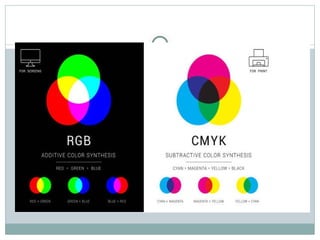
 RGB CMYK HSV RGB: The RGB colour model is the most
common colour model used in Digital image processing and
openCV. The colour image consists of 3 channels. One channel
each for one colour.
 Red, Green and Blue are the main colour components of this
model. All other colours are produced by the proportional ratio of
these three colours only. 0 represents the black and as the value
increases the colour intensity increases.
 CMYK: CMYK colour model is widely used in
printers. It stands for Cyan, Magenta, Yellow and
Black (key). It is a subtractive colour model. 0
represents the primary colour and 1 represents the
lightest colour. In this model, point (1, 1, 1)
represents black, and (0,0,0) represents white. It is a
subtractive model thus the value is subtracted from 1
to vary from least intense to a most intense colour
value.
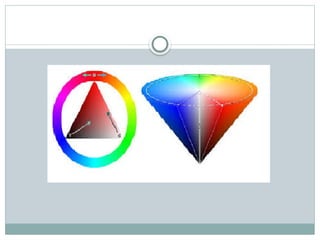
 HSV: The image consists of three channels. Hue,
Saturation and Value are three channels. This colour
model does not use primary colours directly. It uses
colour in the way humans perceive them. HSV colour
when is represented by a cone. Hue is a colour
component. Since the cone represents the HSV
model, the hue represents different colours in
different angle ranges
Illumination and Shader Models
 Shader model refers to a set of instructions and capabilities used
by the graphics processing unit (GPU) to render images in a
game. It determines the level of visual effects and rendering
techniques that the GPU can support. Different shader models
offer varying levels of complexity and visual fidelity, with higher
shader models supporting more advanced rendering techniques
such as dynamic lighting, shadows, reflections, and more
realistic textures. When checking system requirements for a
game, the required shader model indicates the minimum level of
GPU capability needed to run the game with its intended visual
quality and effects. It's important to ensure that your GPU
supports at least the shader model specified for a game in order
to experience it as intended.
Animation
 Animation is a method of photographing successive drawings, models, or
even puppets, to create an illusion of movement in a sequence. Because
our eyes can only retain an image for approximately 1/10 of a second,
when multiple images appear in fast succession, the brain blends them
into a single moving image. In traditional animation, pictures are drawn
or painted on transparent celluloid sheets to be photographed. Early
cartoons are examples of this, but today, most animated movies are made
with computer-generated imagery or CGI. To create the appearance of
smooth motion from these drawn, painted, or computer-generated
images, frame rate, or the number of consecutive images that are
displayed each second, is considered. Moving characters are usually shot
“on twos” which just means one image is shown for two frames, totaling in
at 12 drawings per second. 12 frames per second allows for motion but
may look choppy. In the film, a frame rate of 24 frames per second is
often used for smooth motion.
Different Types of Animation:
 Traditional Animation
 Rotoscoping
 Anime
 Cutout
 3D Animation
 Stop Motion
Controllers and Animation
 Animation is supported in Wild Magic by the concept
of a controller. A controller manages various
quantities that are time varying. Character
animation, for example, might be implemented by
controlling the local transformations at each joint in
the hierarchy representing the character. Motion is
not the only quantity that can be controlled. For
example, you might have a material attached to an
object whose alpha value varies over time, and a
controller can be built to vary the alpha value. You
name it. If it varies with time, you can control it.

1 UNIT I 3D graphics and game design.pptx

  • 1.
    UNIT I 3Dgraphics and game design  EVALUATION OF VIDEO GAME PROGRAMMING The first commercial video game, Computer Space , was released in 1971. Created by future Atari founders Nolan Bushnell and Ted Dabney, the game was not powered by a traditional computer. The hardware had no processor or RAM; it simply was a state machine created with several transistors. All of the logic of Computer Space had to be implemented entirely in hardware.
  • 2.
     But whenthe Atari Video Computer System (Atari 2600) exploded onto the scene in 1977, developers were given a standardized platform for games. This is when video game creation became more about programming software as opposed to designing complex hardware. Though games have changed a great deal since the early Atari titles, some of the core programming techniques developed during that era are still used today. Unlike most of the book, no algorithms will be presented in this section. But before the programming begins, it’s good to have a bit of context on how the video game industry arrived at its current state.
  • 3.
    Atari Era (1977–1985) Though the Atari 2600 was not the first generalized gaming system, it was the first extraordinarily successful one. Unlike games for modern consoles, most games for the Atari were created by a single individual who was responsible for all the art, design, and programming. Development cycles were also substantially shorter—even the most complicated games were finished in a matter of months.
  • 4.
     Programmers inthis era also needed to have a much greater understanding of the low-level operations of the hardware. The processor ran at 1.1 MHz and there was only 128 bytes of RAM. With these limitations, usage of a high-level programming language such as C was impractical due to performance reasons. This meant that games had to be written entirely in assembly. To make matters worse, debugging was wholly up to the developer. There were no development tools or a software development kit (SDK).
  • 5.
    NES and SNESEra (1985–1995)  In 1983, the North American video game market suffered a dramatic crash. Though there were inarguably several contributing factors, the largest might have been the saturation of the market. There were dozens of gaming systems available and thousands of games, some of which were notoriously poor, such as the Atari port of Pac-Man or the infamous E.T. movie tie-in.
  • 6.
     The releaseof the Nintendo Entertainment System in 1985 is largely credited for bringing the industry back on track. Since the NES was noticeably more powerful than the Atari, it required more man hours to create games. Many of the titles in the NES era required a handful of programmers; the original Legend of Zelda , for instance, had three credited programmers.
  • 7.
     Games forthe NES and SNES were still written entirely in assembly, because the hardware still had relatively small amounts of memory. However, Nintendo did actually provide development kits with some debugging functionality, so developers were not completely in the dark as they were with the Atari.
  • 8.
    Playstation/Playstation 2 Era(1995–2005)  The release of the Playstation and N64 in the mid 1990s finally brought high-level programming languages to console development. Games for both platforms were primarily written in C, although assembly subroutines were still used for performance-critical parts of code.
  • 9.
     The productivitygains of using a higher-level programming language may at least partially be responsible for the fact that team sizes did not grow during the initial years of this era. Most early games still only had eight to ten programmers in total. Even relatively complex games, such as 2001’s Grand Theft Auto III , had engineering teams of roughly that size.
  • 10.
    Xbox 360, PS3,and Wii Era (2005–2013)  The first consoles to truly support high definition caused game development to diverge on two paths. AAA titles have become massive operations with equally massive teams and budgets, whereas independent titles have gone back to the much smaller teams of yesteryear.
  • 11.
     For AAAtitles, the growth has been staggering. For example, 2008’s Grand Theft Auto IV had a core programming team of about 30, with an additional 15 programmers from Rockstar’s technology lOMoARcPSD|38300488 team. But that team size would be considered tame compared to more recent titles— 2011’s Assassin’s Creed: Revelations had a programming team with a headcount well over 75.
  • 12.
     But toindependent developers, digital distribution platforms have been a big boon. With storefronts such as XBLA, PSN, Steam, and the iOS App Store, it is possible to reach a wide audience of gamers without the backing of a traditional publisher. The scope of these independent titles is typically much smaller than AAA ones, and in several ways their development is more similar to earlier eras. Many indie games are made with teams of five or less. And some companies have one individual who’s responsible for all the programming, art, and design, essentially completing the full circle back to the Atari era.
  • 13.
    Genres of games: Action games Shooters Fighting games Survival games  Action adventure games Survival horror Zombie games
  • 14.
     Adventure games Interactive movie  Real time 3d adventures  Simulation games  Life simulation  Vehicle simulation  Sports games  Cricket game  Football game  Badminton game
  • 15.
    2D game avatar In computing, an avatar is a graphical representation of a user, the user's character, or persona. Avatars can be two-dimensional icons in Internet forums and other online communities, where they are also known as profile pictures, userpics, or formerly picons (personal icons, or possibly "picture icons").
  • 16.
    3D game avatar 3D, or three dimensional, refers to the three spatial dimensions of width, height and depth. The physical world and everything that is observed in it are three dimensional. While many flat images such as films and photographs register visually as two dimensional (2D) to the human brain, nothing can physically exist without all three dimensions.
  • 17.
    Key Components ofGame Designing  Game World  The game world is crucial for any good video game. After all, the game world makes gamers live their gaming experience in the most authentic way. A game design program will help you build a game that will make the players forget that they are not living it. The characters of the game should feel natural and living. Usually, inline game designers, concept artists, etc., are responsible for this part of game design.
  • 18.
    Game Storyline  Missiondesigners are the ones who have the responsibility of developing a storyline for a game. They build the narrative of the game, develop characters and events that will appeal to the gamers and keep them engaged.
  • 19.
    Video Game Characters You also have character artists and animators who bring the characters of your imagination to life. Character artists and animators work very closely with game designers since they give that unique personality to the characters, making them popular among gamers. The visual aesthetic is crucial to a good video game. Thus, we see that games with heavy graphics and sharp visual appeal are usually the most popular among gamers.
  • 20.
    Music  Another crucialaspect of making a video game popular is its music. Music has the potential to take the video game to the next level by adding a certain mood to it. Music can set the right pace for the gamer and get them hooked on an exciting battle ahead. Without music, a video game is incomplete.
  • 21.
    Quality Assurance  Forthis step, we see the involvement of game testers. They check the software and look out for any glitches or bugs in the game. Game testers possess exceptionally high technical knowledge and evaluation skills.
  • 22.
    Visual Design andArt Style  Talented video game designers leverage aesthetics, color schemes, and graphical fidelity to create visually stunning worlds that resonate with players. Whether it's a realistic setting or a stylized art direction, visual design sets the tone, enhances storytelling, and establishes a unique atmosphere that contributes to the overall game experience.
  • 23.
    Sound Design andMusic  Sound design and music are essential components of video game design. The right sound design and music choices can elevate gameplay moments, intensify narrative beats, and leave a lasting impression on players
  • 24.
    User Interface andUser Experience  User interface (UI) and user experience (UX) are critical component of video game design. A well-designed UI ensures intuitive navigation, clear communication of information, and seamless interaction between players and the game. By prioritizing user experience, video game designers can create interfaces that are visually appealing, easy to understand, and enhance overall gameplay enjoyment. Recent Trends in Video Game Design Recent trends include the rise of virtual reality (VR) and augmented reality (AR), the incorporation of procedural generation techniques for dynamic content creation, and the integration of multiplayer and social interaction features. These trends push the boundaries of video game designer, creating new possibilities for immersive and engaging experiences.
  • 25.
    2D and 3DTransformations  2D Transformations  Translation:  Usage: Moves characters, enemies, items, or any other game objects across the screen.  Implementation: Apply a translation matrix or directly adjust the object's position coordinates.  Example: Moving a player character from (100, 200) to (150, 250) based on user input or game logic.  Rotation:  Usage: Rotate sprites or game objects to show direction, animate actions, or create effects.  Implementation: Apply a rotation matrix around a pivot point or use trigonometric functions to compute new coordinates.  Example: Rotating a spaceship sprite to face the direction of movement or spinning a windmill blade.
  • 26.
     Scaling:  Usage:Resize game objects for visual effects or to represent changes in size (e.g., power-ups that enlarge the player).  Implementation: Apply a scaling matrix to the object's coordinates.  Example: Scaling a collectible item to make it larger as the player approaches.  Shearing:  Usage: Create skewed effects or simulate perspective distortions.  Implementation: Apply a shearing matrix to adjust the object's shape.  Example: Skewing the background to create a sense of depth or perspective.
  • 27.
    3D Transformations  Translation: Usage: Moves 3D objects like characters, enemies, and items throughout the game world.  Implementation: Apply a translation matrix to adjust the object's position in 3D space.  Example: Moving a player character along the X, Y, and Z axes in a 3D environment.  Rotation:  Usage: Rotate objects around their local axes (pitch, yaw, roll) or the world axes.  Implementation: Use rotation matrices or quaternions to apply rotations.  Example: Rotating a camera to look around or animating a rotating planet.
  • 28.
     Scaling:  Usage:Adjust the size of 3D models for visual effects or gameplay mechanics.  Implementation: Apply a scaling matrix to scale objects in X, Y, and Z dimensions.  Example: Scaling a character model to reflect size changes or creating giant enemies.  Shearing:  Usage: Create distortion effects or simulate certain types of interactions.  Implementation: Apply a shearing matrix to the object's coordinates.  Example: Implementing effects like a funhouse mirror or creating a visual illusion of stretching.
  • 29.
    Practical Considerations  TransformationHierarchies:  2D: Objects might be parented to other objects (e.g., a character's weapon attached to the character). Transformations of the parent affect all children.  3D: Hierarchical transformations are essential for complex models (e.g., a character's arm moving relative to the body). This is often managed through a hierarchy of bones in skeletal animation.  Combining Transformations:  2D and 3D: Combine multiple transformations (translation, rotation, scaling) to achieve the desired effect. This is often done using matrix multiplication to apply a sequence of transformations in a single step.  Coordinate Systems:  2D: Typically use screen space coordinates (x, y).  3D: Use world space, view space, and camera space coordinates. Transformations are often applied in a specific order to convert between these spaces.  Performance:  Optimization: Efficiently manage transformations to maintain game performance, especially in real- time scenarios. This includes optimizing matrix calculations and minimizing redundant transformations.  Libraries and Engines:  Game Engines: Many game engines (e.g., Unity, Unreal Engine) provide built-in tools and abstractions for handling transformations, including matrix operations, hierarchical objects, and animation systems.
  • 30.
    Colour model  Thecolour spaces in image processing aim to facilitate the specifications of colours in some standard way. Different types of colour models are used in multiple fields like in hardware, in multiple applications of creating animation, etc. Let’s see each colour model and its application.  RGB CMYK HSV RGB: The RGB colour model is the most common colour model used in Digital image processing and openCV. The colour image consists of 3 channels. One channel each for one colour.  Red, Green and Blue are the main colour components of this model. All other colours are produced by the proportional ratio of these three colours only. 0 represents the black and as the value increases the colour intensity increases.
  • 31.
     CMYK: CMYKcolour model is widely used in printers. It stands for Cyan, Magenta, Yellow and Black (key). It is a subtractive colour model. 0 represents the primary colour and 1 represents the lightest colour. In this model, point (1, 1, 1) represents black, and (0,0,0) represents white. It is a subtractive model thus the value is subtracted from 1 to vary from least intense to a most intense colour value.
  • 33.
     HSV: Theimage consists of three channels. Hue, Saturation and Value are three channels. This colour model does not use primary colours directly. It uses colour in the way humans perceive them. HSV colour when is represented by a cone. Hue is a colour component. Since the cone represents the HSV model, the hue represents different colours in different angle ranges
  • 35.
    Illumination and ShaderModels  Shader model refers to a set of instructions and capabilities used by the graphics processing unit (GPU) to render images in a game. It determines the level of visual effects and rendering techniques that the GPU can support. Different shader models offer varying levels of complexity and visual fidelity, with higher shader models supporting more advanced rendering techniques such as dynamic lighting, shadows, reflections, and more realistic textures. When checking system requirements for a game, the required shader model indicates the minimum level of GPU capability needed to run the game with its intended visual quality and effects. It's important to ensure that your GPU supports at least the shader model specified for a game in order to experience it as intended.
  • 36.
    Animation  Animation isa method of photographing successive drawings, models, or even puppets, to create an illusion of movement in a sequence. Because our eyes can only retain an image for approximately 1/10 of a second, when multiple images appear in fast succession, the brain blends them into a single moving image. In traditional animation, pictures are drawn or painted on transparent celluloid sheets to be photographed. Early cartoons are examples of this, but today, most animated movies are made with computer-generated imagery or CGI. To create the appearance of smooth motion from these drawn, painted, or computer-generated images, frame rate, or the number of consecutive images that are displayed each second, is considered. Moving characters are usually shot “on twos” which just means one image is shown for two frames, totaling in at 12 drawings per second. 12 frames per second allows for motion but may look choppy. In the film, a frame rate of 24 frames per second is often used for smooth motion.
  • 37.
    Different Types ofAnimation:  Traditional Animation  Rotoscoping  Anime  Cutout  3D Animation  Stop Motion
  • 38.
    Controllers and Animation Animation is supported in Wild Magic by the concept of a controller. A controller manages various quantities that are time varying. Character animation, for example, might be implemented by controlling the local transformations at each joint in the hierarchy representing the character. Motion is not the only quantity that can be controlled. For example, you might have a material attached to an object whose alpha value varies over time, and a controller can be built to vary the alpha value. You name it. If it varies with time, you can control it.