User Data Management
                     with

                                   Please stand by...
                                  We’ll begin shortly.

                               Audio: 1-877-668-4493
Kevin Hanson
Solutions Architect, 10gen    Access code: 666 500 606
kevin@10gen.com               Q&A to follow the webinar
twitter: @hungarianhc

                       Recording Available 24 Hours After Event
                       Other issues? E-mail webinars@10gen.com
Agenda
// High Level Overview
> MongoDB
> User Data

// Modeling & Querying User Data
> Insurance Company User Data
> User Check-Ins

// Extending the Data Model for Future Use-Cases
> Tracking User Activity
> Social Media
MongoDB
• Scalable, High-Performance, Open Source, Document-
  Oriented Database
   – JSON (well... BSON) Storage Model
   – Indexes and Full Query Language
   – Easy for Developers to Pick Up
   – Easy for Administrators to Scale


• More Features at http://www.mongodb.org/


• Overview Video: http://www.10gen.com/what-is-mongodb
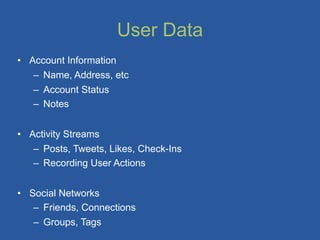
User Data
• Account Information
   – Name, Address, etc
   – Account Status
   – Notes


• Activity Streams
   – Posts, Tweets, Likes, Check-Ins
   – Recording User Actions


• Social Networks
   – Friends, Connections
   – Groups, Tags
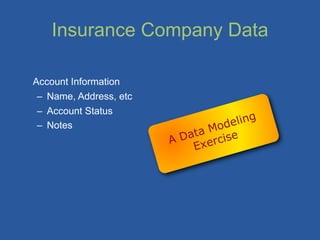
Insurance Company Data

Account Information
 – Name, Address, etc
 – Account Status
                                   eling
 – Notes                      Mod
                        A Data rcise
                            Exe
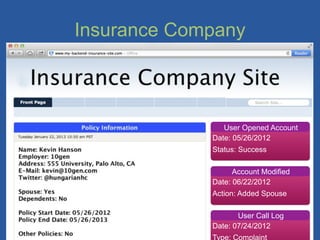
Insurance Company
Insurance Company
Insurance Company
Insurance Company


                User Opened Account
             Date: 05/26/2012
             Status: Success

                   Account Modified
             Date: 06/22/2012
             Action: Added Spouse

                    User Call Log
             Date: 07/24/2012
             Type: Complaint
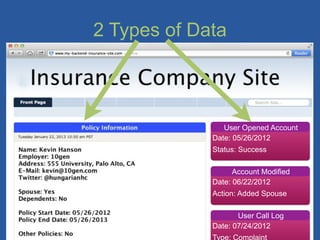
2 Types of Data


                User Opened Account
             Date: 05/26/2012
             Status: Success

                   Account Modified
             Date: 06/22/2012
             Action: Added Spouse

                    User Call Log
             Date: 07/24/2012
             Type: Complaint
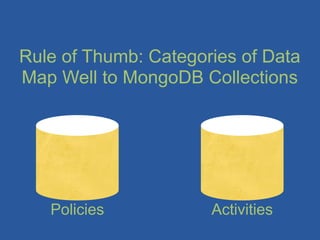
Rule of Thumb: Categories of Data
Map Well to MongoDB Collections


   Policies           Activities
Policies
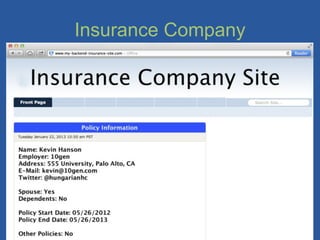
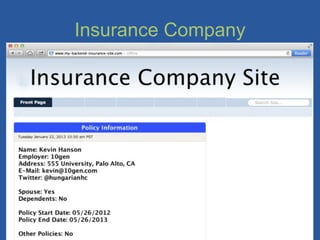
    policy = {
    	

     name: “Kevin Hanson”
    	

     employer: “10gen”,
    	

     address: “555 University”,
    	

     e-mail: “kevin@10gen.com”,
    	

     twitter: “@hungarianhc”,
    	

     spouse: “Yes”,
    	

     dependents: “No”,
    	

     dates: [
             {start: 5/26/2012 10:12:00},
              end: 5/26/2013 10:12:00}],
    	

     others: “No”
    }
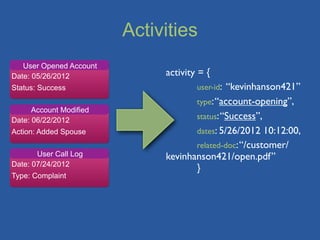
Activities
   User Opened Account
Date: 05/26/2012              activity = {
Status: Success               	

      user-id: “kevinhanson421”
                              	

      type: “account-opening”,
      Account Modified
Date: 06/22/2012              	

      status: “Success”,
Action: Added Spouse          	

      dates: 5/26/2012 10:12:00,
                              	

      related-doc: “/customer/
       User Call Log          kevinhanson421/open.pdf”
Date: 07/24/2012
                                       }
Type: Complaint
User Check-Ins
Activity Streams
 – Posts, Tweets, Check-Ins
 – Recording User Actions
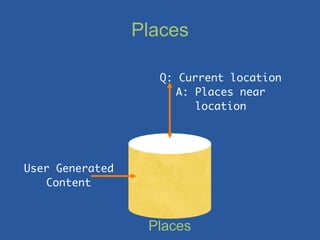
Places

                   Q: Current location
                      A: Places near
                         location


User Generated
   Content


                  Places
Inserting a Place
var p = { name: “10gen HQ”,
          address: “578 Broadway, 7th Floor”,
          city: “New York”,
          zip: “10012”,
          tags: [“mongoDB”, “business”],
          latlong: [40.0, 72.0],
          tips: [{user: “kevin”, time: “3/15/2012”,tip:
“Make sure to stop by for office hours!”}]}

> db.posts.save(p)
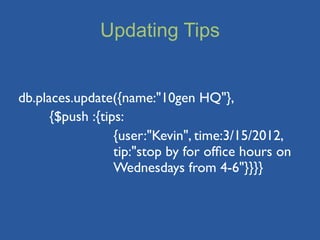
Updating Tips


db.places.update({name:"10gen HQ"},
	

   {$push :{tips:


    {user:"Kevin", time:3/15/2012,


    tip:"stop by for office hours on


    Wednesdays from 4-6"}}}}
Querying Our Places
• Creating Indexes
  ★ db.places.ensureIndex({tags:1})
  ★ db.places.ensureIndex({name:1})
  ★ db.places.ensureIndex({latlong:”2d”})


• Finding Places
  ★ db.places.find({latlong:{$near:[40,70]}})


• Regular Expressions
  ★ db.places.find({name: /^typeaheadstring/)


• Using Tags
  ★ db.places.find({tags: “business”})
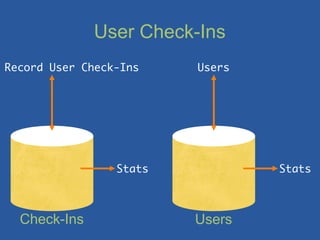
User Check-Ins
Record User Check-Ins    Users


                 Stats           Stats


  Check-Ins              Users
Users
user1 = {
	

  name: “Kevin Hanson”
	

  e-mail: “kevin@10gen.com”,
	

  check-ins: [4b97e62bf1d8c7152c9ccb74,
5a20e62bf1d8c736ab]
}

checkins [] = ObjectId reference to Check-Ins
Collection
Check-Ins
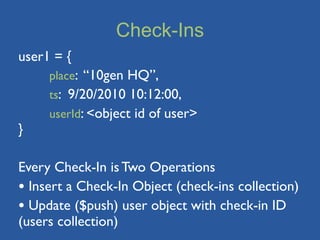
user1 = {
	

  place: “10gen HQ”,
	

  ts: 9/20/2010 10:12:00,
	

  userId: <object id of user>
}

Every Check-In is Two Operations
• Insert a Check-In Object (check-ins collection)
• Update ($push) user object with check-in ID
(users collection)
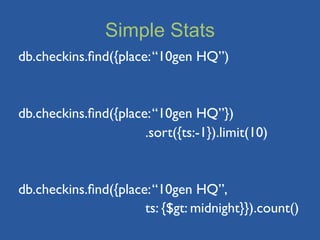
Simple Stats
db.checkins.find({place: “10gen HQ”)


db.checkins.find({place: “10gen HQ”})


   .sort({ts:-1}).limit(10)


db.checkins.find({place: “10gen HQ”, 	


   ts: {$gt: midnight}}).count()
Stats w/ MapReduce
   mapFunc = function() {emit(this.place, 1);}

   reduceFunc = function(key, values) {return
   Array.sum(values);}

   res = db.checkins.mapReduce(mapFunc,reduceFunc,
   	

    {query: {timestamp: {$gt:nowminus3hrs}}})

   res = [{_id:”10gen HQ”, value: 17}, ….., ….]


... or try using the new aggregation framework!
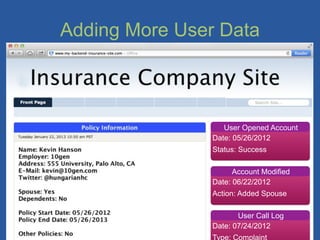
Adding More User Data


                   User Opened Account
                Date: 05/26/2012
                Status: Success

                      Account Modified
                Date: 06/22/2012
                Action: Added Spouse

                       User Call Log
                Date: 07/24/2012
                Type: Complaint
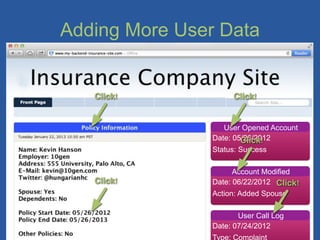
Adding More User Data


   Click!            Click!


                   User Opened Account
                Date: 05/26/2012
                        Click!
                Status: Success

                      Account Modified
   Click!       Date: 06/22/2012 Click!
                Action: Added Spouse

                       User Call Log
                Date: 07/24/2012
                Type: Complaint
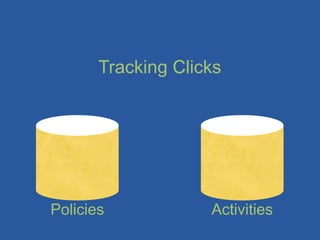
Tracking Clicks


Policies            Activities
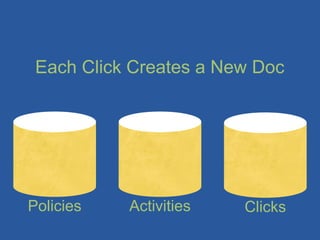
Each Click Creates a New Doc


Policies   Activities   Clicks
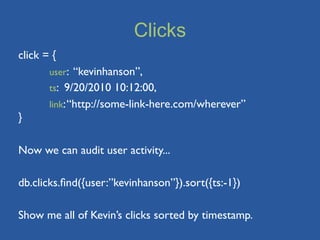
Clicks
click = {
	

    user: “kevinhanson”,
	

    ts: 9/20/2010 10:12:00,
	

    link: “http://some-link-here.com/wherever”
}

Now we can audit user activity...

db.clicks.find({user:”kevinhanson”}).sort({ts:-1})

Show me all of Kevin’s clicks sorted by timestamp.
Extending the Schema
user1 = {
	

  name: “Kevin Hanson”
	

  e-mail: “kevin@10gen.com”,
	

  check-ins: [4b97e62bf1d8c7152c9ccb74,
5a20e62bf1d8c736ab]
}
Extending the Schema
user1 = {
	

  name: “Kevin Hanson”
	

  e-mail: “kevin@10gen.com”,
	

  check-ins: [4b97e62bf1d8c7152c9ccb74,
5a20e62bf1d8c736ab],
	

  friends: [7b47j62bk1d3c5621c1icv90,
1h11p62bf1d8c716za]
}
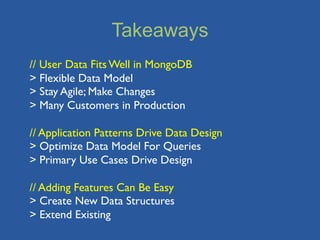
Takeaways
// User Data Fits Well in MongoDB
> Flexible Data Model
> Stay Agile; Make Changes
> Many Customers in Production

// Application Patterns Drive Data Design
> Optimize Data Model For Queries
> Primary Use Cases Drive Design

// Adding Features Can Be Easy
> Create New Data Structures
> Extend Existing
More info at http://www.mongodb.org/

                  conferences,	
  appearances,	
  and	
  meetups
                                              http://www.10gen.com/events


                                                               Questions?
                                                           kevin@10gen.com
                                                             @hungarianhc


    Facebook	


  |	


  Twitter	


  |	


  LinkedIn
http://bit.ly/mongo>	
                                                           @mongodb                                          http://linkd.in/joinmongo

1 24 - user data management

  • 1.
    User Data Management with Please stand by... We’ll begin shortly. Audio: 1-877-668-4493 Kevin Hanson Solutions Architect, 10gen Access code: 666 500 606 kevin@10gen.com Q&A to follow the webinar twitter: @hungarianhc Recording Available 24 Hours After Event Other issues? E-mail webinars@10gen.com
  • 2.
    Agenda // High LevelOverview > MongoDB > User Data // Modeling & Querying User Data > Insurance Company User Data > User Check-Ins // Extending the Data Model for Future Use-Cases > Tracking User Activity > Social Media
  • 3.
    MongoDB • Scalable, High-Performance,Open Source, Document- Oriented Database – JSON (well... BSON) Storage Model – Indexes and Full Query Language – Easy for Developers to Pick Up – Easy for Administrators to Scale • More Features at http://www.mongodb.org/ • Overview Video: http://www.10gen.com/what-is-mongodb
  • 4.
    User Data • AccountInformation – Name, Address, etc – Account Status – Notes • Activity Streams – Posts, Tweets, Likes, Check-Ins – Recording User Actions • Social Networks – Friends, Connections – Groups, Tags
  • 5.
    Insurance Company Data AccountInformation – Name, Address, etc – Account Status eling – Notes Mod A Data rcise Exe
  • 6.
  • 7.
  • 8.
  • 9.
    Insurance Company User Opened Account Date: 05/26/2012 Status: Success Account Modified Date: 06/22/2012 Action: Added Spouse User Call Log Date: 07/24/2012 Type: Complaint
  • 10.
    2 Types ofData User Opened Account Date: 05/26/2012 Status: Success Account Modified Date: 06/22/2012 Action: Added Spouse User Call Log Date: 07/24/2012 Type: Complaint
  • 11.
    Rule of Thumb:Categories of Data Map Well to MongoDB Collections Policies Activities
  • 12.
    Policies policy = { name: “Kevin Hanson” employer: “10gen”, address: “555 University”, e-mail: “kevin@10gen.com”, twitter: “@hungarianhc”, spouse: “Yes”, dependents: “No”, dates: [ {start: 5/26/2012 10:12:00}, end: 5/26/2013 10:12:00}], others: “No” }
  • 13.
    Activities User Opened Account Date: 05/26/2012 activity = { Status: Success user-id: “kevinhanson421” type: “account-opening”, Account Modified Date: 06/22/2012 status: “Success”, Action: Added Spouse dates: 5/26/2012 10:12:00, related-doc: “/customer/ User Call Log kevinhanson421/open.pdf” Date: 07/24/2012 } Type: Complaint
  • 14.
    User Check-Ins Activity Streams – Posts, Tweets, Check-Ins – Recording User Actions
  • 15.
    Places Q: Current location A: Places near location User Generated Content Places
  • 16.
    Inserting a Place varp = { name: “10gen HQ”, address: “578 Broadway, 7th Floor”, city: “New York”, zip: “10012”, tags: [“mongoDB”, “business”], latlong: [40.0, 72.0], tips: [{user: “kevin”, time: “3/15/2012”,tip: “Make sure to stop by for office hours!”}]} > db.posts.save(p)
  • 17.
    Updating Tips db.places.update({name:"10gen HQ"}, {$push :{tips: {user:"Kevin", time:3/15/2012, tip:"stop by for office hours on Wednesdays from 4-6"}}}}
  • 18.
    Querying Our Places •Creating Indexes ★ db.places.ensureIndex({tags:1}) ★ db.places.ensureIndex({name:1}) ★ db.places.ensureIndex({latlong:”2d”}) • Finding Places ★ db.places.find({latlong:{$near:[40,70]}}) • Regular Expressions ★ db.places.find({name: /^typeaheadstring/) • Using Tags ★ db.places.find({tags: “business”})
  • 19.
    User Check-Ins Record UserCheck-Ins Users Stats Stats Check-Ins Users
  • 20.
    Users user1 = { name: “Kevin Hanson” e-mail: “kevin@10gen.com”, check-ins: [4b97e62bf1d8c7152c9ccb74, 5a20e62bf1d8c736ab] } checkins [] = ObjectId reference to Check-Ins Collection
  • 21.
    Check-Ins user1 = { place: “10gen HQ”, ts: 9/20/2010 10:12:00, userId: <object id of user> } Every Check-In is Two Operations • Insert a Check-In Object (check-ins collection) • Update ($push) user object with check-in ID (users collection)
  • 22.
    Simple Stats db.checkins.find({place: “10genHQ”) db.checkins.find({place: “10gen HQ”}) .sort({ts:-1}).limit(10) db.checkins.find({place: “10gen HQ”, ts: {$gt: midnight}}).count()
  • 23.
    Stats w/ MapReduce mapFunc = function() {emit(this.place, 1);} reduceFunc = function(key, values) {return Array.sum(values);} res = db.checkins.mapReduce(mapFunc,reduceFunc, {query: {timestamp: {$gt:nowminus3hrs}}}) res = [{_id:”10gen HQ”, value: 17}, ….., ….] ... or try using the new aggregation framework!
  • 24.
    Adding More UserData User Opened Account Date: 05/26/2012 Status: Success Account Modified Date: 06/22/2012 Action: Added Spouse User Call Log Date: 07/24/2012 Type: Complaint
  • 25.
    Adding More UserData Click! Click! User Opened Account Date: 05/26/2012 Click! Status: Success Account Modified Click! Date: 06/22/2012 Click! Action: Added Spouse User Call Log Date: 07/24/2012 Type: Complaint
  • 26.
  • 27.
    Each Click Createsa New Doc Policies Activities Clicks
  • 28.
    Clicks click = { user: “kevinhanson”, ts: 9/20/2010 10:12:00, link: “http://some-link-here.com/wherever” } Now we can audit user activity... db.clicks.find({user:”kevinhanson”}).sort({ts:-1}) Show me all of Kevin’s clicks sorted by timestamp.
  • 29.
    Extending the Schema user1= { name: “Kevin Hanson” e-mail: “kevin@10gen.com”, check-ins: [4b97e62bf1d8c7152c9ccb74, 5a20e62bf1d8c736ab] }
  • 30.
    Extending the Schema user1= { name: “Kevin Hanson” e-mail: “kevin@10gen.com”, check-ins: [4b97e62bf1d8c7152c9ccb74, 5a20e62bf1d8c736ab], friends: [7b47j62bk1d3c5621c1icv90, 1h11p62bf1d8c716za] }
  • 31.
    Takeaways // User DataFits Well in MongoDB > Flexible Data Model > Stay Agile; Make Changes > Many Customers in Production // Application Patterns Drive Data Design > Optimize Data Model For Queries > Primary Use Cases Drive Design // Adding Features Can Be Easy > Create New Data Structures > Extend Existing
  • 32.
    More info athttp://www.mongodb.org/ conferences,  appearances,  and  meetups http://www.10gen.com/events Questions? kevin@10gen.com @hungarianhc Facebook                    |                  Twitter                  |                  LinkedIn http://bit.ly/mongo>   @mongodb http://linkd.in/joinmongo