Apache Kafka
CMSC 491
Hadoop-Based Distributed Computing
Spring 2016
Adam Shook
Overview
• Kafka is a “publish-subscribe messaging
rethought as a distributed commit log”
• Fast
• Scalable
• Durable
• Distributed
Kafka adoption and use cases
• LinkedIn: activity streams, operational metrics, data bus
– 400 nodes, 18k topics, 220B msg/day (peak 3.2M msg/s), May 2014
• Netflix: real-time monitoring and event processing
• Twitter: as part of their Storm real-time data pipelines
• Spotify: log delivery (from 4h down to 10s), Hadoop
• Loggly: log collection and processing
• Mozilla: telemetry data
• Airbnb, Cisco, Gnip, InfoChimps, Ooyala, Square, Uber, …
3
How fast is Kafka?
• “Up to 2 million writes/sec on 3 cheap machines”
– Using 3 producers on 3 different machines, 3x async replication
• Only 1 producer/machine because NIC already saturated
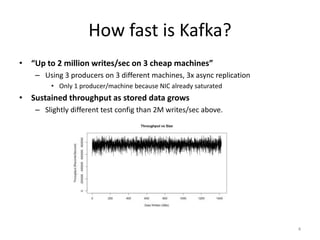
• Sustained throughput as stored data grows
– Slightly different test config than 2M writes/sec above.
4
Why is Kafka so fast?
• Fast writes:
– While Kafka persists all data to disk, essentially all writes go to the
page cache of OS, i.e. RAM.
• Fast reads:
– Very efficient to transfer data from page cache to a network socket
– Linux: sendfile() system call
• Combination of the two = fast Kafka!
– Example (Operations): On a Kafka cluster where the consumers are mostly
caught up you will see no read activity on the disks as they will be serving data
entirely from cache.
5
A first look
• The who is who
– Producers write data to
brokers.
– Consumers read data from
brokers.
– All this is distributed.
• The data
– Data is stored in topics.
– Topics are split into
partitions, which are
replicated.
6
A first look
7
Broker(s)
Topics
8
new
Producer A1
Producer A2
Producer An
…
Producers always append to “tail”
(think: append to a file)
…
Kafka prunes “head” based on age or max size or “key”
Older msgs Newer msgs
Kafka topic
• Topic: feed name to which messages are published
– Example: “zerg.hydra”
Broker(s)
Topics
9
new
Producer A1
Producer A2
Producer An
…
Producers always append to “tail”
(think: append to a file)
…
Older msgs Newer msgs
Consumer group C1 Consumers use an “offset pointer” to
track/control their read progress
(and decide the pace of consumption)
Consumer group C2
Partitions
10
• A topic consists of partitions.
• Partition: ordered + immutable sequence of messages
that is continually appended to
Partitions
11
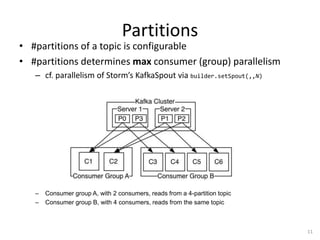
• #partitions of a topic is configurable
• #partitions determines max consumer (group) parallelism
– cf. parallelism of Storm’s KafkaSpout via builder.setSpout(,,N)
– Consumer group A, with 2 consumers, reads from a 4-partition topic
– Consumer group B, with 4 consumers, reads from the same topic
Partition offsets
12
• Offset: messages in the partitions are each assigned a unique
(per partition) and sequential id called the offset
– Consumers track their pointers via (offset, partition, topic) tuples
Consumer group C1
Replicas of a partition
• Replicas: “backups” of a partition
– They exist solely to prevent data loss.
– Replicas are never read from, never written to.
• They do NOT help to increase producer or consumer
parallelism!
– Kafka tolerates (numReplicas - 1) dead brokers
before losing data
• LinkedIn: numReplicas == 2  1 broker can die
13
Kafka Quickstart
• Steps for downloading Kafka, starting a server,
and creating a console-based
consumer/producer
• Requires ZooKeeper to be installed and
running
• https://kafka.apache.org/documentation.html
#quickstart
• https://github.com/adamjshook/hadoop-
demos/tree/master/kafka

04-Kafka.pptx

  • 1.
    Apache Kafka CMSC 491 Hadoop-BasedDistributed Computing Spring 2016 Adam Shook
  • 2.
    Overview • Kafka isa “publish-subscribe messaging rethought as a distributed commit log” • Fast • Scalable • Durable • Distributed
  • 3.
    Kafka adoption anduse cases • LinkedIn: activity streams, operational metrics, data bus – 400 nodes, 18k topics, 220B msg/day (peak 3.2M msg/s), May 2014 • Netflix: real-time monitoring and event processing • Twitter: as part of their Storm real-time data pipelines • Spotify: log delivery (from 4h down to 10s), Hadoop • Loggly: log collection and processing • Mozilla: telemetry data • Airbnb, Cisco, Gnip, InfoChimps, Ooyala, Square, Uber, … 3
  • 4.
    How fast isKafka? • “Up to 2 million writes/sec on 3 cheap machines” – Using 3 producers on 3 different machines, 3x async replication • Only 1 producer/machine because NIC already saturated • Sustained throughput as stored data grows – Slightly different test config than 2M writes/sec above. 4
  • 5.
    Why is Kafkaso fast? • Fast writes: – While Kafka persists all data to disk, essentially all writes go to the page cache of OS, i.e. RAM. • Fast reads: – Very efficient to transfer data from page cache to a network socket – Linux: sendfile() system call • Combination of the two = fast Kafka! – Example (Operations): On a Kafka cluster where the consumers are mostly caught up you will see no read activity on the disks as they will be serving data entirely from cache. 5
  • 6.
    A first look •The who is who – Producers write data to brokers. – Consumers read data from brokers. – All this is distributed. • The data – Data is stored in topics. – Topics are split into partitions, which are replicated. 6
  • 7.
  • 8.
    Broker(s) Topics 8 new Producer A1 Producer A2 ProducerAn … Producers always append to “tail” (think: append to a file) … Kafka prunes “head” based on age or max size or “key” Older msgs Newer msgs Kafka topic • Topic: feed name to which messages are published – Example: “zerg.hydra”
  • 9.
    Broker(s) Topics 9 new Producer A1 Producer A2 ProducerAn … Producers always append to “tail” (think: append to a file) … Older msgs Newer msgs Consumer group C1 Consumers use an “offset pointer” to track/control their read progress (and decide the pace of consumption) Consumer group C2
  • 10.
    Partitions 10 • A topicconsists of partitions. • Partition: ordered + immutable sequence of messages that is continually appended to
  • 11.
    Partitions 11 • #partitions ofa topic is configurable • #partitions determines max consumer (group) parallelism – cf. parallelism of Storm’s KafkaSpout via builder.setSpout(,,N) – Consumer group A, with 2 consumers, reads from a 4-partition topic – Consumer group B, with 4 consumers, reads from the same topic
  • 12.
    Partition offsets 12 • Offset:messages in the partitions are each assigned a unique (per partition) and sequential id called the offset – Consumers track their pointers via (offset, partition, topic) tuples Consumer group C1
  • 13.
    Replicas of apartition • Replicas: “backups” of a partition – They exist solely to prevent data loss. – Replicas are never read from, never written to. • They do NOT help to increase producer or consumer parallelism! – Kafka tolerates (numReplicas - 1) dead brokers before losing data • LinkedIn: numReplicas == 2  1 broker can die 13
  • 14.
    Kafka Quickstart • Stepsfor downloading Kafka, starting a server, and creating a console-based consumer/producer • Requires ZooKeeper to be installed and running • https://kafka.apache.org/documentation.html #quickstart • https://github.com/adamjshook/hadoop- demos/tree/master/kafka