CẬP NHẬT DỮ LIỆU
Chương 4
2
Nội dung
 Câu lệnh SQL
 Dùng đối tượng Command
 Chỉnh sửa dữ liệu Disconnected
 Dùng đối tượng Command với DataTable/DataSet
 Dùng đối tượng DataAdapter
 Dùng đối tượng CommandBuilder
 Cấu hình DataAdapter “bằng tay”
3
Câu lệnh SQL
 Câu lệnh Insert
 Câu lệnh Update
 Câu lệnh Delete
4
Câu lệnh SQL
Insert
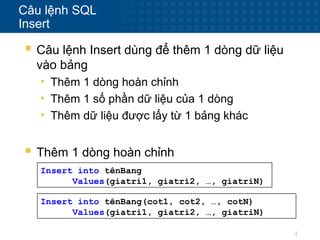
 Câu lệnh Insert dùng để thêm 1 dòng dữ liệu
vào bảng
• Thêm 1 dòng hoàn chỉnh
• Thêm 1 số phần dữ liệu của 1 dòng
• Thêm dữ liệu được lấy từ 1 bảng khác
 Thêm 1 dòng hoàn chỉnh
Insert into tênBang
Values(giatri1, giatri2, …, giatriN)
Insert into tênBang(cot1, cot2, …, cotN)
Values(giatri1, giatri2, …, giatriN)
5
Câu lệnh SQL
Insert
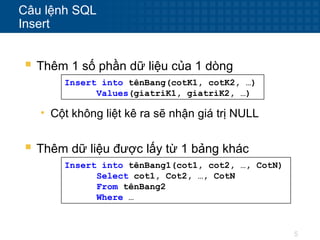
 Thêm 1 số phần dữ liệu của 1 dòng
Insert into tênBang(cotK1, cotK2, …)
Values(giatriK1, giatriK2, …)
• Cột không liệt kê ra sẽ nhận giá trị NULL
 Thêm dữ liệu được lấy từ 1 bảng khác
Insert into tênBang1(cot1, cot2, …, CotN)
Select cot1, Cot2, …, CotN
From tênBang2
Where …
6
Câu lệnh SQL
Insert
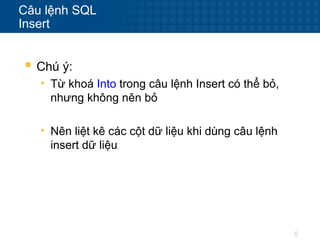
 Chú ý:
• Từ khoá Into trong câu lệnh Insert có thể bỏ,
nhưng không nên bỏ
• Nên liệt kê các cột dữ liệu khi dùng câu lệnh
insert dữ liệu
7
Câu lệnh SQL
Insert
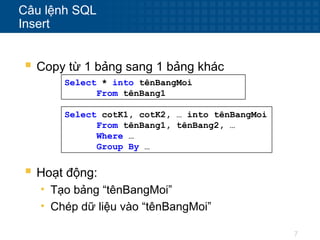
 Copy từ 1 bảng sang 1 bảng khác
Select * into tênBangMoi
From tênBang1
Select cotK1, cotK2, … into tênBangMoi
From tênBang1, tênBang2, …
Where …
Group By …
 Hoạt động:
• Tạo bảng “tênBangMoi”
• Chép dữ liệu vào “tênBangMoi”
8
Câu lệnh SQL
Update
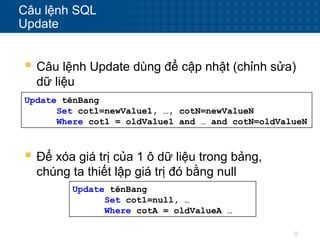
 Câu lệnh Update dùng để cập nhật (chỉnh sửa)
dữ liệu
Update tênBang
Set cot1=newValue1, …, cotN=newValueN
Where cot1 = oldValue1 and … and cotN=oldValueN
 Để xóa giá trị của 1 ô dữ liệu trong bảng,
chúng ta thiết lập giá trị đó bằng null
Update tênBang
Set cot1=null, …
Where cotA = oldValueA …
9
Câu lệnh SQL
Delete
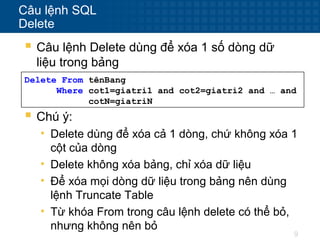
 Câu lệnh Delete dùng để xóa 1 số dòng dữ
liệu trong bảng
Delete From tênBang
Where cot1=giatri1 and cot2=giatri2 and … and
cotN=giatriN
 Chú ý:
• Delete dùng để xóa cả 1 dòng, chứ không xóa 1
cột của dòng
• Delete không xóa bảng, chỉ xóa dữ liệu
• Để xóa mọi dòng dữ liệu trong bảng nên dùng
lệnh Truncate Table
• Từ khóa From trong câu lệnh delete có thể bỏ,
nhưng không nên bỏ
10
Dùng đối tượng Command
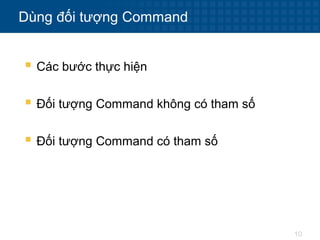
 Các bước thực hiện
 Đối tượng Command không có tham số
 Đối tượng Command có tham số
11
Dùng đối tượng Command
Các bước thực hiện
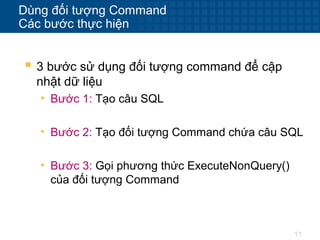
 3 bước sử dụng đối tượng command để cập
nhật dữ liệu
• Bước 1: Tạo câu SQL
• Bước 2: Tạo đối tượng Command chứa câu SQL
• Bước 3: Gọi phương thức ExecuteNonQuery()
của đối tượng Command
12
Dùng đối tượng Command
Đối tượng Command không có tham số
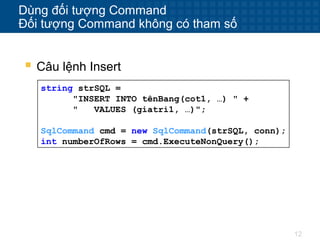
string strSQL =
"INSERT INTO tênBang(cot1, …) " +
" VALUES (giatri1, …)";
SqlCommand cmd = new SqlCommand(strSQL, conn);
int numberOfRows = cmd.ExecuteNonQuery();
 Câu lệnh Insert
13
Dùng đối tượng Command
Đối tượng Command không có tham số
string strSQL =
"UPDATE tênBang" +
" SET cot1 = newValue1,…, cotN=giatriN" +
" WHERE cot1=oldValue1 and … and cotN=oldValueN";
SqlCommand cmd = new SqlCommand(strSQL, conn);
int numberOfRows = cmd.ExecuteNonQuery();
 Câu lệnh Update
14
Dùng đối tượng Command
Đối tượng Command không có tham số
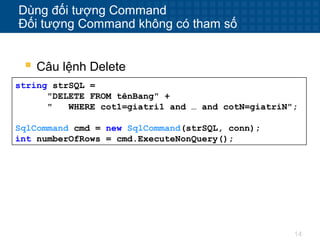
string strSQL =
"DELETE FROM tênBang" +
" WHERE cot1=giatri1 and … and cotN=giatriN";
SqlCommand cmd = new SqlCommand(strSQL, conn);
int numberOfRows = cmd.ExecuteNonQuery();
 Câu lệnh Delete
15
Dùng đối tượng Command
Đối tượng Command có tham số
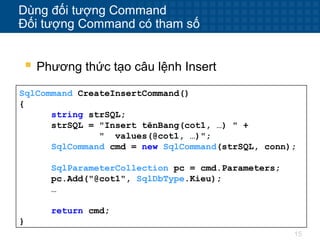
 Phương thức tạo câu lệnh Insert
SqlCommand CreateInsertCommand()
{
string strSQL;
strSQL = "Insert tênBang(cot1, …) " +
" values(@cot1, …)";
SqlCommand cmd = new SqlCommand(strSQL, conn);
SqlParameterCollection pc = cmd.Parameters;
pc.Add("@cot1", SqlDbType.Kieu);
…
return cmd;
}
16
Dùng đối tượng Command
Đối tượng Command có tham số
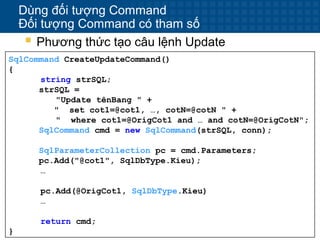
 Phương thức tạo câu lệnh Update
SqlCommand CreateUpdateCommand()
{
string strSQL;
strSQL =
"Update tênBang " +
" set cot1=@cot1, …, cotN=@cotN " +
" where cot1=@OrigCot1 and … and cotN=@OrigCotN";
SqlCommand cmd = new SqlCommand(strSQL, conn);
SqlParameterCollection pc = cmd.Parameters;
pc.Add("@cot1", SqlDbType.Kieu);
…
pc.Add(@OrigCot1, SqlDbType.Kieu)
…
return cmd;
}
17
Dùng đối tượng Command
Đối tượng Command có tham số
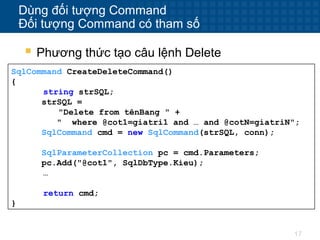
 Phương thức tạo câu lệnh Delete
SqlCommand CreateDeleteCommand()
{
string strSQL;
strSQL =
"Delete from tênBang " +
" where @cot1=giatri1 and … and @cotN=giatriN";
SqlCommand cmd = new SqlCommand(strSQL, conn);
SqlParameterCollection pc = cmd.Parameters;
pc.Add("@cot1", SqlDbType.Kieu);
…
return cmd;
}
18
Dùng đối tượng Command
Đối tượng Command có tham số
 Sử dụng các đối tượng command có tham số
int SubmitInsert/Update/Delete()
{
SqlCommand cmd = CreateInsertCommand();
//SqlCommand cmd = CreateUpdateCommand();
//SqlCommand cmd = CreateDeleteCommand();
cmd.Parameters[@tenThamSo] = giatri;
…
return cmd.ExecuteNonQuery();
}
19
Chỉnh sửa dữ liệu Disconnected
 Trạng thái của DataRow
 Thêm các dòng dữ liệu mới
 Chỉnh sửa các dòng dữ liệu
 Xóa các dòng dữ liệu
 Phiên bản dữ liệu trong DataRow
20
Chỉnh sửa dữ liệu Disconnected
Trạng thái của DataRow
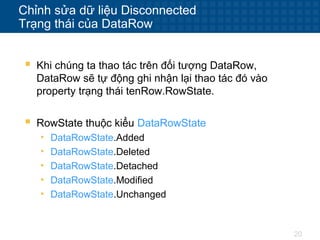
 Khi chúng ta thao tác trên đối tượng DataRow,
DataRow sẽ tự động ghi nhận lại thao tác đó vào
property trạng thái tenRow.RowState.
 RowState thuộc kiểu DataRowState
• DataRowState.Added
• DataRowState.Deleted
• DataRowState.Detached
• DataRowState.Modified
• DataRowState.Unchanged
21
Chỉnh sửa dữ liệu Disconnected
Thêm các dòng dữ liệu mới
 Cách 1: DataRow row;
row = tenBang.NewRow();
row["cot1"] = giatri1;
row["cot2"] = giatri2;
…
tenBang.Rows.Add(row);
 Cách 2:
object[] rowValues = {giatri1,giatri2,…};
tenBang.LoadDataRow(rowValues, false);
22
Chỉnh sửa dữ liệu Disconnected
Chỉnh sửa các dòng dữ liệu
 Cách 1: DataRow row;
int index;
…
row = tenBang.Rows[index];
row["cot1"] = giatrimoi1;
row["cot2"] = giatrimoi2;
…
 Cách 2: DataRow row;
int index;
…
row = tenBang.Rows[index];
row.BeginEdit();
row["cot1"] = giatrimoi1;
row["cot2"] = giatrimoi2;
…
row.EndEdit();
23
Chỉnh sửa dữ liệu Disconnected
Chỉnh sửa các dòng dữ liệu
 Cách 3:
DataRow row;
int index;
…
row = tenBang.Rows[index];
row.ItemArray = new object[]{giatri1, giatri2, … };
24
Chỉnh sửa dữ liệu Disconnected
Xóa các dòng dữ liệu
 Cách 1: DataRow row;
int index;
…
row = tenBang.Rows[index];
row.Delete();
 Cách 2: DataRow row;
int index;
…
row = tenBang.Rows[index];
tenBang.Remove(row);
25
Chỉnh sửa dữ liệu Disconnected
Xóa các dòng dữ liệu
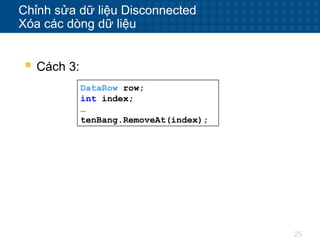
 Cách 3:
DataRow row;
int index;
…
tenBang.RemoveAt(index);
26
Chỉnh sửa dữ liệu Disconnected
Phiên bản dữ liệu trong DataRow
 Truy cập các phiên bản dữ liệu khác nhau
của DataRow
DataRow row;
int index;
…
row = tenBang.Rows[index];
row["cot1"] = giatrimoi1;
row["cot2"] = giatrimoi2;
…
string strOldData;
strOldData = row["tenCot", DataRowVersion.Original];
27
Chỉnh sửa dữ liệu Disconnected
Phiên bản dữ liệu trong DataRow
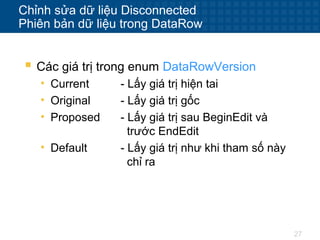
 Các giá trị trong enum DataRowVersion
• Current - Lấy giá trị hiện tai
• Original - Lấy giá trị gốc
• Proposed - Lấy giá trị sau BeginEdit và
trước EndEdit
• Default - Lấy giá trị như khi tham số này
chỉ ra
28
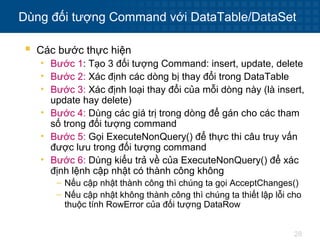
Dùng đối tượng Command với DataTable/DataSet
 Các bước thực hiện
• Bước 1: Tạo 3 đối tượng Command: insert, update, delete
• Bước 2: Xác định các dòng bị thay đổi trong DataTable
• Bước 3: Xác định loại thay đổi của mỗi dòng này (là insert,
update hay delete)
• Bước 4: Dùng các giá trị trong dòng để gán cho các tham
số trong đối tượng command
• Bước 5: Gọi ExecuteNonQuery() để thực thi câu truy vấn
được lưu trong đối tượng command
• Bước 6: Dùng kiểu trả về của ExecuteNonQuery() để xác
định lệnh cập nhật có thành công không
– Nếu cập nhật thành công thì chúng ta gọi AcceptChanges()
– Nếu cập nhật không thành công thì chúng ta thiết lập lỗi cho
thuộc tính RowError của đối tượng DataRow
29
Dùng đối tượng Command với DataTable/DataSet
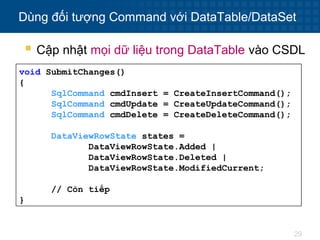
void SubmitChanges()
{
SqlCommand cmdInsert = CreateInsertCommand();
SqlCommand cmdUpdate = CreateUpdateCommand();
SqlCommand cmdDelete = CreateDeleteCommand();
DataViewRowState states =
DataViewRowState.Added |
DataViewRowState.Deleted |
DataViewRowState.ModifiedCurrent;
// Còn tiếp
}
 Cập nhật mọi dữ liệu trong DataTable vào CSDL
30
Dùng đối tượng Command với DataTable/DataSet
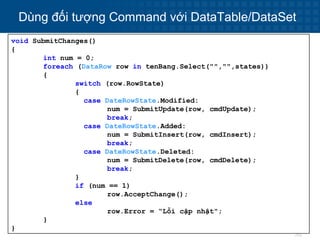
void SubmitChanges()
{
int num = 0;
foreach (DataRow row in tenBang.Select("","",states))
{
switch (row.RowState)
{
case DateRowState.Modified:
num = SubmitUpdate(row, cmdUpdate);
break;
case DateRowState.Added:
num = SubmitInsert(row, cmdInsert);
break;
case DateRowState.Deleted:
num = SubmitDelete(row, cmdDelete);
break;
}
if (num == 1)
row.AcceptChange();
else
row.Error = “Lỗi cập nhật";
}
}
31
Dùng đối tượng Command với DataTable/DataSet
int SubmitInsert(DataRow row, SqlCommand cmdInsert)
{
SqlParameterCollection pc = cmdInsert.Parameters;
pc["@Cot1"].Value = row["Cot1"];
pc["@Cot2"].Value = row["Cot2"];
…
return cmdInsert.ExecuteNonQuery();
}
 Thêm 1 DataRow vào CSDL
32
Dùng đối tượng Command với DataTable/DataSet
int SubmitDelete(DataRow row, SqlCommand cmdDelete)
{
SqlParameterCollection pc = cmdDelete.Parameters;
pc["@Cot1"].Value =
row["Cot1", DataRowVersion.Original];
pc["@Cot2"].Value =
row["Cot2", DataRowVersion.Original];
…
return cmdDelete.ExecuteNonQuery();
}
 Xóa 1 DataRow trong CSDL
33
Dùng đối tượng Command với DataTable/DataSet
int SubmitUpdate(DataRow row, SqlCommand cmdUpdate)
{
SqlParameterCollection pc = cmdUpdate.Parameters;
pc["@Cot1"].Value = row["Cot1"];
pc["@Cot2"].Value = row["Cot2"];
…
pc["@OrginCot1"].Value =
row["Cot1", DataRowVersion.Original];
pc["@OriginCot2"].Value =
row["Cot2", DataRowVersion.Original];
…
return cmdUpdate.ExecuteNonQuery();
}
 Cập nhật 1 DataRow vào CSDL
34
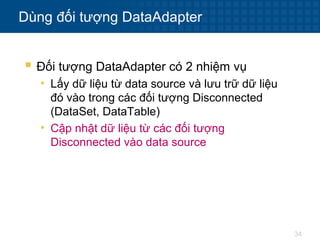
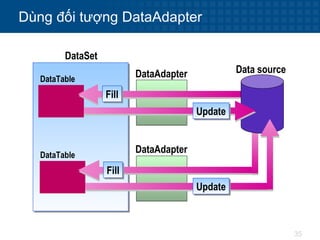
Dùng đối tượng DataAdapter
 Đối tượng DataAdapter có 2 nhiệm vụ
• Lấy dữ liệu từ data source và lưu trữ dữ liệu
đó vào trong các đối tượng Disconnected
(DataSet, DataTable)
• Cập nhật dữ liệu từ các đối tượng
Disconnected vào data source
35
Dùng đối tượng DataAdapter
Data sourceDataAdapterDataTable
DataTable
DataSet
DataAdapter
FillFill
UpdateUpdate
FillFill
UpdateUpdate
36
Dùng đối tượng DataAdapter
 Để cập nhật dữ liệu, DataAdapter cũng dùng các
câu lệnh SQL Insert/Update/Delete được lưu trong
3 đối tượng Command của DataAdapter
• InsertCommand
• UpdateCommand
• DeleteCommand
37
Dùng đối tượng DataAdapter
 Chúng ta có 3 lựa chọn để tạo các đối tượng
Command trong DataAdapter
• Dùng đối tượng SqlCommandBuilder để sinh
3 đối tượng Command lúc thực thi (run time)
• Cấu hình 3 đối tượng Command “bằng tay”
• Dùng Data Adapter Configuration Wizard lúc
thiết kế (design time)
38
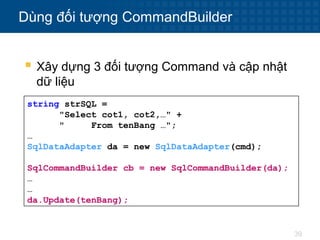
Dùng đối tượng CommandBuilder
 SqlCommandBuilder sẽ sinh các câu lệnh
Insert/Update/Delete dựa trên câu lệnh select chúng
ta cung cấp
 SqlCommandBuilder chỉ sinh được câu lệnh
Insert/Update/Delete khi các điều kiện sau thỏa mãn
• Câu lệnh Select chỉ truy vấn trên 1 bảng
• Câu lệnh Select có chứa khóa chính
39
Dùng đối tượng CommandBuilder
 Xây dựng 3 đối tượng Command và cập nhật
dữ liệu
string strSQL =
"Select cot1, cot2,…" +
" From tenBang …";
…
SqlDataAdapter da = new SqlDataAdapter(cmd);
SqlCommandBuilder cb = new SqlCommandBuilder(da);
…
…
da.Update(tenBang);
40
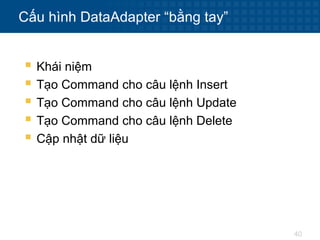
Cấu hình DataAdapter “bằng tay”
 Khái niệm
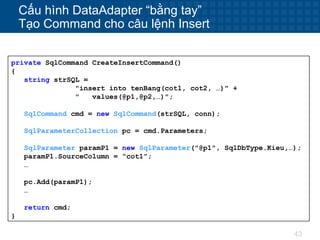
 Tạo Command cho câu lệnh Insert
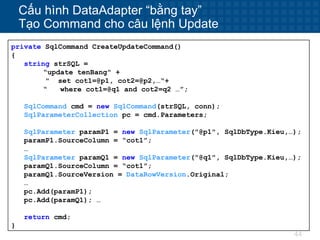
 Tạo Command cho câu lệnh Update
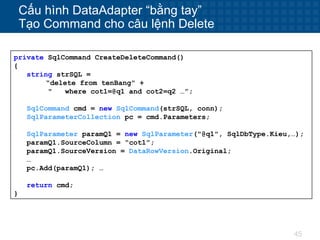
 Tạo Command cho câu lệnh Delete
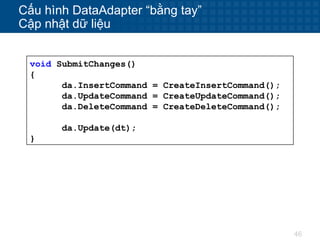
 Cập nhật dữ liệu
41
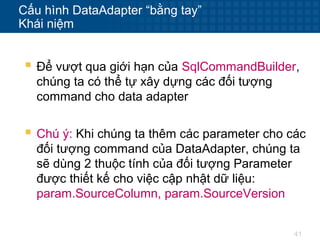
Cấu hình DataAdapter “bằng tay”
Khái niệm
 Để vượt qua giới hạn của SqlCommandBuilder,
chúng ta có thể tự xây dựng các đối tượng
command cho data adapter
 Chú ý: Khi chúng ta thêm các parameter cho các
đối tượng command của DataAdapter, chúng ta
sẽ dùng 2 thuộc tính của đối tượng Parameter
được thiết kế cho việc cập nhật dữ liệu:
param.SourceColumn, param.SourceVersion
42
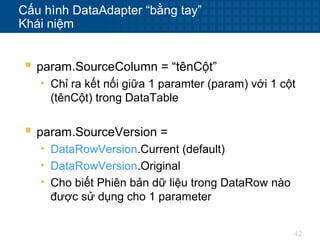
Cấu hình DataAdapter “bằng tay”
Khái niệm
 param.SourceColumn = “tênCột”
• Chỉ ra kết nối giữa 1 paramter (param) với 1 cột
(tênCột) trong DataTable
 param.SourceVersion =
• DataRowVersion.Current (default)
• DataRowVersion.Original
• Cho biết Phiên bản dữ liệu trong DataRow nào
được sử dụng cho 1 parameter
43
Cấu hình DataAdapter “bằng tay”
Tạo Command cho câu lệnh Insert
private SqlCommand CreateInsertCommand()
{
string strSQL =
"insert into tenBang(cot1, cot2, …)" +
" values(@p1,@p2,…)";
SqlCommand cmd = new SqlCommand(strSQL, conn);
SqlParameterCollection pc = cmd.Parameters;
SqlParameter paramP1 = new SqlParameter("@p1", SqlDbType.Kieu,…);
paramP1.SourceColumn = “cot1”;
…
pc.Add(paramP1);
…
return cmd;
}
44
Cấu hình DataAdapter “bằng tay”
Tạo Command cho câu lệnh Update
private SqlCommand CreateUpdateCommand()
{
string strSQL =
“update tenBang" +
" set cot1=@p1, cot2=@p2,…“+
“ where cot1=@q1 and cot2=q2 …”;
SqlCommand cmd = new SqlCommand(strSQL, conn);
SqlParameterCollection pc = cmd.Parameters;
SqlParameter paramP1 = new SqlParameter("@p1", SqlDbType.Kieu,…);
paramP1.SourceColumn = “cot1”;
…
SqlParameter paramQ1 = new SqlParameter("@q1", SqlDbType.Kieu,…);
paramQ1.SourceColumn = “cot1”;
paramQ1.SourceVersion = DataRowVersion.Original;
…
pc.Add(paramP1);
pc.Add(paramQ1); …
return cmd;
}
45
Cấu hình DataAdapter “bằng tay”
Tạo Command cho câu lệnh Delete
private SqlCommand CreateDeleteCommand()
{
string strSQL =
“delete from tenBang" +
" where cot1=@q1 and cot2=q2 …”;
SqlCommand cmd = new SqlCommand(strSQL, conn);
SqlParameterCollection pc = cmd.Parameters;
SqlParameter paramQ1 = new SqlParameter("@q1", SqlDbType.Kieu,…);
paramQ1.SourceColumn = “cot1”;
paramQ1.SourceVersion = DataRowVersion.Original;
…
pc.Add(paramQ1); …
return cmd;
}
46
Cấu hình DataAdapter “bằng tay”
Cập nhật dữ liệu
void SubmitChanges()
{
da.InsertCommand = CreateInsertCommand();
da.UpdateCommand = CreateUpdateCommand();
da.DeleteCommand = CreateDeleteCommand();
da.Update(dt);
}
47
Tóm tắt chương 4

04 chuong4-capnhatdulieu-140404115156-phpapp02

  • 1.
    CẬP NHẬT DỮLIỆU Chương 4
  • 2.
    2 Nội dung  Câulệnh SQL  Dùng đối tượng Command  Chỉnh sửa dữ liệu Disconnected  Dùng đối tượng Command với DataTable/DataSet  Dùng đối tượng DataAdapter  Dùng đối tượng CommandBuilder  Cấu hình DataAdapter “bằng tay”
  • 3.
    3 Câu lệnh SQL Câu lệnh Insert  Câu lệnh Update  Câu lệnh Delete
  • 4.
    4 Câu lệnh SQL Insert Câu lệnh Insert dùng để thêm 1 dòng dữ liệu vào bảng • Thêm 1 dòng hoàn chỉnh • Thêm 1 số phần dữ liệu của 1 dòng • Thêm dữ liệu được lấy từ 1 bảng khác  Thêm 1 dòng hoàn chỉnh Insert into tênBang Values(giatri1, giatri2, …, giatriN) Insert into tênBang(cot1, cot2, …, cotN) Values(giatri1, giatri2, …, giatriN)
  • 5.
    5 Câu lệnh SQL Insert Thêm 1 số phần dữ liệu của 1 dòng Insert into tênBang(cotK1, cotK2, …) Values(giatriK1, giatriK2, …) • Cột không liệt kê ra sẽ nhận giá trị NULL  Thêm dữ liệu được lấy từ 1 bảng khác Insert into tênBang1(cot1, cot2, …, CotN) Select cot1, Cot2, …, CotN From tênBang2 Where …
  • 6.
    6 Câu lệnh SQL Insert Chú ý: • Từ khoá Into trong câu lệnh Insert có thể bỏ, nhưng không nên bỏ • Nên liệt kê các cột dữ liệu khi dùng câu lệnh insert dữ liệu
  • 7.
    7 Câu lệnh SQL Insert Copy từ 1 bảng sang 1 bảng khác Select * into tênBangMoi From tênBang1 Select cotK1, cotK2, … into tênBangMoi From tênBang1, tênBang2, … Where … Group By …  Hoạt động: • Tạo bảng “tênBangMoi” • Chép dữ liệu vào “tênBangMoi”
  • 8.
    8 Câu lệnh SQL Update Câu lệnh Update dùng để cập nhật (chỉnh sửa) dữ liệu Update tênBang Set cot1=newValue1, …, cotN=newValueN Where cot1 = oldValue1 and … and cotN=oldValueN  Để xóa giá trị của 1 ô dữ liệu trong bảng, chúng ta thiết lập giá trị đó bằng null Update tênBang Set cot1=null, … Where cotA = oldValueA …
  • 9.
    9 Câu lệnh SQL Delete Câu lệnh Delete dùng để xóa 1 số dòng dữ liệu trong bảng Delete From tênBang Where cot1=giatri1 and cot2=giatri2 and … and cotN=giatriN  Chú ý: • Delete dùng để xóa cả 1 dòng, chứ không xóa 1 cột của dòng • Delete không xóa bảng, chỉ xóa dữ liệu • Để xóa mọi dòng dữ liệu trong bảng nên dùng lệnh Truncate Table • Từ khóa From trong câu lệnh delete có thể bỏ, nhưng không nên bỏ
  • 10.
    10 Dùng đối tượngCommand  Các bước thực hiện  Đối tượng Command không có tham số  Đối tượng Command có tham số
  • 11.
    11 Dùng đối tượngCommand Các bước thực hiện  3 bước sử dụng đối tượng command để cập nhật dữ liệu • Bước 1: Tạo câu SQL • Bước 2: Tạo đối tượng Command chứa câu SQL • Bước 3: Gọi phương thức ExecuteNonQuery() của đối tượng Command
  • 12.
    12 Dùng đối tượngCommand Đối tượng Command không có tham số string strSQL = "INSERT INTO tênBang(cot1, …) " + " VALUES (giatri1, …)"; SqlCommand cmd = new SqlCommand(strSQL, conn); int numberOfRows = cmd.ExecuteNonQuery();  Câu lệnh Insert
  • 13.
    13 Dùng đối tượngCommand Đối tượng Command không có tham số string strSQL = "UPDATE tênBang" + " SET cot1 = newValue1,…, cotN=giatriN" + " WHERE cot1=oldValue1 and … and cotN=oldValueN"; SqlCommand cmd = new SqlCommand(strSQL, conn); int numberOfRows = cmd.ExecuteNonQuery();  Câu lệnh Update
  • 14.
    14 Dùng đối tượngCommand Đối tượng Command không có tham số string strSQL = "DELETE FROM tênBang" + " WHERE cot1=giatri1 and … and cotN=giatriN"; SqlCommand cmd = new SqlCommand(strSQL, conn); int numberOfRows = cmd.ExecuteNonQuery();  Câu lệnh Delete
  • 15.
    15 Dùng đối tượngCommand Đối tượng Command có tham số  Phương thức tạo câu lệnh Insert SqlCommand CreateInsertCommand() { string strSQL; strSQL = "Insert tênBang(cot1, …) " + " values(@cot1, …)"; SqlCommand cmd = new SqlCommand(strSQL, conn); SqlParameterCollection pc = cmd.Parameters; pc.Add("@cot1", SqlDbType.Kieu); … return cmd; }
  • 16.
    16 Dùng đối tượngCommand Đối tượng Command có tham số  Phương thức tạo câu lệnh Update SqlCommand CreateUpdateCommand() { string strSQL; strSQL = "Update tênBang " + " set cot1=@cot1, …, cotN=@cotN " + " where cot1=@OrigCot1 and … and cotN=@OrigCotN"; SqlCommand cmd = new SqlCommand(strSQL, conn); SqlParameterCollection pc = cmd.Parameters; pc.Add("@cot1", SqlDbType.Kieu); … pc.Add(@OrigCot1, SqlDbType.Kieu) … return cmd; }
  • 17.
    17 Dùng đối tượngCommand Đối tượng Command có tham số  Phương thức tạo câu lệnh Delete SqlCommand CreateDeleteCommand() { string strSQL; strSQL = "Delete from tênBang " + " where @cot1=giatri1 and … and @cotN=giatriN"; SqlCommand cmd = new SqlCommand(strSQL, conn); SqlParameterCollection pc = cmd.Parameters; pc.Add("@cot1", SqlDbType.Kieu); … return cmd; }
  • 18.
    18 Dùng đối tượngCommand Đối tượng Command có tham số  Sử dụng các đối tượng command có tham số int SubmitInsert/Update/Delete() { SqlCommand cmd = CreateInsertCommand(); //SqlCommand cmd = CreateUpdateCommand(); //SqlCommand cmd = CreateDeleteCommand(); cmd.Parameters[@tenThamSo] = giatri; … return cmd.ExecuteNonQuery(); }
  • 19.
    19 Chỉnh sửa dữliệu Disconnected  Trạng thái của DataRow  Thêm các dòng dữ liệu mới  Chỉnh sửa các dòng dữ liệu  Xóa các dòng dữ liệu  Phiên bản dữ liệu trong DataRow
  • 20.
    20 Chỉnh sửa dữliệu Disconnected Trạng thái của DataRow  Khi chúng ta thao tác trên đối tượng DataRow, DataRow sẽ tự động ghi nhận lại thao tác đó vào property trạng thái tenRow.RowState.  RowState thuộc kiểu DataRowState • DataRowState.Added • DataRowState.Deleted • DataRowState.Detached • DataRowState.Modified • DataRowState.Unchanged
  • 21.
    21 Chỉnh sửa dữliệu Disconnected Thêm các dòng dữ liệu mới  Cách 1: DataRow row; row = tenBang.NewRow(); row["cot1"] = giatri1; row["cot2"] = giatri2; … tenBang.Rows.Add(row);  Cách 2: object[] rowValues = {giatri1,giatri2,…}; tenBang.LoadDataRow(rowValues, false);
  • 22.
    22 Chỉnh sửa dữliệu Disconnected Chỉnh sửa các dòng dữ liệu  Cách 1: DataRow row; int index; … row = tenBang.Rows[index]; row["cot1"] = giatrimoi1; row["cot2"] = giatrimoi2; …  Cách 2: DataRow row; int index; … row = tenBang.Rows[index]; row.BeginEdit(); row["cot1"] = giatrimoi1; row["cot2"] = giatrimoi2; … row.EndEdit();
  • 23.
    23 Chỉnh sửa dữliệu Disconnected Chỉnh sửa các dòng dữ liệu  Cách 3: DataRow row; int index; … row = tenBang.Rows[index]; row.ItemArray = new object[]{giatri1, giatri2, … };
  • 24.
    24 Chỉnh sửa dữliệu Disconnected Xóa các dòng dữ liệu  Cách 1: DataRow row; int index; … row = tenBang.Rows[index]; row.Delete();  Cách 2: DataRow row; int index; … row = tenBang.Rows[index]; tenBang.Remove(row);
  • 25.
    25 Chỉnh sửa dữliệu Disconnected Xóa các dòng dữ liệu  Cách 3: DataRow row; int index; … tenBang.RemoveAt(index);
  • 26.
    26 Chỉnh sửa dữliệu Disconnected Phiên bản dữ liệu trong DataRow  Truy cập các phiên bản dữ liệu khác nhau của DataRow DataRow row; int index; … row = tenBang.Rows[index]; row["cot1"] = giatrimoi1; row["cot2"] = giatrimoi2; … string strOldData; strOldData = row["tenCot", DataRowVersion.Original];
  • 27.
    27 Chỉnh sửa dữliệu Disconnected Phiên bản dữ liệu trong DataRow  Các giá trị trong enum DataRowVersion • Current - Lấy giá trị hiện tai • Original - Lấy giá trị gốc • Proposed - Lấy giá trị sau BeginEdit và trước EndEdit • Default - Lấy giá trị như khi tham số này chỉ ra
  • 28.
    28 Dùng đối tượngCommand với DataTable/DataSet  Các bước thực hiện • Bước 1: Tạo 3 đối tượng Command: insert, update, delete • Bước 2: Xác định các dòng bị thay đổi trong DataTable • Bước 3: Xác định loại thay đổi của mỗi dòng này (là insert, update hay delete) • Bước 4: Dùng các giá trị trong dòng để gán cho các tham số trong đối tượng command • Bước 5: Gọi ExecuteNonQuery() để thực thi câu truy vấn được lưu trong đối tượng command • Bước 6: Dùng kiểu trả về của ExecuteNonQuery() để xác định lệnh cập nhật có thành công không – Nếu cập nhật thành công thì chúng ta gọi AcceptChanges() – Nếu cập nhật không thành công thì chúng ta thiết lập lỗi cho thuộc tính RowError của đối tượng DataRow
  • 29.
    29 Dùng đối tượngCommand với DataTable/DataSet void SubmitChanges() { SqlCommand cmdInsert = CreateInsertCommand(); SqlCommand cmdUpdate = CreateUpdateCommand(); SqlCommand cmdDelete = CreateDeleteCommand(); DataViewRowState states = DataViewRowState.Added | DataViewRowState.Deleted | DataViewRowState.ModifiedCurrent; // Còn tiếp }  Cập nhật mọi dữ liệu trong DataTable vào CSDL
  • 30.
    30 Dùng đối tượngCommand với DataTable/DataSet void SubmitChanges() { int num = 0; foreach (DataRow row in tenBang.Select("","",states)) { switch (row.RowState) { case DateRowState.Modified: num = SubmitUpdate(row, cmdUpdate); break; case DateRowState.Added: num = SubmitInsert(row, cmdInsert); break; case DateRowState.Deleted: num = SubmitDelete(row, cmdDelete); break; } if (num == 1) row.AcceptChange(); else row.Error = “Lỗi cập nhật"; } }
  • 31.
    31 Dùng đối tượngCommand với DataTable/DataSet int SubmitInsert(DataRow row, SqlCommand cmdInsert) { SqlParameterCollection pc = cmdInsert.Parameters; pc["@Cot1"].Value = row["Cot1"]; pc["@Cot2"].Value = row["Cot2"]; … return cmdInsert.ExecuteNonQuery(); }  Thêm 1 DataRow vào CSDL
  • 32.
    32 Dùng đối tượngCommand với DataTable/DataSet int SubmitDelete(DataRow row, SqlCommand cmdDelete) { SqlParameterCollection pc = cmdDelete.Parameters; pc["@Cot1"].Value = row["Cot1", DataRowVersion.Original]; pc["@Cot2"].Value = row["Cot2", DataRowVersion.Original]; … return cmdDelete.ExecuteNonQuery(); }  Xóa 1 DataRow trong CSDL
  • 33.
    33 Dùng đối tượngCommand với DataTable/DataSet int SubmitUpdate(DataRow row, SqlCommand cmdUpdate) { SqlParameterCollection pc = cmdUpdate.Parameters; pc["@Cot1"].Value = row["Cot1"]; pc["@Cot2"].Value = row["Cot2"]; … pc["@OrginCot1"].Value = row["Cot1", DataRowVersion.Original]; pc["@OriginCot2"].Value = row["Cot2", DataRowVersion.Original]; … return cmdUpdate.ExecuteNonQuery(); }  Cập nhật 1 DataRow vào CSDL
  • 34.
    34 Dùng đối tượngDataAdapter  Đối tượng DataAdapter có 2 nhiệm vụ • Lấy dữ liệu từ data source và lưu trữ dữ liệu đó vào trong các đối tượng Disconnected (DataSet, DataTable) • Cập nhật dữ liệu từ các đối tượng Disconnected vào data source
  • 35.
    35 Dùng đối tượngDataAdapter Data sourceDataAdapterDataTable DataTable DataSet DataAdapter FillFill UpdateUpdate FillFill UpdateUpdate
  • 36.
    36 Dùng đối tượngDataAdapter  Để cập nhật dữ liệu, DataAdapter cũng dùng các câu lệnh SQL Insert/Update/Delete được lưu trong 3 đối tượng Command của DataAdapter • InsertCommand • UpdateCommand • DeleteCommand
  • 37.
    37 Dùng đối tượngDataAdapter  Chúng ta có 3 lựa chọn để tạo các đối tượng Command trong DataAdapter • Dùng đối tượng SqlCommandBuilder để sinh 3 đối tượng Command lúc thực thi (run time) • Cấu hình 3 đối tượng Command “bằng tay” • Dùng Data Adapter Configuration Wizard lúc thiết kế (design time)
  • 38.
    38 Dùng đối tượngCommandBuilder  SqlCommandBuilder sẽ sinh các câu lệnh Insert/Update/Delete dựa trên câu lệnh select chúng ta cung cấp  SqlCommandBuilder chỉ sinh được câu lệnh Insert/Update/Delete khi các điều kiện sau thỏa mãn • Câu lệnh Select chỉ truy vấn trên 1 bảng • Câu lệnh Select có chứa khóa chính
  • 39.
    39 Dùng đối tượngCommandBuilder  Xây dựng 3 đối tượng Command và cập nhật dữ liệu string strSQL = "Select cot1, cot2,…" + " From tenBang …"; … SqlDataAdapter da = new SqlDataAdapter(cmd); SqlCommandBuilder cb = new SqlCommandBuilder(da); … … da.Update(tenBang);
  • 40.
    40 Cấu hình DataAdapter“bằng tay”  Khái niệm  Tạo Command cho câu lệnh Insert  Tạo Command cho câu lệnh Update  Tạo Command cho câu lệnh Delete  Cập nhật dữ liệu
  • 41.
    41 Cấu hình DataAdapter“bằng tay” Khái niệm  Để vượt qua giới hạn của SqlCommandBuilder, chúng ta có thể tự xây dựng các đối tượng command cho data adapter  Chú ý: Khi chúng ta thêm các parameter cho các đối tượng command của DataAdapter, chúng ta sẽ dùng 2 thuộc tính của đối tượng Parameter được thiết kế cho việc cập nhật dữ liệu: param.SourceColumn, param.SourceVersion
  • 42.
    42 Cấu hình DataAdapter“bằng tay” Khái niệm  param.SourceColumn = “tênCột” • Chỉ ra kết nối giữa 1 paramter (param) với 1 cột (tênCột) trong DataTable  param.SourceVersion = • DataRowVersion.Current (default) • DataRowVersion.Original • Cho biết Phiên bản dữ liệu trong DataRow nào được sử dụng cho 1 parameter
  • 43.
    43 Cấu hình DataAdapter“bằng tay” Tạo Command cho câu lệnh Insert private SqlCommand CreateInsertCommand() { string strSQL = "insert into tenBang(cot1, cot2, …)" + " values(@p1,@p2,…)"; SqlCommand cmd = new SqlCommand(strSQL, conn); SqlParameterCollection pc = cmd.Parameters; SqlParameter paramP1 = new SqlParameter("@p1", SqlDbType.Kieu,…); paramP1.SourceColumn = “cot1”; … pc.Add(paramP1); … return cmd; }
  • 44.
    44 Cấu hình DataAdapter“bằng tay” Tạo Command cho câu lệnh Update private SqlCommand CreateUpdateCommand() { string strSQL = “update tenBang" + " set cot1=@p1, cot2=@p2,…“+ “ where cot1=@q1 and cot2=q2 …”; SqlCommand cmd = new SqlCommand(strSQL, conn); SqlParameterCollection pc = cmd.Parameters; SqlParameter paramP1 = new SqlParameter("@p1", SqlDbType.Kieu,…); paramP1.SourceColumn = “cot1”; … SqlParameter paramQ1 = new SqlParameter("@q1", SqlDbType.Kieu,…); paramQ1.SourceColumn = “cot1”; paramQ1.SourceVersion = DataRowVersion.Original; … pc.Add(paramP1); pc.Add(paramQ1); … return cmd; }
  • 45.
    45 Cấu hình DataAdapter“bằng tay” Tạo Command cho câu lệnh Delete private SqlCommand CreateDeleteCommand() { string strSQL = “delete from tenBang" + " where cot1=@q1 and cot2=q2 …”; SqlCommand cmd = new SqlCommand(strSQL, conn); SqlParameterCollection pc = cmd.Parameters; SqlParameter paramQ1 = new SqlParameter("@q1", SqlDbType.Kieu,…); paramQ1.SourceColumn = “cot1”; paramQ1.SourceVersion = DataRowVersion.Original; … pc.Add(paramQ1); … return cmd; }
  • 46.
    46 Cấu hình DataAdapter“bằng tay” Cập nhật dữ liệu void SubmitChanges() { da.InsertCommand = CreateInsertCommand(); da.UpdateCommand = CreateUpdateCommand(); da.DeleteCommand = CreateDeleteCommand(); da.Update(dt); }
  • 47.

Editor's Notes

  • #5 Although this syntax is indeed simple, it is not at all safe and should generally be avoided at all costs. The above SQL statement is highly dependent on the order in which the columns are defined in the table. It also depends on information about that order being readily available. Even if it is available, there is no guarantee that the columns will be in the exact same order the next time the table is reconstructed. Therefore, writing SQL statements that depend on specific column ordering is very unsafe. If you do so, something will inevitably break at some point.
  • #6 Bang1 phải tồn tại trước
  • #9 UPDATE Customers SET cust_email = 'kim@thetoystore.com' WHERE cust_id = '1000000005'; The UPDATE statement always begins with the name of the table being updated. In this example, it is the Customers table. The SET command is then used to assign the new value to a column. As used here, the SET clause sets the cust_email column to the specified value: SET cust_email = 'kim@thetoystore.com' The UPDATE statement finishes with a WHERE clause that tells the DBMS which row to update. Without a WHERE clause, the DBMS would update all the rows in the Customers table with this new email address—definitely not the desired effect.
  • #10 From trong delete là option nhưng nen dung nó Faster Deletes If you really do want to delete all rows from a table, don't use DELETE. Instead, use the TRUNCATE TABLE statement which accomplished the same thing but does it much quicker (because data changes are not logged).
  • #21 Detached: Dòng đã tạo nhưng chưa thêm vào Table Detached The row has been created but is not part of any DataRowCollection. A DataRow is in this state immediately after it has been created and before it is added to a collection, or if it has been removed from a collection. Unchanged The row has not changed since AcceptChanges was last called. Added The row has been added to a DataRowCollection, and AcceptChanges has not been called. Deleted The row was deleted using the Delete method of the DataRow. Modified The row has been modified and AcceptChanges has not been called.
  • #26 Xoa thi được nhu không the cap nhat dc
  • #38 Cấu hình DataAdapter bằng tay
  • #39 Sinh Insert không cần câu Select có khóa chính