3 - 1
Starting out with Python
Fifth Edition
Chapter 3
Decision Structures and
Boolean Logic
Copyright © 2021, 2018, 2015 Pearson Education, Inc. All Rights Reserved
3 - 2
Copyright © 2021, 2018, 2015 Pearson Education, Inc. All Rights Reserved
Topics
• The if Statement
• The if-else Statement
• Comparing Strings
• Nested Decision Structures and the if-elif-else
Statement
• Logical Operators
• Boolean Variables
• Turtle Graphics: Determining the State of the Turtle
3 - 3
Copyright © 2021, 2018, 2015 Pearson Education, Inc. All Rights Reserved
The if Statement (1 of 4)
• Control structure: logical design that controls order in
which set of statements execute
• Sequence structure: set of statements that execute in
the order they appear
• Decision structure: specific action(s) performed only if
a condition exists
– Also known as selection structure
3 - 4
Copyright © 2021, 2018, 2015 Pearson Education, Inc. All Rights Reserved
The if Statement (2 of 4)
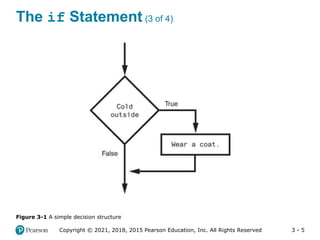
• In flowchart, diamond represents true/false condition
that must be tested
• Actions can be conditionally executed
– Performed only when a condition is true
• Single alternative decision structure: provides only
one alternative path of execution
– If condition is not true, exit the structure
3 - 5
Copyright © 2021, 2018, 2015 Pearson Education, Inc. All Rights Reserved
The if Statement (3 of 4)
Figure 3-1 A simple decision structure
3 - 6
Copyright © 2021, 2018, 2015 Pearson Education, Inc. All Rights Reserved
The if Statement (4 of 4)
• Python syntax:
if condition:
Statement
Statement
• First line known as the if clause
– Includes the keyword if followed by condition
 The condition can be true or false
 When the if statement executes, the condition is tested,
and if it is true the block statements are executed.
otherwise, block statements are skipped
3 - 7
Copyright © 2021, 2018, 2015 Pearson Education, Inc. All Rights Reserved
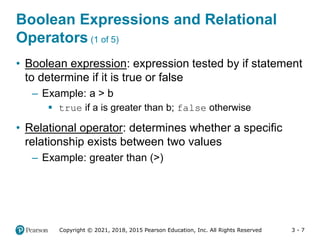
• Boolean expression: expression tested by if statement
to determine if it is true or false
– Example: a > b
 true if a is greater than b; false otherwise
• Relational operator: determines whether a specific
relationship exists between two values
– Example: greater than (>)
Boolean Expressions and Relational
Operators (1 of 5)
3 - 8
Copyright © 2021, 2018, 2015 Pearson Education, Inc. All Rights Reserved
Boolean Expressions and Relational
Operators (2 of 5)
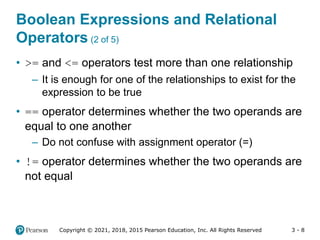
• >= and <= operators test more than one relationship
– It is enough for one of the relationships to exist for the
expression to be true
• == operator determines whether the two operands are
equal to one another
– Do not confuse with assignment operator (=)
• != operator determines whether the two operands are
not equal
3 - 9
Copyright © 2021, 2018, 2015 Pearson Education, Inc. All Rights Reserved
Boolean Expressions and Relational
Operators (3 of 5)
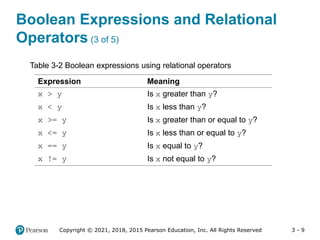
Expression Meaning
x > y Is x greater than y?
x < y Is x less than y?
x >= y Is x greater than or equal to y?
x <= y Is x less than or equal to y?
x == y Is x equal to y?
x != y Is x not equal to y?
Table 3-2 Boolean expressions using relational operators
3 - 10
Copyright © 2021, 2018, 2015 Pearson Education, Inc. All Rights Reserved
Boolean Expressions and Relational
Operators (4 of 5)
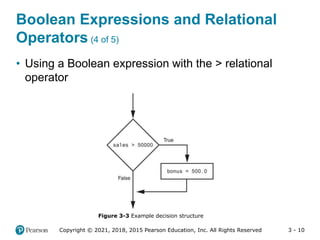
• Using a Boolean expression with the > relational
operator
Figure 3-3 Example decision structure
3 - 11
Copyright © 2021, 2018, 2015 Pearson Education, Inc. All Rights Reserved
Boolean Expressions and Relational
Operators (5 of 5)
• Any relational operator can be used in a decision
block
– Example: if balance == 0
– Example: if payment != balance
• It is possible to have a block inside another block
– Example: if statement inside a function
– Statements in inner block must be indented with
respect to the outer block
3 - 12
Copyright © 2021, 2018, 2015 Pearson Education, Inc. All Rights Reserved
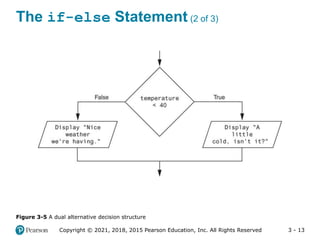
The if-else Statement (1 of 3)
• Dual alternative decision structure: two possible paths
of execution
– One is taken if the condition is true, and the other if the
condition is false
– Syntax: if condition:
statements
else:
other statements
– if clause and else clause must be aligned
– Statements must be consistently indented
3 - 13
Copyright © 2021, 2018, 2015 Pearson Education, Inc. All Rights Reserved
The if-else Statement (2 of 3)
Figure 3-5 A dual alternative decision structure
3 - 14
Copyright © 2021, 2018, 2015 Pearson Education, Inc. All Rights Reserved
The if-else Statement (3 of 3)
Figure 3-6 Conditional execution in an if-else statement
3 - 15
Copyright © 2021, 2018, 2015 Pearson Education, Inc. All Rights Reserved
Comparing Strings (1 of 2)
• Strings can be compared using the == and !=
operators
• String comparisons are case sensitive
• Strings can be compared using >, <, >=, and <=
– Compared character by character based on the ASCII
values for each character
– If shorter word is substring of longer word, longer word
is greater than shorter word
3 - 16
Copyright © 2021, 2018, 2015 Pearson Education, Inc. All Rights Reserved
Comparing Strings (2 of 2)
Figure 3-9 Comparing each character in a string
3 - 17
Copyright © 2021, 2018, 2015 Pearson Education, Inc. All Rights Reserved
Nested Decision Structures and the
if-elif-else Statement (1 of 3)
• A decision structure can be nested inside another
decision structure
– Commonly needed in programs
– Example:
 Determine if someone qualifies for a loan, they must
meet two conditions:
– Must earn at least $30,000/year
– Must have been employed for at least two years
 Check first condition, and if it is true, check second
condition
3 - 18
Copyright © 2021, 2018, 2015 Pearson Education, Inc. All Rights Reserved
Nested Decision Structures and the
if-elif-else Statement (2 of 3)
Figure 3-12 A nested decision structure
3 - 19
Copyright © 2021, 2018, 2015 Pearson Education, Inc. All Rights Reserved
Nested Decision Structures and the
if-elif-else Statement (3 of 3)
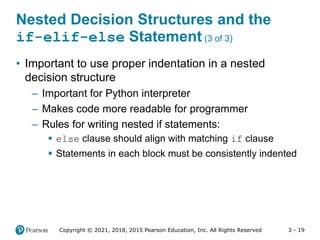
• Important to use proper indentation in a nested
decision structure
– Important for Python interpreter
– Makes code more readable for programmer
– Rules for writing nested if statements:
 else clause should align with matching if clause
 Statements in each block must be consistently indented
3 - 20
Copyright © 2021, 2018, 2015 Pearson Education, Inc. All Rights Reserved
The if-elif-else Statement (1 of 3)
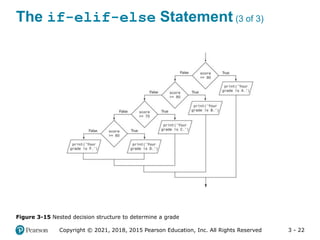
• if-elif-else statement: special version of a
decision structure
– Makes logic of nested decision structures simpler to
write
 Can include multiple elif statements
– Syntax: if condition_1:
statement(s)
elif condition_2:
statement(s)
elif condition_3:
statement(s)
else
statement(s)
Insert as many elif clauses
as necessary.
3 - 21
Copyright © 2021, 2018, 2015 Pearson Education, Inc. All Rights Reserved
The if-elif-else Statement (2 of 3)
• Alignment used with if-elif-else statement:
– if, elif, and else clauses are all aligned
– Conditionally executed blocks are consistently indented
• if-elif-else statement is never required, but logic
easier to follow
– Can be accomplished by nested if-else
 Code can become complex, and indentation can cause
problematic long lines
3 - 22
Copyright © 2021, 2018, 2015 Pearson Education, Inc. All Rights Reserved
The if-elif-else Statement (3 of 3)
Figure 3-15 Nested decision structure to determine a grade
3 - 23
Copyright © 2021, 2018, 2015 Pearson Education, Inc. All Rights Reserved
Logical Operators
• Logical operators: operators that can be used to
create complex Boolean expressions
– and operator and or operator: binary operators,
connect two Boolean expressions into a compound
Boolean expression
– not operator: unary operator, reverses the truth of its
Boolean operand
3 - 24
Copyright © 2021, 2018, 2015 Pearson Education, Inc. All Rights Reserved
The and Operator
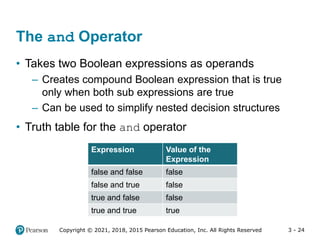
• Takes two Boolean expressions as operands
– Creates compound Boolean expression that is true
only when both sub expressions are true
– Can be used to simplify nested decision structures
• Truth table for the and operator
Value of the
Expression
Expression
false
false and false
false
false and true
false
true and false
true
true and true
3 - 25
Copyright © 2021, 2018, 2015 Pearson Education, Inc. All Rights Reserved
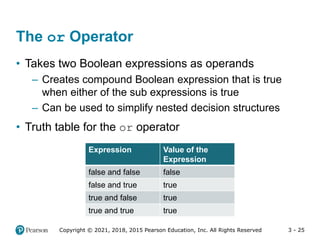
The or Operator
• Takes two Boolean expressions as operands
– Creates compound Boolean expression that is true
when either of the sub expressions is true
– Can be used to simplify nested decision structures
• Truth table for the or operator
Value of the
Expression
Expression
false
false and false
true
false and true
true
true and false
true
true and true
3 - 26
Copyright © 2021, 2018, 2015 Pearson Education, Inc. All Rights Reserved
Short-Circuit Evaluation
• Short circuit evaluation: deciding the value of a
compound Boolean expression after evaluating only
one sub expression
– Performed by the or and and operators
 For or operator: If left operand is true, compound
expression is true. Otherwise, evaluate right operand
 For and operator: If left operand is false, compound
expression is false. Otherwise, evaluate right operand
3 - 27
Copyright © 2021, 2018, 2015 Pearson Education, Inc. All Rights Reserved
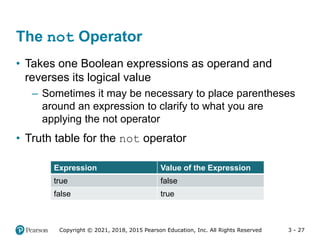
The not Operator
• Takes one Boolean expressions as operand and
reverses its logical value
– Sometimes it may be necessary to place parentheses
around an expression to clarify to what you are
applying the not operator
• Truth table for the not operator
Value of the Expression
Expression
false
true
true
false
3 - 28
Copyright © 2021, 2018, 2015 Pearson Education, Inc. All Rights Reserved
• To determine whether a numeric value is within a
specific range of values, use and
– Example: x >= 10 and x <= 20
• To determine whether a numeric value is outside of a
specific range of values, use or
– Example: x < 10 or x > 20
Checking Numeric Ranges with Logical
Operators
3 - 29
Copyright © 2021, 2018, 2015 Pearson Education, Inc. All Rights Reserved
Boolean Variables
• Boolean variable: references one of two values, True
or False
– Represented by bool data type
• Commonly used as flags
– Flag: variable that signals when some condition exists
in a program
 Flag set to False  condition does not exist
 Flag set to True  condition exists
3 - 30
Copyright © 2021, 2018, 2015 Pearson Education, Inc. All Rights Reserved
• The turtle.xcor() and turtle.ycor()
functions return the turtle's X and Y coordinates
• Examples of calling these functions in an if
statement:
if turtle.xcor() > 100 and turtle.xcor() < 200:
turtle.goto(0, 0)
if turtle.ycor() < 0:
turtle.goto(0, 0)
Turtle Graphics: Determining the State
of the Turtle (1 of 9)
3 - 31
Copyright © 2021, 2018, 2015 Pearson Education, Inc. All Rights Reserved
Turtle Graphics: Determining the State
of the Turtle (2 of 9)
• The turtle.heading() function returns the turtle's
heading. (By default, the heading is returned in degrees.)
• Example of calling the function in an if statement:
if turtle.heading() >= 90 and turtle.heading() <= 270:
turtle.setheading(180)
3 - 32
Copyright © 2021, 2018, 2015 Pearson Education, Inc. All Rights Reserved
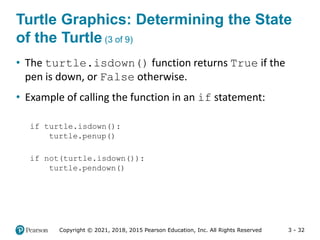
Turtle Graphics: Determining the State
of the Turtle (3 of 9)
• The turtle.isdown() function returns True if the
pen is down, or False otherwise.
• Example of calling the function in an if statement:
if turtle.isdown():
turtle.penup()
if not(turtle.isdown()):
turtle.pendown()
3 - 33
Copyright © 2021, 2018, 2015 Pearson Education, Inc. All Rights Reserved
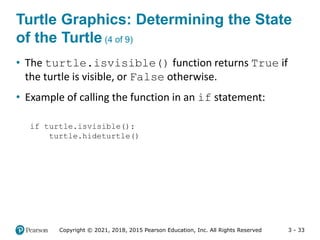
Turtle Graphics: Determining the State
of the Turtle (4 of 9)
• The turtle.isvisible() function returns True if
the turtle is visible, or False otherwise.
• Example of calling the function in an if statement:
if turtle.isvisible():
turtle.hideturtle()
3 - 34
Copyright © 2021, 2018, 2015 Pearson Education, Inc. All Rights Reserved
Turtle Graphics: Determining the State
of the Turtle (5 of 9)
• When you call turtle.pencolor() without passing an
argument, the function returns the pen's current color as a
string. Example of calling the function in an if statement:
• When you call turtle.fillcolor() without passing
an argument, the function returns the current fill color as a
string. Example of calling the function in an if statement:
if turtle.pencolor() == 'red':
turtle.pencolor('blue')
if turtle.fillcolor() == 'blue':
turtle.fillcolor('white')
3 - 35
Copyright © 2021, 2018, 2015 Pearson Education, Inc. All Rights Reserved
Turtle Graphics: Determining the State
of the Turtle (6 of 9)
if turtle.bgcolor() == 'white':
turtle.bgcolor('gray')
• When you call turtle.bgcolor() without passing
an argument, the function returns the current
background color as a string. Example of calling the
function in an if statement:
3 - 36
Copyright © 2021, 2018, 2015 Pearson Education, Inc. All Rights Reserved
Turtle Graphics: Determining the State
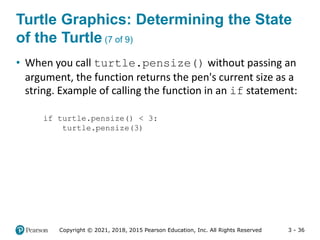
of the Turtle (7 of 9)
• When you call turtle.pensize() without passing an
argument, the function returns the pen's current size as a
string. Example of calling the function in an if statement:
if turtle.pensize() < 3:
turtle.pensize(3)
3 - 37
Copyright © 2021, 2018, 2015 Pearson Education, Inc. All Rights Reserved
Turtle Graphics: Determining the State
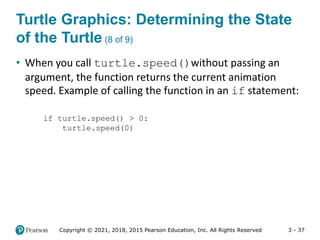
of the Turtle (8 of 9)
• When you call turtle.speed()without passing an
argument, the function returns the current animation
speed. Example of calling the function in an if statement:
if turtle.speed() > 0:
turtle.speed(0)
3 - 38
Copyright © 2021, 2018, 2015 Pearson Education, Inc. All Rights Reserved
Turtle Graphics: Determining the State
of the Turtle (9 of 9)
• See In the Spotlight: The Hit the Target Game in your
textbook for numerous examples of determining the
state of the turtle.
3 - 39
Copyright © 2021, 2018, 2015 Pearson Education, Inc. All Rights Reserved
Summary
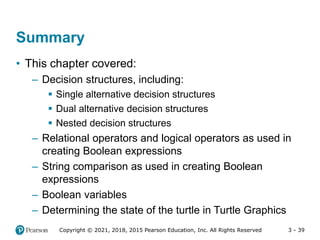
• This chapter covered:
– Decision structures, including:
 Single alternative decision structures
 Dual alternative decision structures
 Nested decision structures
– Relational operators and logical operators as used in
creating Boolean expressions
– String comparison as used in creating Boolean
expressions
– Boolean variables
– Determining the state of the turtle in Turtle Graphics

03_Gaddis Python_Lecture_ppt_ch03.pptx

  • 1.
    3 - 1 Startingout with Python Fifth Edition Chapter 3 Decision Structures and Boolean Logic Copyright © 2021, 2018, 2015 Pearson Education, Inc. All Rights Reserved
  • 2.
    3 - 2 Copyright© 2021, 2018, 2015 Pearson Education, Inc. All Rights Reserved Topics • The if Statement • The if-else Statement • Comparing Strings • Nested Decision Structures and the if-elif-else Statement • Logical Operators • Boolean Variables • Turtle Graphics: Determining the State of the Turtle
  • 3.
    3 - 3 Copyright© 2021, 2018, 2015 Pearson Education, Inc. All Rights Reserved The if Statement (1 of 4) • Control structure: logical design that controls order in which set of statements execute • Sequence structure: set of statements that execute in the order they appear • Decision structure: specific action(s) performed only if a condition exists – Also known as selection structure
  • 4.
    3 - 4 Copyright© 2021, 2018, 2015 Pearson Education, Inc. All Rights Reserved The if Statement (2 of 4) • In flowchart, diamond represents true/false condition that must be tested • Actions can be conditionally executed – Performed only when a condition is true • Single alternative decision structure: provides only one alternative path of execution – If condition is not true, exit the structure
  • 5.
    3 - 5 Copyright© 2021, 2018, 2015 Pearson Education, Inc. All Rights Reserved The if Statement (3 of 4) Figure 3-1 A simple decision structure
  • 6.
    3 - 6 Copyright© 2021, 2018, 2015 Pearson Education, Inc. All Rights Reserved The if Statement (4 of 4) • Python syntax: if condition: Statement Statement • First line known as the if clause – Includes the keyword if followed by condition  The condition can be true or false  When the if statement executes, the condition is tested, and if it is true the block statements are executed. otherwise, block statements are skipped
  • 7.
    3 - 7 Copyright© 2021, 2018, 2015 Pearson Education, Inc. All Rights Reserved • Boolean expression: expression tested by if statement to determine if it is true or false – Example: a > b  true if a is greater than b; false otherwise • Relational operator: determines whether a specific relationship exists between two values – Example: greater than (>) Boolean Expressions and Relational Operators (1 of 5)
  • 8.
    3 - 8 Copyright© 2021, 2018, 2015 Pearson Education, Inc. All Rights Reserved Boolean Expressions and Relational Operators (2 of 5) • >= and <= operators test more than one relationship – It is enough for one of the relationships to exist for the expression to be true • == operator determines whether the two operands are equal to one another – Do not confuse with assignment operator (=) • != operator determines whether the two operands are not equal
  • 9.
    3 - 9 Copyright© 2021, 2018, 2015 Pearson Education, Inc. All Rights Reserved Boolean Expressions and Relational Operators (3 of 5) Expression Meaning x > y Is x greater than y? x < y Is x less than y? x >= y Is x greater than or equal to y? x <= y Is x less than or equal to y? x == y Is x equal to y? x != y Is x not equal to y? Table 3-2 Boolean expressions using relational operators
  • 10.
    3 - 10 Copyright© 2021, 2018, 2015 Pearson Education, Inc. All Rights Reserved Boolean Expressions and Relational Operators (4 of 5) • Using a Boolean expression with the > relational operator Figure 3-3 Example decision structure
  • 11.
    3 - 11 Copyright© 2021, 2018, 2015 Pearson Education, Inc. All Rights Reserved Boolean Expressions and Relational Operators (5 of 5) • Any relational operator can be used in a decision block – Example: if balance == 0 – Example: if payment != balance • It is possible to have a block inside another block – Example: if statement inside a function – Statements in inner block must be indented with respect to the outer block
  • 12.
    3 - 12 Copyright© 2021, 2018, 2015 Pearson Education, Inc. All Rights Reserved The if-else Statement (1 of 3) • Dual alternative decision structure: two possible paths of execution – One is taken if the condition is true, and the other if the condition is false – Syntax: if condition: statements else: other statements – if clause and else clause must be aligned – Statements must be consistently indented
  • 13.
    3 - 13 Copyright© 2021, 2018, 2015 Pearson Education, Inc. All Rights Reserved The if-else Statement (2 of 3) Figure 3-5 A dual alternative decision structure
  • 14.
    3 - 14 Copyright© 2021, 2018, 2015 Pearson Education, Inc. All Rights Reserved The if-else Statement (3 of 3) Figure 3-6 Conditional execution in an if-else statement
  • 15.
    3 - 15 Copyright© 2021, 2018, 2015 Pearson Education, Inc. All Rights Reserved Comparing Strings (1 of 2) • Strings can be compared using the == and != operators • String comparisons are case sensitive • Strings can be compared using >, <, >=, and <= – Compared character by character based on the ASCII values for each character – If shorter word is substring of longer word, longer word is greater than shorter word
  • 16.
    3 - 16 Copyright© 2021, 2018, 2015 Pearson Education, Inc. All Rights Reserved Comparing Strings (2 of 2) Figure 3-9 Comparing each character in a string
  • 17.
    3 - 17 Copyright© 2021, 2018, 2015 Pearson Education, Inc. All Rights Reserved Nested Decision Structures and the if-elif-else Statement (1 of 3) • A decision structure can be nested inside another decision structure – Commonly needed in programs – Example:  Determine if someone qualifies for a loan, they must meet two conditions: – Must earn at least $30,000/year – Must have been employed for at least two years  Check first condition, and if it is true, check second condition
  • 18.
    3 - 18 Copyright© 2021, 2018, 2015 Pearson Education, Inc. All Rights Reserved Nested Decision Structures and the if-elif-else Statement (2 of 3) Figure 3-12 A nested decision structure
  • 19.
    3 - 19 Copyright© 2021, 2018, 2015 Pearson Education, Inc. All Rights Reserved Nested Decision Structures and the if-elif-else Statement (3 of 3) • Important to use proper indentation in a nested decision structure – Important for Python interpreter – Makes code more readable for programmer – Rules for writing nested if statements:  else clause should align with matching if clause  Statements in each block must be consistently indented
  • 20.
    3 - 20 Copyright© 2021, 2018, 2015 Pearson Education, Inc. All Rights Reserved The if-elif-else Statement (1 of 3) • if-elif-else statement: special version of a decision structure – Makes logic of nested decision structures simpler to write  Can include multiple elif statements – Syntax: if condition_1: statement(s) elif condition_2: statement(s) elif condition_3: statement(s) else statement(s) Insert as many elif clauses as necessary.
  • 21.
    3 - 21 Copyright© 2021, 2018, 2015 Pearson Education, Inc. All Rights Reserved The if-elif-else Statement (2 of 3) • Alignment used with if-elif-else statement: – if, elif, and else clauses are all aligned – Conditionally executed blocks are consistently indented • if-elif-else statement is never required, but logic easier to follow – Can be accomplished by nested if-else  Code can become complex, and indentation can cause problematic long lines
  • 22.
    3 - 22 Copyright© 2021, 2018, 2015 Pearson Education, Inc. All Rights Reserved The if-elif-else Statement (3 of 3) Figure 3-15 Nested decision structure to determine a grade
  • 23.
    3 - 23 Copyright© 2021, 2018, 2015 Pearson Education, Inc. All Rights Reserved Logical Operators • Logical operators: operators that can be used to create complex Boolean expressions – and operator and or operator: binary operators, connect two Boolean expressions into a compound Boolean expression – not operator: unary operator, reverses the truth of its Boolean operand
  • 24.
    3 - 24 Copyright© 2021, 2018, 2015 Pearson Education, Inc. All Rights Reserved The and Operator • Takes two Boolean expressions as operands – Creates compound Boolean expression that is true only when both sub expressions are true – Can be used to simplify nested decision structures • Truth table for the and operator Value of the Expression Expression false false and false false false and true false true and false true true and true
  • 25.
    3 - 25 Copyright© 2021, 2018, 2015 Pearson Education, Inc. All Rights Reserved The or Operator • Takes two Boolean expressions as operands – Creates compound Boolean expression that is true when either of the sub expressions is true – Can be used to simplify nested decision structures • Truth table for the or operator Value of the Expression Expression false false and false true false and true true true and false true true and true
  • 26.
    3 - 26 Copyright© 2021, 2018, 2015 Pearson Education, Inc. All Rights Reserved Short-Circuit Evaluation • Short circuit evaluation: deciding the value of a compound Boolean expression after evaluating only one sub expression – Performed by the or and and operators  For or operator: If left operand is true, compound expression is true. Otherwise, evaluate right operand  For and operator: If left operand is false, compound expression is false. Otherwise, evaluate right operand
  • 27.
    3 - 27 Copyright© 2021, 2018, 2015 Pearson Education, Inc. All Rights Reserved The not Operator • Takes one Boolean expressions as operand and reverses its logical value – Sometimes it may be necessary to place parentheses around an expression to clarify to what you are applying the not operator • Truth table for the not operator Value of the Expression Expression false true true false
  • 28.
    3 - 28 Copyright© 2021, 2018, 2015 Pearson Education, Inc. All Rights Reserved • To determine whether a numeric value is within a specific range of values, use and – Example: x >= 10 and x <= 20 • To determine whether a numeric value is outside of a specific range of values, use or – Example: x < 10 or x > 20 Checking Numeric Ranges with Logical Operators
  • 29.
    3 - 29 Copyright© 2021, 2018, 2015 Pearson Education, Inc. All Rights Reserved Boolean Variables • Boolean variable: references one of two values, True or False – Represented by bool data type • Commonly used as flags – Flag: variable that signals when some condition exists in a program  Flag set to False  condition does not exist  Flag set to True  condition exists
  • 30.
    3 - 30 Copyright© 2021, 2018, 2015 Pearson Education, Inc. All Rights Reserved • The turtle.xcor() and turtle.ycor() functions return the turtle's X and Y coordinates • Examples of calling these functions in an if statement: if turtle.xcor() > 100 and turtle.xcor() < 200: turtle.goto(0, 0) if turtle.ycor() < 0: turtle.goto(0, 0) Turtle Graphics: Determining the State of the Turtle (1 of 9)
  • 31.
    3 - 31 Copyright© 2021, 2018, 2015 Pearson Education, Inc. All Rights Reserved Turtle Graphics: Determining the State of the Turtle (2 of 9) • The turtle.heading() function returns the turtle's heading. (By default, the heading is returned in degrees.) • Example of calling the function in an if statement: if turtle.heading() >= 90 and turtle.heading() <= 270: turtle.setheading(180)
  • 32.
    3 - 32 Copyright© 2021, 2018, 2015 Pearson Education, Inc. All Rights Reserved Turtle Graphics: Determining the State of the Turtle (3 of 9) • The turtle.isdown() function returns True if the pen is down, or False otherwise. • Example of calling the function in an if statement: if turtle.isdown(): turtle.penup() if not(turtle.isdown()): turtle.pendown()
  • 33.
    3 - 33 Copyright© 2021, 2018, 2015 Pearson Education, Inc. All Rights Reserved Turtle Graphics: Determining the State of the Turtle (4 of 9) • The turtle.isvisible() function returns True if the turtle is visible, or False otherwise. • Example of calling the function in an if statement: if turtle.isvisible(): turtle.hideturtle()
  • 34.
    3 - 34 Copyright© 2021, 2018, 2015 Pearson Education, Inc. All Rights Reserved Turtle Graphics: Determining the State of the Turtle (5 of 9) • When you call turtle.pencolor() without passing an argument, the function returns the pen's current color as a string. Example of calling the function in an if statement: • When you call turtle.fillcolor() without passing an argument, the function returns the current fill color as a string. Example of calling the function in an if statement: if turtle.pencolor() == 'red': turtle.pencolor('blue') if turtle.fillcolor() == 'blue': turtle.fillcolor('white')
  • 35.
    3 - 35 Copyright© 2021, 2018, 2015 Pearson Education, Inc. All Rights Reserved Turtle Graphics: Determining the State of the Turtle (6 of 9) if turtle.bgcolor() == 'white': turtle.bgcolor('gray') • When you call turtle.bgcolor() without passing an argument, the function returns the current background color as a string. Example of calling the function in an if statement:
  • 36.
    3 - 36 Copyright© 2021, 2018, 2015 Pearson Education, Inc. All Rights Reserved Turtle Graphics: Determining the State of the Turtle (7 of 9) • When you call turtle.pensize() without passing an argument, the function returns the pen's current size as a string. Example of calling the function in an if statement: if turtle.pensize() < 3: turtle.pensize(3)
  • 37.
    3 - 37 Copyright© 2021, 2018, 2015 Pearson Education, Inc. All Rights Reserved Turtle Graphics: Determining the State of the Turtle (8 of 9) • When you call turtle.speed()without passing an argument, the function returns the current animation speed. Example of calling the function in an if statement: if turtle.speed() > 0: turtle.speed(0)
  • 38.
    3 - 38 Copyright© 2021, 2018, 2015 Pearson Education, Inc. All Rights Reserved Turtle Graphics: Determining the State of the Turtle (9 of 9) • See In the Spotlight: The Hit the Target Game in your textbook for numerous examples of determining the state of the turtle.
  • 39.
    3 - 39 Copyright© 2021, 2018, 2015 Pearson Education, Inc. All Rights Reserved Summary • This chapter covered: – Decision structures, including:  Single alternative decision structures  Dual alternative decision structures  Nested decision structures – Relational operators and logical operators as used in creating Boolean expressions – String comparison as used in creating Boolean expressions – Boolean variables – Determining the state of the turtle in Turtle Graphics