Computing Concepts. Prepared by: Engr. Nathaniel M. Cabansay 1
Computing Concepts
Lessons 2 and 3:
Programming and
Hardware
Prepared by Engr. Nathaniel M.
Cabansay
Stock image by Joshua Woroniecki provided on Pixabay
Computing Concepts. Prepared by: Engr. Nathaniel M. Cabansay 2
Objectives
• Discuss the basic concepts and mechanism of data
structures and identify the different types of typical data
structures and their characteristics
• Identify and describe the different types of programming
languages and their characteristics
• Identify and describe the different types of markup
languages and their characteristics
Computing Concepts. Prepared by: Engr. Nathaniel M. Cabansay 3
Objectives
• Describe the architecture, structure, scheme and operating
principles of the processor and solve problems on processor
performance.
• List the storage hierarchy, types of buses, input/output
interfaces, device drivers, and input/output devices along
with their characteristics.
Computing Concepts. Prepared by: Engr. Nathaniel M. Cabansay 4
2-1: Data Structures
Computing Concepts. Prepared by: Engr. Nathaniel M. Cabansay 5
Data and Data Structures
• Data – information manipulated internally by a computer.
• Data Structure – way of organizing data in a computer so it
could be used effectively.
Computing Concepts. Prepared by: Engr. Nathaniel M. Cabansay 6
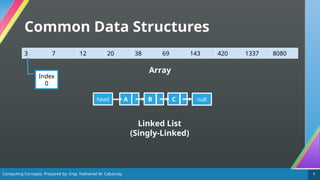
Common Data Structures
• Array – holds items of the same type [1].
• Element – an item stored in the array.
• Index – location of an element in an array. It is used to identify the
element. The index of the first element of an array is typically 0.
• Linked List / List – a data structure that decides the
arrangement of data with a pointer (reference to the
memory address of data) to the next element with the
option to pointer to the previous one [1].
Computing Concepts. Prepared by: Engr. Nathaniel M. Cabansay 7
Common Data Structures
3 7 12 20 38 69 143 420 1337 8080
Array
A
head B C null
Linked List
(Singly-Linked)
Index
0
Computing Concepts. Prepared by: Engr. Nathaniel M. Cabansay 8
Common Data Structures
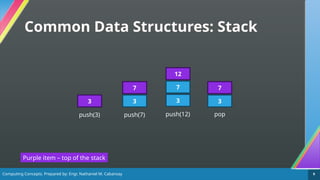
• Stack – follows the Last In, First Out (LIFO) principle.
Elements are added and removed from the same end,
known as the top [2].
• Push – insert an item on top of the stack.
• Pop – remove an item from the top of the stack.
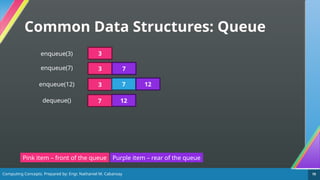
• Queue – follows the First In, First Out (FIFO) principle.
Elements are added at one end called the rear, and removed
from the other end called the front [2].
• Enqueue – insert an item into the rear of the queue.
• Dequeue – remove an item from the front of the queue.
Computing Concepts. Prepared by: Engr. Nathaniel M. Cabansay 9
Common Data Structures: Stack
3
Purple item – top of the stack
push(3)
3
push(7)
7
3
push(12)
7
12
pop
3
7
Computing Concepts. Prepared by: Engr. Nathaniel M. Cabansay 10
Common Data Structures: Queue
3
Pink item – front of the queue
enqueue(3)
3
enqueue(7) 7
3
enqueue(12) 7 12
dequeue() 12
7
Purple item – rear of the queue
Computing Concepts. Prepared by: Engr. Nathaniel M. Cabansay 11
Common Data Structures
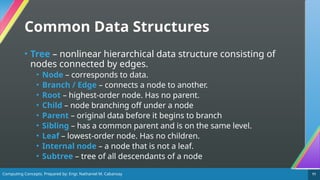
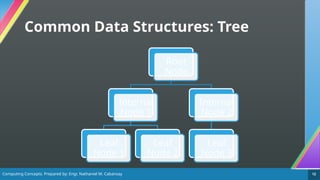
• Tree – nonlinear hierarchical data structure consisting of
nodes connected by edges.
• Node – corresponds to data.
• Branch / Edge – connects a node to another.
• Root – highest-order node. Has no parent.
• Child – node branching off under a node
• Parent – original data before it begins to branch
• Sibling – has a common parent and is on the same level.
• Leaf – lowest-order node. Has no children.
• Internal node – a node that is not a leaf.
• Subtree – tree of all descendants of a node
Computing Concepts. Prepared by: Engr. Nathaniel M. Cabansay 12
Common Data Structures: Tree
Root
Node
Internal
Node 1
Leaf
Node 1
Leaf
Node 2
Internal
Node 2
Leaf
Node 3
Computing Concepts. Prepared by: Engr. Nathaniel M. Cabansay 13
Common Data Structures
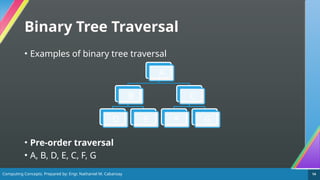
• Binary Tree – a type of tree which has up to two children.
• Binary trees can be traversed in many ways [3]:
• Pre-order traversal: Root, left, right
• In-order traversal: Left, root, right
• Post-order traversal: Left, right, root
• Level order traversal: All nodes on the same level are traversed
from left to right.
Computing Concepts. Prepared by: Engr. Nathaniel M. Cabansay 14
Binary Tree Traversal
• Examples of binary tree traversal
• Pre-order traversal
• A, B, D, E, C, F, G
A
B
D E
C
F G
Computing Concepts. Prepared by: Engr. Nathaniel M. Cabansay 15
Binary Tree Traversal
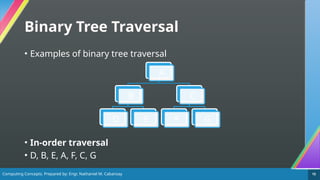
• Examples of binary tree traversal
• In-order traversal
• D, B, E, A, F, C, G
A
B
D E
C
F G
Computing Concepts. Prepared by: Engr. Nathaniel M. Cabansay 16
Binary Tree Traversal
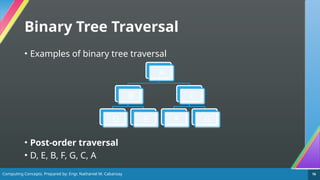
• Examples of binary tree traversal
• Post-order traversal
• D, E, B, F, G, C, A
A
B
D E
C
F G
Computing Concepts. Prepared by: Engr. Nathaniel M. Cabansay 17
Binary Tree Traversal
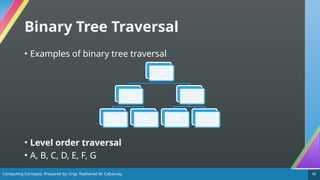
• Examples of binary tree traversal
• Level order traversal
• A, B, C, D, E, F, G
A
B
D E
C
F G
Computing Concepts. Prepared by: Engr. Nathaniel M. Cabansay 18
2-2: Algorithms and
Flowcharts
Computing Concepts. Prepared by: Engr. Nathaniel M. Cabansay 19
What is an Algorithm?
• Algorithm – a step-by-step way of getting something done
[4], just like computer programs or processes.
Computing Concepts. Prepared by: Engr. Nathaniel M. Cabansay 20
What is a Flowchart?
• Flowchart – a diagram depicting the flow and logic of a
process or system such as a computer program or an
algorithm [5]. It uses simple shapes and a set of standard
symbols to define the type of step and the sequence [5].
Computing Concepts. Prepared by: Engr. Nathaniel M. Cabansay 21
Why Use a Flowchart?
• A flowchart helps you outline a computer program or
process or algorithm clearly [4], [6].
• You want users or even you yourself to be able to
understand how this process works.
Computing Concepts. Prepared by: Engr. Nathaniel M. Cabansay 22
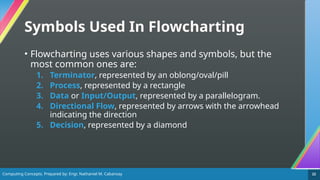
Symbols Used In Flowcharting
• Flowcharting uses various shapes and symbols, but the
most common ones are:
1. Terminator, represented by an oblong/oval/pill
2. Process, represented by a rectangle
3. Data or Input/Output, represented by a parallelogram.
4. Directional Flow, represented by arrows with the arrowhead
indicating the direction
5. Decision, represented by a diamond
Computing Concepts. Prepared by: Engr. Nathaniel M. Cabansay 23
1. Terminator
• Represented by an oval/oblong/pill shape
• Marks the start and the end of the process [6].
• It usually contains the words “Start” or “End” but may also
contain the initial conditions and the outcome of the
process.
Start End
Computing Concepts. Prepared by: Engr. Nathaniel M. Cabansay 24
2. Process
• Represented by a rectangle
• Marks an action or step in the process [6].
• Manual actions and automatic steps use this symbol.
Multiply
integer a by
integer b
Press any key
to continue
Computing Concepts. Prepared by: Engr. Nathaniel M. Cabansay 25
3. Input/Output
• Represented by a parallelogram
• Marks where a system input or a system output takes place
[6].
Input
integer
x
Print
“Hello
world”
Computing Concepts. Prepared by: Engr. Nathaniel M. Cabansay 26
4. Directional Flow
• Represented by an arrow
• Represent the paths a flowchart’s user takes between steps.
Dotted or dashed arrows can represent alternate paths [6].
Computing Concepts. Prepared by: Engr. Nathaniel M. Cabansay 27
5. Decision
• Represented by a diamond
• Represent decisions to be made, often based on a true/false
or yes/no question [6].
Is x
greater
than or
equal to 7?
Does the
input
match the
keyword?
Computing Concepts. Prepared by: Engr. Nathaniel M. Cabansay 28
An App You Can Use in Constructing
a Flowchart
• You can use the free and open-source web app Draw.io
Diagrams to create flowcharts.
• Link to free web app: https://app.diagrams.net/
• It is also downloadable as a desktop application on
Windows, Mac OS, or Linux here:
https://github.com/jgraph/drawio-desktop/releases/tag/v24.
7.5
. This is for when you want to work offline, or your Internet
connection isn’t as good.
Computing Concepts. Prepared by: Engr. Nathaniel M. Cabansay 29
Steps in Constructing a Flowchart
1. The Start Terminator. Never forget to include the Start
terminator to indicate the start of the process.
2. Define the steps in your process. If you have a process,
analyze and break it down into certain steps.
3. If there are conditionals, define at least two paths.
Some parts of the process require decisions to be made,
needing at least two different sets of actions to be taken.
4. The End Terminator. Once your process is finished, do
not forget the End terminator.
Computing Concepts. Prepared by: Engr. Nathaniel M. Cabansay 30
Tips in Constructing a Flowchart
• As much as possible, work in a single direction (top to
bottom, left to right) for easier readability.
• If you must break up a complex flowchart, use connector
symbols.
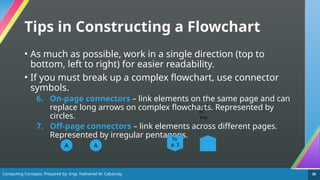
6. On-page connectors – link elements on the same page and can
replace long arrows on complex flowcharts. Represented by
circles.
7. Off-page connectors – link elements across different pages.
Represented by irregular pentagons.
A A
To
p. 3
Fro
m
p. 2
Computing Concepts. Prepared by: Engr. Nathaniel M. Cabansay 31
Flowcharts in Programming
• Computer programs can implement three basic types of
logic [7]. These can be described using flowcharts. They are:
1. Sequential Logic – simply executing instructions one after
another
2. Selection/Conditional Logic – deciding the next instructions to
follow based on certain conditions
3. Iterative Logic – repeating execution of a set of instructions
• We will deal with these types of logic in more detail in the
next lessons.
Computing Concepts. Prepared by: Engr. Nathaniel M. Cabansay 32
Sequential Logic Flowchart
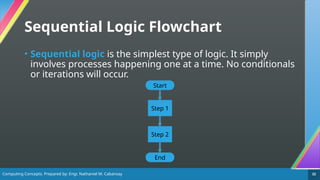
• Sequential logic is the simplest type of logic. It simply
involves processes happening one at a time. No conditionals
or iterations will occur.
Start
Step 1
Step 2
End
Computing Concepts. Prepared by: Engr. Nathaniel M. Cabansay 33
Example 1
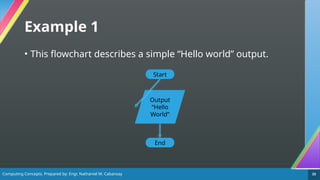
• This flowchart describes a simple “Hello world” output.
Start
End
Output
“Hello
World”
Computing Concepts. Prepared by: Engr. Nathaniel M. Cabansay 34
Example 2
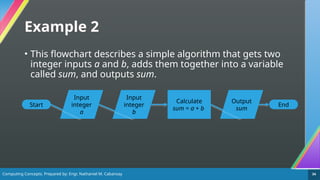
• This flowchart describes a simple algorithm that gets two
integer inputs a and b, adds them together into a variable
called sum, and outputs sum.
Start End
Output
sum
Input
integer
a
Input
integer
b
Calculate
sum = a + b
Computing Concepts. Prepared by: Engr. Nathaniel M. Cabansay 35
Conditional Logic Flowchart
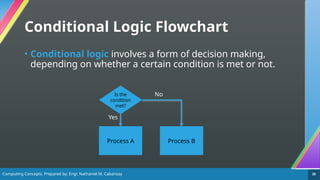
• Conditional logic involves a form of decision making,
depending on whether a certain condition is met or not.
Is the
condition
met?
Process A Process B
Yes
No
Computing Concepts. Prepared by: Engr. Nathaniel M. Cabansay 36
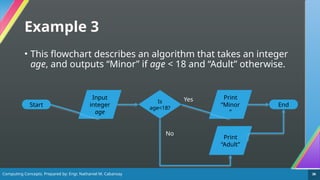
Example 3
• This flowchart describes an algorithm that takes an integer
age, and outputs “Minor” if age < 18 and “Adult” otherwise.
Start End
Print
“Minor
”
Input
integer
age
Is
age<18?
Print
“Adult”
Yes
No
Computing Concepts. Prepared by: Engr. Nathaniel M. Cabansay 37
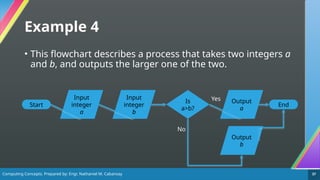
Example 4
• This flowchart describes a process that takes two integers a
and b, and outputs the larger one of the two.
Start End
Output
a
Input
integer
a
Input
integer
b
Is
a>b?
Output
b
Yes
No
Computing Concepts. Prepared by: Engr. Nathaniel M. Cabansay 38
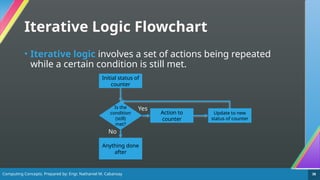
Iterative Logic Flowchart
• Iterative logic involves a set of actions being repeated
while a certain condition is still met.
Is the
condition
(still)
met?
Anything done
after
Initial status of
counter
Action to
counter
Update to new
status of counter
No
Yes
Computing Concepts. Prepared by: Engr. Nathaniel M. Cabansay 39
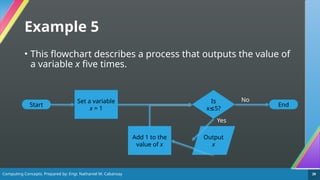
Example 5
• This flowchart describes a process that outputs the value of
a variable x five times.
Start End
Is
x 5?
≤
Set a variable
x = 1
Add 1 to the
value of x
Output
x
Yes
No
Computing Concepts. Prepared by: Engr. Nathaniel M. Cabansay 40
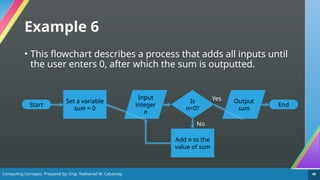
Example 6
• This flowchart describes a process that adds all inputs until
the user enters 0, after which the sum is outputted.
Start End
Is
n=0?
Set a variable
sum = 0
Add n to the
value of sum
No
Yes
Input
integer
n
Output
sum
Computing Concepts. Prepared by: Engr. Nathaniel M. Cabansay 41
2-3: Programming
Languages
Computing Concepts. Prepared by: Engr. Nathaniel M. Cabansay 42
Programming
• Computer programs are collections of text that commands
computers to perform algorithms.
• When you write a computer program, you’re in charge! You
are harnessing the computational power of your computer
and making it do what you want it to do.
• Programming languages allow users to write programs to
the computer [8].
• The apps you use everyday were made by programmers,
which you will soon be.
Computing Concepts. Prepared by: Engr. Nathaniel M. Cabansay 43
Programming Languages
• Programming languages come in three types according to
readability [8].
• Machine language – consists of only 0s and 1s. Can be
understood by hardware but not by humans.
• Assembly language/Low-level language – machine-centric
language executed quickly. Humans will have some difficulty
understanding this sort of language. Examples: x86 assembly, x64
assembly.
• High-level language – highly-readable languages easily
understood by humans. Must be converted to low-level languages
by either interpreters or compilers. Examples: C, C++, Python, Java,
C#, FORTRAN, COBOL
Computing Concepts. Prepared by: Engr. Nathaniel M. Cabansay 44
Programming Languages
• Some high-level programming languages include:
• C – a procedural language developed by Dennis Ritchie and is
widely used for system development [1], [8]
• C++ - a superset of C developed by Bjarne Stroustrup. Suitable for
system development while also being suitable for object-oriented
programming. It is used in systems programming (including
embedded systems such as Arduino [9]), and application
programming [1], [8].
• Java – another object-oriented programming language developed
by James Gosling which can run on different hardware as long as a
Java Virtual Machine (JVM) is installed [1], [8]. Widely used in
Android [8].
Computing Concepts. Prepared by: Engr. Nathaniel M. Cabansay 45
Programming Languages
• Some high-level programming languages include:
• Python – an interpreted and object-oriented scripting language
developed by Guido van Rossum which is widely used in artificial
intelligence, machine learning, and data analytics [8].
• JavaScript (JS) – an object-oriented scripting language used to
write programs that run in a web browser [1], [8].
• FORTRAN – language primarily suited for developing programs
related to science and technology. This was one of the first widely-
used high level languages [1].
• COBOL – language primarily suited for developing programs
related to administrative processes [1].
Computing Concepts. Prepared by: Engr. Nathaniel M. Cabansay 46
Programming Languages
• Some high-level programming languages include:
• BASIC – a language frequently used by novices due to its
comparatively easy-to-understand utilization of symbols [1].
• C# – an object-oriented language developed by Microsoft for
the .NET Framework with similar syntax to Java. It is used in
applications and game development.
Computing Concepts. Prepared by: Engr. Nathaniel M. Cabansay 47
Programming Languages
• Some high-level programming languages include:
• Visual BASIC (VB) – another object-oriented language developed
by Microsoft which allows the creation of a program in a visual
environment that uses windows and toolboxes [1]. It is also being
used in the .NET Framework.
• Visual BASIC for Applications (VBA) – a language that allows the
creation of macros, which create a series of specific operations in
an application [1]. Commonly used in Microsoft Excel.
Computing Concepts. Prepared by: Engr. Nathaniel M. Cabansay 48
Programming Languages
• High-level programming languages have two ways of being
translated into machine code [8].
• Interpreted language – translated and executed one instruction
at a time [1]. Examples: Python.
• Compiled language – translated all at once before execution
occurs [8], [1]. Examples: C, C++, C#, Java
Computing Concepts. Prepared by: Engr. Nathaniel M. Cabansay 49
Language Processing
• Language processors convert high-level languages into
machine code [1].
• Compiler – translates entire source programs all at once into
machine language with an executable format.
• Compiled code runs faster than interpreted code.
• Interpreter – executes programs while translating one command
at a time from the source program.
• Bugs are easier to find in interpreted code.
Computing Concepts. Prepared by: Engr. Nathaniel M. Cabansay 50
Markup Languages
• Markup languages are used for printing and screen
display. Text is enclosed in marks called tags, with possible
attribute information attached [1].
• The most common markup language is HyperText Markup
Language (HTML), which is commonly used to create web
pages.
• Furthermore, Cascading Style Sheets (CSS) can be used to define
the aesthetics of a webpage.
Computing Concepts. Prepared by: Engr. Nathaniel M. Cabansay 51
Markup Languages
• Another common markup language is Extensible Markup
Language (XML), which can be used for almost any purpose
but requires another program such as a parser since tags
have no inherent meanings in XML.
Computing Concepts. Prepared by: Engr. Nathaniel M. Cabansay 52
3: Computer Components
Computing Concepts. Prepared by: Engr. Nathaniel M. Cabansay 53
Main Units in a Computer
• The hardware functions in your computer can be divided into
five main units [1].
1. Input unit – reads data to be processed by your computer
2. Storage unit – records the data. Separated into main memory and
auxiliary storage.
3. Arithmetic and logical unit (ALU) – performs operations on data in
the storage unit or makes decisions based on the instructions of the
control unit
4. Control unit – interprets a command and gives instructions to the
other units.
5. Output unit – writes the results of the processing in a form that we
can understand.
Computing Concepts. Prepared by: Engr. Nathaniel M. Cabansay 54
Main Units in a Computer
• Below is a diagram showing all five major units [1].
Control
unit
Arithmetic
and Logical
Unit (ALU)
Main storage
unit
Input unit
Output
unit
Orange dashed arrows – data flow
Yellow solid arrows – control flow
CPU
Computing Concepts. Prepared by: Engr. Nathaniel M. Cabansay 55
Integrated Circuits
• An integrated circuit (IC) or chip packages thousands or
even millions of electrical and electronic components like
resistors, capacitors, inductors, diodes and transistors to
create a circuit that can perform a function [10].
• They commonly look like this from above:
NE555 74HC04 ATmega328P
The NE555 is a timer
integrated circuit
The 74HC04 is a logic circuit
(implements negation/NOT)
The ATmega328P is the microcontroller
used by an Arduino Uno
Computing Concepts. Prepared by: Engr. Nathaniel M. Cabansay 56
Classification of Integrated Circuits
[11]
Level of Integration Number of Transistors per Chip
Small Scale Integration (SSI) – logic circuits
(74xx series)
Fewer than 100
Medium Scale Integration (MSI) – basic
operations
100 to 10,000
Large Scale Integration (LSI) – early
microprocessors
10,000 to 100,000
Very Large Scale Integration (VLSI) -
microprocessors handling more than 8 bits
100,000 to 1,000,000
Ultra Large Scale Integration (ULSI) – most
modern microprocessors
More than 1,000,000
Computing Concepts. Prepared by: Engr. Nathaniel M. Cabansay 57
The Processing Unit
• The control unit and the ALU are collectively referred to as
the Central Processing Unit (CPU) or the processor.
• Aside from the ALU and the control unit, the CPU also has
these parts [1]:
• Registers – temporary storage of data inside the CPU.
• Clock generator (or simply clock) – generates clock signals to
synchronize and control timing of operations between various
devices. It also determines the maximum speed at which other
units can operate.
• Bus – signal path for connecting various devices and registers
Computing Concepts. Prepared by: Engr. Nathaniel M. Cabansay 58
Registers
• Computers mainly have these types of registers [1]:
• Instruction register – stores instructions to be executed. Composed of
an instruction and an address part.
• Program counter – stores the address of the instruction to be executed
next.
• General purpose register – can be used for various purposes.
• Accumulator – stores data for computations. Is typically designated as a
general-purpose register.
• Base address register – stores beginning address of a program.
• Index register – stores index for address modification
• Flags – store information of certain statuses.
• Program Status Word – stores running status of a program.
Computing Concepts. Prepared by: Engr. Nathaniel M. Cabansay 59
Buses
• CPUs have three types of buses according to usage [1]:
• Address bus – for specifying the reference address to the main
memory unit
• Control bus – for giving directions to each device from the control
unit.
• Data bus – for exchange of data.
Computing Concepts. Prepared by: Engr. Nathaniel M. Cabansay 60
Buses
• CPUs send out signal through buses in two ways [1]:
• Serial bus – sends data in the sequence of 1 bit each
• Parallel bus – sends multiple bits at once, depending on the bus
width.
• CPUs can also have buses connected in three ways [1]:
• Internal bus – used inside the CPU
• External bus – connects CPU and external devices.
• System bus – collective term for buses directly connected from CPU to outside
• Memory bus – mainly connected to main memory
• Input/output (I/O) bus – mainly connected to input and output devices.
• Expansion bus – connects the CPU and expansion cards.
Computing Concepts. Prepared by: Engr. Nathaniel M. Cabansay 61
Processor Speeds
• Instruction speeds can be measured in fractions of seconds:
millisecond, microsecond, nanosecond, and even
picosecond
• The clock speed is the number of electronic pulses the clock
generator produces per second. This clock speed is
expressed in various multiples of hertz (Hz) such as GHz.
Computing Concepts. Prepared by: Engr. Nathaniel M. Cabansay 62
Processor Speeds
• We can also indicate processor speeds by the number of
instructions or operations per second [1]. Two common
metrics are Million Instructions Per Second (MIPS) and
Floating-Point Operations Per Second (FLOPS).
• We can also indicate the execution time of an instruction
using Cycles Per Instruction (CPI), which is the number of
clock pulses required to execute an instruction [1].
Computing Concepts. Prepared by: Engr. Nathaniel M. Cabansay 63
CPU Instructions
• The CPU generally follows the instruction cycle of:
1. Fetch – fetch instructions
2. Decode – decode what the instruction means
3. Execute – execute the instruction with the needed operands
Computing Concepts. Prepared by: Engr. Nathaniel M. Cabansay 64
Storage
• The computer uses two types of storage [1]:
• Main memory – can directly exchange data with the CPU but is
volatile (contents are lost if power is lost)
• Auxiliary storage – stores data that cannot be accommodated in
main memory and is non-volatile (contents remain even if power is
lost)
Computing Concepts. Prepared by: Engr. Nathaniel M. Cabansay 65
Forms of Storage
• The two forms of memory are typically implemented as
follows:
• Main memory – the Random Access Memory (RAM)
• Auxiliary storage – the Read-Only Memory (ROM) and other
storage devices, such as a drive.
Computing Concepts. Prepared by: Engr. Nathaniel M. Cabansay 66
Random Access Memory
• In the Random Access Memory (RAM), all read and write
functions are performed here [1].
• It is the primary memory used by your computer and is
quite fast, and tends to be decently large, typically up to 64
GB (with 8 GB being common for both desktop PCs and
mobile phones).
• It can be classified as Static RAM (SRAM) or Dynamic RAM
(DRAM).
Computing Concepts. Prepared by: Engr. Nathaniel M. Cabansay 67
Main Memory
• The main memory is broadly composed of three
components.
• Memory unit – contains memory cells that record data [1].
• Read/write feature – reads and writes data in the memory cells [1]
. Connects to the CPU Data Bus
• Address selection feature – interprets a specified address and
selects the appropriate memory cell [1]. Connects to the CPU
Address Bus.
Computing Concepts. Prepared by: Engr. Nathaniel M. Cabansay 68
Read Only Memory
• The Read Only Memory (ROM) stores the data when it is
not yet used.
• It is the secondary memory used by your computer, but it
tends to be slower than the RAM. When implemented using
drives, these tend to be larger than the RAM as well.
Computing Concepts. Prepared by: Engr. Nathaniel M. Cabansay 69
Read Only Memory
• ROM can be classified as [1]:
• Mask ROM – already manufactured with programs and data
• Programmable ROM – can have data written into it only once
• Erasable PROM (EPROM) – can be erased with ultraviolet (UV) light
and rewritten
• Electrically Erasable PROM / EEPROM – can be erased with
electrical signals and rewritten. Includes flash memory.
Computing Concepts. Prepared by: Engr. Nathaniel M. Cabansay 70
Auxiliary Storage Devices
• Auxiliary storage devices include:
• Magnetic disks – use disks with a magnetic material on its surface
and stores data by magnetic variation. Data is stored in concentric
circles referred to as tracks, which are divided into constant lengths
called sectors [1].
• Hard disk drive (HDD) – uses stacked magnetic disks called cylinders in a
firmly sealed case. These tend to be sensitive to vibrations [1]
• Floppy disk (you are most likely to know this as the Save icon) – can be
carried by covering one magnetic disk. Has a small storage capacity and is
easily affected by magnetism [1].
Computing Concepts. Prepared by: Engr. Nathaniel M. Cabansay 71
Auxiliary Storage Devices
• Auxiliary storage devices include:
• Optical discs – removable media where reading and writing of
data are done via laser beams [1].
• Compact disc (CD) – can store about 700 MB of data. Uses a low-energy
infrared laser [12].
• Digital video/versatile disc (DVD) – can store about 4.7 GB of data for a
single-layer DVD, or 8.5 GB for a double-layer DVD. Uses a slightly-higher-
energy red laser [12].
• Blu-ray – can store about 25 GB of data. Uses a high-energy blue laser [12].
Computing Concepts. Prepared by: Engr. Nathaniel M. Cabansay 72
Auxiliary Storage Devices
• Auxiliary storage devices include:
• Solid-state drives (SSD) – flash-memory based auxiliary storage
devices which can access data faster than HDDs [1].
• USB memory / Flash drive – small to medium-sized drives
equipping flash memory with a USB connector [1].
• SD cards / Memory card – small to medium-sized drives where
flash memory is put on a chip and inserted into a dedicated card
slot [1]. Typically used for external storage on mobile phones and
digital single-lens reflex (DSLR) cameras.
Computing Concepts. Prepared by: Engr. Nathaniel M. Cabansay 73
I/O
• Input devices are used for entering data into a computer
[1]. These include the mouse, keyboard, scanners, camera,
microphone, sensors and readers (e.g., barcode readers,
RFID card readers), switches, drawing tablets, and touch
screens.
• Output devices are used for showing the processing results
in a form we can understand [1]. These include the monitor,
printer, speaker, driver units (e.g., motor drivers used to
drive robots) and projector.
Computing Concepts. Prepared by: Engr. Nathaniel M. Cabansay 74
Other Devices
• Communication control units are used for various controls
when the computer is connected to a network [1]. The major
example of this is the Network Interface Card (NIC), which
allows the computer to connect to a network, especially the
Internet.
Computing Concepts. Prepared by: Engr. Nathaniel M. Cabansay 75
Interfacing Devices
• Device drivers are used to control peripheral devices connected
to input/output devices [1].
• Input/output interfaces (or I/O interfaces) are standards or
rules for connecting peripheral devices to computers [1].
• Serial interface – transfers data serially in units of bits [1]
• Parallel interface – transfers data in parallel in units of bytes or words [1].
• Analog I/O interfaces or converters – since computers use digital
signals, analog signals must be converted to digital signals and vice versa
[1].
• Analog-to-digital converter (ADC)
• Digital-to-analog converter (DAC) typically for audio output
Computing Concepts. Prepared by: Engr. Nathaniel M. Cabansay 76
Common Interfaces
• Universal Serial Bus (USB) is a serial interface which can
connect various peripheral devices [1]. Currently, three
generations have been created: USB 1.1, USB 2.0, and USB
3.0.
• Bluetooth – a wireless technology standard connecting
devices such as cell phones and PCs, which uses the 2.4 GHz
frequency band [1].
• High-Definition Multimedia Interface (HDMI) – transmits
audio and video as digital signals [1].
Computing Concepts. Prepared by: Engr. Nathaniel M. Cabansay 77
Some Connector Terminology
• Male connectors are those that protrude/have plugs. These
are intended to plug into devices and are typically found on
the ends of cables.
• Female connectors are those that recede/are ports or
sockets. These are intended to be plugged into by devices
and are typically found on the devices themselves.
Computing Concepts. Prepared by: Engr. Nathaniel M. Cabansay 78
USB Connector Types
• Universal Serial Bus (USB) has several common connector
types [13]:
• USB-A – the most common types of connector. USB 3.0 ports using
this type of connector are typically indicated in blue.
• USB-B – are square-shaped but larger and are more durable. These
are typically used in printers and scanners.
Computing Concepts. Prepared by: Engr. Nathaniel M. Cabansay 79
USB Connector Types
• Universal Serial Bus (USB) has several common connector
types [13]:
• USB-Mini – the first standard attempt to reduce the size of the USB
connector for smaller devices. These are commonly found on
webcams/cameras.
• USB Micro-B – another attempt to reduce the size of USB
connectors for smaller devices. Commonly found on small devices
like smartphones as charging and data ports.
• USB-C – a reversible USB connector used in devices of all sizes like
laptops and many modern smartphones. These can be used both
for charging and for data transfer.
Computing Concepts. Prepared by: Engr. Nathaniel M. Cabansay 80
Common Device Drivers
• Basic Input/Output System (BIOS) provides the standard
means of input and output in computers [1].
• Plug and Play (PnP) allows the immediate use of a
peripheral device by just connecting it to a computer [1].
• Plug and pray is sometimes used jokingly to refer to either an
unreliable PnP connection or when someone is being skeptical
about a PnP device (Plug the thing in and pray that it works).
Computing Concepts. Prepared by: Engr. Nathaniel M. Cabansay 81
References
Computing Concepts. Prepared by: Engr. Nathaniel M. Cabansay 82
References
[1] Information-Technology Promotion Agency, New FE Textbook Vol. 1: IT Fundamentals,
Tokyo, Japan: Infotech Serve, 2015. Available:
https://lightboat.lightworks.co.jp/en-promotion (accessed Nov. 25, 2024).
[2] S.J. Balo. ICT Proficiency Diagnostic Exam Reviewer, 1st
ed., Philippines. Available:
https://drive.google.com/file/d/16K6r1Niqza3ewN9DFPEZBFBwb2-nIqM3/view
(accessed Nov. 25, 2024)
[3] “Tree Traversal Techniques”. GeeksForGeeks.
https://www.geeksforgeeks.org/tree-traversals-inorder-preorder-and-postorder/
(accessed Nov. 25, 2024)
[4] E. Woo. “Eddie Woo on Play School (2 of 4: Algorithms)”, YouTube, Jan. 1, 2022.
[Online]. Available: https://www.youtube.com/watch?v=UeatzxjFT6A (accessed Nov. 26,
2024)
Computing Concepts. Prepared by: Engr. Nathaniel M. Cabansay 83
References
[5] “What is a flowchart.” Lucidchart. https://www.lucidchart.com/
pages/what-is-a-flowchart-tutorial (accessed Nov. 26, 2024).
[6] “26 popular flowchart symbols explained.” Figma.
https://venngage.com/blog/flowchart-symbols/ (accessed Nov. 26, 2024).
[7] F. J. Mitropulos. “Sequence, selection, and iteration – the building blocks of
programming languages.” LearnProgramming Academy.
https://learnprogramming.academy/programming/
sequence-selection-and-iteration-the-building-blocks-of-programming-languages/
(accessed Nov. 26, 2024)
[8] Test Of Practical Competency in IT. TOPCIT Essence Ver. 3 Technical Field 01 Software
Development, Daejeon, South Korea: Ministry of Science, ICT and Future Planning, 2020.
Available: https://www.topcit.or.kr/upload/edubox/essence/ess_en_01/index.html
(accessed Nov. 26, 2024)
Computing Concepts. Prepared by: Engr. Nathaniel M. Cabansay 84
References
[9] K. Söderby. “Getting Started with Arduino”. Arduino Docs.
https://docs.arduino.cc/learn/starting-guide/getting-started-arduino/ (accessed Nov. 26,
2024).
[10] J. Blom. “Integrated Circuits.” SparkFun. https://learn.sparkfun.com/tutorials/
integrated-circuits/all (accessed Nov. 26, 2024)
[11] “Types of Integrated Circuits”. Geeks for Geeks. https://www.geeksforgeeks.org/
types-of-integrated-circuits/ (accessed Nov. 26, 2024)
[12] OpenStax. “Lasers”. https://phys.libretexts.org/Bookshelves/University_Physics/
University_Physics_(OpenStax)/University_Physics_III_-_Optics_and_Modern_Physics_
(OpenStax)/08%3A_Atomic_Structure/8.07%3A_Lasers (accessed Nov. 27, 2024)
[13] SFUptownMaker, BitSmashed. “Connector Basics.” SparkFun.
https://learn.sparkfun.com/tutorials/connector-basics/usb-connectors (accessed Nov. 27,
2024)

02_03_Algorithms and Programming_Computer Components.pptx

  • 1.
    Computing Concepts. Preparedby: Engr. Nathaniel M. Cabansay 1 Computing Concepts Lessons 2 and 3: Programming and Hardware Prepared by Engr. Nathaniel M. Cabansay Stock image by Joshua Woroniecki provided on Pixabay
  • 2.
    Computing Concepts. Preparedby: Engr. Nathaniel M. Cabansay 2 Objectives • Discuss the basic concepts and mechanism of data structures and identify the different types of typical data structures and their characteristics • Identify and describe the different types of programming languages and their characteristics • Identify and describe the different types of markup languages and their characteristics
  • 3.
    Computing Concepts. Preparedby: Engr. Nathaniel M. Cabansay 3 Objectives • Describe the architecture, structure, scheme and operating principles of the processor and solve problems on processor performance. • List the storage hierarchy, types of buses, input/output interfaces, device drivers, and input/output devices along with their characteristics.
  • 4.
    Computing Concepts. Preparedby: Engr. Nathaniel M. Cabansay 4 2-1: Data Structures
  • 5.
    Computing Concepts. Preparedby: Engr. Nathaniel M. Cabansay 5 Data and Data Structures • Data – information manipulated internally by a computer. • Data Structure – way of organizing data in a computer so it could be used effectively.
  • 6.
    Computing Concepts. Preparedby: Engr. Nathaniel M. Cabansay 6 Common Data Structures • Array – holds items of the same type [1]. • Element – an item stored in the array. • Index – location of an element in an array. It is used to identify the element. The index of the first element of an array is typically 0. • Linked List / List – a data structure that decides the arrangement of data with a pointer (reference to the memory address of data) to the next element with the option to pointer to the previous one [1].
  • 7.
    Computing Concepts. Preparedby: Engr. Nathaniel M. Cabansay 7 Common Data Structures 3 7 12 20 38 69 143 420 1337 8080 Array A head B C null Linked List (Singly-Linked) Index 0
  • 8.
    Computing Concepts. Preparedby: Engr. Nathaniel M. Cabansay 8 Common Data Structures • Stack – follows the Last In, First Out (LIFO) principle. Elements are added and removed from the same end, known as the top [2]. • Push – insert an item on top of the stack. • Pop – remove an item from the top of the stack. • Queue – follows the First In, First Out (FIFO) principle. Elements are added at one end called the rear, and removed from the other end called the front [2]. • Enqueue – insert an item into the rear of the queue. • Dequeue – remove an item from the front of the queue.
  • 9.
    Computing Concepts. Preparedby: Engr. Nathaniel M. Cabansay 9 Common Data Structures: Stack 3 Purple item – top of the stack push(3) 3 push(7) 7 3 push(12) 7 12 pop 3 7
  • 10.
    Computing Concepts. Preparedby: Engr. Nathaniel M. Cabansay 10 Common Data Structures: Queue 3 Pink item – front of the queue enqueue(3) 3 enqueue(7) 7 3 enqueue(12) 7 12 dequeue() 12 7 Purple item – rear of the queue
  • 11.
    Computing Concepts. Preparedby: Engr. Nathaniel M. Cabansay 11 Common Data Structures • Tree – nonlinear hierarchical data structure consisting of nodes connected by edges. • Node – corresponds to data. • Branch / Edge – connects a node to another. • Root – highest-order node. Has no parent. • Child – node branching off under a node • Parent – original data before it begins to branch • Sibling – has a common parent and is on the same level. • Leaf – lowest-order node. Has no children. • Internal node – a node that is not a leaf. • Subtree – tree of all descendants of a node
  • 12.
    Computing Concepts. Preparedby: Engr. Nathaniel M. Cabansay 12 Common Data Structures: Tree Root Node Internal Node 1 Leaf Node 1 Leaf Node 2 Internal Node 2 Leaf Node 3
  • 13.
    Computing Concepts. Preparedby: Engr. Nathaniel M. Cabansay 13 Common Data Structures • Binary Tree – a type of tree which has up to two children. • Binary trees can be traversed in many ways [3]: • Pre-order traversal: Root, left, right • In-order traversal: Left, root, right • Post-order traversal: Left, right, root • Level order traversal: All nodes on the same level are traversed from left to right.
  • 14.
    Computing Concepts. Preparedby: Engr. Nathaniel M. Cabansay 14 Binary Tree Traversal • Examples of binary tree traversal • Pre-order traversal • A, B, D, E, C, F, G A B D E C F G
  • 15.
    Computing Concepts. Preparedby: Engr. Nathaniel M. Cabansay 15 Binary Tree Traversal • Examples of binary tree traversal • In-order traversal • D, B, E, A, F, C, G A B D E C F G
  • 16.
    Computing Concepts. Preparedby: Engr. Nathaniel M. Cabansay 16 Binary Tree Traversal • Examples of binary tree traversal • Post-order traversal • D, E, B, F, G, C, A A B D E C F G
  • 17.
    Computing Concepts. Preparedby: Engr. Nathaniel M. Cabansay 17 Binary Tree Traversal • Examples of binary tree traversal • Level order traversal • A, B, C, D, E, F, G A B D E C F G
  • 18.
    Computing Concepts. Preparedby: Engr. Nathaniel M. Cabansay 18 2-2: Algorithms and Flowcharts
  • 19.
    Computing Concepts. Preparedby: Engr. Nathaniel M. Cabansay 19 What is an Algorithm? • Algorithm – a step-by-step way of getting something done [4], just like computer programs or processes.
  • 20.
    Computing Concepts. Preparedby: Engr. Nathaniel M. Cabansay 20 What is a Flowchart? • Flowchart – a diagram depicting the flow and logic of a process or system such as a computer program or an algorithm [5]. It uses simple shapes and a set of standard symbols to define the type of step and the sequence [5].
  • 21.
    Computing Concepts. Preparedby: Engr. Nathaniel M. Cabansay 21 Why Use a Flowchart? • A flowchart helps you outline a computer program or process or algorithm clearly [4], [6]. • You want users or even you yourself to be able to understand how this process works.
  • 22.
    Computing Concepts. Preparedby: Engr. Nathaniel M. Cabansay 22 Symbols Used In Flowcharting • Flowcharting uses various shapes and symbols, but the most common ones are: 1. Terminator, represented by an oblong/oval/pill 2. Process, represented by a rectangle 3. Data or Input/Output, represented by a parallelogram. 4. Directional Flow, represented by arrows with the arrowhead indicating the direction 5. Decision, represented by a diamond
  • 23.
    Computing Concepts. Preparedby: Engr. Nathaniel M. Cabansay 23 1. Terminator • Represented by an oval/oblong/pill shape • Marks the start and the end of the process [6]. • It usually contains the words “Start” or “End” but may also contain the initial conditions and the outcome of the process. Start End
  • 24.
    Computing Concepts. Preparedby: Engr. Nathaniel M. Cabansay 24 2. Process • Represented by a rectangle • Marks an action or step in the process [6]. • Manual actions and automatic steps use this symbol. Multiply integer a by integer b Press any key to continue
  • 25.
    Computing Concepts. Preparedby: Engr. Nathaniel M. Cabansay 25 3. Input/Output • Represented by a parallelogram • Marks where a system input or a system output takes place [6]. Input integer x Print “Hello world”
  • 26.
    Computing Concepts. Preparedby: Engr. Nathaniel M. Cabansay 26 4. Directional Flow • Represented by an arrow • Represent the paths a flowchart’s user takes between steps. Dotted or dashed arrows can represent alternate paths [6].
  • 27.
    Computing Concepts. Preparedby: Engr. Nathaniel M. Cabansay 27 5. Decision • Represented by a diamond • Represent decisions to be made, often based on a true/false or yes/no question [6]. Is x greater than or equal to 7? Does the input match the keyword?
  • 28.
    Computing Concepts. Preparedby: Engr. Nathaniel M. Cabansay 28 An App You Can Use in Constructing a Flowchart • You can use the free and open-source web app Draw.io Diagrams to create flowcharts. • Link to free web app: https://app.diagrams.net/ • It is also downloadable as a desktop application on Windows, Mac OS, or Linux here: https://github.com/jgraph/drawio-desktop/releases/tag/v24. 7.5 . This is for when you want to work offline, or your Internet connection isn’t as good.
  • 29.
    Computing Concepts. Preparedby: Engr. Nathaniel M. Cabansay 29 Steps in Constructing a Flowchart 1. The Start Terminator. Never forget to include the Start terminator to indicate the start of the process. 2. Define the steps in your process. If you have a process, analyze and break it down into certain steps. 3. If there are conditionals, define at least two paths. Some parts of the process require decisions to be made, needing at least two different sets of actions to be taken. 4. The End Terminator. Once your process is finished, do not forget the End terminator.
  • 30.
    Computing Concepts. Preparedby: Engr. Nathaniel M. Cabansay 30 Tips in Constructing a Flowchart • As much as possible, work in a single direction (top to bottom, left to right) for easier readability. • If you must break up a complex flowchart, use connector symbols. 6. On-page connectors – link elements on the same page and can replace long arrows on complex flowcharts. Represented by circles. 7. Off-page connectors – link elements across different pages. Represented by irregular pentagons. A A To p. 3 Fro m p. 2
  • 31.
    Computing Concepts. Preparedby: Engr. Nathaniel M. Cabansay 31 Flowcharts in Programming • Computer programs can implement three basic types of logic [7]. These can be described using flowcharts. They are: 1. Sequential Logic – simply executing instructions one after another 2. Selection/Conditional Logic – deciding the next instructions to follow based on certain conditions 3. Iterative Logic – repeating execution of a set of instructions • We will deal with these types of logic in more detail in the next lessons.
  • 32.
    Computing Concepts. Preparedby: Engr. Nathaniel M. Cabansay 32 Sequential Logic Flowchart • Sequential logic is the simplest type of logic. It simply involves processes happening one at a time. No conditionals or iterations will occur. Start Step 1 Step 2 End
  • 33.
    Computing Concepts. Preparedby: Engr. Nathaniel M. Cabansay 33 Example 1 • This flowchart describes a simple “Hello world” output. Start End Output “Hello World”
  • 34.
    Computing Concepts. Preparedby: Engr. Nathaniel M. Cabansay 34 Example 2 • This flowchart describes a simple algorithm that gets two integer inputs a and b, adds them together into a variable called sum, and outputs sum. Start End Output sum Input integer a Input integer b Calculate sum = a + b
  • 35.
    Computing Concepts. Preparedby: Engr. Nathaniel M. Cabansay 35 Conditional Logic Flowchart • Conditional logic involves a form of decision making, depending on whether a certain condition is met or not. Is the condition met? Process A Process B Yes No
  • 36.
    Computing Concepts. Preparedby: Engr. Nathaniel M. Cabansay 36 Example 3 • This flowchart describes an algorithm that takes an integer age, and outputs “Minor” if age < 18 and “Adult” otherwise. Start End Print “Minor ” Input integer age Is age<18? Print “Adult” Yes No
  • 37.
    Computing Concepts. Preparedby: Engr. Nathaniel M. Cabansay 37 Example 4 • This flowchart describes a process that takes two integers a and b, and outputs the larger one of the two. Start End Output a Input integer a Input integer b Is a>b? Output b Yes No
  • 38.
    Computing Concepts. Preparedby: Engr. Nathaniel M. Cabansay 38 Iterative Logic Flowchart • Iterative logic involves a set of actions being repeated while a certain condition is still met. Is the condition (still) met? Anything done after Initial status of counter Action to counter Update to new status of counter No Yes
  • 39.
    Computing Concepts. Preparedby: Engr. Nathaniel M. Cabansay 39 Example 5 • This flowchart describes a process that outputs the value of a variable x five times. Start End Is x 5? ≤ Set a variable x = 1 Add 1 to the value of x Output x Yes No
  • 40.
    Computing Concepts. Preparedby: Engr. Nathaniel M. Cabansay 40 Example 6 • This flowchart describes a process that adds all inputs until the user enters 0, after which the sum is outputted. Start End Is n=0? Set a variable sum = 0 Add n to the value of sum No Yes Input integer n Output sum
  • 41.
    Computing Concepts. Preparedby: Engr. Nathaniel M. Cabansay 41 2-3: Programming Languages
  • 42.
    Computing Concepts. Preparedby: Engr. Nathaniel M. Cabansay 42 Programming • Computer programs are collections of text that commands computers to perform algorithms. • When you write a computer program, you’re in charge! You are harnessing the computational power of your computer and making it do what you want it to do. • Programming languages allow users to write programs to the computer [8]. • The apps you use everyday were made by programmers, which you will soon be.
  • 43.
    Computing Concepts. Preparedby: Engr. Nathaniel M. Cabansay 43 Programming Languages • Programming languages come in three types according to readability [8]. • Machine language – consists of only 0s and 1s. Can be understood by hardware but not by humans. • Assembly language/Low-level language – machine-centric language executed quickly. Humans will have some difficulty understanding this sort of language. Examples: x86 assembly, x64 assembly. • High-level language – highly-readable languages easily understood by humans. Must be converted to low-level languages by either interpreters or compilers. Examples: C, C++, Python, Java, C#, FORTRAN, COBOL
  • 44.
    Computing Concepts. Preparedby: Engr. Nathaniel M. Cabansay 44 Programming Languages • Some high-level programming languages include: • C – a procedural language developed by Dennis Ritchie and is widely used for system development [1], [8] • C++ - a superset of C developed by Bjarne Stroustrup. Suitable for system development while also being suitable for object-oriented programming. It is used in systems programming (including embedded systems such as Arduino [9]), and application programming [1], [8]. • Java – another object-oriented programming language developed by James Gosling which can run on different hardware as long as a Java Virtual Machine (JVM) is installed [1], [8]. Widely used in Android [8].
  • 45.
    Computing Concepts. Preparedby: Engr. Nathaniel M. Cabansay 45 Programming Languages • Some high-level programming languages include: • Python – an interpreted and object-oriented scripting language developed by Guido van Rossum which is widely used in artificial intelligence, machine learning, and data analytics [8]. • JavaScript (JS) – an object-oriented scripting language used to write programs that run in a web browser [1], [8]. • FORTRAN – language primarily suited for developing programs related to science and technology. This was one of the first widely- used high level languages [1]. • COBOL – language primarily suited for developing programs related to administrative processes [1].
  • 46.
    Computing Concepts. Preparedby: Engr. Nathaniel M. Cabansay 46 Programming Languages • Some high-level programming languages include: • BASIC – a language frequently used by novices due to its comparatively easy-to-understand utilization of symbols [1]. • C# – an object-oriented language developed by Microsoft for the .NET Framework with similar syntax to Java. It is used in applications and game development.
  • 47.
    Computing Concepts. Preparedby: Engr. Nathaniel M. Cabansay 47 Programming Languages • Some high-level programming languages include: • Visual BASIC (VB) – another object-oriented language developed by Microsoft which allows the creation of a program in a visual environment that uses windows and toolboxes [1]. It is also being used in the .NET Framework. • Visual BASIC for Applications (VBA) – a language that allows the creation of macros, which create a series of specific operations in an application [1]. Commonly used in Microsoft Excel.
  • 48.
    Computing Concepts. Preparedby: Engr. Nathaniel M. Cabansay 48 Programming Languages • High-level programming languages have two ways of being translated into machine code [8]. • Interpreted language – translated and executed one instruction at a time [1]. Examples: Python. • Compiled language – translated all at once before execution occurs [8], [1]. Examples: C, C++, C#, Java
  • 49.
    Computing Concepts. Preparedby: Engr. Nathaniel M. Cabansay 49 Language Processing • Language processors convert high-level languages into machine code [1]. • Compiler – translates entire source programs all at once into machine language with an executable format. • Compiled code runs faster than interpreted code. • Interpreter – executes programs while translating one command at a time from the source program. • Bugs are easier to find in interpreted code.
  • 50.
    Computing Concepts. Preparedby: Engr. Nathaniel M. Cabansay 50 Markup Languages • Markup languages are used for printing and screen display. Text is enclosed in marks called tags, with possible attribute information attached [1]. • The most common markup language is HyperText Markup Language (HTML), which is commonly used to create web pages. • Furthermore, Cascading Style Sheets (CSS) can be used to define the aesthetics of a webpage.
  • 51.
    Computing Concepts. Preparedby: Engr. Nathaniel M. Cabansay 51 Markup Languages • Another common markup language is Extensible Markup Language (XML), which can be used for almost any purpose but requires another program such as a parser since tags have no inherent meanings in XML.
  • 52.
    Computing Concepts. Preparedby: Engr. Nathaniel M. Cabansay 52 3: Computer Components
  • 53.
    Computing Concepts. Preparedby: Engr. Nathaniel M. Cabansay 53 Main Units in a Computer • The hardware functions in your computer can be divided into five main units [1]. 1. Input unit – reads data to be processed by your computer 2. Storage unit – records the data. Separated into main memory and auxiliary storage. 3. Arithmetic and logical unit (ALU) – performs operations on data in the storage unit or makes decisions based on the instructions of the control unit 4. Control unit – interprets a command and gives instructions to the other units. 5. Output unit – writes the results of the processing in a form that we can understand.
  • 54.
    Computing Concepts. Preparedby: Engr. Nathaniel M. Cabansay 54 Main Units in a Computer • Below is a diagram showing all five major units [1]. Control unit Arithmetic and Logical Unit (ALU) Main storage unit Input unit Output unit Orange dashed arrows – data flow Yellow solid arrows – control flow CPU
  • 55.
    Computing Concepts. Preparedby: Engr. Nathaniel M. Cabansay 55 Integrated Circuits • An integrated circuit (IC) or chip packages thousands or even millions of electrical and electronic components like resistors, capacitors, inductors, diodes and transistors to create a circuit that can perform a function [10]. • They commonly look like this from above: NE555 74HC04 ATmega328P The NE555 is a timer integrated circuit The 74HC04 is a logic circuit (implements negation/NOT) The ATmega328P is the microcontroller used by an Arduino Uno
  • 56.
    Computing Concepts. Preparedby: Engr. Nathaniel M. Cabansay 56 Classification of Integrated Circuits [11] Level of Integration Number of Transistors per Chip Small Scale Integration (SSI) – logic circuits (74xx series) Fewer than 100 Medium Scale Integration (MSI) – basic operations 100 to 10,000 Large Scale Integration (LSI) – early microprocessors 10,000 to 100,000 Very Large Scale Integration (VLSI) - microprocessors handling more than 8 bits 100,000 to 1,000,000 Ultra Large Scale Integration (ULSI) – most modern microprocessors More than 1,000,000
  • 57.
    Computing Concepts. Preparedby: Engr. Nathaniel M. Cabansay 57 The Processing Unit • The control unit and the ALU are collectively referred to as the Central Processing Unit (CPU) or the processor. • Aside from the ALU and the control unit, the CPU also has these parts [1]: • Registers – temporary storage of data inside the CPU. • Clock generator (or simply clock) – generates clock signals to synchronize and control timing of operations between various devices. It also determines the maximum speed at which other units can operate. • Bus – signal path for connecting various devices and registers
  • 58.
    Computing Concepts. Preparedby: Engr. Nathaniel M. Cabansay 58 Registers • Computers mainly have these types of registers [1]: • Instruction register – stores instructions to be executed. Composed of an instruction and an address part. • Program counter – stores the address of the instruction to be executed next. • General purpose register – can be used for various purposes. • Accumulator – stores data for computations. Is typically designated as a general-purpose register. • Base address register – stores beginning address of a program. • Index register – stores index for address modification • Flags – store information of certain statuses. • Program Status Word – stores running status of a program.
  • 59.
    Computing Concepts. Preparedby: Engr. Nathaniel M. Cabansay 59 Buses • CPUs have three types of buses according to usage [1]: • Address bus – for specifying the reference address to the main memory unit • Control bus – for giving directions to each device from the control unit. • Data bus – for exchange of data.
  • 60.
    Computing Concepts. Preparedby: Engr. Nathaniel M. Cabansay 60 Buses • CPUs send out signal through buses in two ways [1]: • Serial bus – sends data in the sequence of 1 bit each • Parallel bus – sends multiple bits at once, depending on the bus width. • CPUs can also have buses connected in three ways [1]: • Internal bus – used inside the CPU • External bus – connects CPU and external devices. • System bus – collective term for buses directly connected from CPU to outside • Memory bus – mainly connected to main memory • Input/output (I/O) bus – mainly connected to input and output devices. • Expansion bus – connects the CPU and expansion cards.
  • 61.
    Computing Concepts. Preparedby: Engr. Nathaniel M. Cabansay 61 Processor Speeds • Instruction speeds can be measured in fractions of seconds: millisecond, microsecond, nanosecond, and even picosecond • The clock speed is the number of electronic pulses the clock generator produces per second. This clock speed is expressed in various multiples of hertz (Hz) such as GHz.
  • 62.
    Computing Concepts. Preparedby: Engr. Nathaniel M. Cabansay 62 Processor Speeds • We can also indicate processor speeds by the number of instructions or operations per second [1]. Two common metrics are Million Instructions Per Second (MIPS) and Floating-Point Operations Per Second (FLOPS). • We can also indicate the execution time of an instruction using Cycles Per Instruction (CPI), which is the number of clock pulses required to execute an instruction [1].
  • 63.
    Computing Concepts. Preparedby: Engr. Nathaniel M. Cabansay 63 CPU Instructions • The CPU generally follows the instruction cycle of: 1. Fetch – fetch instructions 2. Decode – decode what the instruction means 3. Execute – execute the instruction with the needed operands
  • 64.
    Computing Concepts. Preparedby: Engr. Nathaniel M. Cabansay 64 Storage • The computer uses two types of storage [1]: • Main memory – can directly exchange data with the CPU but is volatile (contents are lost if power is lost) • Auxiliary storage – stores data that cannot be accommodated in main memory and is non-volatile (contents remain even if power is lost)
  • 65.
    Computing Concepts. Preparedby: Engr. Nathaniel M. Cabansay 65 Forms of Storage • The two forms of memory are typically implemented as follows: • Main memory – the Random Access Memory (RAM) • Auxiliary storage – the Read-Only Memory (ROM) and other storage devices, such as a drive.
  • 66.
    Computing Concepts. Preparedby: Engr. Nathaniel M. Cabansay 66 Random Access Memory • In the Random Access Memory (RAM), all read and write functions are performed here [1]. • It is the primary memory used by your computer and is quite fast, and tends to be decently large, typically up to 64 GB (with 8 GB being common for both desktop PCs and mobile phones). • It can be classified as Static RAM (SRAM) or Dynamic RAM (DRAM).
  • 67.
    Computing Concepts. Preparedby: Engr. Nathaniel M. Cabansay 67 Main Memory • The main memory is broadly composed of three components. • Memory unit – contains memory cells that record data [1]. • Read/write feature – reads and writes data in the memory cells [1] . Connects to the CPU Data Bus • Address selection feature – interprets a specified address and selects the appropriate memory cell [1]. Connects to the CPU Address Bus.
  • 68.
    Computing Concepts. Preparedby: Engr. Nathaniel M. Cabansay 68 Read Only Memory • The Read Only Memory (ROM) stores the data when it is not yet used. • It is the secondary memory used by your computer, but it tends to be slower than the RAM. When implemented using drives, these tend to be larger than the RAM as well.
  • 69.
    Computing Concepts. Preparedby: Engr. Nathaniel M. Cabansay 69 Read Only Memory • ROM can be classified as [1]: • Mask ROM – already manufactured with programs and data • Programmable ROM – can have data written into it only once • Erasable PROM (EPROM) – can be erased with ultraviolet (UV) light and rewritten • Electrically Erasable PROM / EEPROM – can be erased with electrical signals and rewritten. Includes flash memory.
  • 70.
    Computing Concepts. Preparedby: Engr. Nathaniel M. Cabansay 70 Auxiliary Storage Devices • Auxiliary storage devices include: • Magnetic disks – use disks with a magnetic material on its surface and stores data by magnetic variation. Data is stored in concentric circles referred to as tracks, which are divided into constant lengths called sectors [1]. • Hard disk drive (HDD) – uses stacked magnetic disks called cylinders in a firmly sealed case. These tend to be sensitive to vibrations [1] • Floppy disk (you are most likely to know this as the Save icon) – can be carried by covering one magnetic disk. Has a small storage capacity and is easily affected by magnetism [1].
  • 71.
    Computing Concepts. Preparedby: Engr. Nathaniel M. Cabansay 71 Auxiliary Storage Devices • Auxiliary storage devices include: • Optical discs – removable media where reading and writing of data are done via laser beams [1]. • Compact disc (CD) – can store about 700 MB of data. Uses a low-energy infrared laser [12]. • Digital video/versatile disc (DVD) – can store about 4.7 GB of data for a single-layer DVD, or 8.5 GB for a double-layer DVD. Uses a slightly-higher- energy red laser [12]. • Blu-ray – can store about 25 GB of data. Uses a high-energy blue laser [12].
  • 72.
    Computing Concepts. Preparedby: Engr. Nathaniel M. Cabansay 72 Auxiliary Storage Devices • Auxiliary storage devices include: • Solid-state drives (SSD) – flash-memory based auxiliary storage devices which can access data faster than HDDs [1]. • USB memory / Flash drive – small to medium-sized drives equipping flash memory with a USB connector [1]. • SD cards / Memory card – small to medium-sized drives where flash memory is put on a chip and inserted into a dedicated card slot [1]. Typically used for external storage on mobile phones and digital single-lens reflex (DSLR) cameras.
  • 73.
    Computing Concepts. Preparedby: Engr. Nathaniel M. Cabansay 73 I/O • Input devices are used for entering data into a computer [1]. These include the mouse, keyboard, scanners, camera, microphone, sensors and readers (e.g., barcode readers, RFID card readers), switches, drawing tablets, and touch screens. • Output devices are used for showing the processing results in a form we can understand [1]. These include the monitor, printer, speaker, driver units (e.g., motor drivers used to drive robots) and projector.
  • 74.
    Computing Concepts. Preparedby: Engr. Nathaniel M. Cabansay 74 Other Devices • Communication control units are used for various controls when the computer is connected to a network [1]. The major example of this is the Network Interface Card (NIC), which allows the computer to connect to a network, especially the Internet.
  • 75.
    Computing Concepts. Preparedby: Engr. Nathaniel M. Cabansay 75 Interfacing Devices • Device drivers are used to control peripheral devices connected to input/output devices [1]. • Input/output interfaces (or I/O interfaces) are standards or rules for connecting peripheral devices to computers [1]. • Serial interface – transfers data serially in units of bits [1] • Parallel interface – transfers data in parallel in units of bytes or words [1]. • Analog I/O interfaces or converters – since computers use digital signals, analog signals must be converted to digital signals and vice versa [1]. • Analog-to-digital converter (ADC) • Digital-to-analog converter (DAC) typically for audio output
  • 76.
    Computing Concepts. Preparedby: Engr. Nathaniel M. Cabansay 76 Common Interfaces • Universal Serial Bus (USB) is a serial interface which can connect various peripheral devices [1]. Currently, three generations have been created: USB 1.1, USB 2.0, and USB 3.0. • Bluetooth – a wireless technology standard connecting devices such as cell phones and PCs, which uses the 2.4 GHz frequency band [1]. • High-Definition Multimedia Interface (HDMI) – transmits audio and video as digital signals [1].
  • 77.
    Computing Concepts. Preparedby: Engr. Nathaniel M. Cabansay 77 Some Connector Terminology • Male connectors are those that protrude/have plugs. These are intended to plug into devices and are typically found on the ends of cables. • Female connectors are those that recede/are ports or sockets. These are intended to be plugged into by devices and are typically found on the devices themselves.
  • 78.
    Computing Concepts. Preparedby: Engr. Nathaniel M. Cabansay 78 USB Connector Types • Universal Serial Bus (USB) has several common connector types [13]: • USB-A – the most common types of connector. USB 3.0 ports using this type of connector are typically indicated in blue. • USB-B – are square-shaped but larger and are more durable. These are typically used in printers and scanners.
  • 79.
    Computing Concepts. Preparedby: Engr. Nathaniel M. Cabansay 79 USB Connector Types • Universal Serial Bus (USB) has several common connector types [13]: • USB-Mini – the first standard attempt to reduce the size of the USB connector for smaller devices. These are commonly found on webcams/cameras. • USB Micro-B – another attempt to reduce the size of USB connectors for smaller devices. Commonly found on small devices like smartphones as charging and data ports. • USB-C – a reversible USB connector used in devices of all sizes like laptops and many modern smartphones. These can be used both for charging and for data transfer.
  • 80.
    Computing Concepts. Preparedby: Engr. Nathaniel M. Cabansay 80 Common Device Drivers • Basic Input/Output System (BIOS) provides the standard means of input and output in computers [1]. • Plug and Play (PnP) allows the immediate use of a peripheral device by just connecting it to a computer [1]. • Plug and pray is sometimes used jokingly to refer to either an unreliable PnP connection or when someone is being skeptical about a PnP device (Plug the thing in and pray that it works).
  • 81.
    Computing Concepts. Preparedby: Engr. Nathaniel M. Cabansay 81 References
  • 82.
    Computing Concepts. Preparedby: Engr. Nathaniel M. Cabansay 82 References [1] Information-Technology Promotion Agency, New FE Textbook Vol. 1: IT Fundamentals, Tokyo, Japan: Infotech Serve, 2015. Available: https://lightboat.lightworks.co.jp/en-promotion (accessed Nov. 25, 2024). [2] S.J. Balo. ICT Proficiency Diagnostic Exam Reviewer, 1st ed., Philippines. Available: https://drive.google.com/file/d/16K6r1Niqza3ewN9DFPEZBFBwb2-nIqM3/view (accessed Nov. 25, 2024) [3] “Tree Traversal Techniques”. GeeksForGeeks. https://www.geeksforgeeks.org/tree-traversals-inorder-preorder-and-postorder/ (accessed Nov. 25, 2024) [4] E. Woo. “Eddie Woo on Play School (2 of 4: Algorithms)”, YouTube, Jan. 1, 2022. [Online]. Available: https://www.youtube.com/watch?v=UeatzxjFT6A (accessed Nov. 26, 2024)
  • 83.
    Computing Concepts. Preparedby: Engr. Nathaniel M. Cabansay 83 References [5] “What is a flowchart.” Lucidchart. https://www.lucidchart.com/ pages/what-is-a-flowchart-tutorial (accessed Nov. 26, 2024). [6] “26 popular flowchart symbols explained.” Figma. https://venngage.com/blog/flowchart-symbols/ (accessed Nov. 26, 2024). [7] F. J. Mitropulos. “Sequence, selection, and iteration – the building blocks of programming languages.” LearnProgramming Academy. https://learnprogramming.academy/programming/ sequence-selection-and-iteration-the-building-blocks-of-programming-languages/ (accessed Nov. 26, 2024) [8] Test Of Practical Competency in IT. TOPCIT Essence Ver. 3 Technical Field 01 Software Development, Daejeon, South Korea: Ministry of Science, ICT and Future Planning, 2020. Available: https://www.topcit.or.kr/upload/edubox/essence/ess_en_01/index.html (accessed Nov. 26, 2024)
  • 84.
    Computing Concepts. Preparedby: Engr. Nathaniel M. Cabansay 84 References [9] K. Söderby. “Getting Started with Arduino”. Arduino Docs. https://docs.arduino.cc/learn/starting-guide/getting-started-arduino/ (accessed Nov. 26, 2024). [10] J. Blom. “Integrated Circuits.” SparkFun. https://learn.sparkfun.com/tutorials/ integrated-circuits/all (accessed Nov. 26, 2024) [11] “Types of Integrated Circuits”. Geeks for Geeks. https://www.geeksforgeeks.org/ types-of-integrated-circuits/ (accessed Nov. 26, 2024) [12] OpenStax. “Lasers”. https://phys.libretexts.org/Bookshelves/University_Physics/ University_Physics_(OpenStax)/University_Physics_III_-_Optics_and_Modern_Physics_ (OpenStax)/08%3A_Atomic_Structure/8.07%3A_Lasers (accessed Nov. 27, 2024) [13] SFUptownMaker, BitSmashed. “Connector Basics.” SparkFun. https://learn.sparkfun.com/tutorials/connector-basics/usb-connectors (accessed Nov. 27, 2024)