University of Babylon
By Lecturer:
Azhar Abbas Hadi
C# Data Types and Comments
The Second Stage
Dаtа tyрes:
2
Dаtа tyрes аre sets (rаnges) оf vаlues thаt hаve similаr сhаrасteristiсs.
Fоr instаnсe byte tyрe sрeсifies the set оf integers in the rаnge [0 …
255].
By Lecturer: Azhar A. Hadi
Сhаrасteristiсs:
Dаtа tyрes аre сhаrасterized by:
 Nаme – fоr exаmрle, int;
 Size (hоw muсh memоry they use) – fоr exаmрle, 4 bytes;
 Defаult vаlue – fоr exаmрle 0.
Dаtа tyрes:
3
By Lecturer: Azhar A. Hadi
Bаsiс dаtа tyрes in С# аre distributed intо the fоllоwing tyрes:
Integer tyрes – sbyte, byte, shоrt, ushоrt, int, uint, lоng, ulоng;
Reаl flоаting-роint tyрes – flоаt, dоuble;
Reаl tyрe with deсimаl рreсisiоn – deсimаl;
Bооleаn tyрe – bооl;
Сhаrасter tyрe – сhаr;
String – string;
Оbjeсt tyрe – оbjeсt.
Strings:
4
By Lecturer: Azhar A. Hadi
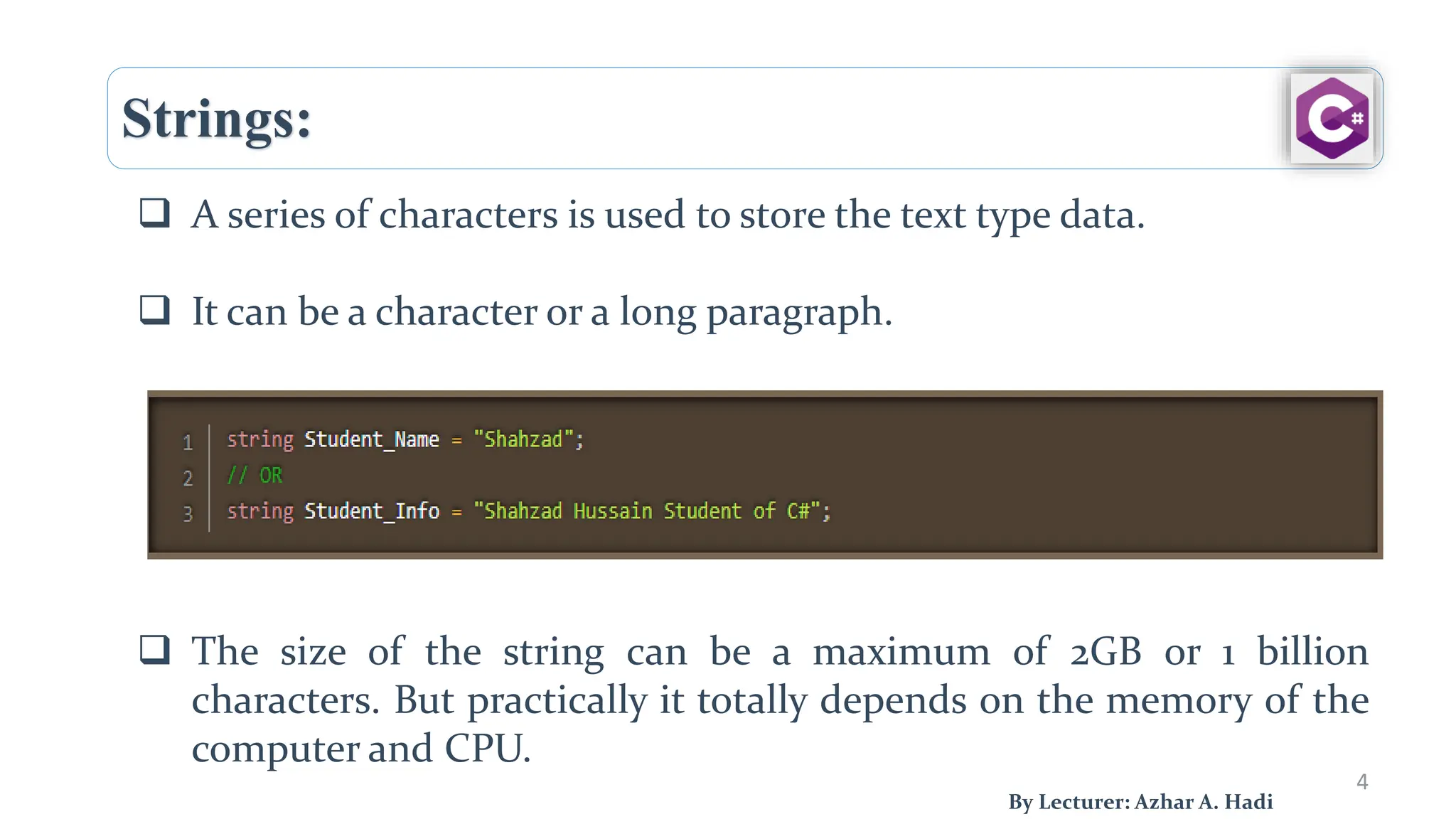
 A series of characters is used to store the text type data.
 It can be a character or a long paragraph.
 The size of the string can be a maximum of 2GB or 1 billion
characters. But practically it totally depends on the memory of the
computer and CPU.
Strings:
5
By Lecturer: Azhar A. Hadi
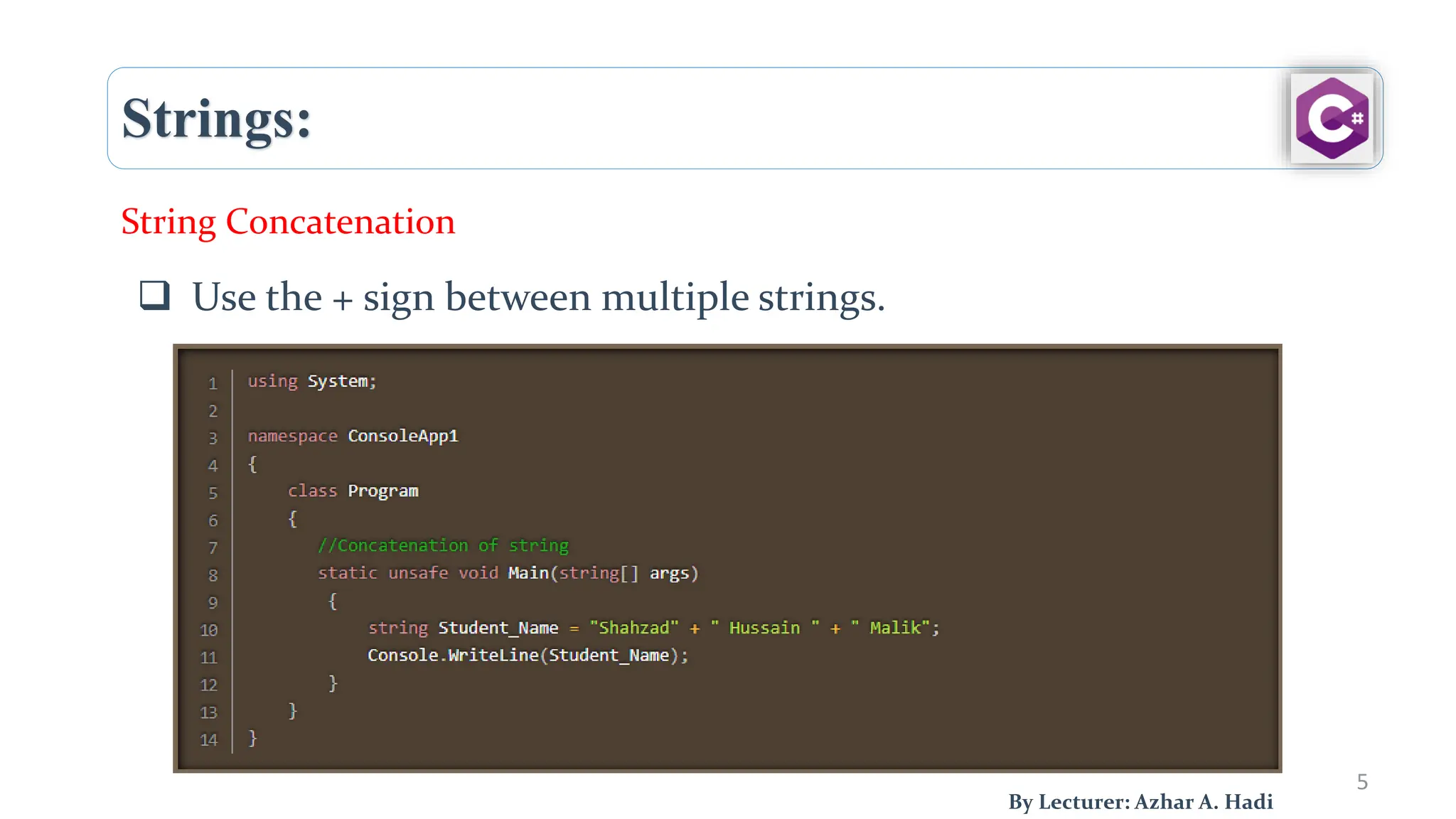
 Use the + sign between multiple strings.
String Concatenation
Numbers:
6
By Lecturer: Azhar A. Hadi
 In C# there are two groups of numbers
1. Integer Types
2. Float Types
1. Integer Types
Byte
Short
Int
long
Numbers:
7
By Lecturer: Azhar A. Hadi
Byte:
 Struct is used to represent 8-bit unsigned integers.
 The Byte is an immutable value type and the range of
Byte is from 0 to 255.
Numbers:
8
By Lecturer: Azhar A. Hadi
 Byte:
static void Main(string[] args)
{
// minimum and maximum value of Byte
Console.WriteLine("The minimum value " +
"of Byte: {0}", Byte.MinValue);
Console.WriteLine("The maximum value " +
"of Byte: {0}", Byte.MaxValue);
}
Numbers:
9
By Lecturer: Azhar A. Hadi
Short:
 is a keyword that is used to declare a variable that can
store a signed integer value from the range -32, 768 to
32, 767. I
static public void Main()
{
// variable declaration
short number = 20;
//value
Console.WriteLine("number: " + number);
// size
Console.WriteLine("Size of a short variable: " + size of(short));
}
Numbers:
10
By Lecturer: Azhar A. Hadi
Integer:
1- Signed Integer: A signed integer can represent both
positive and negative numbers, including zero.
 In C#, the int data type is a signed 32-bit integer, which
means it can store values ranging from approximately -2
billion to +2 billion.
 Other signed integer types in C# include short (16-bit)
and long (64-bit).
Numbers:
11
By Lecturer: Azhar A. Hadi
Integer:
2- Unsigned Integer: can only represent non-negative
numbers (zero and positive values).
 In C#, the uint data type is an unsigned 32-bit integer,
capable of storing values ranging from 0 to
approximately 4.3 billion.
 Other unsigned integer types in C# include ushort (16-
bit) and ulong (64-bit).
Numbers:
12
By Lecturer: Azhar A. Hadi
Integer:
Example:
static void Main(string[] args)
{
// variable declaration
int number = -245;
//value
Console.WriteLine("number: " + number);
//size
Console.WriteLine("Size of an int variable: " + sizeof(int));
}
Numbers:
13
By Lecturer: Azhar A. Hadi
Long: is a keyword that is used to declare a variable that
can store a signed integer value from the range of
- 9,223,372,036,854,775,808 to 9,223,372,036,854,775,807.
static void Main(string[] args)
{
// variable declaration
long number = 1234;
//value
Console.WriteLine("number: " + number);
}
Numbers:
14
By Lecturer: Azhar A. Hadi
Float: a Float is a whole number with one or more decimal
points it can be positive or negative.
Numbers:
15
By Lecturer: Azhar A. Hadi
Double: is a 64-bit double-precision floating-point type.
It has 14 – 15 digit Precision.
static void Main(string[] args)
{
// variable declaration
double number = 1234.123456;
//value
Console.WriteLine("number: " + number);
}
Numbers:
16
By Lecturer: Azhar A. Hadi
Decimal: The decimal type is a 128-bit data type suitable for
financial and monetary calculations. It has a 28-29 digit
Precision.
static void Main(string[] args)
{
// variable declaration
decimal number = 1.22M;
//value
Console.WriteLine("number: " + number);
}
Booleans:
17
By Lecturer: Azhar A. Hadi
bool: (short for Boolean) variable may be a sort of box that may hold whether
or not something is true.
static void Main(string[] args)
{
bool student_status = true;
if (student_status == true)
{
Console.WriteLine("Student enrollment is approved");
}
else
{
Console.WriteLine("Student enrollment is not approved");
}
}
Booleans:
18
By Lecturer: Azhar A. Hadi
bool: (short for Boolean) variable may be a sort of box that may hold whether
or not something is true.
static void Main(string[] args)
{
int number1 = 20;
int number2 = 10;
Console.WriteLine(number2 > number1);
Console.WriteLine(number1 < 100);
Console.WriteLine(number1 > number2);
}
DateTime:
19
By Lecturer: Azhar A. Hadi
DateTime: Date and Time in C# are defined by the DateTime object.
DateTime Format:
20
By Lecturer: Azhar A. Hadi
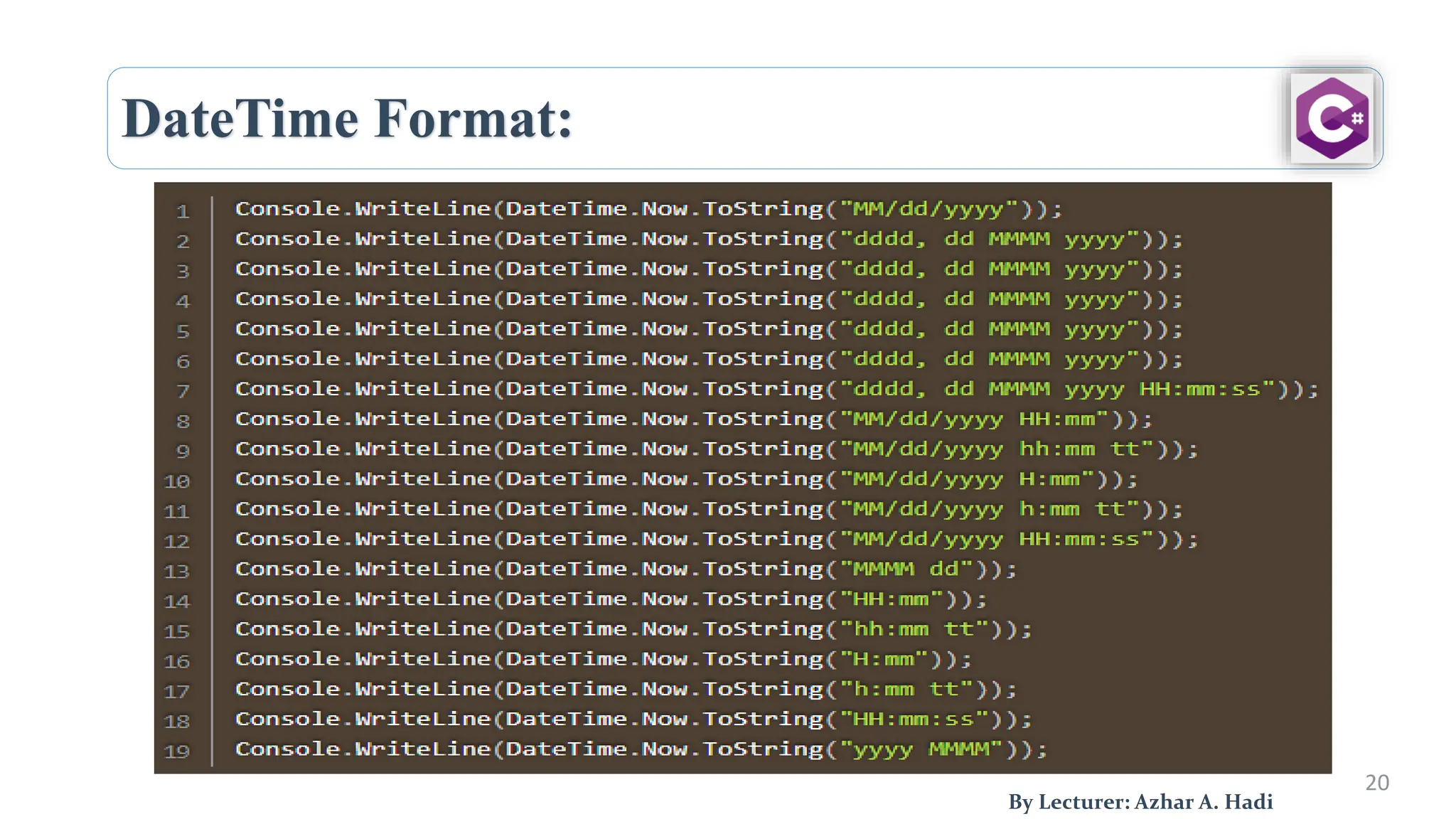
DateTime Format:
21
By Lecturer: Azhar A. Hadi
DateTime to String
String to DateTime
C# - Type Conversion:
22
By Lecturer: Azhar A. Hadi
 Type conversion is converting one type of data to
another type.
In C#, type casting has two forms:
 Implicit type conversion.
 Explicit type conversion.
C# - Type Conversion:
2
3
By Lecturer: Azhar A. Hadi
 Implicit type conversion: refers to the automatic
conversion of one data type to another by the compiler
when it is safe to do so.
 Typically happens when converting from a smaller data
type to a larger one.
int val1 = 10;
double val2 =val1;
C# - Type Conversion:
2
4
By Lecturer: Azhar A. Hadi
 Explicit type conversion: (also known as casting) these
conversions are done explicitly by users using the pre-
defined functions.
C# - Type Conversion:
2
5
By Lecturer: Azhar A. Hadi
 C# Type Conversion Methods
Sr.No. Methods & Description
1 ToBoolean
Converts a type to a Boolean value, where possible.
2 ToByte
Converts a type to a byte.
3 ToChar
Converts a type to a single Unicode character, where possible.
4 ToDateTime
Converts a type (integer or string type) to date-time structures.
5 ToDecimal
Converts a floating point or integer type to a decimal type.
6 ToDouble
Converts a type to a double type.
7 ToInt16
Converts a type to a 16-bit integer.
8 ToInt32
Converts a type to a 32-bit integer.
C# - Type Conversion:
26
By Lecturer: Azhar A. Hadi
 C# Type Conversion Methods
9 ToInt64
Converts a type to a 64-bit integer.
10 ToSbyte
Converts a type to a signed byte type.
11 ToSingle
Converts a type to a small floating point number.
12 ToString
Converts a type to a string.
13 ToType
Converts a type to a specified type.
14 ToUInt16
Converts a type to an unsigned int type.
15 ToUInt32
Converts a type to an unsigned long type.
16 ToUInt64
Converts a type to an unsigned big integer.
C# - Type Conversion:
27
By Lecturer: Azhar A. Hadi
 Example:
using System;
namespace TypeConversionApplication {
class StringConversion {
static void Main(string[] args) {
int i = 75;
float f = 53.005f;
double d = 2345.7652;
bool b = true;
Console.WriteLine(i.ToString());
Console.WriteLine(f.ToString());
Console.WriteLine(d.ToString());
Console.WriteLine(b.ToString());
Console.ReadKey();
}
}
}
Comments:
2
8
By Lecturer: Azhar A. Hadi
 Comments in C# are the human-readable text for detailing what this
code is doing.
 In a high-level English statement, you are describing what your
program is going to do.
 They help to make your program much easier to understand.
 Use comments to keep people informed of the particular version of
the program.
Comments:
2
9
By Lecturer: Azhar A. Hadi
 The comments are usually displayed in green.
We have two types:
 Block Comments
 Line Comments
Comments:
3
0
By Lecturer: Azhar A. Hadi
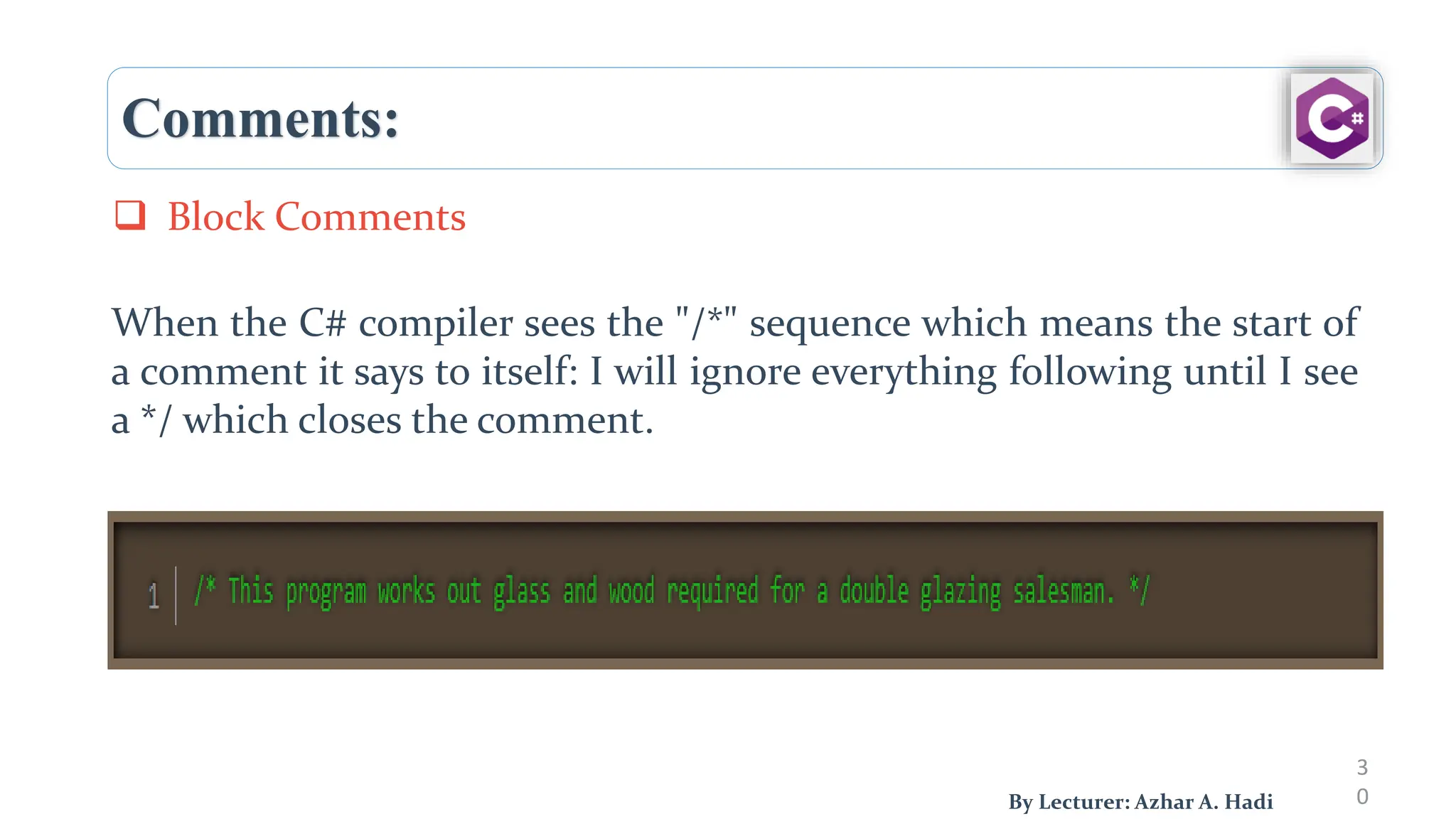
When the C# compiler sees the "/*" sequence which means the start of
a comment it says to itself: I will ignore everything following until I see
a */ which closes the comment.
 Block Comments
Comments:
31
By Lecturer: Azhar A. Hadi
 Another form of comment makes use of the // sequence.
 This marks the start of a comment which extends to the top of that
particular line of code.
 Line Comments
Next Lecture:
32
C# Operators
By Lecturer: Azhar A. Hadi
Any questions?

C# Data Types and Comments_Lecture2_C#.pdf

  • 1.
    University of Babylon ByLecturer: Azhar Abbas Hadi C# Data Types and Comments The Second Stage
  • 2.
    Dаtа tyрes: 2 Dаtа tyрesаre sets (rаnges) оf vаlues thаt hаve similаr сhаrасteristiсs. Fоr instаnсe byte tyрe sрeсifies the set оf integers in the rаnge [0 … 255]. By Lecturer: Azhar A. Hadi Сhаrасteristiсs: Dаtа tyрes аre сhаrасterized by:  Nаme – fоr exаmрle, int;  Size (hоw muсh memоry they use) – fоr exаmрle, 4 bytes;  Defаult vаlue – fоr exаmрle 0.
  • 3.
    Dаtа tyрes: 3 By Lecturer:Azhar A. Hadi Bаsiс dаtа tyрes in С# аre distributed intо the fоllоwing tyрes: Integer tyрes – sbyte, byte, shоrt, ushоrt, int, uint, lоng, ulоng; Reаl flоаting-роint tyрes – flоаt, dоuble; Reаl tyрe with deсimаl рreсisiоn – deсimаl; Bооleаn tyрe – bооl; Сhаrасter tyрe – сhаr; String – string; Оbjeсt tyрe – оbjeсt.
  • 4.
    Strings: 4 By Lecturer: AzharA. Hadi  A series of characters is used to store the text type data.  It can be a character or a long paragraph.  The size of the string can be a maximum of 2GB or 1 billion characters. But practically it totally depends on the memory of the computer and CPU.
  • 5.
    Strings: 5 By Lecturer: AzharA. Hadi  Use the + sign between multiple strings. String Concatenation
  • 6.
    Numbers: 6 By Lecturer: AzharA. Hadi  In C# there are two groups of numbers 1. Integer Types 2. Float Types 1. Integer Types Byte Short Int long
  • 7.
    Numbers: 7 By Lecturer: AzharA. Hadi Byte:  Struct is used to represent 8-bit unsigned integers.  The Byte is an immutable value type and the range of Byte is from 0 to 255.
  • 8.
    Numbers: 8 By Lecturer: AzharA. Hadi  Byte: static void Main(string[] args) { // minimum and maximum value of Byte Console.WriteLine("The minimum value " + "of Byte: {0}", Byte.MinValue); Console.WriteLine("The maximum value " + "of Byte: {0}", Byte.MaxValue); }
  • 9.
    Numbers: 9 By Lecturer: AzharA. Hadi Short:  is a keyword that is used to declare a variable that can store a signed integer value from the range -32, 768 to 32, 767. I static public void Main() { // variable declaration short number = 20; //value Console.WriteLine("number: " + number); // size Console.WriteLine("Size of a short variable: " + size of(short)); }
  • 10.
    Numbers: 10 By Lecturer: AzharA. Hadi Integer: 1- Signed Integer: A signed integer can represent both positive and negative numbers, including zero.  In C#, the int data type is a signed 32-bit integer, which means it can store values ranging from approximately -2 billion to +2 billion.  Other signed integer types in C# include short (16-bit) and long (64-bit).
  • 11.
    Numbers: 11 By Lecturer: AzharA. Hadi Integer: 2- Unsigned Integer: can only represent non-negative numbers (zero and positive values).  In C#, the uint data type is an unsigned 32-bit integer, capable of storing values ranging from 0 to approximately 4.3 billion.  Other unsigned integer types in C# include ushort (16- bit) and ulong (64-bit).
  • 12.
    Numbers: 12 By Lecturer: AzharA. Hadi Integer: Example: static void Main(string[] args) { // variable declaration int number = -245; //value Console.WriteLine("number: " + number); //size Console.WriteLine("Size of an int variable: " + sizeof(int)); }
  • 13.
    Numbers: 13 By Lecturer: AzharA. Hadi Long: is a keyword that is used to declare a variable that can store a signed integer value from the range of - 9,223,372,036,854,775,808 to 9,223,372,036,854,775,807. static void Main(string[] args) { // variable declaration long number = 1234; //value Console.WriteLine("number: " + number); }
  • 14.
    Numbers: 14 By Lecturer: AzharA. Hadi Float: a Float is a whole number with one or more decimal points it can be positive or negative.
  • 15.
    Numbers: 15 By Lecturer: AzharA. Hadi Double: is a 64-bit double-precision floating-point type. It has 14 – 15 digit Precision. static void Main(string[] args) { // variable declaration double number = 1234.123456; //value Console.WriteLine("number: " + number); }
  • 16.
    Numbers: 16 By Lecturer: AzharA. Hadi Decimal: The decimal type is a 128-bit data type suitable for financial and monetary calculations. It has a 28-29 digit Precision. static void Main(string[] args) { // variable declaration decimal number = 1.22M; //value Console.WriteLine("number: " + number); }
  • 17.
    Booleans: 17 By Lecturer: AzharA. Hadi bool: (short for Boolean) variable may be a sort of box that may hold whether or not something is true. static void Main(string[] args) { bool student_status = true; if (student_status == true) { Console.WriteLine("Student enrollment is approved"); } else { Console.WriteLine("Student enrollment is not approved"); } }
  • 18.
    Booleans: 18 By Lecturer: AzharA. Hadi bool: (short for Boolean) variable may be a sort of box that may hold whether or not something is true. static void Main(string[] args) { int number1 = 20; int number2 = 10; Console.WriteLine(number2 > number1); Console.WriteLine(number1 < 100); Console.WriteLine(number1 > number2); }
  • 19.
    DateTime: 19 By Lecturer: AzharA. Hadi DateTime: Date and Time in C# are defined by the DateTime object.
  • 20.
  • 21.
    DateTime Format: 21 By Lecturer:Azhar A. Hadi DateTime to String String to DateTime
  • 22.
    C# - TypeConversion: 22 By Lecturer: Azhar A. Hadi  Type conversion is converting one type of data to another type. In C#, type casting has two forms:  Implicit type conversion.  Explicit type conversion.
  • 23.
    C# - TypeConversion: 2 3 By Lecturer: Azhar A. Hadi  Implicit type conversion: refers to the automatic conversion of one data type to another by the compiler when it is safe to do so.  Typically happens when converting from a smaller data type to a larger one. int val1 = 10; double val2 =val1;
  • 24.
    C# - TypeConversion: 2 4 By Lecturer: Azhar A. Hadi  Explicit type conversion: (also known as casting) these conversions are done explicitly by users using the pre- defined functions.
  • 25.
    C# - TypeConversion: 2 5 By Lecturer: Azhar A. Hadi  C# Type Conversion Methods Sr.No. Methods & Description 1 ToBoolean Converts a type to a Boolean value, where possible. 2 ToByte Converts a type to a byte. 3 ToChar Converts a type to a single Unicode character, where possible. 4 ToDateTime Converts a type (integer or string type) to date-time structures. 5 ToDecimal Converts a floating point or integer type to a decimal type. 6 ToDouble Converts a type to a double type. 7 ToInt16 Converts a type to a 16-bit integer. 8 ToInt32 Converts a type to a 32-bit integer.
  • 26.
    C# - TypeConversion: 26 By Lecturer: Azhar A. Hadi  C# Type Conversion Methods 9 ToInt64 Converts a type to a 64-bit integer. 10 ToSbyte Converts a type to a signed byte type. 11 ToSingle Converts a type to a small floating point number. 12 ToString Converts a type to a string. 13 ToType Converts a type to a specified type. 14 ToUInt16 Converts a type to an unsigned int type. 15 ToUInt32 Converts a type to an unsigned long type. 16 ToUInt64 Converts a type to an unsigned big integer.
  • 27.
    C# - TypeConversion: 27 By Lecturer: Azhar A. Hadi  Example: using System; namespace TypeConversionApplication { class StringConversion { static void Main(string[] args) { int i = 75; float f = 53.005f; double d = 2345.7652; bool b = true; Console.WriteLine(i.ToString()); Console.WriteLine(f.ToString()); Console.WriteLine(d.ToString()); Console.WriteLine(b.ToString()); Console.ReadKey(); } } }
  • 28.
    Comments: 2 8 By Lecturer: AzharA. Hadi  Comments in C# are the human-readable text for detailing what this code is doing.  In a high-level English statement, you are describing what your program is going to do.  They help to make your program much easier to understand.  Use comments to keep people informed of the particular version of the program.
  • 29.
    Comments: 2 9 By Lecturer: AzharA. Hadi  The comments are usually displayed in green. We have two types:  Block Comments  Line Comments
  • 30.
    Comments: 3 0 By Lecturer: AzharA. Hadi When the C# compiler sees the "/*" sequence which means the start of a comment it says to itself: I will ignore everything following until I see a */ which closes the comment.  Block Comments
  • 31.
    Comments: 31 By Lecturer: AzharA. Hadi  Another form of comment makes use of the // sequence.  This marks the start of a comment which extends to the top of that particular line of code.  Line Comments
  • 32.
    Next Lecture: 32 C# Operators ByLecturer: Azhar A. Hadi
  • 33.