Finding 
Information 
Don’t be a mindless wanderer in the 
library! 
Be a “go to” person who can find it 
without help!
STEP 1: TASK DEFINITION 
 1.1 Define the problem. 
 1.2 Identify the information needed. 
Think about the topic you are going to 
research. What exactly do you want to 
know? Make a list of questions you want to 
answer.
STEP 2: INFORMATION SEEKING 
STRATEGIES 
 2.1 Determine all possible sources. 
 2.2 Select the best sources. 
With your shoulder partner, make a list of all 
possible sources of information, like books, 
Internet, etc. 
Who can come up with the most sources?
2.1 Determine all possible sources 
 Book 
 Reference book 
 Atlas 
 Dictionary 
 Thesaurus 
 Encyclopedia 
 Almanac 
 Handbook 
 Yearbook 
 Directory 
 Database 
 Internet search 
 Video 
 Sound recording 
 Magazine 
 Journal 
 Newspaper 
 Map 
 Travel guide 
 Image
Reference Books 
 Why are books put in 
the reference 
section? 
 Why aren’t they like 
other books? 
 What is different 
about a reference 
book and the other 
books in the library? 
 Reference books 
 Atlases 
 Dictionaries 
 Thesauri 
 Encyclopedias 
 Almanacs 
 Handbooks 
 Yearbooks 
 Directories
Almanacs 
 Book of facts for 
previous year (2010 
atlas covers the yea 
2009) 
 Come out each year 
 Are outdated quickly 
 Often specialized 
In our databases
Atlases 
 Contain maps 
 Also contain 
information 
 May be general 
 May be specific
Dictionaries 
 Abridged 
 Unabridged 
 Special languages 
 Special subjects 
 May be combined with 
a thesaurus 
 May be illustrated
Directories 
 Sources used to 
quickly look up small 
bits of information 
 Phone books 
 Lists of doctors, lawyers, 
businesses, etc. 
 May be online
Encyclopedias 
 Contain general 
information 
 Are used to begin 
research but usually 
not to finish research 
 May be general, like 
World Book or 
Britannica 
 May be subject 
specific 
 May be online 
Medical 
Encyclopedia
Handbook 
 “How to” books 
 Think a book you keep 
at hand to do a job 
 Sometimes called 
manuals 
 Frequently updated
Indexes 
 May be the last book 
in a set 
 Helps find the volume 
and page number of 
information you need 
 May help find things 
like poems, magazine 
articles, Bible verses
Thesauri 
 Contain synonyms 
 Arranged in different 
ways 
 May be combined with 
dictionaries
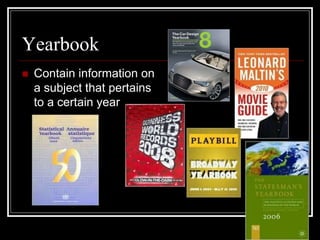
Yearbook 
 Contain information on 
a subject that pertains 
to a certain year
STEP 3: LOCATION AND ACCESS 
 3.1 Locate sources. 
 3.2 Find information within sources.
Where in the library can we find it? 
 Reference books—under 
the window 
 Atlases—in the atlas stand 
by the magazines 
 Dictionaries—in Reference 
under the window 
 Thesauri —in Reference 
under the window 
 Encyclopedias—in 
Reference under the 
window 
 Almanacs--online 
 Handbooks—in the stacks 
 Yearbooks—in the stacks 
 Directories--online
Finding Information within Sources 
 Use the Table of Contents 
 Use the Index 
 Use the directions of “how to” use the 
source at the front of some books 
 Skim and scan for information
4 R’s of Good Sources 
Recent 
Readable 
Reliable 
Relevant
STEP 4: Use of Information 
 4.1 Engage (read, hear, view, etc.). 
 4.2 Extract relevant information.
Engage—Don’t Copy and Paste 
 When you turn in school assignments, you are 
supposed to use your own words. 
 Copying and Pasting may be a good way to 
gather information, but you may turn it in that way. 
 You must engage with the information. 
 Read it 
 Ask questions as you read 
 Think about it 
 Read and look away and see if you can recall the 
information.
Extract information 
 You may find a lot of information that is 
interesting, but don’t spend time on things 
that are not related to your assignment. 
 Gather the facts you need. Ignore the 
things you don’t need. Don’t include 
irrelevant material in your final product.

02 -finding information

  • 1.
    Finding Information Don’tbe a mindless wanderer in the library! Be a “go to” person who can find it without help!
  • 2.
    STEP 1: TASKDEFINITION  1.1 Define the problem.  1.2 Identify the information needed. Think about the topic you are going to research. What exactly do you want to know? Make a list of questions you want to answer.
  • 3.
    STEP 2: INFORMATIONSEEKING STRATEGIES  2.1 Determine all possible sources.  2.2 Select the best sources. With your shoulder partner, make a list of all possible sources of information, like books, Internet, etc. Who can come up with the most sources?
  • 4.
    2.1 Determine allpossible sources  Book  Reference book  Atlas  Dictionary  Thesaurus  Encyclopedia  Almanac  Handbook  Yearbook  Directory  Database  Internet search  Video  Sound recording  Magazine  Journal  Newspaper  Map  Travel guide  Image
  • 5.
    Reference Books Why are books put in the reference section?  Why aren’t they like other books?  What is different about a reference book and the other books in the library?  Reference books  Atlases  Dictionaries  Thesauri  Encyclopedias  Almanacs  Handbooks  Yearbooks  Directories
  • 6.
    Almanacs  Bookof facts for previous year (2010 atlas covers the yea 2009)  Come out each year  Are outdated quickly  Often specialized In our databases
  • 7.
    Atlases  Containmaps  Also contain information  May be general  May be specific
  • 8.
    Dictionaries  Abridged  Unabridged  Special languages  Special subjects  May be combined with a thesaurus  May be illustrated
  • 9.
    Directories  Sourcesused to quickly look up small bits of information  Phone books  Lists of doctors, lawyers, businesses, etc.  May be online
  • 10.
    Encyclopedias  Containgeneral information  Are used to begin research but usually not to finish research  May be general, like World Book or Britannica  May be subject specific  May be online Medical Encyclopedia
  • 11.
    Handbook  “Howto” books  Think a book you keep at hand to do a job  Sometimes called manuals  Frequently updated
  • 12.
    Indexes  Maybe the last book in a set  Helps find the volume and page number of information you need  May help find things like poems, magazine articles, Bible verses
  • 13.
    Thesauri  Containsynonyms  Arranged in different ways  May be combined with dictionaries
  • 14.
    Yearbook  Containinformation on a subject that pertains to a certain year
  • 15.
    STEP 3: LOCATIONAND ACCESS  3.1 Locate sources.  3.2 Find information within sources.
  • 16.
    Where in thelibrary can we find it?  Reference books—under the window  Atlases—in the atlas stand by the magazines  Dictionaries—in Reference under the window  Thesauri —in Reference under the window  Encyclopedias—in Reference under the window  Almanacs--online  Handbooks—in the stacks  Yearbooks—in the stacks  Directories--online
  • 17.
    Finding Information withinSources  Use the Table of Contents  Use the Index  Use the directions of “how to” use the source at the front of some books  Skim and scan for information
  • 18.
    4 R’s ofGood Sources Recent Readable Reliable Relevant
  • 19.
    STEP 4: Useof Information  4.1 Engage (read, hear, view, etc.).  4.2 Extract relevant information.
  • 20.
    Engage—Don’t Copy andPaste  When you turn in school assignments, you are supposed to use your own words.  Copying and Pasting may be a good way to gather information, but you may turn it in that way.  You must engage with the information.  Read it  Ask questions as you read  Think about it  Read and look away and see if you can recall the information.
  • 21.
    Extract information You may find a lot of information that is interesting, but don’t spend time on things that are not related to your assignment.  Gather the facts you need. Ignore the things you don’t need. Don’t include irrelevant material in your final product.