SharePoint Push and
Pull (SPPP)
Denis Molodtsov
Point Alliance
VSCode + SPPP
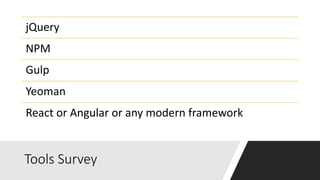
Tools Survey
jQuery
NPM
Gulp
Yeoman
React or Angular or any modern framework
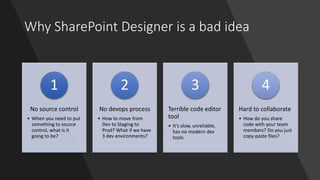
Why SharePoint Designer is a bad idea
No source control
• When you need to put
something to source
control, what is it
going to be?
1
No devops process
• How to move from
Dev to Staging to
Prod? What if we have
3 dev environments?
2
Terrible code editor
tool
• It’s slow, unreliable,
has no modern dev
tools.
3
Hard to collaborate
• How do you share
code with your team
members? Do you just
copy-paste files?
4
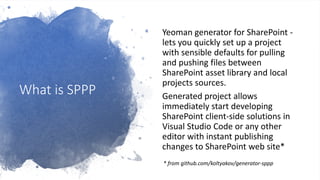
What is SPPP
Yeoman generator for SharePoint -
lets you quickly set up a project
with sensible defaults for pulling
and pushing files between
SharePoint asset library and local
projects sources.
Generated project allows
immediately start developing
SharePoint client-side solutions in
Visual Studio Code or any other
editor with instant publishing
changes to SharePoint web site*
* from github.com/koltyakov/generator-sppp
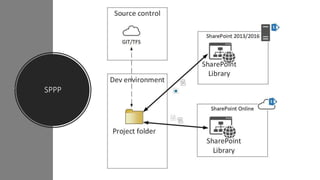
SPPP
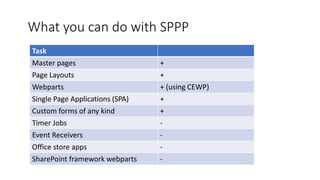
What you can do with SPPP
Task
Master pages +
Page Layouts +
Webparts + (using CEWP)
Single Page Applications (SPA) +
Custom forms of any kind +
Timer Jobs -
Event Receivers -
Office store apps -
SharePoint framework webparts -
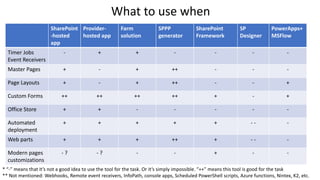
SharePoint
-hosted
app
Provider-
hosted app
Farm
solution
SPPP
generator
SharePoint
Framework
SP
Designer
PowerApps+
MSFlow
Timer Jobs
Event Receivers
- + + - - - -
Master Pages + - + ++ - - -
Page Layouts + - + ++ - - +
Custom Forms ++ ++ ++ ++ + - +
Office Store + + - - - - -
Automated
deployment
+ + + + + - - -
Web parts + + + ++ + - - -
Modern pages
customizations
- ? - ? - - + - -
* “-” means that it’s not a good idea to use the tool for the task. Or it’s simply impossible. “++” means this tool is good for the task
** Not mentioned: Webhooks, Remote event receivers, InfoPath, console apps, Scheduled PowerShell scripts, Azure functions, Nintex, K2, etc.
What to use when
Demo: Advanced
customizations with SPPP
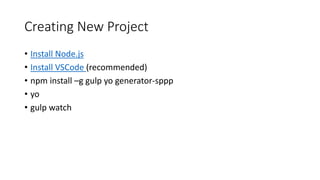
Creating New Project
• Install Node.js
• Install VSCode (recommended)
• npm install –g gulp yo generator-sppp
• yo
• gulp watch
Demo: new SPPP
project
Demo: create SPA
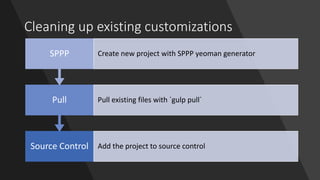
Cleaning up existing customizations
Source Control Add the project to source control
Pull Pull existing files with `gulp pull`
SPPP Create new project with SPPP yeoman generator
How to transition to SPPP
• Stop using Script Editor Webparts
• Store all customization files in the root site collection
• Store customizations in a single library
Demo: sorting out
existing project
Demo: CEWP
Demo: create custom
master page
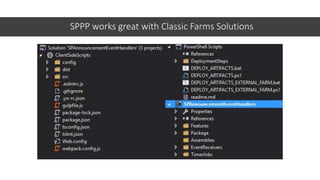
SPPP works great with Classic Farms Solutions
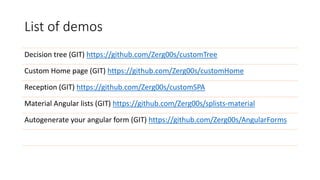
List of demos
Decision tree (GIT) https://github.com/Zerg00s/customTree
Custom Home page (GIT) https://github.com/Zerg00s/customHome
Reception (GIT) https://github.com/Zerg00s/customSPA
Material Angular lists (GIT) https://github.com/Zerg00s/splists-material
Autogenerate your angular form (GIT) https://github.com/Zerg00s/AngularForms
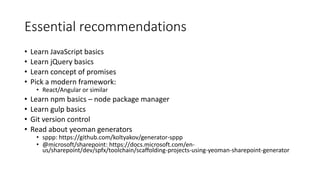
Essential recommendations
• Learn JavaScript basics
• Learn jQuery basics
• Learn concept of promises
• Pick a modern framework:
• React/Angular or similar
• Learn npm basics – node package manager
• Learn gulp basics
• Git version control
• Read about yeoman generators
• sppp: https://github.com/koltyakov/generator-sppp
• @microsoft/sharepoint: https://docs.microsoft.com/en-
us/sharepoint/dev/spfx/toolchain/scaffolding-projects-using-yeoman-sharepoint-generator
Advanced recommendations
• PowerShell PnP
• PnP-Js-Core
Demo AngularJs Forms generator!
• https://github.com/Zerg00s/AngularForms
Questions?

Sppp presentation

  • 1.
    SharePoint Push and Pull(SPPP) Denis Molodtsov Point Alliance
  • 2.
  • 3.
    Tools Survey jQuery NPM Gulp Yeoman React orAngular or any modern framework
  • 4.
    Why SharePoint Designeris a bad idea No source control • When you need to put something to source control, what is it going to be? 1 No devops process • How to move from Dev to Staging to Prod? What if we have 3 dev environments? 2 Terrible code editor tool • It’s slow, unreliable, has no modern dev tools. 3 Hard to collaborate • How do you share code with your team members? Do you just copy-paste files? 4
  • 5.
    What is SPPP Yeomangenerator for SharePoint - lets you quickly set up a project with sensible defaults for pulling and pushing files between SharePoint asset library and local projects sources. Generated project allows immediately start developing SharePoint client-side solutions in Visual Studio Code or any other editor with instant publishing changes to SharePoint web site* * from github.com/koltyakov/generator-sppp
  • 6.
  • 7.
    What you cando with SPPP Task Master pages + Page Layouts + Webparts + (using CEWP) Single Page Applications (SPA) + Custom forms of any kind + Timer Jobs - Event Receivers - Office store apps - SharePoint framework webparts -
  • 8.
    SharePoint -hosted app Provider- hosted app Farm solution SPPP generator SharePoint Framework SP Designer PowerApps+ MSFlow Timer Jobs EventReceivers - + + - - - - Master Pages + - + ++ - - - Page Layouts + - + ++ - - + Custom Forms ++ ++ ++ ++ + - + Office Store + + - - - - - Automated deployment + + + + + - - - Web parts + + + ++ + - - - Modern pages customizations - ? - ? - - + - - * “-” means that it’s not a good idea to use the tool for the task. Or it’s simply impossible. “++” means this tool is good for the task ** Not mentioned: Webhooks, Remote event receivers, InfoPath, console apps, Scheduled PowerShell scripts, Azure functions, Nintex, K2, etc. What to use when
  • 9.
  • 10.
    Creating New Project •Install Node.js • Install VSCode (recommended) • npm install –g gulp yo generator-sppp • yo • gulp watch
  • 11.
  • 12.
  • 13.
    Cleaning up existingcustomizations Source Control Add the project to source control Pull Pull existing files with `gulp pull` SPPP Create new project with SPPP yeoman generator
  • 14.
    How to transitionto SPPP • Stop using Script Editor Webparts • Store all customization files in the root site collection • Store customizations in a single library
  • 15.
  • 16.
  • 17.
  • 18.
    SPPP works greatwith Classic Farms Solutions
  • 19.
    List of demos Decisiontree (GIT) https://github.com/Zerg00s/customTree Custom Home page (GIT) https://github.com/Zerg00s/customHome Reception (GIT) https://github.com/Zerg00s/customSPA Material Angular lists (GIT) https://github.com/Zerg00s/splists-material Autogenerate your angular form (GIT) https://github.com/Zerg00s/AngularForms
  • 20.
    Essential recommendations • LearnJavaScript basics • Learn jQuery basics • Learn concept of promises • Pick a modern framework: • React/Angular or similar • Learn npm basics – node package manager • Learn gulp basics • Git version control • Read about yeoman generators • sppp: https://github.com/koltyakov/generator-sppp • @microsoft/sharepoint: https://docs.microsoft.com/en- us/sharepoint/dev/spfx/toolchain/scaffolding-projects-using-yeoman-sharepoint-generator
  • 21.
  • 22.
    Demo AngularJs Formsgenerator! • https://github.com/Zerg00s/AngularForms
  • 23.