Connect. Collaborate. Innovate.


                               Java Programming Basic
                                      Concepts


                                    Learning Facilitator:
                                           Date:


© Copyright GlobalLogic 2009                                                    1
Connect. Collaborate. Innovate.


                                     Gentle Reminder:
                                 “Switch Off” your Mobile Phone
                                               Or
                               Switch Mobile Phone to “Silent Mode”


© Copyright GlobalLogic 2009                                                             2
Connect. Collaborate. Innovate.


                Agenda

                •     What JAVA is for?
                         –     Software Portability
                         –     Why Portability Matters
                         –     Language and Libraries


                •     Basic Concepts
                         –     JVM, Classpath
                         –     Packages
                         –     Data Types
                         –     JavaDoc/Comments
                         –     Garbage Collection


                • Example Java Application


© Copyright GlobalLogic 2009                                                           3
                                                                                       3
Connect. Collaborate. Innovate.


                What JAVA does for you?


                • Hardware Systems
                         – Processor + memory + I/O devices
                               (Platform to execute softwares)

                • Operating Systems
                         – An operating system (OS) is a set of computer programs that manage
                           the hardware and software resources of a computer.
                         – Runs on top of hardware, so tightly attached with the hardware

                • Application Softwares
                         – Runs on top of operating system, a subclass of computer software
                           which address a particular objective e.g. Word-processors ..
                         – Application made for one OS/hardware system may not run on
                           another.
© Copyright GlobalLogic 2009                                                                           4
                                                                                                       4
Connect. Collaborate. Innovate.


                Why Portability?


                • Softwares Portability

                                    “Applications that are independent of all hardware
                                                 and operating systems”

                         You can compile a Java program on any system and run the
                         resulting binary executable file on the same or any other system

                • “Software portability” refers to adapting a software to a new
                  environment, without re-developing it. This reduces the re-
                  development efforts.


© Copyright GlobalLogic 2009                                                                             5
                                                                                                         5
Connect. Collaborate. Innovate.


                Why Portability?


                • There are different hardware and operating systems
                • Even for one OS, there are numerous releases


                • Software portability is all about “Future-proofing” your
                         Software investment
                         “Future proofing” is a process of trying to anticipate future
                           developments, so that appropriate actions can be taken to minimize
                           negative consequences.
                • With application programs written in Java, you can
                         change/upgrade OS and applications independently


© Copyright GlobalLogic 2009                                                                           6
                                                                                                       6
Connect. Collaborate. Innovate.


                • Example C program
                               void main()
                               {
                                   int arr[2];
                                   printf(“%dn”, arr*3+);
                               }

                               • Run this on windows (using turbo c)
                               • Run this on Unix (using gcc)
                               • Compare the results


© Copyright GlobalLogic 2009                                                                         7
                                                                                                     7
Connect. Collaborate. Innovate.


                Language & Libraries


                • A “programming language” is about
                         – Describing DATA
                         – Describing STATEMENTS that work on DATA
                         – Describing the ways the two can be put together
                               • How expressions are formed
                               • What statements look like
                • Java is a Object-oriented, strongly typed language.
                         – Strongly typed languages specify one or more restrictions on how
                           operations involving values having different data types can be
                           intermixed.
                • Library (package)
                         – Frequently reused code
                         – Not an executable program, but contains executable code
                         – Linking with program's address space
© Copyright GlobalLogic 2009                                                                               8
                                                                                                           8
Connect. Collaborate. Innovate.


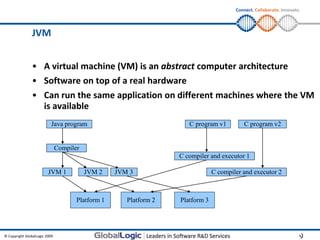
                JVM


                • A virtual machine (VM) is an abstract computer architecture
                • Software on top of a real hardware
                • Can run the same application on different machines where the VM
                  is available
                           Java program                               C program v1         C program v2


                               Compiler
                                                                   C compiler and executor 1

                         JVM 1            JVM 2    JVM 3                        C compiler and executor 2


                                      Platform 1      Platform 2   Platform 3


© Copyright GlobalLogic 2009                                                                                          9
                                                                                                                      9
Connect. Collaborate. Innovate.


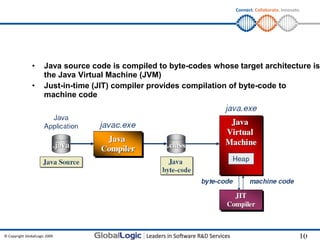
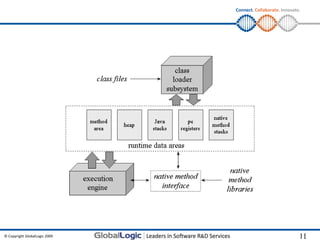
                •     Java source code is compiled to byte-codes whose target architecture is
                      the Java Virtual Machine (JVM)
                •     Just-in-time (JIT) compiler provides compilation of byte-code to
                      machine code


© Copyright GlobalLogic 2009                                                                         10
                                                                                                     10
Connect. Collaborate. Innovate.


© Copyright GlobalLogic 2009                                 11
                                                             11
Connect. Collaborate. Innovate.


                Exercise


                • Write a Java program to print “Hello World!!!” on the command
                  prompt
                         (Use notepad)

                         – Compile the program
                         – Run the program


© Copyright GlobalLogic 2009                                                                 12
                                                                                             12
Connect. Collaborate. Innovate.


                Classpath


                • The Classpath is an argument (Environment variable) that tells the
                  Java Virtual Machine where to look for user-defined classes and
                  packages in Java programs.

                • Setting CLASSPATH from command-line
                               SET CLASSPATH=Dir;

                • Setting CLASSPATH in Windows via Control-panel


© Copyright GlobalLogic 2009                                                                   13
                                                                                               13
Connect. Collaborate. Innovate.


                Exercise


                • Revisit the hello world program

                • Compiling and running the program from any other directory


© Copyright GlobalLogic 2009                                                                 14
                                                                                             14
Connect. Collaborate. Innovate.


                Java Packages


                • A Java package is a mechanism for organizing Java classes into
                  namespaces.
                • A package provides a unique namespace for the types it contains.
                • Classes in the same package can access each other's protected
                  members.
                • Packages are usually defined using a hierarchical naming pattern
                               • Example – java.lang.*, com.globallogic.*


© Copyright GlobalLogic 2009                                                                              15
                                                                                                          15
Connect. Collaborate. Innovate.


                Exercise


                • Move the hello world program in a package
                                   com.globallogic.training.java

                               • Now compile and execute the program


© Copyright GlobalLogic 2009                                                                         16
                                                                                                     16
Connect. Collaborate. Innovate.


                Data Types


                • A data type is a set of values and the operations on those values
                         – For example, the Java "int" type is the set of 32-bit integers together
                           with the operations "+", "*", "%", etc that operate over integers
                • A data type describes representation, interpretation and structure
                  of values manipulated by algorithms or objects stored in computer
                  memory or other storage device
                • Java has two groups of data types, primitive data types and object
                  references.
                         – primitive data types store actual data,
                         – Java object references are variables which hold references to objects


© Copyright GlobalLogic 2009                                                                                17
                                                                                                            17
Connect. Collaborate. Innovate.


                Data Types


                • Arrays
                                    int[] anArray;
                                    anArray = new int[10];
                                          OR
                                    int[] anArray = new int[10];
                • String
                               String greeting = "Hello world!";

                         character array
                               char[] helloArray = { 'h', 'e', 'l', 'l', 'o', '.'};
                               String helloString = new String(helloArray);
                         Basic operations
                               length
                               concat
                               substr
                • int, float
© Copyright GlobalLogic 2009                                                                                        18
                                                                                                                    18
Connect. Collaborate. Innovate.


                Basic I/O


                • I/O streams
                               • An I/O Stream represents an input source or an output destination. A
                                 stream can represent many different kinds of sources and destinations,
                                 including disk files, devices, other programs, and memory arrays.
                               • Input stream
                               • Output stream

                • Writing on console
                                   System.out.println(“...”);


                • Reading from console
                               BufferedReader in = new BufferedReader(new
                                  InputStreamReader(System.in));
                               in.readLine();


© Copyright GlobalLogic 2009                                                                                    19
                                                                                                                19
Connect. Collaborate. Innovate.


                Exercise


                • To determine whether a given string is a palindrome.
                         – Input : a String to be read from console
                         – Ouptput: true/false


© Copyright GlobalLogic 2009                                                                        20
                                                                                                    20
Connect. Collaborate. Innovate.


                Garbage Collection


                • Garbage collection (GC) is a form of automatic memory
                  management.

                • The garbage collector or collector attempts to reclaim garbage, or
                  memory used by objects that will never be accessed the application

                • The basic principle of how a garbage collector works is:
                         – Determine what data objects in a program will not be accessed in the
                           future
                         – Reclaim the resources used by those objects

                • A key feature of Java is its garbage-collected heap, which takes care
                  of freeing dynamically allocated memory that is no longer
                  referenced.
© Copyright GlobalLogic 2009                                                                             21
                                                                                                         21
Connect. Collaborate. Innovate.


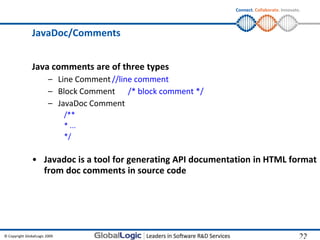
                JavaDoc/Comments


                Java comments are of three types
                         – Line Comment //line comment
                         – Block Comment /* block comment */
                         – JavaDoc Comment
                               /**
                               * ...
                               */

                • Javadoc is a tool for generating API documentation in HTML format
                  from doc comments in source code


© Copyright GlobalLogic 2009                                                                 22
                                                                                             22
Connect. Collaborate. Innovate.


                               Q&A


© Copyright GlobalLogic 2009                                       23
Connect. Collaborate. Innovate.


                    “Thank You” for your learning contribution!


           Please submit feedback to help L&D make continuous
           improvement……

             Dial @ Learning:
             Noida: 4444, Nagpur:333, Pune:5222, Banglore:111

             E mail: learning@globallogic.com


© Copyright GlobalLogic 2009                                                                  24

Java programming basics

  • 1.
    Connect. Collaborate. Innovate. Java Programming Basic Concepts Learning Facilitator: Date: © Copyright GlobalLogic 2009 1
  • 2.
    Connect. Collaborate. Innovate. Gentle Reminder: “Switch Off” your Mobile Phone Or Switch Mobile Phone to “Silent Mode” © Copyright GlobalLogic 2009 2
  • 3.
    Connect. Collaborate. Innovate. Agenda • What JAVA is for? – Software Portability – Why Portability Matters – Language and Libraries • Basic Concepts – JVM, Classpath – Packages – Data Types – JavaDoc/Comments – Garbage Collection • Example Java Application © Copyright GlobalLogic 2009 3 3
  • 4.
    Connect. Collaborate. Innovate. What JAVA does for you? • Hardware Systems – Processor + memory + I/O devices (Platform to execute softwares) • Operating Systems – An operating system (OS) is a set of computer programs that manage the hardware and software resources of a computer. – Runs on top of hardware, so tightly attached with the hardware • Application Softwares – Runs on top of operating system, a subclass of computer software which address a particular objective e.g. Word-processors .. – Application made for one OS/hardware system may not run on another. © Copyright GlobalLogic 2009 4 4
  • 5.
    Connect. Collaborate. Innovate. Why Portability? • Softwares Portability “Applications that are independent of all hardware and operating systems” You can compile a Java program on any system and run the resulting binary executable file on the same or any other system • “Software portability” refers to adapting a software to a new environment, without re-developing it. This reduces the re- development efforts. © Copyright GlobalLogic 2009 5 5
  • 6.
    Connect. Collaborate. Innovate. Why Portability? • There are different hardware and operating systems • Even for one OS, there are numerous releases • Software portability is all about “Future-proofing” your Software investment “Future proofing” is a process of trying to anticipate future developments, so that appropriate actions can be taken to minimize negative consequences. • With application programs written in Java, you can change/upgrade OS and applications independently © Copyright GlobalLogic 2009 6 6
  • 7.
    Connect. Collaborate. Innovate. • Example C program void main() { int arr[2]; printf(“%dn”, arr*3+); } • Run this on windows (using turbo c) • Run this on Unix (using gcc) • Compare the results © Copyright GlobalLogic 2009 7 7
  • 8.
    Connect. Collaborate. Innovate. Language & Libraries • A “programming language” is about – Describing DATA – Describing STATEMENTS that work on DATA – Describing the ways the two can be put together • How expressions are formed • What statements look like • Java is a Object-oriented, strongly typed language. – Strongly typed languages specify one or more restrictions on how operations involving values having different data types can be intermixed. • Library (package) – Frequently reused code – Not an executable program, but contains executable code – Linking with program's address space © Copyright GlobalLogic 2009 8 8
  • 9.
    Connect. Collaborate. Innovate. JVM • A virtual machine (VM) is an abstract computer architecture • Software on top of a real hardware • Can run the same application on different machines where the VM is available Java program C program v1 C program v2 Compiler C compiler and executor 1 JVM 1 JVM 2 JVM 3 C compiler and executor 2 Platform 1 Platform 2 Platform 3 © Copyright GlobalLogic 2009 9 9
  • 10.
    Connect. Collaborate. Innovate. • Java source code is compiled to byte-codes whose target architecture is the Java Virtual Machine (JVM) • Just-in-time (JIT) compiler provides compilation of byte-code to machine code © Copyright GlobalLogic 2009 10 10
  • 11.
    Connect. Collaborate. Innovate. ©Copyright GlobalLogic 2009 11 11
  • 12.
    Connect. Collaborate. Innovate. Exercise • Write a Java program to print “Hello World!!!” on the command prompt (Use notepad) – Compile the program – Run the program © Copyright GlobalLogic 2009 12 12
  • 13.
    Connect. Collaborate. Innovate. Classpath • The Classpath is an argument (Environment variable) that tells the Java Virtual Machine where to look for user-defined classes and packages in Java programs. • Setting CLASSPATH from command-line SET CLASSPATH=Dir; • Setting CLASSPATH in Windows via Control-panel © Copyright GlobalLogic 2009 13 13
  • 14.
    Connect. Collaborate. Innovate. Exercise • Revisit the hello world program • Compiling and running the program from any other directory © Copyright GlobalLogic 2009 14 14
  • 15.
    Connect. Collaborate. Innovate. Java Packages • A Java package is a mechanism for organizing Java classes into namespaces. • A package provides a unique namespace for the types it contains. • Classes in the same package can access each other's protected members. • Packages are usually defined using a hierarchical naming pattern • Example – java.lang.*, com.globallogic.* © Copyright GlobalLogic 2009 15 15
  • 16.
    Connect. Collaborate. Innovate. Exercise • Move the hello world program in a package com.globallogic.training.java • Now compile and execute the program © Copyright GlobalLogic 2009 16 16
  • 17.
    Connect. Collaborate. Innovate. Data Types • A data type is a set of values and the operations on those values – For example, the Java "int" type is the set of 32-bit integers together with the operations "+", "*", "%", etc that operate over integers • A data type describes representation, interpretation and structure of values manipulated by algorithms or objects stored in computer memory or other storage device • Java has two groups of data types, primitive data types and object references. – primitive data types store actual data, – Java object references are variables which hold references to objects © Copyright GlobalLogic 2009 17 17
  • 18.
    Connect. Collaborate. Innovate. Data Types • Arrays int[] anArray; anArray = new int[10]; OR int[] anArray = new int[10]; • String String greeting = "Hello world!"; character array char[] helloArray = { 'h', 'e', 'l', 'l', 'o', '.'}; String helloString = new String(helloArray); Basic operations length concat substr • int, float © Copyright GlobalLogic 2009 18 18
  • 19.
    Connect. Collaborate. Innovate. Basic I/O • I/O streams • An I/O Stream represents an input source or an output destination. A stream can represent many different kinds of sources and destinations, including disk files, devices, other programs, and memory arrays. • Input stream • Output stream • Writing on console System.out.println(“...”); • Reading from console BufferedReader in = new BufferedReader(new InputStreamReader(System.in)); in.readLine(); © Copyright GlobalLogic 2009 19 19
  • 20.
    Connect. Collaborate. Innovate. Exercise • To determine whether a given string is a palindrome. – Input : a String to be read from console – Ouptput: true/false © Copyright GlobalLogic 2009 20 20
  • 21.
    Connect. Collaborate. Innovate. Garbage Collection • Garbage collection (GC) is a form of automatic memory management. • The garbage collector or collector attempts to reclaim garbage, or memory used by objects that will never be accessed the application • The basic principle of how a garbage collector works is: – Determine what data objects in a program will not be accessed in the future – Reclaim the resources used by those objects • A key feature of Java is its garbage-collected heap, which takes care of freeing dynamically allocated memory that is no longer referenced. © Copyright GlobalLogic 2009 21 21
  • 22.
    Connect. Collaborate. Innovate. JavaDoc/Comments Java comments are of three types – Line Comment //line comment – Block Comment /* block comment */ – JavaDoc Comment /** * ... */ • Javadoc is a tool for generating API documentation in HTML format from doc comments in source code © Copyright GlobalLogic 2009 22 22
  • 23.
    Connect. Collaborate. Innovate. Q&A © Copyright GlobalLogic 2009 23
  • 24.
    Connect. Collaborate. Innovate. “Thank You” for your learning contribution! Please submit feedback to help L&D make continuous improvement…… Dial @ Learning: Noida: 4444, Nagpur:333, Pune:5222, Banglore:111 E mail: learning@globallogic.com © Copyright GlobalLogic 2009 24