2
Computers and Languages
•Life in this age depends on smart devices
• Automobiles, Smart homes, Smart cities all of these depend on
computers
• The computer program's role in this technology is essential;
without a list of instructions to follow, the computer is virtually
useless.
• Programming languages allow us to write those programs and
thus make computers do something useful.
3.
3
Elements of aComputer System
• The elements of a computer system fall into two major categories:
hardware and software.
• Hardware is the equipment used to perform the necessary
computations (central processing unit (CPU), monitor, keyboard,
power supply, drives, RAM, etc.
• Software consists of the programs that enable us to solve
problems with a computer (lists of instructions to perform).
4.
4
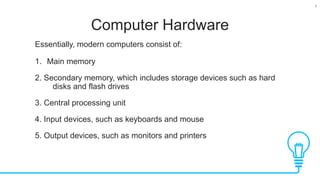
Computer Hardware
Essentially, moderncomputers consist of:
1. Main memory
2. Secondary memory, which includes storage devices such as hard
disks and flash drives
3. Central processing unit
4. Input devices, such as keyboards and mouse
5. Output devices, such as monitors and printers
5.
5
Computer Software
Operating System
•The collection of computer programs that control the interaction of
the user and the computer hardware is called the operating
system (OS): e.g.: UNIX, Windows, MAC-OS X
• The operating system of a computer is the software that is
responsible for directing all computer operations and managing all
computer resources.
• Application Software
• Application programs are developed to assist a computer user in
accomplishing various tasks (i.e. word processing, financial
calculations etc.) e.g. Notepad, MSWord, MATLAB etc.
6.
6
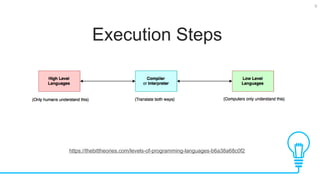
Computer Languages
• Developingnew software requires writing lists of instructions for a
computer to execute.
• The language directly understood by a computer is called
machine language (or machine code) and is a collection of binary
numbers.
• For brevity Software developers rarely use the machine language
directly because:
1. It is not standardised – depends on the CPU
2. Difficult to use – long development times
However it does have some advantages
1. Faster execution
2. Requires less memory.
8
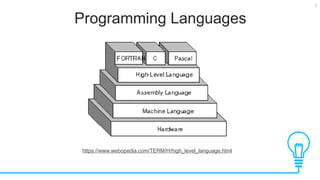
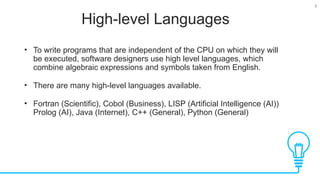
High-level Languages
• Towrite programs that are independent of the CPU on which they will
be executed, software designers use high level languages, which
combine algebraic expressions and symbols taken from English.
• There are many high-level languages available.
• Fortran (Scientific), Cobol (Business), LISP (Artificial Intelligence (AI))
Prolog (AI), Java (Internet), C++ (General), Python (General)
10
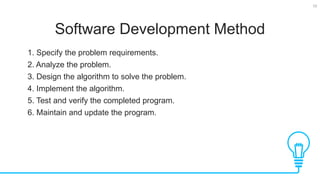
Software Development Method
1.Specify the problem requirements.
2. Analyze the problem.
3. Design the algorithm to solve the problem.
4. Implement the algorithm.
5. Test and verify the completed program.
6. Maintain and update the program.
11.
11
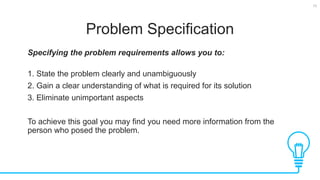
Problem Specification
Specifying theproblem requirements allows you to:
1. State the problem clearly and unambiguously
2. Gain a clear understanding of what is required for its solution
3. Eliminate unimportant aspects
To achieve this goal you may find you need more information from the
person who posed the problem.
12.
12
Analysis
Analyzing the probleminvolves identifying the:
1. Inputs - the data you have to work with
2. Outputs - the desired results
3. Additional requirements or constraints on the solution.
13.
13
Design
Designing the algorithm
1.Develop a list of steps called an algorithm to solve the problem
2. Verify that the algorithm solves the problem as intended. Writing the
algorithm is often the most difficult part of the problem-solving
process. Coding and algorithm is simple once you know the
programming language syntax
Don't attempt to solve every detail of the problem at the beginning.
Top-down Design Approach
1. List the major steps, or subproblems, that need to be solved
2. Solve the original problem by solving each of its sub-problems.
14.
14
Implementation
Implementing the algorithm
•Involves writing the algorithm as a computer program.
• You must convert each step of the algorithm into one or more
statements in a programming language.
• Requires a full grip on programming language syntax and
constraints
15.
15
Testing and Verification
Testingand verification
• Requires testing the completed program to verify that it works as
desired.
• Don't rely on just one test case.
• Run the program several times using different sets of data, making
sure that it works correctly for every situation provided for in the
algorithm.
16.
16
Maintenance
Maintaining and updating
•Involves modifying a program to remove previously undetected
errors and to keep it upto-date as government regulations or
company policies change.
• Many organizations maintain a program for five years or more, often
after the programmers who originally coded it have left or moved on
to other positions.
17.
17
Development of CLanguage
• The creation of C language changed the way programming was
approached and thought about
• The creation of C was direct result of need of a structured, efficient
high level language that could replace assembly language
• C was first developed in 1970s by Dennis Ritchie
• C was formally standardized in 1989
• C++ is enhancement of C which supports Objected oriented
Programming (OOP) that helps organize large complex problems.
18.
18
Development of Java
Tests
•Language innovation is driven by two factors: improvement in art of
programming and computing environment
• Java inherits the rich legacy of C and C++ and adds new features
required by current state of art systems
• Java offers features that streamline programming for a distributed
architecture
• Java was initially conceived in 1991 by a group of programmers at
Sun Microsystems and was initially called “Oak” but it was renamed
as Java in 1995.
19.
19
Purpose of Java
Tests
•C++ required a different compiler for each of these devices as these
had a different kind of CPU and compilers are expensive and time
consuming
• The primary motivation was the need to have a platform independent
language that could be used in consumer electronics, microwave,
toasters remote control etc.
• The need for platform independent language increased after the
development of internet as internet connected devices consisted of
various types of computers, CPUs and operating systems.
• Internet caused Java programmers to switch from consumer
electronics to internet
20.
20
Java and C/C++
Tests
•Java is directly related to C/C++ as it inherits syntax from C/C++.
• Its object oriented model is adapted from C++
• Any programmer who knows C/C++ can easily understand Java and
vice versa.
• Java takes the best of the past languages and adds new features
needed for the online and platform independent environment
• Although java was influenced by C/C++, it is not an enhanced
version of C/C++ and is not compatible with C/C++.
• Java is not designed to replace C/C++ and both of these will coexist
as these sort different sorts of problems.
21.
21
Java’s Success
Tests
• Java’ssuccess lies in its adaptability to changing programming
environments
• Java’s release cycles is about 1.5 years compared to 10 years for
other languages
• Java is more secure and portable
22.
22
Java’s Magic: TheBytecode
Tests
• Java’s security and portability advantage lies in the fact that it java
compiler does not produce an executable file, it produces java
bytecode
• Bytecode is a highly optimized set of instructions designed to be
executed by java runtime systems called java virtual machine (JVM).
• Translating a java program into bytecode makes it easier to run on a
variety of platforms as only JVM needs to be updated
• Although details of JVM will differ from platform to platform, all
understand same bytecode
• Since JVM is in control so it prevents from generating side effects
and makes system more secure
23.
23
Java’s Magic: TheBytecode
Tests
• Compiling program to an intermediate form and then interpreting it
makes process slower compared to if it was compiled to an
executable code, the difference is not great because bytecode is
highly optimized
• It is not practical to compile an entire Java program into executable
code all at once, because Java performs various run-time checks
that can be done only at run time.
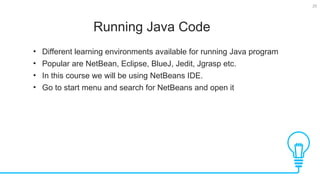
25
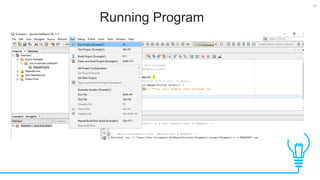
Running Java Code
Tests
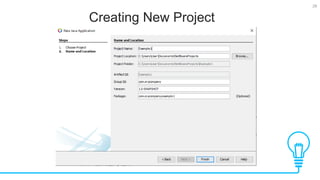
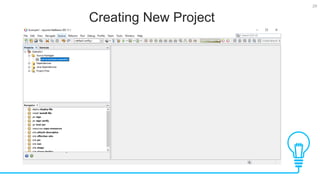
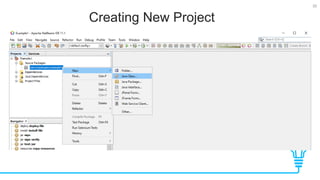
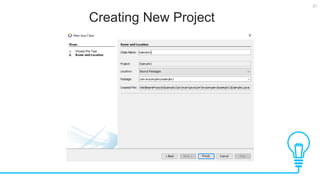
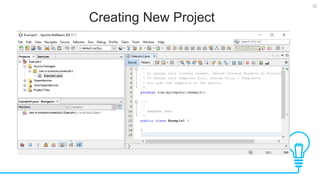
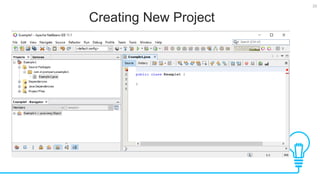
•Different learning environments available for running Java program
• Popular are NetBean, Eclipse, BlueJ, Jedit, Jgrasp etc.
• In this course we will be using NetBeans IDE.
• Go to start menu and search for NetBeans and open it
34
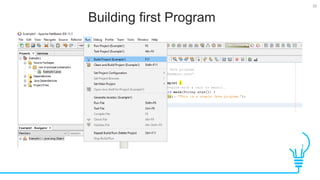
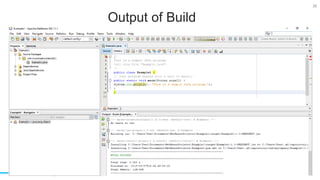
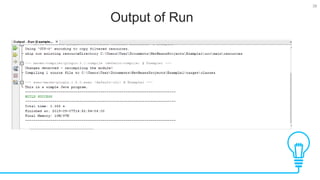
Writing first Program
Tests
/*
Thisis a simple Java program.
Call this file "Example.java".
*/
public class Example {
// Your program begins with a call to main().
public static void main(String args[]) {
System.out.println("This is a simple Java program.");
}
}
39
A closer lookat the program
(Comments)
Tests
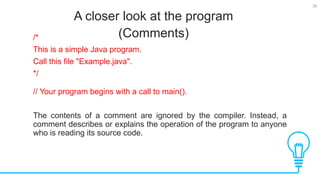
/*
This is a simple Java program.
Call this file "Example.java".
*/
// Your program begins with a call to main().
The contents of a comment are ignored by the compiler. Instead, a
comment describes or explains the operation of the program to anyone
who is reading its source code.
40.
40
public key word
Tests
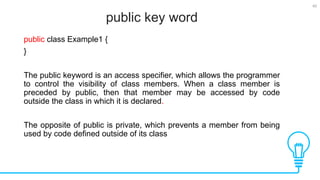
publicclass Example1 {
}
The public keyword is an access specifier, which allows the programmer
to control the visibility of class members. When a class member is
preceded by public, then that member may be accessed by code
outside the class in which it is declared.
The opposite of public is private, which prevents a member from being
used by code defined outside of its class
41.
41
static and void
Tests
publicstatic void main(String args[ ])
The keyword static allows main( ) to be called without having to
instantiate a particular instance of the class.
The keyword void simply tells the compiler that main( ) does not return
a value.
42.
42
main() method
Tests
public staticvoid main(String args[ ])
• All Java applications begin execution by calling main( )
• main( ) must be declared as public, since it must be called by code
outside of its class when the program is started.
• Keep in mind that Java is case-sensitive. Thus, Main is different from
main.
• It is important to understand that the Java compiler will compile
classes that do not contain a main( ) method. But java has no way to
run these classes.
43.
43
String args[ ]
Tests
publicstatic void main(String args[ ])
• String args[ ] declares a parameter named args, which is an array of
instances of the class String.
• Objects of type String store character strings. In this case, args
receives any command-line arguments present when the program is
executed.
44.
44
Printing a statement
Tests
System.out.println("Thisis a simple Java program.");
This line outputs the string “This is a simple Java program.” followed by
a new line on the screen.
Output is actually accomplished by the built-in println( ) method. In this
case, println( ) displays the string which is passed to it.
println( ) can be used to display other types of information, too.
45.
45
Another Simple Program
Tests
classExample2 {
public static void main(String args[]) {
int num; // this declares a variable called num
num = 100; // this assigns num the value 100
System.out.println("This is num: " + num);
num = num * 2;
System.out.print("The value of num * 2 is ");
System.out.println(num);
}
}
![34
Writing first Program
Tests
/*
This is a simple Java program.
Call this file "Example.java".
*/
public class Example {
// Your program begins with a call to main().
public static void main(String args[]) {
System.out.println("This is a simple Java program.");
}
}](https://image.slidesharecdn.com/intoroductiontocomputerlanguagesandjava-250827011205-0a05e7fd/85/Introduction-to-Computer-Languages-and-Java-34-320.jpg)
![41
static and void
Tests
public static void main(String args[ ])
The keyword static allows main( ) to be called without having to
instantiate a particular instance of the class.
The keyword void simply tells the compiler that main( ) does not return
a value.](https://image.slidesharecdn.com/intoroductiontocomputerlanguagesandjava-250827011205-0a05e7fd/85/Introduction-to-Computer-Languages-and-Java-41-320.jpg)
![42
main() method
Tests
public static void main(String args[ ])
• All Java applications begin execution by calling main( )
• main( ) must be declared as public, since it must be called by code
outside of its class when the program is started.
• Keep in mind that Java is case-sensitive. Thus, Main is different from
main.
• It is important to understand that the Java compiler will compile
classes that do not contain a main( ) method. But java has no way to
run these classes.](https://image.slidesharecdn.com/intoroductiontocomputerlanguagesandjava-250827011205-0a05e7fd/85/Introduction-to-Computer-Languages-and-Java-42-320.jpg)
![43
String args[ ]
Tests
public static void main(String args[ ])
• String args[ ] declares a parameter named args, which is an array of
instances of the class String.
• Objects of type String store character strings. In this case, args
receives any command-line arguments present when the program is
executed.](https://image.slidesharecdn.com/intoroductiontocomputerlanguagesandjava-250827011205-0a05e7fd/85/Introduction-to-Computer-Languages-and-Java-43-320.jpg)
![45
Another Simple Program
Tests
class Example2 {
public static void main(String args[]) {
int num; // this declares a variable called num
num = 100; // this assigns num the value 100
System.out.println("This is num: " + num);
num = num * 2;
System.out.print("The value of num * 2 is ");
System.out.println(num);
}
}](https://image.slidesharecdn.com/intoroductiontocomputerlanguagesandjava-250827011205-0a05e7fd/85/Introduction-to-Computer-Languages-and-Java-45-320.jpg)