ユーザのタップに合わせて
  表示を変えるの術
    2012/11/28
      silvers
今日のテーマ
今日のテーマ
 jQueryでなんか
  タップすると
ボタンのデザインが
変わるやつが知りたい
今日のテーマ
 jQueryでなんか
  タップすると
ボタンのデザインが
変わるやつが知りたい


いろんなやりかたあるよ!
自己紹介

•   @silver_s / silvers

•   ソーシャルアプリの開発

•   perl / mysql

•   HTML5 / CSS3 / UX

•   http://www.ofsilvers.com
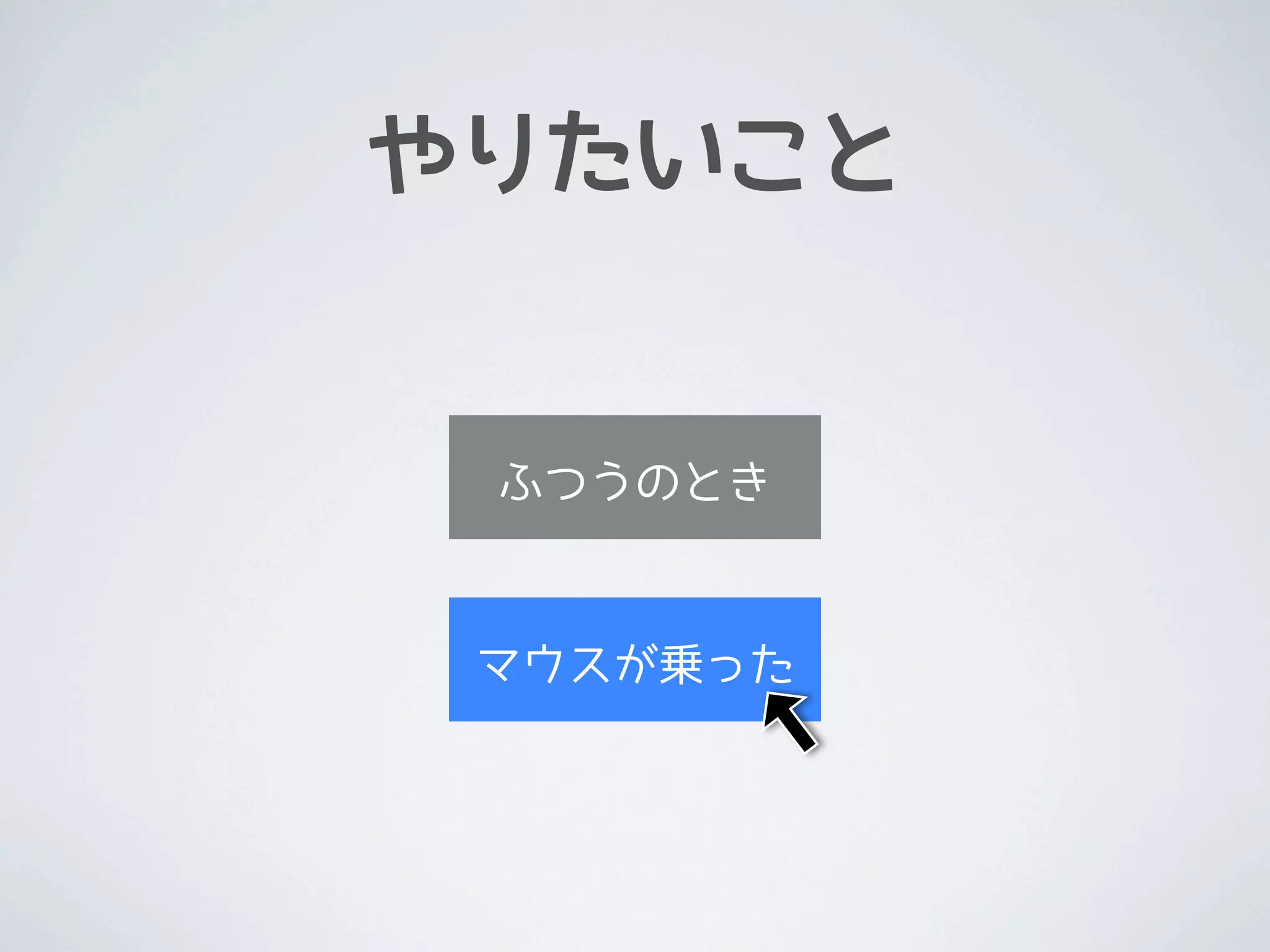
やりたいこと


 ふつうのとき


 マウスが乗った
やりかた

•   やりかたはいろいろある
    •   画像を使う / 使わない


    •   画像を分ける / 分けない


    •   JSで切り替える / CSSで切り替える


    •   擬似クラスを使う / 使わない


•   組み合わせなので全部は紹介しない
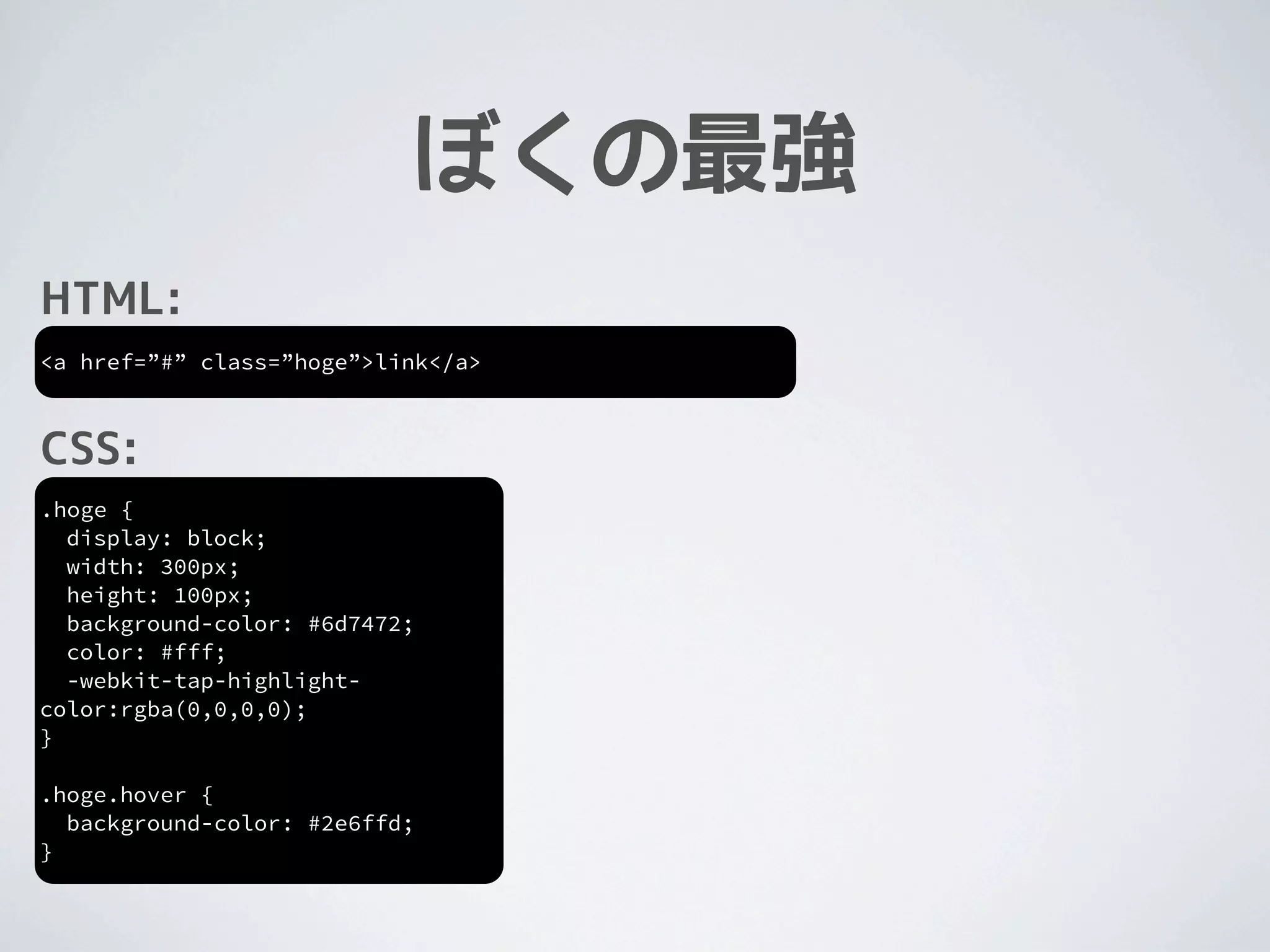
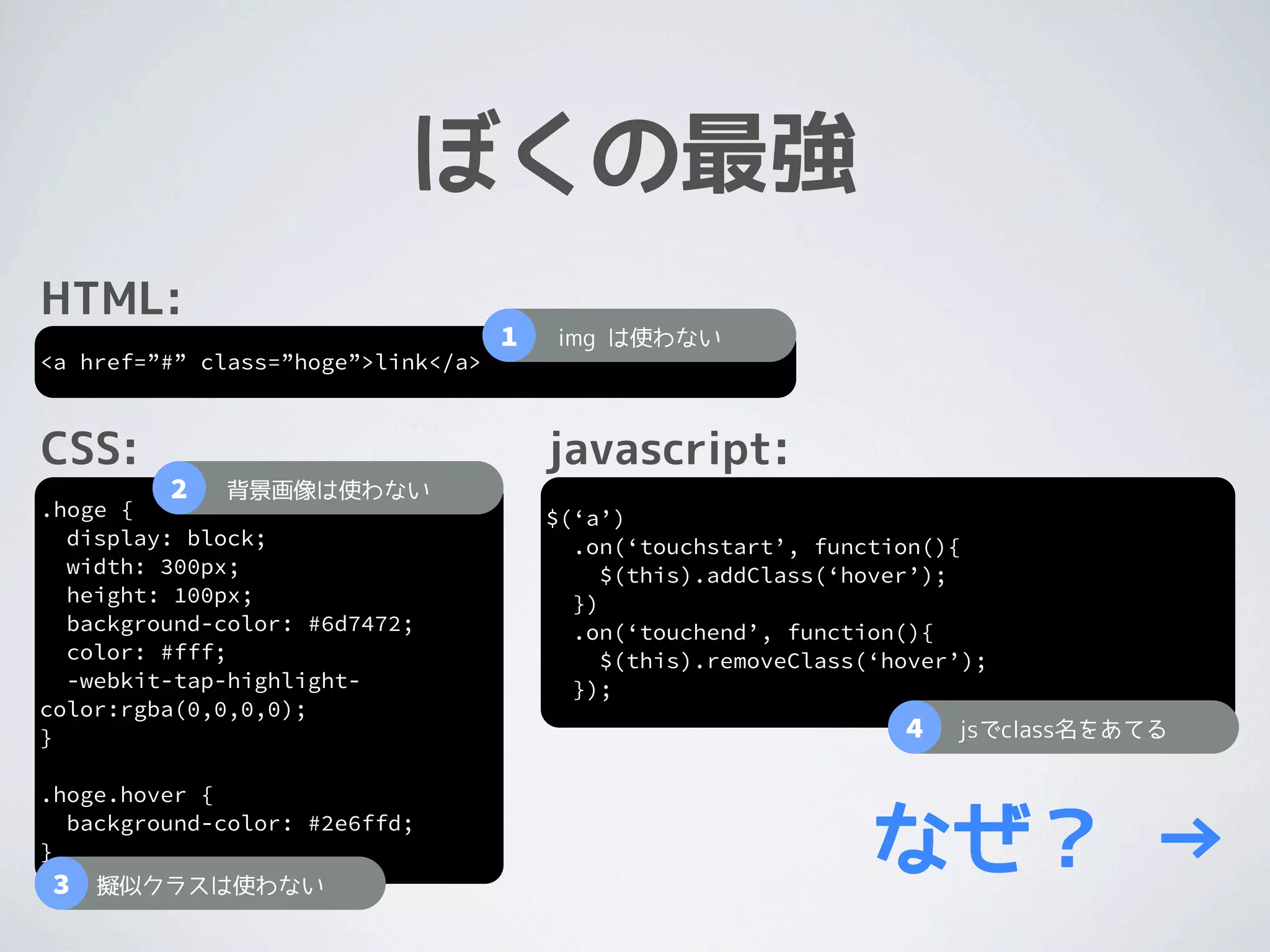
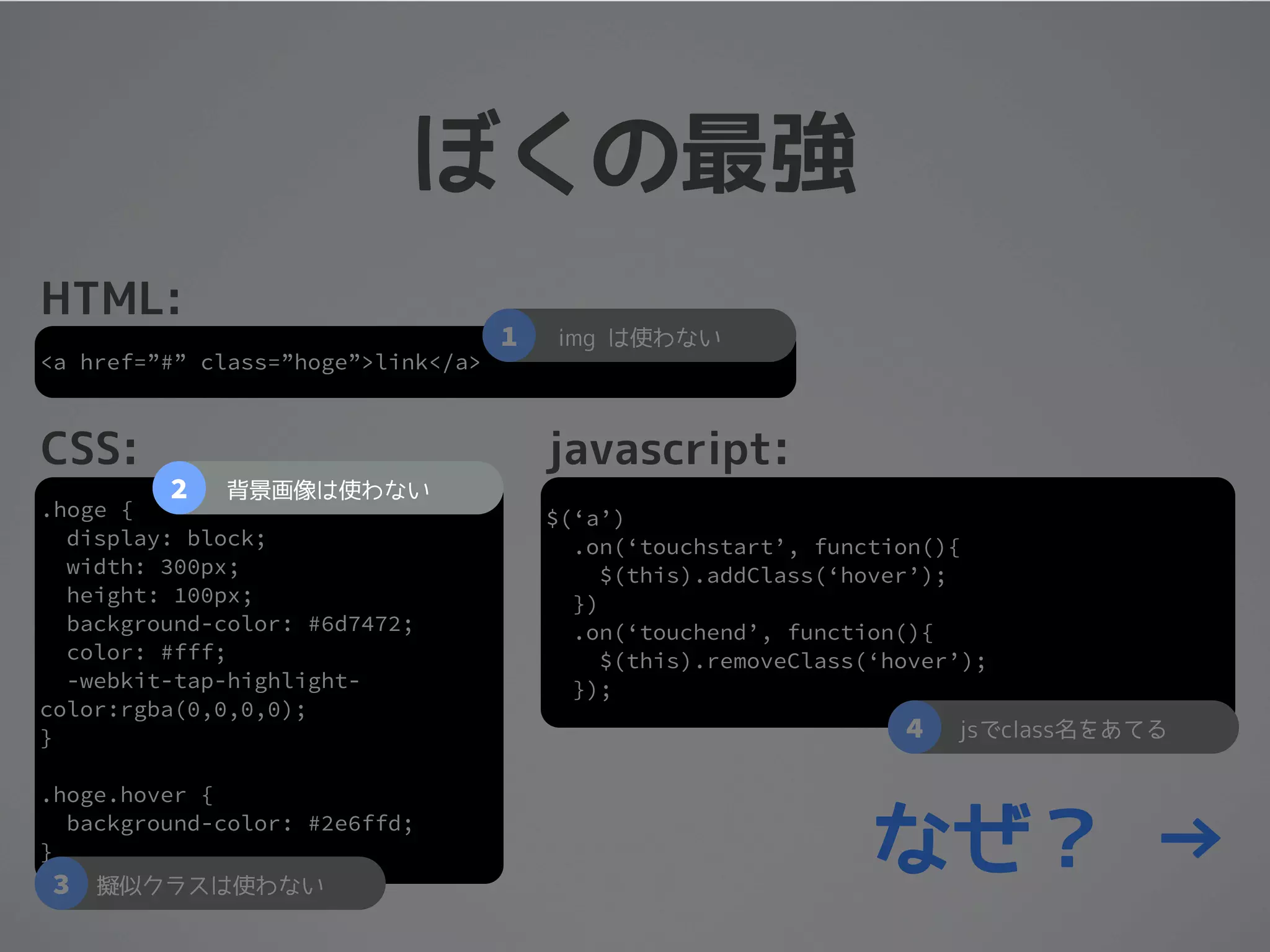
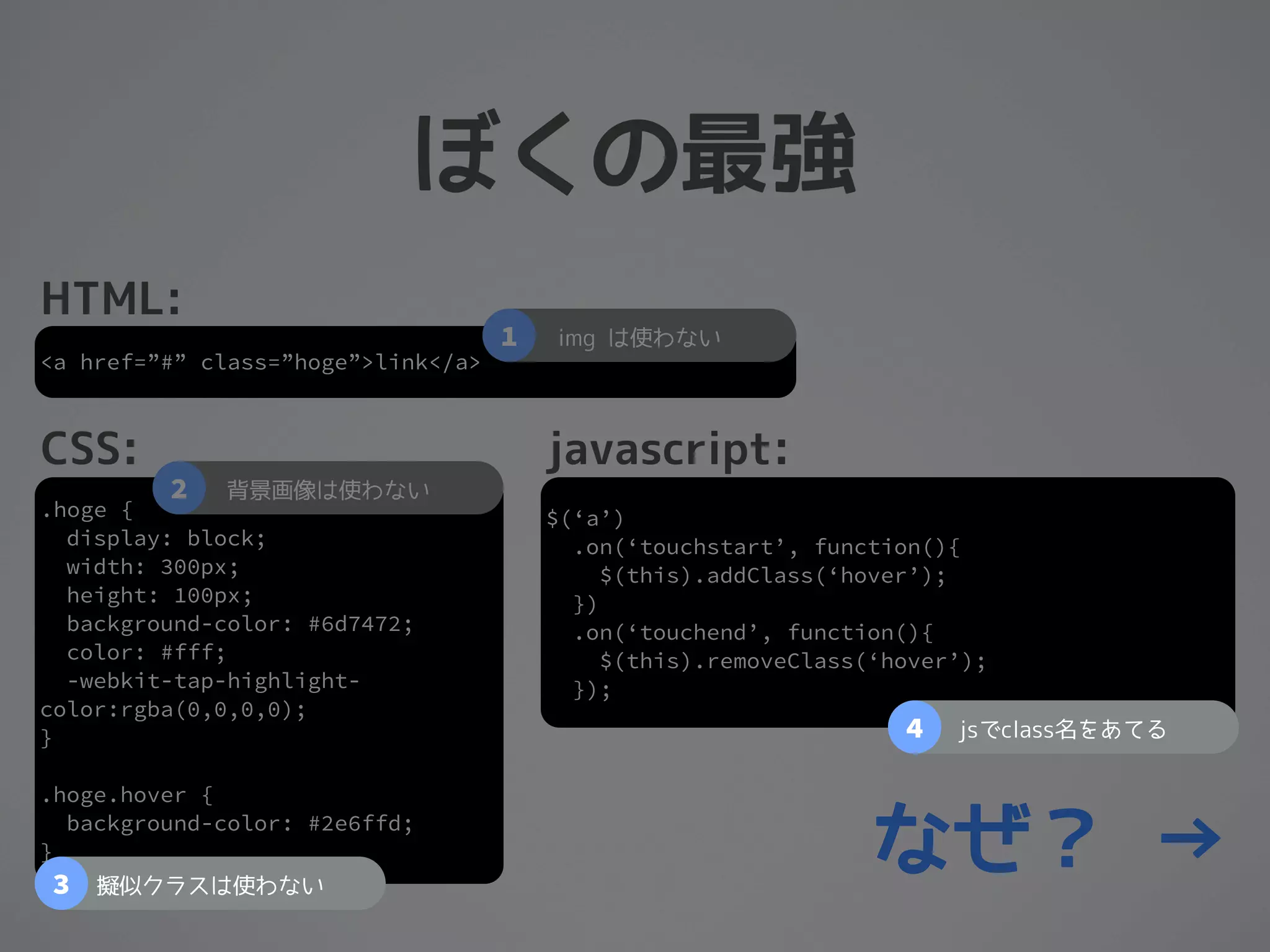
ぼくの最強
ぼくの最強
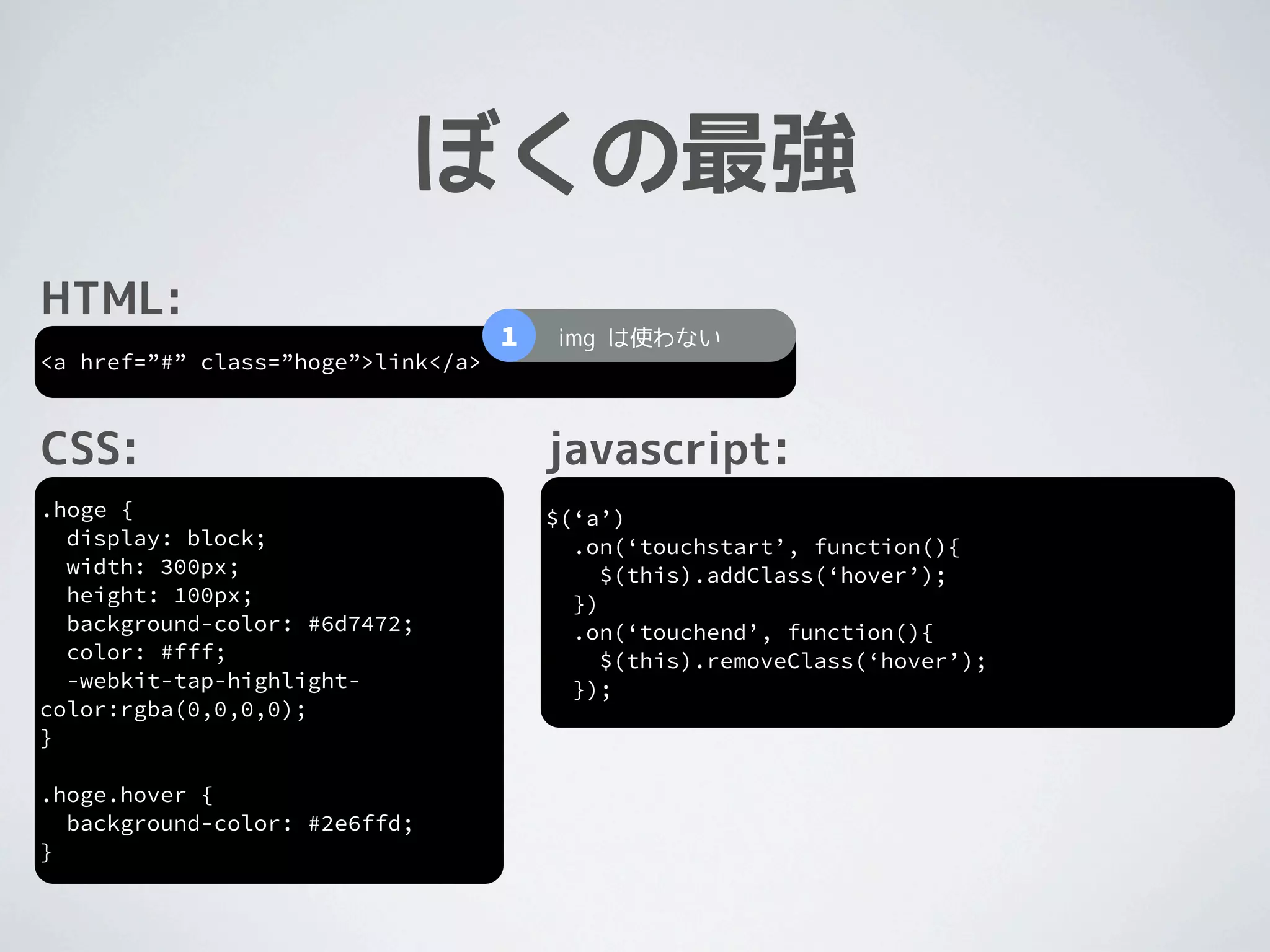
HTML:
<a href=”#” class=”hoge”>link</a>
ぼくの最強
HTML:
<a href=”#” class=”hoge”>link</a>


CSS:
.hoge {
  display: block;
  width: 300px;
  height: 100px;
  background-color: #6d7472;
  color: #fff;
  -webkit-tap-highlight-
color:rgba(0,0,0,0);
}

.hoge.hover {
  background-color: #2e6ffd;
}
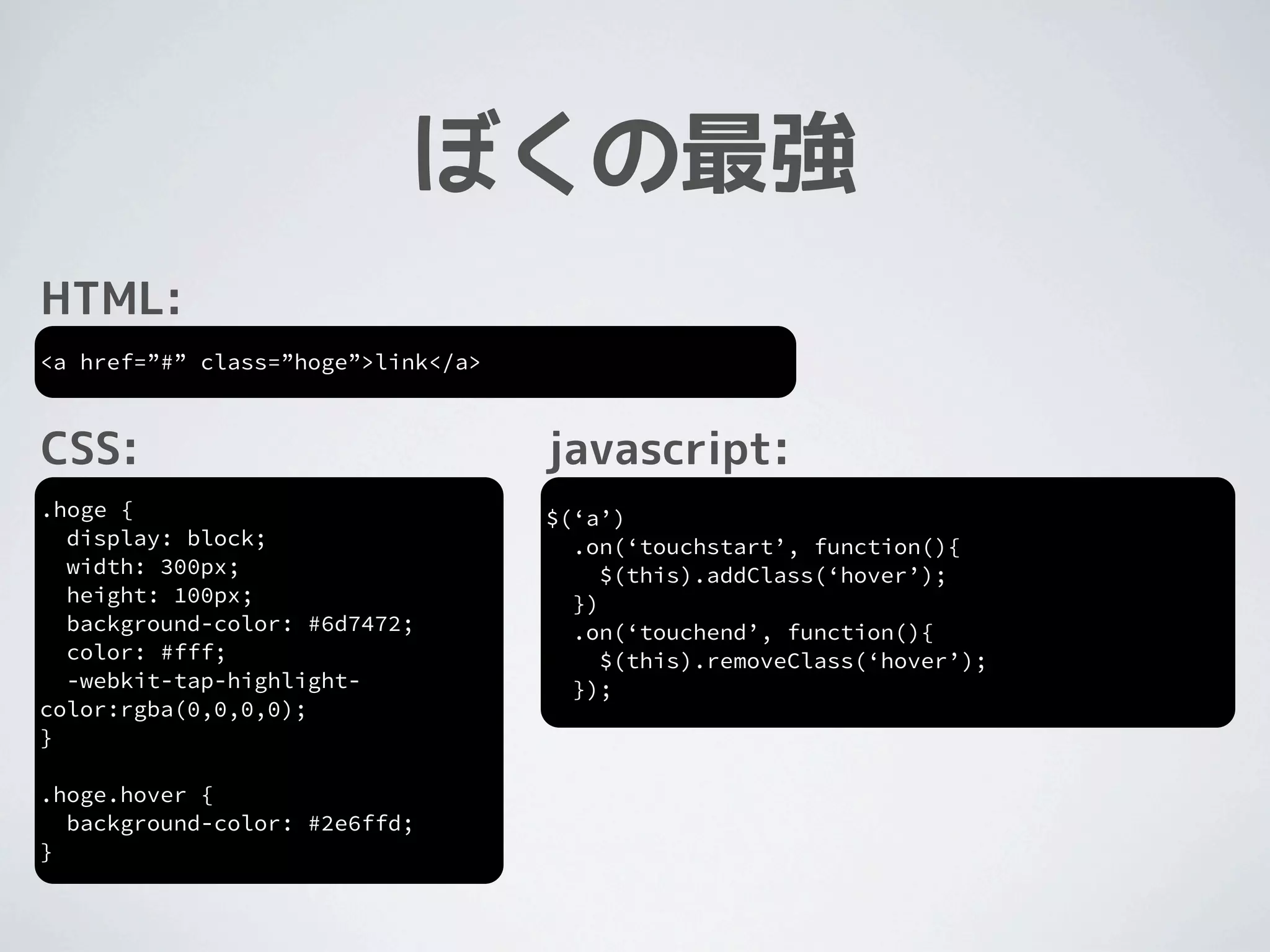
ぼくの最強
HTML:
<a href=”#” class=”hoge”>link</a>


CSS:                                javascript:
.hoge {                             $(‘a’)
  display: block;                     .on(‘touchstart’, function(){
  width: 300px;                          $(this).addClass(‘hover’);
  height: 100px;                      })
  background-color: #6d7472;          .on(‘touchend’, function(){
  color: #fff;                           $(this).removeClass(‘hover’);
  -webkit-tap-highlight-              });
color:rgba(0,0,0,0);
}

.hoge.hover {
  background-color: #2e6ffd;
}
ぼくの最強
HTML:
                                    1   img は使わない
<a href=”#” class=”hoge”>link</a>


CSS:                                    javascript:
.hoge {                                 $(‘a’)
  display: block;                         .on(‘touchstart’, function(){
  width: 300px;                              $(this).addClass(‘hover’);
  height: 100px;                          })
  background-color: #6d7472;              .on(‘touchend’, function(){
  color: #fff;                               $(this).removeClass(‘hover’);
  -webkit-tap-highlight-                  });
color:rgba(0,0,0,0);
}

.hoge.hover {
  background-color: #2e6ffd;
}
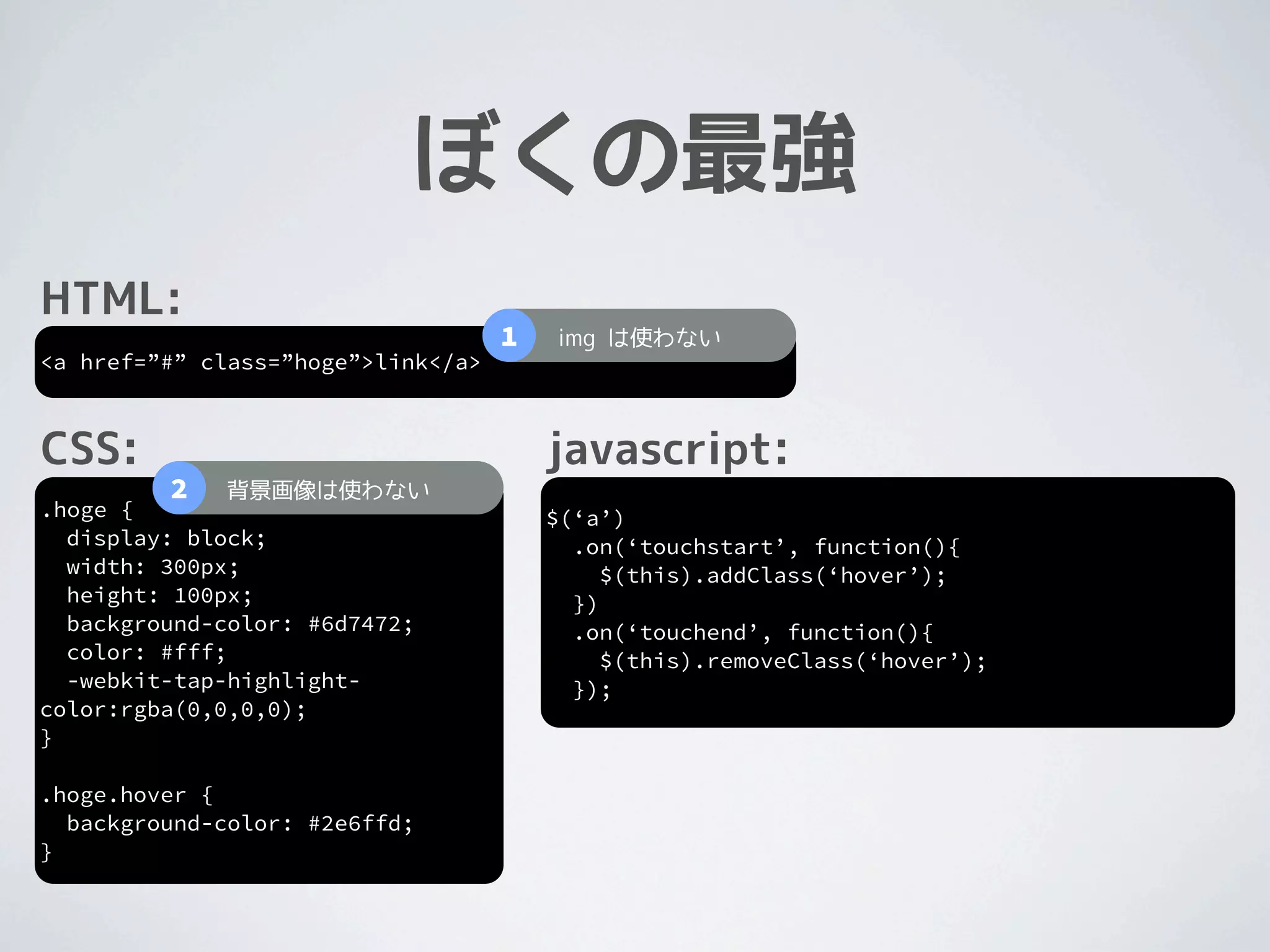
ぼくの最強
HTML:
                                    1   img は使わない
<a href=”#” class=”hoge”>link</a>


CSS:                                    javascript:
         2   背景画像は使わない
.hoge {                                 $(‘a’)
  display: block;                         .on(‘touchstart’, function(){
  width: 300px;                              $(this).addClass(‘hover’);
  height: 100px;                          })
  background-color: #6d7472;              .on(‘touchend’, function(){
  color: #fff;                               $(this).removeClass(‘hover’);
  -webkit-tap-highlight-                  });
color:rgba(0,0,0,0);
}

.hoge.hover {
  background-color: #2e6ffd;
}
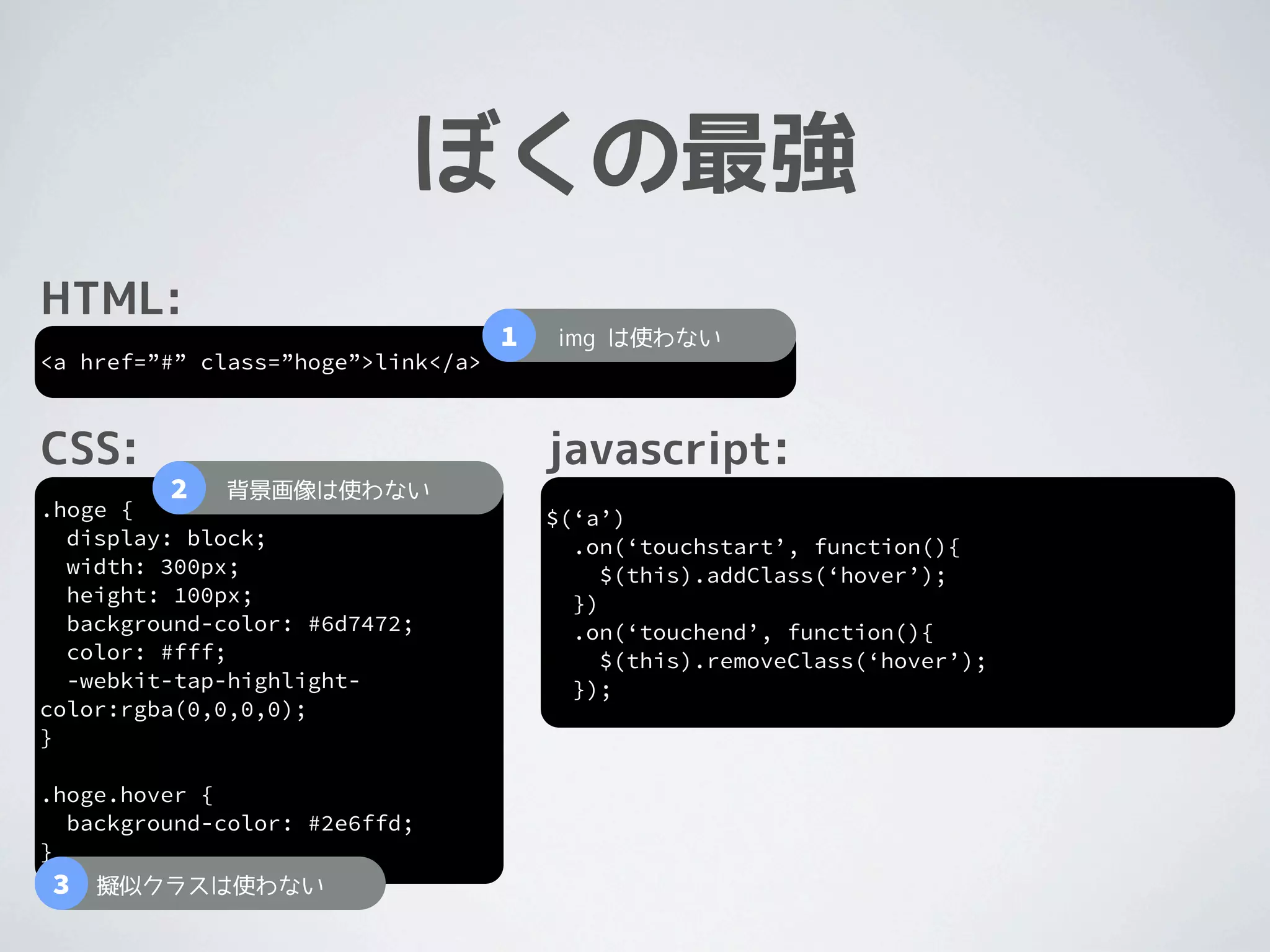
ぼくの最強
HTML:
                                    1   img は使わない
<a href=”#” class=”hoge”>link</a>


CSS:                                    javascript:
         2   背景画像は使わない
.hoge {                                 $(‘a’)
  display: block;                         .on(‘touchstart’, function(){
  width: 300px;                              $(this).addClass(‘hover’);
  height: 100px;                          })
  background-color: #6d7472;              .on(‘touchend’, function(){
  color: #fff;                               $(this).removeClass(‘hover’);
  -webkit-tap-highlight-                  });
color:rgba(0,0,0,0);
}

.hoge.hover {
  background-color: #2e6ffd;
}
3   擬似クラスは使わない
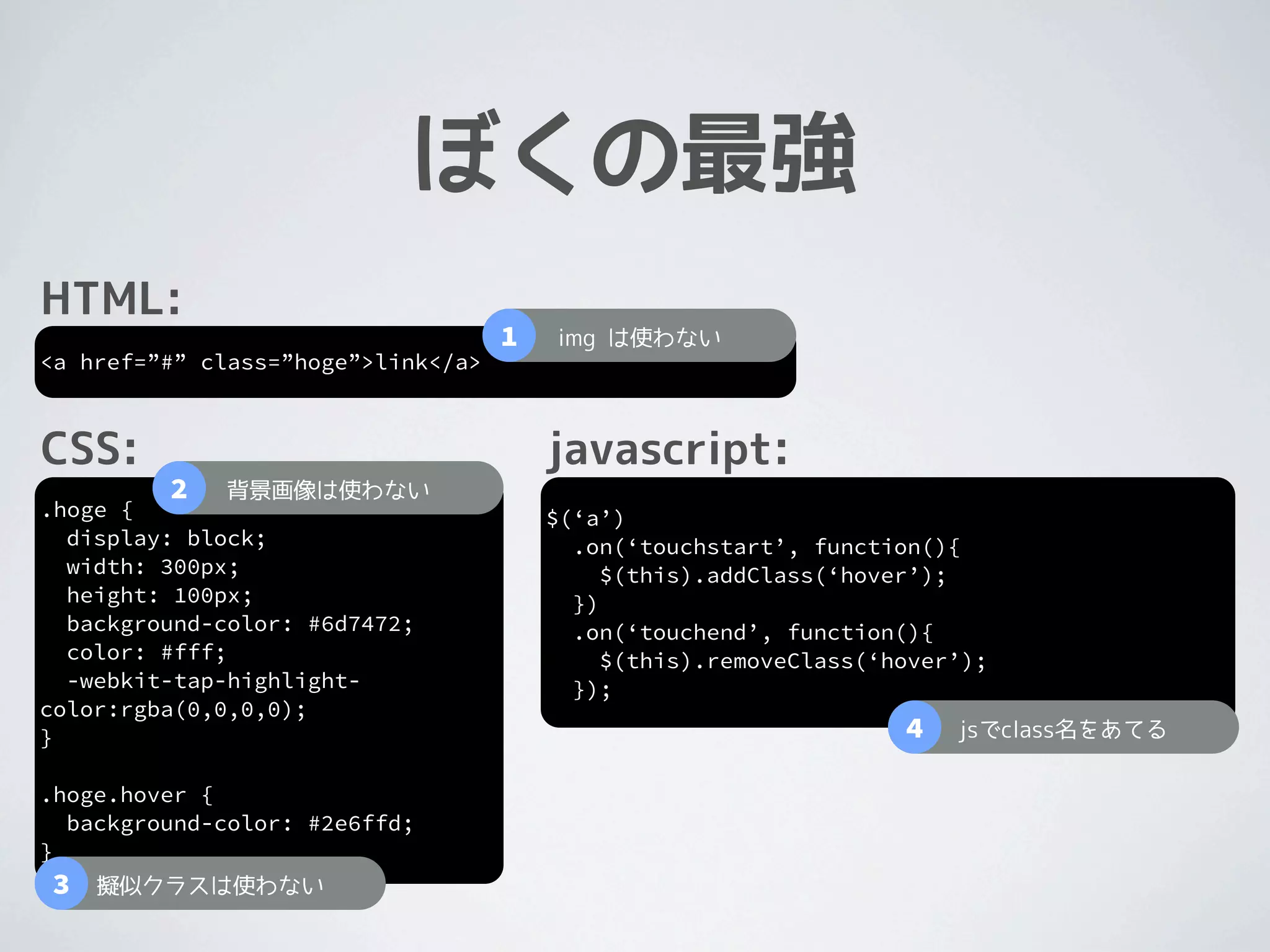
ぼくの最強
HTML:
                                    1   img は使わない
<a href=”#” class=”hoge”>link</a>


CSS:                                    javascript:
         2   背景画像は使わない
.hoge {                                 $(‘a’)
  display: block;                         .on(‘touchstart’, function(){
  width: 300px;                              $(this).addClass(‘hover’);
  height: 100px;                          })
  background-color: #6d7472;              .on(‘touchend’, function(){
  color: #fff;                               $(this).removeClass(‘hover’);
  -webkit-tap-highlight-                  });
color:rgba(0,0,0,0);
}                                                                  4   jsでclass名をあてる

.hoge.hover {
  background-color: #2e6ffd;
}
3   擬似クラスは使わない
ぼくの最強
HTML:
                                    1   img は使わない
<a href=”#” class=”hoge”>link</a>


CSS:                                    javascript:
         2   背景画像は使わない
.hoge {                                 $(‘a’)
  display: block;                         .on(‘touchstart’, function(){
  width: 300px;                              $(this).addClass(‘hover’);
  height: 100px;                          })
  background-color: #6d7472;              .on(‘touchend’, function(){
  color: #fff;                               $(this).removeClass(‘hover’);
  -webkit-tap-highlight-                  });
color:rgba(0,0,0,0);
}                                                                  4   jsでclass名をあてる

.hoge.hover {

}
3
  background-color: #2e6ffd;

    擬似クラスは使わない
                                                                 なぜ? →
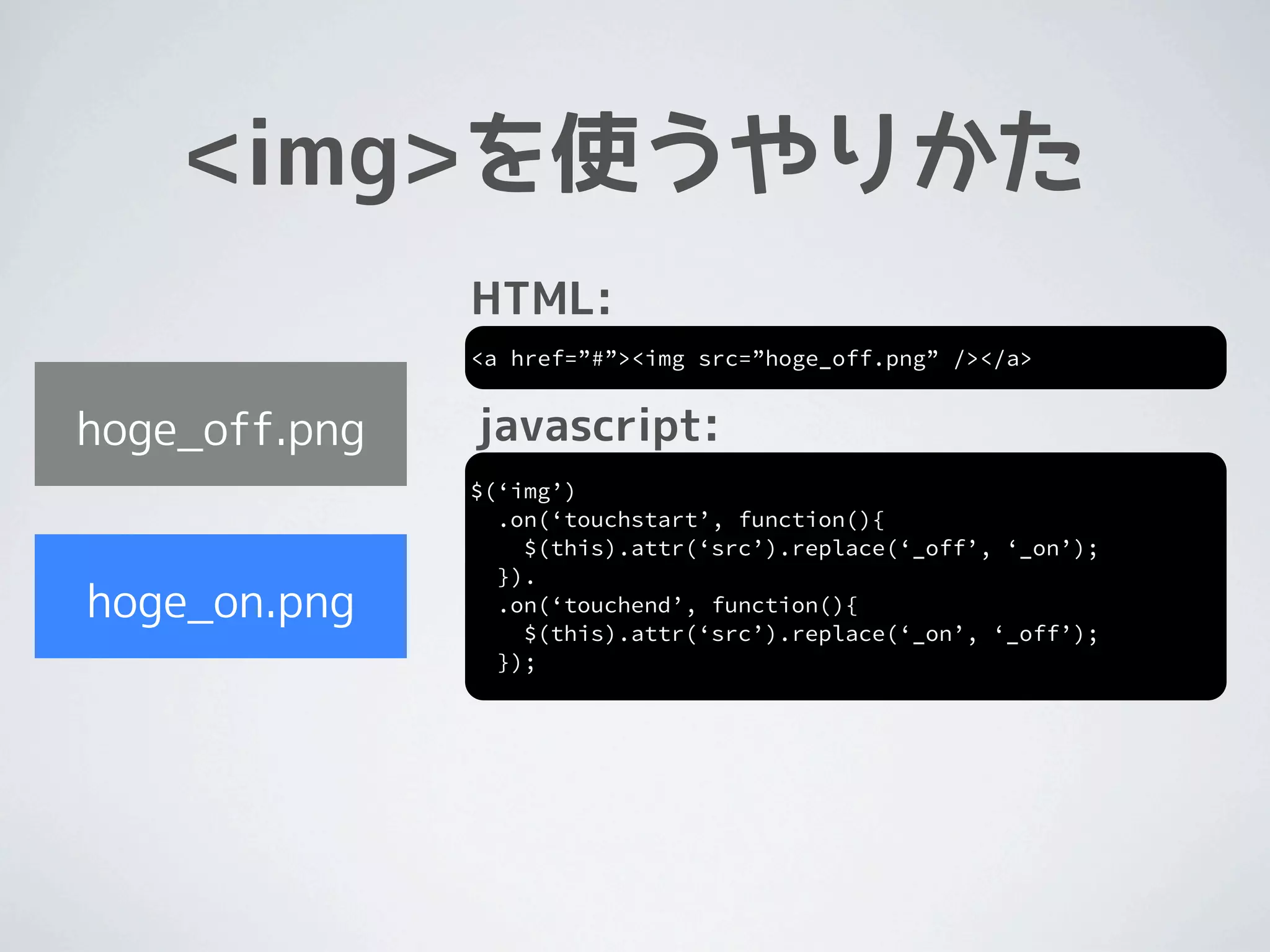
<img>を使うやりかた
<img>を使うやりかた

hoge_off.png


hoge_on.png
<img>を使うやりかた
               HTML:
               <a href=”#”><img src=”hoge_off.png” /></a>


hoge_off.png


hoge_on.png
<img>を使うやりかた
               HTML:
               <a href=”#”><img src=”hoge_off.png” /></a>


hoge_off.png   javascript:
               $(‘img’)
                 .on(‘touchstart’, function(){
                   $(this).attr(‘src’).replace(‘_off’, ‘_on’);
                 }).
hoge_on.png      .on(‘touchend’, function(){
                   $(this).attr(‘src’).replace(‘_on’, ‘_off’);
                 });
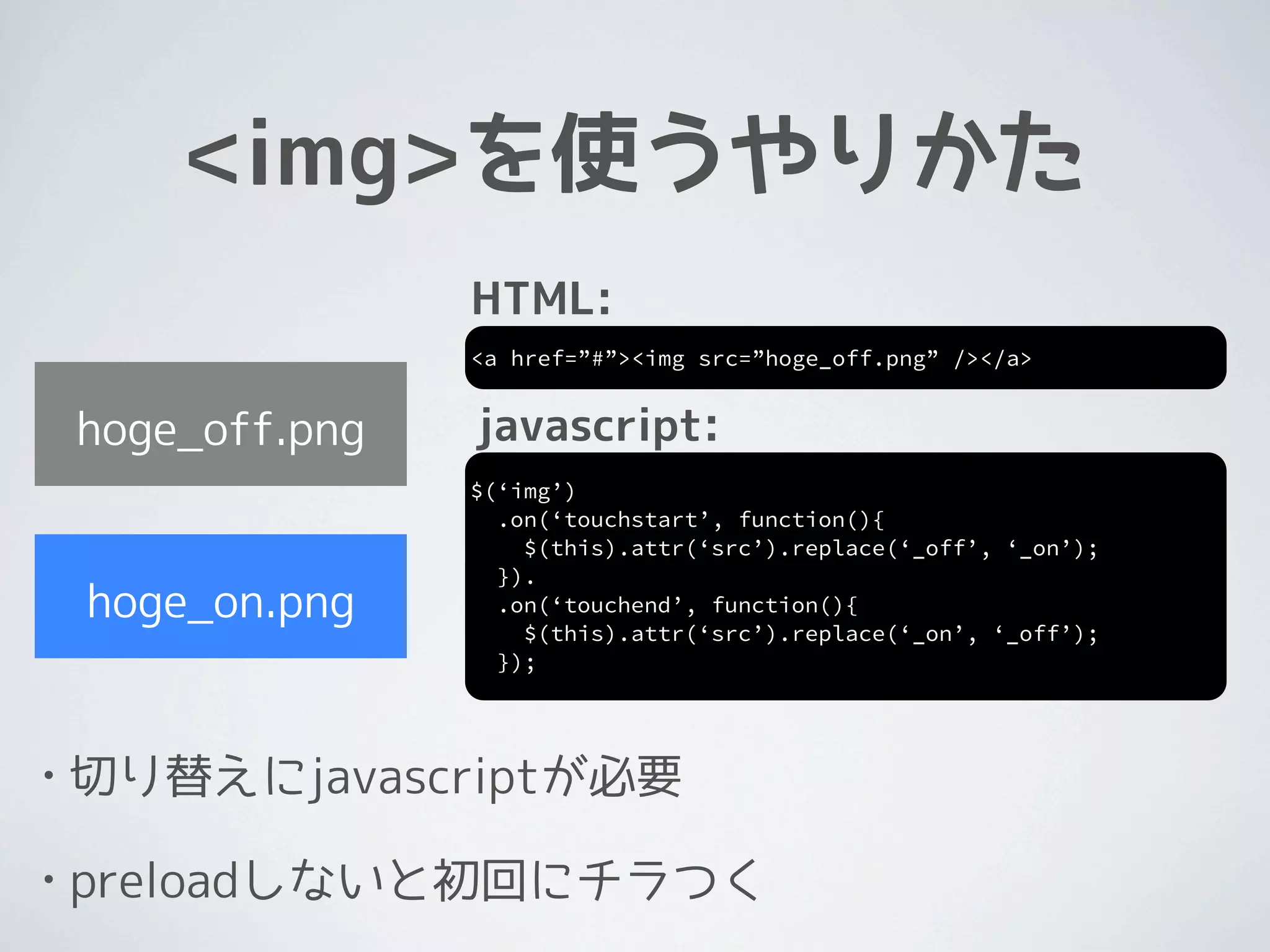
<img>を使うやりかた
                   HTML:
                   <a href=”#”><img src=”hoge_off.png” /></a>


    hoge_off.png   javascript:
                   $(‘img’)
                     .on(‘touchstart’, function(){
                       $(this).attr(‘src’).replace(‘_off’, ‘_on’);
                     }).
    hoge_on.png      .on(‘touchend’, function(){
                       $(this).attr(‘src’).replace(‘_on’, ‘_off’);
                     });


•   切り替えにjavascriptが必要

•   preloadしないと初回にチラつく
ぼくの最強
HTML:
                                    1   img は使わない
<a href=”#” class=”hoge”>link</a>


CSS:                                    javascript:
         2   背景画像は使わない
.hoge {                                 $(‘a’)
  display: block;                         .on(‘touchstart’, function(){
  width: 300px;                              $(this).addClass(‘hover’);
  height: 100px;                          })
  background-color: #6d7472;              .on(‘touchend’, function(){
  color: #fff;                               $(this).removeClass(‘hover’);
  -webkit-tap-highlight-                  });
color:rgba(0,0,0,0);
}                                                                  4   jsでclass名をあてる

.hoge.hover {

}
3
  background-color: #2e6ffd;

    擬似クラスは使わない
                                                                 なぜ? →
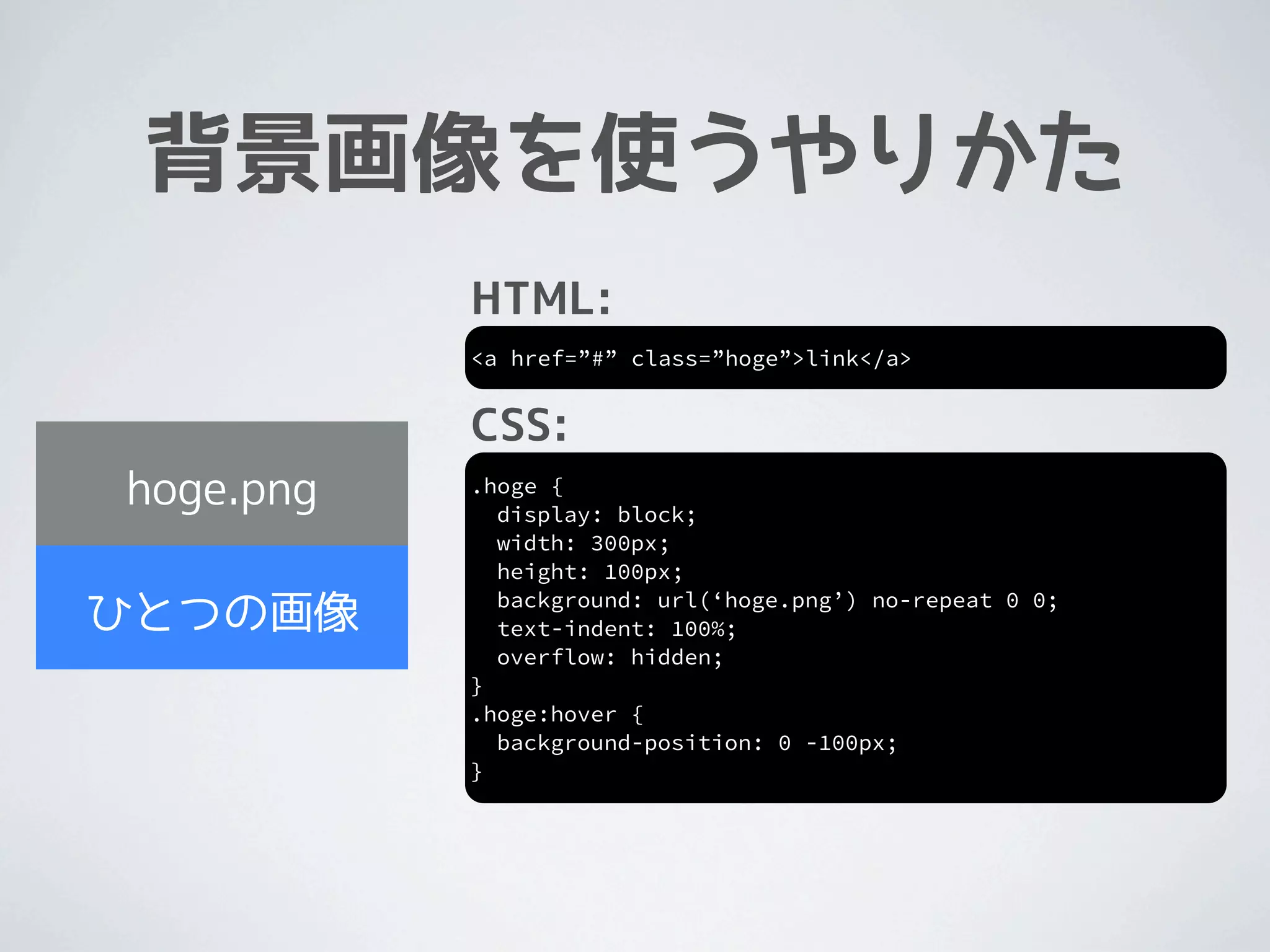
背景画像を使うやりかた
背景画像を使うやりかた


hoge.png

ひとつの画像
背景画像を使うやりかた
           HTML:
           <a href=”#” class=”hoge”>link</a>


hoge.png

ひとつの画像
背景画像を使うやりかた
           HTML:
           <a href=”#” class=”hoge”>link</a>


           CSS:
hoge.png   .hoge {
             display: block;
             width: 300px;
             height: 100px;
             background: url(‘hoge.png’) no-repeat 0 0;
ひとつの画像       text-indent: 100%;
             overflow: hidden;
           }
           .hoge:hover {
             background-position: 0 -100px;
           }
背景画像を使うやりかた
                HTML:
                <a href=”#” class=”hoge”>link</a>


                CSS:
     hoge.png   .hoge {
                  display: block;
                  width: 300px;
                  height: 100px;
                  background: url(‘hoge.png’) no-repeat 0 0;
    ひとつの画像        text-indent: 100%;
                  overflow: hidden;
                }
                .hoge:hover {
                  background-position: 0 -100px;
                }


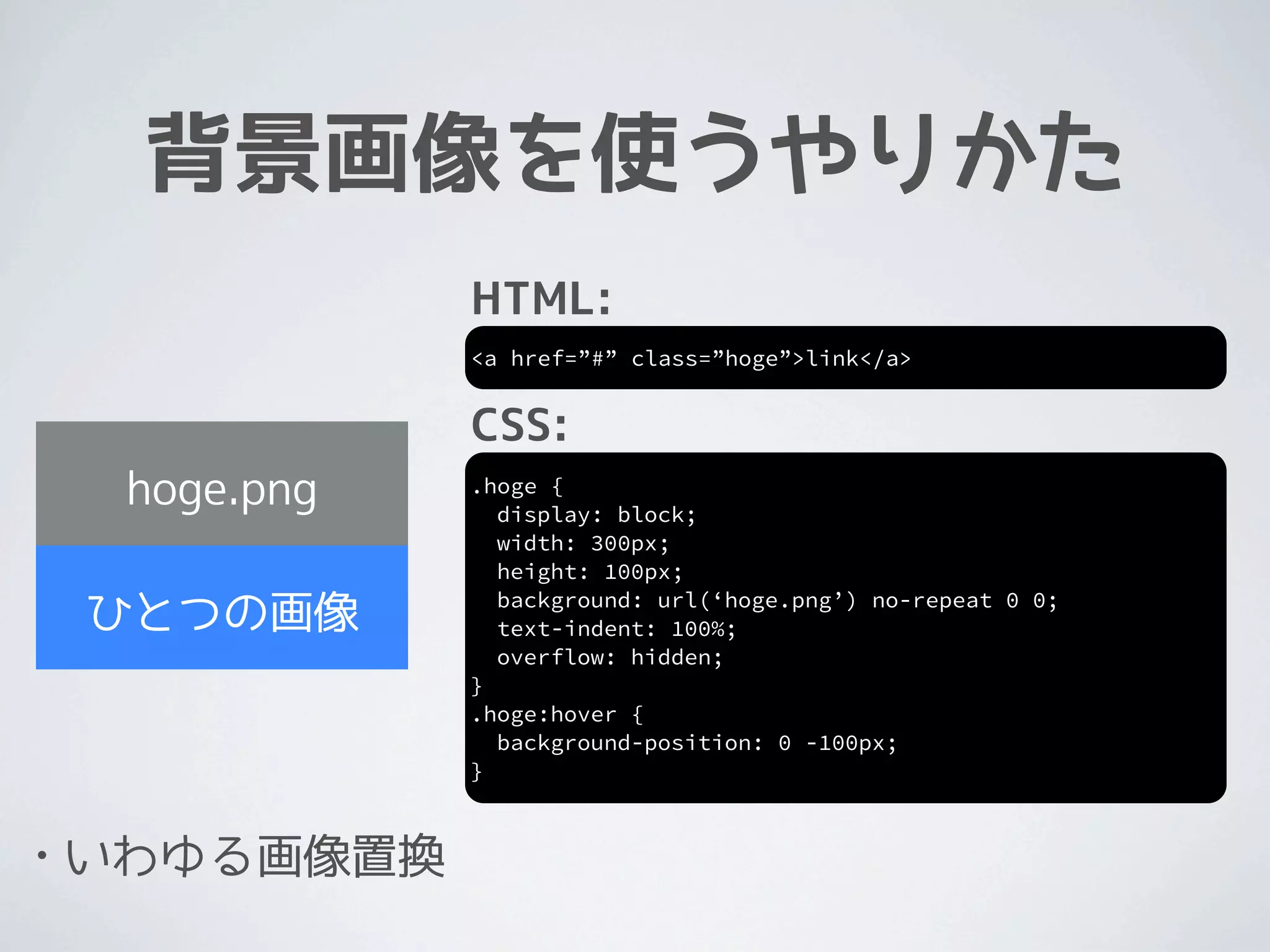
•   いわゆる画像置換
画像置換

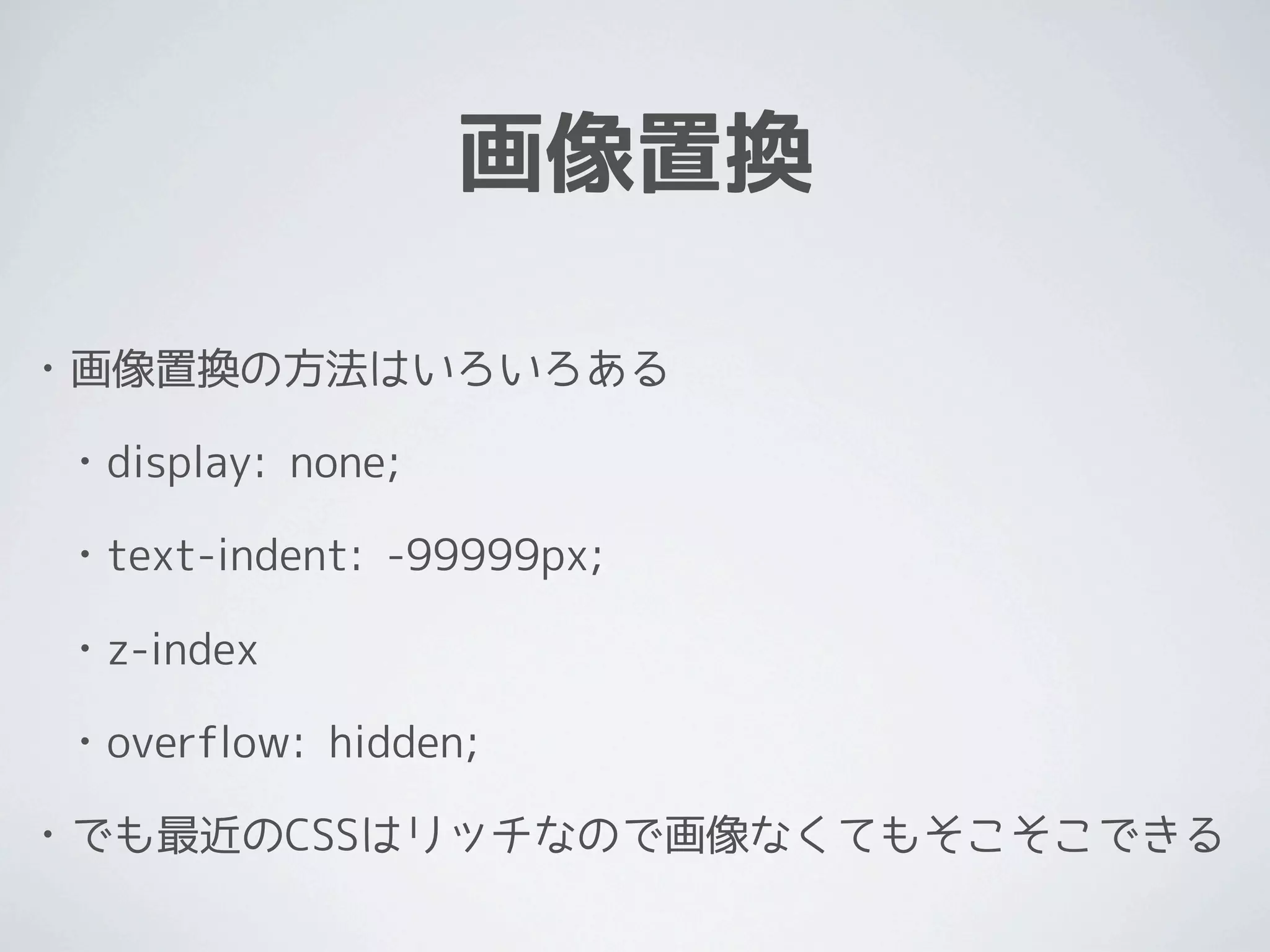
•   画像置換の方法はいろいろある

    •   display: none;

    •   text-indent: -99999px;

    •   z-index

    •   overflow: hidden;

•   でも最近のCSSはリッチなので画像なくてもそこそこできる
ぼくの最強
HTML:
                                    1   img は使わない
<a href=”#” class=”hoge”>link</a>


CSS:                                    javascript:
         2   背景画像は使わない
.hoge {                                 $(‘a’)
  display: block;                         .on(‘touchstart’, function(){
  width: 300px;                              $(this).addClass(‘hover’);
  height: 100px;                          })
  background-color: #6d7472;              .on(‘touchend’, function(){
  color: #fff;                               $(this).removeClass(‘hover’);
  -webkit-tap-highlight-                  });
color:rgba(0,0,0,0);
}                                                                  4   jsでclass名をあてる

.hoge.hover {

}
3
  background-color: #2e6ffd;

    擬似クラスは使わない
                                                                 なぜ? →
:hover


•   擬似クラス

•   スマホで何かがおかしい

•   指を話しても消えないとか

•   「戻る」とそのままとか
ぼくの最強
HTML:
                                    1   img は使わない
<a href=”#” class=”hoge”>link</a>


CSS:                                    javascript:
         2   背景画像は使わない
.hoge {                                 $(‘a’)
  display: block;                         .on(‘touchstart’, function(){
  width: 300px;                              $(this).addClass(‘hover’);
  height: 100px;                          })
  background-color: #6d7472;              .on(‘touchend’, function(){
  color: #fff;                               $(this).removeClass(‘hover’);
  -webkit-tap-highlight-                  });
color:rgba(0,0,0,0);
}                                                                  4   jsでclass名をあてる

.hoge.hover {

}
3
  background-color: #2e6ffd;

    擬似クラスは使わない
                                                                 なぜ? →
DEMO
おわり


•   今日あげたのは、一例で

•   もっと色々やり方はある

•   ので、いろいろ試してみてください

ロールオーバーのいろいろなやり方

  • 1.
  • 2.
  • 3.
    今日のテーマ jQueryでなんか タップすると ボタンのデザインが 変わるやつが知りたい
  • 4.
    今日のテーマ jQueryでなんか タップすると ボタンのデザインが 変わるやつが知りたい いろんなやりかたあるよ!
  • 5.
    自己紹介 • @silver_s / silvers • ソーシャルアプリの開発 • perl / mysql • HTML5 / CSS3 / UX • http://www.ofsilvers.com
  • 6.
  • 7.
    やりかた • やりかたはいろいろある • 画像を使う / 使わない • 画像を分ける / 分けない • JSで切り替える / CSSで切り替える • 擬似クラスを使う / 使わない • 組み合わせなので全部は紹介しない
  • 8.
  • 9.
  • 10.
    ぼくの最強 HTML: <a href=”#” class=”hoge”>link</a> CSS: .hoge{ display: block; width: 300px; height: 100px; background-color: #6d7472; color: #fff; -webkit-tap-highlight- color:rgba(0,0,0,0); } .hoge.hover { background-color: #2e6ffd; }
  • 11.
    ぼくの最強 HTML: <a href=”#” class=”hoge”>link</a> CSS: javascript: .hoge { $(‘a’) display: block; .on(‘touchstart’, function(){ width: 300px; $(this).addClass(‘hover’); height: 100px; }) background-color: #6d7472; .on(‘touchend’, function(){ color: #fff; $(this).removeClass(‘hover’); -webkit-tap-highlight- }); color:rgba(0,0,0,0); } .hoge.hover { background-color: #2e6ffd; }
  • 12.
    ぼくの最強 HTML: 1 img は使わない <a href=”#” class=”hoge”>link</a> CSS: javascript: .hoge { $(‘a’) display: block; .on(‘touchstart’, function(){ width: 300px; $(this).addClass(‘hover’); height: 100px; }) background-color: #6d7472; .on(‘touchend’, function(){ color: #fff; $(this).removeClass(‘hover’); -webkit-tap-highlight- }); color:rgba(0,0,0,0); } .hoge.hover { background-color: #2e6ffd; }
  • 13.
    ぼくの最強 HTML: 1 img は使わない <a href=”#” class=”hoge”>link</a> CSS: javascript: 2 背景画像は使わない .hoge { $(‘a’) display: block; .on(‘touchstart’, function(){ width: 300px; $(this).addClass(‘hover’); height: 100px; }) background-color: #6d7472; .on(‘touchend’, function(){ color: #fff; $(this).removeClass(‘hover’); -webkit-tap-highlight- }); color:rgba(0,0,0,0); } .hoge.hover { background-color: #2e6ffd; }
  • 14.
    ぼくの最強 HTML: 1 img は使わない <a href=”#” class=”hoge”>link</a> CSS: javascript: 2 背景画像は使わない .hoge { $(‘a’) display: block; .on(‘touchstart’, function(){ width: 300px; $(this).addClass(‘hover’); height: 100px; }) background-color: #6d7472; .on(‘touchend’, function(){ color: #fff; $(this).removeClass(‘hover’); -webkit-tap-highlight- }); color:rgba(0,0,0,0); } .hoge.hover { background-color: #2e6ffd; } 3 擬似クラスは使わない
  • 15.
    ぼくの最強 HTML: 1 img は使わない <a href=”#” class=”hoge”>link</a> CSS: javascript: 2 背景画像は使わない .hoge { $(‘a’) display: block; .on(‘touchstart’, function(){ width: 300px; $(this).addClass(‘hover’); height: 100px; }) background-color: #6d7472; .on(‘touchend’, function(){ color: #fff; $(this).removeClass(‘hover’); -webkit-tap-highlight- }); color:rgba(0,0,0,0); } 4 jsでclass名をあてる .hoge.hover { background-color: #2e6ffd; } 3 擬似クラスは使わない
  • 16.
    ぼくの最強 HTML: 1 img は使わない <a href=”#” class=”hoge”>link</a> CSS: javascript: 2 背景画像は使わない .hoge { $(‘a’) display: block; .on(‘touchstart’, function(){ width: 300px; $(this).addClass(‘hover’); height: 100px; }) background-color: #6d7472; .on(‘touchend’, function(){ color: #fff; $(this).removeClass(‘hover’); -webkit-tap-highlight- }); color:rgba(0,0,0,0); } 4 jsでclass名をあてる .hoge.hover { } 3 background-color: #2e6ffd; 擬似クラスは使わない なぜ? →
  • 17.
  • 18.
  • 19.
    <img>を使うやりかた HTML: <a href=”#”><img src=”hoge_off.png” /></a> hoge_off.png hoge_on.png
  • 20.
    <img>を使うやりかた HTML: <a href=”#”><img src=”hoge_off.png” /></a> hoge_off.png javascript: $(‘img’) .on(‘touchstart’, function(){ $(this).attr(‘src’).replace(‘_off’, ‘_on’); }). hoge_on.png .on(‘touchend’, function(){ $(this).attr(‘src’).replace(‘_on’, ‘_off’); });
  • 21.
    <img>を使うやりかた HTML: <a href=”#”><img src=”hoge_off.png” /></a> hoge_off.png javascript: $(‘img’) .on(‘touchstart’, function(){ $(this).attr(‘src’).replace(‘_off’, ‘_on’); }). hoge_on.png .on(‘touchend’, function(){ $(this).attr(‘src’).replace(‘_on’, ‘_off’); }); • 切り替えにjavascriptが必要 • preloadしないと初回にチラつく
  • 22.
    ぼくの最強 HTML: 1 img は使わない <a href=”#” class=”hoge”>link</a> CSS: javascript: 2 背景画像は使わない .hoge { $(‘a’) display: block; .on(‘touchstart’, function(){ width: 300px; $(this).addClass(‘hover’); height: 100px; }) background-color: #6d7472; .on(‘touchend’, function(){ color: #fff; $(this).removeClass(‘hover’); -webkit-tap-highlight- }); color:rgba(0,0,0,0); } 4 jsでclass名をあてる .hoge.hover { } 3 background-color: #2e6ffd; 擬似クラスは使わない なぜ? →
  • 23.
  • 24.
  • 25.
    背景画像を使うやりかた HTML: <a href=”#” class=”hoge”>link</a> hoge.png ひとつの画像
  • 26.
    背景画像を使うやりかた HTML: <a href=”#” class=”hoge”>link</a> CSS: hoge.png .hoge { display: block; width: 300px; height: 100px; background: url(‘hoge.png’) no-repeat 0 0; ひとつの画像 text-indent: 100%; overflow: hidden; } .hoge:hover { background-position: 0 -100px; }
  • 27.
    背景画像を使うやりかた HTML: <a href=”#” class=”hoge”>link</a> CSS: hoge.png .hoge { display: block; width: 300px; height: 100px; background: url(‘hoge.png’) no-repeat 0 0; ひとつの画像 text-indent: 100%; overflow: hidden; } .hoge:hover { background-position: 0 -100px; } • いわゆる画像置換
  • 28.
    画像置換 • 画像置換の方法はいろいろある • display: none; • text-indent: -99999px; • z-index • overflow: hidden; • でも最近のCSSはリッチなので画像なくてもそこそこできる
  • 29.
    ぼくの最強 HTML: 1 img は使わない <a href=”#” class=”hoge”>link</a> CSS: javascript: 2 背景画像は使わない .hoge { $(‘a’) display: block; .on(‘touchstart’, function(){ width: 300px; $(this).addClass(‘hover’); height: 100px; }) background-color: #6d7472; .on(‘touchend’, function(){ color: #fff; $(this).removeClass(‘hover’); -webkit-tap-highlight- }); color:rgba(0,0,0,0); } 4 jsでclass名をあてる .hoge.hover { } 3 background-color: #2e6ffd; 擬似クラスは使わない なぜ? →
  • 30.
    :hover • 擬似クラス • スマホで何かがおかしい • 指を話しても消えないとか • 「戻る」とそのままとか
  • 31.
    ぼくの最強 HTML: 1 img は使わない <a href=”#” class=”hoge”>link</a> CSS: javascript: 2 背景画像は使わない .hoge { $(‘a’) display: block; .on(‘touchstart’, function(){ width: 300px; $(this).addClass(‘hover’); height: 100px; }) background-color: #6d7472; .on(‘touchend’, function(){ color: #fff; $(this).removeClass(‘hover’); -webkit-tap-highlight- }); color:rgba(0,0,0,0); } 4 jsでclass名をあてる .hoge.hover { } 3 background-color: #2e6ffd; 擬似クラスは使わない なぜ? →
  • 32.
  • 33.
    おわり • 今日あげたのは、一例で • もっと色々やり方はある • ので、いろいろ試してみてください