Inside Movable Type
Yet Another web application framework


      2013.2.23 @ Kansai.pm

      @junnama (Alfasado)
About  Me  (野⽥田  純⽣生)

•アルファサード株式会社  代表取締役
•CMS/受託開発を通じてクライアントを爆速化
•Movable  Type  エバンジェリスト
•http://junnama.alfasado.net/online/
•http://twitter.com/junnama
•https://www.facebook.com/junnama.noda
http://alfasado.net/
http://powercms.jp/
どのくらいMTが好きか
http://www.amazon.co.jp/dp/4774147109
http://www.amazon.co.jp/dp/4839927537
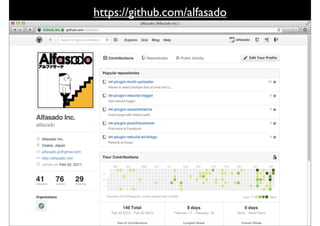
https://github.com/alfasado
http://2012.osaka.wordcamp.org/
http://2012.osaka.wordcamp.org/speakers/sumio-noda/
http://powercms.alfasado.net/blog/2011/04/wordpressmovable_type.html


               エイプリルフールのネタではない!
<mt:wp:Entries category="Foo" limit="20">
    <mt:if name="__first__"><ul></mt:if>
    <li class="<mt:if name="__odd__">odd<mt:else>even</
mt:if>">
         <a href="<$mt:wp:EntryPermalink$>">
              <$mt:wp:EntryTitle escape="html"$>
              (<$mt:wp:EntryAuthorDisplayName$>
               / <$mt:wp:EntryDate format="%b %Y"$>)
         </a>
         <mt:wp:EntryCategories glue=",">
              <mt:if name="__first__">Categories:</mt:if>
              <a href="<$mt:wp:CategoryLink$>">
                   <$mt:wp:CategoryLabel$>
              </a>
         </mt:wp:EntryCategories>
         <mt:wp:EntryTags glue=",">
              <mt:if name="__first__">Tags:</mt:if>
              <a href="<$mt:wp:TagLink$>">
                   <$mt:wp:TagName$>
              </a>
         </mt:wp:EntryTags>
    </li>
    <mt:if name="__last__"></ul></mt:if>
</mt:wp:Entries>
http://powercms.alfasado.net/blog/2011/06/cakephpviewmtmtcake.html
さて、Movable  Type  の話
About  Movable  Type

•Six  Aprt  KK  が開発・サポート
•2001年年10⽉月8⽇日  version1.0
•2004年年  version3.0(PHP  Support)
•2007年年  version4.1(GPL版  -‐‑‒  MTOS)
•2011年年  インフォコムが買収  ⽇日本製に
•2012年年  version5.2  (PSGI対応)
Perl  MongerがMTを
使うたった⼀一つの理理由
⼥女女⼦子率率率が⾼高い
http://movabletype.org
https://github.com/movabletype
http://movabletype.fogbugz.com
http://communities.movabletype.jp
Inside  Movable  Type
設定ファイル


CGIアプリ


MT::App::CMS
アドオン
代替テンプレート
本体モジュール
プラグイン
テーマ(デザイン)
管理理画⾯面テンプレート
コマンドラインツール
MT::App
mt.cgi


#!/usr/bin/perl -w

use strict;
use lib $ENV{MT_HOME}
        ? "$ENV{MT_HOME}/lib" : 'lib';
use MT::Bootstrap App => 'MT::App::CMS';


          # =>/mt/lib/MT/App/CMS.pm
MT::App::Fooを作る
http://xtalk.alfasado.net/
簡単なメールフォーム
mt-‐‑‒inquiry.cgi
#!/usr/bin/perl -w

use strict;
use lib $ENV{MT_HOME} ? "$ENV{MT_HOME}/
lib" : 'lib';
use lib 'plugins/Inquiry/lib';

use MT::Bootstrap App =>
                      'MT::App::Inquiry';

# =>/mt/plugins/Inquily/lib/App/Inquily.pm
/mt/plugins/Inquily/


             定義ファイル


             アプリ本体

             メール本⽂文テンプレート
             メール件名テンプレート
config.yaml
config_settings:
    InquiryScript:
        default: mt-inquiry.cgi
    InquiryRedirectPath:
        default: /
    InquirySendTo:
        default: webmaster@alfasado.jp
tags:
    function:
        inquiryscript: sub { MT->config->InquiryScript }
applications:
    inquiry:
        script: sub { MT->config->InquiryScript }
        handler: MT::App::Inquiry
        methods:
             default: MT::App::Inquiry::_submit
config.yaml


                  mt-config.cgi で
config_settings
                  指定可能な環境設定と初期値

                  テンプレートタグ( <$MTInquiryScript$>
tags              でCGI名を出⼒力力できるようにしておく)

                  なくても動くけど、プラグインで拡張したり
applications
                  PSGI対応のためには必要


requires_login    指定すると、ログインが必要なアプリにできる
mail_̲subject.tmpl


<mt:var name="name">
                            さんからお問い合わせが投稿されました
mail_̲body.tmpl


<mt:loop name="inquiry_loop">
<mt:var name="key"> : <mt:var name="value">
</mt:loop>
Inquiry.pm
package MT::App::Inquiry;
use strict;
use base qw( MT::App );
use MT::Mail;

sub _submit {
    my $app = shift;
    my $param = {};
    ##
}

1;
for my $key ( $app->param ) {
    $param->{ $key } = $app->param( $key );
    push @inquiry_loop,
                { key => $key,
                  value => $app->param( $key ) };
}
$param->{ inquiry_loop } = @inquiry_loop;
# ...
my $body = $app->build_page( $tmpl_body, $param );


<mt:loop name="inquiry_loop">
<mt:var name="key"> : <mt:var name="value">
</mt:loop>

Name  :  野⽥田純⽣生
Emeil  :  junnama@alfasado.jp
Text  :  Kansai.pm  への参加を申し込みます
...
my $to = MT->config( 'InquirySendTo' );
my %head = ( To => $to,
             Subject => $subject );
MT::Mail->send( %head, $body )
                  or die MT::Mail->errstr;
$app->redirect(
       MT->config( 'InquiryRedirectPath' ) );
MTML(MT::Template)
Template  for  WordPress


<ul>
<?php
$myposts = get_posts('posts_per_page=10');
foreach($myposts as $post) :
setup_postdata($post);
?>
<li><a href="<?php the_permalink(); ?>"><?php
the_title(); ?></a></li>
<?php endforeach; ?>
</ul>
Template  for  Movable  Type


<ul>
<MT:Entries limit="10">
<li><a href="<MT:EntryPermalink>"><MT:EntryTitle></
a></li>
</MT:Entries>
</ul>
MTタグを作る
/mt/plugins/MyFirstMTML/


                定義ファイル


                タグの処理理はここに
config.yaml


tags:
  block:
    SampleBlock: MyFirstMTML::Tags::_hdlr_sample_block
    IfSampleBlockRand?: MyFirstMTML::Tags::_hdlr_if_rand
  function:
    SampleFunction1: MyFirstMTML::Tags::_hdlr_function_1
    SampleFunction2: MyFirstMTML::Tags::_hdlr_function_2
  modifier:
    SampleModifier: MyFirstMTML::Tags::_filter_sample
MyFirstMTML::Tags(ファンクションタグ)


sub _hdlr_function_1 {
    return 'Hello MTML.';
}


<$MT:SampleFunction1$>


Hello MTML.
MyFirstMTML::Tags(グローバルモディファイア)

  sub _filter_sample {
      my ( $text, $arg ) = @_;
      $text .= $arg;
      return $text;
  }


  <$MT:EntryTitle SampleModifier=”ただし、イケメンに限る”$>


  Kansai.pm 楽しかった!! ただし、イケメンに限る
MyFirstMTML::Tags  (ブロックタグ)
sub _hdlr_sample_block {
    my ( $ctx, $args, $cond ) = @_;
    my $from = $args->{ from } || 1;
    my $to = $args->{ to } || 10;
    my $glue = $args->{ glue } || ',';
    my $tokens = $ctx->stash( 'tokens' );
    my $builder = $ctx->stash( 'builder' );
    my $res = '';
    for ( $from .. $to ) {
        local $ctx->{ __stash }{ vars }{ __counter__ } = $_;
        $ctx->stash( 'foo', $_ );
        my $out = $builder->build( $ctx, $tokens, $cond );
        $res .= $out;
        $res .= $glue if ( $glue && ( $_ != $to ) );
    }
    $res;
}
MyFirstMTML::Tags(ブロックタグ)
sub _hdlr_function_2 {
    my ( $ctx, $args, $cond ) = @_;
    # _hdlr_sample_block でコンテキストにセットした値を取得する
    # $ctx->stash( 'foo', $_ );
    return $ctx->stash( 'foo' );
}


<MT:SampleBlock from=”1” to=”10” glue=”,”>
<$MTSampleFunction2$> ##または  <$MT:var name=”__counter__”$>
</MT:SampleBlock>


1, 2, 3, 4, 5, 6, 7, 8, 9, 10
MyFirstMTML::Tags(条件タグ)

sub _hdlr_if_sample_rand {
    my ( $ctx, $args, $cond ) = @_;
    return int( rand 2 );
}


<MT:IfSampleBlockRand>
出たり、出なかったり
</MT:IfSampleBlockRand>


出たり、出なかったり  or  [空⽩白]
MTタグを作って
カスタムアプリを作る
<MTIfFacebookLoggedIn>
              <$MTFacebookGetProfile
                        target="gender" setvar="__gender__"$>
              <MTIf name="__gender__" eq="male">
                        男性向けページ
     <MTElseIf name="__gender__" eq="famale">
        ⼥女女性向けページ
    </MTif>
</MTIfFacebookLoggedIn>
MT::Callback
config.yaml
callbacks:
  cms_post_save.entry: >
    sub {
      my ( $cb, $app, $object, $original )
           if ( defined $originel ) {
             if ($originel->title
               eq $object->title) {return 1;}
           }
           if ( $obj->status != 2 ) {return 1;}
           my $title = $obj->title;
           my $link = $obj->permalink;
           # twitterへPOSTするとか
           return 1;
      }
https://github.com/alfasado/mt-plugin-post2facebook
https://github.com/alfasado/mt-plugin-post2weibo
MT::Object
MT::Object(ORマッパ)

my $object =
     MT::Foo->load( $id );
my @objects =
     MT::Foo->load(%terms, %arguments);
my $foo = MT::Foo->new;
$foo->foo('bar');
$foo->save
    or die $foo->errstr;
オブジェクトのロード
my $entry = MT::Entry->load(1); # idが1のブログ記事
my @entries = MT::Entry->load(
                  { blog_id = 2,
                    status => 2 },
                  { sort_by => ‘authored_on’,
                    direction => ‘decend’,
                    limit => 10 );
# SELECT * FROM mt_entry
# WHERE entry_blog_id=2 AND entry_status=2
# ORDER BY ‘entry_authored_on’ DESC LIMIT 10
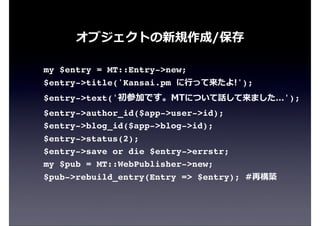
オブジェクトの新規作成/保存

my $entry = MT::Entry->new;
$entry->title('Kansai.pm に⾏行行って来たよ!');
$entry->text('初参加です。MTについて話して来ました...');
$entry->author_id($app->user->id);
$entry->blog_id($app->blog->id);
$entry->status(2);
$entry->save or die $entry->errstr;
my $pub = MT::WebPublisher->new;
$pub->rebuild_entry(Entry => $entry); #再構築
MT::Fooを作る


         定義ファイル


         テーブル定義
config.yaml


schema_version: 1.0
object_types:
    mtddc: MTDDC::MTDDC
package  MTDDC::MTDDC
package MTDDC::MTDDC;
use strict;
use base qw( MT::Object );
__PACKAGE__->install_properties( {
     column_defs => {
         'id'            => 'integer not null
auto_increment',
         'blog_id'       => 'integer',
         'title'         => 'string(255)',
         'text'          => 'text',
     },
     indexes => {
         'blog_id'       => 1,
         'title'         => 1,
     },
     child_of     => [ 'MT::Blog', 'MT::Website' ],
     datasource => 'mtddc',
     primary_key => 'id',
} );
1;
The  Listing  Framework
config.yaml
applications:
    cms:
         menus:
             mtddc:
                 label: MTDDC
             mtddc:list_mtddc:
                 label: Manage
                 mode: list
                 args:
                     _type: mtddc
                 view:
                     - system
listing_screens:
    mtddc:
         object_label: MTDDC
         primary: title
         default_sort_key: title
list_properties:
  mtddc:
    id:
      label: id
         base: __virtual.id
         display: force
         order: 1
      title:
         label: Title
         base: __virtual.title
         display: force
         order: 2
         html: >
           sub {
             my ( $prop, $obj, $app ) = @_;
             my $name = MT::Util::encode_html( $obj->title );
             my $edit_link = $app->uri(
                          mode => 'view', args => {
                              _type => 'mtddc',
                              blog_id => $obj->blog_id,
                              id => $obj->id, } );
                      return qq{
                          <a href="$edit_link">$name</a>
                      };
                  }
さらに...

•多⾔言語対応
•オブジェクト管理理画⾯面を作成
•オブジェクトをカスタムフィールド対応に
•カスタム権限を追加登録する
•MT::Fooを出⼒力力するテンプレートタグを作る
•MT::Fooアーカイブを出⼒力力できるようにする
•ダイナミックパブリッシングに対応...
最後に
Movable  Typeいいよ!


•ブログ以外の使い⽅方もあるよ
•Perlプログラマの副業にどう?
•結構仕事あります!
•⼈人材/外部スタッフ絶賛募集中
•⼥女女⼦子率率率⾼高いよ!
ありがとうございました!!

Inside Movable Type