
Search Logs
+ Machine Learning
= Automatic Tagging
John Berryman
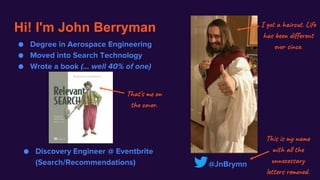
Hi! I'm John Berryman
@JnBrymn
This is my name
with all the
unnecessary
letters removed.
● Degree in Aerospace Engineering
● Moved into Search Technology
● Wrote a book (... well 40% of one)
I got a haircut. Life
has been different
ever since.
That's me on
the cover.
● Discovery Engineer @ Eventbrite
(Search/Recommendations)
What is "tagging"?
… and why would you want it?
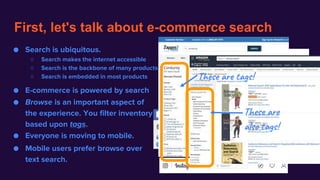
First, let's talk about e-commerce search
● Search is ubiquitous.
○ Search makes the internet accessible
○ Search is the backbone of many products
○ Search is embedded in most products
● E-commerce is powered by search
● Browse is an important aspect of
the experience. You filter inventory
based upon tags.
● Mobile users prefer browse over
text search.
● Everyone is moving to mobile.
These are tags!
These are
also tags!
What is "tagging"?
… and why would you want it?
It's the ability to CATEGORIZE and
UNDERSTAND your inventory.
Because it powers the emerging
dominant e-commerce interaction.
How can you tag your inventory?
● Use curators to tag content:
○ Benefits: control over tagging, uniform tagging approach
○ Drawbacks: curation approach must be define, curators must be trained, curators are
expensive
● Require tagging from content creators:
○ Benefits: content creators know their content the best, scales well
○ Drawback: content creators may not cooperate if they see no advantage for themselves
● Encourage customers to tag content:
○ Benefits: customers are the ones buying content and their idea of tags matters most
○ Drawbacks: there's even less likelihood for customers to cooperate
… but what of nobody wants to tag your content?
An Interesting Observation
● Every day millions of people search for events on Eventbrite.
● They issue approximately > 500K distinct queries in a month.
● But the most common 1,000 queries accounts for 41% of all search traffic.
● The common queries look like tags!
Can we use logged searches as a
training set to built a tagging model?
○ 5k run
○ back to school
○ job fair
○ 4th of july party
○ baby
○ real estate
○ car show
○ pool party
○ golf
○ gospel
○ speed dating
○ boat party
○ photography
○ dog
○ data science
○ business
○ kids
○ networking
○ christian
○ free
Search Logs
+ Machine Learning
= Automatic Tagging
John Berryman
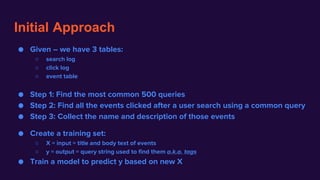
Initial Approach
● Given – we have 3 tables:
○ search log
○ click log
○ event table
● Step 1: Find the most common 500 queries
● Step 2: Find all the events clicked after a user search using a common query
● Step 3: Collect the name and description of those events
● Create a training set:
○ X = input = title and body text of events
○ y = output = query string used to find them a.k.a. tags
● Train a model to predict y based on new X
tagging_with_searches_1.ipynb
emergency backup plan
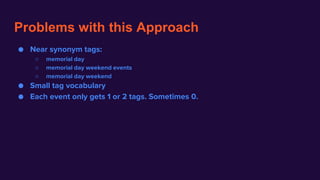
Problems with this Approach
● Near synonym tags:
○ memorial day
○ memorial day weekend events
○ memorial day weekend
● Small tag vocabulary
● Each event only gets 1 or 2 tags. Sometimes 0.
Improved Approach
● A session may contain several queries. These queries are often related:
○ Spelling corrections
○ Word synonyms
○ Query Refinements or generalizations
● Idea:
○ Let's group statistically significant query strings together.
○ Then we can train the neural network based on the query string groups
query_string_clusters
and
tagging_with_searches_2
emergency backup plan
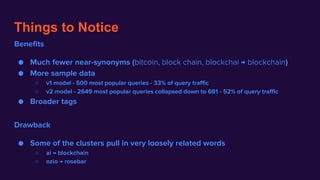
Things to Notice
Benefits
● Much fewer near-synonyms (bitcoin, block chain, blockchai → blockchain)
● More sample data
○ v1 model - 500 most popular queries - 33% of query traffic
○ v2 model - 2649 most popular queries collapsed down to 681 - 52% of query traffic
● Broader tags
Drawback
● Some of the clusters pull in very loosely related words
○ ai → blockchain
○ ozio → rosebar
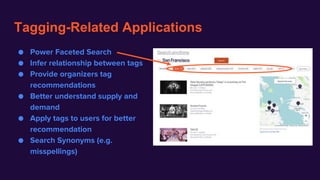
Tagging-Related Applications
● Power Faceted Search
● Infer relationship between tags
● Provide organizers tag
recommendations
● Better understand supply and
demand
● Apply tags to users for better
recommendation
● Search Synonyms (e.g.
misspellings)
Future Work
● Better coverage
○ Currently reach 50% of our traffic with 2,500 queries.
Long tail is long! > 500K distinct queries in a month
○ Model biases towards short tail labels - everything's a "day party"
○ Can't cover searches for an event that isn't in our inventory.
● Create real pipeline
● Build out all the cool ideas on the last slide
Questions?
… better yet, Ideas?
Final notes:
● My jupyter notebooks are here:
○ First implementation
○ Query collapsing
○ Second implementation
○ Third implementation
Data Nerds
● Want to learn data science with
others? You should try Data Nerds.
● Do you like spending time around
people that love learning? Penny
University is the peer-to-peer
learning community for you!
● I just shared my talk
https://twitter.com/JnBrymn
This slide intentionally left blank.
DON'T FORGET
● Tweet the slides out just before the talk
● Open the notebooks
○ do
■ cd ~/Personal/data_science/tagging_events/
■ jupyter notebook
■ open the 3 notebooks in event_tagging_strategies
○ or just use gists: one, two, three
● Bump up the font size on the notebooks
● Remove the menus
● Clear cells

Haystack 2019 - Search Logs + Machine Learning = Auto-Tagging Inventory - John Berryman

  • 1.
    Search Logs + MachineLearning = Automatic Tagging John Berryman
  • 2.
    Hi! I'm JohnBerryman @JnBrymn This is my name with all the unnecessary letters removed. ● Degree in Aerospace Engineering ● Moved into Search Technology ● Wrote a book (... well 40% of one) I got a haircut. Life has been different ever since. That's me on the cover. ● Discovery Engineer @ Eventbrite (Search/Recommendations)
  • 3.
    What is "tagging"? …and why would you want it?
  • 4.
    First, let's talkabout e-commerce search ● Search is ubiquitous. ○ Search makes the internet accessible ○ Search is the backbone of many products ○ Search is embedded in most products ● E-commerce is powered by search ● Browse is an important aspect of the experience. You filter inventory based upon tags. ● Mobile users prefer browse over text search. ● Everyone is moving to mobile. These are tags! These are also tags!
  • 5.
    What is "tagging"? …and why would you want it? It's the ability to CATEGORIZE and UNDERSTAND your inventory. Because it powers the emerging dominant e-commerce interaction.
  • 6.
    How can youtag your inventory? ● Use curators to tag content: ○ Benefits: control over tagging, uniform tagging approach ○ Drawbacks: curation approach must be define, curators must be trained, curators are expensive ● Require tagging from content creators: ○ Benefits: content creators know their content the best, scales well ○ Drawback: content creators may not cooperate if they see no advantage for themselves ● Encourage customers to tag content: ○ Benefits: customers are the ones buying content and their idea of tags matters most ○ Drawbacks: there's even less likelihood for customers to cooperate … but what of nobody wants to tag your content?
  • 7.
    An Interesting Observation ●Every day millions of people search for events on Eventbrite. ● They issue approximately > 500K distinct queries in a month. ● But the most common 1,000 queries accounts for 41% of all search traffic. ● The common queries look like tags! Can we use logged searches as a training set to built a tagging model? ○ 5k run ○ back to school ○ job fair ○ 4th of july party ○ baby ○ real estate ○ car show ○ pool party ○ golf ○ gospel ○ speed dating ○ boat party ○ photography ○ dog ○ data science ○ business ○ kids ○ networking ○ christian ○ free
  • 8.
    Search Logs + MachineLearning = Automatic Tagging John Berryman
  • 9.
    Initial Approach ● Given– we have 3 tables: ○ search log ○ click log ○ event table ● Step 1: Find the most common 500 queries ● Step 2: Find all the events clicked after a user search using a common query ● Step 3: Collect the name and description of those events ● Create a training set: ○ X = input = title and body text of events ○ y = output = query string used to find them a.k.a. tags ● Train a model to predict y based on new X
  • 10.
  • 11.
    Problems with thisApproach ● Near synonym tags: ○ memorial day ○ memorial day weekend events ○ memorial day weekend ● Small tag vocabulary ● Each event only gets 1 or 2 tags. Sometimes 0.
  • 12.
    Improved Approach ● Asession may contain several queries. These queries are often related: ○ Spelling corrections ○ Word synonyms ○ Query Refinements or generalizations ● Idea: ○ Let's group statistically significant query strings together. ○ Then we can train the neural network based on the query string groups
  • 13.
  • 14.
    Things to Notice Benefits ●Much fewer near-synonyms (bitcoin, block chain, blockchai → blockchain) ● More sample data ○ v1 model - 500 most popular queries - 33% of query traffic ○ v2 model - 2649 most popular queries collapsed down to 681 - 52% of query traffic ● Broader tags Drawback ● Some of the clusters pull in very loosely related words ○ ai → blockchain ○ ozio → rosebar
  • 15.
    Tagging-Related Applications ● PowerFaceted Search ● Infer relationship between tags ● Provide organizers tag recommendations ● Better understand supply and demand ● Apply tags to users for better recommendation ● Search Synonyms (e.g. misspellings)
  • 16.
    Future Work ● Bettercoverage ○ Currently reach 50% of our traffic with 2,500 queries. Long tail is long! > 500K distinct queries in a month ○ Model biases towards short tail labels - everything's a "day party" ○ Can't cover searches for an event that isn't in our inventory. ● Create real pipeline ● Build out all the cool ideas on the last slide
  • 17.
  • 18.
    Final notes: ● Myjupyter notebooks are here: ○ First implementation ○ Query collapsing ○ Second implementation ○ Third implementation Data Nerds ● Want to learn data science with others? You should try Data Nerds. ● Do you like spending time around people that love learning? Penny University is the peer-to-peer learning community for you! ● I just shared my talk https://twitter.com/JnBrymn
  • 19.
  • 20.
    DON'T FORGET ● Tweetthe slides out just before the talk ● Open the notebooks ○ do ■ cd ~/Personal/data_science/tagging_events/ ■ jupyter notebook ■ open the 3 notebooks in event_tagging_strategies ○ or just use gists: one, two, three ● Bump up the font size on the notebooks ● Remove the menus ● Clear cells

Editor's Notes

  • #2 I hope so (that we use logged searches as a training set to built a tagging model) because the title of the talk is ^
  • #7 "...but" - this is the situation that Eventbrite was in
  • #9 I hope so (that we use logged searches as a training set to built a tagging model) because the title of the talk is ^