
Nic Jansma
@NicJ
//nicj.net
Debugging IE
Performance Issues
xperf, ETW & NavigationTiming
Who am I?
Nic Jansma
Microsoft Sr. Developer (2005-2011)
Windows 7 & IE 9/10 Performance Teams
Founding member of W3C WebPerf WG
Back to GR / founded Wolverine Digital
Developing high-performance websites and apps
nic@nicj.net @NicJ http://nicj.net
http://github.com/nicjansma
What is ETW/xperf?
• Event Tracing for Windows
(ETW) enables the OS/apps
to efficiently generate
runtime tracing events
o Windows XP+
o CPU usage
o Disk usage
o Hard faults
o DPCs/ISRs
o TCP
o Profiling
o Custom app events (incl IE7+)
o Stacks on most of the above
• xperf is a toolset used to
trace/view ETW events
• Use ETW/xperf to trace page
loads of browsers
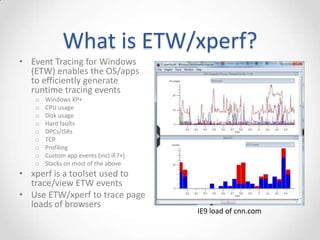
IE9 load of cnn.com
Getting WPT (xperf)
• Windows Performance Toolkit (WPT)
• Free!
• From the Windows SDK
o WPT home
• http://msdn.microsoft.com/en-us/performance/cc825801.aspx
o Windows 7 SDK
• http://www.microsoft.com/en-us/download/details.aspx?id=8279
o Windows 8 SDK
• http://msdn.microsoft.com/en-us/windows/hardware/hh852363
Getting a Trace
From an elevated command prompt:
• Simple trace of system events
o xperf.exe -on latency
o [run scenario]
o xperf.exe -stop -d myscenario.etl
(latency = PROC_THREAD+LOADER+DISK_IO+HARD_FAULTS+DPC+INTERRUPT+CSWITCH+PROFILE)
• Stack-Walking on sample profiling events
o xperf.exe -on latency -stackwalk profile -setprofint 1224
o [run scenario]
o xperf.exe -stop -d myscenario.etl
• IE events
o xperf.exe -on latency -start ie -on Microsoft-IE+Microsoft-IEFRAME+Microsoft-Windows-WinINet+PerfTrack
o [run scenario]
o xperf.exe -stop -stop ie -d myscenario.etl
UIforETW
• https://github.com/google/UIforETW
• https://randomascii.wordpress.com/2015/04/14/uiforetw-
windows-performance-made-easier/
xperfview
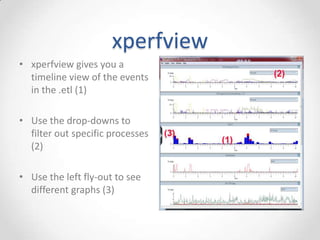
• xperfview gives you a
timeline view of the events
in the .etl (1)
• Use the drop-downs to
filter out specific processes
(2)
• Use the left fly-out to see
different graphs (3)
xperfview - Summary Tables
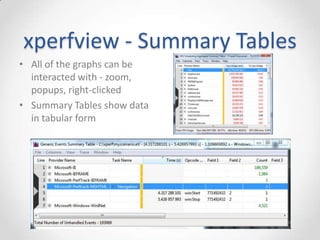
• All of the graphs can be
interacted with - zoom,
popups, right-clicked
• Summary Tables show data
in tabular form
xperfview - Generic Events
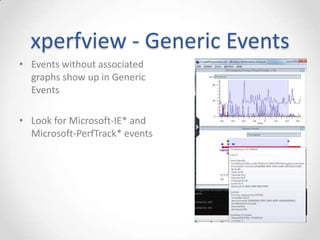
• Events without associated
graphs show up in Generic
Events
• Look for Microsoft-IE* and
Microsoft-PerfTrack* events
xperfview - IE events
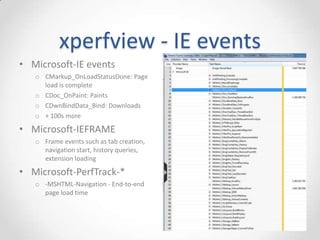
• Microsoft-IE events
o CMarkup_OnLoadStatusDone: Page
load is complete
o CDoc_OnPaint: Paints
o CDwnBindData_Bind: Downloads
o + 100s more
• Microsoft-IEFRAME
o Frame events such as tab creation,
navigation start, history queries,
extension loading
• Microsoft-PerfTrack-*
o -MSHTML-Navigation - End-to-end
page load time
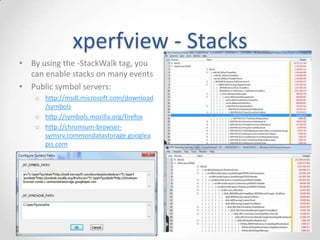
xperfview - Stacks
• By using the -StackWalk tag, you
can enable stacks on many events
• Public symbol servers:
o https://msdl.microsoft.com/downloa
d/symbols
o http://symbols.mozilla.org/firefox
o https://chromium-browser-
symsrv.commondatastorage.googlea
pis.com
Custom Web Events
• JavaScript ETW events
<SCRIPT type="text/javascript">
if (msWriteProfilerMark) {
msWriteProfilerMark("Mark1");
}
</SCRIPT>
• Comes in as:
o Microsoft-IEMshtml_DOM_CustomSiteEvent
What Can You Do?
• Slow page load performance? Take a trace!
• See page load from a system-wide perspective
o Isolate page-load from interference due to other CPU/disk/network activity
• Compare IE/FF/Chrome browser page-load times and
resource usage
• Examine browser CPU usage hot-spots from sampled profile
stacks
• Automated page-load regression testing of browsers via
command-line tools
o Integrate page load time / cpu usage metrics into your build system
ETW/xperf is great, but...
• Your development machine isn’t your customer’s machine
• How does your website behave in the real world?
• Enter...
W3C WebPerf WG
Navigation Timing, User Timing, Resource Timing
Performance Timeline, Page Visibility, High Resolution Time
W3C WebPerf
• Founded in 2010 to give developers the ability to assess and
understand performance characteristics of their applications
• Specs:
o Navigation Timing: Page load timings
o User Timing: Custom site events and measurements
o Resource Timing: Resource / download times
o Page Visibility: Get visibility state
o High Resolution Time: Better than Date.now() - sub-millisecond resolution,
monotonically non-decreasing timestamps
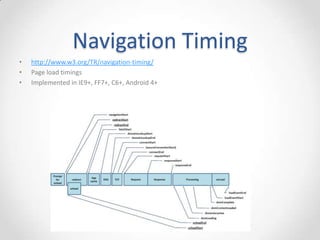
Navigation Timing
• http://www.w3.org/TR/navigation-timing/
• Page load timings
• Implemented in IE9+, FF7+, C6+, Android 4+
Navigation Timing
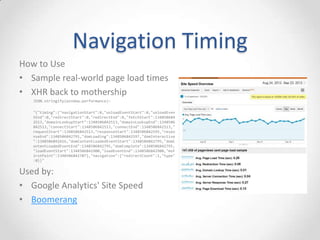
• API available from the DOM (window.performance.timing)
• Get real-world page-load timings from your users via JavaScript
<script type="text/javascript">
window.addEventListener("load", loadTime, false);
function loadTime() {
var now = new Date().getTime();
var pageLoadTime = now - performance.timing.navigationStart;
}
</script>
• Many other sub-timings (DNS, connect, request, response,
redirects, DOM events, load event)
• Demo
o http://ie.microsoft.com/testdrive/Performance/msPerformance/Default.html
Navigation Timing
How to Use
• Sample real-world page load times
• XHR back to mothership
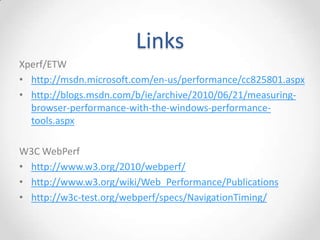
JSON.stringify(window.performance):
"{"timing":{"navigationStart":0,"unloadEventStart":0,"unloadEven
tEnd":0,"redirectStart":0,"redirectEnd":0,"fetchStart":134850684
2513,"domainLookupStart":1348506842513,"domainLookupEnd":1348506
842513,"connectStart":1348506842513,"connectEnd":1348506842513,"
requestStart":1348506842513,"responseStart":1348506842595,"respo
nseEnd":1348506842791,"domLoading":1348506842597,"domInteractive
":1348506842616,"domContentLoadedEventStart":1348506842795,"domC
ontentLoadedEventEnd":1348506842795,"domComplete":1348506842795,
"loadEventStart":1348506842900,"loadEventEnd":1348506842900,"msF
irstPaint":1348506842707},"navigation":{"redirectCount":1,"type"
:0}}"
Used by:
• Google Analytics' Site Speed
• Boomerang
Links
Xperf/ETW
• http://msdn.microsoft.com/en-us/performance/cc825801.aspx
• http://blogs.msdn.com/b/ie/archive/2010/06/21/measuring-
browser-performance-with-the-windows-performance-
tools.aspx
• https://github.com/google/UIforETW
W3C WebPerf
• http://www.w3.org/2010/webperf/
• http://www.w3.org/wiki/Web_Performance/Publications
• http://w3c-test.org/webperf/specs/NavigationTiming/
Questions?
• @NicJ
• nic@nicj.net

Debugging IE Performance Issues with xperf, ETW and NavigationTiming

  • 1.
    Nic Jansma @NicJ //nicj.net Debugging IE PerformanceIssues xperf, ETW & NavigationTiming
  • 2.
    Who am I? NicJansma Microsoft Sr. Developer (2005-2011) Windows 7 & IE 9/10 Performance Teams Founding member of W3C WebPerf WG Back to GR / founded Wolverine Digital Developing high-performance websites and apps nic@nicj.net @NicJ http://nicj.net http://github.com/nicjansma
  • 3.
    What is ETW/xperf? •Event Tracing for Windows (ETW) enables the OS/apps to efficiently generate runtime tracing events o Windows XP+ o CPU usage o Disk usage o Hard faults o DPCs/ISRs o TCP o Profiling o Custom app events (incl IE7+) o Stacks on most of the above • xperf is a toolset used to trace/view ETW events • Use ETW/xperf to trace page loads of browsers IE9 load of cnn.com
  • 4.
    Getting WPT (xperf) •Windows Performance Toolkit (WPT) • Free! • From the Windows SDK o WPT home • http://msdn.microsoft.com/en-us/performance/cc825801.aspx o Windows 7 SDK • http://www.microsoft.com/en-us/download/details.aspx?id=8279 o Windows 8 SDK • http://msdn.microsoft.com/en-us/windows/hardware/hh852363
  • 5.
    Getting a Trace Froman elevated command prompt: • Simple trace of system events o xperf.exe -on latency o [run scenario] o xperf.exe -stop -d myscenario.etl (latency = PROC_THREAD+LOADER+DISK_IO+HARD_FAULTS+DPC+INTERRUPT+CSWITCH+PROFILE) • Stack-Walking on sample profiling events o xperf.exe -on latency -stackwalk profile -setprofint 1224 o [run scenario] o xperf.exe -stop -d myscenario.etl • IE events o xperf.exe -on latency -start ie -on Microsoft-IE+Microsoft-IEFRAME+Microsoft-Windows-WinINet+PerfTrack o [run scenario] o xperf.exe -stop -stop ie -d myscenario.etl
  • 6.
  • 7.
    xperfview • xperfview givesyou a timeline view of the events in the .etl (1) • Use the drop-downs to filter out specific processes (2) • Use the left fly-out to see different graphs (3)
  • 8.
    xperfview - SummaryTables • All of the graphs can be interacted with - zoom, popups, right-clicked • Summary Tables show data in tabular form
  • 9.
    xperfview - GenericEvents • Events without associated graphs show up in Generic Events • Look for Microsoft-IE* and Microsoft-PerfTrack* events
  • 10.
    xperfview - IEevents • Microsoft-IE events o CMarkup_OnLoadStatusDone: Page load is complete o CDoc_OnPaint: Paints o CDwnBindData_Bind: Downloads o + 100s more • Microsoft-IEFRAME o Frame events such as tab creation, navigation start, history queries, extension loading • Microsoft-PerfTrack-* o -MSHTML-Navigation - End-to-end page load time
  • 11.
    xperfview - Stacks •By using the -StackWalk tag, you can enable stacks on many events • Public symbol servers: o https://msdl.microsoft.com/downloa d/symbols o http://symbols.mozilla.org/firefox o https://chromium-browser- symsrv.commondatastorage.googlea pis.com
  • 12.
    Custom Web Events •JavaScript ETW events <SCRIPT type="text/javascript"> if (msWriteProfilerMark) { msWriteProfilerMark("Mark1"); } </SCRIPT> • Comes in as: o Microsoft-IEMshtml_DOM_CustomSiteEvent
  • 13.
    What Can YouDo? • Slow page load performance? Take a trace! • See page load from a system-wide perspective o Isolate page-load from interference due to other CPU/disk/network activity • Compare IE/FF/Chrome browser page-load times and resource usage • Examine browser CPU usage hot-spots from sampled profile stacks • Automated page-load regression testing of browsers via command-line tools o Integrate page load time / cpu usage metrics into your build system
  • 14.
    ETW/xperf is great,but... • Your development machine isn’t your customer’s machine • How does your website behave in the real world? • Enter... W3C WebPerf WG Navigation Timing, User Timing, Resource Timing Performance Timeline, Page Visibility, High Resolution Time
  • 15.
    W3C WebPerf • Foundedin 2010 to give developers the ability to assess and understand performance characteristics of their applications • Specs: o Navigation Timing: Page load timings o User Timing: Custom site events and measurements o Resource Timing: Resource / download times o Page Visibility: Get visibility state o High Resolution Time: Better than Date.now() - sub-millisecond resolution, monotonically non-decreasing timestamps
  • 16.
    Navigation Timing • http://www.w3.org/TR/navigation-timing/ •Page load timings • Implemented in IE9+, FF7+, C6+, Android 4+
  • 17.
    Navigation Timing • APIavailable from the DOM (window.performance.timing) • Get real-world page-load timings from your users via JavaScript <script type="text/javascript"> window.addEventListener("load", loadTime, false); function loadTime() { var now = new Date().getTime(); var pageLoadTime = now - performance.timing.navigationStart; } </script> • Many other sub-timings (DNS, connect, request, response, redirects, DOM events, load event) • Demo o http://ie.microsoft.com/testdrive/Performance/msPerformance/Default.html
  • 18.
    Navigation Timing How toUse • Sample real-world page load times • XHR back to mothership JSON.stringify(window.performance): "{"timing":{"navigationStart":0,"unloadEventStart":0,"unloadEven tEnd":0,"redirectStart":0,"redirectEnd":0,"fetchStart":134850684 2513,"domainLookupStart":1348506842513,"domainLookupEnd":1348506 842513,"connectStart":1348506842513,"connectEnd":1348506842513," requestStart":1348506842513,"responseStart":1348506842595,"respo nseEnd":1348506842791,"domLoading":1348506842597,"domInteractive ":1348506842616,"domContentLoadedEventStart":1348506842795,"domC ontentLoadedEventEnd":1348506842795,"domComplete":1348506842795, "loadEventStart":1348506842900,"loadEventEnd":1348506842900,"msF irstPaint":1348506842707},"navigation":{"redirectCount":1,"type" :0}}" Used by: • Google Analytics' Site Speed • Boomerang
  • 19.
    Links Xperf/ETW • http://msdn.microsoft.com/en-us/performance/cc825801.aspx • http://blogs.msdn.com/b/ie/archive/2010/06/21/measuring- browser-performance-with-the-windows-performance- tools.aspx •https://github.com/google/UIforETW W3C WebPerf • http://www.w3.org/2010/webperf/ • http://www.w3.org/wiki/Web_Performance/Publications • http://w3c-test.org/webperf/specs/NavigationTiming/
  • 20.