How To Installand Configure nginx on CentOS 7
Page | i
Table of Contents
Overview.................................................................................................................................................1
Applies To ...............................................................................................................................................1
Pre-Requisites .........................................................................................................................................1
Package Install – nginx.............................................................................................................................1
Package Install – Verify........................................................................................................................1
Enable Service - nginx..........................................................................................................................2
Configure – nginx.................................................................................................................................2
Server Block – Configuration Table...................................................................................................3
Configure Firewall – nginx .......................................................................................................................3
Reload Firewall Rules...........................................................................................................................3
List Firewall Rules ................................................................................................................................4
Service Management – nginx...................................................................................................................4
Service Start – nginx ............................................................................................................................4
Service Stop – nginx.............................................................................................................................4
Launch Portal – nginx...........................................................................................................................5
2.
How To Installand Configure nginx on CentOS 7
Page | 1
Overview
Nginx is an open-source, high performance HTTP & ReverseProxy Server, it can also be configured to
operate as IMAP / POP3 Server.
It’s well-known for high performance, stability, rich feature set, simple configuration and low resource
consumption.
In this guide we will install and configure nginx webserver on a Linux based operating system.
Applies To
CentOS 7, tested on CentOS Linux release 7.1.1503 (Core)
Pre-Requisites
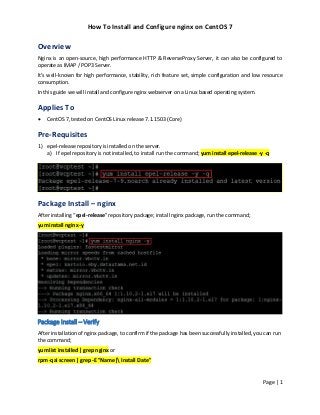
1) epel-release repository is installed on the server.
a) If epel repository is not installed, to install run the command; yum install epel-release -y -q
Package Install – nginx
After installing “epel-release” repository package; install nginx package, run the command;
yum install nginx -y
Package Install – Verify
After installation of nginx package, to confirm if the package has been successfully installed, you can run
the command;
yum list installed | grep nginx or
rpm -qai screen | grep -E "Name| Install Date"
3.
How To Installand Configure nginx on CentOS 7
Page | 2
Enable Service - nginx
After installation of nginx package, next step is to configure nginx service daemon to automatically start
upon server reboots. To start service automatically, run the command;
systemctl enable nginx
Configure – nginx
By default nginx is preconfigured, if you intend to customize server parameters this can be accomplished
by editing the master configuration file “/etc/nginx/nginx.conf” in “server” block section.
By default port “80” is the configured for nginx service to “LISTEN”, and when the server is started,
server starts automatically on IPV4 and IPV6 network interface(s).
4.
How To Installand Configure nginx on CentOS 7
Page | 3
Server Block – Configuration Table
Below server block attributes, that can be configured in the “Server” block section in the nginx
configuration file are listed below;
Attribute Default Purpose
listen 80 default_server; HTTP Access over IPV4
listen [::]:80 default_server; HTTP Access over IPV6
server_name _; Webserver Name
root /usr/share/nginx/html; Default document directory
include /etc/nginx/default.d/*.conf; Load configuration files for default server block
location / Path where from documents have to be served
error_page 404 /404.html; Defining Error Code and file to be shown
error_page 500 502 503 504 /50x.html; Defining Error Code and file to be shown
Configure Firewall – nginx
Next step is to configure firewall rule to allow access to http service, to add firewall rule, run the
command;
firewall-cmd --permanent --zone=public --add-service=http
Reload Firewall Rules
In order to activate the firewall rule configured, firewall rules table has to be reloaded, to reload the
rules, run the command;
firewall-cmd --reload
5.
How To Installand Configure nginx on CentOS 7
Page | 4
List Firewall Rules
After configuring the firewall rules, list of firewall rules can be listed to check if the added http service is
to allow traffic, to know the rules configured, run the command;
firewall-cmd --list-service
Service Management – nginx
After configuring nginx service have to started, this can be done with service manager (system manager
utility).
Service Start – nginx
Next step is to start the service, to start nginx service daemon, run the command;
systemctl start nginx
Service Stop – nginx
Similarly, to stop nginx server and check service status, run the command;
systemctl stop nginx
systemctl status nginx
6.
How To Installand Configure nginx on CentOS 7
Page | 5
Launch Portal – nginx
Nginx by default run’s on port “80” (http), to access the portal open the browser and launch the URL
http://NginxServerName.

![How To Install and Configure nginx on CentOS 7
Page | 3
Server Block – Configuration Table
Below server block attributes, that can be configured in the “Server” block section in the nginx
configuration file are listed below;
Attribute Default Purpose
listen 80 default_server; HTTP Access over IPV4
listen [::]:80 default_server; HTTP Access over IPV6
server_name _; Webserver Name
root /usr/share/nginx/html; Default document directory
include /etc/nginx/default.d/*.conf; Load configuration files for default server block
location / Path where from documents have to be served
error_page 404 /404.html; Defining Error Code and file to be shown
error_page 500 502 503 504 /50x.html; Defining Error Code and file to be shown
Configure Firewall – nginx
Next step is to configure firewall rule to allow access to http service, to add firewall rule, run the
command;
firewall-cmd --permanent --zone=public --add-service=http
Reload Firewall Rules
In order to activate the firewall rule configured, firewall rules table has to be reloaded, to reload the
rules, run the command;
firewall-cmd --reload](https://image.slidesharecdn.com/howtoinstallandconfigurenginxoncentos7-170705031848/85/How-To-Install-and-Configure-nginx-on-CentOS-7-4-320.jpg?cb=1499224747)


