How To Configure Bash History Date and Time in Linux
1.
How To ConfigureBash History Date and Time in Linux
i | P a g e
Table of Contents
Overview.......................................................................................................................................................1
Applies To......................................................................................................................................................1
Pre-Requisites ...............................................................................................................................................1
Bash History Setting......................................................................................................................................1
View History..................................................................................................................................................1
Bash Attributes .............................................................................................................................................2
Configure Bash..............................................................................................................................................2
Blogging Site..................................................................................................................................................2
2.
How To ConfigureBash History Date and Time in Linux
1 | P a g e
Overview
At times you would like to audit engineers commands executed at specific date and time on the server(s)
especially wherein servers are running critical applications and engineers don’t execute unauthorized
commands in a bash shell.
Other scenario is the view the commands that have been executed when you have to compile an RCA
document.
Applies To
Tested on RHEL 7, CentOS 7 with bash profile
Pre-Requisites
None
Bash History Setting
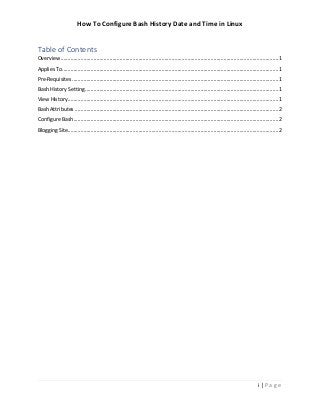
To view the currently configured setting of the bash history run the command below;
cat .bash_profile | grep HISTTIMEFORMAT
Note: if history not configured nothing would displayed.
View History
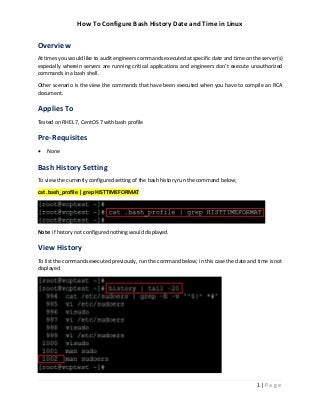
To list the commands executed previously, run the command below; in this case the date and time is not
displayed.
3.
How To ConfigureBash History Date and Time in Linux
2 | P a g e
Bash Attributes
Bash history attributes that can be configured and its purpose is as per below table.
Attribute Display
%d Day
%m Month
%y Year
%T Time
Configure Bash
To display the date and time of this commands history, we need to reconfigure “~/.bash_profile” with
HISTTIMEFORMAT and export the environment variable.
echo 'export HISTTIMEFORMAT="%d/%m/%y %T "' >> ~/.bash_profile
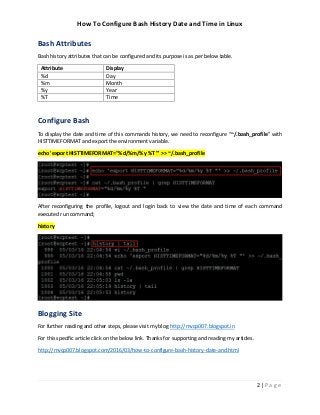
After reconfiguring the profile, logout and login back to view the date and time of each command
executed run command;
history
Blogging Site
For further reading and other steps, please visit my blog http://mvcp007.blogspot.in
For this specific article click on the below link. Thanks for supporting and reading my articles.
http://mvcp007.blogspot.com/2016/03/how-to-configure-bash-history-date-and.html


![Coded Agents – with UiPath SDK + LangGraph [Virtual Hands-on Workshop]](https://cdn.slidesharecdn.com/ss_thumbnails/codedagentsdeck-251215155422-5497c599-thumbnail.jpg?width=640&height=640&fit=bounds)

