1@spsbangalore #SPSBangalore
1st September 2018
Building Efficient eDiscovery and Compliance with
SharePoint
Mitul Rana
SharePoint Consultant | CenturyLink
2@spsbangalore #SPSBangalore@spsbangalore 2
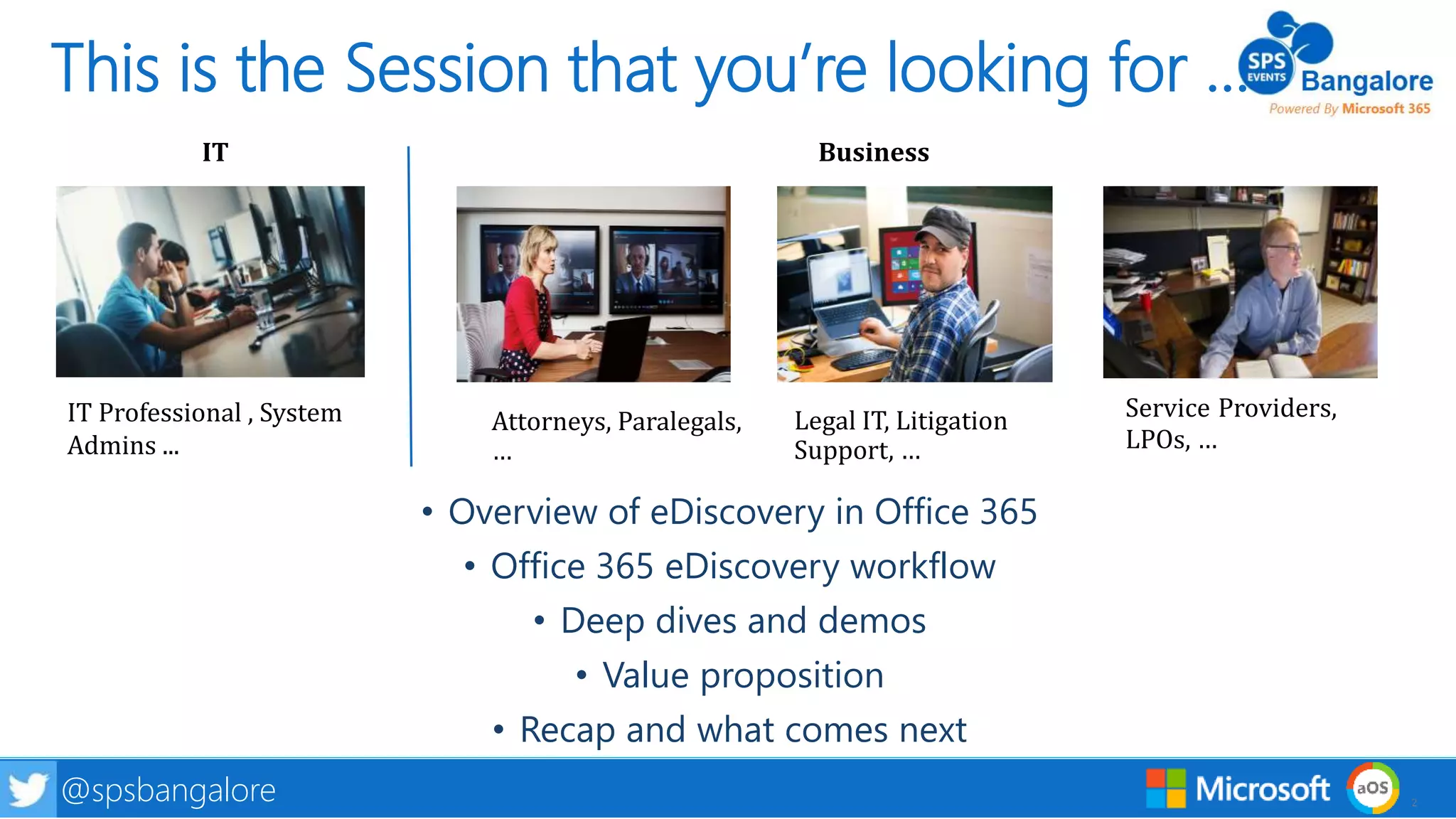
This is the Session that you’re looking for …
• Overview of eDiscovery in Office 365
• Office 365 eDiscovery workflow
• Deep dives and demos
• Value proposition
• Recap and what comes next
Attorneys, Paralegals,
…
Legal IT, Litigation
Support, …
Service Providers,
LPOs, …
IT Professional , System
Admins ...
IT Business
3@spsbangalore #SPSBangalore
When do you need
eDiscovery?
Litigation
Investigations
Legal compliance e.g. GDPR
Criminal
Financial
Employment Law
Anti-Trust
Tax Controversies
Other
4@spsbangalore #SPSBangalore
How big of a
problem do we
have on our hands?
How much is this
worth?
How much truth is
there in the
allegation?
5@spsbangalore #SPSBangalore@spsbangalore 5
eDiscovery Reference Model
Information
Management
Identification
Preservation
Collection
Processing
Review
Analysis
Production Presentation
6@spsbangalore #SPSBangalore
Office 365 eDiscovery
Quickly find what’s relevant and reduce risk with intelligent eDiscovery in Office 365
Reduce effort to preserve data, manage legal holds, and manage
data for a case
Reduce Complexity
Analytics help you organize unstructured data to reduce time and
effort involved in reviewing documents
Reduce Time, Effort, Cost
Case workspace with roles, data permissions, and built in auditing
enable different roles & personas to collaborate on a case – across
organizations
Enable Coordination
7@spsbangalore #SPSBangalore
Office 365 eDiscovery is seeing good momentum
Snapshot of 5 months from April to August
56% ↑
53% ↑
54% ↑
8@spsbangalore #SPSBangalore
eDiscovery model implemented in Office 365
Identify and
Preserve
Data
Search for
Documents
that might
be relevant
Rank
documents
by their
relevance
Organize
documents
& recognize
topics
View and tag
documents
sorted by
relevance,
similarity
Do all of these activities within a case that you create for the new matter
9@spsbangalore #SPSBangalore
Identify and Preserve Data
Identify and
Preserve
Data
Search for
Documents
that might
be relevant
Rank
documents
by their
relevance
Organize
documents
& recognize
topics
View and tag
documents
sorted by
relevance,
similarity
10@spsbangalore #SPSBangalore
Search for documents that might be relevant
Identify and
Preserve
Data
Search for
Documents
that might
be relevant
Rank
documents
by their
relevance
Organize
documents
& recognize
topics
View and tag
documents
sorted by
relevance,
similarity
11@spsbangalore #SPSBangalore
Use Relevance to cull data & prioritize documents
Identify and
Preserve
Data
Search for
Documents
that might
be relevant
Rank
documents
by their
relevance
Organize
documents
& recognize
topics
View and tag
documents
sorted by
relevance,
similarity
12@spsbangalore #SPSBangalore
Organize documents to improve efficiency of review
Identify and
Preserve
Data
Search for
Documents
that might
be relevant
Rank
documents
by their
relevance
Organize
documents
& recognize
topics
View and tag
documents
sorted by
relevance,
similarity
13@spsbangalore #SPSBangalore
View and tag documents
Identify and
Preserve
Data
Search for
Documents
that might
be relevant
Rank
documents
by their
relevance
Organize
documents
& recognize
topics
View and tag
documents
sorted by
relevance,
similarity
14@spsbangalore #SPSBangalore
Deep Dive
• Demos
• Deep dive into how features work
• Special emphasis on new features
15@spsbangalore #SPSBangalore
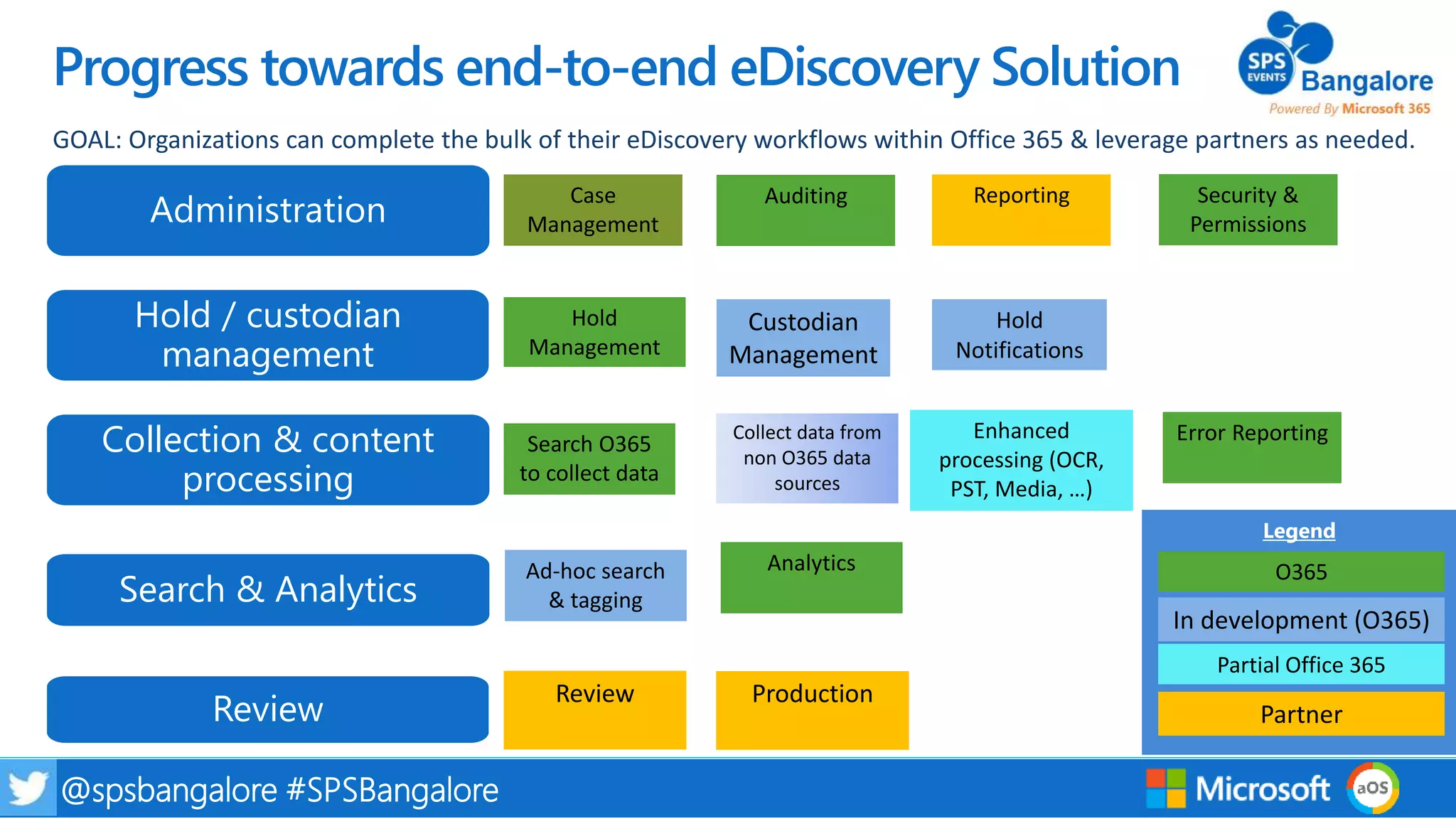
Progress towards end-to-end eDiscovery Solution
GOAL: Organizations can complete the bulk of their eDiscovery workflows within Office 365 & leverage partners as needed.
Administration
Hold / custodian
management
Collection & content
processing
Search & Analytics
Review
Manage portfolio of eDiscovery cases
Manage holds, data sources & notification workflows
Search for and collect content from Office 365 & beyond
Analyze content e.g. for early case assessment
Manual triage of content & produce relevant documents
16@spsbangalore #SPSBangalore
Progress towards end-to-end eDiscovery Solution
Custodian
Management
Search O365
to collect data
Hold
Management
Collect data from
non O365 data
sources
Review Production
Hold
Notifications
Enhanced
processing (OCR,
PST, Media, …)
Ad-hoc search
& tagging
Case
Management
Auditing Reporting
Analytics
GOAL: Organizations can complete the bulk of their eDiscovery workflows within Office 365 & leverage partners as needed.
Security &
PermissionsAdministration
Hold / custodian
management
Collection & content
processing
Search & Analytics
Legend
O365
In development (O365)
Partial Office 365
PartnerReview
Error Reporting
17@spsbangalore #SPSBangalore
Demo
• Custodian and Hold Management
18@spsbangalore #SPSBangalore
19@spsbangalore #SPSBangalore
20@spsbangalore #SPSBangalore
21@spsbangalore #SPSBangalore
22@spsbangalore #SPSBangalore
23@spsbangalore #SPSBangalore
24@spsbangalore #SPSBangalore
25@spsbangalore #SPSBangalore
Custodian and Hold Management
Manage holds, data sources & notification workflows
Add and remove custodians into a case, and apply legal holds to
their data in-place if needed
Manage custodians and legal holds
Manage legally required workflows around notifications to
custodians and their acknowledgments
Custodian notifications
Search for shared data e.g. SharePoint sites / Teams that custodians
have access rights to, and had activities
Identify data sources for a custodian
Automatically expand legal Holds to shared data locations
based on continued activities of custodians
Dynamic holds
26@spsbangalore #SPSBangalore
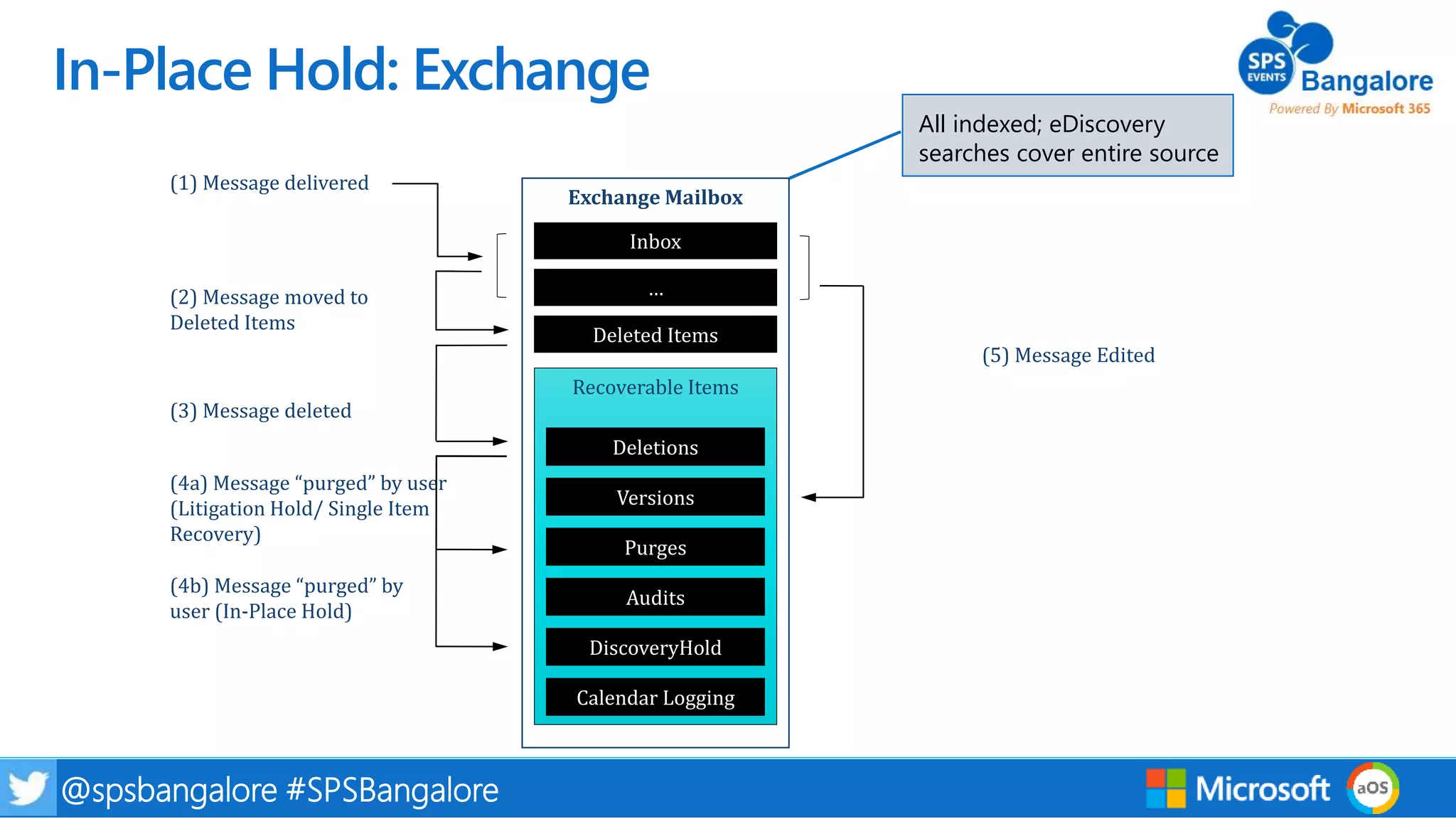
Exchange Mailbox
Recoverable Items
Deletions
Inbox
Purges
Versions
Audits
Deleted Items
…
DiscoveryHold
Calendar Logging
(5) Message Edited
(3) Message deleted
(4a) Message “purged” by user
(Litigation Hold/ Single Item
Recovery)
(4b) Message “purged” by
user (In-Place Hold)
(1) Message delivered
(2) Message moved to
Deleted Items
All indexed; eDiscovery
searches cover entire source
In-Place Hold: Exchange
27@spsbangalore #SPSBangalore
SharePoint/OD4B Site
Pages
Versions
PreservationHoldLibrary
Blogs/Wikis
Document Libraries
Etc.
If Versioning is
enabled, interim
drafts are saved in
the Versions folder
Deleted items
eDiscovery searches cover
entire source except the
Versions folder and Recycle
Bin
In-Place Hold: SharePoint & OneDrive
28@spsbangalore #SPSBangalore
Demo
• Collection & content processing
29@spsbangalore #SPSBangalore
Data collection and content processing
Search for and collect content from Office 365 & beyond
Content in Office 365 is indexed in real time so that you can search
for and collect only the data that you need, and add into a case
Targeted collections of data from Office 365
Ingest data collected from non Office 365 sources and add to a
case
Support for non Office 365 data
Additional processing (e.g. OCR) of all data added into a case to
extract text and metadata
Processing of data
All data is indexed within the case to enable ad-hoc
searching and filtering
Index collected data
30@spsbangalore #SPSBangalore
Data collection: Real time indexing in Office 365
Index Limit Changes (EXO)
Limit Old New
Maximum depth of attachments 1 30
Maximum number of
attachments
10 250
Maximum attachment size 32 MB 150 MB
Maximum annotation tokens
(WordBreaker)
130,000 2 million
Maximum body size in index
(mail body + attachments)
1 million
characters
67 million
Maximum unique tokens in body 10,000 1,000,000
Maximum Excel file size 4 MB 4 MB (also
numbers)
Index Limit Changes (SPO)
Limit Old New
Maximum attachment size 32 MB 150 MB
Maximum Excel file size 4 MB 4 MB
Index limit changes for email in
Exchange Online have rolled out
Index limit changes for documents
in SharePoint Online
31@spsbangalore #SPSBangalore
Demo
• Analytics, Search & Tagging
32@spsbangalore #SPSBangalore
Analytics in Advanced eDiscovery
Intelligently explore and analyze unstructured data to quickly identify what’s relevant
Use predictive coding to train the system to find likely relevant
documents and reduce what’s sent to review
Minimize
Use near duplicate detection to organize the data and email
threading to reconstruct email conversations from unstructured
data
Organize
Use Themes to understand the topics represented in the data set
Recognize
Ad-hoc searches, ability to save search queries, and tag
search results with case specific labels
Search and Tagging
33@spsbangalore #SPSBangalore
Export options
3rd party tools to extend the Office 365 eDiscovery process
34@spsbangalore #SPSBangalore
Administration
35@spsbangalore #SPSBangalore
Administration
Manage a portfolio of eDiscovery cases
Manage a portfolio of eDiscovery cases, and add team members to
individual cases
Case management
Workspace for multiple roles and personas to collaborate upon
activities within a case
Case workspace
Manage roles and security filters for data access
Roles, security filters, & compliance boundaries
Make Advanced eDiscovery available for government and
defense customers
Expansion into new markets
36@spsbangalore #SPSBangalore
Segment eDiscovery searches and results by users as defined by your organization to allow compliance boundaries between
business units, geographic location, or other divisions. This also includes full support of Compliance Security Filters for OneDrive
for Business.
Permissions model for Compliance Boundaries
37@spsbangalore #SPSBangalore
Value Prop
38@spsbangalore #SPSBangalore
On-premises
NOW THERE’S FEWER BOUNDARIES, MORE
DATA, MORE COMPLEXITY
39@spsbangalore #SPSBangalore
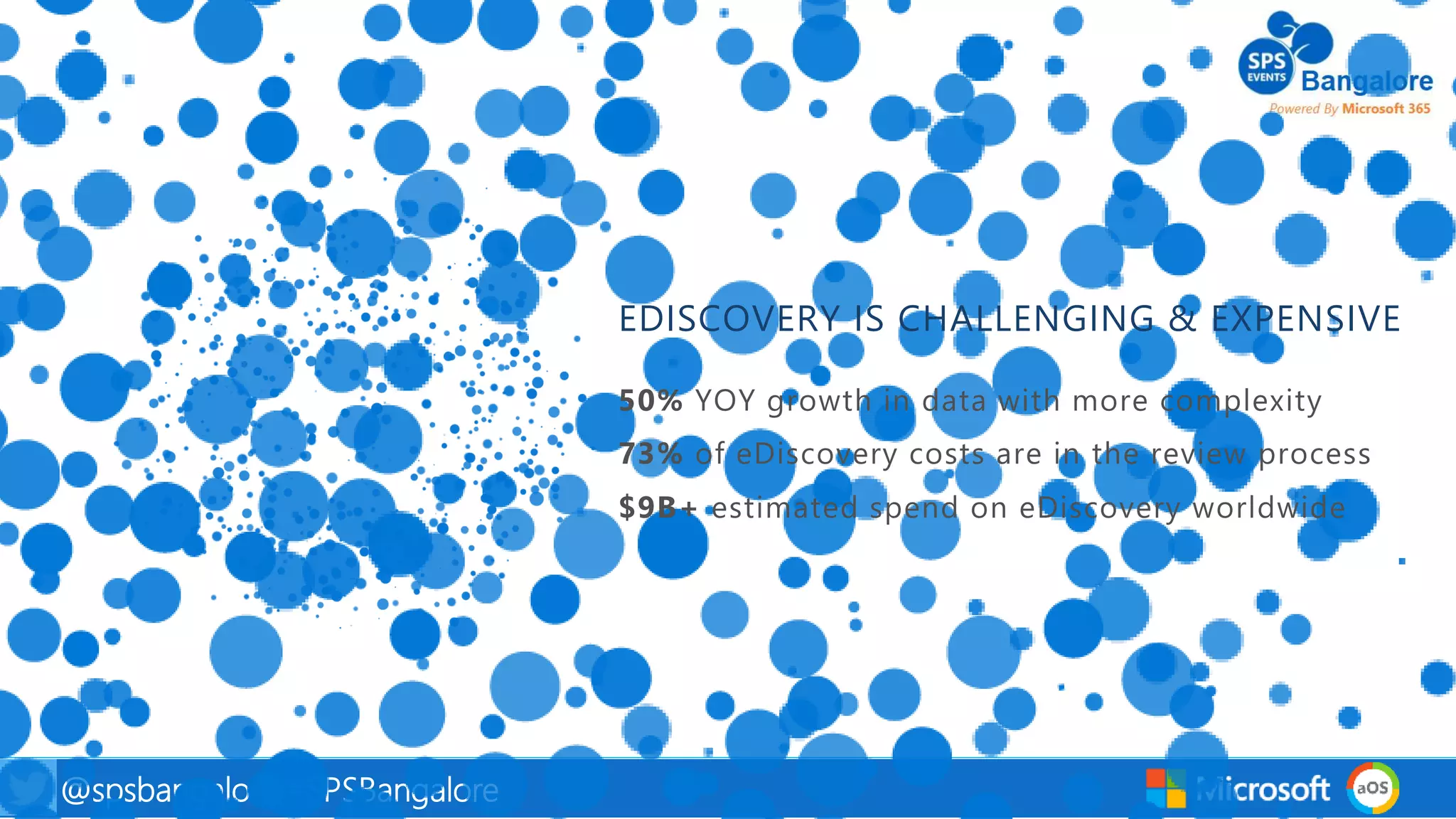
EDISCOVERY IS CHALLENGING & EXPENSIVE
40@spsbangalore #SPSBangalore
EDISCOVERY SCENARIO
41@spsbangalore #SPSBangalore
Utilizing Just eDiscovery Search
42@spsbangalore #SPSBangalore
Leveraging Advanced eDiscovery Predictive Coding
43@spsbangalore #SPSBangalore
Advanced eDiscovery Email Threading and Near Duplication
Documents
Email
44@spsbangalore #SPSBangalore
Looking back, … and Looking forward
45@spsbangalore #SPSBangalore
Key Takeaways
What you should remember from this session
Addition of key features (custodians, search and tagging) make the
solution more complete for a broader set of workflows
Support for a broader set of workflows
Improved indexing limits, error reporting, and permissions model.
Modern look and feel to match the Security & Compliance center.
Engineering improvements & UI modernization
Single eDiscovery workflow to cover data collected from both Office
365 and non Office 365 sources.
Non Office 365 data
Improved customer value through the use of analytics to
reduce time, effort, and cost of doing eDiscovery.
Reduce cost of doing eDiscovery
46@spsbangalore #SPSBangalore
Intelligence powered insights
Reduce total cost of ownership
Protection beyond Office 365
Principles
47@spsbangalore #SPSBangalore
What Microsoft build next
Early thinking on where we’ll be
• Enable iterative workflows on data in-place
• Data visualization to make the process more efficient
• Custodians as a first class concept
Reduce time, cost & effort of eDiscovery
• Better support for personas who do not use our tools today
• Enable collaboration and coordination across a broader set of roles
• Complete workflows for other lifecycle stages of a case
• Make the overall process more repeatable and defensible
Add support for more roles and workflows
• Deeply embed data insights into every step of the workflow
• Make the process easier to manage through reporting and
insights
Intelligence powered insights
48@spsbangalore #SPSBangalore
Learn further -
Reference Links:
Inspired from Insight 2017
https://channel9.msdn.com/events/Ignite/Microsoft-Ignite-Orlando-2017/BRK3133?term=ediscovery&lang-en=true
https://channel9.msdn.com/events/Ignite/Microsoft-Ignite-Orlando-2017/BRK3102?term=ediscovery&lang-en=true
49@spsbangalore #SPSBangalore
Thank You !
Next Session:
Connecting Microsoft Partners Enablement Teams

Building Efficient eDiscovery and Compliance with SharePoint and O365

  • 1.
    1@spsbangalore #SPSBangalore 1st September2018 Building Efficient eDiscovery and Compliance with SharePoint Mitul Rana SharePoint Consultant | CenturyLink
  • 2.
    2@spsbangalore #SPSBangalore@spsbangalore 2 Thisis the Session that you’re looking for … • Overview of eDiscovery in Office 365 • Office 365 eDiscovery workflow • Deep dives and demos • Value proposition • Recap and what comes next Attorneys, Paralegals, … Legal IT, Litigation Support, … Service Providers, LPOs, … IT Professional , System Admins ... IT Business
  • 3.
    3@spsbangalore #SPSBangalore When doyou need eDiscovery? Litigation Investigations Legal compliance e.g. GDPR Criminal Financial Employment Law Anti-Trust Tax Controversies Other
  • 4.
    4@spsbangalore #SPSBangalore How bigof a problem do we have on our hands? How much is this worth? How much truth is there in the allegation?
  • 5.
    5@spsbangalore #SPSBangalore@spsbangalore 5 eDiscoveryReference Model Information Management Identification Preservation Collection Processing Review Analysis Production Presentation
  • 6.
    6@spsbangalore #SPSBangalore Office 365eDiscovery Quickly find what’s relevant and reduce risk with intelligent eDiscovery in Office 365 Reduce effort to preserve data, manage legal holds, and manage data for a case Reduce Complexity Analytics help you organize unstructured data to reduce time and effort involved in reviewing documents Reduce Time, Effort, Cost Case workspace with roles, data permissions, and built in auditing enable different roles & personas to collaborate on a case – across organizations Enable Coordination
  • 7.
    7@spsbangalore #SPSBangalore Office 365eDiscovery is seeing good momentum Snapshot of 5 months from April to August 56% ↑ 53% ↑ 54% ↑
  • 8.
    8@spsbangalore #SPSBangalore eDiscovery modelimplemented in Office 365 Identify and Preserve Data Search for Documents that might be relevant Rank documents by their relevance Organize documents & recognize topics View and tag documents sorted by relevance, similarity Do all of these activities within a case that you create for the new matter
  • 9.
    9@spsbangalore #SPSBangalore Identify andPreserve Data Identify and Preserve Data Search for Documents that might be relevant Rank documents by their relevance Organize documents & recognize topics View and tag documents sorted by relevance, similarity
  • 10.
    10@spsbangalore #SPSBangalore Search fordocuments that might be relevant Identify and Preserve Data Search for Documents that might be relevant Rank documents by their relevance Organize documents & recognize topics View and tag documents sorted by relevance, similarity
  • 11.
    11@spsbangalore #SPSBangalore Use Relevanceto cull data & prioritize documents Identify and Preserve Data Search for Documents that might be relevant Rank documents by their relevance Organize documents & recognize topics View and tag documents sorted by relevance, similarity
  • 12.
    12@spsbangalore #SPSBangalore Organize documentsto improve efficiency of review Identify and Preserve Data Search for Documents that might be relevant Rank documents by their relevance Organize documents & recognize topics View and tag documents sorted by relevance, similarity
  • 13.
    13@spsbangalore #SPSBangalore View andtag documents Identify and Preserve Data Search for Documents that might be relevant Rank documents by their relevance Organize documents & recognize topics View and tag documents sorted by relevance, similarity
  • 14.
    14@spsbangalore #SPSBangalore Deep Dive •Demos • Deep dive into how features work • Special emphasis on new features
  • 15.
    15@spsbangalore #SPSBangalore Progress towardsend-to-end eDiscovery Solution GOAL: Organizations can complete the bulk of their eDiscovery workflows within Office 365 & leverage partners as needed. Administration Hold / custodian management Collection & content processing Search & Analytics Review Manage portfolio of eDiscovery cases Manage holds, data sources & notification workflows Search for and collect content from Office 365 & beyond Analyze content e.g. for early case assessment Manual triage of content & produce relevant documents
  • 16.
    16@spsbangalore #SPSBangalore Progress towardsend-to-end eDiscovery Solution Custodian Management Search O365 to collect data Hold Management Collect data from non O365 data sources Review Production Hold Notifications Enhanced processing (OCR, PST, Media, …) Ad-hoc search & tagging Case Management Auditing Reporting Analytics GOAL: Organizations can complete the bulk of their eDiscovery workflows within Office 365 & leverage partners as needed. Security & PermissionsAdministration Hold / custodian management Collection & content processing Search & Analytics Legend O365 In development (O365) Partial Office 365 PartnerReview Error Reporting
  • 17.
  • 18.
  • 19.
  • 20.
  • 21.
  • 22.
  • 23.
  • 24.
  • 25.
    25@spsbangalore #SPSBangalore Custodian andHold Management Manage holds, data sources & notification workflows Add and remove custodians into a case, and apply legal holds to their data in-place if needed Manage custodians and legal holds Manage legally required workflows around notifications to custodians and their acknowledgments Custodian notifications Search for shared data e.g. SharePoint sites / Teams that custodians have access rights to, and had activities Identify data sources for a custodian Automatically expand legal Holds to shared data locations based on continued activities of custodians Dynamic holds
  • 26.
    26@spsbangalore #SPSBangalore Exchange Mailbox RecoverableItems Deletions Inbox Purges Versions Audits Deleted Items … DiscoveryHold Calendar Logging (5) Message Edited (3) Message deleted (4a) Message “purged” by user (Litigation Hold/ Single Item Recovery) (4b) Message “purged” by user (In-Place Hold) (1) Message delivered (2) Message moved to Deleted Items All indexed; eDiscovery searches cover entire source In-Place Hold: Exchange
  • 27.
    27@spsbangalore #SPSBangalore SharePoint/OD4B Site Pages Versions PreservationHoldLibrary Blogs/Wikis DocumentLibraries Etc. If Versioning is enabled, interim drafts are saved in the Versions folder Deleted items eDiscovery searches cover entire source except the Versions folder and Recycle Bin In-Place Hold: SharePoint & OneDrive
  • 28.
  • 29.
    29@spsbangalore #SPSBangalore Data collectionand content processing Search for and collect content from Office 365 & beyond Content in Office 365 is indexed in real time so that you can search for and collect only the data that you need, and add into a case Targeted collections of data from Office 365 Ingest data collected from non Office 365 sources and add to a case Support for non Office 365 data Additional processing (e.g. OCR) of all data added into a case to extract text and metadata Processing of data All data is indexed within the case to enable ad-hoc searching and filtering Index collected data
  • 30.
    30@spsbangalore #SPSBangalore Data collection:Real time indexing in Office 365 Index Limit Changes (EXO) Limit Old New Maximum depth of attachments 1 30 Maximum number of attachments 10 250 Maximum attachment size 32 MB 150 MB Maximum annotation tokens (WordBreaker) 130,000 2 million Maximum body size in index (mail body + attachments) 1 million characters 67 million Maximum unique tokens in body 10,000 1,000,000 Maximum Excel file size 4 MB 4 MB (also numbers) Index Limit Changes (SPO) Limit Old New Maximum attachment size 32 MB 150 MB Maximum Excel file size 4 MB 4 MB Index limit changes for email in Exchange Online have rolled out Index limit changes for documents in SharePoint Online
  • 31.
  • 32.
    32@spsbangalore #SPSBangalore Analytics inAdvanced eDiscovery Intelligently explore and analyze unstructured data to quickly identify what’s relevant Use predictive coding to train the system to find likely relevant documents and reduce what’s sent to review Minimize Use near duplicate detection to organize the data and email threading to reconstruct email conversations from unstructured data Organize Use Themes to understand the topics represented in the data set Recognize Ad-hoc searches, ability to save search queries, and tag search results with case specific labels Search and Tagging
  • 33.
    33@spsbangalore #SPSBangalore Export options 3rdparty tools to extend the Office 365 eDiscovery process
  • 34.
  • 35.
    35@spsbangalore #SPSBangalore Administration Manage aportfolio of eDiscovery cases Manage a portfolio of eDiscovery cases, and add team members to individual cases Case management Workspace for multiple roles and personas to collaborate upon activities within a case Case workspace Manage roles and security filters for data access Roles, security filters, & compliance boundaries Make Advanced eDiscovery available for government and defense customers Expansion into new markets
  • 36.
    36@spsbangalore #SPSBangalore Segment eDiscoverysearches and results by users as defined by your organization to allow compliance boundaries between business units, geographic location, or other divisions. This also includes full support of Compliance Security Filters for OneDrive for Business. Permissions model for Compliance Boundaries
  • 37.
  • 38.
    38@spsbangalore #SPSBangalore On-premises NOW THERE’SFEWER BOUNDARIES, MORE DATA, MORE COMPLEXITY
  • 39.
  • 40.
  • 41.
  • 42.
  • 43.
    43@spsbangalore #SPSBangalore Advanced eDiscoveryEmail Threading and Near Duplication Documents Email
  • 44.
  • 45.
    45@spsbangalore #SPSBangalore Key Takeaways Whatyou should remember from this session Addition of key features (custodians, search and tagging) make the solution more complete for a broader set of workflows Support for a broader set of workflows Improved indexing limits, error reporting, and permissions model. Modern look and feel to match the Security & Compliance center. Engineering improvements & UI modernization Single eDiscovery workflow to cover data collected from both Office 365 and non Office 365 sources. Non Office 365 data Improved customer value through the use of analytics to reduce time, effort, and cost of doing eDiscovery. Reduce cost of doing eDiscovery
  • 46.
    46@spsbangalore #SPSBangalore Intelligence poweredinsights Reduce total cost of ownership Protection beyond Office 365 Principles
  • 47.
    47@spsbangalore #SPSBangalore What Microsoftbuild next Early thinking on where we’ll be • Enable iterative workflows on data in-place • Data visualization to make the process more efficient • Custodians as a first class concept Reduce time, cost & effort of eDiscovery • Better support for personas who do not use our tools today • Enable collaboration and coordination across a broader set of roles • Complete workflows for other lifecycle stages of a case • Make the overall process more repeatable and defensible Add support for more roles and workflows • Deeply embed data insights into every step of the workflow • Make the process easier to manage through reporting and insights Intelligence powered insights
  • 48.
    48@spsbangalore #SPSBangalore Learn further- Reference Links: Inspired from Insight 2017 https://channel9.msdn.com/events/Ignite/Microsoft-Ignite-Orlando-2017/BRK3133?term=ediscovery&lang-en=true https://channel9.msdn.com/events/Ignite/Microsoft-Ignite-Orlando-2017/BRK3102?term=ediscovery&lang-en=true
  • 49.
    49@spsbangalore #SPSBangalore Thank You! Next Session: Connecting Microsoft Partners Enablement Teams

Editor's Notes

  • #2 Changing SharePoint from storage to productivity suite is the story
  • #3 A productivity suite in cloud , When business started asking for How are we compliant , How are we secure , eDiscovery is high area for Microsoft . investment area , can we become more transparent , You here about ediscovery and want to know how office 365 help to achieve that.
  • #4 When ?? Law Suite ,Tradeable Law Suite , Internal investigation , when Attorney comes to IT and ASK for Data; court asking for supporting information. When it bets the company image .
  • #5 How much big the problem is , A standard process of model
  • #6  A set of repeatable and defaceable sets of workflows and practices. How we can achieve these tasks from Office 365 tool. We want the tool to
  • #7 Easier cheaper and faster, not only running in cloud
  • #8 Data available from apr to aug , 9 % growth at every month
  • #9 Repeatable defensiable and workable workflow , Who Knows about this , A sp site , a Tax matter ,
  • #10 Identify and Preserve Preservation od data GDPR Who are involved , Person ,Location, IP, Process not followed , Data Governance , Retention policy , data is available
  • #11 Search relevant data to case using Keyword search , query search , rank the document , relevance document
  • #12 Rank The document relevance of document
  • #13  We need to find out the documents which are relevant , shorting exercise based on how relevant they are , similar documents, clustering , similarity of documents from each other Organize the unstructured document Reconstruct email thread s ,
  • #14 Tag the document , view and tag document
  • #16 EBRM Model : The EDRM diagram represents a conceptual view of the e-discovery process, not a literal, linear or waterfall model. One may engage in some but not all of the steps outlined in the diagram, or one may elect to carry out the steps in a different order than shown here. The diagram also portrays an iterative process. One might repeat the same step numerous times, honing in on a more precise set of results. One might also cycle back to earlier steps, refining one’s approach as a better understanding of the data emerges or as the nature of the matter changes.
  • #17 New Case of custodian : person responsible to answer all question about data Items in green can be done today
  • #18 Lets Pray for Demo God HR Investigation :: A call to HR :: A Game of Thrones :: Create a Case Open the case (Todays Pieces) 4. Create a Hold and preserve the data New Custodians Tag (shows the screen shots ) (yet to come at public tenant)
  • #29 Collection of data, Add Non Office 365 data Search for office 365 data Identify important set of data for investigation Searches in Advanced ediscovery
  • #30 Policy , data goverance , GDPR data , Data Goverance data , Privacy request , Non office 365 data , consistency standatd set of processs for data, Processing of data extracting metdata, creating indexsx
  • #31 Potential to increase the set of indexed data, Least unindexed data , indexing help in searching
  • #32 Predicting model to run relevance Rank the relevant data Themes for ranking the data profile Apply label to the data