1
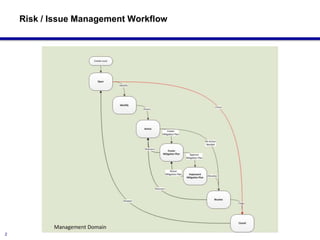
Managing Project Risks
and Issues in JIRA
Michael J Geiser
2
Risk / Issue Management Workflow
3
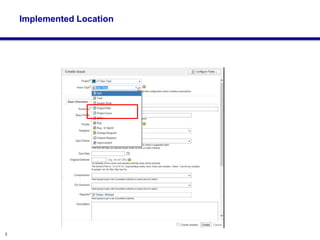
Implemented Location
4
Risk / Issue Management Workflow
• Standard PM definitions: Project Risks have a Likelihood they will
occur and have an project impact; Issue are Risks have occurred.
• Consider managing Risks and Issues in JIRA over other PM software
– Wider adoption across company; all JIRA users have visibility
– Can be assigned to any JIRA user and progress tracked
• Risk and Issue Management is a process that has definable steps and
there is value in ensuring that all groups approach risk management
uniformly
• Continual and organized Risk and Issue Management is a key to
successful projects
• The JIRA Risk Management workflow:
– Standardizes the Risk Management processes
– Ties risks to specific work
– Creates a persistent knowledge base of risks across the entire organization
– Enables transparency into the Risk Management process for all projects
5
Risk / Issue Management Workflow
• Manage Risk in JIRA not in Daptiv:
– Everyone has access to JIRA, few have access to Daptiv for this feature
– JIRA requires no additional training
– Work on Issues and Risks is assignable and reportable in JIRA
• Manage Risk in JIRA not in Rally:
– Rally only has simple statuses limits governance
– A similar system in Rally, with minor drawbacks, is workable but Rally does
not limit transitions by Role or Status
– WIP
• Manage Risk in JIRA not in Excel:
– Visibility across enterprise
– Becomes organizational knowledge
– Persists in company after individuals leave and is discoverable
6
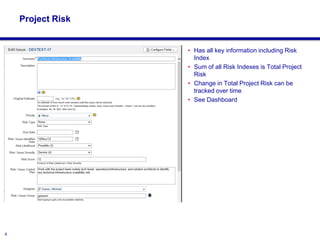
Project Risk
• Has all key information including Risk
Index
• Sum of all Risk Indexes is Total Project
Risk
• Change in Total Project Risk can be
tracked over time
• See Dashboard
7
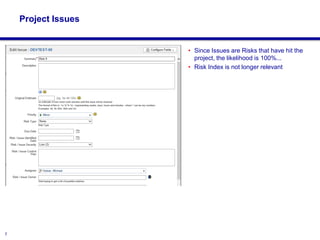
Project Issues
• Since Issues are Risks that have hit the
project, the likelihood is 100%...
• Risk Index is not longer relevant
8
Changes in Next version
• A better implementation is to use one issue type and have a custom attribute
to select if this is a Risk or an Issue
– Converting an Risk to an Issue when defined as types is awkward and some users
have trouble with this;
– Likelihood would be set to “occurred” when moved to a Issue and Risk index goes
away as not relevant
9
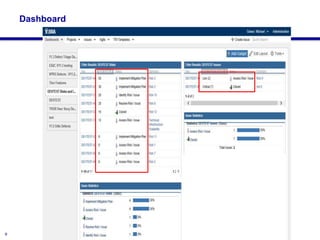
Dashboard

Using JIRA to Manage Project Management Risks and Issues

  • 1.
    1 Managing Project Risks andIssues in JIRA Michael J Geiser
  • 2.
    2 Risk / IssueManagement Workflow
  • 3.
  • 4.
    4 Risk / IssueManagement Workflow • Standard PM definitions: Project Risks have a Likelihood they will occur and have an project impact; Issue are Risks have occurred. • Consider managing Risks and Issues in JIRA over other PM software – Wider adoption across company; all JIRA users have visibility – Can be assigned to any JIRA user and progress tracked • Risk and Issue Management is a process that has definable steps and there is value in ensuring that all groups approach risk management uniformly • Continual and organized Risk and Issue Management is a key to successful projects • The JIRA Risk Management workflow: – Standardizes the Risk Management processes – Ties risks to specific work – Creates a persistent knowledge base of risks across the entire organization – Enables transparency into the Risk Management process for all projects
  • 5.
    5 Risk / IssueManagement Workflow • Manage Risk in JIRA not in Daptiv: – Everyone has access to JIRA, few have access to Daptiv for this feature – JIRA requires no additional training – Work on Issues and Risks is assignable and reportable in JIRA • Manage Risk in JIRA not in Rally: – Rally only has simple statuses limits governance – A similar system in Rally, with minor drawbacks, is workable but Rally does not limit transitions by Role or Status – WIP • Manage Risk in JIRA not in Excel: – Visibility across enterprise – Becomes organizational knowledge – Persists in company after individuals leave and is discoverable
  • 6.
    6 Project Risk • Hasall key information including Risk Index • Sum of all Risk Indexes is Total Project Risk • Change in Total Project Risk can be tracked over time • See Dashboard
  • 7.
    7 Project Issues • SinceIssues are Risks that have hit the project, the likelihood is 100%... • Risk Index is not longer relevant
  • 8.
    8 Changes in Nextversion • A better implementation is to use one issue type and have a custom attribute to select if this is a Risk or an Issue – Converting an Risk to an Issue when defined as types is awkward and some users have trouble with this; – Likelihood would be set to “occurred” when moved to a Issue and Risk index goes away as not relevant
  • 9.