Corda on Azure
Blockchain
Juarez Barbosa Junior
Azure Developer Relations Lead
juarez.junior@Microsoft.com
@juarezjunior
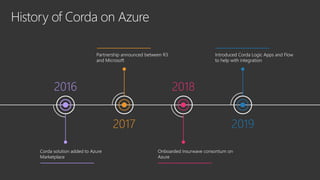
History of Corda on Azure
2016
Corda solution added to Azure
Marketplace
2017
Partnership announced between R3
and Microsoft
2018
Onboarded Insurwave consortium on
Azure
2019
Introduced Corda Logic Apps and Flow
to help with integration
Corda Enterprise (DIY)
- Deployment,
Networking and
Security
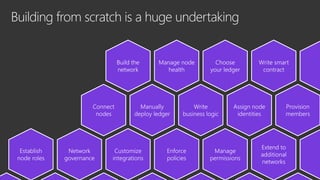
Building from scratch is a huge undertaking
Choose
your ledger
Write smart
contract
Manage node
health
Build the
network
Manually
deploy ledger
Write
business logic
Assign node
identities
Connect
nodes
Provision
members
Network
governance
Extend to
additional
networks
Manage
permissions
Establish
node roles
Enforce
policies
Customize
integrations
Deployment and monitoring of Corda nodes
on Azure
High-level architecture
Describe in detail the automated deployment of Corda nodes along with the design needed to support networking and
security of such an enterprise solution.
We will not go into the details about the Corda Enterprise architecture/design, although we do provide links to the
Corda Enterprise documentation for reference wherever applicable.
Our goal:
• How to deploy Corda network on Microsoft Azure?
• How to integrate Corda with Azure Key Vault?
• How to secure Corda network communication?
Reference Implementation
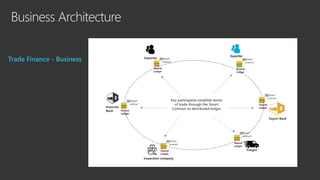
Trade Finance – Business (classic)
A business scenario that involves peer-to-peer transactions in a non-trusted environment is a viable candidate for
Blockchain technology.
Trade Finance enables the exchange of goods. However, the classic process is prone to delays and frauds.
It’s largely manual and lacks transparency.
It is one of the key business scenario for realizing the benefits of Blockchain, which can help reduce the disputes and
errors and bring in transparency by providing a single source of truth.
https://en.wikipedia.org/wiki/Trade_finance
Business Architecture
Trade Finance - Business
Biz Architecture with Blockchain
Trade Finance - Blockchain
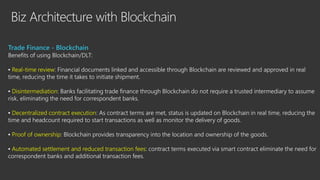
Benefits of using Blockchain/DLT:
▪ Real-time review: Financial documents linked and accessible through Blockchain are reviewed and approved in real
time, reducing the time it takes to initiate shipment.
▪ Disintermediation: Banks facilitating trade finance through Blockchain do not require a trusted intermediary to assume
risk, eliminating the need for correspondent banks.
▪ Decentralized contract execution: As contract terms are met, status is updated on Blockchain in real time, reducing the
time and headcount required to start transactions as well as monitor the delivery of goods.
▪ Proof of ownership: Blockchain provides transparency into the location and ownership of the goods.
▪ Automated settlement and reduced transaction fees: contract terms executed via smart contract eliminate the need for
correspondent banks and additional transaction fees.
Tech Architecture - Cloud
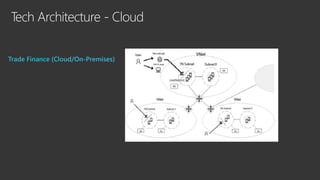
Trade Finance – Cloud Infrastructure and Azure
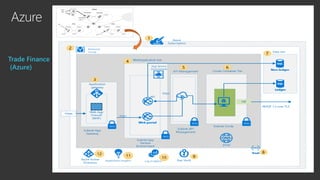
Describe the cloud services needed to enable such a scenario on Microsoft Azure using Corda Enterprise.
The design follows the ‘Multiple Organizations, Private Consortium’ approach (refer here).
It is a true consortium setup where each organization/party has its own setup of Azure services (e.g. AD tenant etc.),
which is provisioned in its own Azure subscription/region.
The Corda node running in respective organization/party setup is enabled for peer-to-peer communication with other
Corda nodes within other organization/party setup.
A conceptual multi-member network architecture follows (refer here for more details).
Tech Architecture - Cloud
Trade Finance (Cloud/On-Premises)
Azure
Trade Finance
(Azure)
Corda
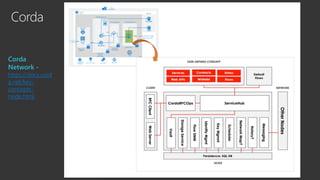
Core Components
▪ A persistence layer for storing data
▪ A network interface for interacting with other nodes
▪ An RPC interface for interacting with the node’s owner
▪ A service hub for allowing the node’s flows to call upon the node’s other services
▪ A CorDapp interface and provider for extending the node by installing CorDapps
https://docs.corda.net/key-concepts-node.html
Corda
Corda
Network -
https://docs.cord
a.net/key-
concepts-
node.html
Azure
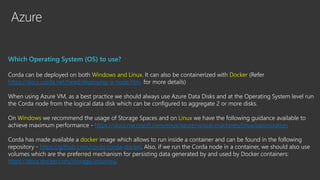
Which Operating System (OS) to use?
Corda can be deployed on both Windows and Linux. It can also be containerized with Docker (Refer
https://docs.corda.net/head/deploying-a-node.htm for more details)
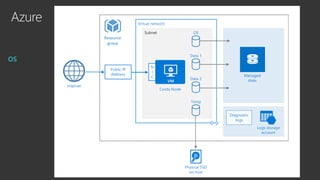
When using Azure VM, as a best practice we should always use Azure Data Disks and at the Operating System level run
the Corda node from the logical data disk which can be configured to aggregate 2 or more disks.
On Windows we recommend the usage of Storage Spaces and on Linux we have the following guidance available to
achieve maximum performance - https://docs.microsoft.com/enus/azure/virtual-machines/linux/optimization
Corda has made available a docker image which allows to run inside a container and can be found in the following
repository - https://github.com/corda/corda-docker. Also, if we run the Corda node in a container, we should also use
volumes which are the preferred mechanism for persisting data generated by and used by Docker containers:
https://docs.docker.com/storage/volumes/
Azure
OS
Azure
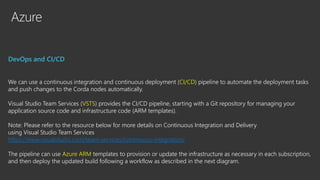
DevOps and CI/CD
We can use a continuous integration and continuous deployment (CI/CD) pipeline to automate the deployment tasks
and push changes to the Corda nodes automatically.
Visual Studio Team Services (VSTS) provides the CI/CD pipeline, starting with a Git repository for managing your
application source code and infrastructure code (ARM templates).
Note: Please refer to the resource below for more details on Continuous Integration and Delivery
using Visual Studio Team Services
https://www.visualstudio.com/team-services/continuous-integration/
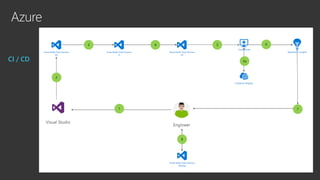
The pipeline can use Azure ARM templates to provision or update the infrastructure as necessary in each subscription,
and then deploy the updated build following a workflow as described in the next diagram.
Azure
CI / CD
Azure
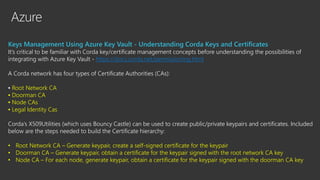
Keys Management Using Azure Key Vault - Understanding Corda Keys and Certificates
It’s critical to be familiar with Corda key/certificate management concepts before understanding the possibilities of
integrating with Azure Key Vault - https://docs.corda.net/permissioning.html
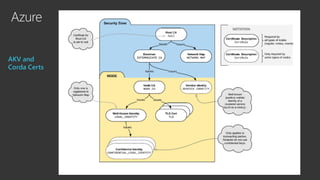
A Corda network has four types of Certificate Authorities (CAs):
▪ Root Network CA
▪ Doorman CA
▪ Node CAs
▪ Legal Identity Cas
Corda’s X509Utilities (which uses Bouncy Castle) can be used to create public/private keypairs and certificates. Included
below are the steps needed to build the Certificate hierarchy:
• Root Network CA – Generate keypair, create a self-signed certificate for the keypair
• Doorman CA – Generate keypair, obtain a certificate for the keypair signed with the root network CA key
• Node CA – For each node, generate keypair, obtain a certificate for the keypair signed with the doorman CA key
Azure
AKV and
Corda Certs
Azure
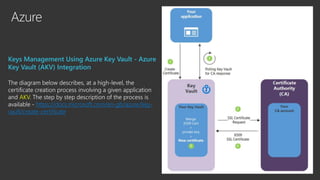
Keys Management Using Azure Key Vault - Azure
Key Vault (AKV) Integration
The diagram below describes, at a high-level, the
certificate creation process involving a given application
and AKV. The step by step description of the process is
available - https://docs.microsoft.com/en-gb/azure/key-
vault/create-certificate
Azure
Securing Corda Network Communication
A Corda network is an authenticated peer-to-peer network of nodes, where each node is a Java Virtual Machine run-
time environment hosting Corda services and executing applications. All communication between nodes is direct, with
TLS-encrypted messages sent over AMQP/1.0.
Each Corda network has a Network Map Service that publishes the IP addresses through which every node on the
network can be reached, along with the identity certificates of those nodes and the services they provide.
More information is available here: https://docs.corda.net/key-concepts-ecosystem.html
On Azure, a Corda network will constitute of corda nodes running within an Azure Virtual Network (VNET) deployed
across multiple Azure subscriptions owned by the respective consortium participants.
We have multiple options to interconnect them. These options take in account subscription limits and best practices for
each of the connectivity methods used to connect corda network nodes across the different VNETs.
Azure
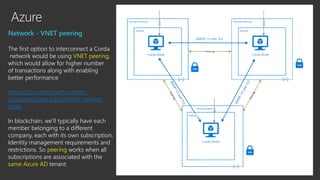
Network - VNET peering
The first option to interconnect a Corda
network would be using VNET peering,
which would allow for higher number
of transactions along with enabling
better performance
https://docs.microsoft.com/en-
us/azure/azure-subscription-service-
limits
In blockchain, we’ll typically have each
member belonging to a different
company, each with its own subscription,
Identity management requirements and
restrictions. So peering works when all
subscriptions are associated with the
same Azure AD tenant.
Azure
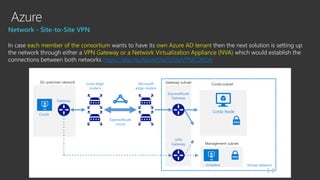
Network - Site-to-Site VPN
In case each member of the consortium wants to have its own Azure AD tenant then the next solution is setting up
the network through either a VPN Gateway or a Network Virtualization Appliance (NVA) which would establish the
connections between both networks https://aka.ms/AzureSiteToSiteVPNCORDA
Azure
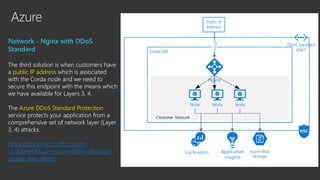
Network - Nginx with DDoS
Standard
The third solution is when customers have
a public IP address which is associated
with the Corda node and we need to
secure this endpoint with the means which
we have available for Layers 3, 4.
The Azure DDoS Standard Protection
service protects your application from a
comprehensive set of network layer (Layer
3, 4) attacks.
https://docs.microsoft.com/en-
us/azure/virtual-machines/linux/tutorial-
secure-web-server
Corda Enterprise with
Azure Blockchain
Service (BaaS)
Announcing Corda Enterprise on Azure Blockchain Service
+
Azure Blockchain Service
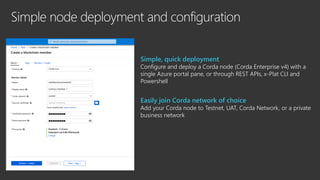
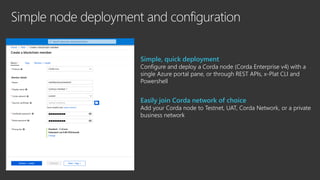
Simple node deployment and configuration
Simple, quick deployment
Configure and deploy a Corda node (Corda Enterprise v4) with a
single Azure portal pane, or through REST APIs, x-Plat CLI and
Powershell
Easily join Corda network of choice
Add your Corda node to Testnet, UAT, Corda Network, or a private
business network
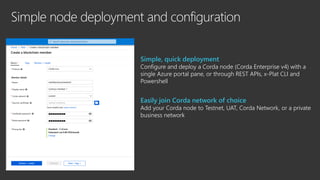
Simple node deployment and configuration
Simple, quick deployment
Configure and deploy a Corda node (Corda Enterprise v4) with a
single Azure portal pane, or through REST APIs, x-Plat CLI and
Powershell
Easily join Corda network of choice
Add your Corda node to Testnet, UAT, Corda Network, or a private
business network
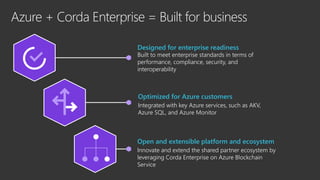
Azure + Corda Enterprise = Built for business
Designed for enterprise readiness
Built to meet enterprise standards in terms of
performance, compliance, security, and
interoperability
Optimized for Azure customers
Integrated with key Azure services, such as AKV,
Azure SQL, and Azure Monitor
Open and extensible platform and ecosystem
Innovate and extend the shared partner ecosystem by
leveraging Corda Enterprise on Azure Blockchain
Service
Simple node deployment and configuration
Simple, quick deployment
Configure and deploy a Corda node (Corda Enterprise v4) with a
single Azure portal pane, or through REST APIs, x-Plat CLI and
Powershell
Easily join Corda network of choice
Add your Corda node to Testnet, UAT, Corda Network, or a private
business network
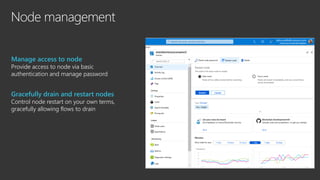
Node management
Manage access to node
Provide access to node via basic
authentication and manage password
Gracefully drain and restart nodes
Control node restart on your own terms,
gracefully allowing flows to drain
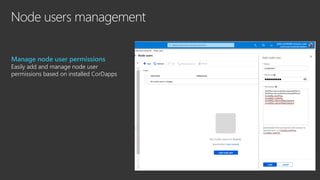
Node users management
Manage node user permissions
Easily add and manage node user
permissions based on installed CorDapps
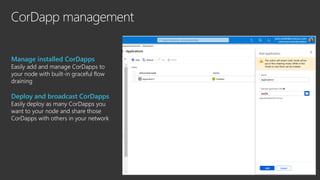
CorDapp management
Manage installed CorDapps
Easily add and manage CorDapps to
your node with built-in graceful flow
draining
Deploy and broadcast CorDapps
Easily deploy as many CorDapps you
want to your node and share those
CorDapps with others in your network
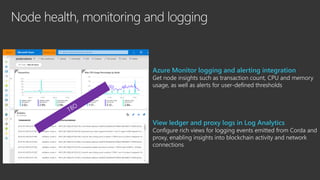
Node health, monitoring and logging
Azure Monitor logging and alerting integration
Get node insights such as transaction count, CPU and memory
usage, as well as alerts for user-defined thresholds
View ledger and proxy logs in Log Analytics
Configure rich views for logging events emitted from Corda and
proxy, enabling insights into blockchain activity and network
connections
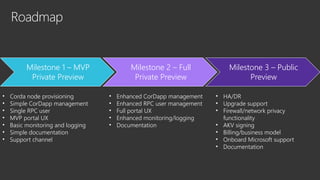
Roadmap
• Corda node provisioning
• Simple CorDapp management
• Single RPC user
• MVP portal UX
• Basic monitoring and logging
• Simple documentation
• Support channel
• Enhanced CorDapp management
• Enhanced RPC user management
• Full portal UX
• Enhanced monitoring/logging
• Documentation
• HA/DR
• Upgrade support
• Firewall/network privacy
functionality
• AKV signing
• Billing/business model
• Onboard Microsoft support
• Documentation
Milestone 1 – MVP
Private Preview
Milestone 2 – Full
Private Preview
Milestone 3 – Public
Preview
All on the best cloud for blockchain
Analysts place us ahead of the competition
Our open, app-focused approach has been
validated by Gartner, Forrester and many other
third-party analysts
We have designed a thoughtful product portfolio
We have spent 4 years developing the most open
and comprehensive blockchain portfolio to simplify
development of this new class of apps
Customers and partners trust us
Businesses have built thousands of blockchain apps
on Azure working with our rich ecosystem of
blockchain partners ​
Join customers and partners building blockchain apps
on Azure
PARTNERS CUSTOMERS
Thank You

Corda on Azure Blockchain

  • 1.
    Corda on Azure Blockchain JuarezBarbosa Junior Azure Developer Relations Lead juarez.junior@Microsoft.com @juarezjunior
  • 2.
    History of Cordaon Azure 2016 Corda solution added to Azure Marketplace 2017 Partnership announced between R3 and Microsoft 2018 Onboarded Insurwave consortium on Azure 2019 Introduced Corda Logic Apps and Flow to help with integration
  • 3.
    Corda Enterprise (DIY) -Deployment, Networking and Security
  • 4.
    Building from scratchis a huge undertaking Choose your ledger Write smart contract Manage node health Build the network Manually deploy ledger Write business logic Assign node identities Connect nodes Provision members Network governance Extend to additional networks Manage permissions Establish node roles Enforce policies Customize integrations
  • 5.
    Deployment and monitoringof Corda nodes on Azure High-level architecture Describe in detail the automated deployment of Corda nodes along with the design needed to support networking and security of such an enterprise solution. We will not go into the details about the Corda Enterprise architecture/design, although we do provide links to the Corda Enterprise documentation for reference wherever applicable. Our goal: • How to deploy Corda network on Microsoft Azure? • How to integrate Corda with Azure Key Vault? • How to secure Corda network communication?
  • 6.
    Reference Implementation Trade Finance– Business (classic) A business scenario that involves peer-to-peer transactions in a non-trusted environment is a viable candidate for Blockchain technology. Trade Finance enables the exchange of goods. However, the classic process is prone to delays and frauds. It’s largely manual and lacks transparency. It is one of the key business scenario for realizing the benefits of Blockchain, which can help reduce the disputes and errors and bring in transparency by providing a single source of truth. https://en.wikipedia.org/wiki/Trade_finance
  • 7.
  • 8.
    Biz Architecture withBlockchain Trade Finance - Blockchain Benefits of using Blockchain/DLT: ▪ Real-time review: Financial documents linked and accessible through Blockchain are reviewed and approved in real time, reducing the time it takes to initiate shipment. ▪ Disintermediation: Banks facilitating trade finance through Blockchain do not require a trusted intermediary to assume risk, eliminating the need for correspondent banks. ▪ Decentralized contract execution: As contract terms are met, status is updated on Blockchain in real time, reducing the time and headcount required to start transactions as well as monitor the delivery of goods. ▪ Proof of ownership: Blockchain provides transparency into the location and ownership of the goods. ▪ Automated settlement and reduced transaction fees: contract terms executed via smart contract eliminate the need for correspondent banks and additional transaction fees.
  • 9.
    Tech Architecture -Cloud Trade Finance – Cloud Infrastructure and Azure Describe the cloud services needed to enable such a scenario on Microsoft Azure using Corda Enterprise. The design follows the ‘Multiple Organizations, Private Consortium’ approach (refer here). It is a true consortium setup where each organization/party has its own setup of Azure services (e.g. AD tenant etc.), which is provisioned in its own Azure subscription/region. The Corda node running in respective organization/party setup is enabled for peer-to-peer communication with other Corda nodes within other organization/party setup. A conceptual multi-member network architecture follows (refer here for more details).
  • 10.
    Tech Architecture -Cloud Trade Finance (Cloud/On-Premises)
  • 11.
  • 12.
    Corda Core Components ▪ Apersistence layer for storing data ▪ A network interface for interacting with other nodes ▪ An RPC interface for interacting with the node’s owner ▪ A service hub for allowing the node’s flows to call upon the node’s other services ▪ A CorDapp interface and provider for extending the node by installing CorDapps https://docs.corda.net/key-concepts-node.html
  • 13.
  • 14.
    Azure Which Operating System(OS) to use? Corda can be deployed on both Windows and Linux. It can also be containerized with Docker (Refer https://docs.corda.net/head/deploying-a-node.htm for more details) When using Azure VM, as a best practice we should always use Azure Data Disks and at the Operating System level run the Corda node from the logical data disk which can be configured to aggregate 2 or more disks. On Windows we recommend the usage of Storage Spaces and on Linux we have the following guidance available to achieve maximum performance - https://docs.microsoft.com/enus/azure/virtual-machines/linux/optimization Corda has made available a docker image which allows to run inside a container and can be found in the following repository - https://github.com/corda/corda-docker. Also, if we run the Corda node in a container, we should also use volumes which are the preferred mechanism for persisting data generated by and used by Docker containers: https://docs.docker.com/storage/volumes/
  • 15.
  • 16.
    Azure DevOps and CI/CD Wecan use a continuous integration and continuous deployment (CI/CD) pipeline to automate the deployment tasks and push changes to the Corda nodes automatically. Visual Studio Team Services (VSTS) provides the CI/CD pipeline, starting with a Git repository for managing your application source code and infrastructure code (ARM templates). Note: Please refer to the resource below for more details on Continuous Integration and Delivery using Visual Studio Team Services https://www.visualstudio.com/team-services/continuous-integration/ The pipeline can use Azure ARM templates to provision or update the infrastructure as necessary in each subscription, and then deploy the updated build following a workflow as described in the next diagram.
  • 17.
  • 18.
    Azure Keys Management UsingAzure Key Vault - Understanding Corda Keys and Certificates It’s critical to be familiar with Corda key/certificate management concepts before understanding the possibilities of integrating with Azure Key Vault - https://docs.corda.net/permissioning.html A Corda network has four types of Certificate Authorities (CAs): ▪ Root Network CA ▪ Doorman CA ▪ Node CAs ▪ Legal Identity Cas Corda’s X509Utilities (which uses Bouncy Castle) can be used to create public/private keypairs and certificates. Included below are the steps needed to build the Certificate hierarchy: • Root Network CA – Generate keypair, create a self-signed certificate for the keypair • Doorman CA – Generate keypair, obtain a certificate for the keypair signed with the root network CA key • Node CA – For each node, generate keypair, obtain a certificate for the keypair signed with the doorman CA key
  • 19.
  • 20.
    Azure Keys Management UsingAzure Key Vault - Azure Key Vault (AKV) Integration The diagram below describes, at a high-level, the certificate creation process involving a given application and AKV. The step by step description of the process is available - https://docs.microsoft.com/en-gb/azure/key- vault/create-certificate
  • 21.
    Azure Securing Corda NetworkCommunication A Corda network is an authenticated peer-to-peer network of nodes, where each node is a Java Virtual Machine run- time environment hosting Corda services and executing applications. All communication between nodes is direct, with TLS-encrypted messages sent over AMQP/1.0. Each Corda network has a Network Map Service that publishes the IP addresses through which every node on the network can be reached, along with the identity certificates of those nodes and the services they provide. More information is available here: https://docs.corda.net/key-concepts-ecosystem.html On Azure, a Corda network will constitute of corda nodes running within an Azure Virtual Network (VNET) deployed across multiple Azure subscriptions owned by the respective consortium participants. We have multiple options to interconnect them. These options take in account subscription limits and best practices for each of the connectivity methods used to connect corda network nodes across the different VNETs.
  • 22.
    Azure Network - VNETpeering The first option to interconnect a Corda network would be using VNET peering, which would allow for higher number of transactions along with enabling better performance https://docs.microsoft.com/en- us/azure/azure-subscription-service- limits In blockchain, we’ll typically have each member belonging to a different company, each with its own subscription, Identity management requirements and restrictions. So peering works when all subscriptions are associated with the same Azure AD tenant.
  • 23.
    Azure Network - Site-to-SiteVPN In case each member of the consortium wants to have its own Azure AD tenant then the next solution is setting up the network through either a VPN Gateway or a Network Virtualization Appliance (NVA) which would establish the connections between both networks https://aka.ms/AzureSiteToSiteVPNCORDA
  • 24.
    Azure Network - Nginxwith DDoS Standard The third solution is when customers have a public IP address which is associated with the Corda node and we need to secure this endpoint with the means which we have available for Layers 3, 4. The Azure DDoS Standard Protection service protects your application from a comprehensive set of network layer (Layer 3, 4) attacks. https://docs.microsoft.com/en- us/azure/virtual-machines/linux/tutorial- secure-web-server
  • 25.
    Corda Enterprise with AzureBlockchain Service (BaaS)
  • 26.
    Announcing Corda Enterpriseon Azure Blockchain Service + Azure Blockchain Service
  • 27.
    Simple node deploymentand configuration Simple, quick deployment Configure and deploy a Corda node (Corda Enterprise v4) with a single Azure portal pane, or through REST APIs, x-Plat CLI and Powershell Easily join Corda network of choice Add your Corda node to Testnet, UAT, Corda Network, or a private business network
  • 28.
    Simple node deploymentand configuration Simple, quick deployment Configure and deploy a Corda node (Corda Enterprise v4) with a single Azure portal pane, or through REST APIs, x-Plat CLI and Powershell Easily join Corda network of choice Add your Corda node to Testnet, UAT, Corda Network, or a private business network
  • 29.
    Azure + CordaEnterprise = Built for business Designed for enterprise readiness Built to meet enterprise standards in terms of performance, compliance, security, and interoperability Optimized for Azure customers Integrated with key Azure services, such as AKV, Azure SQL, and Azure Monitor Open and extensible platform and ecosystem Innovate and extend the shared partner ecosystem by leveraging Corda Enterprise on Azure Blockchain Service
  • 30.
    Simple node deploymentand configuration Simple, quick deployment Configure and deploy a Corda node (Corda Enterprise v4) with a single Azure portal pane, or through REST APIs, x-Plat CLI and Powershell Easily join Corda network of choice Add your Corda node to Testnet, UAT, Corda Network, or a private business network
  • 31.
    Node management Manage accessto node Provide access to node via basic authentication and manage password Gracefully drain and restart nodes Control node restart on your own terms, gracefully allowing flows to drain
  • 32.
    Node users management Managenode user permissions Easily add and manage node user permissions based on installed CorDapps
  • 33.
    CorDapp management Manage installedCorDapps Easily add and manage CorDapps to your node with built-in graceful flow draining Deploy and broadcast CorDapps Easily deploy as many CorDapps you want to your node and share those CorDapps with others in your network
  • 34.
    Node health, monitoringand logging Azure Monitor logging and alerting integration Get node insights such as transaction count, CPU and memory usage, as well as alerts for user-defined thresholds View ledger and proxy logs in Log Analytics Configure rich views for logging events emitted from Corda and proxy, enabling insights into blockchain activity and network connections
  • 35.
    Roadmap • Corda nodeprovisioning • Simple CorDapp management • Single RPC user • MVP portal UX • Basic monitoring and logging • Simple documentation • Support channel • Enhanced CorDapp management • Enhanced RPC user management • Full portal UX • Enhanced monitoring/logging • Documentation • HA/DR • Upgrade support • Firewall/network privacy functionality • AKV signing • Billing/business model • Onboard Microsoft support • Documentation Milestone 1 – MVP Private Preview Milestone 2 – Full Private Preview Milestone 3 – Public Preview
  • 36.
    All on thebest cloud for blockchain Analysts place us ahead of the competition Our open, app-focused approach has been validated by Gartner, Forrester and many other third-party analysts We have designed a thoughtful product portfolio We have spent 4 years developing the most open and comprehensive blockchain portfolio to simplify development of this new class of apps Customers and partners trust us Businesses have built thousands of blockchain apps on Azure working with our rich ecosystem of blockchain partners ​
  • 37.
    Join customers andpartners building blockchain apps on Azure PARTNERS CUSTOMERS
  • 38.