NavalPlan: Open Web Planning
Diego Pino García
dpino@igalia.com

LinuxTag 2011, 12th May
NavalPlan: Open Web Plannig
Contents index

Summary:
–

Introduction.

–

General overview.

–

Main features.

–

Technology.

–

Community.

–

Q & A.

2
NavalPlan: Open Web Planning

What's NavalPlan?

3
NavalPlan: Open Web Planning

NavalPlan is a project management
tool that helps you to plan, monitor
and control any kind of project

4
NavalPlan: Open Web Planning

Commissioned by Xunta de Galicia (regional
administration body).
●

Goal: provide the Galician shipyards a tool that could
help them to manage their production processes.
●

Scenario: Lots of open projects, interdependency of
resources between projects. What's your status? How
can you make the best of your resources?
●

The solution proposed was NavalPlan, a Gantt planning
tool similar to MS Project, but that also helps you to
monitor and control the status of your company.
●

●

Developers: Igalia & Wireless Galicia.

5
NavalPlan: Open Web Planning

Two key ideas:
Web: Runs on the browser. Based on
HTML/CSS/Javascript. No plugins required.
●

●

Open: Free Software. AGPL.

In the coming months NavalPlan will be renamed to LibrePlan.

6
NavalPlan: Open Web Planning

General Overview

7
Main screens

Divided in 5 main screens:
Company view. Global view with all the scheduled
projects.
●

Project scheduling (Gantt view). Create dependencies,
allocate resources, define progress, etc.
●

Project details (WBS, Work Breakdown Structure).
Create projects, add tasks, decorate tasks with criteria,
labels, progress, etc.
●

Resources load. Graph with load per resource
(underused, fully loaded, overloaded).
●

Advance allocation. Fine-grained allocation for every
task.
●

8
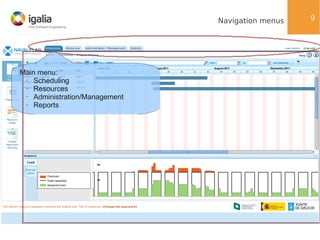
Navigation menus

Main menu:
•
Scheduling
•
Resources
•
Administration/Management
•
Reports

9
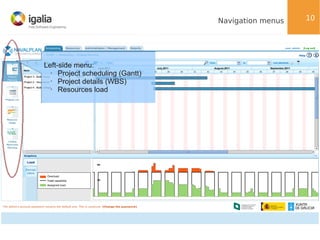
Navigation menus

Left-side menu:
•
Project scheduling (Gantt)
•
Project details (WBS)
•
Resources load

10
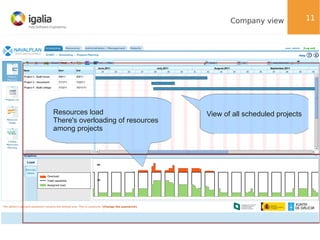
Company view

Resources load
There's overloading of resources
among projects

View of all scheduled projects

11
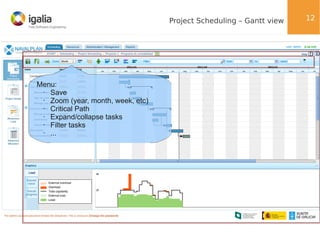
Project Scheduling – Gantt view

Menu:
•
Save
•
Zoom (year, month, week, etc)
•
Critical Path
•
Expand/collapse tasks
•
Filter tasks
•
...

12
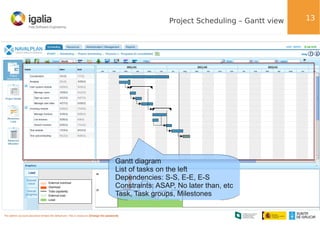
Project Scheduling – Gantt view

Gantt diagram
List of tasks on the left
Dependencies: S-S, E-E, E-S
Constraints: ASAP, No later than, etc
Task, Task groups, Milestones

13
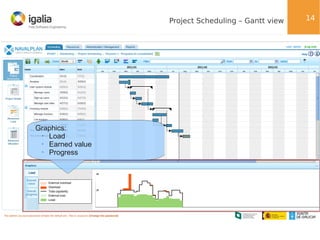
Project Scheduling – Gantt view

Graphics:
•
Load
•
Earned value
•
Progress

14
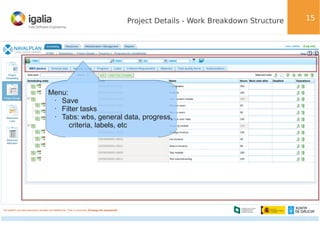
Project Details - Work Breakdown Structure

Menu:
•
Save
•
Filter tasks
•
Tabs: wbs, general data, progress,
criteria, labels, etc

15
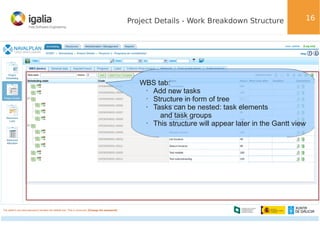
Project Details - Work Breakdown Structure

16

WBS tab:
•
Add new tasks
•
Structure in form of tree
•
Tasks can be nested: task elements
and task groups
•
This structure will appear later in the Gantt view
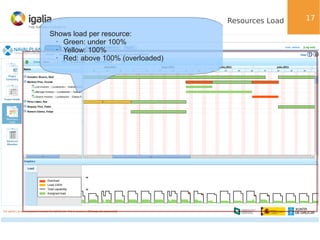
Resources Load
Shows load per resource:
•
Green: under 100%
•
Yellow: 100%
•
Red: above 100% (overloaded)

17
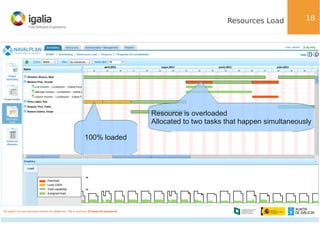
Resources Load

18

Resource is overloaded
Allocated to two tasks that happen simultaneously
100% loaded
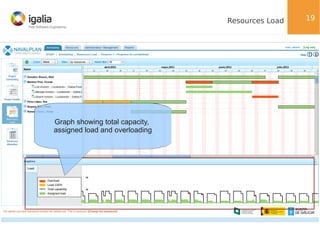
Resources Load

Graph showing total capacity,
assigned load and overloading

19
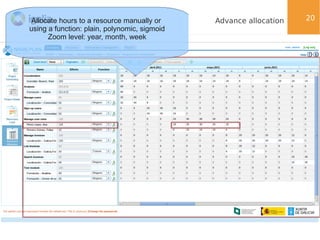
Allocate hours to a resource manually or
using a function: plain, polynomic, sigmoid
Zoom level: year, month, week

Advance allocation

20
NavalPlan: Open Web Planning

Main Features

21
Main Features

Allocation of resources based on dynamic roles
(criteria).
●

●

Powerful management of calendars.

Company view: projects and resources are not
something isolated.
●

●

Resource balancing.

●

Monitor and control.

●

Integration with third-parties.

22
Dynamic roles

Roles: a need that a resource satisfies. For instance:
Work category: plumber, programmer; Location: Madrid,
Berlin.
●

Roles are dynamic. A person can stay half of the year
in Madrid and the other half in Berlin.
●

Tasks can expressed in terms of roles: “To complete this
task I need a plumber and a carpenter”.
●

●

●

Generic allocation vs specific allocation
Specific. A specific resource is allocated to a task.

Generic. Resources that satisfy roles are allocated to
a task (1 plumber and 1 painter).
●

23
Dynamic roles – Basic use case

●

24

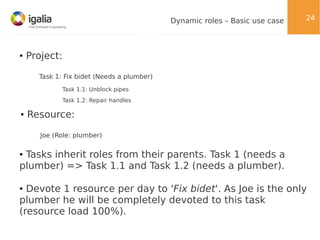
Project:
Task 1: Fix bidet (Needs a plumber)
Task 1.1: Unblock pipes
Task 1.2: Repair handles

●

Resource:
Joe (Role: plumber)

Tasks inherit roles from their parents. Task 1 (needs a
plumber) => Task 1.1 and Task 1.2 (needs a plumber).
●

Devote 1 resource per day to 'Fix bidet'. As Joe is the only
plumber he will be completely devoted to this task
(resource load 100%).
●
Powerful management of calendars

●

Calendars are highly customizable:

–Derive

calendars (Spain → Galicia).

–Define

number of working hours per day in a week.

–Define

exceptions (public holidays, holidays, etc).

●

Resources have calendars. Tasks have calendars.

Calendars play an important role when allocating
resources to a task.
●

●

Example:

–Resource
–Allocate

“Peter” has Spain calendar (16-20 May bank holidays).

“Peter” to task “Paint walls”.

25
Company view

●

A global view of the status of the company

–Resources
–A

are shared among projects.

resource can be overloaded due to another project (external overload).

–Apart

from detecting overload it's possible to know what project is causing
external overload (via 'Resource usage' view).
●

Example:

–A

construction company which builds houses.

–Projects
–Joe

overlap in time.

and Peter are also employees there.

26
Resource balancing

●

NavalPlan is good at spoting overloading of resources.

●

Ways to solve overloading:

Manually (assign another resource, shift task so
resource is no longer overloaded).
●

●

Global reassignment:
●

Recalculate resource allocations.

●

Useful when adding new resources.

Generic allocation: Distributes allocation among all
workers that have less hours.
●

27
Progress, costs control and integration

●

Progress:

–Progress

tracking (percentage, units, subcontracted)

–Progress

graphs (compared different types of progress)

–Deviations
●

Control of costs and reports:

–Work
–Cost
●

and delay summary view.

reports: real imputed hours.
associated to worker.

Integration:

–Integration

with third parties via web-services (RESTful API)

–Integration

with other NavalPlan instances.

28
Technology & Architecture

●

3-tier application: UI, Business logic, Persistence.

●

UI: ZK 3.6.X & YUI. Plan to migrate to ZK5 CE soon.

●

Business logic: Java 1.6/Spring (MVC pattern).

Persistence: Hibernate. PostgreSQL & MySQL
throughly tested.
●

●

Web-services layer: Apache CXF.

Other technologies: Jasper Reports, Timeplot,
JfreeChart, Jgraph.
●

29
Community

Completely developed in the open (wiki, git, mailinglists, bugzilla, etc).
●

In the process of establishing an association for
governing the project.
●

Association will be initially composed of representatives
of public administration and current developing
companies, but it'll be open to everyone.
●

Training courses from user perspective and developing
perspective.
●

Some public administration bodies and private
companies are joining.
●

30
Community

●

Website: www.navalplan.org

SourceForge: www.sourceforge.net/projects/navalplan
(git, mailing-lists)
●

●

Wiki: http://wiki.navalplan.org/

●

Bugzilla: http://bugs.navalplan.org

●

IRC: freenode/#navalplan (6-8 people)

●

Social channels:

●

Identi.ca: http://identi.ca/navalplan

●

Twitter: www.twitter.com/navalplan

31
NavalPlan: Open Web Planning

Q&A
Thanks!

32

NavalPlan: The Open Web Project Planning Tool (LinuxTag 2011)

  • 1.
    NavalPlan: Open WebPlanning Diego Pino García dpino@igalia.com LinuxTag 2011, 12th May
  • 2.
    NavalPlan: Open WebPlannig Contents index Summary: – Introduction. – General overview. – Main features. – Technology. – Community. – Q & A. 2
  • 3.
    NavalPlan: Open WebPlanning What's NavalPlan? 3
  • 4.
    NavalPlan: Open WebPlanning NavalPlan is a project management tool that helps you to plan, monitor and control any kind of project 4
  • 5.
    NavalPlan: Open WebPlanning Commissioned by Xunta de Galicia (regional administration body). ● Goal: provide the Galician shipyards a tool that could help them to manage their production processes. ● Scenario: Lots of open projects, interdependency of resources between projects. What's your status? How can you make the best of your resources? ● The solution proposed was NavalPlan, a Gantt planning tool similar to MS Project, but that also helps you to monitor and control the status of your company. ● ● Developers: Igalia & Wireless Galicia. 5
  • 6.
    NavalPlan: Open WebPlanning Two key ideas: Web: Runs on the browser. Based on HTML/CSS/Javascript. No plugins required. ● ● Open: Free Software. AGPL. In the coming months NavalPlan will be renamed to LibrePlan. 6
  • 7.
    NavalPlan: Open WebPlanning General Overview 7
  • 8.
    Main screens Divided in5 main screens: Company view. Global view with all the scheduled projects. ● Project scheduling (Gantt view). Create dependencies, allocate resources, define progress, etc. ● Project details (WBS, Work Breakdown Structure). Create projects, add tasks, decorate tasks with criteria, labels, progress, etc. ● Resources load. Graph with load per resource (underused, fully loaded, overloaded). ● Advance allocation. Fine-grained allocation for every task. ● 8
  • 9.
  • 10.
    Navigation menus Left-side menu: • Projectscheduling (Gantt) • Project details (WBS) • Resources load 10
  • 11.
    Company view Resources load There'soverloading of resources among projects View of all scheduled projects 11
  • 12.
    Project Scheduling –Gantt view Menu: • Save • Zoom (year, month, week, etc) • Critical Path • Expand/collapse tasks • Filter tasks • ... 12
  • 13.
    Project Scheduling –Gantt view Gantt diagram List of tasks on the left Dependencies: S-S, E-E, E-S Constraints: ASAP, No later than, etc Task, Task groups, Milestones 13
  • 14.
    Project Scheduling –Gantt view Graphics: • Load • Earned value • Progress 14
  • 15.
    Project Details -Work Breakdown Structure Menu: • Save • Filter tasks • Tabs: wbs, general data, progress, criteria, labels, etc 15
  • 16.
    Project Details -Work Breakdown Structure 16 WBS tab: • Add new tasks • Structure in form of tree • Tasks can be nested: task elements and task groups • This structure will appear later in the Gantt view
  • 17.
    Resources Load Shows loadper resource: • Green: under 100% • Yellow: 100% • Red: above 100% (overloaded) 17
  • 18.
    Resources Load 18 Resource isoverloaded Allocated to two tasks that happen simultaneously 100% loaded
  • 19.
    Resources Load Graph showingtotal capacity, assigned load and overloading 19
  • 20.
    Allocate hours toa resource manually or using a function: plain, polynomic, sigmoid Zoom level: year, month, week Advance allocation 20
  • 21.
    NavalPlan: Open WebPlanning Main Features 21
  • 22.
    Main Features Allocation ofresources based on dynamic roles (criteria). ● ● Powerful management of calendars. Company view: projects and resources are not something isolated. ● ● Resource balancing. ● Monitor and control. ● Integration with third-parties. 22
  • 23.
    Dynamic roles Roles: aneed that a resource satisfies. For instance: Work category: plumber, programmer; Location: Madrid, Berlin. ● Roles are dynamic. A person can stay half of the year in Madrid and the other half in Berlin. ● Tasks can expressed in terms of roles: “To complete this task I need a plumber and a carpenter”. ● ● ● Generic allocation vs specific allocation Specific. A specific resource is allocated to a task. Generic. Resources that satisfy roles are allocated to a task (1 plumber and 1 painter). ● 23
  • 24.
    Dynamic roles –Basic use case ● 24 Project: Task 1: Fix bidet (Needs a plumber) Task 1.1: Unblock pipes Task 1.2: Repair handles ● Resource: Joe (Role: plumber) Tasks inherit roles from their parents. Task 1 (needs a plumber) => Task 1.1 and Task 1.2 (needs a plumber). ● Devote 1 resource per day to 'Fix bidet'. As Joe is the only plumber he will be completely devoted to this task (resource load 100%). ●
  • 25.
    Powerful management ofcalendars ● Calendars are highly customizable: –Derive calendars (Spain → Galicia). –Define number of working hours per day in a week. –Define exceptions (public holidays, holidays, etc). ● Resources have calendars. Tasks have calendars. Calendars play an important role when allocating resources to a task. ● ● Example: –Resource –Allocate “Peter” has Spain calendar (16-20 May bank holidays). “Peter” to task “Paint walls”. 25
  • 26.
    Company view ● A globalview of the status of the company –Resources –A are shared among projects. resource can be overloaded due to another project (external overload). –Apart from detecting overload it's possible to know what project is causing external overload (via 'Resource usage' view). ● Example: –A construction company which builds houses. –Projects –Joe overlap in time. and Peter are also employees there. 26
  • 27.
    Resource balancing ● NavalPlan isgood at spoting overloading of resources. ● Ways to solve overloading: Manually (assign another resource, shift task so resource is no longer overloaded). ● ● Global reassignment: ● Recalculate resource allocations. ● Useful when adding new resources. Generic allocation: Distributes allocation among all workers that have less hours. ● 27
  • 28.
    Progress, costs controland integration ● Progress: –Progress tracking (percentage, units, subcontracted) –Progress graphs (compared different types of progress) –Deviations ● Control of costs and reports: –Work –Cost ● and delay summary view. reports: real imputed hours. associated to worker. Integration: –Integration with third parties via web-services (RESTful API) –Integration with other NavalPlan instances. 28
  • 29.
    Technology & Architecture ● 3-tierapplication: UI, Business logic, Persistence. ● UI: ZK 3.6.X & YUI. Plan to migrate to ZK5 CE soon. ● Business logic: Java 1.6/Spring (MVC pattern). Persistence: Hibernate. PostgreSQL & MySQL throughly tested. ● ● Web-services layer: Apache CXF. Other technologies: Jasper Reports, Timeplot, JfreeChart, Jgraph. ● 29
  • 30.
    Community Completely developed inthe open (wiki, git, mailinglists, bugzilla, etc). ● In the process of establishing an association for governing the project. ● Association will be initially composed of representatives of public administration and current developing companies, but it'll be open to everyone. ● Training courses from user perspective and developing perspective. ● Some public administration bodies and private companies are joining. ● 30
  • 31.
    Community ● Website: www.navalplan.org SourceForge: www.sourceforge.net/projects/navalplan (git,mailing-lists) ● ● Wiki: http://wiki.navalplan.org/ ● Bugzilla: http://bugs.navalplan.org ● IRC: freenode/#navalplan (6-8 people) ● Social channels: ● Identi.ca: http://identi.ca/navalplan ● Twitter: www.twitter.com/navalplan 31
  • 32.
    NavalPlan: Open WebPlanning Q&A Thanks! 32