Firebird’s big databasesDmitry Kuzmenko,kdv@ib-aid.comIBSurgeon
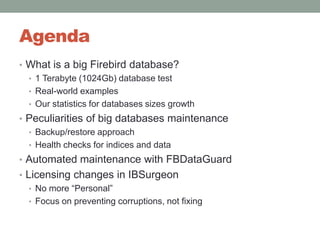
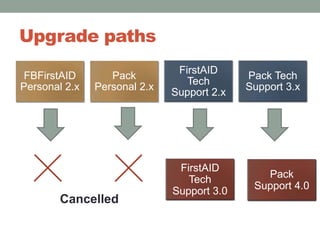
AgendaWhat is a big Firebird database?1 Terabyte (1024Gb) database testReal-world examplesOur statistics for databases sizes growthPeculiarities of big databases maintenanceBackup/restore approachHealth checks for indices and dataAutomated maintenance with FBDataGuardLicensing changes in IBSurgeonNo more “Personal”Focus on preventing corruptions, not fixing
What is a big Firebird database?
What is a big Firebird database? Pre-history2005 IBSurgeon found 37 gigabytes per table limit in Firebird 1.0-1.5 and all InterBase version2006Firebird 2.0 fixes that limit, and introduces nbackupAVARDA (ERP) shows working with the 100gb database2009 – IBSurgeon created 1 TB Firebird databasehttp://www.ib-aid.com/articles/item104
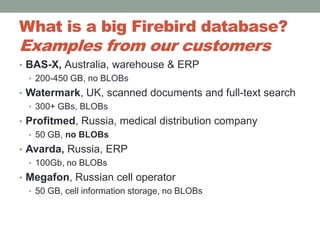
What is a big Firebird database? Examples from our customersBAS-X, Australia, warehouse & ERP200-450 GB, no BLOBsWatermark, UK, scanned documents and full-text search300+ GBs, BLOBsProfitmed, Russia, medical distribution company50 GB, no BLOBs Avarda, Russia, ERP100Gb, no BLOBsMegafon, Russian cell operator50 GB, cell information storage, no BLOBs
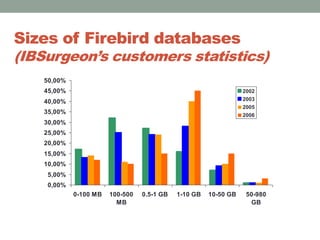
Sizes of Firebird databases (IBSurgeon’s customers statistics)
Peculiarities of big databases maintenance
Usually Firebird database draws simplyFirebirdbecause it is believed as something simple.
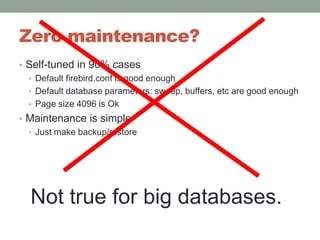
Zero maintenance?Self-tuned in 90% casesDefault firebird.conf is good enoughDefault database parameters: sweep, buffers, etc are good enoughPage size 4096 is OkMaintenance is simpleJust make backup/restoreNot true for big databases.
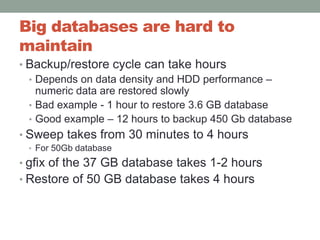
Big databases are hard to maintainBackup/restore cycle can take hoursDepends on data density and HDD performance – numeric data are restored slowlyBad example - 1 hour to restore 3.6 GB databaseGood example – 12 hours to backup 450 Gb databaseSweep takes from 30 minutes to 4 hoursFor 50Gb databasegfix of the 37 GB database takes 1-2 hoursRestore of 50 GB database takes 4 hours
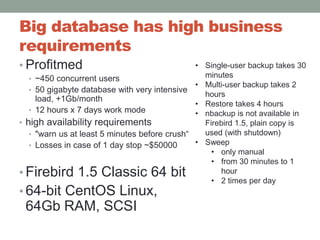
Big database has high business requirementsProfitmed~450 concurrent users50 gigabyte database with very intensive load, +1Gb/month12 hours x 7 days work modehigh availability requirements"warn us at least 5 minutes before crush“Losses in case of 1 day stop ~$50000 Firebird 1.5 Classic 64 bit64-bit CentOS Linux, 64Gb RAM, SCSI Single-user backup takes 30 minutes
Multi-user backup takes 2 hours
Restore takes 4 hours
nbackup is not available in Firebird 1.5, plain copy is used (with shutdown)
Sweep
only manual
from 30 minutes to 1 hour
2 times per dayHow to deal with such big database and fulfill heavy business requirements?We need to look into details of Firebird database
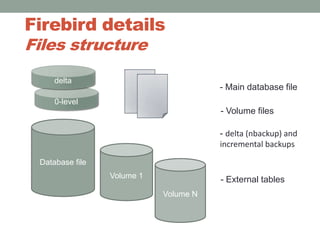
Firebird detailsFiles structuredelta- Main database file0-level- Volume filesDatabase file- delta (nbackup) andincremental backupsVolume 1Volume N- External tables
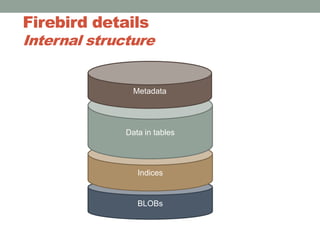
Firebird detailsInternal structureMetadataData in tablesIndicesBLOBs
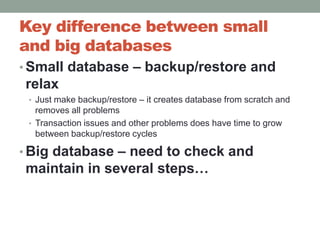
Key difference between small and big databasesSmall database – backup/restore and relaxJust make backup/restore – it creates database from scratch and removes all problemsTransaction issues and other problems does have time to grow between backup/restore cyclesBig database – need to check and maintain in several steps…
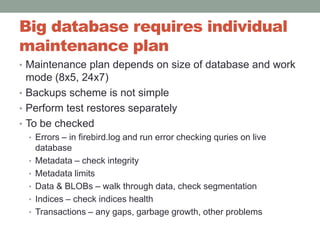
Big database requires individual maintenance plan Maintenance plan depends on size of database and work mode (8x5, 24x7)Backups scheme is not simplePerform test restores separatelyTo be checkedErrors – in firebird.log and run error checking quries on live databaseMetadata – check integrity Metadata limitsData & BLOBs – walk through data, check segmentationIndices – check indices healthTransactions – any gaps, garbage growth, other problems
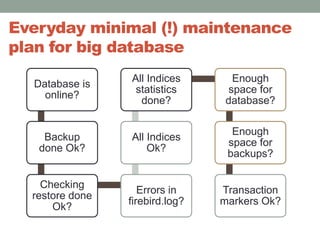
Everyday minimal (!) maintenance plan for big database
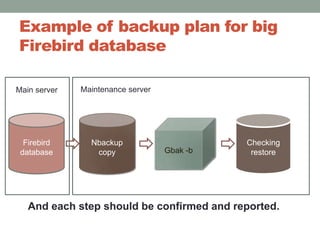
Example of backup plan for big Firebird databaseMaintenance serverMain serverFirebird databaseNbackup copyChecking restoreGbak-bAnd each step should be confirmed and reported.
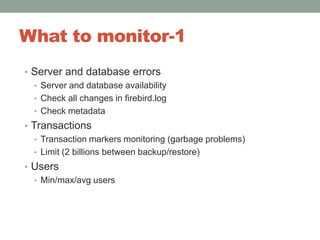
What to monitor-1Server and database errorsServer and database availabilityCheck all changes in firebird.logCheck metadataTransactionsTransaction markers monitoring (garbage problems)Limit (2 billions between backup/restore)UsersMin/max/avg users
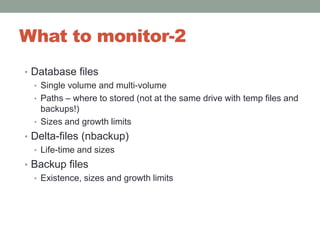
What to monitor-2Database filesSingle volume and multi-volumePaths – where to stored (not at the same drive with temp files and backups!)Sizes and growth limitsDelta-files (nbackup)Life-time and sizesBackup filesExistence, sizes and growth limits
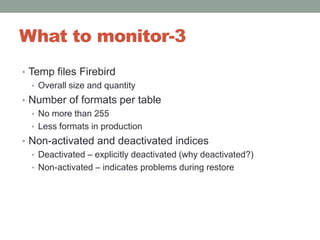
What to monitor-3Temp files FirebirdOverall size and quantityNumber of formats per tableNo more than 255Less formats in productionNon-activated and deactivated indicesDeactivated – explicitly deactivated (why deactivated?)Non-activated – indicates problems during restore
What to monitor-4Periodical statistics (gstat)Firebird server versionLatest patches are recommendedFirebird installation sizeFirebird logs size and paths
Maintenance-1BackupsRevolver (days, week, month copies) backupsBackup depthChecking restore (need to check results)Growth prognosis (if not enough space, backup should be canceled)Control backup time (too long backup indicates problems)
Maintenance-2IndicesRecalculate indices statisticsSelected or excludedCheck index status – active/in-active/non-activatedCheck physical index health
Maintenance-3Validate database with gfixDon’t forget to shutdown databaseAnalysis (includingfirebird.log)Metadata validationCheck important system tablesFirebird.log maintenanceWhen log becomes very big, copy it to backup log filesAnd some more things….
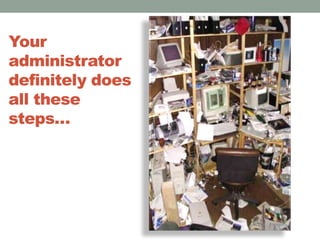
Your administrator definitely does all these steps…
…especially in remote offices.
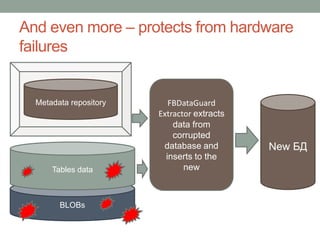
And this is not enough!Business wants to have warranty  - even if hardware fails data should be recovered!
That’s why we created FBDATAguard
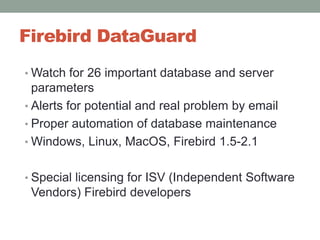
FBDataGuarddoes all above things…Watches database files, volumes, deltas, performs and checks backups in the right wayVerifies metadata, data and indicesWatches for errors, limits and wrong versionsSends alerts and recommendations

Firebird's Big Databases (in English)

  • 1.
    Firebird’s big databasesDmitryKuzmenko,kdv@ib-aid.comIBSurgeon
  • 2.
    AgendaWhat is abig Firebird database?1 Terabyte (1024Gb) database testReal-world examplesOur statistics for databases sizes growthPeculiarities of big databases maintenanceBackup/restore approachHealth checks for indices and dataAutomated maintenance with FBDataGuardLicensing changes in IBSurgeonNo more “Personal”Focus on preventing corruptions, not fixing
  • 3.
    What is abig Firebird database?
  • 4.
    What is abig Firebird database? Pre-history2005 IBSurgeon found 37 gigabytes per table limit in Firebird 1.0-1.5 and all InterBase version2006Firebird 2.0 fixes that limit, and introduces nbackupAVARDA (ERP) shows working with the 100gb database2009 – IBSurgeon created 1 TB Firebird databasehttp://www.ib-aid.com/articles/item104
  • 5.
    What is abig Firebird database? Examples from our customersBAS-X, Australia, warehouse & ERP200-450 GB, no BLOBsWatermark, UK, scanned documents and full-text search300+ GBs, BLOBsProfitmed, Russia, medical distribution company50 GB, no BLOBs Avarda, Russia, ERP100Gb, no BLOBsMegafon, Russian cell operator50 GB, cell information storage, no BLOBs
  • 6.
    Sizes of Firebirddatabases (IBSurgeon’s customers statistics)
  • 7.
    Peculiarities of bigdatabases maintenance
  • 8.
    Usually Firebird databasedraws simplyFirebirdbecause it is believed as something simple.
  • 9.
    Zero maintenance?Self-tuned in90% casesDefault firebird.conf is good enoughDefault database parameters: sweep, buffers, etc are good enoughPage size 4096 is OkMaintenance is simpleJust make backup/restoreNot true for big databases.
  • 10.
    Big databases arehard to maintainBackup/restore cycle can take hoursDepends on data density and HDD performance – numeric data are restored slowlyBad example - 1 hour to restore 3.6 GB databaseGood example – 12 hours to backup 450 Gb databaseSweep takes from 30 minutes to 4 hoursFor 50Gb databasegfix of the 37 GB database takes 1-2 hoursRestore of 50 GB database takes 4 hours
  • 11.
    Big database hashigh business requirementsProfitmed~450 concurrent users50 gigabyte database with very intensive load, +1Gb/month12 hours x 7 days work modehigh availability requirements"warn us at least 5 minutes before crush“Losses in case of 1 day stop ~$50000 Firebird 1.5 Classic 64 bit64-bit CentOS Linux, 64Gb RAM, SCSI Single-user backup takes 30 minutes
  • 12.
  • 13.
  • 14.
    nbackup is notavailable in Firebird 1.5, plain copy is used (with shutdown)
  • 15.
  • 16.
  • 17.
  • 18.
    2 times perdayHow to deal with such big database and fulfill heavy business requirements?We need to look into details of Firebird database
  • 19.
    Firebird detailsFiles structuredelta-Main database file0-level- Volume filesDatabase file- delta (nbackup) andincremental backupsVolume 1Volume N- External tables
  • 20.
  • 21.
    Key difference betweensmall and big databasesSmall database – backup/restore and relaxJust make backup/restore – it creates database from scratch and removes all problemsTransaction issues and other problems does have time to grow between backup/restore cyclesBig database – need to check and maintain in several steps…
  • 22.
    Big database requiresindividual maintenance plan Maintenance plan depends on size of database and work mode (8x5, 24x7)Backups scheme is not simplePerform test restores separatelyTo be checkedErrors – in firebird.log and run error checking quries on live databaseMetadata – check integrity Metadata limitsData & BLOBs – walk through data, check segmentationIndices – check indices healthTransactions – any gaps, garbage growth, other problems
  • 23.
    Everyday minimal (!)maintenance plan for big database
  • 24.
    Example of backupplan for big Firebird databaseMaintenance serverMain serverFirebird databaseNbackup copyChecking restoreGbak-bAnd each step should be confirmed and reported.
  • 25.
    What to monitor-1Serverand database errorsServer and database availabilityCheck all changes in firebird.logCheck metadataTransactionsTransaction markers monitoring (garbage problems)Limit (2 billions between backup/restore)UsersMin/max/avg users
  • 26.
    What to monitor-2DatabasefilesSingle volume and multi-volumePaths – where to stored (not at the same drive with temp files and backups!)Sizes and growth limitsDelta-files (nbackup)Life-time and sizesBackup filesExistence, sizes and growth limits
  • 27.
    What to monitor-3Tempfiles FirebirdOverall size and quantityNumber of formats per tableNo more than 255Less formats in productionNon-activated and deactivated indicesDeactivated – explicitly deactivated (why deactivated?)Non-activated – indicates problems during restore
  • 28.
    What to monitor-4Periodicalstatistics (gstat)Firebird server versionLatest patches are recommendedFirebird installation sizeFirebird logs size and paths
  • 29.
    Maintenance-1BackupsRevolver (days, week,month copies) backupsBackup depthChecking restore (need to check results)Growth prognosis (if not enough space, backup should be canceled)Control backup time (too long backup indicates problems)
  • 30.
    Maintenance-2IndicesRecalculate indices statisticsSelectedor excludedCheck index status – active/in-active/non-activatedCheck physical index health
  • 31.
    Maintenance-3Validate database withgfixDon’t forget to shutdown databaseAnalysis (includingfirebird.log)Metadata validationCheck important system tablesFirebird.log maintenanceWhen log becomes very big, copy it to backup log filesAnd some more things….
  • 32.
    Your administrator definitelydoes all these steps…
  • 33.
    …especially in remoteoffices.
  • 34.
    And this isnot enough!Business wants to have warranty - even if hardware fails data should be recovered!
  • 35.
    That’s why wecreated FBDATAguard
  • 36.
    FBDataGuarddoes all abovethings…Watches database files, volumes, deltas, performs and checks backups in the right wayVerifies metadata, data and indicesWatches for errors, limits and wrong versionsSends alerts and recommendations