How Firebird transactions work
Alexey Kovyazin
www.IBSurgeon.com
2
• Tools and consulting
• Platinum Sponsor of Firebird
Foundation
• Founded in 2002: 12 years of
Firebird and InterBase recoveries
and consulting
• Based in Moscow, Russia
3Agenda
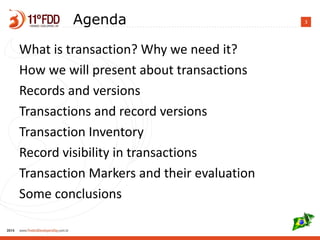
What is transaction? Why we need it?
How we will present about transactions
Records and versions
Transactions and record versions
Transaction Inventory
Record visibility in transactions
Transaction Markers and their evaluation
Some conclusions
4What is transaction?
• Transaction as a general concept of any dynamic system
• “Classic” example
• begin
• -- move money from account1 to account2
• Decrease account1
• Increase account2
• end – commit/rollback
• Transaction Managers
5Database transaction
definition
• a unit of work performed against a database, and treated
in a coherent and reliable way independent of other
transactions.
• A database transaction, by definition, must be atomic,
consistent, isolated and durable
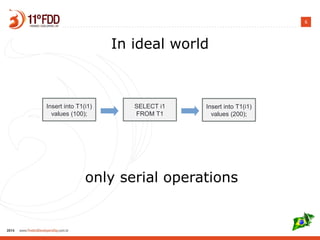
6
In ideal world
only serial operations
Insert into T1(i1)
values (100);
SELECT i1
FROM T1
Insert into T1(i1)
values (200);
7
8
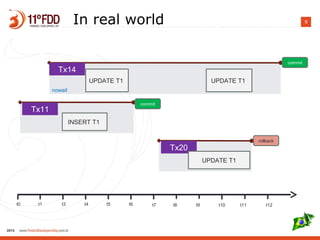
9In real world
t0 t1 t3 t4 t5 t6 t7 t8 t9 t10 t11 t12
Tx11
INSERT T1
Tx14
commit
UPDATE T1
nowait
commit
Tx20
UPDATE T1
rollback
UPDATE T1
10The ultimate purpose of
transaction:
• Concurrent execution of operations should lead to the
exactly the same result as sequental execution of
operations.
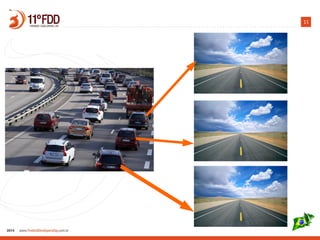
For each [snapshot] transaction Firebird engine should
maintain a stable view of the database.
In simple words: each transaction should run as the only
transaction.
11
12
How Firebird does implement stable
view for each transactions?
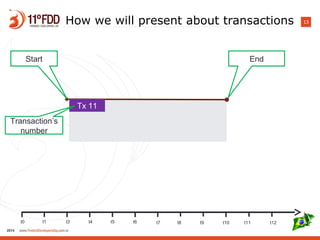
13How we will present about transactions
t0 t1 t3 t4 t5 t6 t7 t8 t9 t10 t11 t12
Tx 11
Transaction’s
number
Start End
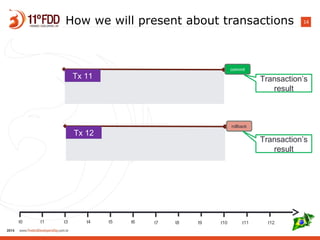
14How we will present about transactions
t0 t1 t3 t4 t5 t6 t7 t8 t9 t10 t11 t12
Tx 11
commit
Tx 12
rollback
Transaction’s
result
Transaction’s
result
15How we will present about transactions
Tx 11
commit
snapshot
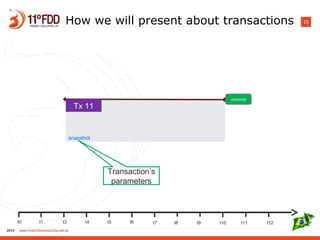
Transaction’s
parameters
t0 t1 t3 t4 t5 t6 t7 t8 t9 t10 t11 t12
16How we will present about transactions
t0 t1 t3 t4 t5 t6 t7 t8 t9 t10 t11 t12
Tx 11
commit
Insert into T1(i1)
values (100);
snapshot
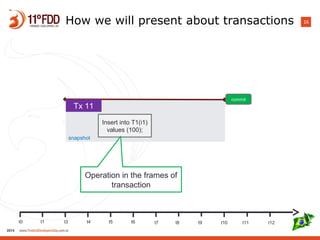
Operation in the frames of
transaction
17How we will present about transactions
t0 t1 t3 t4 t5 t6 t7 t8 t9 t10 t11 t12
Tx 11
commit
Insert into T1(i1)
values (100);
SELECT i1
FROM T1
snapshot
i1
100
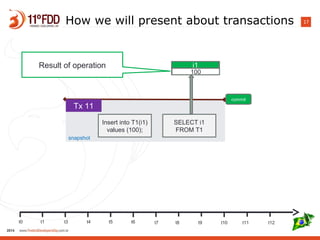
Result of operation
18
Now let's start...
Basics your [probably] know:
- Everything in the database is done within transaction
- Each transaction gets own incremental number
1, 2, 3, … etc
- Firebird is a multi-version engine (each record in Firebird
can have versions)
19
Record version concept is a key thing to
understand transactions' work in Firebird.
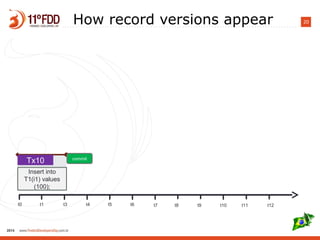
20How record versions appear
t0 t1 t3 t4 t5 t6 t7 t8 t9 t10 t11 t12
Tx10 commit
Insert into
T1(i1) values
(100);
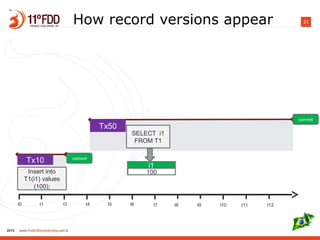
21How record versions appear
t0 t1 t3 t4 t5 t6 t7 t8 t9 t10 t11 t12
Tx10 commit
Insert into
T1(i1) values
(100);
Tx50
commit
SELECT i1
FROM T1
i1
100
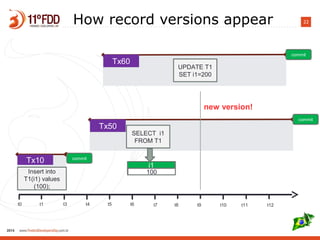
22How record versions appear
t0 t1 t3 t4 t5 t6 t7 t8 t9 t10 t11 t12
Tx10 commit
Insert into
T1(i1) values
(100);
Tx50
commit
SELECT i1
FROM T1
i1
100
Tx60
commit
UPDATE T1
SET i1=200
new version!
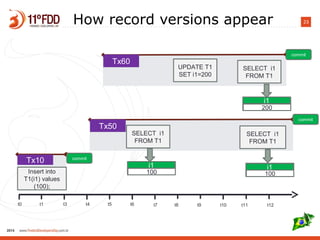
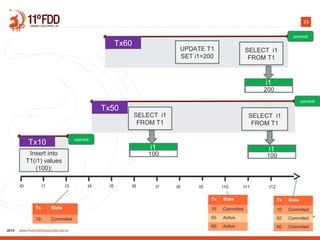
23How record versions appear
t0 t1 t3 t4 t5 t6 t7 t8 t9 t10 t11 t12
Tx10 commit
Insert into
T1(i1) values
(100);
Tx50
commit
SELECT i1
FROM T1
i1
100
SELECT i1
FROM T1
Tx60
commit
UPDATE T1
SET i1=200
SELECT i1
FROM T1
i1
100
i1
200
24How it works?
25
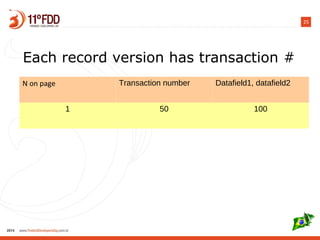
Each record version has transaction #
N on page Transaction number Datafield1, datafield2
1 50 100
26
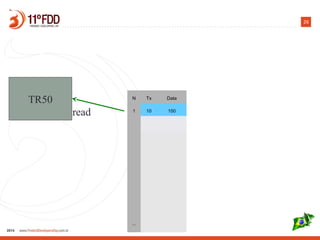
TR50
read
N Tx Data
1 10 100
...
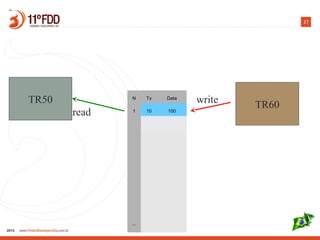
27
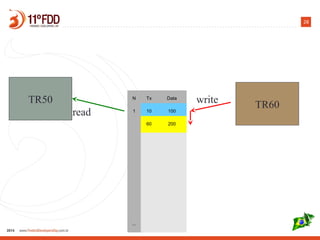
N Tx Data
1 10 100
...
TR50 TR60write
read
28
N Tx Data
1 10 100
60 200
...
TR50 TR60
read
write
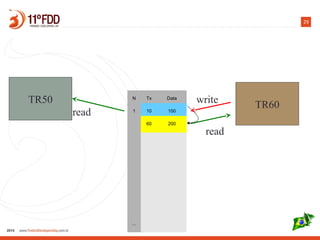
29
TR50 TR60
read
N Tx Data
1 10 100
60 200
...
read
write
30
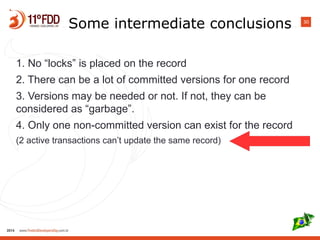
Some intermediate conclusions
1. No “locks” is placed on the record
2. There can be a lot of committed versions for one record
3. Versions may be needed or not. If not, they can be
considered as “garbage”.
4. Only one non-committed version can exist for the record
(2 active transactions can’t update the same record)
31
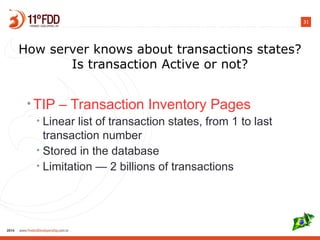
How server knows about transactions states?
Is transaction Active or not?
• TIP – Transaction Inventory Pages
• Linear list of transaction states, from 1 to last
transaction number
• Stored in the database
• Limitation — 2 billions of transactions
32
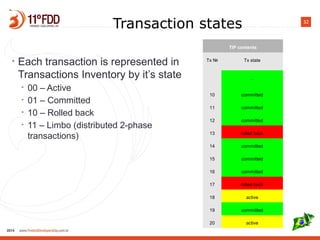
Transaction states
• Each transaction is represented in
Transactions Inventory by it’s state
• 00 – Active
• 01 – Committed
• 10 – Rolled back
• 11 – Limbo (distributed 2-phase
transactions)
TIP contents
Tx № Tx state
…
10 committed
11 committed
12 committed
13 rolled back
14 committed
15 committed
16 committed
17 rolled back
18 active
19 committed
20 active
33
t0 t1 t3 t4 t5 t6 t7 t8 t9 t10 t11 t12
Tx10 commit
Insert into
T1(i1) values
(100);
Tx50
commit
SELECT i1
FROM T1
i1
100
SELECT i1
FROM T1
Tx60
commit
UPDATE T1
SET i1=200
SELECT i1
FROM T1
i1
100
i1
200
TIP
Tx State
10 Commited
Tx State
10 Commited
50 Active
60 Active
Tx State
10 Commited
50 Commited
60 Commited
34
Transaction isolation levels
35
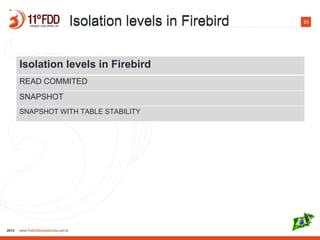
Isolation levels in Firebird
READ COMMITED
SNAPSHOT
SNAPSHOT WITH TABLE STABILITY
Isolation levels in FirebirdIsolation levels in Firebird
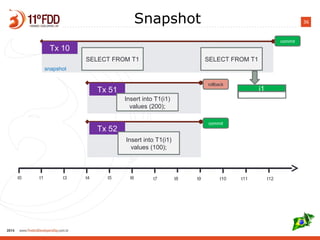
36Snapshot
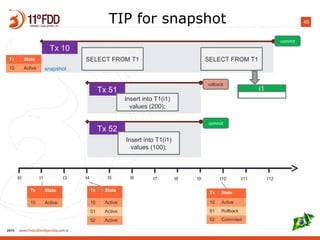
t0 t1 t3 t4 t5 t6 t7 t8 t9 t10 t11 t12
Tx 52
commit
Insert into T1(i1)
values (100);
Tx 51
rollback
Insert into T1(i1)
values (200);
Tx 10
commit
SELECT FROM T1 SELECT FROM T1
snapshot
i1
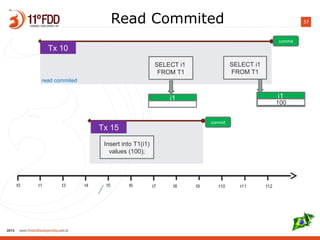
37Read Commited
t0 t1 t3 t4 t5 t6 t7 t8 t9 t10 t11 t12
Tx 15
commit
Insert into T1(i1)
values (100);
Tx 10
commit
SELECT i1
FROM T1
SELECT i1
FROM T1
read commited
i1
100
i1
38
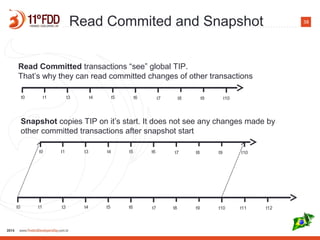
t0 t1 t3 t4 t5 t6 t7 t8 t9 t10
Read Committed transactions “see” global TIP.
That’s why they can read committed changes of other transactions
t0 t1 t3 t4 t5 t6 t7 t8 t9 t10 t11 t12
t0 t1 t3 t4 t5 t6 t7 t8 t9 t10
Snapshot copies TIP on it’s start. It does not see any changes made by
other committed transactions after snapshot start
Read Commited and Snapshot
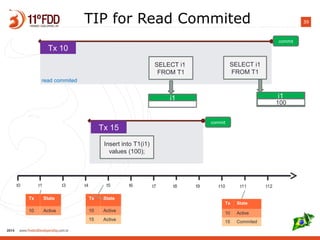
39TIP for Read Commited
t0 t1 t3 t4 t5 t6 t7 t8 t9 t10 t11 t12
Tx 15
commit
Insert into T1(i1)
values (100);
Tx 10
commit
SELECT i1
FROM T1
SELECT i1
FROM T1
read commited
i1
100
i1
Tx State
10 Active
Tx State
10 Active
15 Active
Tx State
10 Active
15 Commited
40
t0 t1 t3 t4 t5 t6 t7 t8 t9 t10 t11 t12
Tx 52
commit
Insert into T1(i1)
values (100);
Tx 51
rollback
Insert into T1(i1)
values (200);
Tx 10
commit
SELECT FROM T1 SELECT FROM T1
snapshot
i1
Tx State
10 Active
Tx State
10 Active
51 Active
52 Active
Tx State
10 Active
51 Rollback
52 Commited
Tx State
10 Active
TIP for snapshot
41
Each transaction can see:
• Own created records and versions
• Insert, Update, Delete
• If it is Read Committed, it can see every changes that
was made by committed transactions, because it looks
into global TIP
• If it is Snapshot, it can see own changes and record
versions commited to the moment of its start, because it
looks into it’s own copy of TIP
42
Record versions visibility
43
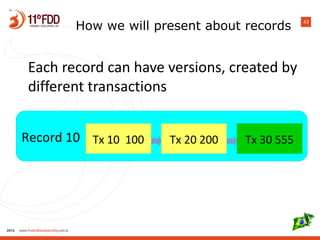
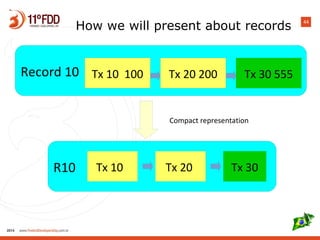
How we will present about records
Each record can have versions, created by
different transactions
Record 10 Tx 10 100 Tx 20 200 Tx 30 555
44
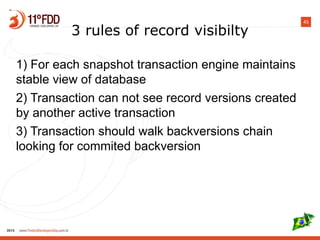
Record 10 Tx 10 100 Tx 20 200 Tx 30 555
R10 Tx 10 Tx 20 Tx 30
Compact representation
How we will present about records
45
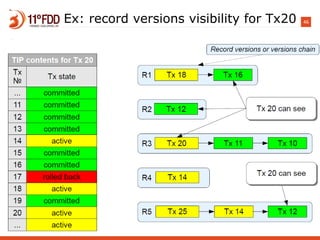
3 rules of record visibilty
1) For each snapshot transaction engine maintains
stable view of database
2) Transaction can not see record versions created
by another active transaction
3) Transaction should walk backversions chain
looking for commited backversion
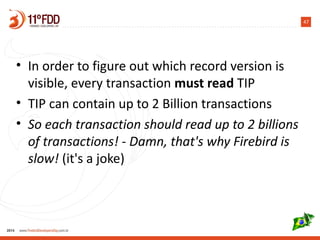
46Ex: record versions visibility for Tx20
47
• In order to figure out which record version is
visible, every transaction must read TIP
• TIP can contain up to 2 Billion transactions
• So each transaction should read up to 2 billions
of transactions! - Damn, that's why Firebird is
slow! (it's a joke)
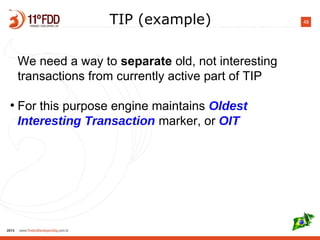
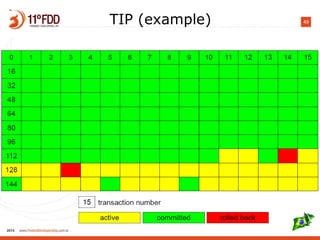
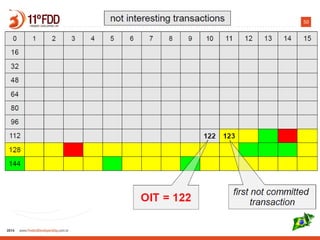
48TIP (example)
We need a way to separate old, not interesting
transactions from currently active part of TIP
●
For this purpose engine maintains Oldest
Interesting Transaction marker, or OIT
49TIP (example)
50
51
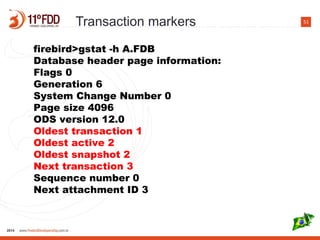
firebird>gstat -h A.FDB
Database header page information:
Flags 0
Generation 6
System Change Number 0
Page size 4096
ODS version 12.0
Oldest transaction 1
Oldest active 2
Oldest snapshot 2
Next transaction 3
Sequence number 0
Next attachment ID 3
Transaction markers
52
4 markers
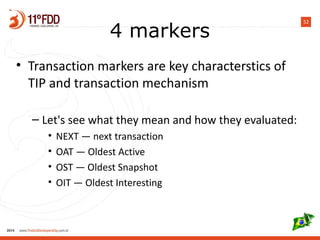
• Transaction markers are key characterstics of
TIP and transaction mechanism
– Let's see what they mean and how they evaluated:
• NEXT — next transaction
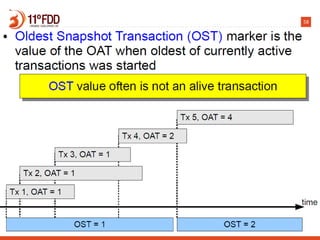
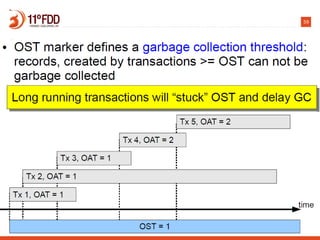
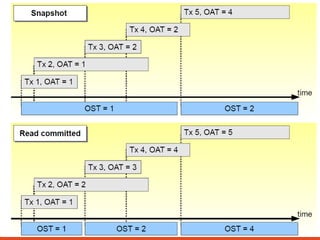
• OAT — Oldest Active
• OST — Oldest Snapshot
• OIT — Oldest Interesting
53
NEXT
• NEXT is the simplest — it's the most recent
transaction
• NEXT number is written on header page
54
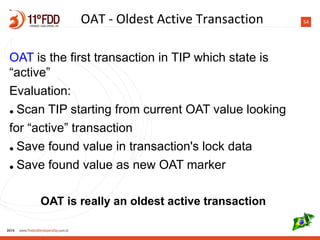
OAT is the first transaction in TIP which state is
“active”
Evaluation:
● Scan TIP starting from current OAT value looking
for “active” transaction
● Save found value in transaction's lock data
● Save found value as new OAT marker
OAT is really an oldest active transaction
OAT - Oldest Active Transaction
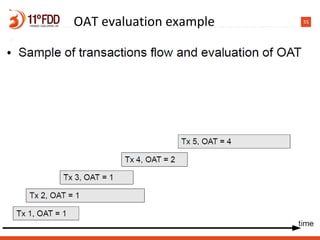
55OAT evaluation example
56
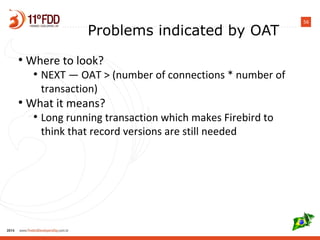
Problems indicated by OAT
●
Where to look?
●
NEXT — OAT > (number of connections * number of
transaction)
●
What it means?
●
Long running transaction which makes Firebird to
think that record versions are still needed
57
58
59
60
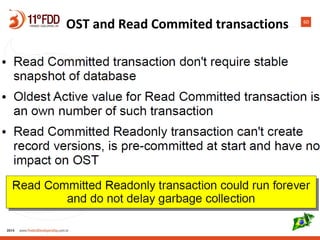
OST and Read Commited transactions
61
62
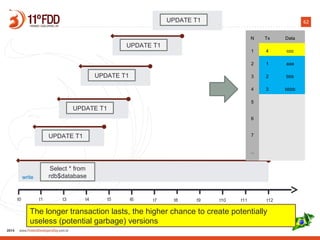
t0 t1 t3 t4 t5 t6 t7 t8 t9 t10 t11 t12
UPDATE T1
UPDATE T1
UPDATE T1
UPDATE T1
UPDATE T1
N Tx Data
1 4 ccc
2 1 aaa
3 2 bbb
4 3 bbbb
5
6
7
...
Select * from
rdb$databasewrite
The longer transaction lasts, the higher chance to create potentially
useless (potential garbage) versions
63
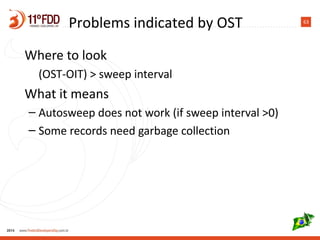
Where to look
(OST-OIT) > sweep interval
What it means
– Autosweep does not work (if sweep interval >0)
– Some records need garbage collection
Problems indicated by OST
64
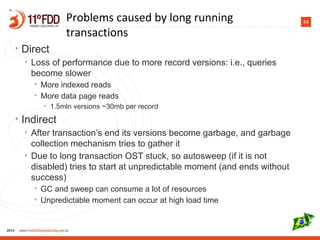
• Direct
• Loss of performance due to more record versions: i.e., queries
become slower
• More indexed reads
• More data page reads
• 1.5mln versions ~30mb per record
• Indirect
• After transaction’s end its versions become garbage, and garbage
collection mechanism tries to gather it
• Due to long transaction OST stuck, so autosweep (if it is not
disabled) tries to start at unpredictable moment (and ends without
success)
• GC and sweep can consume a lot of resources
• Unpredictable moment can occur at high load time
Problems caused by long running
transactions
65Oldest Interesting Transaction
66TIP size
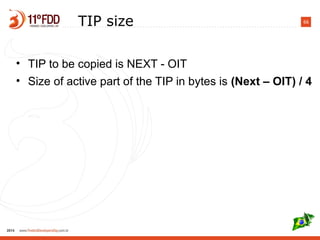
• TIP to be copied is NEXT - OIT
• Size of active part of the TIP in bytes is (Next – OIT) / 4
67Problems indicated by OIT
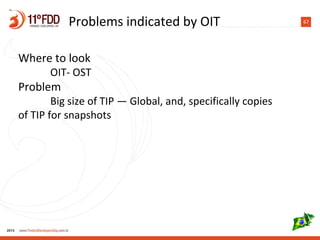
Where to look
OIT- OST
Problem
Big size of TIP — Global, and, specifically copies
of TIP for snapshots
68Ideal transactions flow
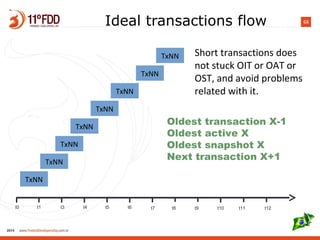
t0 t1 t3 t4 t5 t6 t7 t8 t9 t10 t11 t12
TxNN
TxNN
TxNN
TxNN
TxNN
TxNN
TxNN
TxNN Short transactions does
not stuck OIT or OAT or
OST, and avoid problems
related with it.
Oldest transaction X-1
Oldest active X
Oldest snapshot X
Next transaction X+1
69
Summary
• Make write (for INSERT/UPDATE/DELETE)
transactions as short as possible
• Use Read Commited Read-Only transactions for
SELECTs
70
Thank you!
• Questions? support@ib-aid.com

How Firebird transactions work

  • 1.
    How Firebird transactionswork Alexey Kovyazin www.IBSurgeon.com
  • 2.
    2 • Tools andconsulting • Platinum Sponsor of Firebird Foundation • Founded in 2002: 12 years of Firebird and InterBase recoveries and consulting • Based in Moscow, Russia
  • 3.
    3Agenda What is transaction?Why we need it? How we will present about transactions Records and versions Transactions and record versions Transaction Inventory Record visibility in transactions Transaction Markers and their evaluation Some conclusions
  • 4.
    4What is transaction? •Transaction as a general concept of any dynamic system • “Classic” example • begin • -- move money from account1 to account2 • Decrease account1 • Increase account2 • end – commit/rollback • Transaction Managers
  • 5.
    5Database transaction definition • aunit of work performed against a database, and treated in a coherent and reliable way independent of other transactions. • A database transaction, by definition, must be atomic, consistent, isolated and durable
  • 6.
    6 In ideal world onlyserial operations Insert into T1(i1) values (100); SELECT i1 FROM T1 Insert into T1(i1) values (200);
  • 7.
  • 8.
  • 9.
    9In real world t0t1 t3 t4 t5 t6 t7 t8 t9 t10 t11 t12 Tx11 INSERT T1 Tx14 commit UPDATE T1 nowait commit Tx20 UPDATE T1 rollback UPDATE T1
  • 10.
    10The ultimate purposeof transaction: • Concurrent execution of operations should lead to the exactly the same result as sequental execution of operations. For each [snapshot] transaction Firebird engine should maintain a stable view of the database. In simple words: each transaction should run as the only transaction.
  • 11.
  • 12.
    12 How Firebird doesimplement stable view for each transactions?
  • 13.
    13How we willpresent about transactions t0 t1 t3 t4 t5 t6 t7 t8 t9 t10 t11 t12 Tx 11 Transaction’s number Start End
  • 14.
    14How we willpresent about transactions t0 t1 t3 t4 t5 t6 t7 t8 t9 t10 t11 t12 Tx 11 commit Tx 12 rollback Transaction’s result Transaction’s result
  • 15.
    15How we willpresent about transactions Tx 11 commit snapshot Transaction’s parameters t0 t1 t3 t4 t5 t6 t7 t8 t9 t10 t11 t12
  • 16.
    16How we willpresent about transactions t0 t1 t3 t4 t5 t6 t7 t8 t9 t10 t11 t12 Tx 11 commit Insert into T1(i1) values (100); snapshot Operation in the frames of transaction
  • 17.
    17How we willpresent about transactions t0 t1 t3 t4 t5 t6 t7 t8 t9 t10 t11 t12 Tx 11 commit Insert into T1(i1) values (100); SELECT i1 FROM T1 snapshot i1 100 Result of operation
  • 18.
    18 Now let's start... Basicsyour [probably] know: - Everything in the database is done within transaction - Each transaction gets own incremental number 1, 2, 3, … etc - Firebird is a multi-version engine (each record in Firebird can have versions)
  • 19.
    19 Record version conceptis a key thing to understand transactions' work in Firebird.
  • 20.
    20How record versionsappear t0 t1 t3 t4 t5 t6 t7 t8 t9 t10 t11 t12 Tx10 commit Insert into T1(i1) values (100);
  • 21.
    21How record versionsappear t0 t1 t3 t4 t5 t6 t7 t8 t9 t10 t11 t12 Tx10 commit Insert into T1(i1) values (100); Tx50 commit SELECT i1 FROM T1 i1 100
  • 22.
    22How record versionsappear t0 t1 t3 t4 t5 t6 t7 t8 t9 t10 t11 t12 Tx10 commit Insert into T1(i1) values (100); Tx50 commit SELECT i1 FROM T1 i1 100 Tx60 commit UPDATE T1 SET i1=200 new version!
  • 23.
    23How record versionsappear t0 t1 t3 t4 t5 t6 t7 t8 t9 t10 t11 t12 Tx10 commit Insert into T1(i1) values (100); Tx50 commit SELECT i1 FROM T1 i1 100 SELECT i1 FROM T1 Tx60 commit UPDATE T1 SET i1=200 SELECT i1 FROM T1 i1 100 i1 200
  • 24.
  • 25.
    25 Each record versionhas transaction # N on page Transaction number Datafield1, datafield2 1 50 100
  • 26.
  • 27.
    27 N Tx Data 110 100 ... TR50 TR60write read
  • 28.
    28 N Tx Data 110 100 60 200 ... TR50 TR60 read write
  • 29.
    29 TR50 TR60 read N TxData 1 10 100 60 200 ... read write
  • 30.
    30 Some intermediate conclusions 1.No “locks” is placed on the record 2. There can be a lot of committed versions for one record 3. Versions may be needed or not. If not, they can be considered as “garbage”. 4. Only one non-committed version can exist for the record (2 active transactions can’t update the same record)
  • 31.
    31 How server knowsabout transactions states? Is transaction Active or not? • TIP – Transaction Inventory Pages • Linear list of transaction states, from 1 to last transaction number • Stored in the database • Limitation — 2 billions of transactions
  • 32.
    32 Transaction states • Eachtransaction is represented in Transactions Inventory by it’s state • 00 – Active • 01 – Committed • 10 – Rolled back • 11 – Limbo (distributed 2-phase transactions) TIP contents Tx № Tx state … 10 committed 11 committed 12 committed 13 rolled back 14 committed 15 committed 16 committed 17 rolled back 18 active 19 committed 20 active
  • 33.
    33 t0 t1 t3t4 t5 t6 t7 t8 t9 t10 t11 t12 Tx10 commit Insert into T1(i1) values (100); Tx50 commit SELECT i1 FROM T1 i1 100 SELECT i1 FROM T1 Tx60 commit UPDATE T1 SET i1=200 SELECT i1 FROM T1 i1 100 i1 200 TIP Tx State 10 Commited Tx State 10 Commited 50 Active 60 Active Tx State 10 Commited 50 Commited 60 Commited
  • 34.
  • 35.
    35 Isolation levels inFirebird READ COMMITED SNAPSHOT SNAPSHOT WITH TABLE STABILITY Isolation levels in FirebirdIsolation levels in Firebird
  • 36.
    36Snapshot t0 t1 t3t4 t5 t6 t7 t8 t9 t10 t11 t12 Tx 52 commit Insert into T1(i1) values (100); Tx 51 rollback Insert into T1(i1) values (200); Tx 10 commit SELECT FROM T1 SELECT FROM T1 snapshot i1
  • 37.
    37Read Commited t0 t1t3 t4 t5 t6 t7 t8 t9 t10 t11 t12 Tx 15 commit Insert into T1(i1) values (100); Tx 10 commit SELECT i1 FROM T1 SELECT i1 FROM T1 read commited i1 100 i1
  • 38.
    38 t0 t1 t3t4 t5 t6 t7 t8 t9 t10 Read Committed transactions “see” global TIP. That’s why they can read committed changes of other transactions t0 t1 t3 t4 t5 t6 t7 t8 t9 t10 t11 t12 t0 t1 t3 t4 t5 t6 t7 t8 t9 t10 Snapshot copies TIP on it’s start. It does not see any changes made by other committed transactions after snapshot start Read Commited and Snapshot
  • 39.
    39TIP for ReadCommited t0 t1 t3 t4 t5 t6 t7 t8 t9 t10 t11 t12 Tx 15 commit Insert into T1(i1) values (100); Tx 10 commit SELECT i1 FROM T1 SELECT i1 FROM T1 read commited i1 100 i1 Tx State 10 Active Tx State 10 Active 15 Active Tx State 10 Active 15 Commited
  • 40.
    40 t0 t1 t3t4 t5 t6 t7 t8 t9 t10 t11 t12 Tx 52 commit Insert into T1(i1) values (100); Tx 51 rollback Insert into T1(i1) values (200); Tx 10 commit SELECT FROM T1 SELECT FROM T1 snapshot i1 Tx State 10 Active Tx State 10 Active 51 Active 52 Active Tx State 10 Active 51 Rollback 52 Commited Tx State 10 Active TIP for snapshot
  • 41.
    41 Each transaction cansee: • Own created records and versions • Insert, Update, Delete • If it is Read Committed, it can see every changes that was made by committed transactions, because it looks into global TIP • If it is Snapshot, it can see own changes and record versions commited to the moment of its start, because it looks into it’s own copy of TIP
  • 42.
  • 43.
    43 How we willpresent about records Each record can have versions, created by different transactions Record 10 Tx 10 100 Tx 20 200 Tx 30 555
  • 44.
    44 Record 10 Tx10 100 Tx 20 200 Tx 30 555 R10 Tx 10 Tx 20 Tx 30 Compact representation How we will present about records
  • 45.
    45 3 rules ofrecord visibilty 1) For each snapshot transaction engine maintains stable view of database 2) Transaction can not see record versions created by another active transaction 3) Transaction should walk backversions chain looking for commited backversion
  • 46.
    46Ex: record versionsvisibility for Tx20
  • 47.
    47 • In orderto figure out which record version is visible, every transaction must read TIP • TIP can contain up to 2 Billion transactions • So each transaction should read up to 2 billions of transactions! - Damn, that's why Firebird is slow! (it's a joke)
  • 48.
    48TIP (example) We needa way to separate old, not interesting transactions from currently active part of TIP ● For this purpose engine maintains Oldest Interesting Transaction marker, or OIT
  • 49.
  • 50.
  • 51.
    51 firebird>gstat -h A.FDB Databaseheader page information: Flags 0 Generation 6 System Change Number 0 Page size 4096 ODS version 12.0 Oldest transaction 1 Oldest active 2 Oldest snapshot 2 Next transaction 3 Sequence number 0 Next attachment ID 3 Transaction markers
  • 52.
    52 4 markers • Transactionmarkers are key characterstics of TIP and transaction mechanism – Let's see what they mean and how they evaluated: • NEXT — next transaction • OAT — Oldest Active • OST — Oldest Snapshot • OIT — Oldest Interesting
  • 53.
    53 NEXT • NEXT isthe simplest — it's the most recent transaction • NEXT number is written on header page
  • 54.
    54 OAT is thefirst transaction in TIP which state is “active” Evaluation: ● Scan TIP starting from current OAT value looking for “active” transaction ● Save found value in transaction's lock data ● Save found value as new OAT marker OAT is really an oldest active transaction OAT - Oldest Active Transaction
  • 55.
  • 56.
    56 Problems indicated byOAT ● Where to look? ● NEXT — OAT > (number of connections * number of transaction) ● What it means? ● Long running transaction which makes Firebird to think that record versions are still needed
  • 57.
  • 58.
  • 59.
  • 60.
    60 OST and ReadCommited transactions
  • 61.
  • 62.
    62 t0 t1 t3t4 t5 t6 t7 t8 t9 t10 t11 t12 UPDATE T1 UPDATE T1 UPDATE T1 UPDATE T1 UPDATE T1 N Tx Data 1 4 ccc 2 1 aaa 3 2 bbb 4 3 bbbb 5 6 7 ... Select * from rdb$databasewrite The longer transaction lasts, the higher chance to create potentially useless (potential garbage) versions
  • 63.
    63 Where to look (OST-OIT)> sweep interval What it means – Autosweep does not work (if sweep interval >0) – Some records need garbage collection Problems indicated by OST
  • 64.
    64 • Direct • Lossof performance due to more record versions: i.e., queries become slower • More indexed reads • More data page reads • 1.5mln versions ~30mb per record • Indirect • After transaction’s end its versions become garbage, and garbage collection mechanism tries to gather it • Due to long transaction OST stuck, so autosweep (if it is not disabled) tries to start at unpredictable moment (and ends without success) • GC and sweep can consume a lot of resources • Unpredictable moment can occur at high load time Problems caused by long running transactions
  • 65.
  • 66.
    66TIP size • TIPto be copied is NEXT - OIT • Size of active part of the TIP in bytes is (Next – OIT) / 4
  • 67.
    67Problems indicated byOIT Where to look OIT- OST Problem Big size of TIP — Global, and, specifically copies of TIP for snapshots
  • 68.
    68Ideal transactions flow t0t1 t3 t4 t5 t6 t7 t8 t9 t10 t11 t12 TxNN TxNN TxNN TxNN TxNN TxNN TxNN TxNN Short transactions does not stuck OIT or OAT or OST, and avoid problems related with it. Oldest transaction X-1 Oldest active X Oldest snapshot X Next transaction X+1
  • 69.
    69 Summary • Make write(for INSERT/UPDATE/DELETE) transactions as short as possible • Use Read Commited Read-Only transactions for SELECTs
  • 70.
    70 Thank you! • Questions?support@ib-aid.com