



























Chris Zacharias
Hyper-LightweightWebsites
CEO, FOUNDER @
chris@imgix.com
@zacman85
Web Unleashed - Toronto
October 2, 2018
“If they can build an entire Quake clone1 in LESS than 100KB,
WHY can’t we get YouTube to load in under 1MB?”
1. https://en.wikipedia.org/wiki/.kkrieger
Mike Solomon
Early engineer at YouTube.
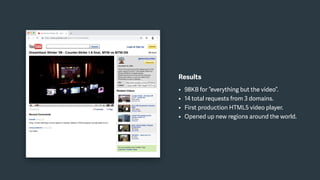
YouTube Feather
A hyper-light version of YouTube, back in 2010.
Constraints
• Start the video as fast as possible.
• Maintain >80% of the user experience.
• Use the latest technologies (circa 2010).
• Make as few requests as possible.
Results
• 98KB for “everything but the video”.
• 14 total requests from 3 domains.
• First production HTML5 video player.
• Opened up new regions around the world.
High latency environments are EVERYWHERE, even to this day.
A hyper-lightweight website is a RECONCEPTION of a web-based user interface
designed for the purposes of pushing the limits of performance.
Buildinga hyper-lightweightwebsite.
The goal is to provide an experience, roughly consistent with the real thing,
that can be delivered to an end user AS FAST AS POSSIBLE.
Steps to building a hyper-lightweight version of a website:
1. Identify the most active page on your website.
2. Build a new version of that page from scratch with a singular focus on optimization.
3. Assemble all of the HTML, CSS and Javascript into a single “hyper-light” HTML page.
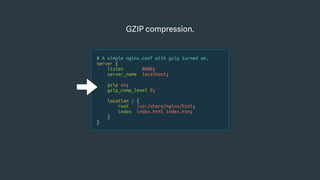
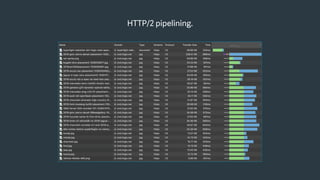
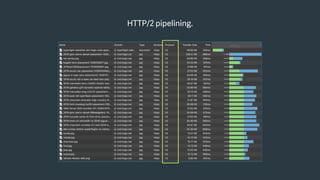
4. Serve the hyper-light page behind a CDN with compression and HTTP/2 pipelining enabled.
5. Measure both the original page, uncached, and the hyper-light page.
6. Analyze the results.
Things you want to KEEP doing:
• Serve real content, preferably dynamically.
• Responsive layouts (at minimum, common breakpoints).
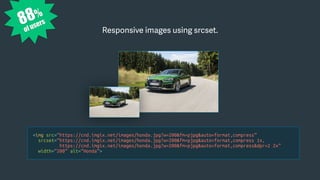
• Responsive images.
• Sprites, in some cases.
• SVG graphics (optimized responsibly).
• Accessibility.
Things you want to STOP doing: (for the purposes of this exercise)
• Ads and social media trackers.
• CMS integrations.
• Javascript libraries.
• CSS layouts via frameworks.
• Lazy loading content (except images).
• Data URIs, unless absolutely certain.
• Javascript and CSS compilation.
• Custom web fonts.
Areal worldexample.
Walking through an example
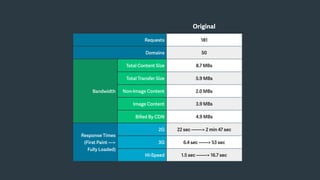
Original
Requests 181
Domains 50
Bandwidth
Total Content Size 8.7 MBs
Total Transfer Size 5.9 MBs
Non-Image Content 2.0 MBs
Image Content 3.9 MBs
Billed By CDN 4.9 MBs
Response Times
(First Paint —>
Fully Loaded)
2G 22 sec —-—> 2 min 47 sec
3G 6.4 sec ——> 53 sec
Hi-Speed 1.5 sec ——-> 16.7 sec
Hyper-Light
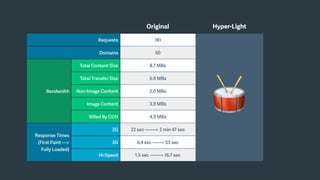
Walking through an example
Original
Original Hyper-Light
Requests 181
🥁
Domains 50
Bandwidth
Total Content Size 8.7 MBs
Total Transfer Size 5.9 MBs
Non-Image Content 2.0 MBs
Image Content 3.9 MBs
Billed By CDN 4.9 MBs
Response Times
(First Paint —>
Fully Loaded)
2G 22 sec —-—> 2 min 47 sec
3G 6.4 sec ——> 53 sec
Hi-Speed 1.5 sec ——-> 16.7 sec
Original Hyper-Light
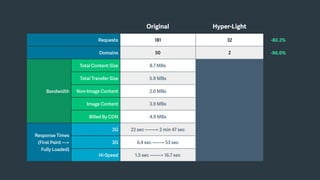
Requests 181 32 -82.3%
Domains 50 2 -96.0%
Bandwidth
Total Content Size 8.7 MBs
Total Transfer Size 5.9 MBs
Non-Image Content 2.0 MBs
Image Content 3.9 MBs
Billed By CDN 4.9 MBs
Response Times
(First Paint —>
Fully Loaded)
2G 22 sec —-—> 2 min 47 sec
3G 6.4 sec ——> 53 sec
Hi-Speed 1.5 sec ——-> 16.7 sec
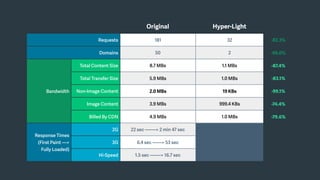
Original Hyper-Light
Requests 181 32 -82.3%
Domains 50 2 -96.0%
Bandwidth
Total Content Size 8.7 MBs 1.1 MBs -87.4%
Total Transfer Size 5.9 MBs 1.0 MBs -83.1%
Non-Image Content 2.0 MBs 19 KBs -99.1%
Image Content 3.9 MBs 999.4 KBs -74.4%
Billed By CDN 4.9 MBs 1.0 MBs -79.6%
Response Times
(First Paint —>
Fully Loaded)
2G 22 sec —-—> 2 min 47 sec
3G 6.4 sec ——> 53 sec
Hi-Speed 1.5 sec ——-> 16.7 sec
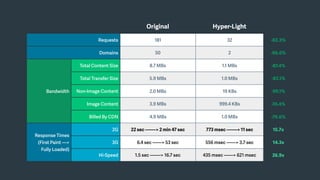
Original Hyper-Light
Requests 181 32 -82.3%
Domains 50 2 -96.0%
Bandwidth
Total Content Size 8.7 MBs 1.1 MBs -87.4%
Total Transfer Size 5.9 MBs 1.0 MBs -83.1%
Non-Image Content 2.0 MBs 19 KBs -99.1%
Image Content 3.9 MBs 999.4 KBs -74.4%
Billed By CDN 4.9 MBs 1.0 MBs -79.6%
Response Times
(First Paint —>
Fully Loaded)
2G 22 sec —-—> 2 min 47 sec 773 msec ——-> 11 sec 15.7x
3G 6.4 sec ——> 53 sec 556 msec ——> 3.7 sec 14.3x
Hi-Speed 1.5 sec ——-> 16.7 sec 435 msec ——> 621 msec 26.9x
Thetechniquesused.
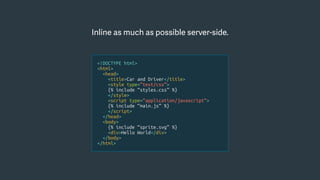
Inline as much as possible server-side.
<!DOCTYPE html>
<html>
<head>
<title>Car and Driver</title>
<style type=“text/css”>
{% include “styles.css” %}
</style>
<script type=“application/javascript”>
{% include “main.js” %}
</script>
</head>
<body>
{% include “sprite.svg” %}
<div>Hello World</div>
</body>
</html>
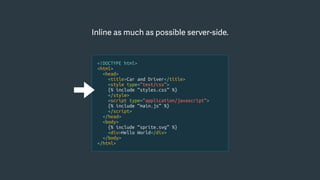
Inline as much as possible server-side.
<!DOCTYPE html>
<html>
<head>
<title>Car and Driver</title>
<style type=“text/css”>
{% include “styles.css” %}
</style>
<script type=“application/javascript”>
{% include “main.js” %}
</script>
</head>
<body>
{% include “sprite.svg” %}
<div>Hello World</div>
</body>
</html>
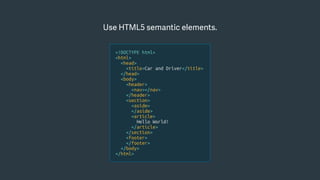
Use HTML5 semantic elements.
<!DOCTYPE html>
<html>
<head>
<title>Car and Driver</title>
</head>
<body>
<header>
<nav></nav>
</header>
<section>
<aside>
</aside>
<article>
Hello World!
</article>
</section>
<footer>
</footer>
</body>
</html>
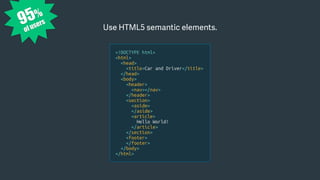
95%
of users
Use HTML5 semantic elements.
<!DOCTYPE html>
<html>
<head>
<title>Car and Driver</title>
</head>
<body>
<header>
<nav></nav>
</header>
<section>
<aside>
</aside>
<article>
Hello World!
</article>
</section>
<footer>
</footer>
</body>
</html>
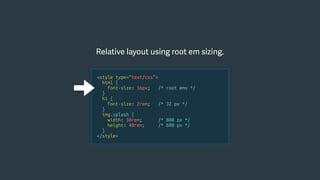
Relative layout using root em sizing.
<style type=“text/css”>
html {
font-size: 16px; /* root ems */
}
h1 {
font-size: 2rem; /* 32 px */
}
img.splash {
width: 50rem; /* 800 px */
height: 40rem; /* 600 px */
}
</style>
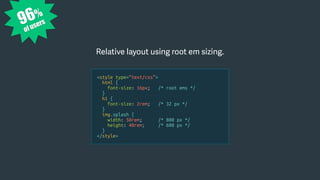
Relative layout using root em sizing.
96%
of users
<style type=“text/css”>
html {
font-size: 16px; /* root ems */
}
h1 {
font-size: 2rem; /* 32 px */
}
img.splash {
width: 50rem; /* 800 px */
height: 40rem; /* 600 px */
}
</style>
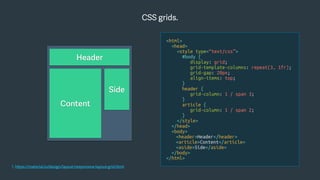
CSS grids.
1. https://material.io/design/layout/responsive-layout-grid.html
<html>
<head>
<style type=“text/css”>
#body {
display: grid;
grid-template-columns: repeat(3, 1fr);
grid-gap: 20px;
align-items: top;
}
header {
grid-column: 1 / span 3;
}
article {
grid-column: 1 / span 2;
}
</style>
</head>
<body>
<header>Header</header>
<article>Content</article>
<aside>Side</aside>
</body>
</html>
Header
Side
Content
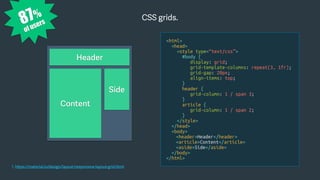
CSS grids.
1. https://material.io/design/layout/responsive-layout-grid.html
<html>
<head>
<style type=“text/css”>
#body {
display: grid;
grid-template-columns: repeat(3, 1fr);
grid-gap: 20px;
align-items: top;
}
header {
grid-column: 1 / span 3;
}
article {
grid-column: 1 / span 2;
}
</style>
</head>
<body>
<header>Header</header>
<article>Content</article>
<aside>Side</aside>
</body>
</html>
87%
of users
Header
Side
Content
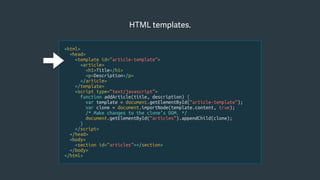
<html>
<head>
<template id=“article-template”>
<article>
<h1>Title</h1>
<p>Description</p>
</article>
</template>
<script type=“text/javascript”>
function addArticle(title, description) {
var template = document.getElementById(“article-template”);
var clone = document.importNode(template.content, true);
/* Make changes to the clone’s DOM. */
document.getElementById(“articles”).appendChild(clone);
}
</script>
</head>
<body>
<section id=“articles”></section>
</body>
</html>
HTML templates.
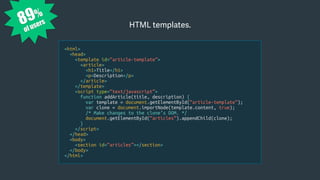
<html>
<head>
<template id=“article-template”>
<article>
<h1>Title</h1>
<p>Description</p>
</article>
</template>
<script type=“text/javascript”>
function addArticle(title, description) {
var template = document.getElementById(“article-template”);
var clone = document.importNode(template.content, true);
/* Make changes to the clone’s DOM. */
document.getElementById(“articles”).appendChild(clone);
}
</script>
</head>
<body>
<section id=“articles”></section>
</body>
</html>
HTML templates.89%
of users
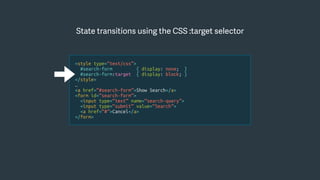
State transitions using the CSS :target selector
<style type=“text/css”>
#search-form { display: none; }
#search-form:target { display: block; }
</style>
…
<a href=“#search-form”>Show Search</a>
<form id=“search-form”>
<input type=“text” name=“search-query”>
<input type=“submit” value=“Search”>
<a href=“#”>Cancel</a>
</form>
<style type=“text/css”>
#search-form { display: none; }
#search-form:target { display: block; }
</style>
…
<a href=“#search-form”>Show Search</a>
<form id=“search-form”>
<input type=“text” name=“search-query”>
<input type=“submit” value=“Search”>
<a href=“#”>Cancel</a>
</form>
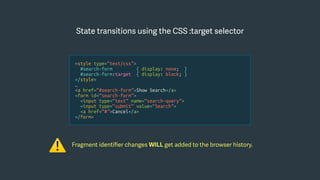
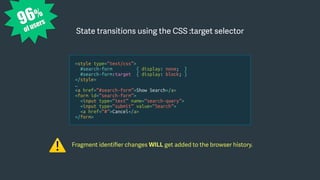
Fragment identifier changes WILL get added to the browser history.
⚠
State transitions using the CSS :target selector
96%
of users
<style type=“text/css”>
#search-form { display: none; }
#search-form:target { display: block; }
</style>
…
<a href=“#search-form”>Show Search</a>
<form id=“search-form”>
<input type=“text” name=“search-query”>
<input type=“submit” value=“Search”>
<a href=“#”>Cancel</a>
</form>
Fragment identifier changes WILL get added to the browser history.
⚠
State transitions using the CSS :target selector
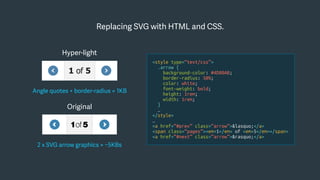
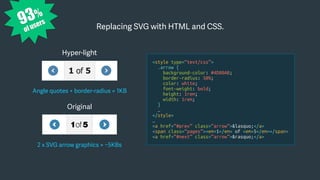
Replacing SVG with HTML and CSS.
Original
2 x SVG arrow graphics = ~5KBs
Hyper-light
Angle quotes + border-radius = 1KB
<style type=“text/css”>
.arrow {
background-color: #4D80AB;
border-radius: 50%;
color: white;
font-weight: bold;
height: 1rem;
width: 1rem;
}
…
</style>
…
<a href=“#prev” class=“arrow”>&lasquo;</a>
<span class=“pages”><em>1</em> of <em>5</em></span>
<a href=“#next” class=“arrow”>&rasquo;</a>
93%
of users
Replacing SVG with HTML and CSS.
Original
2 x SVG arrow graphics = ~5KBs
Hyper-light
Angle quotes + border-radius = 1KB
<style type=“text/css”>
.arrow {
background-color: #4D80AB;
border-radius: 50%;
color: white;
font-weight: bold;
height: 1rem;
width: 1rem;
}
…
</style>
…
<a href=“#prev” class=“arrow”>&lasquo;</a>
<span class=“pages”><em>1</em> of <em>5</em></span>
<a href=“#next” class=“arrow”>&rasquo;</a>
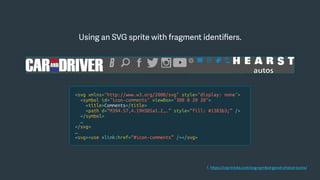
Using an SVG sprite with fragment identifiers.
<svg xmlns="http://www.w3.org/2000/svg" style="display: none">
<symbol id="icon-comments" viewBox="380 0 20 20">
<title>Comments</title>
<path d=“M394.57,4.19H385a1.2,…” style=“fill: #1383b3;” />
</symbol>
…
</svg>
…
<svg><use xlink:href=“#icon-comments” /></svg>
1. https://css-tricks.com/svg-symbol-good-choice-icons/
91%
of users
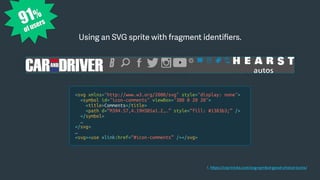
Using an SVG sprite with fragment identifiers.
<svg xmlns="http://www.w3.org/2000/svg" style="display: none">
<symbol id="icon-comments" viewBox="380 0 20 20">
<title>Comments</title>
<path d=“M394.57,4.19H385a1.2,…” style=“fill: #1383b3;” />
</symbol>
…
</svg>
…
<svg><use xlink:href=“#icon-comments” /></svg>
1. https://css-tricks.com/svg-symbol-good-choice-icons/
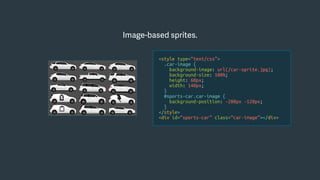
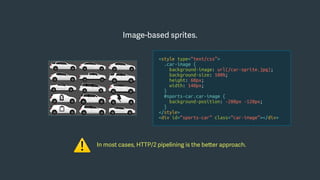
Image-based sprites.
<style type=“text/css”>
.car-image {
background-image: url(/car-sprite.jpg);
background-size: 100%;
height: 60px;
width: 140px;
}
#sports-car.car-image {
background-position: -280px -120px;
}
</style>
<div id=“sports-car” class=“car-image”></div>
Image-based sprites.
In most cases, HTTP/2 pipelining is the better approach.
⚠
<style type=“text/css”>
.car-image {
background-image: url(/car-sprite.jpg);
background-size: 100%;
height: 60px;
width: 140px;
}
#sports-car.car-image {
background-position: -280px -120px;
}
</style>
<div id=“sports-car” class=“car-image”></div>
96%
of users
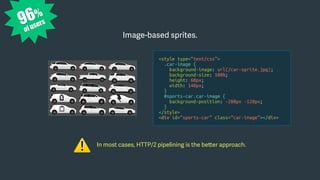
Image-based sprites.
In most cases, HTTP/2 pipelining is the better approach.
⚠
<style type=“text/css”>
.car-image {
background-image: url(/car-sprite.jpg);
background-size: 100%;
height: 60px;
width: 140px;
}
#sports-car.car-image {
background-position: -280px -120px;
}
</style>
<div id=“sports-car” class=“car-image”></div>
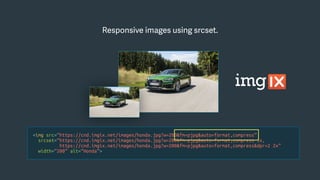
<img src=“https://cnd.imgix.net/images/honda.jpg?w=200&fm=pjpg&auto=format,compress”
srcset=“https://cnd.imgix.net/images/honda.jpg?w=200&fm=pjpg&auto=format,compress 1x,
https://cnd.imgix.net/images/honda.jpg?w=200&fm=pjpg&auto=format,compress&dpr=2 2x”
width=“200” alt=“Honda”>
Responsive images using srcset.
<img src=“https://cnd.imgix.net/images/honda.jpg?w=200&fm=pjpg&auto=format,compress”
srcset=“https://cnd.imgix.net/images/honda.jpg?w=200&fm=pjpg&auto=format,compress 1x,
https://cnd.imgix.net/images/honda.jpg?w=200&fm=pjpg&auto=format,compress&dpr=2 2x”
width=“200” alt=“Honda”>
Responsive images using srcset.
<img src=“https://cnd.imgix.net/images/honda.jpg?w=200&fm=pjpg&auto=format,compress”
srcset=“https://cnd.imgix.net/images/honda.jpg?w=200&fm=pjpg&auto=format,compress 1x,
https://cnd.imgix.net/images/honda.jpg?w=200&fm=pjpg&auto=format,compress&dpr=2 2x”
width=“200” alt=“Honda”>
Responsive images using srcset.
<img src=“https://cnd.imgix.net/images/honda.jpg?w=200&fm=pjpg&auto=format,compress”
srcset=“https://cnd.imgix.net/images/honda.jpg?w=200&fm=pjpg&auto=format,compress 1x,
https://cnd.imgix.net/images/honda.jpg?w=200&fm=pjpg&auto=format,compress&dpr=2 2x”
width=“200” alt=“Honda”>
Responsive images using srcset.
88%
of users
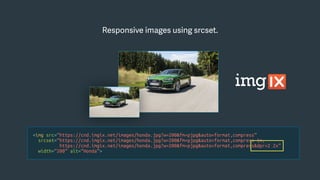
<img src=“https://cnd.imgix.net/images/honda.jpg?w=200&fm=pjpg&auto=format,compress”
srcset=“https://cnd.imgix.net/images/honda.jpg?w=200&fm=pjpg&auto=format,compress 1x,
https://cnd.imgix.net/images/honda.jpg?w=200&fm=pjpg&auto=format,compress&dpr=2 2x”
width=“200” alt=“Honda”>
Responsive images using srcset.
GZIP compression.
# A simple nginx.conf with gzip turned on.
server {
listen 8080;
server_name localhost;
gzip on;
gzip_comp_level 9;
location / {
root /usr/share/nginx/html;
index index.html index.htm;
}
}
GZIP compression.
# A simple nginx.conf with gzip turned on.
server {
listen 8080;
server_name localhost;
gzip on;
gzip_comp_level 9;
location / {
root /usr/share/nginx/html;
index index.html index.htm;
}
}
Make sure to vary on Accept-Encoding in your caching layers.
⚠
99%
of users
GZIP compression.
# A simple nginx.conf with gzip turned on.
server {
listen 8080;
server_name localhost;
gzip on;
gzip_comp_level 9;
location / {
root /usr/share/nginx/html;
index index.html index.htm;
}
}
Make sure to vary on Accept-Encoding in your caching layers.
⚠
Experiment with Brotli.
tom@servo:/www$ cd /data/repos && git clone https://github.com/google/brotli.git
tom@servo:/www$ sudo ln -s /data/repos/brotli/python/bro.py /usr/local/bin/bro.py
tom@servo:/www$ bro.py -i index.html -o index.html.br
Experiment with Brotli.
tom@servo:/www$ cd /data/repos && git clone https://github.com/google/brotli.git
tom@servo:/www$ sudo ln -s /data/repos/brotli/python/bro.py /usr/local/bin/bro.py
tom@servo:/www$ bro.py -i index.html -o index.html.br
84%
of users
tom@servo:/www$ cd /data/repos && git clone https://github.com/google/brotli.git
tom@servo:/www$ sudo ln -s /data/repos/brotli/python/bro.py /usr/local/bin/bro.py
tom@servo:/www$ bro.py -i index.html -o index.html.br
Experiment with Brotli.
HTTP/2 pipelining.
HTTP/2 pipelining.
84%
of users HTTP/2 pipelining.
Takingmeasurementsand actingonthedata.
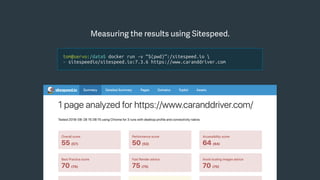
Measuring the results using Sitespeed.
tom@servo:/data$ docker run -v “$(pwd)”:/sitespeed.io 
> sitespeedio/sitespeed.io:7.3.6 https://www.caranddriver.com
Zeroing in on the biggest wins.
15 images requests
~600KBs
1 image request
~50KBs
Taking the next steps…
• Repeat the process with other pages.
• Run a 1% test in the wild.
• Build a performance budget.
• Run Sitespeed (or similar) regularly.
{
"browsertime.pageSummary": [{
"metric": "statistics.timings.firstPaint.median",
"max": 1500
}],
"pagexray.pageSummary": [{
"metric": "transferSize",
"max": 1000000
}, {
"metric": "requests",
"max": 45
}
}
1. https://www.sitespeed.io/documentation/sitespeed.io/performance-budget/
Source code:
https://github.com/zacman85/hyperlight-websites
Live demo:
http://hlw.chriszacharias.com
Special thanks to Miguel Cardona.
Thankyou!
Chris Zacharias
CEO, FOUNDER @
chris@imgix.com
@zacman85

Hyper-Lightweight Websites

  • 1.
    Chris Zacharias Hyper-LightweightWebsites CEO, FOUNDER@ chris@imgix.com @zacman85 Web Unleashed - Toronto October 2, 2018
  • 2.
    “If they canbuild an entire Quake clone1 in LESS than 100KB, WHY can’t we get YouTube to load in under 1MB?” 1. https://en.wikipedia.org/wiki/.kkrieger Mike Solomon Early engineer at YouTube.
  • 3.
    YouTube Feather A hyper-lightversion of YouTube, back in 2010. Constraints • Start the video as fast as possible. • Maintain >80% of the user experience. • Use the latest technologies (circa 2010). • Make as few requests as possible.
  • 4.
    Results • 98KB for“everything but the video”. • 14 total requests from 3 domains. • First production HTML5 video player. • Opened up new regions around the world.
  • 5.
    High latency environmentsare EVERYWHERE, even to this day.
  • 7.
    A hyper-lightweight websiteis a RECONCEPTION of a web-based user interface designed for the purposes of pushing the limits of performance.
  • 10.
  • 11.
    The goal isto provide an experience, roughly consistent with the real thing, that can be delivered to an end user AS FAST AS POSSIBLE.
  • 12.
    Steps to buildinga hyper-lightweight version of a website: 1. Identify the most active page on your website. 2. Build a new version of that page from scratch with a singular focus on optimization. 3. Assemble all of the HTML, CSS and Javascript into a single “hyper-light” HTML page. 4. Serve the hyper-light page behind a CDN with compression and HTTP/2 pipelining enabled. 5. Measure both the original page, uncached, and the hyper-light page. 6. Analyze the results.
  • 13.
    Things you wantto KEEP doing: • Serve real content, preferably dynamically. • Responsive layouts (at minimum, common breakpoints). • Responsive images. • Sprites, in some cases. • SVG graphics (optimized responsibly). • Accessibility.
  • 14.
    Things you wantto STOP doing: (for the purposes of this exercise) • Ads and social media trackers. • CMS integrations. • Javascript libraries. • CSS layouts via frameworks. • Lazy loading content (except images). • Data URIs, unless absolutely certain. • Javascript and CSS compilation. • Custom web fonts.
  • 15.
  • 16.
  • 17.
    Original Requests 181 Domains 50 Bandwidth TotalContent Size 8.7 MBs Total Transfer Size 5.9 MBs Non-Image Content 2.0 MBs Image Content 3.9 MBs Billed By CDN 4.9 MBs Response Times (First Paint —> Fully Loaded) 2G 22 sec —-—> 2 min 47 sec 3G 6.4 sec ——> 53 sec Hi-Speed 1.5 sec ——-> 16.7 sec
  • 18.
  • 19.
    Walking through anexample Original
  • 20.
    Original Hyper-Light Requests 181 🥁 Domains50 Bandwidth Total Content Size 8.7 MBs Total Transfer Size 5.9 MBs Non-Image Content 2.0 MBs Image Content 3.9 MBs Billed By CDN 4.9 MBs Response Times (First Paint —> Fully Loaded) 2G 22 sec —-—> 2 min 47 sec 3G 6.4 sec ——> 53 sec Hi-Speed 1.5 sec ——-> 16.7 sec
  • 21.
    Original Hyper-Light Requests 18132 -82.3% Domains 50 2 -96.0% Bandwidth Total Content Size 8.7 MBs Total Transfer Size 5.9 MBs Non-Image Content 2.0 MBs Image Content 3.9 MBs Billed By CDN 4.9 MBs Response Times (First Paint —> Fully Loaded) 2G 22 sec —-—> 2 min 47 sec 3G 6.4 sec ——> 53 sec Hi-Speed 1.5 sec ——-> 16.7 sec
  • 22.
    Original Hyper-Light Requests 18132 -82.3% Domains 50 2 -96.0% Bandwidth Total Content Size 8.7 MBs 1.1 MBs -87.4% Total Transfer Size 5.9 MBs 1.0 MBs -83.1% Non-Image Content 2.0 MBs 19 KBs -99.1% Image Content 3.9 MBs 999.4 KBs -74.4% Billed By CDN 4.9 MBs 1.0 MBs -79.6% Response Times (First Paint —> Fully Loaded) 2G 22 sec —-—> 2 min 47 sec 3G 6.4 sec ——> 53 sec Hi-Speed 1.5 sec ——-> 16.7 sec
  • 23.
    Original Hyper-Light Requests 18132 -82.3% Domains 50 2 -96.0% Bandwidth Total Content Size 8.7 MBs 1.1 MBs -87.4% Total Transfer Size 5.9 MBs 1.0 MBs -83.1% Non-Image Content 2.0 MBs 19 KBs -99.1% Image Content 3.9 MBs 999.4 KBs -74.4% Billed By CDN 4.9 MBs 1.0 MBs -79.6% Response Times (First Paint —> Fully Loaded) 2G 22 sec —-—> 2 min 47 sec 773 msec ——-> 11 sec 15.7x 3G 6.4 sec ——> 53 sec 556 msec ——> 3.7 sec 14.3x Hi-Speed 1.5 sec ——-> 16.7 sec 435 msec ——> 621 msec 26.9x
  • 24.
  • 25.
    Inline as muchas possible server-side. <!DOCTYPE html> <html> <head> <title>Car and Driver</title> <style type=“text/css”> {% include “styles.css” %} </style> <script type=“application/javascript”> {% include “main.js” %} </script> </head> <body> {% include “sprite.svg” %} <div>Hello World</div> </body> </html>
  • 26.
    Inline as muchas possible server-side. <!DOCTYPE html> <html> <head> <title>Car and Driver</title> <style type=“text/css”> {% include “styles.css” %} </style> <script type=“application/javascript”> {% include “main.js” %} </script> </head> <body> {% include “sprite.svg” %} <div>Hello World</div> </body> </html>
  • 27.
    Use HTML5 semanticelements. <!DOCTYPE html> <html> <head> <title>Car and Driver</title> </head> <body> <header> <nav></nav> </header> <section> <aside> </aside> <article> Hello World! </article> </section> <footer> </footer> </body> </html>
  • 28.
    95% of users Use HTML5semantic elements. <!DOCTYPE html> <html> <head> <title>Car and Driver</title> </head> <body> <header> <nav></nav> </header> <section> <aside> </aside> <article> Hello World! </article> </section> <footer> </footer> </body> </html>
  • 29.
    Relative layout usingroot em sizing. <style type=“text/css”> html { font-size: 16px; /* root ems */ } h1 { font-size: 2rem; /* 32 px */ } img.splash { width: 50rem; /* 800 px */ height: 40rem; /* 600 px */ } </style>
  • 30.
    Relative layout usingroot em sizing. 96% of users <style type=“text/css”> html { font-size: 16px; /* root ems */ } h1 { font-size: 2rem; /* 32 px */ } img.splash { width: 50rem; /* 800 px */ height: 40rem; /* 600 px */ } </style>
  • 31.
    CSS grids. 1. https://material.io/design/layout/responsive-layout-grid.html <html> <head> <styletype=“text/css”> #body { display: grid; grid-template-columns: repeat(3, 1fr); grid-gap: 20px; align-items: top; } header { grid-column: 1 / span 3; } article { grid-column: 1 / span 2; } </style> </head> <body> <header>Header</header> <article>Content</article> <aside>Side</aside> </body> </html> Header Side Content
  • 32.
    CSS grids. 1. https://material.io/design/layout/responsive-layout-grid.html <html> <head> <styletype=“text/css”> #body { display: grid; grid-template-columns: repeat(3, 1fr); grid-gap: 20px; align-items: top; } header { grid-column: 1 / span 3; } article { grid-column: 1 / span 2; } </style> </head> <body> <header>Header</header> <article>Content</article> <aside>Side</aside> </body> </html> 87% of users Header Side Content
  • 33.
    <html> <head> <template id=“article-template”> <article> <h1>Title</h1> <p>Description</p> </article> </template> <script type=“text/javascript”> functionaddArticle(title, description) { var template = document.getElementById(“article-template”); var clone = document.importNode(template.content, true); /* Make changes to the clone’s DOM. */ document.getElementById(“articles”).appendChild(clone); } </script> </head> <body> <section id=“articles”></section> </body> </html> HTML templates.
  • 34.
    <html> <head> <template id=“article-template”> <article> <h1>Title</h1> <p>Description</p> </article> </template> <script type=“text/javascript”> functionaddArticle(title, description) { var template = document.getElementById(“article-template”); var clone = document.importNode(template.content, true); /* Make changes to the clone’s DOM. */ document.getElementById(“articles”).appendChild(clone); } </script> </head> <body> <section id=“articles”></section> </body> </html> HTML templates.89% of users
  • 35.
    State transitions usingthe CSS :target selector <style type=“text/css”> #search-form { display: none; } #search-form:target { display: block; } </style> … <a href=“#search-form”>Show Search</a> <form id=“search-form”> <input type=“text” name=“search-query”> <input type=“submit” value=“Search”> <a href=“#”>Cancel</a> </form>
  • 36.
    <style type=“text/css”> #search-form {display: none; } #search-form:target { display: block; } </style> … <a href=“#search-form”>Show Search</a> <form id=“search-form”> <input type=“text” name=“search-query”> <input type=“submit” value=“Search”> <a href=“#”>Cancel</a> </form> Fragment identifier changes WILL get added to the browser history. ⚠ State transitions using the CSS :target selector
  • 37.
    96% of users <style type=“text/css”> #search-form{ display: none; } #search-form:target { display: block; } </style> … <a href=“#search-form”>Show Search</a> <form id=“search-form”> <input type=“text” name=“search-query”> <input type=“submit” value=“Search”> <a href=“#”>Cancel</a> </form> Fragment identifier changes WILL get added to the browser history. ⚠ State transitions using the CSS :target selector
  • 38.
    Replacing SVG withHTML and CSS. Original 2 x SVG arrow graphics = ~5KBs Hyper-light Angle quotes + border-radius = 1KB <style type=“text/css”> .arrow { background-color: #4D80AB; border-radius: 50%; color: white; font-weight: bold; height: 1rem; width: 1rem; } … </style> … <a href=“#prev” class=“arrow”>&lasquo;</a> <span class=“pages”><em>1</em> of <em>5</em></span> <a href=“#next” class=“arrow”>&rasquo;</a>
  • 39.
    93% of users Replacing SVGwith HTML and CSS. Original 2 x SVG arrow graphics = ~5KBs Hyper-light Angle quotes + border-radius = 1KB <style type=“text/css”> .arrow { background-color: #4D80AB; border-radius: 50%; color: white; font-weight: bold; height: 1rem; width: 1rem; } … </style> … <a href=“#prev” class=“arrow”>&lasquo;</a> <span class=“pages”><em>1</em> of <em>5</em></span> <a href=“#next” class=“arrow”>&rasquo;</a>
  • 40.
    Using an SVGsprite with fragment identifiers. <svg xmlns="http://www.w3.org/2000/svg" style="display: none"> <symbol id="icon-comments" viewBox="380 0 20 20"> <title>Comments</title> <path d=“M394.57,4.19H385a1.2,…” style=“fill: #1383b3;” /> </symbol> … </svg> … <svg><use xlink:href=“#icon-comments” /></svg> 1. https://css-tricks.com/svg-symbol-good-choice-icons/
  • 41.
    91% of users Using anSVG sprite with fragment identifiers. <svg xmlns="http://www.w3.org/2000/svg" style="display: none"> <symbol id="icon-comments" viewBox="380 0 20 20"> <title>Comments</title> <path d=“M394.57,4.19H385a1.2,…” style=“fill: #1383b3;” /> </symbol> … </svg> … <svg><use xlink:href=“#icon-comments” /></svg> 1. https://css-tricks.com/svg-symbol-good-choice-icons/
  • 42.
    Image-based sprites. <style type=“text/css”> .car-image{ background-image: url(/car-sprite.jpg); background-size: 100%; height: 60px; width: 140px; } #sports-car.car-image { background-position: -280px -120px; } </style> <div id=“sports-car” class=“car-image”></div>
  • 43.
    Image-based sprites. In mostcases, HTTP/2 pipelining is the better approach. ⚠ <style type=“text/css”> .car-image { background-image: url(/car-sprite.jpg); background-size: 100%; height: 60px; width: 140px; } #sports-car.car-image { background-position: -280px -120px; } </style> <div id=“sports-car” class=“car-image”></div>
  • 44.
    96% of users Image-based sprites. Inmost cases, HTTP/2 pipelining is the better approach. ⚠ <style type=“text/css”> .car-image { background-image: url(/car-sprite.jpg); background-size: 100%; height: 60px; width: 140px; } #sports-car.car-image { background-position: -280px -120px; } </style> <div id=“sports-car” class=“car-image”></div>
  • 45.
  • 46.
  • 47.
  • 48.
  • 49.
    88% of users <img src=“https://cnd.imgix.net/images/honda.jpg?w=200&fm=pjpg&auto=format,compress” srcset=“https://cnd.imgix.net/images/honda.jpg?w=200&fm=pjpg&auto=format,compress1x, https://cnd.imgix.net/images/honda.jpg?w=200&fm=pjpg&auto=format,compress&dpr=2 2x” width=“200” alt=“Honda”> Responsive images using srcset.
  • 50.
    GZIP compression. # Asimple nginx.conf with gzip turned on. server { listen 8080; server_name localhost; gzip on; gzip_comp_level 9; location / { root /usr/share/nginx/html; index index.html index.htm; } }
  • 51.
    GZIP compression. # Asimple nginx.conf with gzip turned on. server { listen 8080; server_name localhost; gzip on; gzip_comp_level 9; location / { root /usr/share/nginx/html; index index.html index.htm; } } Make sure to vary on Accept-Encoding in your caching layers. ⚠
  • 52.
    99% of users GZIP compression. #A simple nginx.conf with gzip turned on. server { listen 8080; server_name localhost; gzip on; gzip_comp_level 9; location / { root /usr/share/nginx/html; index index.html index.htm; } } Make sure to vary on Accept-Encoding in your caching layers. ⚠
  • 53.
    Experiment with Brotli. tom@servo:/www$cd /data/repos && git clone https://github.com/google/brotli.git tom@servo:/www$ sudo ln -s /data/repos/brotli/python/bro.py /usr/local/bin/bro.py tom@servo:/www$ bro.py -i index.html -o index.html.br
  • 54.
    Experiment with Brotli. tom@servo:/www$cd /data/repos && git clone https://github.com/google/brotli.git tom@servo:/www$ sudo ln -s /data/repos/brotli/python/bro.py /usr/local/bin/bro.py tom@servo:/www$ bro.py -i index.html -o index.html.br
  • 55.
    84% of users tom@servo:/www$ cd/data/repos && git clone https://github.com/google/brotli.git tom@servo:/www$ sudo ln -s /data/repos/brotli/python/bro.py /usr/local/bin/bro.py tom@servo:/www$ bro.py -i index.html -o index.html.br Experiment with Brotli.
  • 56.
  • 57.
  • 58.
  • 59.
  • 60.
    Measuring the resultsusing Sitespeed. tom@servo:/data$ docker run -v “$(pwd)”:/sitespeed.io > sitespeedio/sitespeed.io:7.3.6 https://www.caranddriver.com
  • 61.
    Zeroing in onthe biggest wins. 15 images requests ~600KBs 1 image request ~50KBs
  • 62.
    Taking the nextsteps… • Repeat the process with other pages. • Run a 1% test in the wild. • Build a performance budget. • Run Sitespeed (or similar) regularly. { "browsertime.pageSummary": [{ "metric": "statistics.timings.firstPaint.median", "max": 1500 }], "pagexray.pageSummary": [{ "metric": "transferSize", "max": 1000000 }, { "metric": "requests", "max": 45 } } 1. https://www.sitespeed.io/documentation/sitespeed.io/performance-budget/
  • 63.
    Source code: https://github.com/zacman85/hyperlight-websites Live demo: http://hlw.chriszacharias.com Specialthanks to Miguel Cardona. Thankyou! Chris Zacharias CEO, FOUNDER @ chris@imgix.com @zacman85