Systems Analysis and DesignSystems Analysis and Design
5th Edition5th Edition
Chapter 11. Data Storage DesignChapter 11. Data Storage Design
Alan Dennis, Barbara Haley Wixom, and Roberta Roth
11-1© Copyright 2011 John Wiley & Sons, Inc.
Chapter 11 Outline
Data storage formats.
- Files.
- Databases.
Moving from logical to physical data
models.
Optimizing data storage.
© Copyright 2011 John Wiley & Sons, Inc. 11-2
INTRODUCTION
 The data storage function is concerned with how
data is stored and handled by programs that run the
system.
 Data storage design is to
- select the data storage format;
- convert the logical data model created during
analysis into a physical data model to reflect the
implementation decision;
- ensure that DFDs and ERDs balance; and
- design the selected data storage format to optimize
its processing efficiency.
© Copyright 2011 John Wiley & Sons, Inc. 11-3
DATA STORAGE FORMATS
There are two types of data storage formats:
- Files: electronic lists of data that have been
optimized to perform a particular transaction.
- Database: a collection of groupings of
information that are related to each other in
some way.
A Database Management System (DBMS) is
software that creates and manipulates the
databases.
© Copyright 2011 John Wiley & Sons, Inc. 11-4
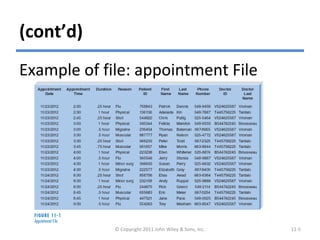
(cont’d)
Example of file: appointment File
© Copyright 2011 John Wiley & Sons, Inc. 11-5
(cont’d)
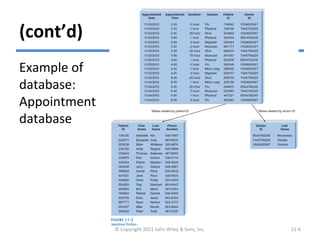
Example of
database:
Appointment
database
© Copyright 2011 John Wiley & Sons, Inc. 11-6
Files
A data file contains an electronic list of
information that is formatted for a
particular transaction.
Typically, files are organized sequentially.
Records can be associated with other
records by pointers.
Sometimes files are called linked Lists
because of the way the records are linked
together using pointers.
© Copyright 2011 John Wiley & Sons, Inc. 11-7
(cont’d)
There are several types of files:
- Master files – store core information that is
important to the application.
- Look-up files – contain static values.
- Transaction files – store information that can
be used to update a master file.
- Audit files – record “before” and “after”
images of data as the data are altered.
- History files (or archive files) – store past
transactions. © Copyright 2011 John Wiley & Sons, Inc. 11-8
Databases
There are many types of databases:
- Legacy database
- Relational database
- Object database
- Multidimensional database
© Copyright 2011 John Wiley & Sons, Inc. 11-9
Legacy Databases
The name of legacy database is given to those
databases which are based on older
technology that is seldom used to develop
new applications.
Two major types of legacy databases:
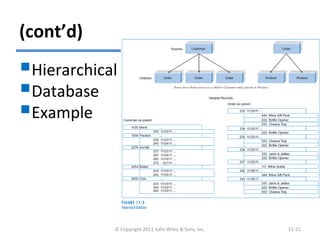
- Hierarchical databases use hierarchies, or
inverted trees, to represent relationships.
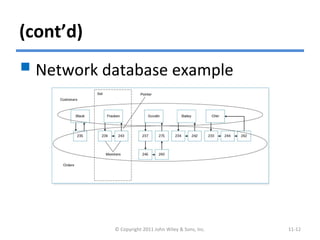
- Network databases are collections of records
that are related to each other through
pointers. © Copyright 2011 John Wiley & Sons, Inc. 11-10
(cont’d)
Hierarchical
Database
Example
© Copyright 2011 John Wiley & Sons, Inc. 11-11
(cont’d)
© Copyright 2011 John Wiley & Sons, Inc. 11-12
 Network database example
Relational Databases
The relational database is the most
popular kind of database for application
development today.
A relational database is based on
collections of tables, each of which has a
primary key.
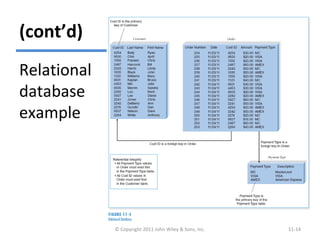
The tables are related to each other by the
placement of the primary key from one
table into the related table as a foreign
key. © Copyright 2011 John Wiley & Sons, Inc. 11-13
(cont’d)
© Copyright 2011 John Wiley & Sons, Inc. 11-14
Relational
database
example
(cont’d)
Most relational database management
systems (RDBMS) support referential
integrity, or the idea of ensuring that
values linking the tables together are
valid and correctly synchronized.
Structured Query Language (SQL) is the
standard language for accessing the
data in the tables.
© Copyright 2011 John Wiley & Sons, Inc. 11-15
Object Databases
The object database, or object-oriented
database, is based on the premise of object
orientation that all things should be treated as
objects that have both data (attributes) and
processes (behaviors).
Changes to one object have no effect on other
objects because the attributes and behaviors
self-contained, or encapsulated, within each one.
This encapsulation allows objects to be reused.
© Copyright 2011 John Wiley & Sons, Inc. 11-16
(cont’d)
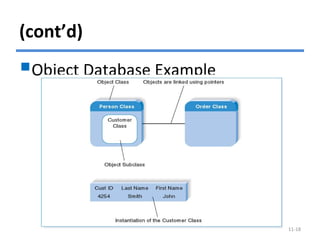
 In object databases, the combination of data and
processes is represented by object classes.
 An object class can contain a variety of subclasses.
 An instance of data in object databases is referred to
as an instantiation.
 Object-oriented database management system
(OODBMS) are mainly used to support multimedia
applications or systems that involve complex data.
 Hybrid OODBMS technology includes databases with
both object and relational features.
© Copyright 2011 John Wiley & Sons, Inc. 11-17
(cont’d)
Object Database Example
© Copyright 2011 John Wiley & Sons, Inc. 11-18
Multidimensional Databases
 A multidimensional database is a type of relational
database that is used extensively in data
warehousing.
 Data warehousing is the practice of taking and
storing data in a data warehouse (i.e., a large
database) that supports decision support systems
(DSS).
 Data marts are smaller databases based on data
warehouse data, and support DSS for specific
departments or functional areas of the
organization. © Copyright 2011 John Wiley & Sons, Inc. 11-19
(cont’d)
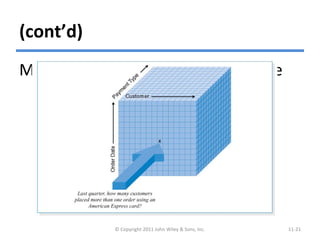
A multidimensional database stores
data to support aggregations of data
on multiple dimensions.
When the data are first loaded into a
multidimensional database, the
database precalculates the data across
the multiple dimensions and stores the
answers for fast access.
© Copyright 2011 John Wiley & Sons, Inc. 11-20
(cont’d)
Multidimensional Database Example
© Copyright 2011 John Wiley & Sons, Inc. 11-21
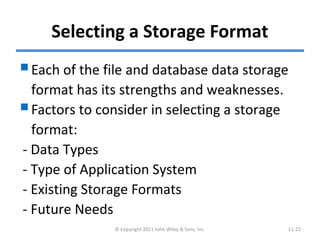
Selecting a Storage Format
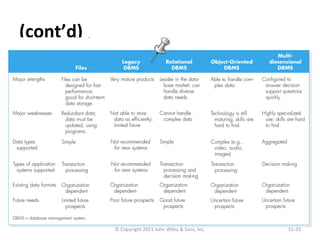
Each of the file and database data storage
format has its strengths and weaknesses.
Factors to consider in selecting a storage
format:
- Data Types
- Type of Application System
- Existing Storage Formats
- Future Needs
© Copyright 2011 John Wiley & Sons, Inc. 11-22
(cont’d)
Comparing Data Storage Formats
© Copyright 2011 John Wiley & Sons, Inc. 11-23
MOVING FROM LOGICAL TO PHYSICAL
DATA MODELS
The logical entity relationship diagrams
(ERDs) created during analysis depict the
“business view” of the data, but omit
implementation details.
Having determined the data storage
format, physical data models are created
to show implementation details and to
explain more about the “how” of the final
system. © Copyright 2011 John Wiley & Sons, Inc. 11-24
The Physical Entity Relationship
Diagram
 The ERD contains the same
components for both logical and
physical models, including entities,
relationships, and attributes.
The difference lies in the fact that
physical ERDs contain references to
how data will be stored and that much
more metadata are defined.
© Copyright 2011 John Wiley & Sons, Inc. 11-25
(cont’d)
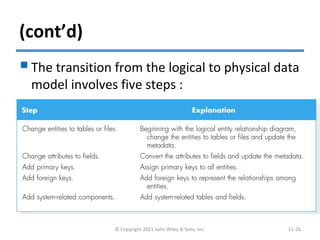
The transition from the logical to physical data
model involves five steps :
© Copyright 2011 John Wiley & Sons, Inc. 11-26
(cont’d)
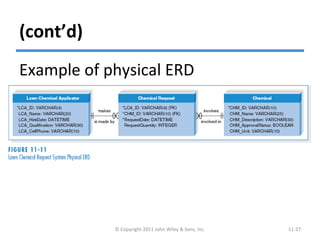
Example of physical ERD
© Copyright 2011 John Wiley & Sons, Inc. 11-27
(cont’d)
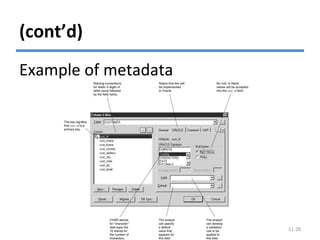
© Copyright 2011 John Wiley & Sons, Inc. 11-28
Example of metadata
Revising the CRUD Matrix
It is important to verify that the system’s
DFD and ERD models are balanced.
In design, as these models are converted
into physical models, changes in the
form of new processes, new data stores,
and new data elements may occur. The
CRUD matrix should be revised.
© Copyright 2011 John Wiley & Sons, Inc. 11-29
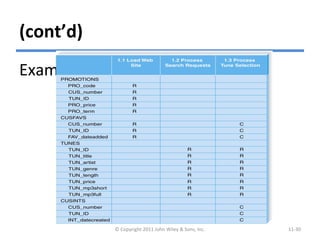
(cont’d)
Example of revised CRUD matrix
© Copyright 2011 John Wiley & Sons, Inc. 11-30
OPTIMIZING DATA STORAGE
The data storage format is now
optimized for processing efficiency.
There are two primary dimensions in
which to optimize a relational database:
for storage efficiency and for speed of
access.
© Copyright 2011 John Wiley & Sons, Inc. 11-31
Optimizing Storage Efficiency
The most efficient tables in a relational
database in terms of storage space have
no redundant data and very few null
values.
Normalization is the best way to
optimize data storage for efficiency.
© Copyright 2011 John Wiley & Sons, Inc. 11-32
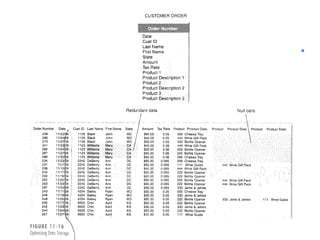
(cont’d)
Optimizing data storage
© Copyright 2011 John Wiley & Sons, Inc. 11-33
Optimizing Access Speed
 After having optimized the data model design for data
storage efficiency, the end result is that data are spread
out across a number of tables.
 For a large relational database, it is necessary to
optimize access speed.
 There are several techniques of optimizing access speed:
– Denormalization
– Clustering
– Indexing
– Estimating the size of data for hardware planning
© Copyright 2011 John Wiley & Sons, Inc. 11-34
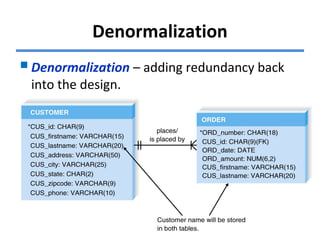
Denormalization
Denormalization – adding redundancy back
into the design.
© Copyright 2011 John Wiley & Sons, Inc. 11-35
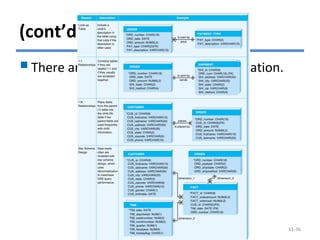
(cont’d)
There are four reasons for denormalization.
© Copyright 2011 John Wiley & Sons, Inc. 11-36
Clustering
Clustering – placing records together
physically so that like records are stored
close together.
Intrafile clustering – Similar records in
the table are stored together.
Interfile clustering – Combining records
from more that one table that typically
are retrieved together.
© Copyright 2011 John Wiley & Sons, Inc. 11-37
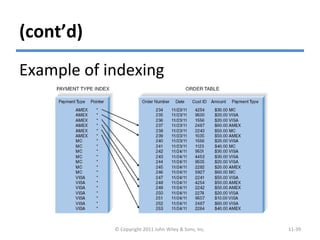
Indexing
An index in data storage is a minitable
(similar to an index of a book) that
contains values from one or more
columns in a table and the location of
the values within the table.
Indexes require overhead in that they
take up space on the storage.
© Copyright 2011 John Wiley & Sons, Inc. 11-38
(cont’d)
Example of indexing
© Copyright 2011 John Wiley & Sons, Inc. 11-39
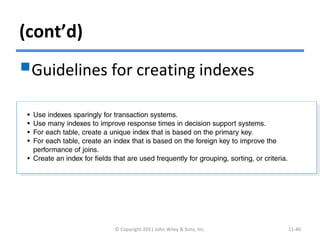
(cont’d)
Guidelines for creating indexes
© Copyright 2011 John Wiley & Sons, Inc. 11-40
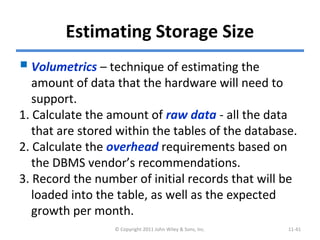
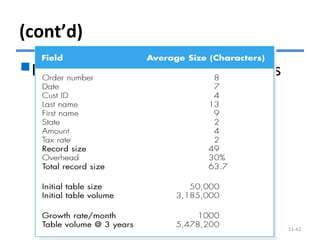
Estimating Storage Size
Volumetrics – technique of estimating the
amount of data that the hardware will need to
support.
1. Calculate the amount of raw data - all the data
that are stored within the tables of the database.
2. Calculate the overhead requirements based on
the DBMS vendor’s recommendations.
3. Record the number of initial records that will be
loaded into the table, as well as the expected
growth per month.
© Copyright 2011 John Wiley & Sons, Inc. 11-41
(cont’d)
Example of calculating volumetrics
© Copyright 2011 John Wiley & Sons, Inc. 11-42
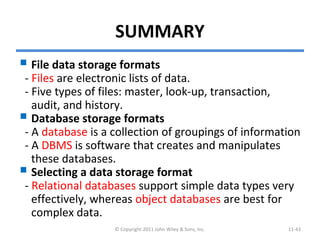
SUMMARY
 File data storage formats
- Files are electronic lists of data.
- Five types of files: master, look-up, transaction,
audit, and history.
 Database storage formats
- A database is a collection of groupings of information
- A DBMS is software that creates and manipulates
these databases.
 Selecting a data storage format
- Relational databases support simple data types very
effectively, whereas object databases are best for
complex data.
© Copyright 2011 John Wiley & Sons, Inc. 11-43
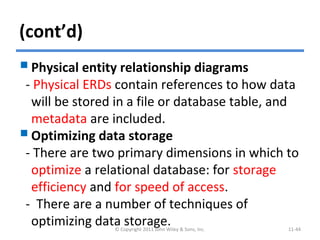
(cont’d)
Physical entity relationship diagrams
- Physical ERDs contain references to how data
will be stored in a file or database table, and
metadata are included.
Optimizing data storage
- There are two primary dimensions in which to
optimize a relational database: for storage
efficiency and for speed of access.
- There are a number of techniques of
optimizing data storage.© Copyright 2011 John Wiley & Sons, Inc. 11-44
Copyright 2011 John Wiley & Sons, Inc.
All rights reserved. Reproduction or translation of this work
beyond that permitted in Section 117 of the 1976 United States
Copyright Act without the express written permission of the
copyright owner is unlawful. Request for further information
should be addressed to the Permissions Department, John Wiley
& Sons, Inc. The purchaser may make back-up copies for his/her
own use only and not for redistribution or resale. The Publisher
assumes no responsibility for errors, omissions, or damages,
caused by the use of these programs or from the use of the
information contained herein.
© Copyright 2011 John Wiley & Sons, Inc. 11-45

Ch11-Data Storage Design

  • 1.
    Systems Analysis andDesignSystems Analysis and Design 5th Edition5th Edition Chapter 11. Data Storage DesignChapter 11. Data Storage Design Alan Dennis, Barbara Haley Wixom, and Roberta Roth 11-1© Copyright 2011 John Wiley & Sons, Inc.
  • 2.
    Chapter 11 Outline Datastorage formats. - Files. - Databases. Moving from logical to physical data models. Optimizing data storage. © Copyright 2011 John Wiley & Sons, Inc. 11-2
  • 3.
    INTRODUCTION  The datastorage function is concerned with how data is stored and handled by programs that run the system.  Data storage design is to - select the data storage format; - convert the logical data model created during analysis into a physical data model to reflect the implementation decision; - ensure that DFDs and ERDs balance; and - design the selected data storage format to optimize its processing efficiency. © Copyright 2011 John Wiley & Sons, Inc. 11-3
  • 4.
    DATA STORAGE FORMATS Thereare two types of data storage formats: - Files: electronic lists of data that have been optimized to perform a particular transaction. - Database: a collection of groupings of information that are related to each other in some way. A Database Management System (DBMS) is software that creates and manipulates the databases. © Copyright 2011 John Wiley & Sons, Inc. 11-4
  • 5.
    (cont’d) Example of file:appointment File © Copyright 2011 John Wiley & Sons, Inc. 11-5
  • 6.
  • 7.
    Files A data filecontains an electronic list of information that is formatted for a particular transaction. Typically, files are organized sequentially. Records can be associated with other records by pointers. Sometimes files are called linked Lists because of the way the records are linked together using pointers. © Copyright 2011 John Wiley & Sons, Inc. 11-7
  • 8.
    (cont’d) There are severaltypes of files: - Master files – store core information that is important to the application. - Look-up files – contain static values. - Transaction files – store information that can be used to update a master file. - Audit files – record “before” and “after” images of data as the data are altered. - History files (or archive files) – store past transactions. © Copyright 2011 John Wiley & Sons, Inc. 11-8
  • 9.
    Databases There are manytypes of databases: - Legacy database - Relational database - Object database - Multidimensional database © Copyright 2011 John Wiley & Sons, Inc. 11-9
  • 10.
    Legacy Databases The nameof legacy database is given to those databases which are based on older technology that is seldom used to develop new applications. Two major types of legacy databases: - Hierarchical databases use hierarchies, or inverted trees, to represent relationships. - Network databases are collections of records that are related to each other through pointers. © Copyright 2011 John Wiley & Sons, Inc. 11-10
  • 11.
  • 12.
    (cont’d) © Copyright 2011John Wiley & Sons, Inc. 11-12  Network database example
  • 13.
    Relational Databases The relationaldatabase is the most popular kind of database for application development today. A relational database is based on collections of tables, each of which has a primary key. The tables are related to each other by the placement of the primary key from one table into the related table as a foreign key. © Copyright 2011 John Wiley & Sons, Inc. 11-13
  • 14.
    (cont’d) © Copyright 2011John Wiley & Sons, Inc. 11-14 Relational database example
  • 15.
    (cont’d) Most relational databasemanagement systems (RDBMS) support referential integrity, or the idea of ensuring that values linking the tables together are valid and correctly synchronized. Structured Query Language (SQL) is the standard language for accessing the data in the tables. © Copyright 2011 John Wiley & Sons, Inc. 11-15
  • 16.
    Object Databases The objectdatabase, or object-oriented database, is based on the premise of object orientation that all things should be treated as objects that have both data (attributes) and processes (behaviors). Changes to one object have no effect on other objects because the attributes and behaviors self-contained, or encapsulated, within each one. This encapsulation allows objects to be reused. © Copyright 2011 John Wiley & Sons, Inc. 11-16
  • 17.
    (cont’d)  In objectdatabases, the combination of data and processes is represented by object classes.  An object class can contain a variety of subclasses.  An instance of data in object databases is referred to as an instantiation.  Object-oriented database management system (OODBMS) are mainly used to support multimedia applications or systems that involve complex data.  Hybrid OODBMS technology includes databases with both object and relational features. © Copyright 2011 John Wiley & Sons, Inc. 11-17
  • 18.
    (cont’d) Object Database Example ©Copyright 2011 John Wiley & Sons, Inc. 11-18
  • 19.
    Multidimensional Databases  Amultidimensional database is a type of relational database that is used extensively in data warehousing.  Data warehousing is the practice of taking and storing data in a data warehouse (i.e., a large database) that supports decision support systems (DSS).  Data marts are smaller databases based on data warehouse data, and support DSS for specific departments or functional areas of the organization. © Copyright 2011 John Wiley & Sons, Inc. 11-19
  • 20.
    (cont’d) A multidimensional databasestores data to support aggregations of data on multiple dimensions. When the data are first loaded into a multidimensional database, the database precalculates the data across the multiple dimensions and stores the answers for fast access. © Copyright 2011 John Wiley & Sons, Inc. 11-20
  • 21.
    (cont’d) Multidimensional Database Example ©Copyright 2011 John Wiley & Sons, Inc. 11-21
  • 22.
    Selecting a StorageFormat Each of the file and database data storage format has its strengths and weaknesses. Factors to consider in selecting a storage format: - Data Types - Type of Application System - Existing Storage Formats - Future Needs © Copyright 2011 John Wiley & Sons, Inc. 11-22
  • 23.
    (cont’d) Comparing Data StorageFormats © Copyright 2011 John Wiley & Sons, Inc. 11-23
  • 24.
    MOVING FROM LOGICALTO PHYSICAL DATA MODELS The logical entity relationship diagrams (ERDs) created during analysis depict the “business view” of the data, but omit implementation details. Having determined the data storage format, physical data models are created to show implementation details and to explain more about the “how” of the final system. © Copyright 2011 John Wiley & Sons, Inc. 11-24
  • 25.
    The Physical EntityRelationship Diagram  The ERD contains the same components for both logical and physical models, including entities, relationships, and attributes. The difference lies in the fact that physical ERDs contain references to how data will be stored and that much more metadata are defined. © Copyright 2011 John Wiley & Sons, Inc. 11-25
  • 26.
    (cont’d) The transition fromthe logical to physical data model involves five steps : © Copyright 2011 John Wiley & Sons, Inc. 11-26
  • 27.
    (cont’d) Example of physicalERD © Copyright 2011 John Wiley & Sons, Inc. 11-27
  • 28.
    (cont’d) © Copyright 2011John Wiley & Sons, Inc. 11-28 Example of metadata
  • 29.
    Revising the CRUDMatrix It is important to verify that the system’s DFD and ERD models are balanced. In design, as these models are converted into physical models, changes in the form of new processes, new data stores, and new data elements may occur. The CRUD matrix should be revised. © Copyright 2011 John Wiley & Sons, Inc. 11-29
  • 30.
    (cont’d) Example of revisedCRUD matrix © Copyright 2011 John Wiley & Sons, Inc. 11-30
  • 31.
    OPTIMIZING DATA STORAGE Thedata storage format is now optimized for processing efficiency. There are two primary dimensions in which to optimize a relational database: for storage efficiency and for speed of access. © Copyright 2011 John Wiley & Sons, Inc. 11-31
  • 32.
    Optimizing Storage Efficiency Themost efficient tables in a relational database in terms of storage space have no redundant data and very few null values. Normalization is the best way to optimize data storage for efficiency. © Copyright 2011 John Wiley & Sons, Inc. 11-32
  • 33.
    (cont’d) Optimizing data storage ©Copyright 2011 John Wiley & Sons, Inc. 11-33
  • 34.
    Optimizing Access Speed After having optimized the data model design for data storage efficiency, the end result is that data are spread out across a number of tables.  For a large relational database, it is necessary to optimize access speed.  There are several techniques of optimizing access speed: – Denormalization – Clustering – Indexing – Estimating the size of data for hardware planning © Copyright 2011 John Wiley & Sons, Inc. 11-34
  • 35.
    Denormalization Denormalization – addingredundancy back into the design. © Copyright 2011 John Wiley & Sons, Inc. 11-35
  • 36.
    (cont’d) There are fourreasons for denormalization. © Copyright 2011 John Wiley & Sons, Inc. 11-36
  • 37.
    Clustering Clustering – placingrecords together physically so that like records are stored close together. Intrafile clustering – Similar records in the table are stored together. Interfile clustering – Combining records from more that one table that typically are retrieved together. © Copyright 2011 John Wiley & Sons, Inc. 11-37
  • 38.
    Indexing An index indata storage is a minitable (similar to an index of a book) that contains values from one or more columns in a table and the location of the values within the table. Indexes require overhead in that they take up space on the storage. © Copyright 2011 John Wiley & Sons, Inc. 11-38
  • 39.
    (cont’d) Example of indexing ©Copyright 2011 John Wiley & Sons, Inc. 11-39
  • 40.
    (cont’d) Guidelines for creatingindexes © Copyright 2011 John Wiley & Sons, Inc. 11-40
  • 41.
    Estimating Storage Size Volumetrics– technique of estimating the amount of data that the hardware will need to support. 1. Calculate the amount of raw data - all the data that are stored within the tables of the database. 2. Calculate the overhead requirements based on the DBMS vendor’s recommendations. 3. Record the number of initial records that will be loaded into the table, as well as the expected growth per month. © Copyright 2011 John Wiley & Sons, Inc. 11-41
  • 42.
    (cont’d) Example of calculatingvolumetrics © Copyright 2011 John Wiley & Sons, Inc. 11-42
  • 43.
    SUMMARY  File datastorage formats - Files are electronic lists of data. - Five types of files: master, look-up, transaction, audit, and history.  Database storage formats - A database is a collection of groupings of information - A DBMS is software that creates and manipulates these databases.  Selecting a data storage format - Relational databases support simple data types very effectively, whereas object databases are best for complex data. © Copyright 2011 John Wiley & Sons, Inc. 11-43
  • 44.
    (cont’d) Physical entity relationshipdiagrams - Physical ERDs contain references to how data will be stored in a file or database table, and metadata are included. Optimizing data storage - There are two primary dimensions in which to optimize a relational database: for storage efficiency and for speed of access. - There are a number of techniques of optimizing data storage.© Copyright 2011 John Wiley & Sons, Inc. 11-44
  • 45.
    Copyright 2011 JohnWiley & Sons, Inc. All rights reserved. Reproduction or translation of this work beyond that permitted in Section 117 of the 1976 United States Copyright Act without the express written permission of the copyright owner is unlawful. Request for further information should be addressed to the Permissions Department, John Wiley & Sons, Inc. The purchaser may make back-up copies for his/her own use only and not for redistribution or resale. The Publisher assumes no responsibility for errors, omissions, or damages, caused by the use of these programs or from the use of the information contained herein. © Copyright 2011 John Wiley & Sons, Inc. 11-45