CODE PAD: INTERACTIVE SPACES FOR
MAINTAINING CONCENTRATION IN
PROGRAMMING ENVIRONMENTS
Chris Parnin Georgia Institute of Technology
Carsten Görg, UC Denver
Spencer Rugaber, Georgia Institute of Technology
Visualization: Introducing a new species into an environment.
ECOSYSTEMS
SUCCESSFUL INTRODUCTIONS…
RICH INTERACTION IN
ENVIRONMENT
How do I survive in the wild?
SOFTWARE
DEVELOPMENT
ECOSYSTEM?
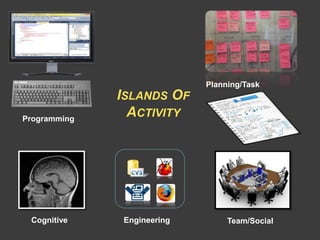
Resource-starved and isolated
Programming
Team/SocialCognitive
Planning/Task
Engineering
ISLANDS OF
ACTIVITY
Scribble on code.
Keep its items in a mental workspace.
Share and interact with others.
WHY CAN’T WE….
INTRODUCING
CODE PAD
A platform first,
a device second.
Outline
• Design
• Examples
• Implementation
• Future
DESIGN
Content
Actions
Programming activities Secondary activities
Automatic
or
Manual
WHY NOT ANOTHER DISPLAY?
• Social Mobility and Sharing
(collaboration, meetings, hand-off)
• Alternate Modality (pen, multi-touch)
• Spatial Affordances
(push aside, stacking)
TWO COMPETING DESIGNS
Chomp
Pellets.cs
using System;
using System.Collections;
using System.Drawing;
using System.Drawing.Drawing2D;
namespace Chomp
{
public enum PelletType
{
RegularPellet = 0,
PowerPellet = 1
}
public class Pellets
{
private ArrayList _pellets;
private ArrayList _powerPellets;
private PelletType _pelletType;
private SolidBrush _brushPowerPellet;
public const int POWER_PELLET_POINTS = 50;
public const int REGULAR_PELLET_POINTS = 10;
public delegate void
onPowerPelletEatenEventHandler (object Source,
PelletEventArgs e);
public event onPowerPelletEatenEventHandler
OnPelletEaten;
public Pellets()
{
_brushPowerPellet = new SolidBrush
(Color.FromArgb(255,194,159));
}
public int RegularPelletCount
{
get {return _pellets.Count;}
}
public int PowerPelletCount
{
get {return _powerPellets.Count;}
}
public void BlinkPowerPellet()
{
if (_brushPowerPellet.Color == Color.Black)
{
_brushPowerPellet.Color = Color.FromArgb
(255,194,159);
}
else
{
_brushPowerPellet.Color = Color.Black;
}
}
Chomp
Pacman.cs
using System;
using System.Drawing;
using System.Drawing.Drawing2D;
namespace Chomp
{
public class PacmanCharacter : GameCharacter
{
Bitmap _bmpCharClosed;
Bitmap _bmpCharOpenMidLeft;
Bitmap _bmpCharOpenMidRight;
Bitmap _bmpCharOpenMidUp;
Bitmap _bmpCharOpenMidDown;
Bitmap _bmpCharOpenAllLeft;
Bitmap _bmpCharOpenAllRight;
Bitmap _bmpCharOpenAllUp;
Bitmap _bmpCharOpenAllDown;
public enum CharacterPosition
{
Closed = 0,
OpenMidLow = 1,
OpenMidHigh = 3,
OpenAll = 4,
}
private CharacterPosition
_currentCharacterPosition;
public PacmanCharacter(GameBoard Board, Point
CurrentLocation, int Width, int Height): base (Board,
CurrentLocation, Width, Height)
{
_currentCharacterPosition =
CharacterPosition.Closed;
}
public CharacterPosition Position
{
get {return _currentCharacterPosition;}
set {_currentCharacterPosition = value;}
}
public override sealed void Initialize()
{
GenerateCharacters();
}
public void AnimateDeath()
{
}
public override sealed void Move()
{
base.Move();
if (_currentCharacterState ==
CharacterState.Moving) _currentCharacterPosition =
GetNextCharacterPosition();
}
Organize content by task Organize content by activity
CONTENT TYPE
Chomp
Pellets.cs
using System;
using System.Collections;
using System.Drawing;
using System.Drawing.Drawing2D;
namespace Chomp
{
public enum PelletType
{
RegularPellet = 0,
PowerPellet = 1
}
public class Pellets
{
private ArrayList _pellets;
private ArrayList _powerPellets;
private PelletType _pelletType;
private SolidBrush _brushPowerPellet;
public const int POWER_PELLET_POINTS = 50;
public const int REGULAR_PELLET_POINTS = 10;
public delegate void
onPowerPelletEatenEventHandler (object Source,
PelletEventArgs e);
public event onPowerPelletEatenEventHandler
OnPelletEaten;
public Pellets()
{
_brushPowerPellet = new SolidBrush
(Color.FromArgb(255,194,159));
}
public int RegularPelletCount
{
get {return _pellets.Count;}
}
public int PowerPelletCount
{
get {return _powerPellets.Count;}
}
public void BlinkPowerPellet()
{
if (_brushPowerPellet.Color == Color.Black)
{
_brushPowerPellet.Color = Color.FromArgb
(255,194,159);
}
else
{
_brushPowerPellet.Color = Color.Black;
}
}
File Overview
2
Name Value
address
City
State
Postcode 30332
null
{Name=”Atlanta”}
IDE WireframesSnippets
EXAMPLE: REFACTORING
Scenario:
Developer wants to extract
a set of methods scattered
throughout code to form
new classes…
Developer sees candidate, send!
Main development task…
Now, enough snippets to get started!
REFACTORING WORKBENCH
Create new class!
public Point CenterPoint(Polyline line)
{
var first = line.Points.First();
var last = line.Points.Last();
return new Point((first.X + last.X) / 2,
(first.Y + last.Y) / 2);
}
public Point CenterPoint(Polyline line)
{
var first = line.Points.First();
var last = line.Points.Last();
return new Point((first.X + last.X) / 2,
(first.Y + last.Y) / 2);
}
public Point CenterPoint(Polyline line)
{
var first = line.Points.First();
var last = line.Points.Last();
return new Point((first.X + last.X) / 2,
(first.Y + last.Y) / 2);
}
Organize Generate!
Pellets.cs
13: public class Pellets
42: public void BlinkPowerPellet()
54: public void RemovePellet(Point Location)
108: _powerPellets
114: public void GeneratePellets()
GameBoard.cs
22: public class GameBoard
54: public event PowerModeEventHandler
62: public GameBoard(int Width, int Height,
System.Windows.Forms.PictureBox PictureGameBoard)
wen=+netaEtellePnO.stellep_:66
Pellets.onPowerPelletEatenEventHandler(PelletEaten);
877:
//:388
889: _powerMode
(fi:098
(this, new EventArgs());
891:
892:
GameCharacter.cs
5:namespace Chomp
13: public class Pellets
19: _soundDevice = new Device();
27: public abstract class GameCharacter
35: protected int _moveInterval;
215:
CurrentCoordinate)
;++y:922
;kaerb:032
256: {
261:
266:
esac:072
.stelleP.draob_:172 GeneratePellets
274:
;kaerb:772
282:
Pellets.cs
13: public class Pellets
42: public void BlinkPowerPellet()
54: public void RemovePellet(Point Location)
108: _powerPellets
114: public void GeneratePellets()
GameBoard.cs
22: public class GameBoard
54: public event PowerModeEventHandler
62: public GameBoard(int Width, int Height,
System.Windows.Forms.PictureBox PictureGameBoard)
wen=+netaEtellePnO.stellep_:66
Pellets.onPowerPelletEatenEventHandler(PelletEaten);
877:
//:388
889: _powerMode
(fi:098
(this, new EventArgs());
891:
892:
GameCharacter.cs
5:namespace Chomp
13: public class Pellets
19: _soundDevice = new Device();
27: public abstract class GameCharacter
35: protected int _moveInterval;
215:
CurrentCoordinate)
;++y:922
;kaerb:032
256: {
261:
266:
esac:072
.stelleP.draob_:172 GeneratePellets
274:
;kaerb:772
282:
Pellets.cs
13: public class Pellets
42: public void BlinkPowerPellet()
54: public void RemovePellet(Point Location)
108: _powerPellets
114: public void GeneratePellets()
GameBoard.cs
22: public class GameBoard
54: public event PowerModeEventHandler
62: public GameBoard(int Width, int Height,
System.Windows.Forms.PictureBox PictureGameBoard)
wen=+netaEtellePnO.stellep_:66
Pellets.onPowerPelletEatenEventHandler(PelletEaten);
877:
//:388
889: _powerMode
(fi:098
(this, new EventArgs());
891:
892:
GameCharacter.cs
5:namespace Chomp
13: public class Pellets
19: _soundDevice = new Device();
27: public abstract class GameCharacter
35: protected int _moveInterval;
215:
CurrentCoordinate)
;++y:922
;kaerb:032
256: {
261:
266:
esac:072
.stelleP.draob_:172 GeneratePellets
274:
;kaerb:772
282:
GameBoard.cs
22: public class GameBoard
54: public event PowerModeEventHandler
62: public GameBoard(int Width, int Height,
System.Windows.Forms.PictureBox PictureGameBoard)
wen=+netaEtellePnO.stellep_:66
Pellets.onPowerPelletEatenEventHandler(PelletEaten);
877:
//:388
889: _powerMode
(fi:098
(this, new EventArgs());
891:
892:
1
2
GameBoard.cs
22: public class GameBoard
54: public event PowerModeEventHandler
62: public GameBoard(int Width, int Height,
System.Windows.Forms.PictureBox PictureGameBoard)
wen=+netaEtellePnO.stellep_:66
Pellets.onPowerPelletEatenEventHandler(PelletEaten);
877:
//:388
889: _powerMode
(fi:098
(this, new EventArgs());
891:
892:
OTHER EXAMPLES
• Handing off a task to another
developer.
• Navigation support.
See paper!.
IMPLEMENTATION
From vision to platform.
Lessons learned.
Activity
App
Code Pad
Events
IDE
Notification
Service
Code Pad
Actions
IDE
Command
Service
IDE
Code Pad
Services
(Gestures, History)
Code Pad
View Manager
PLATFORM DESIGN
TOUCH
Manipulation
TouchDown
TouchMove
TouchUp
id 1
id 2
Touch Actions
Chomp
Pacman.cs
using System;
using System.Drawing;
using System.Drawing.Drawing2D;
namespace Chomp
{
public class PacmanCharacter : GameCharacter
{
Bitmap _bmpCharClosed;
Bitmap _bmpCharOpenMidLeft;
Bitmap _bmpCharOpenMidRight;
Bitmap _bmpCharOpenMidUp;
Bitmap _bmpCharOpenMidDown;
Bitmap _bmpCharOpenAllLeft;
Bitmap _bmpCharOpenAllRight;
Bitmap _bmpCharOpenAllUp;
Bitmap _bmpCharOpenAllDown;
public enum CharacterPosition
{
Closed = 0,
OpenMidLow = 1,
OpenMidHigh = 3,
OpenAll = 4,
}
private CharacterPosition
_currentCharacterPosition;
public PacmanCharacter(GameBoard Board, Point
CurrentLocation, int Width, int Height): base (Board,
CurrentLocation, Width, Height)
{
_currentCharacterPosition =
CharacterPosition.Closed;
}
public CharacterPosition Position
{
get {return _currentCharacterPosition;}
set {_currentCharacterPosition = value;}
}
public override sealed void Initialize()
{
GenerateCharacters();
}
public void AnimateDeath()
{
}
public override sealed void Move()
{
base.Move();
if (_currentCharacterState ==
CharacterState.Moving) _currentCharacterPosition =
GetNextCharacterPosition();
}
Raw input Resample Templates
GESTURES (SHAPED)
Match?
.59
.30
.90
OTHER FORM FACTORS…
TOMORROW'S INTERACTIONS
Code Canvas, DeLine, ICSE 2010
Code Bubbles, Bragdon ICSE/CHI 2010
CONCLUSION
QUESTIONS?
Task vs. ActivityOther Devices
Missing
Affordances
Multiple Pads Divided Attention
Platform Design

Code Pad

  • 1.
    CODE PAD: INTERACTIVESPACES FOR MAINTAINING CONCENTRATION IN PROGRAMMING ENVIRONMENTS Chris Parnin Georgia Institute of Technology Carsten Görg, UC Denver Spencer Rugaber, Georgia Institute of Technology
  • 2.
    Visualization: Introducing anew species into an environment. ECOSYSTEMS
  • 3.
    SUCCESSFUL INTRODUCTIONS… RICH INTERACTIONIN ENVIRONMENT How do I survive in the wild?
  • 4.
  • 5.
  • 6.
    Scribble on code. Keepits items in a mental workspace. Share and interact with others. WHY CAN’T WE….
  • 7.
    INTRODUCING CODE PAD A platformfirst, a device second. Outline • Design • Examples • Implementation • Future
  • 8.
  • 9.
    WHY NOT ANOTHERDISPLAY? • Social Mobility and Sharing (collaboration, meetings, hand-off) • Alternate Modality (pen, multi-touch) • Spatial Affordances (push aside, stacking)
  • 10.
    TWO COMPETING DESIGNS Chomp Pellets.cs usingSystem; using System.Collections; using System.Drawing; using System.Drawing.Drawing2D; namespace Chomp { public enum PelletType { RegularPellet = 0, PowerPellet = 1 } public class Pellets { private ArrayList _pellets; private ArrayList _powerPellets; private PelletType _pelletType; private SolidBrush _brushPowerPellet; public const int POWER_PELLET_POINTS = 50; public const int REGULAR_PELLET_POINTS = 10; public delegate void onPowerPelletEatenEventHandler (object Source, PelletEventArgs e); public event onPowerPelletEatenEventHandler OnPelletEaten; public Pellets() { _brushPowerPellet = new SolidBrush (Color.FromArgb(255,194,159)); } public int RegularPelletCount { get {return _pellets.Count;} } public int PowerPelletCount { get {return _powerPellets.Count;} } public void BlinkPowerPellet() { if (_brushPowerPellet.Color == Color.Black) { _brushPowerPellet.Color = Color.FromArgb (255,194,159); } else { _brushPowerPellet.Color = Color.Black; } } Chomp Pacman.cs using System; using System.Drawing; using System.Drawing.Drawing2D; namespace Chomp { public class PacmanCharacter : GameCharacter { Bitmap _bmpCharClosed; Bitmap _bmpCharOpenMidLeft; Bitmap _bmpCharOpenMidRight; Bitmap _bmpCharOpenMidUp; Bitmap _bmpCharOpenMidDown; Bitmap _bmpCharOpenAllLeft; Bitmap _bmpCharOpenAllRight; Bitmap _bmpCharOpenAllUp; Bitmap _bmpCharOpenAllDown; public enum CharacterPosition { Closed = 0, OpenMidLow = 1, OpenMidHigh = 3, OpenAll = 4, } private CharacterPosition _currentCharacterPosition; public PacmanCharacter(GameBoard Board, Point CurrentLocation, int Width, int Height): base (Board, CurrentLocation, Width, Height) { _currentCharacterPosition = CharacterPosition.Closed; } public CharacterPosition Position { get {return _currentCharacterPosition;} set {_currentCharacterPosition = value;} } public override sealed void Initialize() { GenerateCharacters(); } public void AnimateDeath() { } public override sealed void Move() { base.Move(); if (_currentCharacterState == CharacterState.Moving) _currentCharacterPosition = GetNextCharacterPosition(); } Organize content by task Organize content by activity
  • 11.
    CONTENT TYPE Chomp Pellets.cs using System; usingSystem.Collections; using System.Drawing; using System.Drawing.Drawing2D; namespace Chomp { public enum PelletType { RegularPellet = 0, PowerPellet = 1 } public class Pellets { private ArrayList _pellets; private ArrayList _powerPellets; private PelletType _pelletType; private SolidBrush _brushPowerPellet; public const int POWER_PELLET_POINTS = 50; public const int REGULAR_PELLET_POINTS = 10; public delegate void onPowerPelletEatenEventHandler (object Source, PelletEventArgs e); public event onPowerPelletEatenEventHandler OnPelletEaten; public Pellets() { _brushPowerPellet = new SolidBrush (Color.FromArgb(255,194,159)); } public int RegularPelletCount { get {return _pellets.Count;} } public int PowerPelletCount { get {return _powerPellets.Count;} } public void BlinkPowerPellet() { if (_brushPowerPellet.Color == Color.Black) { _brushPowerPellet.Color = Color.FromArgb (255,194,159); } else { _brushPowerPellet.Color = Color.Black; } } File Overview 2 Name Value address City State Postcode 30332 null {Name=”Atlanta”} IDE WireframesSnippets
  • 12.
    EXAMPLE: REFACTORING Scenario: Developer wantsto extract a set of methods scattered throughout code to form new classes…
  • 13.
  • 14.
    Main development task… Now,enough snippets to get started!
  • 15.
    REFACTORING WORKBENCH Create newclass! public Point CenterPoint(Polyline line) { var first = line.Points.First(); var last = line.Points.Last(); return new Point((first.X + last.X) / 2, (first.Y + last.Y) / 2); } public Point CenterPoint(Polyline line) { var first = line.Points.First(); var last = line.Points.Last(); return new Point((first.X + last.X) / 2, (first.Y + last.Y) / 2); } public Point CenterPoint(Polyline line) { var first = line.Points.First(); var last = line.Points.Last(); return new Point((first.X + last.X) / 2, (first.Y + last.Y) / 2); } Organize Generate!
  • 16.
    Pellets.cs 13: public classPellets 42: public void BlinkPowerPellet() 54: public void RemovePellet(Point Location) 108: _powerPellets 114: public void GeneratePellets() GameBoard.cs 22: public class GameBoard 54: public event PowerModeEventHandler 62: public GameBoard(int Width, int Height, System.Windows.Forms.PictureBox PictureGameBoard) wen=+netaEtellePnO.stellep_:66 Pellets.onPowerPelletEatenEventHandler(PelletEaten); 877: //:388 889: _powerMode (fi:098 (this, new EventArgs()); 891: 892: GameCharacter.cs 5:namespace Chomp 13: public class Pellets 19: _soundDevice = new Device(); 27: public abstract class GameCharacter 35: protected int _moveInterval; 215: CurrentCoordinate) ;++y:922 ;kaerb:032 256: { 261: 266: esac:072 .stelleP.draob_:172 GeneratePellets 274: ;kaerb:772 282: Pellets.cs 13: public class Pellets 42: public void BlinkPowerPellet() 54: public void RemovePellet(Point Location) 108: _powerPellets 114: public void GeneratePellets() GameBoard.cs 22: public class GameBoard 54: public event PowerModeEventHandler 62: public GameBoard(int Width, int Height, System.Windows.Forms.PictureBox PictureGameBoard) wen=+netaEtellePnO.stellep_:66 Pellets.onPowerPelletEatenEventHandler(PelletEaten); 877: //:388 889: _powerMode (fi:098 (this, new EventArgs()); 891: 892: GameCharacter.cs 5:namespace Chomp 13: public class Pellets 19: _soundDevice = new Device(); 27: public abstract class GameCharacter 35: protected int _moveInterval; 215: CurrentCoordinate) ;++y:922 ;kaerb:032 256: { 261: 266: esac:072 .stelleP.draob_:172 GeneratePellets 274: ;kaerb:772 282: Pellets.cs 13: public class Pellets 42: public void BlinkPowerPellet() 54: public void RemovePellet(Point Location) 108: _powerPellets 114: public void GeneratePellets() GameBoard.cs 22: public class GameBoard 54: public event PowerModeEventHandler 62: public GameBoard(int Width, int Height, System.Windows.Forms.PictureBox PictureGameBoard) wen=+netaEtellePnO.stellep_:66 Pellets.onPowerPelletEatenEventHandler(PelletEaten); 877: //:388 889: _powerMode (fi:098 (this, new EventArgs()); 891: 892: GameCharacter.cs 5:namespace Chomp 13: public class Pellets 19: _soundDevice = new Device(); 27: public abstract class GameCharacter 35: protected int _moveInterval; 215: CurrentCoordinate) ;++y:922 ;kaerb:032 256: { 261: 266: esac:072 .stelleP.draob_:172 GeneratePellets 274: ;kaerb:772 282: GameBoard.cs 22: public class GameBoard 54: public event PowerModeEventHandler 62: public GameBoard(int Width, int Height, System.Windows.Forms.PictureBox PictureGameBoard) wen=+netaEtellePnO.stellep_:66 Pellets.onPowerPelletEatenEventHandler(PelletEaten); 877: //:388 889: _powerMode (fi:098 (this, new EventArgs()); 891: 892: 1 2 GameBoard.cs 22: public class GameBoard 54: public event PowerModeEventHandler 62: public GameBoard(int Width, int Height, System.Windows.Forms.PictureBox PictureGameBoard) wen=+netaEtellePnO.stellep_:66 Pellets.onPowerPelletEatenEventHandler(PelletEaten); 877: //:388 889: _powerMode (fi:098 (this, new EventArgs()); 891: 892: OTHER EXAMPLES • Handing off a task to another developer. • Navigation support. See paper!.
  • 17.
    IMPLEMENTATION From vision toplatform. Lessons learned.
  • 18.
    Activity App Code Pad Events IDE Notification Service Code Pad Actions IDE Command Service IDE CodePad Services (Gestures, History) Code Pad View Manager PLATFORM DESIGN
  • 19.
    TOUCH Manipulation TouchDown TouchMove TouchUp id 1 id 2 TouchActions Chomp Pacman.cs using System; using System.Drawing; using System.Drawing.Drawing2D; namespace Chomp { public class PacmanCharacter : GameCharacter { Bitmap _bmpCharClosed; Bitmap _bmpCharOpenMidLeft; Bitmap _bmpCharOpenMidRight; Bitmap _bmpCharOpenMidUp; Bitmap _bmpCharOpenMidDown; Bitmap _bmpCharOpenAllLeft; Bitmap _bmpCharOpenAllRight; Bitmap _bmpCharOpenAllUp; Bitmap _bmpCharOpenAllDown; public enum CharacterPosition { Closed = 0, OpenMidLow = 1, OpenMidHigh = 3, OpenAll = 4, } private CharacterPosition _currentCharacterPosition; public PacmanCharacter(GameBoard Board, Point CurrentLocation, int Width, int Height): base (Board, CurrentLocation, Width, Height) { _currentCharacterPosition = CharacterPosition.Closed; } public CharacterPosition Position { get {return _currentCharacterPosition;} set {_currentCharacterPosition = value;} } public override sealed void Initialize() { GenerateCharacters(); } public void AnimateDeath() { } public override sealed void Move() { base.Move(); if (_currentCharacterState == CharacterState.Moving) _currentCharacterPosition = GetNextCharacterPosition(); }
  • 20.
    Raw input ResampleTemplates GESTURES (SHAPED) Match? .59 .30 .90
  • 21.
  • 22.
  • 23.
    Code Canvas, DeLine,ICSE 2010 Code Bubbles, Bragdon ICSE/CHI 2010
  • 24.
  • 25.
    QUESTIONS? Task vs. ActivityOtherDevices Missing Affordances Multiple Pads Divided Attention Platform Design

Editor's Notes

  • #4 The power of visualization is that data can speak to us. But when do we need this data? What can it support?
  • #5 In other words, what is soft devs ecosystem. How does soft vis fit in with software development?
  • #25 Started paper, with a vision. Now have a platform, with some first applications emerging.