Intro to Android
for iOS developers
Chiu-Ki Chan
@chiuki
@chiuki@chiuki
@chiuki@chiuki
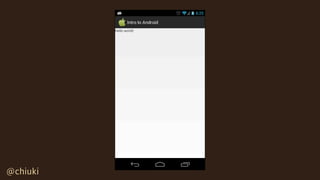
Hello World
Layouts
Intents & Components
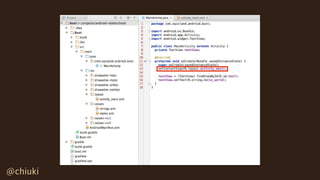
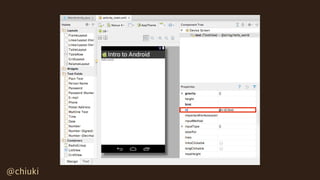
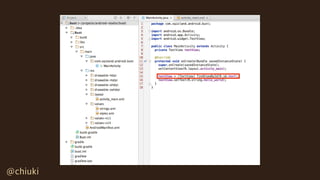
Hello World
@chiuki
@chiuki
ViewController
@chiuki
@chiuki
@chiuki
xib
@chiuki
@chiuki
@chiuki
@chiuki
@chiuki
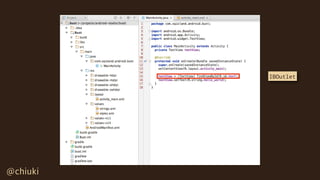
IBOutlet
@chiuki
@chiuki@chiuki
Center
<TextView
android:id="@+id/text"
android:layout_width="wrap_content"
android:layout_height="wrap_content"
android:layout_gravity="center" />
@chiuki
@chiuki@chiuki
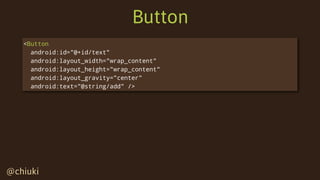
Button
<Button
android:id="@+id/text"
android:layout_width="wrap_content"
android:layout_height="wrap_content"
android:layout_gravity="center"
android:text="@string/add" />
@chiuki
LinearLayout
@chiuki
@chiuki@chiuki
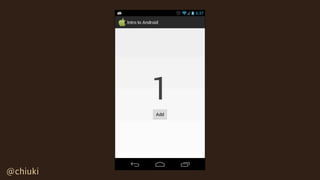
LinearLayout
<LinearLayout
android:layout_width="match_parent"
android:layout_height="match_parent"
android:gravity="center"
android:orientation="vertical" >
<TextView
android:id="@+id/count"
android:layout_width="wrap_content"
android:layout_height="wrap_content"
android:textSize="128sp" />
<Button
android:layout_width="wrap_content"
android:layout_height="wrap_content"
android:text="@string/add"
android:onClick="add" />
</LinearLayout>
@chiuki@chiuki
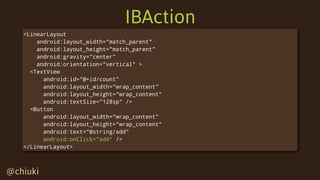
IBAction
<LinearLayout
android:layout_width="match_parent"
android:layout_height="match_parent"
android:gravity="center"
android:orientation="vertical" >
<TextView
android:id="@+id/count"
android:layout_width="wrap_content"
android:layout_height="wrap_content"
android:textSize="128sp" />
<Button
android:layout_width="wrap_content"
android:layout_height="wrap_content"
android:text="@string/add"
android:onClick="add" />
</LinearLayout>
@chiuki@chiuki
IBAction
public class MainActivity extends Activity {
private TextView countView;
private int count = 0;
protected void onCreate(Bundle savedInstanceState) {
super.onCreate(savedInstanceState);
setContentView(R.layout.activity_main);
countView = (TextView) findViewById(R.id.count);
updateCount();
}
public void add(View v) {
count += 1;
updateCount();
}
private void updateCount() {
countView.setText(String.valueOf(count));
}
}
android:onClick="add"
@chiuki@chiuki
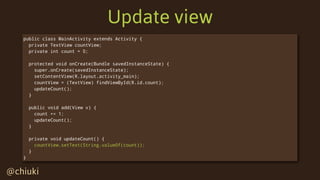
Update view
public class MainActivity extends Activity {
private TextView countView;
private int count = 0;
protected void onCreate(Bundle savedInstanceState) {
super.onCreate(savedInstanceState);
setContentView(R.layout.activity_main);
countView = (TextView) findViewById(R.id.count);
updateCount();
}
public void add(View v) {
count += 1;
updateCount();
}
private void updateCount() {
countView.setText(String.valueOf(count));
}
}
@chiuki
@chiuki
@chiuki
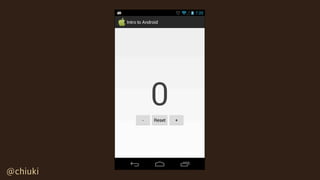
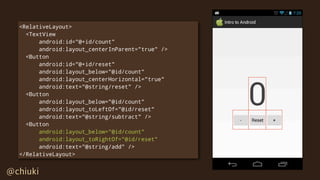
RelativeLayout
@chiuki
@chiuki
@chiuki
@chiuki
@chiuki
<RelativeLayout>
<TextView
android:id="@+id/count"
android:layout_centerInParent="true" />
<Button
android:id="@+id/reset"
android:layout_below="@id/count"
android:layout_centerHorizontal="true"
android:text="@string/reset" />
<Button
android:layout_below="@id/count"
android:layout_toLeftOf="@id/reset"
android:text="@string/subtract" />
<Button
android:layout_below="@id/count"
android:layout_toRightOf="@id/reset"
android:text="@string/add" />
</RelativeLayout>
@chiuki
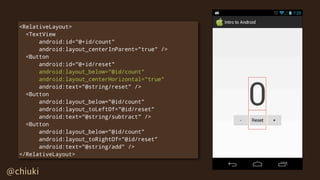
<RelativeLayout>
<TextView
android:id="@+id/count"
android:layout_centerInParent="true" />
<Button
android:id="@+id/reset"
android:layout_below="@id/count"
android:layout_centerHorizontal="true"
android:text="@string/reset" />
<Button
android:layout_below="@id/count"
android:layout_toLeftOf="@id/reset"
android:text="@string/subtract" />
<Button
android:layout_below="@id/count"
android:layout_toRightOf="@id/reset"
android:text="@string/add" />
</RelativeLayout>
@chiuki
<RelativeLayout>
<TextView
android:id="@+id/count"
android:layout_centerInParent="true" />
<Button
android:id="@+id/reset"
android:layout_below="@id/count"
android:layout_centerHorizontal="true"
android:text="@string/reset" />
<Button
android:layout_below="@id/count"
android:layout_toLeftOf="@id/reset"
android:text="@string/subtract" />
<Button
android:layout_below="@id/count"
android:layout_toRightOf="@id/reset"
android:text="@string/add" />
</RelativeLayout>
@chiuki
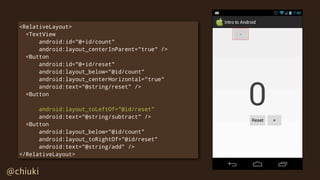
<RelativeLayout>
<TextView
android:id="@+id/count"
android:layout_centerInParent="true" />
<Button
android:id="@+id/reset"
android:layout_below="@id/count"
android:layout_centerHorizontal="true"
android:text="@string/reset" />
<Button
android:layout_toLeftOf="@id/reset"
android:text="@string/subtract" />
<Button
android:layout_below="@id/count"
android:layout_toRightOf="@id/reset"
android:text="@string/add" />
</RelativeLayout>
@chiuki
<RelativeLayout>
<TextView
android:id="@+id/count"
android:layout_centerInParent="true" />
<Button
android:id="@+id/reset"
android:layout_below="@id/count"
android:layout_centerHorizontal="true"
android:text="@string/reset" />
<Button
android:layout_below="@id/count"
android:layout_toLeftOf="@id/reset"
android:text="@string/subtract" />
<Button
android:layout_below="@id/count"
android:layout_toRightOf="@id/reset"
android:text="@string/add" />
</RelativeLayout>
@chiuki@chiuki
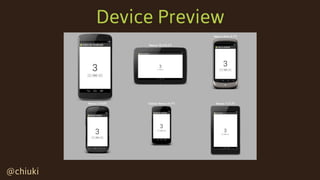
Device Preview
@chiuki@chiuki
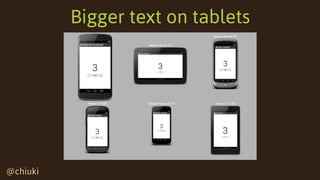
Bigger text on tablets
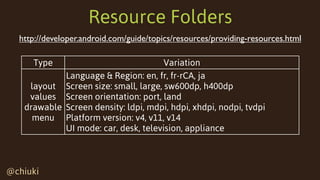
Resource Folders
@chiuki@chiuki
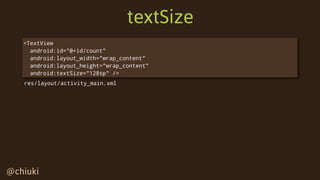
textSize
<TextView
android:id="@+id/count"
android:layout_width="wrap_content"
android:layout_height="wrap_content"
android:textSize="128sp" />
res/layout/activity_main.xml
@chiuki@chiuki
res/values/dimens.xml
<TextView
android:id="@+id/count"
android:layout_width="wrap_content"
android:layout_height="wrap_content"
android:textSize="@dimen/counter_size" />
res/layout/activity_main.xml
<dimen name="counter_size" value="128sp" />
res/values/dimens.xml
@chiuki@chiuki
res/values-sw600dp/dimens.xml
<TextView
android:id="@+id/count"
android:layout_width="wrap_content"
android:layout_height="wrap_content"
android:textSize="@dimen/counter_size" />
res/layout/activity_main.xml
<dimen name="counter_size" value="128sp" />
<dimen name="counter_size" value="256sp" />
res/values/dimens.xml
res/values-sw600dp/dimens.xml
@chiuki@chiuki
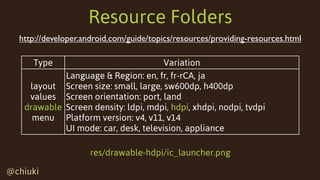
Resource Folders
Type Variation
layout
values
drawable
menu
Language & Region: en, fr, fr-rCA, ja
Screen size: small, large, sw600dp, h400dp
Screen orientation: port, land
Screen density: ldpi, mdpi, hdpi, xhdpi, nodpi, tvdpi
Platform version: v4, v11, v14
UI mode: car, desk, television, appliance
http://developer.android.com/guide/topics/resources/providing-resources.html
@chiuki@chiuki
Resource Folders

Type Variation
layout
values
drawable
menu
Language & Region: en, fr, fr-rCA, ja
Screen size: small, large, sw600dp, h400dp
Screen orientation: port, land
Screen density: ldpi, mdpi, hdpi, xhdpi, nodpi, tvdpi
Platform version: v4, v11, v14
UI mode: car, desk, television, appliance
http://developer.android.com/guide/topics/resources/providing-resources.html
res/values-sw600dp/dimens.xml
@chiuki@chiuki
Resource Folders
Type Variation
layout
values
drawable
menu
Language & Region: en, fr, fr-rCA, ja
Screen size: small, large, sw600dp, h400dp
Screen orientation: port, land
Screen density: ldpi, mdpi, hdpi, xhdpi, nodpi, tvdpi
Platform version: v4, v11, v14
UI mode: car, desk, television, appliance
http://developer.android.com/guide/topics/resources/providing-resources.html
res/drawable-hdpi/ic_launcher.png
@chiuki@chiuki
Resource Folders
Type Variation
layout
values
drawable
menu
Language & Region: en, fr, fr-rCA, ja
Screen size: small, large, sw600dp, h400dp
Screen orientation: port, land
Screen density: ldpi, mdpi, hdpi, xhdpi, nodpi, tvdpi
Platform version: v4, v11, v14
UI mode: car, desk, television, appliance
http://developer.android.com/guide/topics/resources/providing-resources.html
res/drawable-hdpi/ic_launcher.png
@2x
@chiuki@chiuki
Resource Folders
Type Variation
layout
values
drawable
menu
Language & Region: en, fr, fr-rCA, ja
Screen size: small, large, sw600dp, h400dp
Screen orientation: port, land
Screen density: ldpi, mdpi, hdpi, xhdpi, nodpi, tvdpi
Platform version: v4, v11, v14
UI mode: car, desk, television, appliance
http://developer.android.com/guide/topics/resources/providing-resources.html
res/layout-ja/name.xml
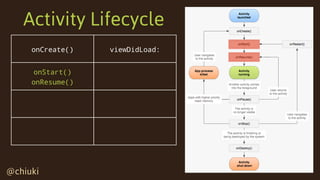
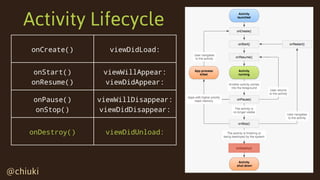
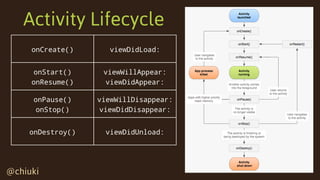
Activity Lifecycle
@chiuki@chiuki
onCreate()
Activity Lifecycle
@chiuki@chiuki
onCreate()
Activity Lifecycle
@chiuki@chiuki
onCreate() viewDidLoad:
Activity Lifecycle
@chiuki@chiuki
onCreate() viewDidLoad:
onStart()
Activity Lifecycle
@chiuki@chiuki
onCreate() viewDidLoad:
onStart()
onResume()
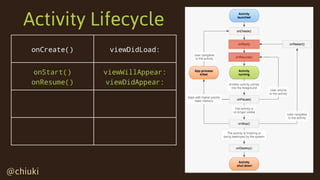
Activity Lifecycle
@chiuki@chiuki
onCreate() viewDidLoad:
onStart()
onResume()
viewWillAppear:
viewDidAppear:
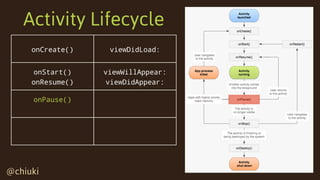
Activity Lifecycle
@chiuki@chiuki
onCreate() viewDidLoad:
onStart()
onResume()
viewWillAppear:
viewDidAppear:
onPause()
Activity Lifecycle
@chiuki@chiuki
onCreate() viewDidLoad:
onStart()
onResume()
viewWillAppear:
viewDidAppear:
onPause()
onStop()
Activity Lifecycle
@chiuki@chiuki
onCreate() viewDidLoad:
onStart()
onResume()
viewWillAppear:
viewDidAppear:
onPause()
onStop()
viewWillDisappear:
viewDidDisappear:
Activity Lifecycle
@chiuki@chiuki
onCreate() viewDidLoad:
onStart()
onResume()
viewWillAppear:
viewDidAppear:
onPause()
onStop()
viewWillDisappear:
viewDidDisappear:
onDestroy()
Activity Lifecycle
@chiuki@chiuki
onCreate() viewDidLoad:
onStart()
onResume()
viewWillAppear:
viewDidAppear:
onPause()
onStop()
viewWillDisappear:
viewDidDisappear:
onDestroy() viewDidUnload:
Activity Lifecycle
@chiuki@chiuki
onCreate() viewDidLoad:
onStart()
onResume()
viewWillAppear:
viewDidAppear:
onPause()
onStop()
viewWillDisappear:
viewDidDisappear:
onDestroy() viewDidUnload:
Activity Lifecycle
@chiuki@chiuki
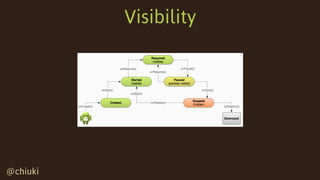
Visibility
More Activities
@chiuki@chiuki
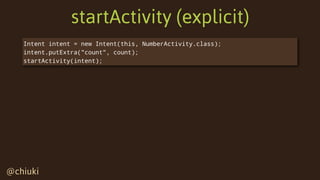
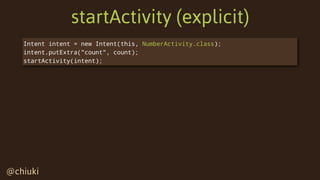
startActivity (explicit)
Intent intent = new Intent(this, NumberActivity.class);
intent.putExtra("count", count);
startActivity(intent);
@chiuki@chiuki
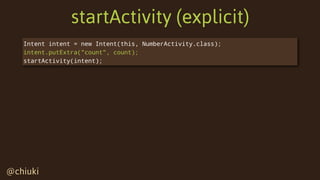
startActivity (explicit)
Intent intent = new Intent(this, NumberActivity.class);
intent.putExtra("count", count);
startActivity(intent);
@chiuki@chiuki
startActivity (explicit)
Intent intent = new Intent(this, NumberActivity.class);
intent.putExtra("count", count);
startActivity(intent);
@chiuki@chiuki
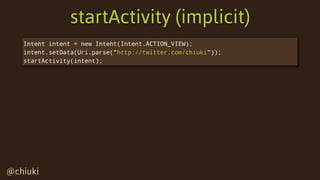
startActivity (implicit)
Intent intent = new Intent(Intent.ACTION_VIEW);
intent.setData(Uri.parse("http://twitter.com/chiuki"));
startActivity(intent);
@chiuki@chiuki
startActivity (implicit)
Intent intent = new Intent(Intent.ACTION_VIEW);
intent.setData(Uri.parse("http://twitter.com/chiuki"));
startActivity(intent);
@chiuki@chiuki
startActivity (implicit)
Intent intent = new Intent(Intent.ACTION_VIEW);
intent.setData(Uri.parse("http://twitter.com/chiuki"));
startActivity(intent);
@chiuki@chiuki
startActivity (implicit)
Intent intent = new Intent(Intent.ACTION_VIEW);
intent.setData(Uri.parse("http://twitter.com/chiuki"));
startActivity(intent);
@chiuki@chiuki
Register your Activity
<activity android:name=".YourActivity">
<intent-filter>
   <action android:name="android.intent.action.VIEW" />
    <category android:name="android.intent.category.DEFAULT" />
    <category android:name="android.intent.category.BROWSABLE" />
  <data android:scheme="http" android:host="twitter.com" />
  </intent-filter>
</activity>
AndroidManifest.xml
Intent intent = new Intent(Intent.ACTION_VIEW);
intent.setData(Uri.parse("http://twitter.com/chiuki"));
startActivity(intent);
Info.plist
@chiuki@chiuki
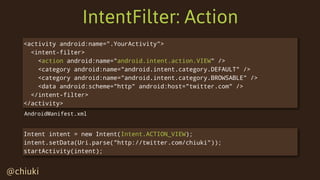
IntentFilter: Action
<activity android:name=".YourActivity">
<intent-filter>
   <action android:name="android.intent.action.VIEW" />
    <category android:name="android.intent.category.DEFAULT" />
    <category android:name="android.intent.category.BROWSABLE" />
  <data android:scheme="http" android:host="twitter.com" />
  </intent-filter>
</activity>
AndroidManifest.xml
Intent intent = new Intent(Intent.ACTION_VIEW);
intent.setData(Uri.parse("http://twitter.com/chiuki"));
startActivity(intent);
@chiuki@chiuki
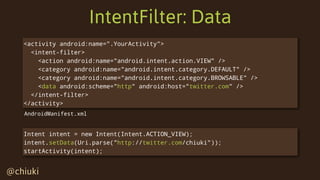
IntentFilter: Data
<activity android:name=".YourActivity">
<intent-filter>
   <action android:name="android.intent.action.VIEW" />
    <category android:name="android.intent.category.DEFAULT" />
    <category android:name="android.intent.category.BROWSABLE" />
  <data android:scheme="http" android:host="twitter.com" />
  </intent-filter>
</activity>
AndroidManifest.xml
Intent intent = new Intent(Intent.ACTION_VIEW);
intent.setData(Uri.parse("http://twitter.com/chiuki"));
startActivity(intent);
@chiuki@chiuki
IntentFilter: Category
<activity android:name=".YourActivity">
<intent-filter>
   <action android:name="android.intent.action.VIEW" />
<category android:name="android.intent.category.DEFAULT" />
    <category android:name="android.intent.category.BROWSABLE" />
  <data android:scheme="http" android:host="twitter.com" />
  </intent-filter>
</activity>
AndroidManifest.xml
Intent intent = new Intent(Intent.ACTION_VIEW);
intent.setData(Uri.parse("http://twitter.com/chiuki"));
startActivity(intent);
@chiuki@chiuki
IntentFilter: Category
<activity android:name=".YourActivity">
<intent-filter>
   <action android:name="android.intent.action.VIEW" />
    <category android:name="android.intent.category.DEFAULT" />
    <category android:name="android.intent.category.BROWSABLE" />
  <data android:scheme="http" android:host="twitter.com" />
  </intent-filter>
</activity>
AndroidManifest.xml
Intent intent = new Intent(Intent.ACTION_VIEW);
intent.setData(Uri.parse("http://twitter.com/chiuki"));
startActivity(intent);
@chiuki@chiuki
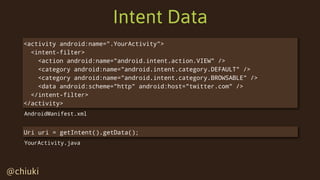
Intent Data
<activity android:name=".YourActivity">
<intent-filter>
   <action android:name="android.intent.action.VIEW" />
    <category android:name="android.intent.category.DEFAULT" />
    <category android:name="android.intent.category.BROWSABLE" />
  <data android:scheme="http" android:host="twitter.com" />
  </intent-filter>
</activity>
Uri uri = getIntent().getData();
AndroidManifest.xml
YourActivity.java
@chiuki@chiuki
startActivityForResult
private static final int REQUEST_CODE_CAMERA = 1;
Intent intent = new Intent(MediaStore.ACTION_IMAGE_CAPTURE);
startActivityForResult(intent, REQUEST_CODE_CAMREA);
protected void onActivityResult(
int requestCode, int resultCode, Intent data) {
if (requestCode == REQUEST_CODE_CAMERA &&
resultCode == RESULT_OK) {
Bitmap bitmap = (Bitmap) data.getExtras().get("data");
}
}
@chiuki@chiuki
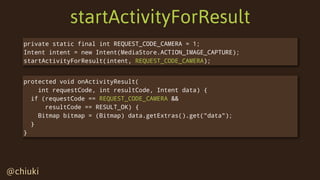
startActivityForResult
private static final int REQUEST_CODE_CAMERA = 1;
Intent intent = new Intent(MediaStore.ACTION_IMAGE_CAPTURE);
startActivityForResult(intent, REQUEST_CODE_CAMERA);
protected void onActivityResult(
int requestCode, int resultCode, Intent data) {
if (requestCode == REQUEST_CODE_CAMERA &&
resultCode == RESULT_OK) {
Bitmap bitmap = (Bitmap) data.getExtras().get("data");
}
}
@chiuki@chiuki
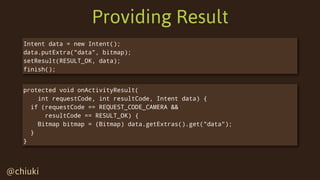
Providing Result
Intent data = new Intent();
data.putExtra("data", bitmap);
setResult(RESULT_OK, data);
finish();
protected void onActivityResult(
int requestCode, int resultCode, Intent data) {
if (requestCode == REQUEST_CODE_CAMERA &&
resultCode == RESULT_OK) {
Bitmap bitmap = (Bitmap) data.getExtras().get("data");
}
}
@chiuki@chiuki
Intent Data
Intent data = new Intent();
data.putExtra("data", bitmap);
setResult(RESULT_OK, data);
finish();
protected void onActivityResult(
int requestCode, int resultCode, Intent data) {
if (requestCode == REQUEST_CODE_CAMERA &&
resultCode == RESULT_OK) {
Bitmap bitmap = (Bitmap) data.getExtras().get("data");
}
}
@chiuki@chiuki
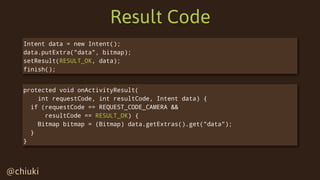
Result Code
Intent data = new Intent();
data.putExtra("data", bitmap);
setResult(RESULT_OK, data);
finish();
protected void onActivityResult(
int requestCode, int resultCode, Intent data) {
if (requestCode == REQUEST_CODE_CAMERA &&
resultCode == RESULT_OK) {
Bitmap bitmap = (Bitmap) data.getExtras().get("data");
}
}
@chiuki@chiuki
Share intent
Intent intent = new Intent(Intent.ACTION_SEND);
intent.putExtra(Intent.EXTRA_SUBJECT, subject);
intent.putExtra(Intent.EXTRA_TEXT, message);
intent.setType("image/*");
Uri uri = Uri.fromFile(new File(path));
intent.putExtra(Intent.EXTRA_STREAM, uri);
@chiuki@chiuki
IntentFilter: Type
<activity android:name=".YourActivity">
<intent-filter>
   <action android:name="android.intent.action.ACTION_SEND" />
    <category android:name="android.intent.category.DEFAULT" />
  <data android:mimeType="image/*" />
  </intent-filter>
</activity>
AndroidManifest.xml
Intent intent = new Intent(Intent.ACTION_SEND);
intent.setType("image/*");
@chiuki@chiuki
Intent Data
String subject = intent.getStringExtra(Intent.EXTRA_SUBJECT);
String message = intent.getStringExtra(Intent.EXTRA_TEXT);
Uri imageUri = (Uri) intent.getParcelableExtra(Intent.EXTRA_STREAM);
YourActivity.java
Intent intent = new Intent(Intent.ACTION_SEND);
intent.putExtra(Intent.EXTRA_SUBJECT, subject);
intent.putExtra(Intent.EXTRA_TEXT, message);
intent.setType("image/*");
Uri uri = Uri.fromFile(new File(path));
intent.putExtra(Intent.EXTRA_STREAM, uri);
Beyond Activities
@chiuki@chiuki
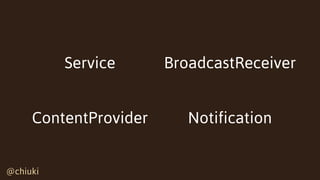
Service BroadcastReceiver
ContentProvider Notification
@chiuki@chiuki
Service
Look ma, no UI!
@chiuki@chiuki
Service
Long-running
@chiuki@chiuki
BroadcastReceiver
Respond
@chiuki@chiuki
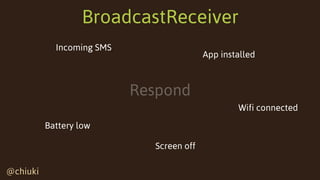
BroadcastReceiver
Respond
Battery low
Wifi connected
Incoming SMS
App installed
Screen off
@chiuki@chiuki
ContentProvider
Provide data to other apps
@chiuki@chiuki
ContentProvider
Provide data to other apps
Contacts
Images Music
Calendar
@chiuki@chiuki
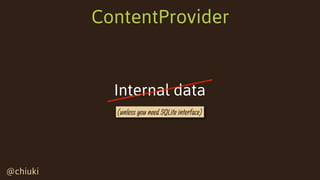
ContentProvider
Internal data
(unless you need SQLite interface)
@chiuki@chiuki
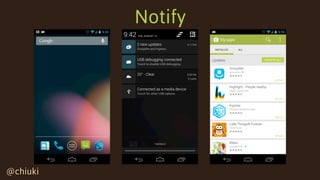
Notification
Notify
@chiuki@chiuki
Notify
@chiuki@chiuki
Notification
Communicate with background Service
@chiuki@chiuki
Background Service
Case study
@chiuki
Email Outbox
@chiuki
@chiuki@chiuki
Notification
@chiuki@chiuki
AlarmService
@chiuki@chiuki
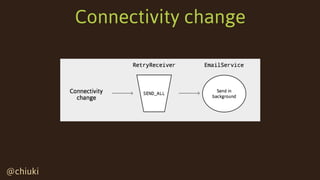
Connectivity change
Summary
@chiuki@chiuki
Summary
Hello World
Layouts
Resource Folders
Activity Lifecycle
Intents & Components
Case Study
@chiuki@chiuki
Thank you!
http://eepurl.com/lR5uD
http://blog.sqisland.com
http://twitter.com/chiuki

Intro to Android for iOS developers